Prometheus + Grafana for Spring Boot: Custom Metrics, Dashboards & Alerting
In production microservices, "it's slow" is not an incident description — it's the beginning of a question. Prometheus and Grafana, powered by Micrometer's elegant instrumentation facade, transform that question into precise, actionable answers: which endpoint, which service instance, which JVM generation, which database query pool. This guide walks through the complete observability stack from dependency setup to Kubernetes-native deployment.
TL;DR
"Complete guide to Prometheus and Grafana for Spring Boot: custom metrics with Micrometer, production dashboards, AlertManager alerting rules, recording."
Table of Contents
- Why Prometheus + Grafana is the Gold Standard for Spring Boot
- Setting Up Prometheus with Spring Boot Actuator
- Custom Business Metrics with Micrometer
- Building Production Grafana Dashboards
- AlertManager Rules for Spring Boot
- Recording Rules for Performance
- Production Deployment: Prometheus Operator on Kubernetes
Why Prometheus + Grafana is the Gold Standard for Spring Boot
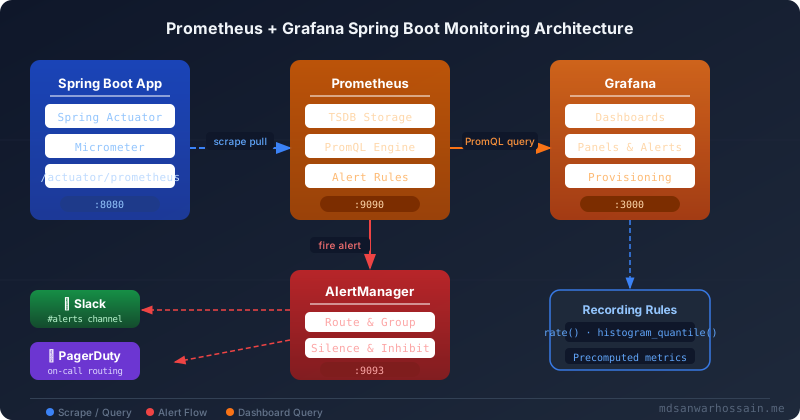
The observability ecosystem for JVM workloads has converged on a clear winner: Prometheus for time-series metric collection paired with Grafana for visualization and alerting. This combination holds approximately 70% market share in cloud-native environments, and the reasons go beyond popularity — they reflect a fundamentally superior architectural model for the dynamic, ephemeral nature of Kubernetes-deployed Spring Boot services.
The pull-based model is the key architectural insight. Unlike push-based systems (StatsD, Graphite, InfluxDB with Telegraf), Prometheus initiates metric collection by scraping HTTP endpoints on each target. This inverts the data flow: services do not need to know where their metrics go, do not need network access to a central collector, and cannot accidentally overwhelm a central aggregator. When a pod dies, Prometheus simply stops receiving data from it — the dead pod cannot send erroneous final metrics that corrupt your time series. When pods scale from 3 to 30 during a traffic spike, Prometheus automatically discovers and scrapes all 30 instances without any configuration change (when using Kubernetes service discovery).
Micrometer is the bridge that makes this elegant. Rather than coupling your Spring Boot code directly to Prometheus client libraries, Micrometer provides a vendor-neutral instrumentation facade. Your application code calls Metrics.counter("orders.created") and Micrometer handles the translation to Prometheus's counter format, OpenTelemetry's metric format, Datadog's StatsD format, or any of 30+ other backends — without changing a single line of application code. This portability means your metric instrumentation is not a liability that ties you to a particular vendor.
Comparison with push-based systems in production:
- No agent required — Spring Boot Actuator exposes the
/actuator/prometheusscrape endpoint directly. No sidecar, no DaemonSet agent consuming node resources. - Pull timing is ground truth — The timestamp on a Prometheus metric is when Prometheus collected it, not when the application computed it. This eliminates clock skew problems that plague push-based systems where instances may have subtly different system clocks.
- Service discovery is native — Prometheus natively integrates with Kubernetes, Consul, EC2, and DNS to discover scrape targets dynamically. Adding a new Spring Boot deployment automatically adds it to monitoring.
- Long-term storage is handled separately — Prometheus is optimized for recent data (default 15-day retention). For long-term storage, integrate Thanos or Cortex as a remote write target, keeping the core system lean.
The Prometheus data model uses labeled time series: every metric is identified by a metric name plus a set of key-value label pairs. http_server_requests_seconds_count{method="POST",status="201",uri="/api/orders"} is a distinct time series from http_server_requests_seconds_count{method="GET",status="200",uri="/api/orders/{id}"}. This labeling system enables PromQL (Prometheus Query Language) to slice and aggregate metrics across any dimension: per-endpoint error rate, per-instance latency, per-region request volume — all from a single set of instrumented metrics.
Setting Up Prometheus with Spring Boot Actuator
The setup requires three coordinated pieces: Spring Boot dependencies that expose the scrape endpoint, application configuration that controls what is exposed and how, and Prometheus configuration that tells the server where to scrape. Let's walk through each in production-ready detail.
Maven dependencies:
<dependencies>
    <!-- Spring Boot Actuator: exposes /actuator/prometheus endpoint -->
    <dependency>
        <groupId>org.springframework.boot</groupId>
        <artifactId>spring-boot-starter-actuator</artifactId>
    </dependency>

    <!-- Micrometer Prometheus registry: translates Micrometer metrics to Prometheus format -->
    <dependency>
        <groupId>io.micrometer</groupId>
        <artifactId>micrometer-registry-prometheus</artifactId>
    </dependency>
</dependencies>
For Gradle users:
dependencies {
    implementation 'org.springframework.boot:spring-boot-starter-actuator'
    implementation 'io.micrometer:micrometer-registry-prometheus'
}
Application configuration (application.yml):
management:
  endpoints:
    web:
      exposure:
        include: health,info,prometheus,metrics
      base-path: /actuator
  endpoint:
    health:
      show-details: when-authorized
    prometheus:
      enabled: true
  metrics:
    tags:
      # Common labels applied to ALL metrics — critical for multi-instance correlation
      application: ${spring.application.name}
      environment: ${APP_ENV:development}
      region: ${AWS_REGION:us-east-1}
    distribution:
      # Enable histogram buckets for percentile computation in Prometheus
      percentiles-histogram:
        http.server.requests: true
        spring.data.repository.invocations: true
      # SLO boundaries for SLI tracking (adds _bucket with these boundaries)
      slo:
        http.server.requests: 50ms, 100ms, 200ms, 500ms, 1s, 2s, 5s
      # Precomputed percentiles (client-side, no histogram_quantile needed)
      percentiles:
        http.server.requests: 0.50, 0.90, 0.95, 0.99
  export:
    prometheus:
      enabled: true

spring:
  application:
    name: order-service
Three configuration choices here deserve explanation. First, the common tags (application, environment, region) are injected into every single metric emitted by this service. When you have 15 Spring Boot microservices all sending metrics to the same Prometheus instance, these tags are what let you filter http_server_requests_seconds_count{application="order-service"} vs {application="payment-service"} in a single PromQL query without separate scrapers. Second, percentiles-histogram: true enables Prometheus histogram buckets, which allows histogram_quantile() to compute accurate percentiles server-side — this is the correct approach for multi-instance deployments because you can aggregate across instances. Third, the SLO boundaries create precise bucket boundaries aligned to your service level objectives, so you can directly query what fraction of requests exceeded your 200ms SLO.
Prometheus scrape configuration (prometheus.yml) for local development:
global:
  scrape_interval: 15s       # How often to scrape targets
  evaluation_interval: 15s   # How often to evaluate alert rules
  scrape_timeout: 10s        # Timeout per scrape request

# AlertManager integration
alerting:
  alertmanagers:
    - static_configs:
        - targets: ['alertmanager:9093']

# Load alert rules from separate files
rule_files:
  - "rules/spring-boot-alerts.yml"
  - "rules/jvm-alerts.yml"
  - "rules/recording-rules.yml"

scrape_configs:
  # Spring Boot application scrape job
  - job_name: 'spring-boot-order-service'
    metrics_path: '/actuator/prometheus'
    scrape_interval: 10s
    static_configs:
      - targets: ['order-service:8080']
        labels:
          service: 'order-service'
          team: 'platform'

  # Prometheus self-monitoring
  - job_name: 'prometheus'
    static_configs:
      - targets: ['localhost:9090']

  # Node exporter for host metrics
  - job_name: 'node-exporter'
    static_configs:
      - targets: ['node-exporter:9100']
After starting your application, verify the endpoint is working:
# Verify Prometheus endpoint is accessible
curl http://localhost:8080/actuator/prometheus | head -40

# Expected output format:
# HELP jvm_memory_used_bytes The amount of used memory
# TYPE jvm_memory_used_bytes gauge
# jvm_memory_used_bytes{application="order-service",area="heap",id="G1 Eden Space",...} 4.2991616E7
# HELP http_server_requests_seconds Duration of HTTP server request handling
# TYPE http_server_requests_seconds histogram
# http_server_requests_seconds_bucket{application="order-service",exception="None",method="GET",...,le="0.05"} 142
Custom Business Metrics with Micrometer
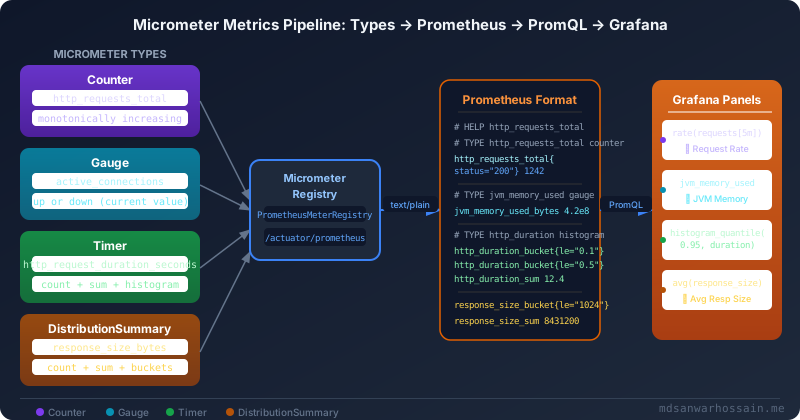
Spring Boot auto-configures dozens of JVM and framework metrics automatically: heap usage, GC pause times, thread pool utilization, HTTP request duration, database connection pool size, and more. But the metrics that catch production incidents before they become outages are business metrics: orders created per minute, payment processing latency, checkout funnel drop-off rate, inventory cache hit ratio. These require intentional instrumentation.
Micrometer provides four core metric types, each suited to different measurement semantics.
Counter — monotonically increasing values:
@Service
@RequiredArgsConstructor
public class OrderService {

    private final MeterRegistry registry;
    private final Counter ordersCreated;
    private final Counter ordersFailedCounter;

    public OrderService(MeterRegistry registry) {
        this.registry = registry;
        // Counter with tags for dimensional slicing
        this.ordersCreated = Counter.builder("orders.created")
            .description("Total number of orders successfully created")
            .tag("region", "us-east-1")
            .register(registry);
        this.ordersFailedCounter = Counter.builder("orders.failed")
            .description("Total number of order creation failures")
            .register(registry);
    }

    public Order createOrder(CreateOrderRequest request) {
        try {
            Order order = processOrder(request);
            // Increment with dynamic tags per call
            registry.counter("orders.created",
                "payment_method", request.getPaymentMethod(),
                "customer_tier", request.getCustomerTier()
            ).increment();
            return order;
        } catch (PaymentDeclinedException e) {
            registry.counter("orders.failed",
                "reason", "payment_declined",
                "payment_method", request.getPaymentMethod()
            ).increment();
            throw e;
        } catch (InventoryException e) {
            registry.counter("orders.failed",
                "reason", "out_of_stock"
            ).increment();
            throw e;
        }
    }
}
Gauge — point-in-time values that go up and down:
@Service
public class CartService {

    private final AtomicInteger activeCheckouts = new AtomicInteger(0);
    private final Map<String, Cart> activeCarts = new ConcurrentHashMap<>();

    public CartService(MeterRegistry registry) {
        // Gauge tracking active checkout sessions
        Gauge.builder("checkout.active.sessions", activeCheckouts, AtomicInteger::get)
            .description("Number of checkout sessions currently in progress")
            .register(registry);

        // Gauge tracking total carts in memory
        Gauge.builder("cart.in.memory.count", activeCarts, Map::size)
            .description("Number of active shopping carts held in memory")
            .tag("store", "us-east")
            .register(registry);

        // JVM-style: report queue depth of a background processor
        registry.gauge("order.processing.queue.depth", orderProcessingQueue,
            queue -> (double) queue.size());
    }

    public CheckoutSession startCheckout(String cartId) {
        activeCheckouts.incrementAndGet();
        try {
            return initiateCheckoutFlow(cartId);
        } finally {
            // Gauge value updates automatically via AtomicInteger reference
        }
    }

    public void completeCheckout(String sessionId) {
        activeCheckouts.decrementAndGet();
        // Grafana shows real-time fluctuation, great for capacity planning
    }
}
Timer — latency and throughput for operations:
@Service
public class PaymentService {

    private final Timer paymentTimer;
    private final Timer externalGatewayTimer;

    public PaymentService(MeterRegistry registry) {
        this.paymentTimer = Timer.builder("payment.processing.duration")
            .description("Time taken to process a payment end-to-end")
            .publishPercentileHistogram()          // Enable histogram_quantile in Prometheus
            .minimumExpectedValue(Duration.ofMillis(50))
            .maximumExpectedValue(Duration.ofSeconds(10))
            .sla(Duration.ofMillis(200), Duration.ofMillis(500), Duration.ofSeconds(1))
            .register(registry);

        this.externalGatewayTimer = Timer.builder("payment.gateway.duration")
            .description("Time taken for the external payment gateway to respond")
            .publishPercentileHistogram()
            .register(registry);
    }

    public PaymentResult processPayment(PaymentRequest request) {
        return paymentTimer.record(() -> {
            // Timer records duration of this supplier automatically
            String gatewayRef = externalGatewayTimer.record(() ->
                stripeClient.charge(request.getAmount(), request.getToken())
            );
            return new PaymentResult(gatewayRef, PaymentStatus.SUCCESS);
        });
    }

    // Alternative: explicit start/stop for async flows
    public CompletableFuture<PaymentResult> processPaymentAsync(PaymentRequest request) {
        Timer.Sample sample = Timer.start(registry);
        return paymentGatewayAsync.charge(request)
            .whenComplete((result, ex) -> {
                sample.stop(Timer.builder("payment.async.duration")
                    .tag("status", ex == null ? "success" : "error")
                    .register(registry));
            });
    }
}
DistributionSummary — non-time value distributions:
@Service
public class ApiGatewayMetrics {

    private final DistributionSummary requestSizeSummary;
    private final DistributionSummary responseSizeSummary;
    private final DistributionSummary orderValueSummary;

    public ApiGatewayMetrics(MeterRegistry registry) {
        this.requestSizeSummary = DistributionSummary.builder("http.request.size.bytes")
            .description("HTTP request payload size in bytes")
            .baseUnit("bytes")
            .publishPercentileHistogram()
            .register(registry);

        this.responseSizeSummary = DistributionSummary.builder("http.response.size.bytes")
            .description("HTTP response payload size in bytes")
            .baseUnit("bytes")
            .publishPercentileHistogram()
            .register(registry);

        this.orderValueSummary = DistributionSummary.builder("order.value.dollars")
            .description("Monetary value of placed orders in USD cents")
            .baseUnit("cents")
            .publishPercentileHistogram()
            .sla(1000, 5000, 10000, 50000) // $10, $50, $100, $500 boundaries
            .register(registry);
    }

    public void recordRequest(int requestBytes, int responseBytes) {
        requestSizeSummary.record(requestBytes);
        responseSizeSummary.record(responseBytes);
    }

    public void recordOrderPlaced(BigDecimal orderValueUsd) {
        // Record GMV — histogram_quantile gives P50/P95 order value
        orderValueSummary.record(orderValueUsd.multiply(BigDecimal.valueOf(100)).longValue());
    }
}
Naming conventions and tagging strategy: Prometheus naming conventions use lowercase with underscores. Micrometer uses dots (e.g., orders.created) and automatically converts them to underscores when exporting to Prometheus (orders_created_total). Keep tag cardinality controlled — a tag with unbounded values (like user ID or request ID) creates a cardinality explosion that will OOM your Prometheus server. Use tags for bounded categorical dimensions: status, method, region, payment_method. Never use unbounded values as tags.
Building Production Grafana Dashboards
A production Grafana dashboard for Spring Boot typically consists of three tiers: the "golden signals" overview row (request rate, error rate, latency), the JVM internals row (heap, GC, threads), and the business metrics row (orders/sec, GMV, funnel metrics). Start by importing the community JVM dashboard and layer your custom panels on top.
Import the standard JVM Micrometer dashboard: In Grafana, navigate to Dashboards → Import and enter ID 4701 (JVM Micrometer) or 12900 (Spring Boot 2.1 Statistics). Select your Prometheus datasource. This immediately gives you heap usage per generation, GC pause time and frequency, thread state breakdown, CPU usage, and class loading — without writing a single PromQL query.
Custom PromQL queries for production panels:
# ── REQUEST RATE (Requests per Second, 5-minute rate) ──
rate(http_server_requests_seconds_count{
  application="order-service",
  status!~"5.."
}[5m])

# ── ERROR RATE (percentage of 5xx responses) ──
(
  rate(http_server_requests_seconds_count{
    application="order-service",
    status=~"5.."
  }[5m])
  /
  rate(http_server_requests_seconds_count{
    application="order-service"
  }[5m])
) * 100

# ── LATENCY P95 (95th percentile request duration) ──
histogram_quantile(0.95,
  sum(rate(http_server_requests_seconds_bucket{
    application="order-service"
  }[5m])) by (le, uri)
)

# ── JVM HEAP USAGE (used vs committed) ──
jvm_memory_used_bytes{application="order-service", area="heap"}
/
jvm_memory_committed_bytes{application="order-service", area="heap"}

# ── GC PAUSE TIME RATE (seconds of GC pause per second) ──
rate(jvm_gc_pause_seconds_sum{application="order-service"}[5m])

# ── HikariCP CONNECTION POOL UTILIZATION ──
hikaricp_connections_active{application="order-service"}
/
hikaricp_connections_max{application="order-service"}

# ── BUSINESS METRIC: Orders per Minute ──
rate(orders_created_total{application="order-service"}[1m]) * 60

# ── BUSINESS METRIC: Payment Success Rate ──
(
  rate(payment_processing_duration_seconds_count{
    application="order-service",
    status="success"
  }[5m])
  /
  rate(payment_processing_duration_seconds_count{
    application="order-service"
  }[5m])
) * 100

# ── APDEX SCORE (Application Performance Index) ──
# Satisfied: < 200ms | Tolerating: 200ms-1s | Frustrated: > 1s
(
  sum(rate(http_server_requests_seconds_bucket{
    application="order-service", le="0.2"
  }[5m]))
  +
  sum(rate(http_server_requests_seconds_bucket{
    application="order-service", le="1.0"
  }[5m])) / 2
) / sum(rate(http_server_requests_seconds_count{
    application="order-service"
}[5m]))
Dashboard provisioning as code — store dashboards in version control with Grafana's provisioning configuration (grafana/provisioning/dashboards/order-service.json) so they are automatically loaded on startup. This enables infrastructure-as-code workflows where dashboard changes go through code review before reaching production.
Configure the datasource via grafana/provisioning/datasources/prometheus.yml:
apiVersion: 1
datasources:
  - name: Prometheus
    type: prometheus
    url: http://prometheus:9090
    access: proxy
    isDefault: true
    jsonData:
      timeInterval: "15s"
      queryTimeout: "60s"
      httpMethod: POST
    editable: false
AlertManager Rules for Spring Boot
Alerts defined in Prometheus fire when a PromQL expression evaluates to a non-empty result. AlertManager then routes, deduplicates, groups, and delivers those alerts to the correct receiver (Slack, PagerDuty, email). Defining alerts is a two-file exercise: the Prometheus alert rules file and the AlertManager routing configuration.
Prometheus alert rules file (rules/spring-boot-alerts.yml):
groups:
  - name: spring-boot-slo-alerts
    interval: 30s
    rules:
      # SLO Alert: Error rate exceeds 1% over 5 minutes
      - alert: HighErrorRate
        expr: |
          (
            sum(rate(http_server_requests_seconds_count{
              application="order-service",status=~"5.."
            }[5m]))
            /
            sum(rate(http_server_requests_seconds_count{
              application="order-service"
            }[5m]))
          ) > 0.01
        for: 5m
        labels:
          severity: critical
          team: platform
          service: order-service
        annotations:
          summary: "High HTTP error rate on {{ $labels.application }}"
          description: "Error rate is {{ $value | humanizePercentage }} over the last 5 minutes. SLO threshold: 1%."
          runbook_url: "https://wiki.internal/runbooks/high-error-rate"
          dashboard_url: "https://grafana.internal/d/spring-boot-slo"

      # SLO Alert: P95 latency exceeds 500ms
      - alert: HighLatencyP95
        expr: |
          histogram_quantile(0.95,
            sum(rate(http_server_requests_seconds_bucket{
              application="order-service"
            }[5m])) by (le)
          ) > 0.5
        for: 3m
        labels:
          severity: warning
          team: platform
        annotations:
          summary: "P95 latency SLO breach on order-service"
          description: "P95 request latency is {{ $value | humanizeDuration }}. Threshold: 500ms."

      # Alert: Pod is down (no scrape data)
      - alert: SpringBootInstanceDown
        expr: up{job="spring-boot-order-service"} == 0
        for: 1m
        labels:
          severity: critical
          team: platform
        annotations:
          summary: "Spring Boot instance {{ $labels.instance }} is down"
          description: "Prometheus cannot scrape {{ $labels.instance }}. Pod may be unhealthy."

  - name: jvm-alerts
    rules:
      # JVM heap usage consistently above 90%
      - alert: JvmHeapUsageCritical
        expr: |
          (
            jvm_memory_used_bytes{area="heap"}
            /
            jvm_memory_max_bytes{area="heap"}
          ) > 0.90
        for: 5m
        labels:
          severity: critical
        annotations:
          summary: "JVM heap usage critical on {{ $labels.application }}"
          description: "Heap usage is {{ $value | humanizePercentage }}. Risk of OOM. Check for memory leaks."

      # GC is spending too much time collecting
      - alert: JvmGcOverhead
        expr: |
          rate(jvm_gc_pause_seconds_sum{application="order-service"}[5m]) > 0.10
        for: 5m
        labels:
          severity: warning
        annotations:
          summary: "GC overhead > 10% on {{ $labels.application }}"
          description: "GC is consuming {{ $value | humanizePercentage }} of CPU time. Possible GC thrashing."

      # HikariCP connection pool exhausted
      - alert: HikariCPPoolExhausted
        expr: |
          hikaricp_connections_pending{application="order-service"} > 5
        for: 2m
        labels:
          severity: warning
        annotations:
          summary: "HikariCP connection pool under pressure"
          description: "{{ $value }} threads waiting for DB connection. Increase pool size or optimize queries."

  - name: business-alerts
    rules:
      # Sudden drop in order creation rate (possible outage)
      - alert: OrderRateDrop
        expr: |
          (
            rate(orders_created_total{application="order-service"}[5m])
            /
            rate(orders_created_total{application="order-service"}[30m] offset 5m)
          ) < 0.5
        for: 3m
        labels:
          severity: critical
          team: business
        annotations:
          summary: "Order creation rate dropped 50%"
          description: "Current rate is {{ $value | humanize }}x the baseline. Possible checkout funnel failure."
AlertManager configuration (alertmanager.yml):
global:
  resolve_timeout: 5m
  slack_api_url: '${SLACK_WEBHOOK_URL}'
  pagerduty_url: 'https://events.pagerduty.com/v2/enqueue'

# Notification templates
templates:
  - '/etc/alertmanager/templates/*.tmpl'

route:
  # Default receiver for unmatched alerts
  receiver: 'slack-notifications'
  # Group alerts by these labels to reduce notification noise
  group_by: ['alertname', 'service', 'severity']
  # Wait this long before sending a group (collects related alerts)
  group_wait: 30s
  # Wait before resending a group with new alerts
  group_interval: 5m
  # Wait before re-notifying about an already-firing alert
  repeat_interval: 4h

  routes:
    # Critical alerts page the on-call engineer immediately
    - match:
        severity: critical
      receiver: 'pagerduty-critical'
      group_wait: 10s
      repeat_interval: 1h
      continue: true  # Also send to Slack

    # Business alerts go to the business team Slack channel
    - match:
        team: business
      receiver: 'slack-business-team'

    # Platform team gets all alerts in #platform-alerts
    - match_re:
        team: platform|infrastructure
      receiver: 'slack-platform-team'

receivers:
  - name: 'slack-notifications'
    slack_configs:
      - channel: '#alerts-all'
        title: '{{ template "slack.title" . }}'
        text: '{{ template "slack.text" . }}'
        send_resolved: true
        color: '{{ if eq .Status "firing" }}danger{{ else }}good{{ end }}'

  - name: 'slack-platform-team'
    slack_configs:
      - channel: '#platform-alerts'
        title: '[{{ .Status | toUpper }}] {{ .CommonAnnotations.summary }}'
        text: |
          *Description:* {{ .CommonAnnotations.description }}
          *Runbook:* {{ .CommonAnnotations.runbook_url }}
          *Dashboard:* {{ .CommonAnnotations.dashboard_url }}
        send_resolved: true

  - name: 'slack-business-team'
    slack_configs:
      - channel: '#business-alerts'
        title: '🚨 Business Alert: {{ .CommonAnnotations.summary }}'
        text: '{{ .CommonAnnotations.description }}'

  - name: 'pagerduty-critical'
    pagerduty_configs:
      - routing_key: '${PAGERDUTY_INTEGRATION_KEY}'
        description: '{{ .CommonAnnotations.summary }}'
        details:
          description: '{{ .CommonAnnotations.description }}'
          runbook: '{{ .CommonAnnotations.runbook_url }}'
        severity: critical

inhibit_rules:
  # If the instance is down, suppress all other alerts from it
  - source_match:
      alertname: SpringBootInstanceDown
    target_match_re:
      alertname: '.+'
    equal: ['instance']
Recording Rules for Performance
As your Prometheus instance scales to hundreds of Spring Boot pods and your dashboards grow to dozens of panels, you will encounter a critical performance problem: expensive PromQL queries executed by every dashboard load and every alert evaluation create significant CPU load on Prometheus. Recording rules precompute these expensive queries and store the results as new time series, converting repeated expensive computations into cheap label lookups.
Recording rules file (rules/recording-rules.yml):
groups:
  - name: spring-boot-recording-rules
    interval: 30s
    rules:
      # Precompute 5-minute request rate per service, method, and status
      - record: job:http_server_requests:rate5m
        expr: |
          sum(rate(http_server_requests_seconds_count[5m]))
          by (application, method, status, uri)

      # Precompute error rate ratio (avoids division in every dashboard panel)
      - record: job:http_server_requests:error_rate5m
        expr: |
          sum(rate(http_server_requests_seconds_count{status=~"5.."}[5m]))
          by (application)
          /
          sum(rate(http_server_requests_seconds_count[5m]))
          by (application)

      # Precompute P95 latency per service (expensive histogram_quantile)
      - record: job:http_server_requests:p95_duration5m
        expr: |
          histogram_quantile(0.95,
            sum(rate(http_server_requests_seconds_bucket[5m]))
            by (le, application)
          )

      # Precompute P99 latency per service
      - record: job:http_server_requests:p99_duration5m
        expr: |
          histogram_quantile(0.99,
            sum(rate(http_server_requests_seconds_bucket[5m]))
            by (le, application)
          )

      # JVM heap utilization ratio
      - record: job:jvm_heap:utilization
        expr: |
          sum(jvm_memory_used_bytes{area="heap"}) by (application, instance)
          /
          sum(jvm_memory_max_bytes{area="heap"}) by (application, instance)

      # HikariCP pool utilization ratio
      - record: job:hikaricp_pool:utilization
        expr: |
          hikaricp_connections_active
          /
          hikaricp_connections_max
After recording rules are defined, dashboards reference the precomputed series: job:http_server_requests:p95_duration5m{application="order-service"} instead of the expensive raw histogram query. Query time drops from seconds to milliseconds for complex aggregations across hundreds of instances.
Understanding rate() vs irate(): rate(counter[5m]) computes the per-second average rate over the last 5 minutes — smooth, representative of sustained load, suitable for dashboards and alerts. irate(counter[5m]) computes the instantaneous rate using only the last two data points — highly responsive to spikes, but noisy. Use rate() for alert rules (to avoid false positives from short spikes) and irate() sparingly in dashboards when you need to see fast-changing behavior. In recording rules, always use rate().
Avoiding cardinality explosions: The most common Prometheus performance disaster is unbounded label cardinality. If you accidentally instrument orders_created_total{user_id="..."} across 1 million users, you create 1 million distinct time series from a single metric. Rules of thumb: never use user IDs, request IDs, order IDs, or any UUID as a label value. Use bounded categorical values only (10s to 100s of distinct values, not millions). Monitor your cardinality with prometheus_tsdb_head_series and alert when it grows unexpectedly.
Production Deployment: Prometheus Operator on Kubernetes
Running Prometheus as a static deployment in Kubernetes means manually updating scrape configurations every time a new Spring Boot service is deployed. The Prometheus Operator solves this with Kubernetes-native CRDs: you define a ServiceMonitor resource alongside your Spring Boot deployment, and the Operator automatically configures Prometheus to scrape it. No central Prometheus config file edits, no restarts — entirely declarative and GitOps-compatible.
Install kube-prometheus-stack via Helm:
# Add the Prometheus community Helm repository
helm repo add prometheus-community https://prometheus-community.github.io/helm-charts
helm repo update

# Install the complete monitoring stack
helm upgrade --install kube-prometheus-stack \
  prometheus-community/kube-prometheus-stack \
  --namespace monitoring \
  --create-namespace \
  --values prometheus-values.yml \
  --wait
Production Helm values (prometheus-values.yml):
prometheus:
  prometheusSpec:
    retention: 15d
    retentionSize: "50GB"
    resources:
      requests:
        memory: "2Gi"
        cpu: "500m"
      limits:
        memory: "4Gi"
        cpu: "2000m"
    storageSpec:
      volumeClaimTemplate:
        spec:
          storageClassName: gp3
          resources:
            requests:
              storage: 100Gi
    # Auto-discover ServiceMonitors from any namespace
    serviceMonitorSelectorNilUsesHelmValues: false
    serviceMonitorSelector: {}
    serviceMonitorNamespaceSelector: {}
    # Remote write to Thanos for long-term storage
    remoteWrite:
      - url: http://thanos-receive:10908/api/v1/receive

grafana:
  enabled: true
  adminPassword: "${GRAFANA_ADMIN_PASSWORD}"
  persistence:
    enabled: true
    storageClassName: gp3
    size: 20Gi
  grafana.ini:
    server:
      domain: grafana.yourdomain.com
      root_url: https://grafana.yourdomain.com
    auth.generic_oauth:
      enabled: true
      client_id: "${OAUTH_CLIENT_ID}"
      client_secret: "${OAUTH_CLIENT_SECRET}"
  sidecar:
    dashboards:
      enabled: true          # Auto-load ConfigMap dashboards
      searchNamespace: ALL
    datasources:
      enabled: true

alertmanager:
  alertmanagerSpec:
    resources:
      requests:
        memory: "256Mi"
      limits:
        memory: "512Mi"
    storage:
      volumeClaimTemplate:
        spec:
          storageClassName: gp3
          resources:
            requests:
              storage: 10Gi
ServiceMonitor CRD for your Spring Boot deployment:
apiVersion: monitoring.coreos.com/v1
kind: ServiceMonitor
metadata:
  name: order-service-monitor
  namespace: production
  labels:
    # Must match the Prometheus operator's serviceMonitorSelector
    release: kube-prometheus-stack
spec:
  selector:
    matchLabels:
      app: order-service   # Matches your Service labels
  namespaceSelector:
    matchNames:
      - production
  endpoints:
    - port: http            # Named port in the Service spec
      path: /actuator/prometheus
      interval: 15s
      scrapeTimeout: 10s
      honorLabels: false
      relabelings:
        # Add pod name as an instance label for fine-grained filtering
        - sourceLabels: [__meta_kubernetes_pod_name]
          targetLabel: pod
        - sourceLabels: [__meta_kubernetes_namespace]
          targetLabel: namespace
      metricRelabelings:
        # Drop high-cardinality Spring Boot endpoint metrics we don't need
        - sourceLabels: [uri]
          regex: "/actuator/.*"
          action: drop
Spring Boot Deployment with correct labels and port naming:
apiVersion: apps/v1
kind: Deployment
metadata:
  name: order-service
  namespace: production
spec:
  replicas: 3
  selector:
    matchLabels:
      app: order-service
  template:
    metadata:
      labels:
        app: order-service
        version: "2.1.0"
      annotations:
        # Prometheus annotations for basic scraping (fallback without Operator)
        prometheus.io/scrape: "true"
        prometheus.io/port: "8080"
        prometheus.io/path: "/actuator/prometheus"
    spec:
      containers:
        - name: order-service
          image: your-registry/order-service:2.1.0
          ports:
            - name: http       # Named port — referenced by ServiceMonitor
              containerPort: 8080
          env:
            - name: APP_ENV
              value: production
            - name: AWS_REGION
              valueFrom:
                fieldRef:
                  fieldPath: metadata.annotations['topology.kubernetes.io/region']
          resources:
            requests:
              memory: "512Mi"
              cpu: "250m"
            limits:
              memory: "1Gi"
              cpu: "1000m"
          readinessProbe:
            httpGet:
              path: /actuator/health/readiness
              port: 8080
            initialDelaySeconds: 20
            periodSeconds: 10
          livenessProbe:
            httpGet:
              path: /actuator/health/liveness
              port: 8080
            initialDelaySeconds: 30
            periodSeconds: 15
---
apiVersion: v1
kind: Service
metadata:
  name: order-service
  namespace: production
  labels:
    app: order-service     # Must match ServiceMonitor selector
spec:
  selector:
    app: order-service
  ports:
    - name: http           # Named port — must match ServiceMonitor endpoint port
      port: 8080
      targetPort: 8080
PrometheusRule CRD for alert rules: With the Prometheus Operator, alert rules are also managed as Kubernetes resources rather than config files:
apiVersion: monitoring.coreos.com/v1
kind: PrometheusRule
metadata:
  name: order-service-alerts
  namespace: production
  labels:
    release: kube-prometheus-stack
spec:
  groups:
    - name: order-service
      interval: 30s
      rules:
        - alert: HighErrorRate
          expr: |
            (
              sum(rate(http_server_requests_seconds_count{
                namespace="production",
                pod=~"order-service-.*",
                status=~"5.."
              }[5m]))
              /
              sum(rate(http_server_requests_seconds_count{
                namespace="production",
                pod=~"order-service-.*"
              }[5m]))
            ) > 0.01
          for: 5m
          labels:
            severity: critical
            service: order-service
          annotations:
            summary: "order-service error rate exceeds SLO"
            description: "Error rate: {{ $value | humanizePercentage }}"
With this setup, adding observability to a new Spring Boot service requires only two Kubernetes YAML files: a ServiceMonitor pointing at the service's /actuator/prometheus endpoint and a PrometheusRule with the service's alert definitions. The Operator picks them up within 30 seconds and Prometheus begins scraping automatically — no central configuration file to edit, no Prometheus restarts required.
Production Checklist
- Add
application,environment, andregioncommon tags inmanagement.metrics.tags - Enable
percentiles-histogram: truefor all latency-sensitive endpoints - Define SLO boundaries with
management.metrics.distribution.slo - Use
ServiceMonitorCRD instead of static scrape configs in Kubernetes - Implement recording rules for all expensive PromQL queries used in dashboards
- Configure
inhibit_rulesin AlertManager to suppress cascading alert storms - Set Prometheus retention + remote write to Thanos for long-term metric storage
- Monitor Prometheus itself: alert on
prometheus_tsdb_head_series > 5000000 - Store Grafana dashboards as JSON in version control and provision via ConfigMaps
The Prometheus + Grafana + Micrometer stack gives Spring Boot teams the precision instrumentation needed to move from reactive firefighting to proactive reliability engineering. With SLO-based alerts, business metrics dashboards, and GitOps-managed observability configurations, you gain the visibility to confidently deploy to production and catch issues before users report them — the hallmark of a mature engineering organization.
Leave a Comment
Related Posts

Software Engineer · Java · Spring Boot · Microservices