Multi-Tenancy Architecture in Microservices: Data Isolation, Routing & SaaS Design Patterns 2026
Building a SaaS product on microservices forces an early architectural decision that is extremely hard to undo: how do you isolate tenant data? The wrong choice costs you years of painful migrations, compliance violations, and runaway infrastructure bills. This production-grade guide gives you a complete multi-tenancy decision framework — from database isolation models and Spring Boot routing through to Kubernetes onboarding pipelines, per-tenant observability, and cross-tenant security hardening.
TL;DR — Multi-Tenancy in One Decision Rule
"Use Database-per-Tenant when strong isolation, compliance (HIPAA/PCI), or enterprise SLA requirements dominate. Use Schema-per-Tenant when you need logical isolation with moderate cost. Use Shared Database with Row-Level Security only for high-volume, cost-sensitive, SMB-tier SaaS where regulatory risk is low. Never start with shared DB and plan to migrate — migration cost is enormous."
Table of Contents
- What is Multi-Tenancy? SaaS Models and Core Tradeoffs
- Three Data Isolation Models Compared
- Tenant Routing: Extracting Tenant Context at Runtime
- Database-per-Tenant with Spring Boot AbstractRoutingDataSource
- Schema-per-Tenant with Flyway and Liquibase
- Shared Database Row-Level Security with Hibernate Filters
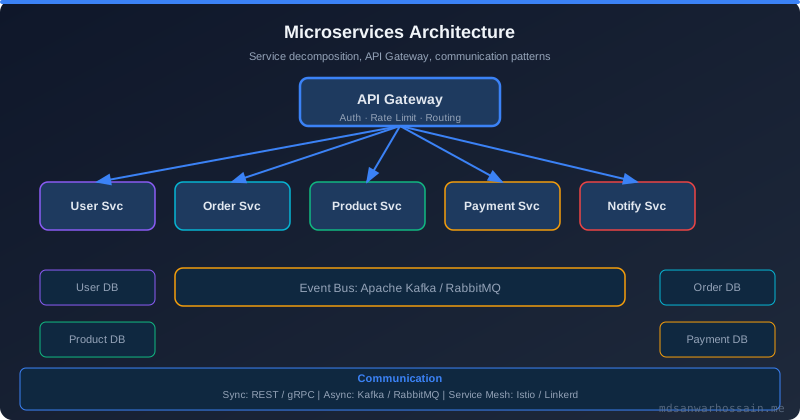
- Service Decomposition: Shared vs Tenant-Specific Services
- Tenant Onboarding Automation: Terraform and Kubernetes
- Rate Limiting and Resource Quotas Per Tenant
- Cross-Tenant Security: Preventing Data Leakage
- Observability: Per-Tenant Metrics, Logs, and SLOs
- Production Checklist and Decision Framework
1. What is Multi-Tenancy? SaaS Models and Core Tradeoffs
Multi-tenancy is an architectural pattern in which a single instance of a software application serves multiple customers (tenants), while each tenant's data and configuration remain logically — or physically — isolated from all others. In a SaaS product on microservices, this is not just a data concern; it permeates routing, billing, observability, deployment, and security from day one.
SaaS Tenancy Models in Practice
Most modern SaaS products sit somewhere on a spectrum between two extremes:
- Silo model (full isolation): Each tenant gets a dedicated stack — dedicated microservice instances, dedicated databases, sometimes dedicated Kubernetes namespaces or clusters. Maximum isolation, maximum cost.
- Pool model (full sharing): All tenants share the same microservice instances, the same database, and the same connection pools. A single row-level filter (tenant_id) separates data. Minimum cost, minimum isolation.
- Bridge model (hybrid): Most enterprise SaaS uses a hybrid: shared compute and networking, but isolated data storage. The sweet spot for 80% of B2B products.
The Isolation vs. Efficiency Tradeoff
The core tension in multi-tenancy architecture is always the same: stronger isolation costs more money and engineering effort, while weaker isolation risks compliance violations and cascading failures (the "noisy neighbor" problem). Concretely:
- Compliance requirements (HIPAA, PCI-DSS, SOC 2 Type II, GDPR) often mandate physical isolation of sensitive data — particularly in healthcare, finance, and government SaaS.
- Enterprise buyers routinely demand data residency guarantees: "our data must stay in EU-West-1." Shared databases complicate this enormously.
- Noisy neighbor: A single high-volume tenant in a shared database can saturate connection pools, degrade query performance for all other tenants, and spike I/O across the board. Without explicit rate controls per tenant, the shared model breaks at scale.
- Operational overhead: Database-per-tenant means managing hundreds or thousands of databases — migrations, backups, monitoring, failover. Automation is non-negotiable.
Before choosing an isolation model, answer these four questions: (1) What are your compliance obligations? (2) Who are your customers — SMBs or enterprises? (3) What is your tenant volume growth curve? (4) What is your operational maturity for managing multiple databases?
2. Three Data Isolation Models Compared
There are exactly three canonical patterns for tenant data isolation in microservices. Every real-world implementation is a variation or combination of these three. Understanding their mechanics, costs, and failure modes is the foundation for every architectural decision that follows.
| Dimension | Database-per-Tenant | Schema-per-Tenant | Shared DB (Row-Level) |
|---|---|---|---|
| Isolation strength | Strongest (physical) | Strong (logical) | Weakest (application) |
| Cost per tenant | High ($$$) | Medium ($$) | Low ($) |
| Schema migration complexity | High (run per DB) | Medium (run per schema) | Low (run once) |
| Noisy neighbor risk | None | Low (shared server) | High (shared tables) |
| Compliance (HIPAA/PCI) | Easiest to certify | Achievable with care | Difficult / risky |
| Data residency support | Native (place DB anywhere) | Possible (per server) | Difficult |
| Backup granularity | Per-tenant (full control) | Per-schema restore | Full DB backup only |
| Max tenant scale | Hundreds (ops cost) | Thousands | Millions |
| Ideal customer segment | Enterprise / regulated | Mid-market B2B | SMB / consumer SaaS |
| Real-world examples | Salesforce enterprise, Workday | Notion teams, Jira Cloud | Slack free, GitHub public |
3. Tenant Routing: Extracting Tenant Context at Runtime
Before any data isolation strategy can work, each microservice must reliably know which tenant is making the current request. Tenant context extraction must happen early in the request pipeline — typically in a servlet filter or Spring Security filter — and be propagated throughout the entire call chain, including async tasks and downstream service calls.
Three Mechanisms for Carrying Tenant Identity
- JWT claims: The most common approach in OAuth2/OIDC-based SaaS. The tenant identifier is embedded in the JWT as a custom claim (e.g.,
tenant_idororg_id) and validated on every request. Works seamlessly with Spring Security's JWT resource server support. - Subdomain routing: Each tenant gets a subdomain (
acme.yourapp.com,globex.yourapp.com). The API Gateway extracts the tenant ID from the Host header. Simple and visible to users, but requires wildcard TLS certificates. - Request headers: A custom header (
X-Tenant-ID) is injected by the API Gateway after validating the inbound request. Downstream services read this header and never need to touch the JWT themselves. Clean but requires the gateway to be the single trust boundary.
TenantContext: ThreadLocal Carrier
The extracted tenant ID must be available to any component within the same thread. The canonical pattern uses a ThreadLocal-backed context holder:
// TenantContext.java — ThreadLocal carrier for tenant identity
public final class TenantContext {

    private static final ThreadLocal<String> CURRENT_TENANT =
            new InheritableThreadLocal<>();

    private TenantContext() {}

    public static void setTenantId(String tenantId) {
        if (tenantId == null || tenantId.isBlank()) {
            throw new IllegalArgumentException("tenantId must not be blank");
        }
        CURRENT_TENANT.set(tenantId);
    }

    public static String getTenantId() {
        String tenantId = CURRENT_TENANT.get();
        if (tenantId == null) {
            throw new TenantContextMissingException(
                "No tenant context found in current thread. " +
                "Ensure TenantFilter is applied.");
        }
        return tenantId;
    }

    public static void clear() {
        CURRENT_TENANT.remove(); // CRITICAL: call in finally block to prevent leakage
    }
}
JWT Tenant Extraction with Spring Security
// TenantJwtFilter.java — extract tenant_id from validated JWT
@Component
@Order(Ordered.HIGHEST_PRECEDENCE + 5)
public class TenantJwtFilter extends OncePerRequestFilter {

    private static final String TENANT_CLAIM = "tenant_id";

    @Override
    protected void doFilterInternal(HttpServletRequest request,
                                    HttpServletResponse response,
                                    FilterChain filterChain)
            throws ServletException, IOException {
        try {
            Authentication auth = SecurityContextHolder.getContext().getAuthentication();
            if (auth instanceof JwtAuthenticationToken jwtAuth) {
                Jwt jwt = jwtAuth.getToken();
                String tenantId = jwt.getClaimAsString(TENANT_CLAIM);
                if (tenantId != null) {
                    TenantContext.setTenantId(tenantId);
                }
            } else {
                // Fallback: read X-Tenant-ID header injected by API Gateway
                String headerTenantId = request.getHeader("X-Tenant-ID");
                if (headerTenantId != null) {
                    TenantContext.setTenantId(headerTenantId);
                }
            }
            filterChain.doFilter(request, response);
        } finally {
            TenantContext.clear(); // Always clear to prevent ThreadLocal leakage
        }
    }
}

// Spring Security config — wire the filter after JWT authentication
@Configuration
@EnableWebSecurity
public class SecurityConfig {

    @Bean
    public SecurityFilterChain filterChain(HttpSecurity http,
                                           TenantJwtFilter tenantFilter) throws Exception {
        http
            .oauth2ResourceServer(oauth2 -> oauth2.jwt(Customizer.withDefaults()))
            .addFilterAfter(tenantFilter, BearerTokenAuthenticationFilter.class)
            .authorizeHttpRequests(auth -> auth
                .requestMatchers("/actuator/health").permitAll()
                .anyRequest().authenticated()
            );
        return http.build();
    }
}
Propagating Tenant Context in Async and Reactive Code
ThreadLocal does not propagate automatically to @Async methods, CompletableFuture chains, or reactive pipelines. Three solutions:
- TaskDecorator (Spring @Async): Implement a
TaskDecoratorthat captures the current tenant ID before task submission and restores it on the worker thread. - MDC + Context propagation: Store tenant ID in the SLF4J MDC and use Logback's context propagation for logging. For execution, copy tenant ID into the Runnable closure explicitly.
- Project Reactor Context: In WebFlux, store tenant ID in the Reactor
ContextusingcontextWrite()and retrieve withMono.deferContextual().
4. Database-per-Tenant with Spring Boot AbstractRoutingDataSource
The database-per-tenant model routes each request to a dedicated database instance based on the current tenant context. Spring Boot's AbstractRoutingDataSource is the natural integration point — it acts as a proxy DataSource that delegates to one of many target DataSource instances at connection-acquisition time.
Dynamic DataSource Routing Implementation
// TenantRoutingDataSource.java
public class TenantRoutingDataSource extends AbstractRoutingDataSource {

    @Override
    protected Object determineCurrentLookupKey() {
        // Called on every connection request — keep this fast
        return TenantContext.getTenantId();
    }
}

// TenantDataSourceConfig.java — build one HikariCP pool per tenant
@Configuration
public class TenantDataSourceConfig {

    @Autowired
    private TenantRepository tenantRepository; // Reads tenant DB URLs from master config DB

    @Bean
    public DataSource dataSource() {
        TenantRoutingDataSource routingDataSource = new TenantRoutingDataSource();

        Map<Object, Object> dataSources = new HashMap<>();
        List<TenantConfig> tenants = tenantRepository.findAll();

        for (TenantConfig tenant : tenants) {
            dataSources.put(tenant.getTenantId(), buildDataSource(tenant));
        }

        routingDataSource.setTargetDataSources(dataSources);
        routingDataSource.setDefaultTargetDataSource(dataSources.values().iterator().next());
        routingDataSource.afterPropertiesSet(); // Resolves the target map
        return routingDataSource;
    }

    private DataSource buildDataSource(TenantConfig config) {
        HikariConfig hikariConfig = new HikariConfig();
        hikariConfig.setJdbcUrl(config.getJdbcUrl());
        hikariConfig.setUsername(config.getDbUser());
        hikariConfig.setPassword(config.getDbPassword()); // Fetch from Secrets Manager
        hikariConfig.setDriverClassName("org.postgresql.Driver");
        // Per-tenant pool sizing — prevents one tenant monopolising connections
        hikariConfig.setMaximumPoolSize(config.getMaxPoolSize()); // e.g. 5–20
        hikariConfig.setMinimumIdle(2);
        hikariConfig.setConnectionTimeout(3000);
        hikariConfig.setIdleTimeout(300000);
        hikariConfig.setMaxLifetime(1200000);
        hikariConfig.setPoolName("HikariPool-" + config.getTenantId());
        return new HikariDataSource(hikariConfig);
    }
}

// Dynamic tenant registration at runtime (new tenant onboarded without restart)
@Service
public class TenantDataSourceRegistry {

    private final TenantRoutingDataSource routingDataSource;

    public void registerTenant(TenantConfig config) {
        Map<Object, Object> currentSources = new HashMap<>(routingDataSource.getResolvedDataSources());
        currentSources.put(config.getTenantId(), buildDataSource(config));
        routingDataSource.setTargetDataSources(currentSources);
        routingDataSource.afterPropertiesSet(); // Hot reload
    }
}
Connection Pool Per Tenant: Sizing and Cost Considerations
With 500 tenants and a max pool size of 10 per tenant, you have 5,000 potential database connections. PostgreSQL's default max_connections is 100. This arithmetic is dangerous. Production mitigations:
- PgBouncer per tenant: Deploy a connection pooler in transaction mode between each HikariCP pool and its PostgreSQL instance. Multiplexes hundreds of application connections through a handful of real server connections.
- RDS Proxy (AWS): Managed connection pooling and credentials rotation. Works with IAM authentication, eliminates the need to store database passwords in application config.
- Lazy DataSource initialization: Don't create connection pools for inactive tenants at startup. Create on first request, evict after configurable idle period (e.g., 30 minutes).
- Tenant tier-based pool sizing: Enterprise tenants get maxPoolSize=20, starter tenants get maxPoolSize=2. Store this in the tenant config table.
5. Schema-per-Tenant with Flyway and Liquibase
The schema-per-tenant model provisions a separate PostgreSQL schema (or MySQL schema, which is equivalent to a database in MySQL's terminology) for each tenant within a shared database server. Logical isolation is strong — each tenant has separate tables with no row-level sharing — but physical resources (CPU, memory, I/O) remain shared.
Tenant Schema Routing with Spring and Flyway
// SchemaRoutingDataSource.java — sets schema on each connection
public class SchemaRoutingDataSource extends AbstractRoutingDataSource {

    @Override
    protected Object determineCurrentLookupKey() {
        return "default"; // Single physical DataSource
    }

    @Override
    protected DataSource determineTargetDataSource() {
        DataSource ds = super.determineTargetDataSource();
        String schema = TenantContext.getTenantId();
        // Wrap to set search_path on connection checkout
        return new SchemaSettingDataSourceWrapper(ds, schema);
    }
}

// SchemaSettingDataSourceWrapper.java
public class SchemaSettingDataSourceWrapper extends DelegatingDataSource {

    private final String schema;

    public SchemaSettingDataSourceWrapper(DataSource delegate, String schema) {
        super(delegate);
        this.schema = sanitizeSchema(schema); // CRITICAL: prevent SQL injection
    }

    @Override
    public Connection getConnection() throws SQLException {
        Connection connection = super.getConnection();
        // PostgreSQL: set search_path to tenant schema
        try (Statement stmt = connection.createStatement()) {
            stmt.execute("SET search_path TO " + schema + ", public");
        }
        return connection;
    }

    private String sanitizeSchema(String schema) {
        // Allow only alphanumeric and underscore — never user-controlled input
        if (!schema.matches("^[a-zA-Z0-9_]{1,63}$")) {
            throw new SecurityException("Invalid schema name: " + schema);
        }
        return schema;
    }
}

// TenantMigrationService.java — run Flyway per-schema on tenant creation
@Service
public class TenantMigrationService {

    private final DataSource dataSource;

    public void migrateSchema(String tenantId) {
        String schema = "tenant_" + tenantId;

        // First: create the schema if it doesn't exist
        try (Connection conn = dataSource.getConnection();
             Statement stmt = conn.createStatement()) {
            stmt.execute("CREATE SCHEMA IF NOT EXISTS " + schema);
        } catch (SQLException e) {
            throw new TenantProvisioningException("Failed to create schema: " + schema, e);
        }

        // Then: run Flyway migrations scoped to the new schema
        Flyway flyway = Flyway.configure()
            .dataSource(dataSource)
            .schemas(schema)                           // Target schema
            .locations("classpath:db/migration/tenant") // Tenant-specific migrations
            .table("flyway_schema_history")            // History table per schema
            .baselineOnMigrate(true)
            .load();

        flyway.migrate();
    }
}
Shared Tables vs. Tenant Tables Strategy
Not every table should be in the tenant schema. Reference data that is truly global (countries, currencies, plan definitions, feature flags) lives in a shared public schema and is accessed by all tenant schemas via PostgreSQL's search_path. This reduces storage and ensures consistent reference data without duplication.
- In tenant schema: users, roles, projects, documents, audit_logs, subscriptions, settings — any data owned by the tenant.
- In shared public schema: plans, features, countries, currencies, system_settings, email_templates — any data managed by the SaaS operator.
- Migration strategy: Two Flyway location sets:
db/migration/shared(run once on the public schema) anddb/migration/tenant(run for every tenant schema). A shared migration bootstrap runs at app startup; a tenant migration runs at onboarding time.
6. Shared Database Row-Level Security with Hibernate Filters
In the shared database model, all tenants' data lives in the same tables. Every table has a tenant_id column. Every query must include a WHERE tenant_id = ? predicate — without exception. A single missed predicate is a data breach. The engineering challenge is making this enforcement automatic and invisible to developers.
Hibernate @Filter for Transparent Tenant Scoping
// Step 1: Define the filter on the entity
@Entity
@Table(name = "projects")
@FilterDef(
    name = "tenantFilter",
    parameters = @ParamDef(name = "tenantId", type = String.class)
)
@Filter(name = "tenantFilter", condition = "tenant_id = :tenantId")
public class Project {

    @Id
    @GeneratedValue(strategy = GenerationType.IDENTITY)
    private Long id;

    @Column(name = "tenant_id", nullable = false, updatable = false)
    private String tenantId;

    @Column(nullable = false)
    private String name;

    // other fields...
}

// Step 2: Activate the filter in a Hibernate interceptor / aspect
@Component
@Aspect
public class TenantFilterAspect {

    @PersistenceContext
    private EntityManager entityManager;

    @Before("execution(* com.yourapp.repository..*(..))")
    public void enableTenantFilter(JoinPoint joinPoint) {
        Session session = entityManager.unwrap(Session.class);
        session.enableFilter("tenantFilter")
               .setParameter("tenantId", TenantContext.getTenantId());
    }
}

// Step 3: Enforce tenant_id on save — prevent cross-tenant writes
@PrePersist
public void prePersist(Project project) {
    String contextTenantId = TenantContext.getTenantId();
    if (project.getTenantId() == null) {
        project.setTenantId(contextTenantId);
    } else if (!project.getTenantId().equals(contextTenantId)) {
        throw new CrossTenantWriteException(
            "Attempt to write to tenant " + project.getTenantId() +
            " from context of tenant " + contextTenantId);
    }
}
Database-Level Row Security with PostgreSQL RLS
For defence-in-depth, enforce tenant isolation at the PostgreSQL level using Row-Level Security policies. This catches bugs that slip through the application layer:
-- Enable RLS on the projects table
ALTER TABLE projects ENABLE ROW LEVEL SECURITY;
ALTER TABLE projects FORCE ROW LEVEL SECURITY; -- applies to table owner too

-- Policy: a connection can only see rows matching current_setting('app.tenant_id')
CREATE POLICY tenant_isolation_policy ON projects
    USING (tenant_id = current_setting('app.tenant_id', true));

-- Set the session variable on each connection from the application
-- (called in the connection initialization or via a connection wrapper)
SET app.tenant_id = 'tenant-abc-123';

-- Spring Boot: set session variable via Hibernate connection interceptor
@Component
public class TenantSessionCustomizer implements Customizer<JpaProperties> {
    // Or use a Hibernate ConnectionProvider that calls:
    // SET LOCAL app.tenant_id = :tenantId on each connection
}
Native Query and JPQL Safety
Hibernate filters do not apply to native SQL queries. Treat every @Query(nativeQuery = true) annotation as a potential tenant isolation bypass. Mandate code review gates for all native queries and enforce linting rules that require a tenant_id = :tenantId parameter on any native query touching multi-tenant tables.
7. Service Decomposition: Shared vs Tenant-Specific Services
In a multi-tenant microservices platform, not every service should be duplicated per tenant. The decomposition decision — shared pool of instances vs. per-tenant deployment — depends on data sensitivity, scalability requirements, and tenant SLA tiers. Getting this wrong leads to either excessive resource waste or unacceptable cross-tenant risk.
Services That Should Be Shared (Single Pool)
- API Gateway: All tenant traffic flows through a shared gateway. The gateway is responsible for tenant identification, rate limiting per tenant, and routing. It must be highly available and stateless.
- Identity / Auth Service: A centralized Identity Provider (Keycloak, Auth0) serves all tenants. Tenant isolation is enforced through realms (Keycloak) or organizations (Auth0). JWT tokens carry tenant claims.
- Billing Service: Stripe or in-house billing logic is shared. Each tenant has a separate Stripe customer ID and subscription record, but the service itself is a single deployment.
- Notification Service: Email, SMS, and push notification delivery is shared. Tenant-specific templates and rate limits are stored in the database and scoped by tenant ID at send time.
- Feature Flag Service: A single feature flag service (LaunchDarkly, Unleash) manages feature rollouts. Flags can be configured per-tenant, but the evaluation engine is shared.
- Audit Log Service: A shared append-only audit log service receives events from all services. Tenant ID is mandatory on every event. Query APIs enforce strict tenant scoping.
Services That Should Be Tenant-Specific (For Enterprise Tiers)
- Dedicated compute workers: For enterprise tenants running heavy background jobs (ETL, report generation, ML inference), deploy dedicated worker instances in a separate Kubernetes namespace to eliminate noisy neighbor effects.
- Search service: Elasticsearch indices can be scoped per tenant (index-per-tenant or alias-per-tenant). High-volume tenants with complex search needs benefit from dedicated Elasticsearch clusters.
- Custom integration services: Enterprise tenants often need private integrations (on-premise ERP connectors, VPN-based data syncs). Deploy these as tenant-specific services in isolated network segments.
Product Catalog Service: A Nuanced Example
A product catalog in a B2B SaaS is typically tenant-owned (each tenant manages their own catalog), but the catalog service itself is shared. The service uses the tenant context to scope all reads and writes to the correct tenant's data partition. Only if a tenant has extreme catalog scale (millions of SKUs, high ingestion rate) would you consider a dedicated deployment — and even then, through feature-flag-controlled routing rather than a hard architectural split.
8. Tenant Onboarding Automation: Terraform and Kubernetes
Manual tenant onboarding is an anti-pattern. At scale — hundreds of tenants, enterprise sign-ups happening via self-service — every provisioning step must be automated, idempotent, and observable. The onboarding pipeline is a first-class engineering product, not an afterthought.
Onboarding Pipeline Architecture
A robust onboarding pipeline typically consists of these ordered steps, each idempotent so retries are safe:
- Tenant record creation: Write the tenant record to the master control plane database (tenantId, plan, region, status=PROVISIONING).
- Identity provisioning: Create an Auth0 organization or Keycloak realm. Generate admin credentials. Store in AWS Secrets Manager under
/tenants/{tenantId}/auth. - Database provisioning: For database-per-tenant: trigger Terraform to create an RDS instance or PostgreSQL database on an existing cluster. For schema-per-tenant: call TenantMigrationService to create and migrate the schema.
- Flyway migration: Run all pending migrations against the new database or schema. Mark migration version in
flyway_schema_history. - Kubernetes namespace (enterprise tier): Apply a Kubernetes namespace manifest and RBAC policies for tenant-dedicated workloads.
- DNS and TLS: Create DNS CNAME record for
{tenantId}.yourapp.com. Provision TLS certificate via cert-manager with Let's Encrypt or AWS ACM. - Seed data: Insert default roles, permission sets, onboarding data, and sample content into the tenant's data partition.
- Status update: Update tenant record to status=ACTIVE. Trigger welcome email via Notification Service. Emit TenantProvisionedEvent to event bus for downstream consumers.
Terraform Snippet: RDS Database Per Tenant
# terraform/modules/tenant_database/main.tf
variable "tenant_id"   { type = string }
variable "db_password" { type = string, sensitive = true }
variable "region"      { type = string }
variable "instance_class" { type = string, default = "db.t3.medium" }

resource "aws_db_instance" "tenant_db" {
  identifier         = "saas-tenant-${var.tenant_id}"
  engine             = "postgres"
  engine_version     = "16.2"
  instance_class     = var.instance_class
  allocated_storage  = 20
  max_allocated_storage = 200  # Auto-scaling storage

  db_name  = "tenant_${replace(var.tenant_id, "-", "_")}"
  username = "tenant_${var.tenant_id}"
  password = var.db_password

  vpc_security_group_ids = [aws_security_group.tenant_db.id]
  db_subnet_group_name   = aws_db_subnet_group.tenant_subnet_group.name

  backup_retention_period = 7
  deletion_protection     = true
  skip_final_snapshot     = false
  final_snapshot_identifier = "final-${var.tenant_id}-${formatdate("YYYYMMDD", timestamp())}"

  performance_insights_enabled = true
  monitoring_interval          = 60

  tags = {
    TenantId    = var.tenant_id
    Environment = "production"
    ManagedBy   = "terraform"
  }
}

# Store connection details in Secrets Manager
resource "aws_secretsmanager_secret_version" "tenant_db_secret" {
  secret_id = "/tenants/${var.tenant_id}/database"
  secret_string = jsonencode({
    host     = aws_db_instance.tenant_db.address
    port     = 5432
    dbname   = aws_db_instance.tenant_db.db_name
    username = aws_db_instance.tenant_db.username
    password = var.db_password
  })
}
Kubernetes Namespace Per Tenant (Enterprise Tier)
For enterprise tenants requiring dedicated compute (dedicated pods, dedicated workers, custom resource limits), a Kubernetes namespace per tenant provides workload isolation within the same cluster. Apply ResourceQuotas to cap CPU, memory, and storage consumption per namespace, and use NetworkPolicies to prevent cross-tenant pod communication.
# k8s/tenant-namespace-template.yaml
apiVersion: v1
kind: Namespace
metadata:
  name: tenant-{{ tenantId }}
  labels:
    tenant-id: "{{ tenantId }}"
    tier: enterprise
---
apiVersion: v1
kind: ResourceQuota
metadata:
  name: tenant-quota
  namespace: tenant-{{ tenantId }}
spec:
  hard:
    requests.cpu: "4"
    requests.memory: "8Gi"
    limits.cpu: "8"
    limits.memory: "16Gi"
    pods: "20"
    persistentvolumeclaims: "5"
---
apiVersion: networking.k8s.io/v1
kind: NetworkPolicy
metadata:
  name: deny-cross-tenant
  namespace: tenant-{{ tenantId }}
spec:
  podSelector: {}
  policyTypes:
    - Ingress
    - Egress
  ingress:
    - from:
        - namespaceSelector:
            matchLabels:
              kubernetes.io/metadata.name: tenant-{{ tenantId }}
        - namespaceSelector:
            matchLabels:
              role: shared-services  # Allow shared services (monitoring, ingress)
  egress:
    - to:
        - namespaceSelector:
            matchLabels:
              kubernetes.io/metadata.name: tenant-{{ tenantId }}
        - namespaceSelector:
            matchLabels:
              role: shared-services
9. Rate Limiting and Resource Quotas Per Tenant
Without per-tenant rate limits, a single misbehaving or hacked tenant can degrade or take down service for all others — the classic noisy neighbor problem. Rate limiting must be applied at multiple layers: the API Gateway (request rate), the application layer (business operation quotas), and the database layer (connection and query limits).
API Gateway Rate Limiting with Redis Token Bucket
Spring Cloud Gateway with Redis Rate Limiter applies per-tenant rate limits using the tenant ID as the key:
# application.yml — Spring Cloud Gateway rate limiting per tenant
spring:
  cloud:
    gateway:
      routes:
        - id: api-route
          uri: lb://api-service
          predicates:
            - Path=/api/**
          filters:
            - name: RequestRateLimiter
              args:
                redis-rate-limiter.replenishRate: 100   # requests/second base
                redis-rate-limiter.burstCapacity: 200   # burst allowance
                redis-rate-limiter.requestedTokens: 1
                key-resolver: "#{@tenantKeyResolver}"

// TenantKeyResolver.java — use tenant_id as the rate limit bucket key
@Component
public class TenantKeyResolver implements KeyResolver {

    @Override
    public Mono<String> resolve(ServerWebExchange exchange) {
        // Extract from validated JWT or X-Tenant-ID header
        return Mono.justOrEmpty(
            exchange.getRequest().getHeaders().getFirst("X-Tenant-ID")
        ).switchIfEmpty(Mono.just("anonymous"));
    }
}

// TenantRateLimitService.java — dynamic limits per tenant plan
@Service
public class TenantRateLimitService {

    private final RedisTemplate<String, String> redisTemplate;
    private final TenantPlanRepository planRepository;

    public boolean isAllowed(String tenantId, String operation) {
        TenantPlan plan = planRepository.findByTenantId(tenantId);
        String key = "ratelimit:" + tenantId + ":" + operation;
        Long count = redisTemplate.opsForValue().increment(key);
        if (count == 1) {
            redisTemplate.expire(key, Duration.ofMinutes(1));
        }
        return count <= plan.getOperationLimit(operation);
    }
}
Business-Level Quotas: Storage, API Calls, Seats
Rate limiting at the HTTP level is necessary but insufficient. Business-level quotas enforce plan limits on:
- Storage: Track per-tenant storage consumption in a quota table. Before any file upload, check remaining quota. Enforce soft limits (warning at 80%) and hard limits (block at 100%).
- API calls: Monthly API call quotas per plan. Use a counter in Redis with a 30-day TTL. Expose current usage via a tenant-facing usage dashboard.
- Seats / users: Before creating a new user in a tenant, check user count against the plan limit. Return a descriptive 402 Payment Required response when the limit is reached.
- Concurrent jobs: For background processing, maintain a per-tenant semaphore in Redis. Reject job submission when the concurrent job limit is reached.
10. Cross-Tenant Security: Preventing Data Leakage
Cross-tenant data leakage is the most severe class of bug in a multi-tenant SaaS. A single vulnerability can expose all customers' data, trigger regulatory penalties, and permanently destroy trust. Defence-in-depth is non-negotiable: application-layer enforcement, database-layer enforcement, automated testing, and continuous audit logging must all work together.
Cross-Tenant Vulnerability Taxonomy
- IDOR (Insecure Direct Object Reference): A tenant accesses another tenant's resource by manipulating an ID in the URL. Example:
GET /api/projects/12345where project 12345 belongs to a different tenant. Fix: always scope resource lookups by tenant ID, never trust IDs alone. - Missing Hibernate filter activation: An async task or scheduled job runs outside the normal request context and never activates the tenant filter, returning data from all tenants. Fix: explicit tenant context initialization in every async entry point.
- Native query bypass: A developer writes a native SQL query that joins tenant tables without a tenant_id predicate. Fix: static analysis lint rules + PR review policy.
- Cache poisoning: A shared cache (Redis, Caffeine) caches a response keyed only by resource ID, then serves it to a different tenant. Fix: always include tenant ID in cache keys. Example:
"project:" + tenantId + ":" + projectId. - Event queue cross-contamination: A domain event is consumed by a different tenant's worker due to missing tenant routing in the message broker. Fix: include tenantId in every event payload and consumer-side validation.
Automated Cross-Tenant Penetration Testing
Manual code reviews catch some cross-tenant vulnerabilities but not all. Automate penetration testing as part of CI/CD:
- IDOR fuzzing: In integration tests, create resources as Tenant A, then attempt to read/update/delete them as Tenant B. Assert 403/404 is returned, never 200 with data.
- Tenant isolation test suite: A dedicated test class that runs against each major API endpoint, systematically testing cross-tenant access for each resource type. Fails CI if any endpoint returns cross-tenant data.
- OWASP ZAP with tenant tokens: Configure ZAP active scans with two different tenant JWT tokens and flag any response that returns identical data regardless of tenant context.
Per-Tenant Audit Logging
Every data access and mutation must generate an audit log entry that includes: tenant_id, user_id, resource_type, resource_id, action, timestamp, source IP, and request correlation ID. The audit log must be append-only and stored separately from the tenant's operational data — in a write-once S3 bucket with Object Lock, or a dedicated append-only database table with no DELETE privileges granted to application roles. Audit logs are the forensic record for breach investigations and compliance evidence for SOC 2 audits.
11. Observability: Per-Tenant Metrics, Logs, and SLOs
Generic service metrics are insufficient for multi-tenant operations. When a customer calls to report slowness, you must be able to answer: "Is this a platform-wide issue or isolated to your tenant?" Per-tenant observability gives you that answer in seconds, not hours.
Per-Tenant Prometheus Metrics with Micrometer
// TenantMetricsAspect.java — tag all metrics with tenant_id
@Component
@Aspect
public class TenantMetricsAspect {

    private final MeterRegistry meterRegistry;
    private static final String TENANT_TAG = "tenant_id";

    @Around("@annotation(com.yourapp.metrics.TenantMetered)")
    public Object recordTenantMetric(ProceedingJoinPoint pjp) throws Throwable {
        String tenantId = TenantContext.getTenantId();
        String methodName = pjp.getSignature().getName();

        Timer.Sample sample = Timer.start(meterRegistry);
        try {
            Object result = pjp.proceed();
            sample.stop(Timer.builder("api.request.duration")
                .tag(TENANT_TAG, tenantId)
                .tag("method", methodName)
                .tag("status", "success")
                .description("API request duration per tenant")
                .register(meterRegistry));
            return result;
        } catch (Exception e) {
            sample.stop(Timer.builder("api.request.duration")
                .tag(TENANT_TAG, tenantId)
                .tag("method", methodName)
                .tag("status", "error")
                .register(meterRegistry));

            meterRegistry.counter("api.errors.total",
                TENANT_TAG, tenantId,
                "method", methodName,
                "exception", e.getClass().getSimpleName()
            ).increment();

            throw e;
        }
    }
}

// Per-tenant request counter and active session gauge
@Component
public class TenantMetricsCollector {

    private final MeterRegistry meterRegistry;
    private final Map<String, AtomicInteger> activeSessionsByTenant = new ConcurrentHashMap<>();

    public void recordRequest(String tenantId) {
        meterRegistry.counter("tenant.requests.total",
            "tenant_id", tenantId).increment();
    }

    public void updateActiveConnections(String tenantId, int count) {
        Gauge.builder("tenant.db.active_connections", activeSessionsByTenant,
            map -> map.computeIfAbsent(tenantId, k -> new AtomicInteger(0)).get())
            .tag("tenant_id", tenantId)
            .register(meterRegistry);
        activeSessionsByTenant.computeIfAbsent(tenantId, k -> new AtomicInteger(0)).set(count);
    }
}
Per-Tenant Structured Logging
Every log line must include the tenant ID in structured form, enabling Kibana or Grafana Loki queries to filter by tenant instantly. Add tenant ID to the SLF4J MDC at the same point where you populate TenantContext:
// In TenantJwtFilter — add to MDC alongside TenantContext
MDC.put("tenantId", tenantId);
MDC.put("correlationId", UUID.randomUUID().toString());

// logback-spring.xml — include tenant_id in JSON log output
<appender name="JSON_STDOUT" class="ch.qos.logback.core.ConsoleAppender">
    <encoder class="net.logstash.logback.encoder.LogstashEncoder">
        <includeMdcKeyName>tenantId</includeMdcKeyName>
        <includeMdcKeyName>correlationId</includeMdcKeyName>
    </encoder>
</appender>

// Always clear MDC in the finally block
finally {
    TenantContext.clear();
    MDC.remove("tenantId");
    MDC.remove("correlationId");
}
Per-Tenant SLOs and Error Budgets
Enterprise SaaS customers negotiate individual SLAs. Monitoring per-tenant SLOs requires Prometheus recording rules that aggregate by tenant_id label:
- Availability SLO:
1 - (sum(rate(api.errors.total{tenant_id="$tenant"}[5m])) / sum(rate(api.requests.total{tenant_id="$tenant"}[5m]))) - Latency SLO:
histogram_quantile(0.99, rate(api.request.duration_bucket{tenant_id="$tenant"}[5m]))< 500ms target. - Error budget burn rate alerts: Alert Slack when a tenant's 30-day error budget is consumed faster than 2× the expected rate. This gives 15 days of warning before SLA breach.
- Grafana per-tenant dashboard: A single dashboard with
$tenant_idtemplate variable enables on-call engineers to instantly drill into any tenant's real-time performance profile.
12. Production Checklist and Decision Framework
Use this checklist before declaring your multi-tenant microservices architecture production-ready. Each item represents a real failure mode observed in production SaaS systems. Missing any of these is a security or reliability risk that will eventually manifest under load or adversarial conditions.
Data Isolation Checklist
- ✅ Tenant context is extracted and validated at the security filter layer, before any business logic executes
- ✅ TenantContext is always cleared in a
finallyblock — no ThreadLocal leakage between requests - ✅ Hibernate @Filter is activated for every tenant-scoped entity in every repository call
- ✅ Native SQL queries are audited — every one touching multi-tenant tables has a tenant_id predicate
- ✅ All cache keys include tenant_id — no cross-tenant cache poisoning possible
- ✅ Event payloads include tenant_id — consumers validate it before processing
- ✅ Automated cross-tenant IDOR tests run on every pull request
- ✅ PostgreSQL Row-Level Security is enabled as defence-in-depth on sensitive tables
Operational Checklist
- ✅ Tenant onboarding is fully automated — zero manual steps, idempotent, observable with step-by-step status tracking
- ✅ Database migrations run automatically for all tenant databases/schemas on deployment
- ✅ Per-tenant connection pools have explicit maximum sizes — no single tenant can exhaust all connections
- ✅ Rate limiting is enforced at API Gateway level with per-tenant buckets stored in Redis
- ✅ Business quotas (storage, API calls, seats) are enforced with soft warnings and hard blocks
- ✅ Per-tenant metrics, dashboards, and SLO alerts are in place before the first enterprise customer goes live
- ✅ Audit logs are append-only, tenant-scoped, and written to tamper-resistant storage
- ✅ Tenant offboarding (data export + deletion) is automated for GDPR right-to-erasure compliance
- ✅ Disaster recovery procedures are documented and tested per isolation model (restore one tenant without affecting others)
- ✅ Secrets rotation (DB passwords, API keys) is automated per tenant via AWS Secrets Manager or Vault
Isolation Model Decision Framework
Choose Database-per-Tenant if:
- You have HIPAA, PCI-DSS, or SOC 2 compliance requirements demanding physical data separation
- Enterprise customers contractually require data residency guarantees (specific cloud region or AZ)
- Your business model supports 10–500 high-value tenants each paying $10k+/year ARR
- You have the operational maturity to manage per-tenant database automation
Choose Schema-per-Tenant if:
- You need strong logical isolation without the cost of dedicated database instances
- Your tenant volume is in the hundreds to low thousands
- You use PostgreSQL (excellent schema support) or MySQL/MariaDB
- You need per-tenant schema migration control but want shared infrastructure
Choose Shared Database (Row-Level) if:
- You are targeting SMB or consumer market with thousands to millions of tenants
- Regulatory requirements are light or absent
- You have robust application-layer isolation with Hibernate filters AND database-level RLS as defence-in-depth
- You have a comprehensive automated test suite specifically for cross-tenant isolation
The most important piece of advice: choose your isolation model before you write your first line of business logic. Migrating from shared database to schema-per-tenant at 10,000 tenants requires a multi-month, high-risk migration with significant downtime risk. The cost of early architectural conservatism (choosing stronger isolation) is almost always lower than the cost of migrating later under pressure.
