Spring Security 6 OAuth2 Resource Server: Keycloak & Auth0 Integration
Building a production Spring Boot API in 2026 means integrating with an external identity provider — Keycloak, Auth0, Okta, or Azure AD. Spring Security 6 has first-class OAuth2 Resource Server support: you provide a JWKS URI and the framework handles signature verification, expiry, issuer validation, and principal extraction automatically. This guide covers the full configuration: from minimal YAML to audience validators, custom claim converters, and multi-tenant JWT routing.
TL;DR
"Configure Spring Security 6 as an OAuth2 Resource Server with Keycloak and Auth0. JWT validation, JWKS, audience claims, custom converters, and."
Table of Contents
- The OAuth2 Resource Server Architecture
- Maven Dependencies
- Keycloak Integration — Minimal Configuration
- Auth0 Integration — Audience Validation Required
- Custom Claims Converter: Mapping Keycloak Roles
- Accessing JWT Claims in Controllers
- Multi-Tenant JWT Routing
- JWKS Caching and Key Rotation
- Security Hardening Checklist
- Testing the Resource Server
- Conclusion
The OAuth2 Resource Server Architecture
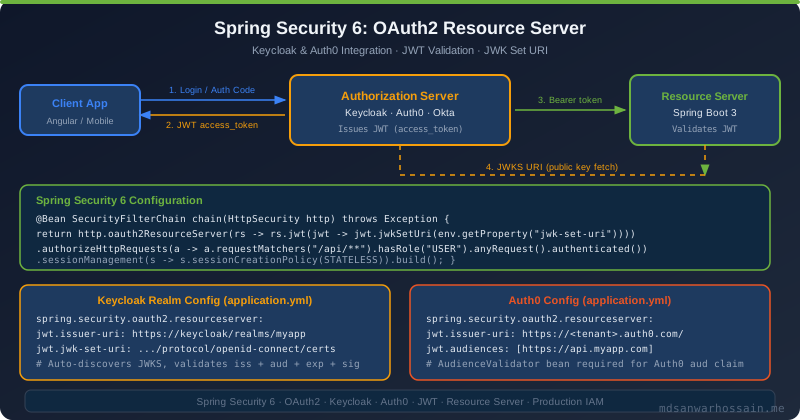
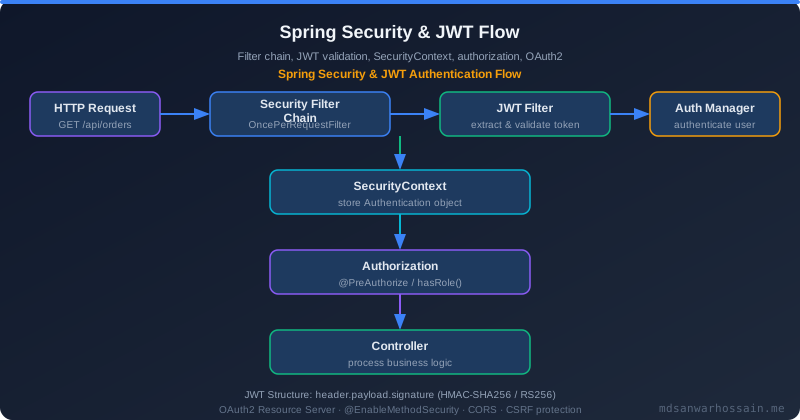
In the OAuth2 model, your Spring Boot API is the Resource Server — it holds the protected resources (user data, orders, etc.). A separate Authorization Server (Keycloak, Auth0, Okta) issues JWTs. Clients authenticate with the Authorization Server, receive a JWT access token, and then present that token as a Bearer header on every call to your Resource Server.
Your Resource Server's job is to:
- Extract the JWT from the
Authorization: Bearer <token>header. - Fetch the public key from the Authorization Server's JWKS (JSON Web Key Set) endpoint.
- Verify the JWT signature, expiry (
exp), issuer (iss), and optionally audience (aud). - Map the JWT claims to a Spring Security
Authenticationobject. - Allow your controllers to use
@AuthenticationPrincipal,@PreAuthorize, etc. as normal.
Spring Security handles steps 2–4 automatically once configured. The configuration is minimal — typically just a YAML property or two.
Maven Dependencies
<!-- pom.xml -->
<dependency>
    <groupId>org.springframework.boot</groupId>
    <artifactId>spring-boot-starter-security</artifactId>
</dependency>
<dependency>
    <groupId>org.springframework.boot</groupId>
    <artifactId>spring-boot-starter-oauth2-resource-server</artifactId>
</dependency>
<!-- spring-security-oauth2-jose is included transitively -->
Keycloak Integration — Minimal Configuration
With a Keycloak realm, the minimal configuration is a single YAML property. Spring Security auto-discovers the JWKS URI, token endpoint, and issuer from the OIDC discovery document at /.well-known/openid-configuration.
# application.yml — Keycloak
spring:
  security:
    oauth2:
      resourceserver:
        jwt:
          issuer-uri: http://keycloak:8080/realms/my-realm
          # Spring auto-fetches:
          # http://keycloak:8080/realms/my-realm/.well-known/openid-configuration
          # and extracts the jwks_uri from the discovery document
// SecurityConfig.java — minimal
@Configuration
@EnableWebSecurity
public class SecurityConfig {
@Bean
public SecurityFilterChain filterChain(HttpSecurity http) throws Exception {
http
.csrf(AbstractHttpConfigurer::disable)
.sessionManagement(s -> s.sessionCreationPolicy(SessionCreationPolicy.STATELESS))
.authorizeHttpRequests(auth -> auth
.requestMatchers("/api/public/**").permitAll()
.requestMatchers("/actuator/health").permitAll()
.anyRequest().authenticated()
)
.oauth2ResourceServer(oauth2 -> oauth2
.jwt(Customizer.withDefaults()) // uses issuer-uri from YAML
);
return http.build();
}
}That is the entire configuration for a basic Keycloak integration. Spring Security fetches the Keycloak public key via JWKS on startup, caches it, and rotates it automatically when Keycloak rotates keys.
Auth0 Integration — Audience Validation Required
Auth0 tokens include an aud (audience) claim that identifies the API the token is intended for. Spring Security's default JWT decoder does not validate aud unless you configure it — this is a required step for Auth0.
# application.yml — Auth0
spring:
  security:
    oauth2:
      resourceserver:
        jwt:
          issuer-uri: https://your-tenant.auth0.com/
          # Auth0 JWKS: https://your-tenant.auth0.com/.well-known/jwks.json

# Add custom properties for audience validation
auth0:
  audience: https://api.your-app.com
// AudienceValidator.java — required for Auth0
@Component
public class AudienceValidator implements OAuth2TokenValidator<Jwt> {
private final String audience;
public AudienceValidator(@Value("${auth0.audience}") String audience) {
this.audience = audience;
}
@Override
public OAuth2TokenValidatorResult validate(Jwt jwt) {
List<String> audiences = jwt.getAudience();
if (audiences != null && audiences.contains(audience)) {
return OAuth2TokenValidatorResult.success();
}
OAuth2Error error = new OAuth2Error(
"invalid_token",
"JWT does not contain required audience: " + audience,
null
);
return OAuth2TokenValidatorResult.failure(error);
}
}// SecurityConfig.java — Auth0 with audience validation
@Configuration
@EnableWebSecurity
public class SecurityConfig {
@Value("${spring.security.oauth2.resourceserver.jwt.issuer-uri}")
private String issuerUri;
private final AudienceValidator audienceValidator;
public SecurityConfig(AudienceValidator audienceValidator) {
this.audienceValidator = audienceValidator;
}
@Bean
public SecurityFilterChain filterChain(HttpSecurity http) throws Exception {
http
.csrf(AbstractHttpConfigurer::disable)
.sessionManagement(s -> s.sessionCreationPolicy(SessionCreationPolicy.STATELESS))
.authorizeHttpRequests(auth -> auth
.requestMatchers("/api/public/**").permitAll()
.anyRequest().authenticated()
)
.oauth2ResourceServer(oauth2 -> oauth2
.jwt(jwt -> jwt.decoder(jwtDecoder()))
);
return http.build();
}
@Bean
public JwtDecoder jwtDecoder() {
NimbusJwtDecoder decoder = JwtDecoders.fromIssuerLocation(issuerUri);
// Compose validators: default (issuer + expiry) + audience
OAuth2TokenValidator<Jwt> defaultValidators = JwtValidators.createDefaultWithIssuer(issuerUri);
OAuth2TokenValidator<Jwt> withAudience =
new DelegatingOAuth2TokenValidator<>(defaultValidators, audienceValidator);
decoder.setJwtAuthenticationConverter(jwtAuthenticationConverter());
decoder.setJwtValidator(withAudience);
return decoder;
}
@Bean
public JwtAuthenticationConverter jwtAuthenticationConverter() {
JwtGrantedAuthoritiesConverter authoritiesConverter = new JwtGrantedAuthoritiesConverter();
authoritiesConverter.setAuthoritiesClaimName("permissions"); // Auth0 uses 'permissions'
authoritiesConverter.setAuthorityPrefix("SCOPE_");
JwtAuthenticationConverter converter = new JwtAuthenticationConverter();
converter.setJwtGrantedAuthoritiesConverter(authoritiesConverter);
return converter;
}
}Custom Claims Converter: Mapping Keycloak Roles
Keycloak stores roles in a nested structure: realm_access.roles or resource_access.<client-id>.roles. Spring Security's default converter does not understand this structure — you need a custom JwtAuthenticationConverter.
// KeycloakRoleConverter.java
@Component
public class KeycloakRoleConverter implements Converter<Jwt, Collection<GrantedAuthority>> {

    private static final String REALM_ROLES_CLAIM = "realm_access";
    private static final String ROLES_KEY = "roles";

    @Override
    @SuppressWarnings("unchecked")
    public Collection<GrantedAuthority> convert(Jwt jwt) {
        Map<String, Object> realmAccess = jwt.getClaim(REALM_ROLES_CLAIM);
        if (realmAccess == null) return Collections.emptyList();

        List<String> roles = (List<String>) realmAccess.get(ROLES_KEY);
        if (roles == null) return Collections.emptyList();

        return roles.stream()
            .map(role -> new SimpleGrantedAuthority("ROLE_" + role.toUpperCase()))
            .collect(Collectors.toList());
    }
}

// SecurityConfig.java — integrate Keycloak converter
@Bean
public JwtAuthenticationConverter jwtAuthenticationConverter(KeycloakRoleConverter roleConverter) {
    JwtAuthenticationConverter converter = new JwtAuthenticationConverter();
    converter.setJwtGrantedAuthoritiesConverter(roleConverter);
    converter.setPrincipalClaimName("preferred_username"); // Keycloak's user identifier
    return converter;
}
After this configuration, @PreAuthorize("hasRole('ADMIN')") works correctly when the Keycloak user has the admin realm role.
Accessing JWT Claims in Controllers
@RestController
@RequestMapping("/api/v1/orders")
public class OrderController {

    // Access the full JWT principal
    @GetMapping("/my-orders")
    public List<Order> getMyOrders(@AuthenticationPrincipal Jwt jwt) {
        String userId = jwt.getSubject();          // 'sub' claim
        String username = jwt.getClaim("preferred_username"); // Keycloak specific
        String tenantId = jwt.getClaim("tenant_id");          // custom claim
        return orderService.findByUser(userId, tenantId);
    }

    // Access the typed Authentication object
    @GetMapping("/admin/all")
    @PreAuthorize("hasRole('ADMIN')")
    public List<Order> getAllOrders(Authentication authentication) {
        JwtAuthenticationToken jwtAuth = (JwtAuthenticationToken) authentication;
        Jwt jwt = (Jwt) jwtAuth.getCredentials();
        log.info("Admin access by: {}", jwt.getSubject());
        return orderService.findAll();
    }

    // Combine JWT claims with path variables for ownership check
    @GetMapping("/{orderId}")
    @PreAuthorize("@orderSecurity.isOwner(#orderId, authentication)")
    public Order getOrder(@PathVariable String orderId) {
        return orderService.findById(orderId);
    }
}

// OrderSecurity.java — custom security expression bean
@Component("orderSecurity")
public class OrderSecurity {
    private final OrderRepository orderRepo;

    public boolean isOwner(String orderId, Authentication auth) {
        JwtAuthenticationToken jwtAuth = (JwtAuthenticationToken) auth;
        String userId = ((Jwt) jwtAuth.getCredentials()).getSubject();
        return orderRepo.existsByIdAndUserId(orderId, userId);
    }
}
Multi-Tenant JWT Routing
Some architectures need to accept JWTs from multiple identity providers — e.g., Keycloak for internal users and Auth0 for external partners. Spring Security supports this via a custom AuthenticationManagerResolver.
// MultiTenantJwtDecoder.java
@Component
public class MultiTenantJwtDecoder implements JwtDecoder {

    private final Map<String, JwtDecoder> decoderCache = new ConcurrentHashMap<>();

    @Override
    public Jwt decode(String token) throws JwtException {
        // Decode without verification to read the 'iss' claim
        String issuer = extractIssuerWithoutVerification(token);

        JwtDecoder decoder = decoderCache.computeIfAbsent(issuer, iss -> {
            if (iss.contains("keycloak")) {
                return JwtDecoders.fromIssuerLocation(iss);
            } else if (iss.contains("auth0.com")) {
                return buildAuth0Decoder(iss);
            }
            throw new JwtException("Unknown issuer: " + iss);
        });

        return decoder.decode(token);
    }

    private String extractIssuerWithoutVerification(String token) {
        try {
            JWT parsed = JWTParser.parse(token);
            return parsed.getJWTClaimsSet().getIssuer();
        } catch (ParseException e) {
            throw new JwtException("Cannot parse JWT", e);
        }
    }

    private JwtDecoder buildAuth0Decoder(String issuer) {
        NimbusJwtDecoder decoder = JwtDecoders.fromIssuerLocation(issuer);
        // Add audience validator for Auth0
        OAuth2TokenValidator<Jwt> validators = new DelegatingOAuth2TokenValidator<>(
            JwtValidators.createDefaultWithIssuer(issuer),
            jwt -> {
                List<String> aud = jwt.getAudience();
                return (aud != null && aud.contains("https://api.your-app.com"))
                    ? OAuth2TokenValidatorResult.success()
                    : OAuth2TokenValidatorResult.failure(new OAuth2Error("invalid_token", "Invalid audience", null));
            }
        );
        decoder.setJwtValidator(validators);
        return decoder;
    }
}

// SecurityConfig.java — use the multi-tenant decoder
.oauth2ResourceServer(oauth2 -> oauth2.jwt(jwt -> jwt.decoder(multiTenantJwtDecoder)))
JWKS Caching and Key Rotation
Spring Security's default NimbusJwtDecoder caches the JWKS for 5 minutes and automatically re-fetches when it encounters a signature verification failure with an unknown key ID (kid). This handles key rotation transparently for most scenarios. However, for high-security environments you may want to tune this:
@Bean
public JwtDecoder jwtDecoder() {
    // Build decoder with explicit JWKS URI (bypasses issuer discovery overhead)
    return NimbusJwtDecoder
        .withJwkSetUri("https://keycloak:8080/realms/my-realm/protocol/openid-connect/certs")
        .jwsAlgorithm(SignatureAlgorithm.RS256)  // accept only RS256 — reject HS256
        .cache(
            new NimbusJwtDecoder.JwkSetUriJwtDecoderBuilder.CachingDefaults()
                .jwkSetCache(Duration.ofMinutes(10))  // cache JWKS for 10 minutes
        )
        .build();
}
Security Hardening Checklist
| Check | Keycloak | Auth0 |
|---|---|---|
| Signature algorithm | RS256 (default) | RS256 (default) |
| Issuer validation | Auto via issuer-uri | Auto via issuer-uri |
| Audience validation | Optional (client IDs) | Required — AudienceValidator |
| Role claim | realm_access.roles | permissions (custom) |
| JWKS auto-rotation | Yes (unknown kid) | Yes (unknown kid) |
| Session policy | STATELESS | STATELESS |
| CSRF disabled | Yes (stateless API) | Yes (stateless API) |
Testing the Resource Server
// Integration test with @WithMockUser or mocked JWT
@WebMvcTest(OrderController.class)
@Import(SecurityConfig.class)
class OrderControllerTest {

    @Autowired MockMvc mvc;

    @Test
    void getMyOrders_withValidJwt_returns200() throws Exception {
        mvc.perform(get("/api/v1/orders/my-orders")
                .with(jwt()
                    .jwt(builder -> builder
                        .subject("user-123")
                        .claim("preferred_username", "alice")
                        .claim("tenant_id", "tenant-acme")
                    )
                )
            )
            .andExpect(status().isOk());
    }

    @Test
    void adminEndpoint_withoutAdminRole_returns403() throws Exception {
        mvc.perform(get("/api/v1/orders/admin/all")
                .with(jwt().authorities(new SimpleGrantedAuthority("ROLE_USER")))
            )
            .andExpect(status().isForbidden());
    }

    @Test
    void adminEndpoint_withAdminRole_returns200() throws Exception {
        mvc.perform(get("/api/v1/orders/admin/all")
                .with(jwt().authorities(new SimpleGrantedAuthority("ROLE_ADMIN")))
            )
            .andExpect(status().isOk());
    }
}
The SecurityMockMvcRequestPostProcessors.jwt() DSL (from spring-security-test) creates a valid mock JWT without requiring a real identity provider in your test environment. For a deeper look at method-level authorization with @PreAuthorize, see the companion post on Spring Security Method-Level Security and RBAC patterns.
Conclusion
Spring Security 6's OAuth2 Resource Server support is production-ready and requires minimal boilerplate. For Keycloak, a single YAML property enables full JWT validation with automatic key rotation. For Auth0, add an AudienceValidator and a custom claims converter. For multi-tenant scenarios, implement a custom JwtDecoder that routes by issuer. The framework handles the cryptographic heavy lifting — your job is configuration, claim mapping, and method-level authorization.
For the custom JWT filter approach (when you manage your own tokens rather than delegating to an IdP), see the Spring Boot Security with JWT guide which covers token lifecycle, refresh rotation, and blacklisting in detail.
Token Introspection vs JWT: When to Use Remote Validation
By default, Spring Security validates JWTs locally using the JWKS endpoint — no network call per request, O(1) validation after public key caching. But local validation has a critical gap: it cannot detect revoked tokens until the JWT expires. For scenarios where immediate revocation is required (user logout, compromised credentials, privilege escalation events), switch to opaque tokens with the Keycloak introspection endpoint:
# application.yml — opaque token introspection
spring:
  security:
    oauth2:
      resourceserver:
        opaquetoken:
          introspection-uri: https://keycloak.example.com/realms/myrealm/protocol/openid-connect/token/introspect
          client-id: resource-server
          client-secret: ${INTROSPECTION_SECRET}
Introspection adds 5–20ms of latency per request (network round-trip to Keycloak). Mitigate this with a short-lived token cache — cache introspection results for 30 seconds (well under the typical 5-minute JWT lifetime) to avoid hammering Keycloak under load:
@Configuration
public class IntrospectionConfig {

    @Bean
    OpaqueTokenIntrospector cachingIntrospector(
            NimbusOpaqueTokenIntrospector delegate) {

        // Caffeine cache: 30s TTL, 1000 entries max
        Cache<String, OAuth2AuthenticatedPrincipal> cache = Caffeine.newBuilder()
            .expireAfterWrite(Duration.ofSeconds(30))
            .maximumSize(1000)
            .build();

        return token -> cache.get(token, delegate::introspect);
    }
}
Choose the right approach based on your security and performance requirements:
| Approach | Latency | Revocation | IdP dependency | Best For |
|---|---|---|---|---|
| JWT (local) | <1ms | At expiry only | JWKS refresh only | High-throughput APIs, microservices mesh |
| Opaque + Introspect | 5–20ms | Immediate | Per-request (or cached) | Financial, compliance-sensitive APIs |
Production Security Monitoring with Actuator & Micrometer
Security events — invalid tokens, access denied errors, expired tokens — are high-signal indicators of attacks or misconfigurations. Expose them as Micrometer metrics so Prometheus/Grafana can alert on anomalies before they become incidents:
@Component
public class SecurityMetricsPublisher implements ApplicationListener<AbstractAuthorizationEvent> {

    private final Counter accessDenied;
    private final Counter authFailure;

    public SecurityMetricsPublisher(MeterRegistry registry) {
        this.accessDenied = Counter.builder("security.access.denied")
            .description("HTTP 403 access denied events")
            .register(registry);
        this.authFailure = Counter.builder("security.auth.failure")
            .description("Authentication failures (bad/expired tokens)")
            .register(registry);
    }

    @Override
    public void onApplicationEvent(AbstractAuthorizationEvent event) {
        if (event instanceof AuthorizationDeniedEvent) {
            accessDenied.increment();
        }
    }
}

// application.yml — expose Spring Security actuator metrics
management:
  endpoints:
    web:
      exposure:
        include: health,metrics,prometheus
  metrics:
    tags:
      application: ${spring.application.name}
Set up Grafana alerts: if security.access.denied rate spikes above 50/minute, page your security team. This pattern catches credential stuffing attacks, misconfigured clients, and broken authorization logic within minutes rather than hours.
# Prometheus alert rule — spike in auth failures
groups:
  - name: security_alerts
    rules:
      - alert: HighAuthFailureRate
        expr: rate(security_auth_failure_total[5m]) > 10
        for: 2m
        labels:
          severity: warning
        annotations:
          summary: "Elevated auth failure rate on {{ $labels.application }}"
          description: "{{ $value }} failures/sec — possible credential attack"
Fine-Grained Scope-Based Authorization Patterns
Most teams rely on coarse-grained role checks (hasRole("ADMIN")) which conflate authentication with authorization and lead to permission explosion. JWT scopes combined with Spring Security's method-level security enable fine-grained resource-action authorization that scales to complex permission models:
# Keycloak client scope mapping — fine-grained JWT scopes
# Token payload includes: "scope": "orders:read orders:write users:read"

// Spring Security: scope-based method authorization
@RestController
@RequestMapping("/orders")
public class OrderController {

    @GetMapping
    @PreAuthorize("hasAuthority('SCOPE_orders:read')")
    public List<Order> listOrders() { ... }

    @PostMapping
    @PreAuthorize("hasAuthority('SCOPE_orders:write')")
    public Order createOrder(@RequestBody CreateOrderRequest req) { ... }

    @DeleteMapping("/{id}")
    @PreAuthorize("hasAuthority('SCOPE_orders:write') and hasAuthority('SCOPE_admin')")
    public void deleteOrder(@PathVariable Long id) { ... }
}
For resource ownership checks — user X can only access their own orders, not other users' — combine scope checks with principal extraction from the JWT:
@GetMapping("/{orderId}")
@PreAuthorize("hasAuthority('SCOPE_orders:read') and @orderSecurityService.isOwner(#orderId, authentication)")
public Order getOrder(@PathVariable Long orderId) { ... }

@Component
public class OrderSecurityService {
    public boolean isOwner(Long orderId, Authentication auth) {
        String userId = ((Jwt) auth.getPrincipal()).getSubject();
        return orderRepository.findById(orderId)
            .map(o -> o.getUserId().equals(userId))
            .orElse(false);
    }
}
Enable @EnableMethodSecurity (Spring Security 6's replacement for @EnableGlobalMethodSecurity) in your security configuration. It activates @PreAuthorize, @PostAuthorize, and @PreFilter annotations, and supports Spring Expression Language (SpEL) for rich authorization expressions that reference beans, method parameters, and return values.
Refresh Token Rotation and Silent Re-Authentication
Resource servers validate access tokens but don't manage refresh tokens — that's the OAuth2 client's (frontend or BFF) responsibility. However, understanding refresh token rotation is critical for resource server architects because token rotation policies dictate access token lifetimes, which in turn affect your revocation strategy. Keycloak supports refresh token rotation by default since version 21: each token refresh invalidates the old refresh token and issues a new one, preventing refresh token replay attacks.
For the resource server, the key configuration decision is access token lifetime. Short-lived access tokens (5 minutes) combined with refresh token rotation give you near-immediate effective revocation — even without token introspection, a revoked user can only make requests for up to 5 minutes after their session is terminated. Configure this in Keycloak's realm settings:
# Keycloak realm configuration (Terraform)
resource "keycloak_realm" "main" {
  realm                    = "production"
  access_token_lifespan    = "5m"     # Short — reduces revocation gap
  refresh_token_max_reuse  = 0        # Strict rotation — no reuse
  sso_session_max_lifespan = "8h"     # Working day session
  offline_session_max_lifespan = "30d" # Remember-me duration
  revoke_refresh_token     = true     # Enable rotation
}
On the Spring Boot resource server side, validate the token's iat (issued-at) and nbf (not-before) claims when present, and reject tokens issued before a known compromise timestamp. This provides a manual "revoke all tokens issued before X" mechanism for breach response without requiring token introspection:
@Bean
JwtDecoder jwtDecoderWithRevocation(
        NimbusJwtDecoder nimbusDecoder,
        RevocationTimestampService revocationService) {

    return token -> {
        Jwt jwt = nimbusDecoder.decode(token);

        // Reject tokens issued before breach timestamp
        Instant breachTime = revocationService.getBreachTime(jwt.getSubject());
        if (breachTime != null && jwt.getIssuedAt().isBefore(breachTime)) {
            throw new JwtException("Token issued before security event — please re-authenticate");
        }
        return jwt;
    };
}
Testing OAuth2 Resource Server Configuration
Testing a Spring Security OAuth2 Resource Server without a live Keycloak or Auth0 instance is essential for CI/CD pipelines. Spring Security Test provides first-class support for JWT-secured endpoints via SecurityMockMvcRequestPostProcessors.jwt(), which creates a mock JWT Authentication with custom claims — no actual token signing or IdP required:
@WebMvcTest(OrderController.class)
class OrderControllerSecurityTest {

    @Autowired
    private MockMvc mockMvc;

    @Test
    void listOrders_requiresReadScope() throws Exception {
        // No token — expect 401
        mockMvc.perform(get("/orders"))
            .andExpect(status().isUnauthorized());

        // Valid JWT with read scope — expect 200
        mockMvc.perform(get("/orders")
                .with(jwt().jwt(builder -> builder
                    .subject("user-123")
                    .claim("scope", "orders:read")
                    .issuer("https://keycloak.example.com/realms/prod"))))
            .andExpect(status().isOk());

        // JWT missing read scope — expect 403
        mockMvc.perform(get("/orders")
                .with(jwt().jwt(builder -> builder
                    .subject("user-456")
                    .claim("scope", "profile email"))))  // no orders:read
            .andExpect(status().isForbidden());
    }

    @Test
    void getOrder_enforcesOwnership() throws Exception {
        // User trying to access another user's order
        mockMvc.perform(get("/orders/42")
                .with(jwt().jwt(b -> b
                    .subject("user-999")       // wrong user
                    .claim("scope", "orders:read"))))
            .andExpect(status().isForbidden());
    }
}
For multi-tenant tests, parameterize the issuer claim across your supported issuers to verify each tenant's JWT decoder configuration in a single test class. This gives you confidence that tenant isolation is correctly implemented and prevents regressions when adding new tenants or updating JWT decoder routing logic. Combine this with an automated integration test in your CI pipeline that verifies a real Keycloak instance (via Testcontainers) issues valid tokens that your resource server accepts — catching configuration drift between your Keycloak realm export and your Spring Security configuration before it reaches production. The full security test suite — unit tests with MockMvc JWT, integration tests with Testcontainers Keycloak, and performance tests that measure token validation latency under load — gives you complete confidence that your OAuth2 Resource Server behaves correctly across all authentication scenarios your production users will encounter.
Leave a Comment
Related Posts

Software Engineer · Java · Spring Boot · Spring Security