PostgreSQL MVCC Internals: Dead Tuples, Autovacuum Tuning, and Index Bloat in Production
It starts with a subtle complaint: "The SELECT COUNT(*) that used to take 20ms is now taking 800ms and we haven't changed the query." You check query plans, indexes look correct, statistics are fresh. The real culprit is invisible to most developers: dead tuples silently inflating table and index storage, forcing sequential scans through gigabytes of garbage data on tables that contain millions of live rows but tens of millions of dead ones. Understanding PostgreSQL's MVCC model — the engine behind its transaction isolation guarantees — is the only way to prevent this class of performance degradation in production.
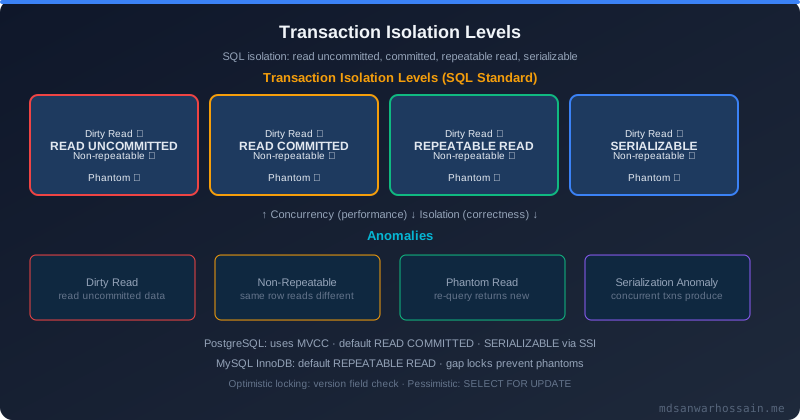
Table of Contents
- MVCC Fundamentals: xmin, xmax, and Visibility
- How Dead Tuples Accumulate
- HOT Updates and Index-Only Scans
- Table Bloat vs Index Bloat
- Monitoring Dead Tuples in Production
- Autovacuum Configuration Deep Dive
- Manual VACUUM Strategies
- Index Bloat Detection and REINDEX CONCURRENTLY
- Production War Story: 90% Dead Tuple Table
- Key Takeaways
1. MVCC Fundamentals: xmin, xmax, and Visibility
PostgreSQL implements transaction isolation using Multi-Version Concurrency Control (MVCC). Instead of locking rows for reads, PostgreSQL keeps multiple versions of each row simultaneously, allowing readers and writers to proceed without blocking each other. Every row in every table carries two hidden system columns: xmin and xmax.
xmin is the transaction ID (XID) that inserted this row version. xmax is the XID that deleted or updated this row version (0 means still live). A transaction can see a row version if: the inserting transaction (xmin) committed before the current transaction's snapshot was taken, and the deleting transaction (xmax) either hasn't committed yet or hasn't started. This is the essence of snapshot isolation — each transaction sees a consistent point-in-time view of the data determined at transaction start.
When a row is updated, PostgreSQL doesn't modify it in place. It inserts a new row version with the new data and a fresh xmin (the updating transaction's XID), then marks the old row version's xmax with the same XID. Both row versions physically exist on disk. Transactions that started before the update still see the old version via their snapshot. Transactions that start after see the new version. This is MVCC — no row locking for reads, complete isolation via versioning.
-- Inspect hidden system columns to see MVCC data
SELECT xmin, xmax, ctid, id, status
FROM orders
WHERE id = 42;

-- ctid is the physical location: (page_number, item_number)
-- xmin = transaction that created this version
-- xmax = transaction that deleted/updated this version (0 = live)
-- xmax > 0 means this is a dead tuple (pending cleanup)

-- Check transaction ID age and wraparound risk
SELECT datname,
       age(datfrozenxid) AS xid_age,
       2147483648 - age(datfrozenxid) AS xids_remaining
FROM pg_database
ORDER BY xid_age DESC;
Transaction IDs are 32-bit integers that wrap around at 2 billion. PostgreSQL uses a modular arithmetic comparison where any XID within 2 billion transactions in the past is "older" than the current XID. If a row's xmin is more than 2 billion transactions old, the comparison breaks and PostgreSQL can no longer determine if the row is visible — the catastrophic XID wraparound failure mode. Autovacuum's freeze process exists to prevent this by marking old rows as "frozen" (xmin = FrozenTransactionId), making them visible to all future transactions regardless of XID comparison.
2. How Dead Tuples Accumulate
Every UPDATE creates one dead tuple (the old row version) and one live tuple (the new row version). Every DELETE marks a row as dead by setting its xmax to the deleting transaction's XID. These dead tuples can only be removed once all active transactions that could see them have completed — specifically, once there are no open transactions with a snapshot older than the deleting transaction.
The accumulation accelerates under three conditions: high-churn tables (order status updates, session tokens, queue tables that are frequently UPDATEd); long-running transactions (analytics queries, OLAP workloads, or accidentally left-open transactions in connection pools) that hold snapshots and prevent dead tuple cleanup; and disabled or mis-tuned autovacuum that can't keep up with the churn rate.
A long-running transaction is the most dangerous dead-tuple accumulator. If a transaction opens at 10:00 AM and runs until 11:30 AM, every dead tuple created during that 90-minute window cannot be vacuumed away — their xmax transaction might still be in-progress from that old snapshot's perspective. On a table with 5,000 updates/second over 90 minutes, that's 27 million dead tuples that cannot be removed until the long-running transaction commits or rolls back.
3. HOT Updates and Index-Only Scans
PostgreSQL introduced Heap Only Tuple (HOT) updates in version 8.3 as an optimization that reduces index bloat for certain update patterns. When an UPDATE modifies only non-indexed columns, and the new row version fits on the same heap page as the old version, PostgreSQL can create a HOT chain: the old tuple points to the new tuple on the same page, and index entries still point to the old tuple's location. Sequential page scans follow the HOT chain to find the live version, but index scans don't create new index entries.
HOT updates significantly reduce index bloat for tables where updates frequently touch unindexed columns. But HOT is impossible when: the updated column is indexed (the index entry must change), or there's no free space on the same page for the new tuple. The fillfactor storage parameter controls how full PostgreSQL packs pages at write time — a fillfactor=70 on a hot update table leaves 30% of each page reserved for updates, dramatically increasing HOT update eligibility.
4. Table Bloat vs Index Bloat
Table bloat is disk pages occupied by dead tuples. Even after VACUUM reclaims dead tuples, the freed pages are marked available for reuse but are NOT returned to the filesystem — the table file stays the same size on disk. Only VACUUM FULL (which rewrites the entire table) returns space to the OS. Standard VACUUM just marks dead pages as reusable, enabling future inserts to use them without extending the file.
Index bloat is a separate problem. B-tree indexes in PostgreSQL accumulate dead entries just like tables. When a row is deleted or updated, the index entry pointing to the old row version remains in the index until autovacuum processes the index pages. On high-churn tables, B-tree indexes can grow to 3–4× their minimal size, causing index scans to traverse significantly more pages than necessary.
The critical insight: table bloat hurts sequential scans. Index bloat hurts index scans. They can occur independently. A well-vacuumed table with minimal dead tuples can still have severely bloated indexes if index vacuum is lagging, and vice versa. Both need monitoring.
5. Monitoring Dead Tuples in Production
-- Dead tuple ratio per table — alert if dead_ratio > 10%
SELECT
    schemaname,
    relname AS table_name,
    n_live_tup AS live_tuples,
    n_dead_tup AS dead_tuples,
    ROUND(100.0 * n_dead_tup / NULLIF(n_live_tup + n_dead_tup, 0), 2) AS dead_ratio_pct,
    last_vacuum,
    last_autovacuum,
    last_analyze,
    last_autoanalyze
FROM pg_stat_user_tables
WHERE n_dead_tup > 10000
ORDER BY n_dead_tup DESC
LIMIT 20;

-- Tables where autovacuum is blocked by long-running transactions
SELECT
    pid,
    now() - pg_stat_activity.query_start AS duration,
    query,
    state,
    wait_event_type,
    wait_event
FROM pg_stat_activity
WHERE (now() - pg_stat_activity.query_start) > interval '5 minutes'
  AND state != 'idle'
ORDER BY duration DESC;

-- Check oldest transaction preventing vacuum
SELECT
    pid,
    usename,
    state,
    backend_xid,
    backend_xmin,
    now() - xact_start AS transaction_age,
    query
FROM pg_stat_activity
WHERE backend_xmin IS NOT NULL
ORDER BY backend_xmin ASC
LIMIT 10;
The pg_stat_user_tables view is your primary monitoring window. Set up alerting when n_dead_tup exceeds 20% of total tuples, or when last_autovacuum is more than 1 hour old for high-churn tables. The pg_stat_activity query surfaces long-running transactions whose backend_xmin is blocking vacuum cleanup — these are the invisible actors causing dead tuple accumulation.
6. Autovacuum Configuration Deep Dive
Autovacuum triggers when a table's dead tuple count exceeds: autovacuum_vacuum_threshold + autovacuum_vacuum_scale_factor × reltuples. Default values: threshold = 50 tuples, scale_factor = 0.2 (20% of table size). For a 10 million row table, autovacuum triggers when dead tuples exceed 50 + 0.2 × 10,000,000 = 2,000,050. That's 2 million dead tuples before cleanup begins — an enormous accumulation for high-traffic tables.
The scale_factor default is designed for small tables. For large high-churn tables, it causes autovacuum to run too infrequently. The fix: lower the scale_factor per-table using storage parameters. For a hot order status table, set autovacuum_vacuum_scale_factor = 0.01 (trigger at 1% dead tuples instead of 20%) and autovacuum_vacuum_threshold = 1000.
-- Per-table autovacuum tuning for high-churn tables
ALTER TABLE orders SET (
    autovacuum_vacuum_scale_factor = 0.01,    -- trigger at 1% dead tuples
    autovacuum_vacuum_threshold = 1000,        -- minimum 1000 dead tuples to trigger
    autovacuum_analyze_scale_factor = 0.005,   -- re-analyze at 0.5% row changes
    autovacuum_vacuum_cost_limit = 400,        -- allow more I/O per autovacuum pass
    fillfactor = 70                             -- reserve 30% per page for HOT updates
);

-- Global autovacuum parameters (postgresql.conf)
-- autovacuum_max_workers = 6        -- default 3; increase for busy systems
-- autovacuum_vacuum_cost_delay = 2  -- default 2ms; lower = more aggressive vacuum
-- autovacuum_vacuum_cost_limit = 200 -- default 200; higher = more pages per pass
-- autovacuum_naptime = 15s          -- how often autovacuum launcher wakes
-- maintenance_work_mem = 256MB      -- memory for each autovacuum worker

-- Check current per-table autovacuum settings
SELECT
    relname,
    reloptions
FROM pg_class
WHERE relnamespace = 'public'::regnamespace
  AND reloptions IS NOT NULL
ORDER BY relname;
autovacuum_vacuum_cost_limit is the throttle that prevents autovacuum from overwhelming I/O on production systems. Each page read costs 1 unit, a dirty page hit costs 10, and a clean page modification costs 2 (configurable via vacuum_cost_page_*). When the running cost reaches the limit, autovacuum sleeps for autovacuum_vacuum_cost_delay milliseconds. The default limit of 200 with a 2ms delay is extremely conservative — many production systems benefit from increasing autovacuum_vacuum_cost_limit to 400–800 for heavily-written tables, accepting higher I/O usage in exchange for keeping dead tuples under control.
7. Manual VACUUM Strategies
When autovacuum can't keep up or you need immediate cleanup, manual VACUUM is the tool. Understanding the three levels of VACUUM prevents accidentally choosing the wrong one under production load.
VACUUM table_name: The standard vacuum. Marks dead tuples as reusable space (but doesn't return space to OS). Updates visibility map and free space map. Allows concurrent reads and writes. Use this for routine cleanup and to unblock autovacuum on a specific table. Can be run online with no table locks.
VACUUM ANALYZE table_name: Runs VACUUM followed by ANALYZE to refresh query planner statistics. Essential after bulk loads, large deletes, or when query plans suddenly degrade. The ANALYZE step updates the per-column statistics that the planner uses for cardinality estimation — stale statistics after a large data change are a common cause of catastrophically bad query plans.
VACUUM FULL table_name: Rewrites the entire table from scratch, reclaiming all dead tuple space and returning it to the OS. Requires an exclusive lock on the table — no reads or writes allowed during the operation. Duration is proportional to table size. For a 500GB table, VACUUM FULL might take hours. Never run this on production without a maintenance window or a strategy for the table lock.
8. Index Bloat Detection and REINDEX CONCURRENTLY
Index bloat is harder to detect than table bloat because pg_stat_user_tables doesn't report index-specific dead entries. The pgstattuple extension provides detailed index health metrics including dead tuple counts inside indexes.
-- Install pgstattuple extension (requires superuser)
CREATE EXTENSION IF NOT EXISTS pgstattuple;

-- Check index bloat for specific index
SELECT *
FROM pgstatindex('orders_status_idx');
-- Returns: index_size, leaf_pages, empty_pages, deleted_pages,
--          avg_leaf_density (ideal: 70-90%), leaf_fragmentation

-- Estimate index bloat across all indexes (without pgstattuple, lighter query)
SELECT
    schemaname,
    tablename,
    indexname,
    pg_size_pretty(pg_relation_size(indexrelid)) AS index_size,
    idx_scan AS total_scans,
    idx_tup_read AS tuples_read,
    idx_tup_fetch AS tuples_fetched
FROM pg_stat_user_indexes
JOIN pg_index USING (indexrelid)
WHERE indisvalid = true
ORDER BY pg_relation_size(indexrelid) DESC
LIMIT 20;

-- Rebuild a bloated index without locking the table (PostgreSQL 12+)
REINDEX INDEX CONCURRENTLY orders_status_idx;

-- Rebuild ALL indexes on a table concurrently
REINDEX TABLE CONCURRENTLY orders;
REINDEX CONCURRENTLY (PostgreSQL 12+) builds a new index alongside the existing one without locking reads or writes on the table. It uses significantly more CPU and disk I/O than a standard REINDEX and takes longer, but it's the only way to rebuild indexes on production tables that can't afford downtime. The trade-off: REINDEX CONCURRENTLY cannot be run inside a transaction block and may fail partway through on catalog updates; the old index remains valid if it fails.
A common alternative to REINDEX for high-churn tables is periodic CREATE INDEX CONCURRENTLY new_idx ON table(col); DROP INDEX CONCURRENTLY old_idx; — this gives you full control over the replacement sequence and a rollback path if the new index build fails.
9. Production War Story: The 90% Dead Tuple Table
An e-commerce platform's order processing microservice started throwing timeout errors in their Java Spring Boot app during peak hours. Query response times on SELECT * FROM order_events WHERE order_id = ? escalated from 5ms to 4 seconds. The table had 50 million rows with an index on order_id — the query plan showed an index scan, so it should have been fast.
Investigation with pg_stat_user_tables revealed the table had 48 million dead tuples against 50 million live tuples — a 49% dead ratio. But the index was even worse: pgstatindex showed the B-tree index had 78% of leaf pages occupied by dead entries, with an average leaf density of only 22% (meaning only 22% of index page space held live entries). Each index scan was traversing 4× more pages than necessary to find live tuples, and each heap fetch hit pages that were 50% garbage.
Recovery required a scheduled maintenance window for VACUUM FULL order_events (4 hours for the 120GB table) followed by REINDEX TABLE CONCURRENTLY order_events. Post-recovery, the query returned to 3ms. Long-term prevention: autovacuum scale_factor lowered to 0.01, analytics job broken into 10-minute transaction windows, and a monitoring alert on any transaction older than 15 minutes with backend_xmin IS NOT NULL.
For a broader treatment of distributed systems failure scenarios and their diagnostics, the Java Structured Concurrency post covers how structured task management in Java prevents the application-side timeout and connection pool exhaustion patterns that often accompany database degradation incidents like this one.
Key Takeaways
- Every UPDATE creates a dead tuple — MVCC keeps the old row version until no active snapshots reference it, making high-churn tables the primary dead-tuple generators.
- Long-running transactions block vacuum cleanup — a 90-minute analytics query can accumulate hundreds of millions of dead tuples; alert on transactions older than 10–15 minutes with active xmin.
- Default autovacuum scale_factor (0.2) is too conservative for large high-churn tables — set per-table
autovacuum_vacuum_scale_factor = 0.01for order/event/queue tables. - Table bloat and index bloat are separate problems — VACUUM cleans dead tuples; REINDEX CONCURRENTLY fixes index bloat; both are needed for full recovery.
- VACUUM FULL requires a maintenance window — it takes exclusive locks; use it only when space reclamation to OS is required; REINDEX CONCURRENTLY is your online index rebuild tool.
- Set fillfactor=70 on HOT-eligible tables — reserving 30% page space dramatically increases HOT update eligibility and reduces index churn.
Conclusion
PostgreSQL's MVCC model is one of its greatest strengths — it provides read-write concurrency without read locks, enabling high-throughput transactional workloads. But it externalizes the cost of version management to the database engineer: dead tuples must be actively cleaned up, and autovacuum must be tuned aggressively for high-churn tables. The engineers who understand xmin/xmax mechanics, autovacuum trigger math, and the distinction between table and index bloat are the ones who keep production databases performing at scale instead of fighting fires.
Start with monitoring: weekly reviews of pg_stat_user_tables dead_ratio and last_autovacuum timestamps catch accumulating problems before they become incidents. Tune autovacuum per-table for your top 10 highest-churn tables. Alert on long-running transactions. And when the inevitable bloat incident happens, you'll have the tools and knowledge to diagnose it in minutes rather than hours.
Leave a Comment
Related Posts

Software Engineer · Java · Spring Boot · Microservices