Progressive Delivery with Argo Rollouts: Canary Analysis, Automated Rollbacks, and Traffic Splitting in Kubernetes
Feature flags let you toggle features without deployment. Blue-green deployments let you switch traffic instantly between two versions. But neither gives you the ability to route 5% of real production traffic to a new version, watch its error rate and p99 latency against Prometheus metrics in real time, and automatically roll back if any metric crosses a threshold — all without a human in the loop. That is progressive delivery, and Argo Rollouts is the Kubernetes-native implementation that makes it operationally practical.
TL;DR
"Master progressive delivery with Argo Rollouts in Kubernetes. Learn canary analysis with Prometheus metrics, automated rollback triggers, traffic."
Table of Contents
- The Gap Between Blue-Green and True Progressive Delivery
- Argo Rollouts Architecture
- Defining Canary Steps and Analysis Templates
- Traffic Splitting: Istio vs NGINX vs SMI
- Analysis Templates: Prometheus, Datadog, Web
- Automated Rollback: Triggers and Safety Nets
- Production Failure Scenarios
- GitOps Integration with ArgoCD
- Trade-offs and When to Use Which Strategy
1. The Gap Between Blue-Green and True Progressive Delivery
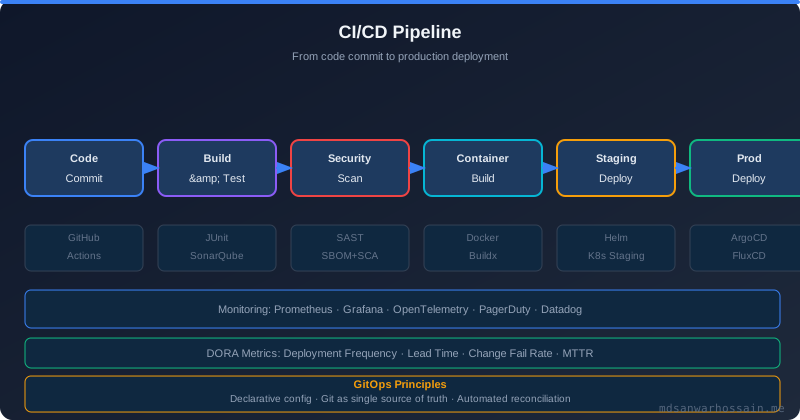
Standard Kubernetes Deployment rolling updates shift traffic gradually via replica count changes, but they provide no mechanism to pause the rollout based on application-level health signals. If the new version's error rate is 2% (vs the baseline's 0.1%), the rolling update continues regardless — it only looks at pod readiness, not business-level metrics. By the time a PagerDuty alert fires, 50% of traffic is on the broken version.
Argo Rollouts replaces the standard Deployment controller for progressive delivery scenarios, adding configurable step-based rollout logic, metric-gated promotion, and automated rollback to the Kubernetes reconciliation loop.
2. Argo Rollouts Architecture
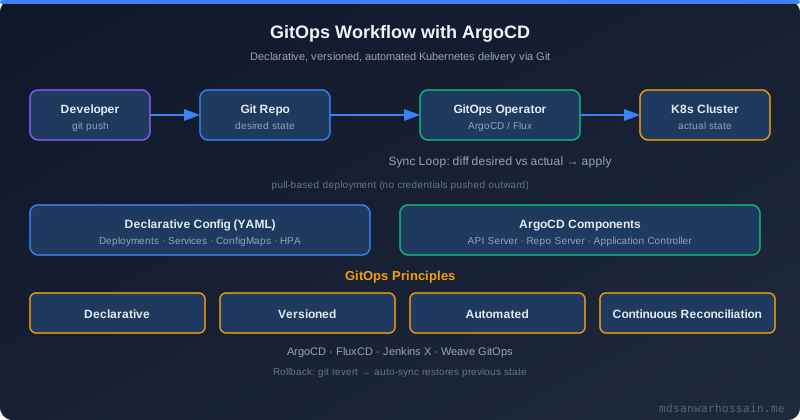
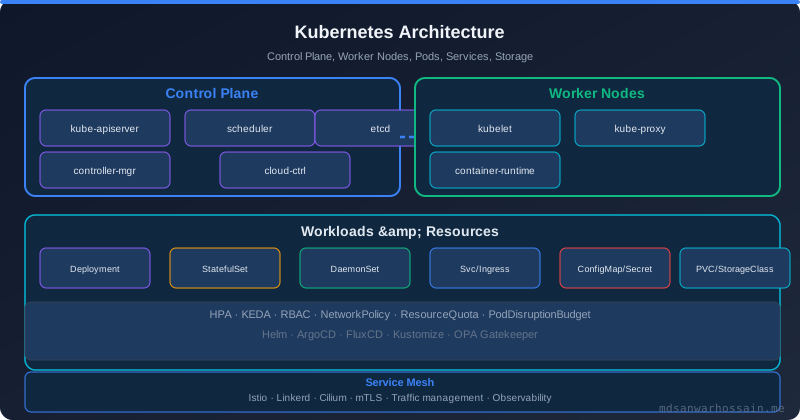
Argo Rollouts introduces a Rollout custom resource (CR) that replaces the Deployment CR for services requiring progressive delivery. The Argo Rollouts controller watches Rollout objects and manages two ReplicaSets: the stable ReplicaSet (current production version) and the canary ReplicaSet (new version under analysis). Traffic is split between them via integration with Istio VirtualService, NGINX Ingress annotations, or SMI TrafficSplit resources.
The AnalysisRun CR is created automatically during a rollout step that includes an analysis. It queries configured metric providers (Prometheus, Datadog, New Relic, CloudWatch, or custom HTTP endpoints) and evaluates the results against success/failure conditions. If an AnalysisRun fails, the Rollout controller automatically sets the rollout to Degraded phase and scales up the stable ReplicaSet while scaling down the canary.
3. Defining Canary Steps and Analysis Templates
A production-grade canary rollout for a payments service looks like this:
apiVersion: argoproj.io/v1alpha1
kind: Rollout
metadata:
  name: checkout-api
spec:
  replicas: 20
  strategy:
    canary:
      # Traffic routing via Istio VirtualService
      trafficRouting:
        istio:
          virtualService:
            name: checkout-api-vsvc
          destinationRule:
            name: checkout-api-destrule
            canarySubsetName: canary
            stableSubsetName: stable

      steps:
        # Step 1: send 5% of traffic to canary, run baseline analysis
        - setWeight: 5
        - analysis:
            templates:
              - templateName: checkout-error-rate
              - templateName: checkout-p99-latency
            args:
              - name: service-name
                value: checkout-api

        # Step 2: pause for manual validation if desired
        - pause: {duration: 10m}

        # Step 3: increase to 30%, run analysis again
        - setWeight: 30
        - analysis:
            templates:
              - templateName: checkout-error-rate

        # Step 4: go to 60%, final analysis
        - setWeight: 60
        - pause: {duration: 5m}

        # After all steps pass, Argo promotes canary to stable (100%)
4. Traffic Splitting: Istio vs NGINX vs SMI
Istio integration provides the most precise traffic splitting — exact percentage weights via VirtualService routing rules, with header-based routing for canary testing by specific users or regions. Ideal for services where traffic is measured in requests-per-second and exact weight percentages matter.
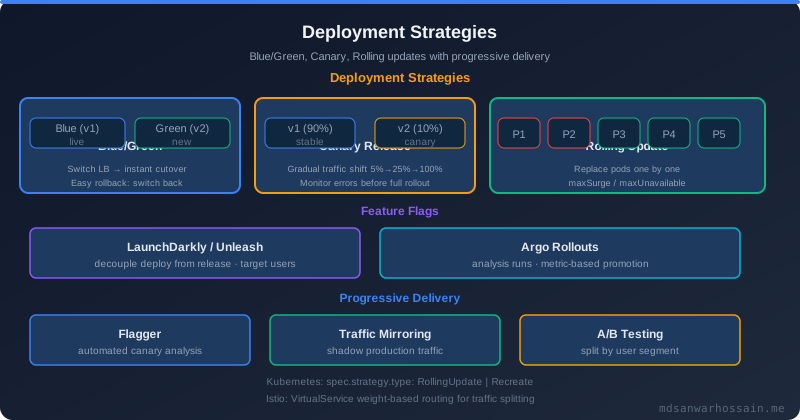
NGINX Ingress integration uses NGINX's canary annotations (nginx.ingress.kubernetes.io/canary-weight) to split traffic at the ingress level. Simpler to set up but less precise — NGINX canary is based on request sampling, not exact weights, so at low traffic volumes the actual split can diverge significantly from the configured percentage. Not suitable for low-traffic services where statistical validity of metrics matters.
Pod-replica-based splitting (no mesh/ingress integration) is Argo's fallback: traffic split is approximated by replica count ratio (e.g., 1 canary pod + 9 stable pods ≈ 10% canary traffic). This is the least precise method and is not appropriate for fine-grained progressive delivery.
5. Analysis Templates: Prometheus, Datadog, Web
apiVersion: argoproj.io/v1alpha1
kind: AnalysisTemplate
metadata:
  name: checkout-error-rate
spec:
  args:
    - name: service-name
  metrics:
    # Metric 1: Error rate must be below 1%
    - name: error-rate
      interval: 1m
      count: 10          # run 10 times (10 minutes of analysis)
      failureLimit: 2    # allow max 2 failures before declaring AnalysisRun failed
      successCondition: result[0] < 0.01
      failureCondition: result[0] >= 0.05
      provider:
        prometheus:
          address: http://prometheus.monitoring:9090
          query: |
            sum(rate(http_requests_total{
              service="{{args.service-name}}",
              status=~"5..",
              version="canary"
            }[2m])) /
            sum(rate(http_requests_total{
              service="{{args.service-name}}",
              version="canary"
            }[2m]))

    # Metric 2: p99 latency must stay below 200ms
    - name: p99-latency
      interval: 1m
      count: 10
      successCondition: result[0] < 0.2
      provider:
        prometheus:
          address: http://prometheus.monitoring:9090
          query: |
            histogram_quantile(0.99, rate(http_request_duration_seconds_bucket{
              service="{{args.service-name}}",
              version="canary"
            }[2m]))
6. Automated Rollback: Triggers and Safety Nets
When an AnalysisRun fails (the failureCondition is met or failureLimit is exceeded), Argo Rollouts automatically triggers an abort: sets rollout phase to Degraded, scales canary ReplicaSet to zero, restores stable ReplicaSet to full replica count, and reverts the Istio VirtualService weights to 100% stable. This entire process typically completes in under 60 seconds — far faster than any human-in-the-loop process.
Critical safety nets to configure alongside automated rollback: (1) Webhook notifications to Slack/PagerDuty on analysis failure — engineers need to know what metric triggered rollback and why. (2) Rollback history limit — keep at least 3 previous stable ReplicaSets in the cluster for fast manual recovery. (3) Analysis result archival — store AnalysisRun results in a persistent backend for post-incident review.
7. Production Failure Scenarios
Prometheus query returns no data during analysis. If the Prometheus query returns an empty result (service not yet receiving traffic, metric series doesn't exist), the AnalysisRun evaluates the metric as Inconclusive by default. An inconclusive metric contributes to the inconclusiveLimit counter. If you have not configured inconclusiveLimit, the analysis run continues and may promote the canary even without valid metric data. Always set inconclusiveLimit: 0 for safety-critical services.
VirtualService drift. If an operator or another tool modifies the Istio VirtualService weights outside of Argo Rollouts, the actual traffic split diverges from what Argo believes. Argo Rollouts reconciles the VirtualService on every controller loop, but the reconciliation period (default 10s) creates a window of divergence. Use RBAC to restrict VirtualService modification to the Argo Rollouts service account only.
Rollout stuck in Paused state. A pause: {} step (no duration) waits for manual promotion indefinitely. If the engineer who deployed the canary goes on-call rotation and no one promotes it, the rollout sits at 5% indefinitely. Implement a maximum pause duration policy via admission webhooks or a custom Rollout controller plugin.
8. GitOps Integration with ArgoCD
Argo Rollouts integrates naturally with ArgoCD: the Rollout CR is stored in Git, ArgoCD syncs it to the cluster, and Argo Rollouts manages the actual traffic shifting. ArgoCD's application health checks recognize Rollout phase transitions (Progressing, Healthy, Degraded) and surface them in the ArgoCD UI alongside the standard resource health. This gives you a single pane of glass for both configuration drift (ArgoCD) and release progress (Argo Rollouts).
The standard GitOps release workflow becomes: (1) developer pushes a new image tag to the Rollout manifest in Git, (2) ArgoCD detects drift and syncs, (3) Argo Rollouts starts the canary steps, (4) AnalysisRuns evaluate Prometheus metrics, (5) rollout auto-promotes or auto-aborts, (6) Slack notification with analysis results. No manual kubectl commands, no SSH to production clusters, full audit trail in Git history.
9. Trade-offs and When to Use Which Strategy
Canary with analysis is appropriate for stateless, horizontally scaled services with sufficient traffic for statistically valid metrics (typically >100 req/s through the canary). Not appropriate for low-traffic services where metric noise will trigger false-positive rollbacks.
Blue-green is appropriate when you need instant rollback capability and cannot tolerate even 5% of traffic seeing the new version before promotion. Higher resource cost (double the pods during deployment). Required for database migrations where the new version requires schema changes incompatible with the old version.
Standard rolling update remains appropriate for services where production incidents are acceptable risks during deployment — low-criticality batch jobs, internal tooling, services with comprehensive integration test coverage where pre-production testing provides sufficient confidence.
10. Canary Deployments Deep Dive: Traffic Splitting and Analysis
A production-grade canary deployment is far more nuanced than simply sending 5 % of traffic to a new pod. Effective canary analysis requires precise traffic control, statistically valid metric windows, and automated promotion or abort decisions based on real user-facing signals. Argo Rollouts combined with Istio provides the most precise control surface available in open-source Kubernetes tooling.
A fully annotated canary rollout for a high-traffic payments API with Istio traffic splitting and multi-metric analysis:
apiVersion: argoproj.io/v1alpha1
kind: Rollout
metadata:
  name: payments-api
  namespace: production
spec:
  replicas: 40
  revisionHistoryLimit: 5
  selector:
    matchLabels:
      app: payments-api
  template:
    metadata:
      labels:
        app: payments-api
  strategy:
    canary:
      # Istio VirtualService manages the actual traffic percentages
      trafficRouting:
        istio:
          virtualService:
            name: payments-api-vsvc
            routes:
              - primary
          destinationRule:
            name: payments-api-destrule
            canarySubsetName: canary
            stableSubsetName: stable
      # Keep canary pods separate for clean metric attribution
      canaryMetadata:
        labels:
          version: canary
      stableMetadata:
        labels:
          version: stable
      steps:
        - setWeight: 5
        - analysis:
            templates:
              - templateName: payments-success-rate
              - templateName: payments-p99-latency
            args:
              - name: service
                value: payments-api
              - name: canary-version
                value: "{{ .Rollout.Spec.Template.Spec.Containers.0.Image }}"
        - pause: {duration: 10m}     # manual validation window
        - setWeight: 25
        - analysis:
            templates:
              - templateName: payments-success-rate
              - templateName: payments-p99-latency
              - templateName: payments-business-metrics
        - pause: {duration: 5m}
        - setWeight: 60
        - analysis:
            templates:
              - templateName: payments-success-rate
        - setWeight: 100
        # Full promotion happens automatically when all analyses pass
The Istio DestinationRule and VirtualService that back this rollout use subset-based routing to ensure traffic attribution is precise — not pod-count-based (which creates skewed distributions when pod counts are small):
apiVersion: networking.istio.io/v1alpha3
kind: DestinationRule
metadata:
  name: payments-api-destrule
spec:
  host: payments-api
  subsets:
    - name: stable
      labels:
        version: stable
    - name: canary
      labels:
        version: canary
      trafficPolicy:
        connectionPool:
          http:
            h2UpgradePolicy: UPGRADE
---
# VirtualService managed by Argo Rollouts controller
apiVersion: networking.istio.io/v1alpha3
kind: VirtualService
metadata:
  name: payments-api-vsvc
spec:
  hosts:
    - payments-api
  http:
    - name: primary
      route:
        - destination:
            host: payments-api
            subset: stable
          weight: 95
        - destination:
            host: payments-api
            subset: canary
          weight: 5
The analysis template for the payments success rate uses a ratio query that compares canary error rate against the stable baseline — more robust than an absolute threshold because it automatically accounts for organic traffic fluctuations:
apiVersion: argoproj.io/v1alpha1
kind: AnalysisTemplate
metadata:
  name: payments-success-rate
spec:
  args:
    - name: service
    - name: canary-version
  metrics:
    - name: success-rate-vs-baseline
      interval: 2m
      count: 8           # 16 minutes of analysis
      failureLimit: 1
      # Compare canary error rate against stable; fail if canary is 2x worse
      successCondition: >
        result[0] <= result[1] * 2.0
      provider:
        prometheus:
          address: http://prometheus.monitoring:9090
          query: |
            (
              sum(rate(http_requests_total{
                service="{{args.service}}",
                version="canary",
                status=~"5.."
              }[2m])) /
              sum(rate(http_requests_total{
                service="{{args.service}}",
                version="canary"
              }[2m]))
            )
            or vector(0)
11. Blue-Green Deployments with Argo Rollouts: Zero-Downtime Strategy
Blue-green deployments with Argo Rollouts work differently from canary: the new version (green) receives zero production traffic until a deliberate promotion step, after which traffic switches completely and instantaneously. This makes blue-green the correct choice for database schema migrations, breaking API version changes, and any deployment where even 1 % of users experiencing a new behavior is unacceptable.
apiVersion: argoproj.io/v1alpha1
kind: Rollout
metadata:
  name: checkout-api-bluegreen
  namespace: production
spec:
  replicas: 20
  revisionHistoryLimit: 3
  strategy:
    blueGreen:
      # activeService receives 100% of production traffic
      activeService: checkout-api-active
      # previewService receives 0% production traffic but is reachable for pre-promotion testing
      previewService: checkout-api-preview
      # Prevent automatic promotion — require explicit manual promote command
      autoPromotionEnabled: false
      # Scale down old (blue) ReplicaSet 30 minutes after promotion
      scaleDownDelaySeconds: 1800
      # Run analysis on the preview environment before allowing promotion
      prePromotionAnalysis:
        templates:
          - templateName: checkout-smoke-test
          - templateName: checkout-integration-test
        args:
          - name: service-url
            value: http://checkout-api-preview
      # Run analysis on live traffic after promotion (safety net)
      postPromotionAnalysis:
        templates:
          - templateName: checkout-error-rate
        args:
          - name: service
            value: checkout-api
The preview service is one of blue-green's most powerful features: it gives QA teams, product managers, and security reviewers a fully functional production replica that they can hit with real integration tests, manual exploratory testing, or automated synthetic checks — all before a single production user sees the new version.
Promotion and abort procedures:
# Promote green to active (switches 100% traffic instantly)
kubectl argo rollouts promote checkout-api-bluegreen -n production

# Abort and revert to blue (instant traffic switch back — sub-second)
kubectl argo rollouts abort checkout-api-bluegreen -n production

# Check current rollout status
kubectl argo rollouts status checkout-api-bluegreen -n production --watch

# Get diff between active and preview pod specs
kubectl argo rollouts get rollout checkout-api-bluegreen -n production
The scaleDownDelaySeconds: 1800 configuration is critical — it keeps the old blue ReplicaSet running for 30 minutes after promotion, providing a 30-minute window for instant rollback if post-promotion analysis detects issues or if on-call engineers observe anomalous business metrics that automated analysis missed. Only after the delay expires does Argo Rollouts scale the old ReplicaSet to zero, reclaiming cluster resources.
12. Automated Rollback: Configuring Analysis Templates
Analysis templates are the decision engine of progressive delivery — they encode your SLO acceptance criteria as machine-readable rules that run automatically at each canary step. The quality of your analysis templates determines whether automated rollback is a safety net or a source of false positives that erode engineer confidence in the system.
apiVersion: argoproj.io/v1alpha1
kind: AnalysisTemplate
metadata:
  name: multi-signal-analysis
spec:
  args:
    - name: service
    - name: baseline-version
      value: stable
  metrics:
    # Signal 1: 5xx error rate (hard gate)
    - name: error-rate
      interval: 1m
      count: 10
      failureLimit: 0
      inconclusiveLimit: 1
      successCondition: result[0] < 0.005
      failureCondition: result[0] >= 0.02
      provider:
        prometheus:
          address: http://prometheus.monitoring:9090
          query: |
            sum(rate(http_requests_total{
              service="{{args.service}}",version="canary",status=~"5.."
            }[2m])) /
            sum(rate(http_requests_total{
              service="{{args.service}}",version="canary"
            }[2m]))

    # Signal 2: p95 latency (soft gate — warning only via inconclusiveLimit)
    - name: p95-latency-ms
      interval: 1m
      count: 10
      inconclusiveLimit: 3
      successCondition: result[0] < 500
      failureCondition: result[0] >= 2000
      provider:
        prometheus:
          address: http://prometheus.monitoring:9090
          query: |
            histogram_quantile(0.95,
              rate(http_request_duration_seconds_bucket{
                service="{{args.service}}",version="canary"
              }[2m])
            ) * 1000

    # Signal 3: webhook to custom quality evaluator
    - name: business-metric-check
      interval: 5m
      count: 3
      failureLimit: 1
      provider:
        web:
          url: https://quality-evaluator.internal/check
          method: POST
          body: |
            {"service": "{{args.service}}", "window": "5m"}
          successCondition: result.status == "pass"
          timeoutSeconds: 30
Webhook notifications on analysis events keep on-call engineers informed without requiring them to watch rollout status continuously. Configure Argo Rollouts to post to Slack on every analysis transition:
# argo-rollouts-config ConfigMap in argo-rollouts namespace
apiVersion: v1
kind: ConfigMap
metadata:
  name: argo-rollouts-notification-secret
  namespace: argo-rollouts
data:
  service.slack: |
    token: $slack-token
---
apiVersion: notifications.argoproj.io/v1alpha1
kind: NotificationTemplate
metadata:
  name: rollout-analysisfailed
spec:
  message: |
    Canary analysis FAILED for *{{.rollout.metadata.name}}*
    Metric: {{.analysisRun.status.metricResults | toJson}}
    Rollout automatically aborted and reverted to stable.
  slack:
    attachments: |
      [{
        "color": "danger",
        "title": "Rollout Aborted: {{.rollout.metadata.name}}",
        "fields": [
          {"title": "Namespace", "value": "{{.rollout.metadata.namespace}}", "short": true},
          {"title": "Reason", "value": "Analysis failed", "short": true}
        ]
      }]
13. Multi-Cluster Progressive Delivery with Argo CD + Rollouts
At fleet scale, progressive delivery must extend beyond a single cluster. A global SaaS platform with clusters in us-east-1, eu-west-1, and ap-southeast-1 needs a coordinated canary progression that validates new versions in low-risk regions before automatically promoting to high-traffic ones. Argo CD ApplicationSets combined with Argo Rollouts provide this without requiring a separate fleet management tool.
Fleet rollout strategy using Argo CD ApplicationSet with per-cluster canary progression:
apiVersion: argoproj.io/v1alpha1
kind: ApplicationSet
metadata:
  name: payments-api-fleet
  namespace: argocd
spec:
  generators:
    - list:
        elements:
          # Stage 1: canary region — low traffic, first to receive new version
          - cluster: staging-us-east-1
            url: https://k8s-staging-us-east.example.com
            canaryWeight: "50"     # 50% canary in staging = safe to validate
            analysisTemplate: payments-staging-analysis
          # Stage 2: production low-traffic region
          - cluster: prod-ap-southeast-1
            url: https://k8s-prod-apac.example.com
            canaryWeight: "10"
            analysisTemplate: payments-production-analysis
          # Stage 3: production high-traffic regions — last to receive
          - cluster: prod-us-east-1
            url: https://k8s-prod-useast.example.com
            canaryWeight: "5"
            analysisTemplate: payments-production-analysis
          - cluster: prod-eu-west-1
            url: https://k8s-prod-eu.example.com
            canaryWeight: "5"
            analysisTemplate: payments-production-analysis
  template:
    metadata:
      name: "payments-api-{{cluster}}"
    spec:
      project: default
      destination:
        server: "{{url}}"
        namespace: production
      syncPolicy:
        automated:
          prune: true
          selfHeal: true
        syncOptions:
          - CreateNamespace=true
The fleet promotion workflow enforces a sequential region gate: staging must complete its rollout successfully before the APAC production cluster begins its canary. APAC must pass before US East and EU West start simultaneously. This is enforced via Argo CD sync waves — staging gets wave 0, APAC gets wave 1, and both high-traffic clusters get wave 2:
Centralized analysis results are collected by a dedicated Argo Rollouts analysis aggregator that combines signals from all regional Prometheus instances into a fleet-level health score. If any region's AnalysisRun fails, a global abort annotation is applied to all in-progress rollouts across all clusters simultaneously — preventing a partial fleet promotion where some regions run the new version and others run the old version indefinitely.
Leave a Comment
Related Posts

Software Engineer · Java · Spring Boot · Microservices