GitOps with ArgoCD: Kubernetes Continuous Delivery at Scale
GitOps flips the traditional CD model. Instead of pushing deployments from a CI system, the cluster pulls its desired state from Git. ArgoCD is the most widely adopted implementation — and it changes how teams think about deployment safety, auditability, and multi-environment management.
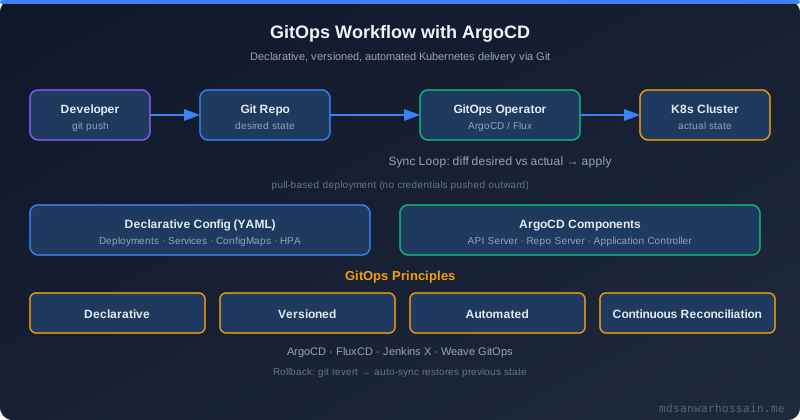
Table of Contents
- Introduction
- Problem Statement: Why Push-Based CD Breaks at Scale
- ArgoCD Architecture: How It Works
- Application Configuration Example
- ApplicationSets: Scaling Across Environments and Clusters
- Multi-Cluster GitOps: Hub-Spoke Architecture
- Drift Detection and Self-Healing
- RBAC: Secure Multi-Tenant Access
- ArgoCD vs Flux: Choosing the Right Tool
- Pros and Cons
- Common Mistakes
- Conclusion
Introduction
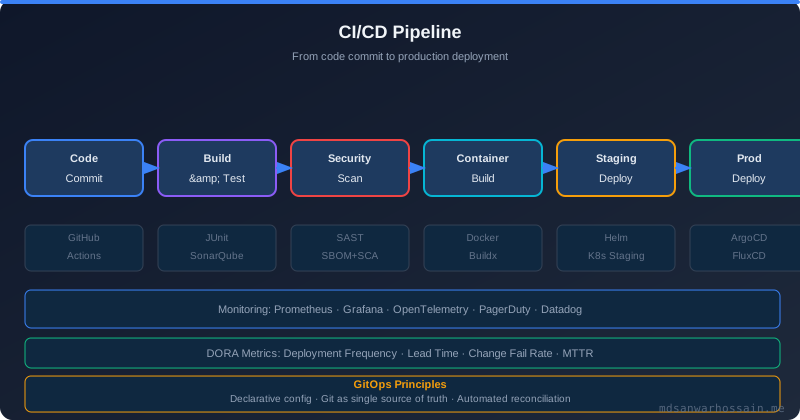
Traditional continuous deployment uses a push model: a CI pipeline builds an artifact and then runs kubectl apply or calls the Kubernetes API directly to deploy changes. This works for small teams with one or two clusters. As organizations scale to dozens of services, multiple environments, and several clusters, push-based CD creates serious problems: deployment credentials scattered across CI systems, no systematic drift detection, and difficult incident recovery when cluster state diverges from intended configuration.
GitOps inverts this model. Git becomes the single source of truth for the desired state of every Kubernetes resource. A GitOps operator running inside the cluster watches Git repositories and reconciles the live cluster state to match. Deployments happen by merging a PR. Rollbacks happen by reverting a commit. Audit trails are commit histories. ArgoCD is the most widely deployed GitOps operator in the ecosystem, powering continuous delivery for thousands of Kubernetes clusters in production.
Problem Statement: Why Push-Based CD Breaks at Scale
When your CI pipeline deploys directly to clusters, you accumulate multiple problems. First, you need to grant CI runner credentials to every cluster — a significant security surface area. Second, if someone applies a manual hotfix directly with kubectl, your Git repository no longer reflects cluster reality. This drift is invisible until something breaks. Third, promoting the same artifact across dev, staging, and production environments requires increasingly complex pipeline logic. Fourth, incident recovery is painful: to understand what changed, you must reconstruct the deployment history from CI logs rather than Git commits.
GitOps with ArgoCD solves all four problems. No CI credentials in cluster. Drift is detected automatically and either auto-corrected or alerted. Promotions are PR-based config changes. Recovery is a Git revert.
ArgoCD Architecture: How It Works
ArgoCD deploys as a set of Kubernetes components: an API server, a repository server (that clones and renders Git repos), an application controller (that compares live state to desired state), and a Dex-based OIDC server for authentication. The application controller polls Git repositories at configurable intervals (default three minutes) and on webhook triggers for push events, then applies the diff to the cluster using standard Kubernetes API calls.
The central abstraction is the Application CRD. Each Application points to a Git source (repo URL, path, target revision) and a destination (cluster, namespace). ArgoCD computes the diff between the rendered manifests from Git and the live Kubernetes resources, then either syncs automatically or waits for manual approval depending on your sync policy.
Application Configuration Example
apiVersion: argoproj.io/v1alpha1
kind: Application
metadata:
  name: payment-service
  namespace: argocd
spec:
  project: production
  source:
    repoURL: https://github.com/myorg/k8s-manifests
    targetRevision: HEAD
    path: apps/payment-service/overlays/production
  destination:
    server: https://kubernetes.default.svc
    namespace: payments
  syncPolicy:
    automated:
      prune: true
      selfHeal: true
    syncOptions:
      - CreateNamespace=true
The selfHeal: true flag means ArgoCD will automatically re-sync if manual changes are detected in the cluster. This is the GitOps invariant: cluster state must always match Git. The prune: true flag ensures resources removed from Git are also removed from the cluster.
ApplicationSets: Scaling Across Environments and Clusters
Managing 50 individual Application objects for 10 services across 5 environments becomes tedious. ApplicationSets solve this with a generator-based templating system. You define one ApplicationSet and a generator that produces Application objects from a list, a Git directory structure, or a cluster selector.
apiVersion: argoproj.io/v1alpha1
kind: ApplicationSet
metadata:
  name: microservices
  namespace: argocd
spec:
  generators:
    - matrix:
        generators:
          - list:
              elements:
                - service: order-service
                - service: inventory-service
                - service: payment-service
          - list:
              elements:
                - env: staging
                - env: production
  template:
    metadata:
      name: '{{service}}-{{env}}'
    spec:
      source:
        repoURL: https://github.com/myorg/k8s-manifests
        path: 'apps/{{service}}/overlays/{{env}}'
        targetRevision: HEAD
      destination:
        server: https://kubernetes.default.svc
        namespace: '{{env}}'
This single ApplicationSet generates six Application objects (three services × two environments) automatically. Adding a new service means adding one entry to the list — not creating and configuring a new Application object manually.
Multi-Cluster GitOps: Hub-Spoke Architecture
For organizations running multiple Kubernetes clusters (separate clusters per region or per environment boundary), ArgoCD supports a hub-spoke model. A single ArgoCD instance (the hub) manages multiple remote clusters. Each cluster is registered with an ArgoCD service account, and Applications target specific cluster API server URLs. This centralizes visibility and audit while clusters remain operationally independent.
For very large scale or strict network isolation requirements, the App of Apps pattern allows a root Application that deploys other Applications — effectively bootstrapping an entire cluster environment from a single Git commit.
Drift Detection and Self-Healing
One of ArgoCD's most valuable production capabilities is drift detection. With selfHeal enabled, any manual kubectl apply that deviates from Git state is automatically reversed within the next sync cycle. This is a powerful operational guarantee: Git is always truth, and production cannot drift silently for days without detection.
For cases where you genuinely need to allow temporary manual overrides — for example, emergency scaling during an incident — you can pause auto-sync for an Application from the ArgoCD UI or CLI. The pause is visible to the team and time-limited, ensuring it is not forgotten.
RBAC: Secure Multi-Tenant Access
ArgoCD's RBAC model assigns roles to users and groups mapped from your identity provider. At minimum, define three roles: read-only for developers browsing application state, sync permissions for CI/CD pipelines triggering manual syncs, and admin for platform engineers managing Application and AppProject configuration. Use AppProjects to restrict which Git repos and which clusters each team can target. This prevents accidental or malicious cross-team deployments.
ArgoCD vs Flux: Choosing the Right Tool
Flux (part of the CNCF ecosystem) is the other widely adopted GitOps operator. Flux is more modular — controllers for image automation, Helm releases, Kustomization, and notification are separate components. ArgoCD provides a richer UI and a centralized multi-app view out of the box. For teams that prioritize a strong operator UI and multi-cluster application visibility, ArgoCD is usually the better choice. For teams that prefer minimal-footprint GitOps deeply integrated with Helm and Flux's notification ecosystem, Flux is a strong alternative. Both are production-ready and CNCF-graduated.
Pros and Cons
Pros of GitOps with ArgoCD: Declarative, auditable deployments with full Git history. Automatic drift detection and correction. No cluster credentials needed in CI pipelines. Multi-cluster visibility in a single UI. Strong RBAC and project isolation. Widely adopted with a large community.
Cons: ArgoCD itself is an operational component that requires maintenance, HA configuration, and backup of its Application CRDs. Pull-based sync has a polling lag (minutes, not seconds) that may require webhook configuration for faster feedback. Secrets management requires a complementary tool (Sealed Secrets, External Secrets Operator, or Vault) since raw secrets should never be committed to Git.
Common Mistakes
Committing secrets to the GitOps repo: Use External Secrets Operator or Sealed Secrets. Never store raw Kubernetes Secret manifests in Git.
Enabling auto-sync and prune on production without testing: Start with sync disabled in production. Validate behavior in staging. Enable automated sync with prune only after you trust the Git state completely.
Ignoring ArgoCD HA for production: The default single-replica installation is not suitable for production. Run ArgoCD in HA mode with at least two replicas of the application controller and API server.
Key Takeaways
- GitOps makes Git the single source of truth for cluster state, enabling auditable and recoverable deployments.
- ArgoCD's Application CRD points to a Git path and a cluster destination, reconciling them continuously.
- ApplicationSets scale GitOps to dozens of services and environments with minimal configuration overhead.
- selfHeal automatically corrects cluster drift; paired with drift alerts it provides a strong operational guarantee.
- Never commit secrets to Git — use External Secrets Operator or Sealed Secrets as a complement.
Conclusion
GitOps with ArgoCD is the modern standard for Kubernetes continuous delivery in organizations running multiple services and environments. It reduces deployment risk by making changes auditable and reversible, eliminates credential sprawl in CI systems, and gives platform teams reliable drift detection. The operational investment — running ArgoCD in HA, structuring your Git repository cleanly, and choosing a secrets management strategy — pays off quickly for any team managing more than a handful of Kubernetes applications. Start with a non-production cluster, master the Application and ApplicationSet models, then expand to production with automated sync and selfHeal enabled.
Argo CD Application of Applications: Managing Hundreds of Apps
As GitOps adoption grows from one cluster to tens of clusters and from a handful of services to hundreds, manually creating Argo CD Application resources becomes a bottleneck. The App of Apps pattern and the ApplicationSet controller solve this at different scales: App of Apps works well for structured hierarchies, while ApplicationSet provides templated, data-driven application generation that can manage entire cluster fleets from a single definition.
App of Apps Pattern
The App of Apps pattern uses one Argo CD Application to manage a directory of other Application manifests stored in Git. The root application syncs Application YAML files; Argo CD then reconciles each child application independently. This creates a two-level GitOps hierarchy: the root app manages application definitions, and each child application manages its own workload:
# root-app.yaml — deployed once to bootstrap the cluster
apiVersion: argoproj.io/v1alpha1
kind: Application
metadata:
  name: root-app
  namespace: argocd
spec:
  project: platform
  source:
    repoURL: https://github.com/myorg/gitops-config
    targetRevision: HEAD
    path: clusters/production/apps   # directory containing child Application YAMLs
  destination:
    server: https://kubernetes.default.svc
    namespace: argocd
  syncPolicy:
    automated:
      prune: true
      selfHeal: true

# clusters/production/apps/payment-service.yaml
apiVersion: argoproj.io/v1alpha1
kind: Application
metadata:
  name: payment-service
  namespace: argocd
  finalizers:
    - resources-finalizer.argocd.argoproj.io
spec:
  project: production
  source:
    repoURL: https://github.com/myorg/gitops-config
    targetRevision: HEAD
    path: services/payment-service/overlays/production
  destination:
    server: https://kubernetes.default.svc
    namespace: payment
  syncPolicy:
    automated:
      prune: true
      selfHeal: true
    syncOptions:
      - CreateNamespace=true
ApplicationSet Controller for Multi-Cluster Fleet Management
The ApplicationSet controller generates Argo CD Application resources dynamically from templates. It reads a generator (cluster list, Git directory scan, matrix, or pull-request list) and produces one Application per generated element. This is how you manage 50 services across 5 clusters with a single ApplicationSet definition:
apiVersion: argoproj.io/v1alpha1
kind: ApplicationSet
metadata:
  name: microservices-fleet
  namespace: argocd
spec:
  generators:
    - matrix:
        generators:
          # Generator 1: discover all service overlays from Git
          - git:
              repoURL: https://github.com/myorg/gitops-config
              revision: HEAD
              directories:
                - path: services/*/overlays/production
          # Generator 2: enumerate all production clusters
          - clusters:
              selector:
                matchLabels:
                  environment: production
  template:
    metadata:
      name: '{{path.basename}}-{{name}}'
    spec:
      project: production
      source:
        repoURL: https://github.com/myorg/gitops-config
        targetRevision: HEAD
        path: '{{path}}'
      destination:
        server: '{{server}}'
        namespace: '{{path.basename}}'
      syncPolicy:
        automated:
          prune: true
          selfHeal: true
        retry:
          limit: 3
          backoff:
            duration: 5s
            factor: 2
            maxDuration: 3m
With ApplicationSet's matrix generator, adding a new service directory to the Git repository automatically creates Applications for it across all registered production clusters. Adding a new cluster automatically creates Applications for all existing services on that cluster. This bidirectional automation eliminates the manual application registration step for homogeneous fleet environments.
Progressive Delivery with Argo Rollouts: Canary and Blue-Green
Argo Rollouts extends Kubernetes with progressive delivery primitives, integrating seamlessly with Argo CD. Rather than replacing all pods atomically on a new deployment, Rollouts supports canary analysis and blue-green switching with automatic traffic shifting and rollback based on live metrics from Prometheus.
Canary Rollout with Analysis Template
apiVersion: argoproj.io/v1alpha1
kind: Rollout
metadata:
  name: api-gateway
  namespace: production
spec:
  replicas: 10
  strategy:
    canary:
      maxSurge: "20%"
      maxUnavailable: 0
      steps:
        - setWeight: 10          # Route 10% of traffic to new version
        - pause: {duration: 5m}  # Observe for 5 minutes
        - analysis:
            templates:
              - templateName: success-rate-check
        - setWeight: 30
        - pause: {duration: 5m}
        - setWeight: 60
        - pause: {duration: 5m}
        - setWeight: 100         # Full promotion
---
apiVersion: argoproj.io/v1alpha1
kind: AnalysisTemplate
metadata:
  name: success-rate-check
  namespace: production
spec:
  args:
    - name: service-name
  metrics:
    - name: success-rate
      interval: 1m
      successCondition: result[0] >= 0.95
      failureLimit: 2
      provider:
        prometheus:
          address: http://prometheus:9090
          query: |
            sum(rate(http_requests_total{
              job="{{args.service-name}}",
              status!~"5.."
            }[2m])) /
            sum(rate(http_requests_total{
              job="{{args.service-name}}"
            }[2m]))
    - name: p99-latency
      interval: 1m
      successCondition: result[0] <= 0.5
      failureLimit: 2
      provider:
        prometheus:
          address: http://prometheus:9090
          query: |
            histogram_quantile(0.99,
              rate(http_request_duration_seconds_bucket{
                job="{{args.service-name}}"
              }[2m])
            )
When the AnalysisRun detects that the success rate drops below 95% or P99 latency exceeds 500ms, it automatically fails the analysis and triggers a rollback — routing all traffic back to the stable version without human intervention. This is automatic blast radius control for every deployment, enforced at the infrastructure level rather than relying on manual monitoring.
Argo CD Security: RBAC, SSO Integration, and Audit Logging
Argo CD controls deployment of all workloads in your Kubernetes clusters. A misconfigured Argo CD instance is a critical security risk: unauthorized actors could deploy malicious images, modify production configurations, or exfiltrate secrets through environment variable injection. Production Argo CD deployments require layered security: fine-grained RBAC, SSO integration with your identity provider, and comprehensive audit logging.
RBAC Policy Configuration
# argocd-rbac-cm ConfigMap
apiVersion: v1
kind: ConfigMap
metadata:
  name: argocd-rbac-cm
  namespace: argocd
data:
  policy.default: role:readonly            # All authenticated users default to read-only
  policy.csv: |
    # Platform engineers can sync any application in any project
    p, role:platform-engineer, applications, sync,   */*, allow
    p, role:platform-engineer, applications, get,    */*, allow
    p, role:platform-engineer, applications, delete, */*, deny

    # Service owners can only sync their own project's applications
    p, role:service-owner, applications, sync,  production/payment-*, allow
    p, role:service-owner, applications, get,   production/payment-*, allow

    # RBAC group bindings from SSO group claims
    g, platform-team, role:platform-engineer
    g, payment-team,  role:service-owner
    g, security-team, role:readonly
  scopes: '[groups]'
OIDC SSO Integration
# argocd-cm ConfigMap — OIDC SSO with Okta
apiVersion: v1
kind: ConfigMap
metadata:
  name: argocd-cm
  namespace: argocd
data:
  url: https://argocd.mycompany.com
  oidc.config: |
    name: Okta
    issuer: https://mycompany.okta.com/oauth2/default
    clientID: $oidc-client-id
    clientSecret: $oidc-client-secret
    requestedScopes:
      - openid
      - profile
      - email
      - groups
    requestedIDTokenClaims:
      groups:
        essential: true   # Fail authentication if groups claim is absent
With SSO integration, Argo CD RBAC leverages your existing group memberships in Okta, Azure AD, or Google Workspace — no separate user management required. Users who leave the organization or are removed from a group lose Argo CD access automatically at their next login, enforcing least-privilege without manual deprovisioning steps.
Audit Log Streaming
Argo CD emits Kubernetes events and structured application controller logs for every sync, resource modification, and access event. Stream these to your SIEM or audit log store for compliance and forensic investigation. Enable structured JSON logging for easy parsing:
# argocd-cmd-params-cm — enable structured JSON audit logging
data:
  applicationcontroller.log.format: json
  applicationcontroller.log.level: info
  server.log.format: json
  server.log.level: info
The JSON logs include user, action, resource, project, and result fields. Feed these into Elasticsearch or Splunk with a one-year retention window to satisfy SOC 2 and ISO 27001 audit log requirements. Alert on high-risk operations: deleting applications, modifying RBAC policies, and force-syncing production applications outside of approved change windows.
Disaster Recovery: Git as Source of Truth
One of GitOps' most powerful and underappreciated properties is disaster recovery. When the cluster's desired state lives entirely in Git, recovering from a total cluster failure — accidental deletion, cloud provider outage, or ransomware — is a matter of provisioning a new cluster and pointing Argo CD at the same Git repository. Everything converges automatically. This transforms cluster disaster recovery from a multi-day, procedure-heavy process into a reproducible, automatable one with measurable RTO targets.
Cluster Recreation Playbook
- Provision a new Kubernetes cluster from your IaC templates in Git (Terraform, Pulumi, or EKS Blueprints)
- Install Argo CD using the pinned version from your bootstrap chart:
helm install argocd argo/argo-cd --version 7.x.x -f clusters/production/argocd-values.yaml - Apply the root Application manifest to register all child applications:
kubectl apply -f clusters/production/root-app.yaml - Restore secrets: apply Sealed Secrets from Git or fetch from AWS Secrets Manager / HashiCorp Vault using External Secrets Operator
- Argo CD reconciles all Applications to their desired Git state — workloads recover without any additional manual intervention
Sealed Secrets Backup for Git-Safe Secret Storage
# SealedSecret — encrypted with cluster public key, safe to commit to Git
apiVersion: bitnami.com/v1alpha1
kind: SealedSecret
metadata:
  name: payment-service-db-creds
  namespace: payment
spec:
  encryptedData:
    DB_PASSWORD: AgBvq8F2hK...   # Encrypted — only the cluster private key can decrypt
    DB_USERNAME: AgCm3Rp1nL...
  template:
    metadata:
      name: payment-service-db-creds
      namespace: payment
    type: Opaque
When recovering to a new cluster, restore the Sealed Secrets controller's private key first (stored in AWS Secrets Manager or your corporate vault), then all SealedSecret manifests in Git decrypt automatically on first sync. If you cannot restore the original private key, re-seal all secrets with the new cluster's public key — a scripted process that takes minutes, not hours, when your secret inventory is managed in Git.
RTO/RPO Targets for GitOps Disaster Recovery
| Scenario | RTO (Recovery Time) | RPO (Data Loss) | Key Dependency |
|---|---|---|---|
| Single app misconfiguration | <2 min (git revert + sync) | Zero | Argo CD selfHeal enabled |
| Namespace deletion | 5–15 min (sync + pod startup) | Zero (stateless) / DB backup lag (stateful) | Persistent volume snapshots |
| Full cluster loss | 20–45 min (new cluster + bootstrap) | Zero for config; DB backup lag for data | IaC automation, secret key restore |
| Region outage (multi-cluster) | <5 min (failover DNS + pre-synced standby) | DB replication lag (<30s async replication) | Active standby cluster pre-registered in Argo CD |
Achieving these targets requires rehearsal. Run quarterly disaster recovery drills where you restore a non-production cluster from scratch using only Git and your bootstrap playbook. The first time you do this during a real crisis is not the time to discover that your Sealed Secrets backup key was never stored outside the cluster it protected.
Leave a Comment

Software Engineer · Java · Spring Boot · Microservices