Redis Caching Patterns for Microservices: Cache-Aside, Write-Through & Distributed Locking 2026
Distributed microservices architecture lives and dies by latency. A cache miss that triggers five downstream service calls plus a database query can spike your p99 from 30ms to 800ms. This production-grade guide covers every Redis caching pattern used in high-traffic microservices systems — from lazy-loading cache-aside to distributed locking with Redisson — with real Spring Boot code, tradeoff tables, and operational guidance for 2026.
TL;DR — Caching Strategy in One Sentence
"Start with cache-aside (lazy loading + @Cacheable) for read-heavy services. Use write-through when cache consistency is critical. Add Redisson distributed locks to prevent cache stampede. Graduate to Redis Cluster only after your data exceeds a single node's memory capacity or you need multi-AZ HA."
Table of Contents
- Why Caching Matters in Microservices
- Redis Architecture Overview
- Cache-Aside Pattern: Lazy Loading with @Cacheable
- Write-Through Pattern: Keeping Cache & DB in Sync
- Write-Behind (Write-Back) Pattern: Async Writes
- Read-Through Pattern with Spring Cache Abstraction
- Cache Invalidation Strategies
- Distributed Locking with Redisson & Lettuce
- Session Caching with Spring Session + Redis
- Redis Cluster for High Availability
- Cache Serialization: JSON vs Java Serialization
- Monitoring & Eviction Policies
1. Why Caching Matters in Microservices
In a monolithic application, an in-process cache is cheap and effective. In a microservices architecture, the picture changes dramatically. Each service runs in its own process (often on separate pods/nodes), so in-process caches cannot be shared. A user profile read that was previously a single hash-map lookup now travels the network to a dedicated User Service, which in turn queries a PostgreSQL replica, parses the result, and serializes it for the network response — all under the pressure of hundreds of concurrent requests.
The Latency Problem
Consider an e-commerce checkout flow that calls six microservices: Product, Inventory, Pricing, User, Promotions, and Tax. Even at 20ms per uncached service call (p50), the sequential total is 120ms before any business logic runs. Fan-out parallelism helps but introduces orchestration complexity. A Redis cache with sub-millisecond reads collapses those 20ms calls to 0.3–1ms, bringing end-to-end checkout latency well under 50ms.
Database Load Reduction
Without caching, popular endpoints create a thundering herd against your primary database. A viral product page with 10,000 concurrent users generates 10,000 identical SELECT queries for the same product row. A Redis cache with a 60-second TTL means that SELECT runs once per minute regardless of traffic. At scale, this is the difference between a healthy database at 30% CPU and a melting database at 95% CPU triggering cascading failures across every service sharing that database host.
Cascade Failure Protection
When a downstream service goes down in a microservices mesh, the cache becomes a critical resilience layer. A well-designed caching strategy can serve stale data for seconds to minutes (using stale-while-revalidate semantics), giving the failing service time to recover without user-visible errors. Circuit breakers integrated with cache fallbacks can transform hard outages into degraded-but-functional experiences — a foundational practice in services with five-nines SLAs.
Why Redis Wins
Redis dominates distributed caching for microservices in 2026 because of its combination of speed (sub-millisecond operations), rich data structures (strings, hashes, sorted sets, streams), Lua scripting for atomic multi-key operations, built-in pub/sub for event-driven invalidation, cluster mode for horizontal scaling, and first-class Spring Boot integration via Spring Data Redis and Spring Cache abstraction. Alternatives like Memcached offer simplicity but lack data structures, pub/sub, persistence, and cluster-aware clients that Redis provides.
2. Redis Architecture Overview
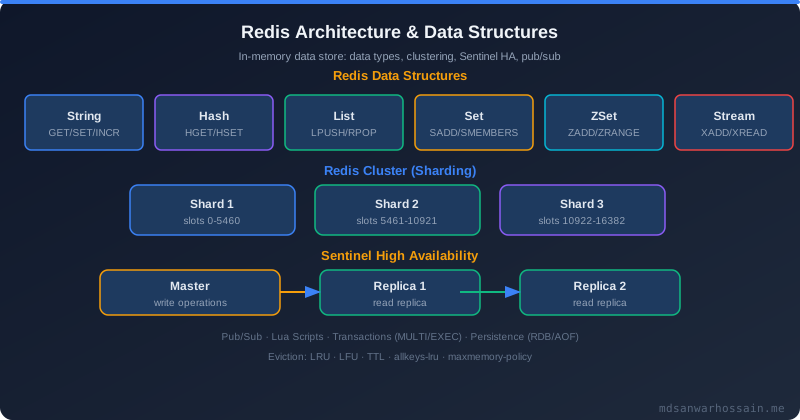
Before selecting a caching pattern, you must choose the correct Redis deployment topology. The wrong topology is the single most common cause of production Redis failures.
Standalone Mode
A single Redis instance — appropriate only for development, staging, or low-traffic services where data loss on node failure is acceptable. Maximum dataset size is bounded by a single machine's RAM (typically 32–256 GB in production). Failover is manual. Never use standalone mode for production caches with write-through semantics or session storage.
Sentinel Mode
Redis Sentinel provides automated failover for a primary + replica topology. A quorum of Sentinel processes monitors the primary and promotes a replica when the primary fails (typically within 10–30 seconds). Sentinel is the right choice when your dataset fits on a single node but you need HA. AWS ElastiCache in non-cluster mode uses Sentinel-compatible behavior with Multi-AZ replication.
- Minimum quorum: 3 Sentinel processes (odd number to avoid split-brain)
- Failover time: 10–30 seconds by default (
min-replicas-to-writecontrols write safety) - Client requirement: Sentinel-aware client (Spring Data Redis supports this natively)
- Scale ceiling: Single primary's memory; reads scale via replicas
Cluster Mode
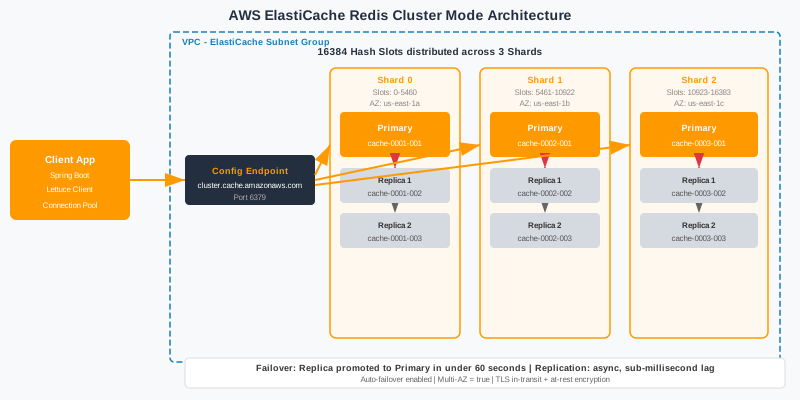
Redis Cluster shards data across 16,384 hash slots distributed across multiple primary nodes, each with their own replicas. It enables both horizontal scaling (beyond a single machine's memory) and HA (each primary has at least one replica for automatic failover without Sentinel). Cluster mode is covered in depth in Section 10.
Memory Model
Redis stores all data in RAM with optional persistence via RDB snapshots or AOF (Append-Only File). The memory model has critical implications for caching:
- jemalloc allocator: Redis uses jemalloc by default, which can hold fragmented memory. Monitor
mem_fragmentation_ratio— above 1.5 indicates significant fragmentation. - Object encoding: Redis automatically selects compact encodings (ziplist, listpack, intset) for small collections. A hash with ≤128 fields each ≤64 bytes uses ziplist, consuming ~10× less memory than a full hash table.
- maxmemory: Always set this. Without it, Redis will consume all available RAM until the OOM killer terminates it. Set to 70–80% of available RAM to leave headroom for fragmentation and OS use.
3. Cache-Aside Pattern: Lazy Loading with @Cacheable
Cache-aside (also called lazy loading) is the most widely used caching pattern in microservices. The application is responsible for managing the cache — it is not automatically populated. On a cache miss, the application fetches data from the database, writes it to the cache, and returns it. Subsequent requests hit the cache directly.
How Cache-Aside Works
- Application receives a read request for
product:42. - Application checks Redis: key exists? → return cached value (cache hit).
- Key not found (cache miss) → query database → store result in Redis with TTL → return to caller.
- On write: update database → invalidate (delete) the cache key (do not update — prevents stale dual-write races).
Spring Boot Configuration
Add the dependencies and wire up RedisCacheManager with per-cache TTL configuration:
// pom.xml dependencies
<dependency>
    <groupId>org.springframework.boot</groupId>
    <artifactId>spring-boot-starter-data-redis</artifactId>
</dependency>
<dependency>
    <groupId>org.springframework.boot</groupId>
    <artifactId>spring-boot-starter-cache</artifactId>
</dependency>
// CacheConfig.java
@Configuration
@EnableCaching
public class CacheConfig {
@Bean
public RedisCacheManager cacheManager(RedisConnectionFactory connectionFactory) {
// Default TTL: 10 minutes
RedisCacheConfiguration defaults = RedisCacheConfiguration.defaultCacheConfig()
.entryTtl(Duration.ofMinutes(10))
.serializeKeysWith(RedisSerializationContext.SerializationPair
.fromSerializer(new StringRedisSerializer()))
.serializeValuesWith(RedisSerializationContext.SerializationPair
.fromSerializer(new GenericJackson2JsonRedisSerializer()))
.disableCachingNullValues();
// Per-cache TTL overrides
Map<String, RedisCacheConfiguration> cacheConfigs = new HashMap<>();
cacheConfigs.put("products", defaults.entryTtl(Duration.ofMinutes(30)));
cacheConfigs.put("userProfiles",defaults.entryTtl(Duration.ofMinutes(5)));
cacheConfigs.put("inventory", defaults.entryTtl(Duration.ofSeconds(30)));
cacheConfigs.put("sessions", defaults.entryTtl(Duration.ofHours(2)));
return RedisCacheManager.builder(connectionFactory)
.cacheDefaults(defaults)
.withInitialCacheConfigurations(cacheConfigs)
.transactionAware()
.build();
}
}Using @Cacheable, @CachePut, @CacheEvict
@Service
@RequiredArgsConstructor
public class ProductService {

    private final ProductRepository productRepository;

    // Cache-aside read: returns cached value or fetches from DB on miss
    @Cacheable(value = "products", key = "#productId",
               unless = "#result == null")
    public ProductDto getProduct(Long productId) {
        return productRepository.findById(productId)
            .map(ProductMapper::toDto)
            .orElseThrow(() -> new ProductNotFoundException(productId));
    }

    // Write + update cache (use sparingly — prefer eviction)
    @CachePut(value = "products", key = "#result.id")
    public ProductDto updateProduct(Long productId, UpdateProductRequest req) {
        Product product = productRepository.findById(productId)
            .orElseThrow(() -> new ProductNotFoundException(productId));
        ProductMapper.applyUpdate(product, req);
        return ProductMapper.toDto(productRepository.save(product));
    }

    // Evict cache on delete
    @CacheEvict(value = "products", key = "#productId")
    public void deleteProduct(Long productId) {
        productRepository.deleteById(productId);
    }

    // Evict entire cache (use with caution in production)
    @CacheEvict(value = "products", allEntries = true)
    public void clearProductCache() { }
}
TTL Strategy for Cache-Aside
TTL selection is the most important operational decision for cache-aside. Too short and your hit rate collapses; too long and users see stale data after writes. Use this heuristic:
- Reference data (product categories, country codes): 60–120 minutes — changes rarely, high read volume
- User profiles: 5–15 minutes — changes infrequently, staleness for a few minutes is acceptable
- Inventory counts: 15–60 seconds — must be reasonably fresh to avoid overselling
- Pricing: 30 seconds to 5 minutes — depends on pricing volatility; use event-driven invalidation for flash sales
- Session data: match your application session timeout (30 minutes to 2 hours)
A critical production tip: add jitter (±10–20% random variance) to your TTLs to prevent the cache expiration thundering herd — when thousands of keys set with the same TTL all expire simultaneously, causing a spike of database queries.
// TTL with jitter to prevent mass simultaneous expiration
private Duration ttlWithJitter(Duration base) {
    long jitterMs = (long)(base.toMillis() * 0.15 * Math.random());
    return base.plusMillis(jitterMs);
}
4. Write-Through Pattern: Keeping Cache & DB in Sync
In the write-through pattern, every write updates both the cache and the database synchronously before the write is acknowledged to the caller. Unlike cache-aside where writes evict the cache, write-through keeps the cache always warm with the latest data.
When to Use Write-Through
- Data that is read immediately after it is written (e.g., user submits a form and immediately views the result)
- Services where cache misses are very expensive (complex joins, cross-service aggregations)
- Systems where cache consistency is more important than write throughput
- Reference data management services where all readers must see the same version
Dual-Write Risks and Mitigation
Write-through introduces the classic dual-write consistency problem: what happens if the database write succeeds but the cache write fails (or vice versa)? You have three options:
Option 1: DB-first, cache-second (recommended)
Write to the database first. If it succeeds, write to cache. If the cache write fails, log and continue — the worst case is a cache miss on the next read, which is safely handled by cache-aside fallback. This preserves DB as the source of truth. Never use cache-first — a cache write success followed by a DB failure creates an inconsistent cache with no error recovery path.
Option 2: Transactional cache write with Spring Cache + @Transactional
Use transactionAware = true on RedisCacheManager (already shown in the config above). With this flag, @CachePut and @CacheEvict operations are deferred until the Spring transaction commits. If the transaction rolls back, the cache operation is discarded. This eliminates the "successful cache write + rolled-back DB write" inconsistency.
Option 3: CDC-based synchronization (Debezium)
Use Change Data Capture (Debezium + Kafka) to stream database changes to a cache-updating consumer. The application writes only to the DB; the cache is updated asynchronously by the CDC pipeline. This fully decouples write path from cache management and guarantees eventual consistency. See the Outbox Pattern post for implementation details.
Write-Through with Spring Data Redis (Manual)
@Service
@RequiredArgsConstructor
@Transactional
public class UserProfileService {

    private final UserRepository userRepository;
    private final RedisTemplate<String, UserProfileDto> redisTemplate;
    private static final Duration PROFILE_TTL = Duration.ofMinutes(10);

    public UserProfileDto updateProfile(Long userId, UpdateProfileRequest req) {
        // 1. Write to database (inside transaction)
        User user = userRepository.findById(userId)
            .orElseThrow(() -> new UserNotFoundException(userId));
        UserMapper.applyUpdate(user, req);
        UserProfileDto dto = UserMapper.toProfileDto(userRepository.save(user));

        // 2. Write-through to cache after successful DB save
        // (transactionAware cache manager defers this until commit)
        String cacheKey = "userProfiles::" + userId;
        redisTemplate.opsForValue().set(cacheKey, dto, PROFILE_TTL);

        return dto;
    }
}
5. Write-Behind (Write-Back) Pattern: Async Writes
Write-behind (also called write-back) inverts the persistence order: the application writes to the cache first and acknowledges the write immediately. The cache asynchronously flushes dirty data to the database at a later point — in batches or after a delay. This dramatically improves write throughput but introduces data loss risk.
When Write-Behind Makes Sense
- High-frequency counters: page view counts, like counts, analytics events — losing a few counts on crash is acceptable
- Rate limiting state: token bucket counters can tolerate brief inconsistency
- Session activity tracking: "last seen" timestamps, browsing history accumulation
- Leaderboard scores: real-time sorted set updates with periodic persistence to RDBMS
Data Loss Risks
Write-behind is unsuitable for financial transactions, order state, or any data where loss of a single write has business impact. If Redis crashes between the cache write and the database flush, that data is gone (unless Redis persistence is enabled). Mitigations:
- Enable AOF with
appendfsync alwaysto persist every write to disk — reduces write throughput advantage significantly - Use Redis Streams as a durable write buffer that the DB consumer processes sequentially, with consumer group acknowledgements
- Set a short flush interval (1–5 seconds) to bound potential data loss window
// Write-behind with Redis INCR (atomic counter accumulation)
// High-frequency view counter — write to Redis first, flush to DB every 60s

@Component
@RequiredArgsConstructor
public class ViewCounterService {

    private final RedisTemplate<String, Long> redisTemplate;
    private static final String KEY_PREFIX = "view_count:product:";

    public void incrementView(Long productId) {
        // Atomic increment — sub-millisecond, no DB hit
        redisTemplate.opsForValue().increment(KEY_PREFIX + productId);
    }

    public Long getViewCount(Long productId) {
        Long count = redisTemplate.opsForValue().get(KEY_PREFIX + productId);
        return count != null ? count : 0L;
    }
}

// Scheduled flusher — flush accumulated counts to DB every 60 seconds
@Component
@RequiredArgsConstructor
public class ViewCountFlusher {

    private final ViewCounterService viewCounterService;
    private final ProductRepository productRepository;
    private final RedisTemplate<String, Long> redisTemplate;

    @Scheduled(fixedRate = 60_000)
    public void flushCountsToDatabase() {
        Set<String> keys = redisTemplate.keys("view_count:product:*");
        if (keys == null || keys.isEmpty()) return;

        for (String key : keys) {
            Long delta = redisTemplate.opsForValue().getAndDelete(key);
            if (delta != null && delta > 0) {
                Long productId = Long.parseLong(key.replace("view_count:product:", ""));
                productRepository.incrementViewCount(productId, delta);
            }
        }
    }
}
6. Read-Through Pattern with Spring Cache Abstraction
Read-through differs from cache-aside in who is responsible for the cache population on a miss. In cache-aside, the application code manages cache reads explicitly. In read-through, the cache itself (or a cache loader configured in the cache manager) transparently fetches from the backing store on a miss and populates itself — the caller sees only a unified interface.
In practice, Spring's @Cacheable annotation implements read-through semantics from the application's perspective — the method body acts as the data loader invoked on a cache miss. The key difference from pure cache-aside is that the application code does not need to handle "check cache → miss → load → store" explicitly; Spring's AOP proxy handles the full flow.
Programmatic Cache Loader with CacheLoader Interface
// Caffeine (local) + Redis (distributed) two-level read-through cache
@Configuration
@EnableCaching
public class TwoLevelCacheConfig {

    // L1: fast local Caffeine cache (per-JVM, 1000 entries, 30s TTL)
    @Bean
    public CaffeineCache caffeineProductCache() {
        return new CaffeineCache("products-l1",
            Caffeine.newBuilder()
                .expireAfterWrite(30, TimeUnit.SECONDS)
                .maximumSize(1000)
                .recordStats()
                .build());
    }

    // L2: Redis distributed cache (all pods share this)
    @Bean
    public RedisCacheManager redisCacheManager(RedisConnectionFactory cf) {
        RedisCacheConfiguration config = RedisCacheConfiguration.defaultCacheConfig()
            .entryTtl(Duration.ofMinutes(10))
            .serializeValuesWith(RedisSerializationContext.SerializationPair
                .fromSerializer(new GenericJackson2JsonRedisSerializer()));
        return RedisCacheManager.builder(cf)
            .cacheDefaults(config).build();
    }
}

// Service using Spring's @Cacheable for transparent read-through
@Service
@RequiredArgsConstructor
public class CatalogService {

    private final ProductRepository productRepository;

    @Cacheable(value = "products", key = "#sku",
               cacheManager = "redisCacheManager")
    public ProductDto getProductBySku(String sku) {
        // This method body is the "data loader" — only called on cache miss
        log.info("Cache miss for SKU {}; loading from database", sku);
        return productRepository.findBySku(sku)
            .map(ProductMapper::toDto)
            .orElseThrow(() -> new ProductNotFoundException(sku));
    }
}
7. Cache Invalidation Strategies
Phil Karlton's famous quip — "There are only two hard things in Computer Science: cache invalidation and naming things" — is especially true in microservices where a single business entity (e.g., a Product) may be cached across five different services. Getting invalidation right is the difference between a fast, consistent system and one that serves subtly wrong data.
Strategy 1: TTL-Based Expiration
The simplest strategy: set a TTL and accept eventual consistency up to that window. Every cached entry automatically expires. No invalidation code required. The trade-off is a bounded staleness window — during TTL period, stale data may be served. Suitable for reference data, static content, and anything where eventually consistent is acceptable.
Strategy 2: Event-Driven Invalidation
The owning service publishes an event when data changes (e.g., ProductUpdatedEvent on a Kafka topic). All services that cache that data subscribe and invalidate their local cache entries on receipt. This achieves near-real-time consistency while keeping services decoupled.
// Publisher: Product Service
@Service
@RequiredArgsConstructor
public class ProductCommandService {

    private final ProductRepository productRepository;
    private final KafkaTemplate<String, ProductUpdatedEvent> kafkaTemplate;
    private final CacheManager cacheManager;

    @Transactional
    public ProductDto updateProduct(Long productId, UpdateProductRequest req) {
        Product product = productRepository.findById(productId)
            .orElseThrow(() -> new ProductNotFoundException(productId));
        ProductMapper.applyUpdate(product, req);
        Product saved = productRepository.save(product);

        // Invalidate local cache
        Cache productCache = cacheManager.getCache("products");
        if (productCache != null) productCache.evict(productId);

        // Publish event for distributed invalidation
        kafkaTemplate.send("product-events",
            new ProductUpdatedEvent(productId, saved.getVersion()));

        return ProductMapper.toDto(saved);
    }
}

// Subscriber: Any service caching product data
@Component
@RequiredArgsConstructor
public class ProductCacheInvalidationListener {

    private final CacheManager cacheManager;

    @KafkaListener(topics = "product-events",
                   groupId = "pricing-service-cache-invalidation")
    public void onProductUpdated(ProductUpdatedEvent event) {
        Cache productCache = cacheManager.getCache("products");
        if (productCache != null) {
            productCache.evict(event.getProductId());
            log.info("Evicted product {} from cache due to update event v{}",
                event.getProductId(), event.getVersion());
        }
    }
}
Strategy 3: Versioned Cache Keys
Embed a version number or hash into the cache key. When data changes, increment the version — old keys become orphaned and expire via TTL. No explicit eviction needed. Works well for deployments where you want to immediately invalidate all cached data on a new application version:
// Key format: "v{appVersion}:products:{productId}"
// Changing APP_VERSION in your config immediately "invalidates" all old entries
@Cacheable(value = "products",
           key = "'v' + @appVersion + ':' + #productId")
public ProductDto getProduct(Long productId) { ... }

// In application.properties:
// app.cache.version=42  (increment on breaking data structure changes)
8. Distributed Locking with Redisson & Lettuce
Two of the most dangerous caching failure modes in microservices are the cache stampede and the thundering herd. Both occur when a popular cached key expires and many concurrent requests simultaneously attempt to rebuild it — each triggering an expensive database query, overwhelming the database, and defeating the purpose of caching.
Cache Stampede: The Problem
Consider 500 concurrent requests for product:hotdeal:99. The key expires. All 500 threads call getProduct(99), see a cache miss, and simultaneously query the database. PostgreSQL now receives 500 identical queries in a few milliseconds — enough to spike CPU to 100% and trigger connection pool exhaustion. The solution is a distributed lock that ensures only one thread rebuilds the cache while others wait (or serve stale data).
Redisson Distributed Lock: Production Implementation
// pom.xml
<dependency>
    <groupId>org.redisson</groupId>
    <artifactId>redisson-spring-boot-starter</artifactId>
    <version>3.27.2</version>
</dependency>
@Service
@RequiredArgsConstructor
public class StampedeProtectedProductService {
private final RedissonClient redissonClient;
private final RedisTemplate<String, ProductDto> redisTemplate;
private final ProductRepository productRepository;
private static final Duration CACHE_TTL = Duration.ofMinutes(10);
private static final Duration LOCK_TTL = Duration.ofSeconds(5);
private static final Duration LOCK_WAIT = Duration.ofSeconds(3);
public ProductDto getProduct(Long productId) {
String cacheKey = "products::" + productId;
String lockKey = "lock:products::" + productId;
// Fast path: return from cache
ProductDto cached = redisTemplate.opsForValue().get(cacheKey);
if (cached != null) return cached;
// Slow path: acquire lock to rebuild cache
RLock lock = redissonClient.getLock(lockKey);
try {
boolean acquired = lock.tryLock(
LOCK_WAIT.toMillis(), LOCK_TTL.toMillis(), TimeUnit.MILLISECONDS);
if (acquired) {
try {
// Double-checked locking: another thread may have rebuilt while we waited
ProductDto doubleCheck = redisTemplate.opsForValue().get(cacheKey);
if (doubleCheck != null) return doubleCheck;
// Only this thread reaches the database
ProductDto dto = productRepository.findById(productId)
.map(ProductMapper::toDto)
.orElseThrow(() -> new ProductNotFoundException(productId));
redisTemplate.opsForValue().set(cacheKey, dto,
ttlWithJitter(CACHE_TTL));
return dto;
} finally {
lock.unlock();
}
} else {
// Lock not acquired — serve stale or throw (configurable behavior)
log.warn("Could not acquire cache rebuild lock for product {}; "
+ "returning stale or empty", productId);
// Optionally: return stale value from a secondary "stale" key
throw new CacheLockTimeoutException(
"Cache rebuild in progress for product " + productId);
}
} catch (InterruptedException e) {
Thread.currentThread().interrupt();
throw new CacheException("Interrupted waiting for cache lock", e);
}
}
private Duration ttlWithJitter(Duration base) {
long jitter = (long)(base.toMillis() * 0.15 * Math.random());
return base.plusMillis(jitter);
}
}Probabilistic Early Expiration (PER) — Zero-Lock Alternative
An elegant lockless alternative to distributed locks for stampede prevention. Instead of expiring at a fixed TTL, each cache read calculates a probability of early recomputation using the formula: current_time - (recompute_time × β × log(random)). Threads probabilistically start refreshing the cache before it expires, so expiration never results in a mass-concurrent miss. The β parameter (typically 1.0) controls how eagerly pre-computation starts.
9. Session Caching with Spring Session + Redis
In a microservices deployment with multiple replicas behind a load balancer, HTTP session state cannot be stored in JVM memory — the next request may hit a different pod. Spring Session with Redis solves this by storing session data in a shared Redis store, making sessions available across all pods transparently.
Configuration
// pom.xml
<dependency>
    <groupId>org.springframework.session</groupId>
    <artifactId>spring-session-data-redis</artifactId>
</dependency>

// application.yml
spring:
  session:
    store-type: redis
    redis:
      namespace: myapp:session
      flush-mode: on-save      # or 'immediate' for eager flush
    timeout: 30m               # session TTL

  data:
    redis:
      host: ${REDIS_HOST:localhost}
      port: 6379
      password: ${REDIS_PASSWORD:}
      lettuce:
        pool:
          max-active: 20
          max-idle: 10
          min-idle: 5
          max-wait: 1000ms
// Enable Spring Session with Redis
@SpringBootApplication
@EnableRedisHttpSession(maxInactiveIntervalInSeconds = 1800)
public class ApiGatewayApplication {
public static void main(String[] args) {
SpringApplication.run(ApiGatewayApplication.class, args);
}
}Session Security Considerations
- Encrypt session data: Session objects serialized to Redis may contain sensitive user data. Encrypt at-rest using a custom
RedisSerializerthat wraps AES-256 encryption around the serialized payload. - Session fixation protection: Spring Security's
SessionFixationProtectionStrategyrotates session IDs on login. Ensure Redis session store propagates the new ID correctly before the old one expires. - TLS to Redis: All session data travels over the network to Redis. Enforce TLS with
spring.data.redis.ssl.enabled=trueand mutual TLS on AWS ElastiCache in-transit encryption. - Namespace isolation: Use distinct Redis key namespaces (
myapp:session:,myapp:cache:,myapp:lock:) to avoid key collisions between session storage and application caches sharing the same Redis cluster.
10. Redis Cluster for High Availability
Redis Cluster is the production-grade solution for datasets that exceed a single node's memory or require sub-second automatic failover without Sentinel. Understanding hash slots is fundamental to designing cluster-compatible caching strategies.
Hash Slots and Sharding
Redis Cluster divides the keyspace into 16,384 hash slots. Each key is assigned to a slot via CRC16(key) % 16384. Hash slots are distributed evenly across primary nodes. With 3 primaries, each holds ~5,461 slots. When you add a fourth primary, Redis re-balances slots with zero downtime (live resharding).
Hash tags allow you to force related keys to the same slot: wrap the meaningful part of the key in curly braces — {user:42}:profile and {user:42}:settings both hash to the slot of user:42, enabling multi-key operations like MGET and Lua scripts across them.
Replica Failover
Each primary in a Redis Cluster has one or more replicas. When a primary fails, the cluster automatically elects a replica as the new primary (typically within 1–3 seconds) without Sentinel involvement. The cluster uses a gossip protocol (CLUSTER PING/PONG) for failure detection — a primary is declared failed when a majority of primaries agree it is unreachable.
Spring Boot Cluster Configuration
# application.yml — Redis Cluster configuration
spring:
  data:
    redis:
      cluster:
        nodes:
          - redis-cluster-node-1:6379
          - redis-cluster-node-2:6379
          - redis-cluster-node-3:6379
          - redis-cluster-node-4:6379
          - redis-cluster-node-5:6379
          - redis-cluster-node-6:6379
        max-redirects: 3       # MOVED / ASK redirect limit
      password: ${REDIS_CLUSTER_PASSWORD}
      ssl:
        enabled: true
      lettuce:
        cluster:
          refresh:
            adaptive: true        # Dynamic topology refresh
            period: 30s           # Periodic topology refresh
        pool:
          max-active: 50
          max-idle: 20
          min-idle: 10
          max-wait: 2000ms
// AWS ElastiCache Cluster configuration bean
@Configuration
public class RedisClusterConfig {
@Value("${spring.data.redis.cluster.nodes}")
private List<String> clusterNodes;
@Bean
public LettuceConnectionFactory redisConnectionFactory() {
RedisClusterConfiguration clusterConfig =
new RedisClusterConfiguration(clusterNodes);
clusterConfig.setMaxRedirects(3);
LettuceClientConfiguration clientConfig = LettuceClientConfiguration.builder()
.readFrom(ReadFrom.REPLICA_PREFERRED) // Read from replicas to reduce primary load
.clientOptions(ClusterClientOptions.builder()
.autoReconnect(true)
.topologyRefreshOptions(ClusterTopologyRefreshOptions.builder()
.enableAdaptiveRefreshTrigger(
RefreshTrigger.MOVED_REDIRECT,
RefreshTrigger.PERSISTENT_RECONNECTS)
.adaptiveRefreshTriggersTimeout(Duration.ofSeconds(30))
.enablePeriodicRefresh(Duration.ofSeconds(30))
.build())
.build())
.build();
return new LettuceConnectionFactory(clusterConfig, clientConfig);
}
}Cluster Limitations to Design Around
- Multi-key commands: MGET, MSET, DEL with multiple keys must all target the same hash slot. Use hash tags to group related keys, or avoid multi-key commands across different slots.
- Lua scripts: All keys referenced in a Lua script must reside in the same slot. Design scripts to operate on hash-tagged key groups.
- Database index: Redis Cluster supports only database 0 (
SELECTis disabled). Namespacing via key prefixes replaces DB index separation. - SCAN complexity:
SCANin cluster mode must be run against each node individually. Use Lettuce's ClusterScanCursor or Redisson's cluster-aware key scan.
11. Cache Serialization: JSON vs Java Serialization
Every object stored in Redis must be serialized to bytes and deserialized on read. The serialization choice has major implications for performance, debuggability, schema evolution, and security.
Java Serialization (JdkSerializationRedisSerializer)
Spring Data Redis uses Java serialization by default if you don't configure otherwise. Avoid this in production. Java serialization:
- Produces opaque binary blobs — impossible to inspect in Redis CLI
- Tightly couples serialized format to Java class structure — any field rename or class move breaks deserialization of existing cache entries
- Significantly larger payload than JSON (~3–5× for typical DTOs)
- Is a well-known attack vector (deserialization gadget chains) — never deserialize untrusted data with Java serialization
JSON Serialization (GenericJackson2JsonRedisSerializer)
The recommended default for application caches. Human-readable in Redis CLI, survives most refactoring (field additions are ignored by older readers), and ~2–3× smaller than Java serialized output. Configure Jackson carefully:
@Bean
public RedisSerializer<Object> redisSerializer() {
    ObjectMapper mapper = new ObjectMapper();
    // Include type information so deserialization works without explicit class knowledge
    mapper.activateDefaultTyping(
        mapper.getPolymorphicTypeValidator(),
        ObjectMapper.DefaultTyping.NON_FINAL,
        JsonTypeInfo.As.PROPERTY);
    mapper.disable(SerializationFeature.WRITE_DATES_AS_TIMESTAMPS);
    mapper.registerModule(new JavaTimeModule());
    // Ignore unknown fields (schema evolution tolerance)
    mapper.configure(DeserializationFeature.FAIL_ON_UNKNOWN_PROPERTIES, false);
    return new GenericJackson2JsonRedisSerializer(mapper);
}

@Bean
public RedisTemplate<String, Object> redisTemplate(
        RedisConnectionFactory connectionFactory) {
    RedisTemplate<String, Object> template = new RedisTemplate<>();
    template.setConnectionFactory(connectionFactory);
    template.setKeySerializer(new StringRedisSerializer());
    template.setHashKeySerializer(new StringRedisSerializer());
    template.setValueSerializer(redisSerializer());
    template.setHashValueSerializer(redisSerializer());
    template.afterPropertiesSet();
    return template;
}
Performance Comparison
| Serializer | Payload Size | Speed | Debuggable | Schema Evolution |
|---|---|---|---|---|
| Java Serialization | Large (~3–5×) | Moderate | ❌ Opaque binary | ❌ Brittle |
| JSON (Jackson) | Medium | Good | ✅ Human-readable | ✅ Flexible |
| MessagePack | Small (~30% vs JSON) | Excellent | ⚠️ Binary | ✅ Good |
| Protocol Buffers | Smallest (~20% vs JSON) | Excellent | ⚠️ Binary | ✅ Schema-registry |
| Kryo | Small | Fastest | ❌ Opaque | ⚠️ Fragile |
Recommendation: Use JSON (Jackson) for most caches. Switch to MessagePack for high-throughput caches where serialization CPU is measurable in profiling. Use Protobuf only if you already have schema management infrastructure. Never use Java serialization or Kryo in multi-service distributed caches — schema fragility will cause deployment headaches.
12. Monitoring & Eviction Policies
A Redis cache you cannot observe is a liability. Production Redis monitoring requires understanding three categories: cache effectiveness, memory health, and client behavior.
Key Metrics to Monitor
keyspace_hits/keyspace_misses: Cache hit rate = hits / (hits + misses). Target ≥85% for read-heavy services. A sudden drop signals cold cache (restart?) or misconfigured keys.evicted_keys: Keys evicted due to maxmemory pressure. Any evictions indicate your maxmemory budget is too low or your dataset has grown. Evictions on a write-through cache cause data loss.mem_fragmentation_ratio: Ratio of RSS to allocated memory. Above 1.5 indicates significant fragmentation — schedule aMEMORY PURGEor rolling restart.connected_clients: Compare to your connection pool max-active × pod count. If connected_clients approachesmaxclients(default 10,000), new connections will be refused.blocked_clients: Clients blocked on BLPOP, BRPOP, BZPOPMIN. High counts indicate queue consumers are slow.instantaneous_ops_per_sec: Baseline this metric. Spikes during deployments (cold cache restart) are expected; unexpected spikes indicate stampede events.rdb_last_bgsave_status/aof_last_write_status: Monitor persistence health. A failed bgsave means your last restore point is older than you think.
Eviction Policies
When Redis reaches maxmemory, it evicts keys based on the configured maxmemory-policy. Choose carefully — the wrong policy can silently destroy cache correctness:
| Policy | Behavior | Best For |
|---|---|---|
| noeviction | Return errors on writes when full | Persistent data stores (not pure caches) |
| allkeys-lru | Evict least-recently-used keys from all keys | General-purpose caches (recommended default) |
| volatile-lru | Evict LRU keys only among keys with TTL set | Mixed persistent + cache data in same instance |
| allkeys-lfu | Evict least-frequently-used keys from all | Skewed access patterns (hot key workloads) |
| volatile-ttl | Evict keys with shortest remaining TTL first | When you want to preserve long-lived entries |
| allkeys-random | Evict a random key from all keys | Uniform access patterns (rarely optimal) |
Spring Boot Actuator + Micrometer Redis Metrics
# application.yml — expose Redis metrics to Prometheus
management:
  endpoints:
    web:
      exposure:
        include: health,info,metrics,prometheus
  metrics:
    tags:
      application: ${spring.application.name}
      environment: ${APP_ENV:prod}
    cache:
      redis:
        enable-statistics: true    # Enables cache hit/miss metrics

# Useful Prometheus queries for Grafana dashboards:
# Cache hit rate:
#   sum(rate(cache_gets_total{result="hit"}[5m]))
#   / sum(rate(cache_gets_total[5m]))
#
# Redis memory usage:
#   redis_memory_used_bytes / redis_memory_max_bytes
#
# Redis ops/sec:
#   rate(redis_commands_processed_total[1m])
Caching Patterns Comparison Table
| Pattern | Write Path | Read Path | Consistency | Write Latency | Best For |
|---|---|---|---|---|---|
| Cache-Aside | DB only → evict cache | App manages miss | Eventual (TTL) | Low | Read-heavy, general purpose |
| Write-Through | DB + cache (sync) | Always cache hit | Strong | Higher (dual write) | Read-after-write consistency |
| Write-Behind | Cache only → async DB | Always cache hit | Eventual + data loss risk | Lowest | Write-heavy, loss-tolerant |
| Read-Through | DB only → evict cache | Cache auto-loads on miss | Eventual (TTL) | Low | Clean abstraction via @Cacheable |
Grafana Dashboard for Redis in Microservices
Build a dedicated Redis dashboard in Grafana with these panels as a minimum viable observability setup:
- Cache Hit Rate % — line chart, alert when below 80%
- Memory Used / Max — gauge with warning at 75%, critical at 90%
- Evicted Keys/sec — any evictions on write-through caches should alert immediately
- Commands/sec by Type — GET, SET, DEL, EXPIRE breakdown to spot unusual patterns
- Connected Clients — alert when approaching
maxclients - Replication Lag (ms) — for Sentinel/Cluster — alert when replica lag exceeds 1 second
- Slow Log Queries — Redis commands exceeding
slowlog-log-slower-than(default 10ms) - Keyspace by Prefix — track key counts per namespace to detect unbounded key growth
Import Grafana dashboard ID 763 (Redis Dashboard by Prometheus community) as a starting point, then add application-specific panels for cache hit rate per cache name using the Micrometer metrics exposed by Spring Boot Actuator.
