AWS ElastiCache Redis Production: Cluster Mode, Eviction Policies & Spring Boot Caching Guide
Running Redis in production on AWS is not just about spinning up an ElastiCache cluster — it is about choosing the right architecture, eviction policy, connection pool settings, and failover strategy that match your workload. This comprehensive guide walks you through every production decision you need to make, backed by real-world configuration examples and Spring Boot code.
TL;DR — Production Rule in One Sentence
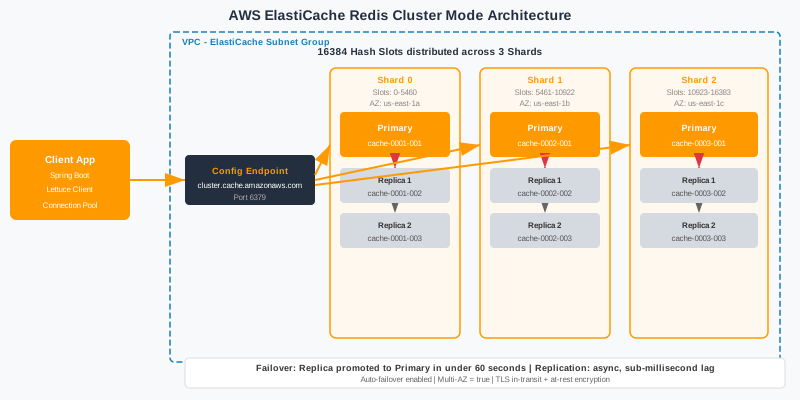
"Use ElastiCache Cluster Mode with 3 shards and 2 replicas per shard for production. Set maxmemory-policy to allkeys-lru unless you need volatile keys. Configure Lettuce with connection pooling (minIdle=2, maxIdle=8) in Spring Boot. Enable encryption in transit and at rest. Always test failover by rebooting a primary node before go-live."
Table of Contents
- Why ElastiCache Redis Is Your Production Caching Backbone
- Standalone vs Cluster Mode: Choosing the Right Architecture
- Shard and Replica Configuration for High Availability
- Eviction Policies: Picking the Right Strategy
- Spring Boot Integration with Spring Cache and Lettuce
- Connection Pooling and Timeout Configuration
- Cache Patterns: Cache-Aside, Write-Through, and Read-Through
- Encryption in Transit and At Rest with AWS KMS
- Backup, Snapshots, and Disaster Recovery
- Monitoring with CloudWatch: Key Metrics and Alarms
- Pre-Production Checklist and Cost Optimization
1. Why ElastiCache Redis Is Your Production Caching Backbone
When it comes to caching in AWS-hosted applications, ElastiCache for Redis is the de-facto standard for good reason. Redis is not just a key-value store — it is a versatile data structure server that supports strings, hashes, lists, sorted sets, bitmaps, and HyperLogLog. This richness makes it the right tool for session storage, API response caching, real-time leaderboards, rate limiting counters, and pub/sub messaging within a single managed service. AWS ElastiCache wraps Redis in a fully managed layer: automatic failover, patching, parameter groups, CloudWatch integration, and VPC security — all without a dedicated Redis operations team.
The performance numbers justify the investment. ElastiCache Redis nodes on cache.r7g.large consistently deliver sub-millisecond P99 latency and can sustain millions of read/write operations per second per node. For comparison, a PostgreSQL RDS instance under similar load might return P99 latencies of 5–50 ms. The delta is enormous, and caching even 40–60% of your hot read traffic can halve database load and reduce infrastructure spend proportionally. For APIs serving 10,000+ requests per second, Redis caching is not optional — it is the architecture.
A common early-stage question is Redis vs Memcached. Both are ElastiCache-supported, but Redis wins on almost every enterprise dimension. Memcached supports only string values; Redis supports rich data structures. Redis persists data to disk (RDB snapshots or AOF logs), enabling warm restarts without cold-cache penalties. Redis supports Lua scripting for atomic multi-step operations, pub/sub channels for event broadcasting, and transactions via MULTI/EXEC. Memcached scales horizontally through client-side sharding; Redis Cluster handles sharding server-side. Unless you need a purely horizontal, multi-threaded object cache and nothing else, choose Redis.
Self-managed Redis on EC2 is an option some teams consider to save costs or to run specific Redis versions. However, the operational overhead is significant: you own instance patching, Redis version upgrades, failover scripting with Redis Sentinel or Cluster coordination, backup management, and CloudWatch custom metrics. ElastiCache handles all of this and is typically cost-competitive at scale once engineering hours are factored in. Reserve that EC2 self-hosted approach for niche requirements like Redis modules (RedisSearch, RedisJSON) that ElastiCache does not support yet.
| Feature | Redis (ElastiCache) | Memcached (ElastiCache) |
|---|---|---|
| Data Structures | Strings, Hashes, Lists, Sets, Sorted Sets, Bitmaps | Strings only |
| Persistence | RDB snapshots + AOF logging | None |
| Replication | Primary + up to 5 read replicas per shard | No native replication |
| Clustering / Sharding | Server-side (Redis Cluster, up to 500 shards) | Client-side only |
| Pub/Sub & Scripting | Yes (Lua, pub/sub channels) | No |
| Use Case Fit | Sessions, leaderboards, rate limiting, queues, caching | Simple object caching only |
2. Standalone vs Cluster Mode: Choosing the Right Architecture
ElastiCache Redis offers two architectural modes: Standalone (non-clustered) Replication Group and Cluster Mode Enabled (CME). Understanding the trade-offs before provisioning is critical — migrating between them later requires a full data migration and application changes. Standalone mode creates a single shard with one primary node and up to five read replicas. It is simpler to operate, supports all Redis commands including multi-key operations and transactions across arbitrary keys, and is suitable for datasets up to roughly 500 GB that can fit on a single node family.
Cluster Mode splits your dataset across multiple shards using consistent hashing over 16,384 hash slots. Each shard owns a contiguous range of slots, and keys are assigned to slots via CRC16(key) mod 16384. You can configure between 1 and 500 shards, with each shard having its own primary plus replicas. This enables horizontal scaling of both memory and write throughput — something standalone mode fundamentally cannot do. If your dataset exceeds a single node's memory, or if your write-per-second rate saturates a single primary, Cluster Mode is mandatory.
Cluster Mode comes with important limitations that catch teams off guard. Multi-key operations (e.g., MGET, MSET, SUNION, SDIFF) only work if all involved keys hash to the same slot. Redis transactions (MULTI/EXEC) are similarly slot-scoped. Lua scripts must operate within a single slot. To work around this, use hash tags: keys like {user:123}:session and {user:123}:cart both hash on user:123 and land on the same slot, enabling multi-key ops. Design your key namespace carefully before enabling cluster mode.
For most production applications at scale, the recommendation is Cluster Mode with 3 shards as a starting point. Three shards gives you 5,461 hash slots per shard, adequate failover safety, and easy scale-out by adding shards without downtime via Online Resharding. The Terraform snippet below provisions a production-grade ElastiCache replication group with Cluster Mode enabled, Multi-AZ, and automatic failover.
# terraform/elasticache.tf — ElastiCache Redis Cluster Mode
resource "aws_elasticache_replication_group" "redis" {
  replication_group_id       = "my-app-redis"
  description                = "Production Redis cluster for my-app"
  engine                     = "redis"
  engine_version             = "7.1"
  node_type                  = "cache.r7g.large"
  num_node_groups            = 3          # shards
  replicas_per_node_group    = 2          # replicas per shard
  automatic_failover_enabled = true
  multi_az_enabled           = true
  parameter_group_name       = aws_elasticache_parameter_group.redis7.name
  subnet_group_name          = aws_elasticache_subnet_group.redis.name
  security_group_ids         = [aws_security_group.redis.id]
  at_rest_encryption_enabled = true
  transit_encryption_enabled = true
  auth_token                 = var.redis_auth_token
  snapshot_retention_limit   = 7
  snapshot_window            = "03:00-04:00"
  maintenance_window         = "sun:05:00-sun:06:00"
  tags = {
    Environment = "production"
    Application = "my-app"
  }
}
resource "aws_elasticache_parameter_group" "redis7" {
  name   = "my-app-redis7-params"
  family = "redis7"
  parameter {
    name  = "maxmemory-policy"
    value = "allkeys-lru"
  }
  parameter {
    name  = "activerehashing"
    value = "yes"
  }
  parameter {
    name  = "lazyfree-lazy-eviction"
    value = "yes"
  }
}
resource "aws_elasticache_subnet_group" "redis" {
  name       = "my-app-redis-subnets"
  subnet_ids = var.private_subnet_ids
}| Dimension | Standalone (non-clustered) | Cluster Mode Enabled |
|---|---|---|
| Max Data Size | ~500 GB (single node limit) | Up to 500 × node memory (PBs) |
| Sharding | No (single shard) | Yes (1–500 shards, 16384 slots) |
| Read Replicas | Up to 5 per group | Up to 5 per shard |
| Multi-key Operations | Full support | Same-slot keys only (use hash tags) |
| Cost | Lower (fewer nodes) | Higher (shards × replicas × nodes) |
| Best Use Case | <500 GB, moderate traffic, simpler apps | >500 GB or >1M writes/sec, large scale |
3. Shard and Replica Configuration for High Availability
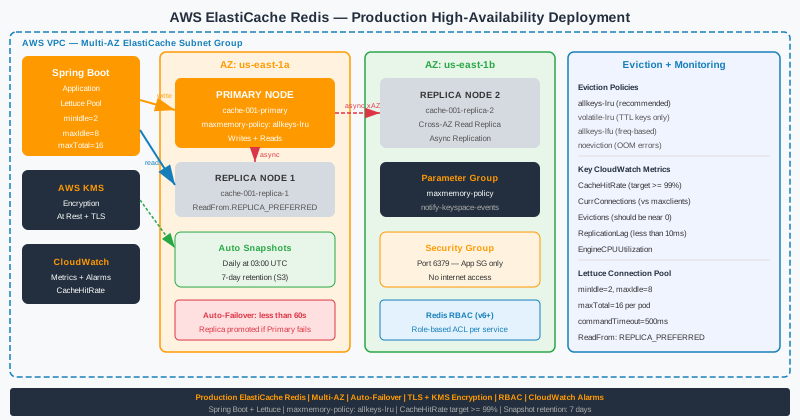
Choosing the right number of shards and replicas is a capacity and resilience decision that you must make before launch. Start with 3 shards as the minimum production baseline. Each shard handles approximately 5,461 hash slots, and a minimum of three shards ensures that a single-shard failure still leaves two operational shards — the cluster remains functional (though degraded) while ElastiCache promotes a replica to primary in roughly 30–60 seconds. One or two shards offer insufficient resilience; five or more shards add cost and operational complexity without benefit until your dataset genuinely requires it.
Set 2 replicas per shard for production. One replica is a minimum and acceptable for dev/staging environments, but leaves you with no read-scaling headroom and a single hot standby. Two replicas per shard means each shard has three nodes (one primary + two replicas) spread across at least two (ideally three) Availability Zones. ElastiCache automatically distributes primaries and replicas across AZs when you enable Multi-AZ. This configuration means an AZ outage loses at most one node per shard, and automatic failover restores write availability within a minute.
Replica lag is a critical consideration when scaling reads. ElastiCache replicas are asynchronous — under heavy write load, replica lag can reach tens of milliseconds. For read-your-writes consistency (e.g., a user updates their profile and immediately reads it back), always route those reads to the primary. Use read replicas only for data where slight staleness is acceptable: product catalogue listings, recommendation feeds, non-critical counts. Configure your Spring Boot Lettuce client to route reads preferring replicas (ReadFrom.REPLICA_PREFERRED) to distribute load, while falling back to primary.
For node type selection, the R-family (memory-optimised) is the correct choice for caching workloads. The cache.r7g generation (Graviton3) offers the best price-performance ratio in 2026. The cache.r7g.large provides 13.07 GB usable memory and is the right starting point for most production clusters. Move to cache.r7g.xlarge (26.04 GB) when a single shard's dataset consistently exceeds 8 GB (60% of node memory is a common headroom target). Avoid the M-family for caching — it is compute-optimised and overpriced for memory-heavy Redis workloads.
| Node Type | vCPU | Memory (GB) | Network | Best For |
|---|---|---|---|---|
| cache.r6g.large | 2 | 13.07 | Up to 10 Gbps | Previous gen, cost saving |
| cache.r7g.large | 2 | 13.07 | Up to 12.5 Gbps | General production baseline |
| cache.r7g.xlarge | 4 | 26.04 | Up to 12.5 Gbps | Memory-intensive caching |
| cache.r7g.2xlarge | 8 | 52.82 | Up to 15 Gbps | Large session stores, analytics |
Cost estimate (on-demand, us-east-1): 3 shards × 3 nodes (1 primary + 2 replicas) × cache.r7g.large at ~$0.166/hr = ~$357/month. With 1-year Reserved Nodes (~35% discount), this drops to ~$232/month — a compelling saving for a stable production cluster.
4. Eviction Policies: Picking the Right Strategy
The eviction policy controls what Redis does when maxmemory is reached and a new write arrives. Choosing the wrong policy can silently cause data loss or, worse, make your cache return errors under load. The policy is configured via the maxmemory-policy parameter in your ElastiCache Parameter Group, and changes take effect without a node restart. Understanding each option is not optional — it is a fundamental production decision.
allkeys-lru is the correct default for pure caching workloads. Redis tracks a probabilistic LRU approximation using a sample of N keys (default 5, configurable via maxmemory-samples) and evicts the least recently used one. This ensures your cache naturally prioritises hot data regardless of TTL settings. If you set TTLs on some keys (for correctness) but also want LRU eviction across all keys, allkeys-lru is still the right choice — it handles both. Increase maxmemory-samples to 10 for better LRU accuracy at a marginal CPU cost.
volatile-lru only evicts keys that have an expiry (TTL) set. Keys without a TTL are never evicted. This is useful when Redis serves dual purposes: acting as a cache (volatile keys with TTL) and as a persistent store (non-volatile keys without TTL). However, if your application never sets TTLs, volatile-lru behaves identically to noeviction — a dangerous footgun. Use volatile-lru only when you intentionally maintain a mix of ephemeral cached values and permanent reference data in the same Redis instance.
allkeys-lfu (Least Frequently Used, available in Redis 4+) tracks access frequency rather than recency. It excels with heavily skewed access patterns where a small subset of keys receives the vast majority of requests — evicting infrequently accessed keys even if they were touched recently. For content delivery caches, product recommendation caches, or anything with a strong Zipf distribution, allkeys-lfu outperforms allkeys-lru. Monitor Evictions in CloudWatch after switching to validate the policy is working as intended.
| Policy | Evicts From | Algorithm | Use Case |
|---|---|---|---|
| noeviction | N/A — returns errors | N/A | Primary data store (never use for cache) |
| allkeys-lru | All keys | Least recently used | General-purpose caching ✅ recommended |
| volatile-lru | Keys with TTL only | Least recently used | Mixed cache + persistent store |
| allkeys-lfu | All keys | Least frequently used | Skewed access patterns, content caches |
| volatile-ttl | Keys with TTL only | Shortest TTL first | Expiry-heavy caches, session data |
| allkeys-random | All keys | Random selection | Not recommended — poor hit rate |
# AWS CLI — update parameter group to set eviction policy
aws elasticache modify-cache-parameter-group \
  --cache-parameter-group-name my-app-redis7-params \
  --parameter-name-values \
    ParameterName=maxmemory-policy,ParameterValue=allkeys-lru \
    ParameterName=maxmemory-samples,ParameterValue=10 \
    ParameterName=lazyfree-lazy-eviction,ParameterValue=yes
# Verify current maxmemory-policy on a live node via redis-cli
redis-cli -h my-cluster.xyz.0001.use1.cache.amazonaws.com \
  -p 6379 --tls -a $AUTH_TOKEN CONFIG GET maxmemory-policy
5. Spring Boot Integration with Spring Cache and Lettuce
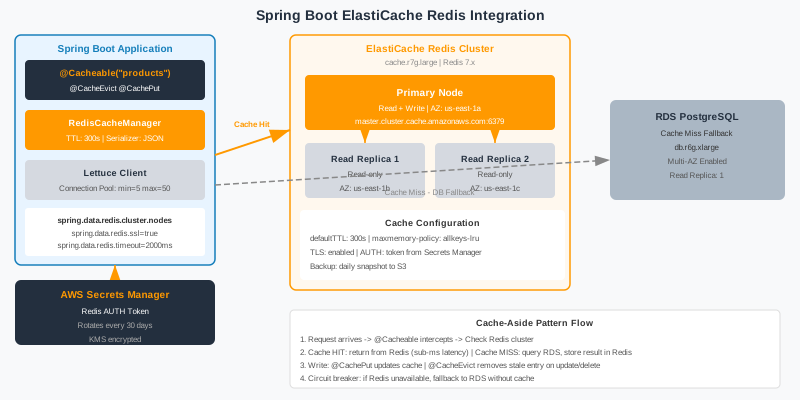
Integrating Spring Boot with ElastiCache Redis is straightforward with spring-boot-starter-data-redis, but production-grade configuration requires attention to serialisation, TTL per cache, connection pool settings, and graceful degradation. The default Spring Boot auto-configuration wires in a Lettuce connection factory with no connection pooling — a critical gap for production workloads that you must address explicitly.
Add the required dependencies to your pom.xml. Spring Cache's @Cacheable, @CachePut, and @CacheEvict annotations work out-of-the-box once RedisCacheManager is configured. Use Jackson2JsonRedisSerializer for human-readable JSON serialisation rather than the default Java serialisation — it avoids ClassCastExceptions across deployments and makes Redis key inspection readable in the AWS console.
<!-- pom.xml dependencies -->
<dependency>
    <groupId>org.springframework.boot</groupId>
    <artifactId>spring-boot-starter-data-redis</artifactId>
</dependency>
<dependency>
    <groupId>org.springframework.boot</groupId>
    <artifactId>spring-boot-starter-cache</artifactId>
</dependency>
<dependency>
    <groupId>io.lettuce</groupId>
    <artifactId>lettuce-core</artifactId>
</dependency>
<dependency>
    <groupId>org.apache.commons</groupId>
    <artifactId>commons-pool2</artifactId>
</dependency>
// RedisConfig.java — production-grade Spring Boot Redis configuration
@Configuration
@EnableCaching
public class RedisConfig {
@Value("${spring.data.redis.cluster.nodes}")
private List<String> clusterNodes;
@Value("${spring.data.redis.password}")
private String authToken;
@Bean
public RedisConnectionFactory redisConnectionFactory() {
RedisClusterConfiguration clusterConfig =
new RedisClusterConfiguration(clusterNodes);
clusterConfig.setPassword(authToken);
clusterConfig.setMaxRedirects(3);
LettucePoolingClientConfiguration poolConfig =
LettucePoolingClientConfiguration.builder()
.poolConfig(lettucePoolConfig())
.commandTimeout(Duration.ofMillis(500))
.useSsl()
.build();
return new LettuceConnectionFactory(clusterConfig, poolConfig);
}
private GenericObjectPoolConfig<?> lettucePoolConfig() {
GenericObjectPoolConfig<?> poolConfig = new GenericObjectPoolConfig<>();
poolConfig.setMinIdle(2);
poolConfig.setMaxIdle(8);
poolConfig.setMaxTotal(16);
poolConfig.setTestOnBorrow(true);
poolConfig.setTestWhileIdle(true);
poolConfig.setTimeBetweenEvictionRuns(Duration.ofSeconds(60));
return poolConfig;
}
@Bean
public RedisTemplate<String, Object> redisTemplate(
RedisConnectionFactory factory) {
RedisTemplate<String, Object> template = new RedisTemplate<>();
template.setConnectionFactory(factory);
Jackson2JsonRedisSerializer<Object> serializer =
new Jackson2JsonRedisSerializer<>(Object.class);
ObjectMapper mapper = new ObjectMapper()
.activateDefaultTyping(
LaissezFaireSubTypeValidator.instance,
ObjectMapper.DefaultTyping.NON_FINAL,
JsonTypeInfo.As.PROPERTY)
.registerModule(new JavaTimeModule())
.disable(SerializationFeature.WRITE_DATES_AS_TIMESTAMPS);
serializer.setObjectMapper(mapper);
template.setKeySerializer(new StringRedisSerializer());
template.setValueSerializer(serializer);
template.setHashKeySerializer(new StringRedisSerializer());
template.setHashValueSerializer(serializer);
template.afterPropertiesSet();
return template;
}
@Bean
public RedisCacheManager cacheManager(RedisConnectionFactory factory) {
RedisCacheConfiguration defaultConfig = RedisCacheConfiguration
.defaultCacheConfig()
.entryTtl(Duration.ofMinutes(30))
.serializeKeysWith(RedisSerializationContext.SerializationPair
.fromSerializer(new StringRedisSerializer()))
.serializeValuesWith(RedisSerializationContext.SerializationPair
.fromSerializer(new GenericJackson2JsonRedisSerializer()))
.disableCachingNullValues();
Map<String, RedisCacheConfiguration> perCacheConfig = Map.of(
"products", defaultConfig.entryTtl(Duration.ofHours(2)),
"user-sessions", defaultConfig.entryTtl(Duration.ofMinutes(15)),
"rate-limits", defaultConfig.entryTtl(Duration.ofSeconds(60))
);
return RedisCacheManager.builder(factory)
.cacheDefaults(defaultConfig)
.withInitialCacheConfigurations(perCacheConfig)
.build();
}
}# application.yml — ElastiCache Cluster Mode configuration
spring:
data:
redis:
cluster:
nodes:
- my-cluster.xyz.0001.use1.cache.amazonaws.com:6379
- my-cluster.xyz.0002.use1.cache.amazonaws.com:6379
- my-cluster.xyz.0003.use1.cache.amazonaws.com:6379
max-redirects: 3
password: ${REDIS_AUTH_TOKEN}
ssl:
enabled: true
timeout: 500ms
lettuce:
pool:
min-idle: 2
max-idle: 8
max-active: 16
max-wait: 200ms
cache:
type: redisUse @Cacheable to cache method results, @CachePut to update the cache on writes, and @CacheEvict to invalidate entries. Add a custom KeyGenerator if the default key (method name + arguments) produces collisions or lacks clarity in Redis keyspace inspection.
// ProductService.java — using Spring Cache annotations
@Service
public class ProductService {
    private final ProductRepository repository;
    @Cacheable(value = "products", key = "#productId",
               unless = "#result == null")
    public ProductDto getProduct(Long productId) {
        return repository.findById(productId)
            .map(ProductMapper::toDto)
            .orElse(null);
    }
    @CachePut(value = "products", key = "#dto.id")
    public ProductDto updateProduct(ProductDto dto) {
        Product saved = repository.save(ProductMapper.toEntity(dto));
        return ProductMapper.toDto(saved);
    }
    @CacheEvict(value = "products", key = "#productId")
    public void deleteProduct(Long productId) {
        repository.deleteById(productId);
    }
    @CacheEvict(value = "products", allEntries = true)
    @Scheduled(fixedDelay = 3_600_000) // hourly full refresh
    public void evictAllProducts() {
        // triggers full cache eviction — Spring handles it
    }
}
6. Connection Pooling and Timeout Configuration
The Spring Boot default Lettuce configuration uses a single shared connection for all operations — no pooling. This is fine for development but catastrophic in production under concurrent load. Without pooling, all threads share one TCP connection and queue commands serially, creating a bottleneck that makes your P99 latency explode under moderate concurrency. Enable LettucePoolingClientConfiguration with commons-pool2 on the classpath to activate connection pooling.
Lettuce vs Jedis: Both are production-capable, but Lettuce is the recommended choice. Lettuce is non-blocking, built on Netty, and supports reactive programming with Project Reactor. A single Lettuce connection handles pipelining and multiplexes multiple commands over one TCP socket, making it more efficient under high concurrency. Jedis uses one connection per thread (or requires explicit pooling) and lacks reactive support. Spring Boot's auto-configuration defaults to Lettuce for these reasons. Stick with Lettuce unless you have a specific Jedis requirement.
Setting appropriate timeouts prevents cascading failures when Redis is temporarily slow or unreachable. Use three timeout settings: connection timeout (how long to wait establishing a TCP connection — keep at 1–2 seconds), command timeout (how long to wait for a single Redis command response — 200–500 ms for production), and socket timeout (idle connection cleanup). A command timeout of 500 ms ensures that Redis slowness does not hold application threads for minutes. Combine this with a circuit breaker (Resilience4j) around Redis calls so that repeated timeouts trip the circuit and return stale or default values instead of queuing up failed connections.
Pool sizing should follow the formula: maxTotal = (expected concurrent Redis ops per pod) × 1.5. For a Spring Boot app with 200 concurrent HTTP threads and an average of 2 Redis calls per request, set maxTotal=16 (most requests complete rapidly and return connections quickly). Oversizing the pool wastes memory and connections on the Redis server. ElastiCache has a per-node connection limit (maxclients), and with many application pods, connection count adds up: 20 pods × 16 max connections = 320 connections to each shard's primary — well within the default of 65,000.
// LettuceConnectionFactory with full pool and timeout configuration
@Bean
public LettuceConnectionFactory lettuceConnectionFactory() {
    RedisClusterConfiguration clusterConfig =
        new RedisClusterConfiguration(clusterNodes);
    clusterConfig.setPassword(RedisPassword.of(authToken));
    clusterConfig.setMaxRedirects(3);
    // Pool configuration
    GenericObjectPoolConfig<StatefulRedisClusterConnection<?, ?>> poolConfig =
        new GenericObjectPoolConfig<>();
    poolConfig.setMinIdle(2);
    poolConfig.setMaxIdle(8);
    poolConfig.setMaxTotal(16);
    poolConfig.setMaxWait(Duration.ofMillis(200));
    poolConfig.setTestOnBorrow(true);
    poolConfig.setTestOnReturn(false);
    poolConfig.setTestWhileIdle(true);
    poolConfig.setTimeBetweenEvictionRuns(Duration.ofSeconds(60));
    poolConfig.setMinEvictableIdleTime(Duration.ofSeconds(300));
    // Lettuce client options
    ClusterClientOptions clientOptions = ClusterClientOptions.builder()
        .autoReconnect(true)
        .pingBeforeActivateConnection(true)
        .timeoutOptions(TimeoutOptions.builder()
            .fixedTimeout(Duration.ofMillis(500))
            .build())
        .socketOptions(SocketOptions.builder()
            .connectTimeout(Duration.ofSeconds(2))
            .keepAlive(true)
            .build())
        .topologyRefreshOptions(ClusterTopologyRefreshOptions.builder()
            .enablePeriodicRefresh(Duration.ofMinutes(5))
            .enableAllAdaptiveRefreshTriggers()
            .build())
        .build();
    LettucePoolingClientConfiguration lettuceConfig =
        LettucePoolingClientConfiguration.builder()
            .poolConfig(poolConfig)
            .clientOptions(clientOptions)
            .commandTimeout(Duration.ofMillis(500))
            .useSsl()
            .build();
    return new LettuceConnectionFactory(clusterConfig, lettuceConfig);
}7. Cache Patterns: Cache-Aside, Write-Through, and Read-Through
The pattern by which your application reads from and writes to the cache determines consistency guarantees, write amplification, and cold-start behaviour. There is no universally correct pattern — the right choice depends on your read/write ratio, data freshness requirements, and tolerance for stale reads. Understand all four patterns before architecting your caching layer.
Cache-Aside (Lazy Loading) is the most common pattern in Spring Boot applications and what @Cacheable implements by default. On a cache miss, the application fetches data from the database, populates the cache with a TTL, and returns the result. On subsequent reads, the cache serves the response without touching the database. The advantage is simplicity and that the cache only holds data that is actually requested — no cold data wastes memory. The disadvantage is that the first request after a TTL expiry is always a cache miss and hits the database. Under high traffic, simultaneous cache misses on the same key can overwhelm the database — this is the cache stampede problem. Mitigate it with probabilistic early expiration or distributed locks (Redis SET NX PX).
Write-Through writes to both the cache and the database synchronously on every write. The cache is always consistent with the database (for the keys that have been written). This eliminates stale reads but adds write latency (two sequential writes on every mutation). It is appropriate when reads are very frequent, write volume is moderate, and you can tolerate slightly higher write P99. Use @CachePut to implement write-through in Spring Boot — it updates the cache on every invocation regardless of whether a cache entry exists.
Write-Behind (Write-Back) writes to the cache immediately and asynchronously syncs to the database in the background. This delivers the lowest write latency but risks data loss if the cache node fails before the async write completes. It is suitable for non-critical counters, analytics events, or click tracking where occasional data loss is acceptable. ElastiCache itself does not implement write-behind — you must implement the async flush logic in your application layer, typically with a scheduled job reading a Redis list or stream and flushing to the database.
| Pattern | Read Flow | Write Flow | Pros | Cons |
|---|---|---|---|---|
| Cache-Aside | Check cache → miss → read DB → populate cache | Write DB → evict/invalidate cache key | Simple, cache only holds hot data | Cache miss on first read, stampede risk |
| Write-Through | Check cache → serve (always warm) | Write cache + write DB synchronously | No stale reads, always warm | Higher write latency, write amplification |
| Read-Through | Cache fetches from DB automatically on miss | Write directly to DB | Transparent to application, lazy loading | Cache must implement DB read logic |
| Write-Behind | Check cache → serve | Write cache immediately → async flush to DB | Lowest write latency | Data loss on cache failure, complex |
// Cache-Aside with stampede prevention using Redis SETNX lock
@Service
public class ProductCacheService {
    private final StringRedisTemplate redis;
    private final ProductRepository repository;
    private final ObjectMapper objectMapper;
    private static final Duration TTL = Duration.ofMinutes(30);
    private static final Duration LOCK_TTL = Duration.ofSeconds(5);
    public ProductDto getProduct(Long productId) throws JsonProcessingException {
        String cacheKey = "product:" + productId;
        String lockKey  = "lock:" + cacheKey;
        // 1. Try cache hit
        String cached = redis.opsForValue().get(cacheKey);
        if (cached != null) {
            return objectMapper.readValue(cached, ProductDto.class);
        }
        // 2. Acquire lock to prevent stampede
        Boolean acquired = redis.opsForValue()
            .setIfAbsent(lockKey, "1", LOCK_TTL);
        if (Boolean.TRUE.equals(acquired)) {
            try {
                // 3. Double-check after acquiring lock
                cached = redis.opsForValue().get(cacheKey);
                if (cached != null) {
                    return objectMapper.readValue(cached, ProductDto.class);
                }
                // 4. Load from DB and populate cache
                ProductDto dto = repository.findById(productId)
                    .map(ProductMapper::toDto).orElse(null);
                if (dto != null) {
                    redis.opsForValue().set(cacheKey,
                        objectMapper.writeValueAsString(dto), TTL);
                }
                return dto;
            } finally {
                redis.delete(lockKey);
            }
        }
        // 5. Another thread is loading — wait briefly and retry
        Thread.sleep(50);
        cached = redis.opsForValue().get(cacheKey);
        return cached != null
            ? objectMapper.readValue(cached, ProductDto.class)
            : null; // let caller fall through to DB
    }
}
8. Encryption in Transit and At Rest with AWS KMS
Production ElastiCache clusters must have both encryption in transit (TLS/SSL) and encryption at rest (AWS KMS) enabled. These settings can only be set at cluster creation time — you cannot enable them on a running cluster without creating a new one and migrating. Plan for this from day zero. With encryption in transit enabled, all client-to-node and node-to-node traffic is TLS-encrypted. Lettuce handles TLS transparently when you call .useSsl() on the client configuration; no certificate management is needed for AWS-managed CAs.
Authentication to ElastiCache Redis is handled via an AUTH token (pre-Redis 6) or RBAC with Redis ACLs (Redis 6+, ElastiCache 6.x and later). The AUTH token is a 16–128 character alphanumeric password passed with every connection. Store it in AWS Secrets Manager and inject it into your application at runtime — never hardcode it in application.yml or Terraform files committed to source control. Rotate the auth token via the ElastiCache console; the cluster supports two concurrent tokens during rotation so you can update application credentials without downtime.
For encryption at rest, ElastiCache uses AES-256 applied to snapshots and data stored on disk. You can use the AWS-managed key (aws/elasticache) or bring your own Customer Managed Key (CMK) from AWS KMS. Use a CMK if you need key rotation control, cross-account key sharing, or audit logs via CloudTrail showing every key usage event. Create the KMS key with a key policy that allows the ElastiCache service principal to use it, and reference the key ARN in your Terraform configuration.
Redis 6+ RBAC (Role-Based Access Control) allows you to create multiple users with different command permissions and key pattern restrictions. For example, create a read-only user for reporting services and a full-access user for your primary application. This replaces the single shared AUTH token model with fine-grained access control. Configure RBAC users in ElastiCache via the User and User Group API, then reference the user group in your replication group configuration.
# terraform — KMS key for ElastiCache + encrypted replication group
resource "aws_kms_key" "elasticache" {
  description             = "CMK for ElastiCache Redis encryption"
  deletion_window_in_days = 30
  enable_key_rotation     = true
  policy = jsonencode({
    Version = "2012-10-17"
    Statement = [
      {
        Sid    = "Enable IAM User Permissions"
        Effect = "Allow"
        Principal = { AWS = "arn:aws:iam::${var.account_id}:root" }
        Action    = "kms:*"
        Resource  = "*"
      },
      {
        Sid    = "Allow ElastiCache Service"
        Effect = "Allow"
        Principal = { Service = "elasticache.amazonaws.com" }
        Action = [
          "kms:Decrypt",
          "kms:GenerateDataKey"
        ]
        Resource = "*"
      }
    ]
  })
}
resource "aws_kms_alias" "elasticache" {
  name          = "alias/my-app-elasticache"
  target_key_id = aws_kms_key.elasticache.key_id
}
resource "aws_elasticache_replication_group" "redis_encrypted" {
  replication_group_id       = "my-app-redis-enc"
  description                = "Encrypted Redis cluster"
  engine_version             = "7.1"
  node_type                  = "cache.r7g.large"
  num_node_groups            = 3
  replicas_per_node_group    = 2
  automatic_failover_enabled = true
  multi_az_enabled           = true
  at_rest_encryption_enabled = true
  transit_encryption_enabled = true
  kms_key_id                 = aws_kms_key.elasticache.arn
  auth_token                 = data.aws_secretsmanager_secret_version.redis_auth.secret_string
  parameter_group_name       = aws_elasticache_parameter_group.redis7.name
  subnet_group_name          = aws_elasticache_subnet_group.redis.name
  security_group_ids         = [aws_security_group.redis.id]
}
9. Backup, Snapshots, and Disaster Recovery
While Redis is a cache and not a primary data store, losing the cache during a disaster forces every request to cold-load from the database simultaneously — the thundering herd problem at its worst. A large production cache warming from zero can take 15–60 minutes and spike database CPU to 100% in the process, causing an outage cascade. Snapshots mitigate this by allowing you to restore a warm cache state, dramatically reducing the blast radius of a cluster replacement event.
ElastiCache supports automatic daily snapshots with configurable retention (1–35 days). Set the snapshot window to a low-traffic period (e.g., 03:00–04:00 UTC) to minimise performance impact. Snapshots are stored in S3 and you are charged S3 storage rates. For a 13 GB node with 7-day retention, the cost is negligible ($0.02/GB/month for S3 Standard). Configure at least 7 days retention in production — this covers a full week of rollback window for any data corruption events caused by application bugs.
Take manual snapshots before major application deployments that change cache key schemas or serialisation formats. A bad deploy that corrupts cache keys can be rolled back by restoring the pre-deploy snapshot. Manual snapshots do not expire and remain until you delete them — create a naming convention like pre-deploy-v2.4.1-20260407 for traceability. Delete manual snapshots after the deployment is stable (7 days post-deploy is a reasonable policy).
For cross-region disaster recovery, use snapshot copy. ElastiCache supports copying a snapshot to another AWS region, from which you can restore a cluster. RTO (Recovery Time Objective) for ElastiCache is dominated by cluster creation time (~5–10 minutes) plus data loading from snapshot. RPO (Recovery Point Objective) is limited by snapshot frequency — with daily snapshots, maximum data loss is 24 hours of cache writes. Since the cache can be rebuilt from the database, the practical RPO is "time to warm cache" rather than data loss. Test failover quarterly by rebooting the primary node of one shard in staging.
# Test failover — reboot primary node via AWS CLI
# First, find the shard's primary node
aws elasticache describe-replication-groups \
  --replication-group-id my-app-redis \
  --query 'ReplicationGroups[0].NodeGroups[*].NodeGroupMembers[?CurrentRole==`primary`]'
# Reboot the primary to trigger automatic failover
aws elasticache reboot-cache-cluster \
  --cache-cluster-id my-app-redis-0001-001 \
  --cache-node-ids-to-reboot 0001
# Monitor failover events
aws elasticache describe-events \
  --source-identifier my-app-redis \
  --source-type replication-group \
  --duration 60
# Take a manual snapshot before deployment
aws elasticache create-snapshot \
  --replication-group-id my-app-redis \
  --snapshot-name "pre-deploy-v2.4.1-$(date +%Y%m%d)"
# Copy snapshot cross-region for DR
aws elasticache copy-snapshot \
  --source-snapshot-name pre-deploy-v2.4.1-20260407 \
  --target-snapshot-name pre-deploy-v2.4.1-20260407-eu-west-1 \
  --target-bucket my-app-redis-dr-bucket \
  --region eu-west-1
# terraform — backup and retention configuration
resource "aws_elasticache_replication_group" "redis_backup" {
# ... other config ...
snapshot_retention_limit = 7 # days of automatic snapshots
snapshot_window = "03:00-04:00" # UTC low-traffic window
maintenance_window = "sun:05:00-sun:06:00"
# Notifications via SNS
notification_topic_arn = aws_sns_topic.elasticache_events.arn
}
resource "aws_sns_topic" "elasticache_events" {
name = "my-app-elasticache-events"
}
resource "aws_sns_topic_subscription" "elasticache_email" {
topic_arn = aws_sns_topic.elasticache_events.arn
protocol = "email"
endpoint = var.ops_email
}10. Monitoring with CloudWatch: Key Metrics and Alarms
ElastiCache publishes a rich set of CloudWatch metrics at 1-minute granularity for every node. Monitoring these metrics proactively is essential — Redis problems surface as subtle metric changes before they cause user-facing errors. Set up dashboards and alarms on day one, not after the first outage. The most important metrics fall into four categories: memory, performance, network, and connections.
FreeableMemory is the single most important metric to monitor. When FreeableMemory approaches zero, Redis begins evicting keys (if your policy allows it) or returning OOM errors (if using noeviction). Target keeping FreeableMemory above 20% of node capacity at all times. Set a CloudWatch alarm at 15% remaining. SwapUsage is equally critical — Redis swapping to disk degrades latency by orders of magnitude. SwapUsage above 50 MB is a hard alarm threshold; anything above 0 MB warrants investigation. Redis should never swap under normal conditions.
CacheHitRate (derived from CacheHits / (CacheHits + CacheMisses)) should stay above 80% in a well-tuned production cache. A dropping hit rate means your cache is not serving its purpose — investigate TTL expiry patterns, eviction rate, and whether new data types have been introduced without being cached. Evictions count the number of keys evicted due to memory pressure. Some evictions are normal under allkeys-lru, but a sustained eviction rate above 100/minute indicates your node is undersized or your TTLs are too long, preventing natural expiry.
CurrConnections tracks the number of open connections to the node. Sudden spikes indicate connection leaks or application pods scaling up without proper pool configuration. A sustained high connection count approaching the maxclients limit (default 65,000) will cause new connections to fail with a "max number of clients reached" error. Monitor NetworkBytesIn and NetworkBytesOut to understand throughput utilisation and right-size your node network capacity.
| Metric | Normal Range | Alarm Threshold | What It Means |
|---|---|---|---|
| FreeableMemory | > 20% of node memory | < 15% remaining | Node is near memory limit; scale up or add shards |
| SwapUsage | 0 MB | > 50 MB | Redis swapping to disk; severe latency degradation |
| CacheHitRate | > 90% | < 80% | Cache not serving its purpose; review TTLs and patterns |
| Evictions | < 50/min | > 100/min | Memory pressure; reduce TTLs or scale up node |
| CurrConnections | 100–500 per node | > 60,000 | Connection leak or pool misconfiguration |
| ReplicationLag | < 100 ms | > 1000 ms | Replica falling behind; stale reads from replicas |
# terraform — CloudWatch alarms for ElastiCache
resource "aws_cloudwatch_metric_alarm" "redis_low_memory" {
  alarm_name          = "elasticache-low-freeable-memory"
  comparison_operator = "LessThanThreshold"
  evaluation_periods  = 3
  metric_name         = "FreeableMemory"
  namespace           = "AWS/ElastiCache"
  period              = 60
  statistic           = "Average"
  threshold           = 2000000000  # 2 GB in bytes (~15% of r7g.large)
  alarm_description   = "ElastiCache node is running low on memory"
  alarm_actions       = [aws_sns_topic.elasticache_events.arn]
  dimensions = {
    CacheClusterId = "my-app-redis-0001-001"
  }
}
resource "aws_cloudwatch_metric_alarm" "redis_high_evictions" {
  alarm_name          = "elasticache-high-evictions"
  comparison_operator = "GreaterThanThreshold"
  evaluation_periods  = 2
  metric_name         = "Evictions"
  namespace           = "AWS/ElastiCache"
  period              = 60
  statistic           = "Sum"
  threshold           = 100
  alarm_description   = "Redis evictions exceeding 100/min — memory pressure"
  alarm_actions       = [aws_sns_topic.elasticache_events.arn]
  dimensions = {
    CacheClusterId = "my-app-redis-0001-001"
  }
}
resource "aws_cloudwatch_metric_alarm" "redis_swap_usage" {
  alarm_name          = "elasticache-swap-usage"
  comparison_operator = "GreaterThanThreshold"
  evaluation_periods  = 1
  metric_name         = "SwapUsage"
  namespace           = "AWS/ElastiCache"
  period              = 60
  statistic           = "Average"
  threshold           = 52428800  # 50 MB in bytes
  alarm_description   = "Redis swap usage critical — latency degradation imminent"
  alarm_actions       = [aws_sns_topic.elasticache_events.arn]
  dimensions = {
    CacheClusterId = "my-app-redis-0001-001"
  }
}
Use the Redis INFO command for detailed runtime statistics not available in CloudWatch. Connect via redis-cli --tls -h <cluster-endpoint> -a $AUTH_TOKEN INFO all to get memory fragmentation ratio, keyspace statistics, connected clients, and persistence status. Set up a scheduled Lambda that calls INFO and publishes custom metrics to CloudWatch for advanced monitoring beyond what ElastiCache natively provides.
11. Pre-Production Checklist and Cost Optimization
Before promoting your ElastiCache cluster to production, run through this checklist systematically. Skipping any item is a gamble — production Redis incidents are disproportionately painful because they affect every service that depends on the cache simultaneously. A failed ElastiCache node that is not configured for automatic failover becomes a complete service outage, not a degraded state.
Pre-Production Checklist (20 Items)
- ✅ Cluster Mode Enabled with ≥ 3 shards for horizontal scalability
- ✅ 2 replicas per shard configured for read scaling and HA
- ✅ Multi-AZ enabled with automatic failover turned on
- ✅ Encryption in transit (TLS) enabled — set at creation time
- ✅ Encryption at rest (KMS) enabled with CMK for audit trail
- ✅ AUTH token stored in AWS Secrets Manager, not in source code
- ✅ maxmemory-policy set to
allkeys-lru(orallkeys-lfufor skewed access) - ✅ Parameter group with
lazyfree-lazy-eviction=yesandmaxmemory-samples=10 - ✅ Lettuce connection pool configured (minIdle=2, maxIdle=8, maxTotal=16)
- ✅ Command timeout set to ≤ 500 ms with retry logic and circuit breaker
- ✅ JSON serialization (Jackson) — not Java native serialization
- ✅ Per-cache TTL configured in RedisCacheManager for each cache name
- ✅ Automatic daily snapshots with 7-day retention in a low-traffic window
- ✅ Manual snapshot taken and validated before every major deployment
- ✅ Failover tested by rebooting a primary node in staging — confirmed < 60 s
- ✅ CloudWatch alarms on FreeableMemory, SwapUsage, Evictions, CacheHitRate
- ✅ SNS notifications wired to ops Slack channel for failover events
- ✅ VPC Security Group restricts Redis port (6379) to application subnets only
- ✅ Subnet group spans private subnets across ≥ 2 AZs
- ✅ Reserved Nodes purchased for stable production clusters (1-year term)
Cost Optimization Strategies
ElastiCache costs are dominated by node-hours multiplied by the number of nodes. For a 3-shard, 3-node-per-shard cluster (9 total nodes) on cache.r7g.large, the on-demand cost is approximately $1,071/month. Reserved Nodes (1-year, no upfront) reduce this by ~35% to ~$696/month. Three-year reserved nodes drop costs by ~55%. Purchase reserved capacity for any cluster running steadily for more than 6 months.
Right-size before reserving. Run your cluster for 2–4 weeks on-demand and use CloudWatch FreeableMemory data to determine actual memory utilisation. If FreeableMemory averages above 50% of node capacity, downsize by one node tier before purchasing reserved capacity. Moving from cache.r7g.xlarge to cache.r7g.large across 9 nodes saves ~$535/month on-demand. Never reserve oversized capacity.
TTL tuning reduces evictions and memory pressure. Audit your cache key TTL distribution with redis-cli --scan --pattern '*' | xargs -L 100 redis-cli TTL (on a replica, never production primary). If many keys have TTLs > 4 hours, consider whether the data truly needs to be cached that long or whether shorter TTLs would reduce memory headroom requirements, enabling a smaller node type. Shorter TTLs also reduce stale data risk.
Use separate clusters for dev/staging and production. Dev clusters can use a single cache.t4g.micro (burstable, ~$12/month) — Cluster Mode is not required and standalone mode with one primary and one replica suffices. Never share a production cluster with dev/staging: noisy neighbour effects, accidental key pollution, and security boundaries all argue for isolation. The cost delta is trivial versus the operational risk of shared infrastructure.
# Cost formula for ElastiCache cluster
# Cost = node_price_per_hour × hours_per_month × num_shards × nodes_per_shard
# Example: cache.r7g.large, 3 shards, 3 nodes per shard (1 primary + 2 replicas)
node_price  = 0.166   # USD/hr on-demand us-east-1
hours       = 730     # hours per month
shards      = 3
nodes       = 3       # 1 primary + 2 replicas
monthly_od  = node_price * hours * shards * nodes
# = 0.166 * 730 * 3 * 3 = $1,091/month on-demand
# 1-year reserved (~35% discount)
monthly_ri  = monthly_od * 0.65
# = ~$709/month
# Savings per year
annual_savings = (monthly_od - monthly_ri) * 12
# = ~$4,588/year saved with reserved nodes