SLO Error Budget Management: Engineering Reliability Without Alert Fatigue in 2026
Alert fatigue is quietly killing on-call culture. When engineers learn to ignore pages because 95% are noise, the one critical outage that actually matters gets missed. The antidote is not more monitoring — it is smarter reliability targets driven by Service Level Objectives and error budgets. This guide walks through the complete SRE error budget model, from defining meaningful SLIs to enforcing error budget policies in your CI/CD pipeline, with real PromQL examples and Grafana dashboards that actually tell you what to do next.
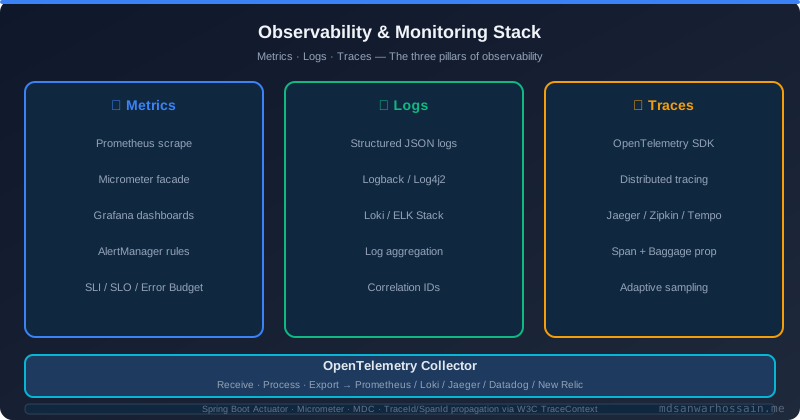
Table of Contents
1. The Alert Fatigue Epidemic
Consider a real scenario that plays out at dozens of engineering teams every year. A mid-size e-commerce platform has instrumented every component of their stack — CPU utilization, heap usage, database connection pool size, HTTP 5xx counts, queue depth, and a dozen others. They are proud of their observability maturity. On-call engineers receive roughly 400 pages per week. By the third month, the on-call rotation has become a grim ritual: most engineers silence their phones, triage alerts in the morning as a batch, and mentally filter out anything that resolves within ten minutes. Then one Friday evening, a subtle race condition in the checkout service causes a 0.3% error rate on payment confirmations. The alert fires. It is triaged alongside 60 others in the backlog. By Saturday morning, the team discovers that 12,000 orders failed silently. The business lost $340,000.
This is the broken model: threshold-based alerting on individual metrics. You set CPU > 80% as a trigger because you think high CPU is bad. But high CPU during a batch job is expected. High CPU during a traffic spike is expected. High CPU that persists for six hours during normal load is a problem. The metric alone does not carry enough context to tell you whether user experience is actually degraded. So engineers get paged for things that do not matter, while the things that do matter get buried in noise.
More monitoring does not solve alert fatigue — it amplifies it. Every new service you add, every new metric you instrument, every new threshold you configure, adds to the noise floor. The fundamental shift required is from metric-centric alerting to user-centric reliability targets. That is exactly what the SLO model provides: alert only when user happiness is at risk, and express that risk in quantitative budget terms that the entire organization can understand and act on.
2. SLOs, SLIs, SLAs — Getting the Definitions Right
These three acronyms are frequently conflated, but each plays a distinct role in the reliability model. Getting the definitions precise matters because your entire alerting and policy framework depends on the hierarchy being correct.
A Service Level Indicator (SLI) is the raw measurement — a quantitative measure of a specific aspect of the service behavior that correlates with user experience. Good SLIs capture whether users are successfully getting what they want from the system. Examples include: the ratio of HTTP 200 responses to total requests, the 99th-percentile latency of checkout completions, or the proportion of search queries returning results within 300ms.
A Service Level Objective (SLO) is the target value for an SLI over a measurement window. For example: "99.9% of HTTP requests must succeed over a rolling 28-day window" or "99th-percentile checkout latency must stay below 500ms for 95% of 5-minute intervals." The SLO represents the reliability bar that, if maintained, means users are sufficiently happy. It is set internally by the engineering and product teams together.
A Service Level Agreement (SLA) is the contractual commitment made to external customers, typically with financial penalties for breach. The critical engineering insight is that your SLO must always be stricter than your SLA — typically by one to two nines. If your SLA promises 99.9% availability and you set your SLO at 99.9%, you have zero engineering margin. A single bad deploy during a holiday weekend exhausts both simultaneously. Set your SLO at 99.95% so you have a detection buffer before the SLA breach.
The error budget is the arithmetic consequence of your SLO: it is the maximum allowable unreliability. A 99.9% monthly SLO means you can afford 0.1% of failed requests, which translates to roughly 43.8 minutes of complete downtime per month, or an equivalent quantity of partial degradation. The error budget is not a penalty — it is a resource that engineering teams spend intentionally to ship value. When the budget is healthy, ship faster. When it approaches zero, slow down and invest in reliability.
3. Defining Meaningful SLIs
The Google SRE book popularized the four golden signals as a starting framework: latency, traffic, errors, and saturation. For most web-facing services, availability and latency SLIs cover the majority of user experience signal. Saturation SLIs (queue depth, connection pool headroom) are better suited as leading indicators that inform capacity planning rather than direct SLO targets.
For an availability SLI, the standard formula is the ratio of successful requests to total requests. A request is "successful" if it returns an HTTP 2xx or 3xx status within an acceptable latency window. Requests that time out or return 5xx count as failures. Intentional 4xx client errors generally should not count against availability — the service behaved correctly by rejecting a bad request.
For a latency SLI, histogram quantiles are the right tool. Measuring average latency is deceptive because it masks the long tail. Use the 99th percentile to capture the worst experience for 1% of your users, or the 95th percentile for a slightly broader signal. Choose the percentile that matches the sensitivity of your user base and the nature of the workload.
The following Prometheus recording rules compute both SLIs efficiently. Recording rules pre-aggregate the math so that dashboard queries and alerting rules stay fast even at scale:
# Recording rules for SLI calculation
# File: slo_recording_rules.yml

groups:
  - name: slo_sli_rules
    interval: 30s
    rules:

      # Availability SLI: ratio of successful requests (5-minute window)
      - record: sli:http_availability:ratio_rate5m
        expr: |
          sum(rate(http_requests_total{status=~"2..|3.."}[5m]))
          /
          sum(rate(http_requests_total[5m]))

      # Availability SLI: rolling 1-hour window (for burn rate calc)
      - record: sli:http_availability:ratio_rate1h
        expr: |
          sum(rate(http_requests_total{status=~"2..|3.."}[1h]))
          /
          sum(rate(http_requests_total[1h]))

      # Availability SLI: rolling 6-hour window
      - record: sli:http_availability:ratio_rate6h
        expr: |
          sum(rate(http_requests_total{status=~"2..|3.."}[6h]))
          /
          sum(rate(http_requests_total[6h]))

      # Latency SLI: proportion of requests faster than 500ms
      - record: sli:http_latency_fast:ratio_rate5m
        expr: |
          sum(rate(http_request_duration_seconds_bucket{le="0.5"}[5m]))
          /
          sum(rate(http_request_duration_seconds_count[5m]))

      # p99 latency (for dashboard display only, not for SLO target)
      - record: sli:http_latency_p99:gauge5m
        expr: |
          histogram_quantile(0.99,
            sum by (le) (rate(http_request_duration_seconds_bucket[5m]))
          )
Choose between request-based and time-based measurement windows carefully. Request-based windows (as above) are more statistically meaningful because they account for traffic volume — a 2-minute degradation at midnight costs far fewer bad requests than a 2-minute degradation during peak hours. Time-based windows (e.g., "was the service up for this 5-minute interval?") are simpler to reason about but can be misleading for variable-traffic services.
4. Error Budget Calculation and Tracking
For a 99.9% availability SLO over a 28-day rolling window, the error budget is 0.1% of all requests. In time terms, that is 40.32 minutes of total downtime per 28 days (28 days × 24 hours × 60 minutes × 0.001). The rolling 28-day window is strongly preferred over a calendar month because it eliminates the "reset" behavior where teams spend the budget aggressively in the first week of the month knowing the clock resets on the 1st.
The most powerful alerting construct in the SRE model is the burn rate: how fast you are consuming error budget relative to the rate that would exhaust it exactly at the end of the window. A burn rate of 1.0 means you are consuming budget at exactly the sustainable rate. A burn rate of 2.0 means you will exhaust the budget in half the window. A burn rate of 14.4 means a 1-hour incident will consume 14.4/28-days worth of budget — about 12 hours of your monthly allowance.
# Error budget burn rate alerting — the Google multi-window approach
# Fires only when BOTH a fast window AND a slow window exceed the threshold
# This eliminates false positives from short transient spikes

groups:
  - name: error_budget_alerts
    rules:

      # Page: fast burn — consuming budget 14x faster than sustainable
      # 2% of monthly budget consumed in 1 hour = critical
      - alert: ErrorBudgetBurnRateCritical
        expr: |
          (
            (1 - sli:http_availability:ratio_rate1h) / (1 - 0.999) > 14.4
          )
          and
          (
            (1 - sli:http_availability:ratio_rate5m) / (1 - 0.999) > 14.4
          )
        for: 2m
        labels:
          severity: page
        annotations:
          summary: "Critical error budget burn rate on {{ $labels.service }}"
          description: |
            Burn rate {{ $value | humanize }}x. At this rate the monthly
            error budget will be exhausted in less than 1 hour.
            Immediate action required.

      # Ticket: slow burn — consuming 3x faster than sustainable
      # 10% of monthly budget consumed in 6 hours = warning
      - alert: ErrorBudgetBurnRateWarning
        expr: |
          (
            (1 - sli:http_availability:ratio_rate6h) / (1 - 0.999) > 3
          )
          and
          (
            (1 - sli:http_availability:ratio_rate1h) / (1 - 0.999) > 3
          )
        for: 15m
        labels:
          severity: ticket
        annotations:
          summary: "Elevated error budget burn rate on {{ $labels.service }}"
          description: |
            Burn rate {{ $value | humanize }}x over the past 6 hours.
            10% of monthly budget consumed. Schedule reliability work.

      # Budget remaining gauge (for dashboards)
      - record: slo:error_budget_remaining:ratio28d
        expr: |
          1 - (
            (1 - sli:http_availability:ratio_rate5m) / (1 - 0.999)
          ) / (28 * 24 * 60 / 5)
The multi-window approach is the key innovation here. Alerting on a single 5-minute window produces pages for transient spikes that self-heal. By requiring both a fast window (1h) and a slow window (5m) to exceed the threshold simultaneously, you guarantee that the degradation is real and sustained before waking anyone up. This single change typically reduces page volume by 60-70% while maintaining equivalent or better detection of genuine incidents.
5. Error Budget Policy — The Decision Framework
An error budget has no value without a policy that dictates behavior based on its state. The policy transforms the budget from a dashboard metric into an organizational decision framework. Without it, engineers track the budget but still deploy whenever product management asks them to. The policy gives engineering teams the authority to say no — backed by objective data rather than subjective risk assessment.
The four-tier framework used by mature SRE teams works as follows. When the error budget is above 50%, the service is healthy and the team has earned the right to ship features aggressively. Experiment with risky deploys, run chaos experiments, test new infrastructure configurations — now is the time to accept higher risk because you have the budget to absorb failures. When the budget is between 10% and 50%, the cadence shifts. Risky experiments pause. Reliability work gets one dedicated sprint per month. Deploy frequency may be modestly reduced. When the budget drops below 10%, a reliability sprint begins immediately. Feature work is paused except for critical business commitments already in flight. The team focuses exclusively on eliminating known reliability risks. When the budget is exhausted, a hard feature freeze takes effect. All deployments (excluding security hotfixes) require VP engineering approval. A post-mortem review is mandatory before the freeze lifts.
You can enforce the policy automatically in CI/CD by querying Prometheus from your deployment pipeline:
#!/bin/bash
# deploy-gate.sh — called as a pre-deploy CI/CD step
# Blocks deployment if error budget is critically low

PROM_URL="${PROMETHEUS_URL:-http://prometheus:9090}"
SLO_TARGET=0.999
SERVICE="${SERVICE_NAME:-api-gateway}"

# Query remaining error budget fraction over rolling 28d
BUDGET_REMAINING=$(curl -s "${PROM_URL}/api/v1/query" \
  --data-urlencode "query=slo:error_budget_remaining:ratio28d{service=\"${SERVICE}\"}" \
  | jq -r '.data.result[0].value[1]')

if [ -z "$BUDGET_REMAINING" ]; then
  echo "WARNING: Could not fetch error budget. Proceeding with deploy."
  exit 0
fi

BUDGET_PCT=$(echo "$BUDGET_REMAINING * 100" | bc -l | xargs printf "%.1f")
echo "Error budget remaining: ${BUDGET_PCT}%"

if (( $(echo "$BUDGET_REMAINING < 0.01" | bc -l) )); then
  echo "ERROR: Error budget exhausted. Deployment blocked."
  echo "Open a post-mortem and obtain VP engineering approval."
  exit 1
elif (( $(echo "$BUDGET_REMAINING < 0.10" | bc -l) )); then
  echo "WARNING: Error budget below 10%. Flagging for reliability review."
  echo "Deploy proceeds but team lead approval required."
  # Optionally post to Slack, open a JIRA ticket, etc.
fi

echo "Deploy gate passed."
exit 0
6. Building Error Budget Dashboards
A well-structured Grafana error budget dashboard has three rows. The top row contains three stat panels showing current SLI value versus target, the remaining error budget as a percentage, and the current burn rate. These three numbers tell you the full story at a glance. The middle row contains a time-series graph of burn rate over 28 days — you can immediately see the shape of incidents and how budget was consumed over time. The bottom row contains a table of SLO compliance by endpoint or customer tier, helping the team prioritize which degradations matter most.
The most important Grafana panel configuration tip: color-threshold the burn rate panel with green for <1, yellow for 1–3, orange for 3–10, and red for >10. This creates an immediate visual signal that matches your alert severity tiers, so the dashboard reinforces the same mental model as the alerting rules.
# Grafana panel queries for error budget dashboard

# Panel 1: Current SLI (last 5 minutes)
# Query: sli:http_availability:ratio_rate5m
# Unit: percentunit | Threshold: 0.999 (green above, red below)

# Panel 2: Error budget remaining (%)
# Query:
(1 - (
  sum_over_time((1 - sli:http_availability:ratio_rate5m)[28d:5m])
  /
  (28 * 24 * 60 / 5)
) / (1 - 0.999)) * 100
# Unit: percent | Thresholds: red=0, orange=10, yellow=25, green=50

# Panel 3: Current burn rate (1h window)
# Query:
(1 - sli:http_availability:ratio_rate1h) / (1 - 0.999)
# Unit: short (multiplier) | Thresholds: green=0, yellow=1, orange=3, red=14.4

# Panel 4: Burn rate trend (28d time series)
# Query A — fast burn rate (1h):
(1 - sli:http_availability:ratio_rate1h) / (1 - 0.999)
# Query B — slow burn rate (6h):
(1 - sli:http_availability:ratio_rate6h) / (1 - 0.999)
# Add a horizontal reference line at y=1 (sustainable rate)
# Add a horizontal reference line at y=14.4 (critical threshold)
Alert on burn rate, not on threshold breaches. This is the conceptual shift that makes error budget dashboards actionable rather than decorative. An alert that says "HTTP error rate is 0.5% — page on-call" gives the engineer no context about severity. An alert that says "Burn rate is 14.4x — at this rate the monthly error budget exhausts in 47 minutes" tells the engineer exactly what is at stake and how urgently to respond.
7. Production Failure Scenarios
Scenario 1 — Deploying into a low error budget: A team has consumed 85% of their monthly error budget by the 20th of the month due to a flaky database migration earlier in the period. On the 21st, product management requests a deploy for a high-priority feature. Without an error budget policy, this deploy happens. The feature includes a subtle memory leak that causes intermittent OOM restarts in the API tier. This burns the remaining 15% of budget in six hours and triggers an SLA breach. With a proper error budget policy and CI/CD gate, the deploy would have been blocked automatically on the 20th when budget dropped below 15%, and the team would have invested the remaining days in the month stabilizing the memory issue in staging before deploying.
Scenario 2 — The SLO inheritance problem: Your service has a 99.9% availability SLO. Your critical upstream dependency (a payment gateway) has a 99.5% availability SLO in their contract with you. Mathematically, if you depend on a service that is down 0.5% of the time, your own maximum achievable availability is 99.5% — which already violates your 99.9% target. This is the SLO inheritance trap. When you define SLOs for services with external dependencies, you must either negotiate tighter upstream SLAs, add resilience patterns (circuit breakers, caching, fallback modes) that reduce dependency on uptime, or adjust your own SLO to reflect the mathematical ceiling imposed by your dependency chain.
Handling planned maintenance: Scheduled downtime for maintenance windows should not count against your error budget if users were notified in advance. The standard approach is to annotate your Grafana dashboards with maintenance windows and use Prometheus alertmanager silences to suppress burn rate alerts during the window. Some teams exclude maintenance windows from SLO compliance calculations entirely via recording rule exclusion filters on time ranges. Be cautious with this approach — it can become a way to artificially inflate SLO compliance numbers if abused.
8. Key Takeaways
- Alert on burn rate, not thresholds. Multi-window burn rate alerts (fast + slow window both exceeded) dramatically reduce false positives while maintaining incident detection fidelity.
- Set your SLO stricter than your SLA by one to two nines to preserve engineering margin and prevent simultaneous SLO/SLA breaches during a single incident.
- Use rolling 28-day windows rather than calendar months to eliminate the budget reset behavior that incentivizes reckless deploys at the start of each month.
- Codify the error budget policy in writing, get leadership buy-in, and automate it in CI/CD gates — otherwise it is just a dashboard metric that nobody acts on.
- Audit your SLO inheritance chain. Every external dependency with a looser SLO than yours is a reliability ceiling. Design for graceful degradation or negotiate better upstream contracts.
- Error budgets create alignment between product and engineering. When the budget is healthy, product gets faster feature velocity. When it is low, engineering gets the mandate to fix reliability. Both sides benefit from the same data-driven system.
9. Conclusion
Alert fatigue is not an operations problem — it is an architecture problem. When your reliability model is built on threshold-based metric alerts, every new component you add creates new alert noise. The SLO and error budget model inverts this: you define what good looks like for users, measure deviation from that bar, and alert only when the deviation is large enough and fast enough to exhaust your budget within a meaningful time horizon. Everything else is noise you do not need to page for.
The technical implementation — PromQL recording rules, multi-window burn rate alerts, Grafana dashboards, and CI/CD deploy gates — is the straightforward part. The harder part is the organizational change: convincing product managers that a feature freeze is the rational choice when error budget is exhausted, building the political will to enforce the policy when a high-stakes release is queued, and cultivating the discipline to actually invest reliability sprint time in systemic fixes rather than quick patches. Teams that master both dimensions find that their on-call rotation becomes sustainable, their incidents become less frequent, and their engineers stop dreading the rotation and start treating it as a normal part of delivering a quality product.
Leave a Comment
Related Posts

Software Engineer · Java · Spring Boot · Microservices