Spring Batch for Large-Scale Data Processing in Java — Production Guide 2026
Processing tens of millions of records reliably, efficiently, and restartably is one of the hardest challenges in backend engineering. Spring Batch is the battle-tested answer for Java teams: a lightweight, chunk-oriented framework built on Spring Boot that handles partitioning, fault tolerance, retry, skip, and job restart out of the box. This guide covers everything from first job to 50M-record production deployments.
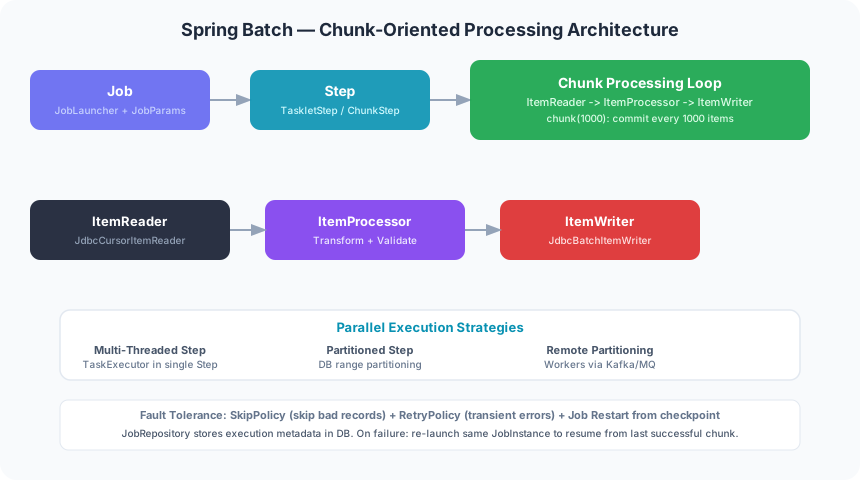
TL;DR — Spring Batch in One Paragraph
"Spring Batch provides a Job → Step → Chunk (Reader → Processor → Writer) execution model with a built-in JobRepository for checkpoint/restart. Use chunk size 500–1000, enable skip & retry policies for fault tolerance, leverage partitioned steps to parallelize across ID ranges, and always back your JobRepository with a real database in production. With these patterns, teams routinely achieve 10M+ records/hour throughput on standard hardware."
Table of Contents
- Why Spring Batch? The 10M Records/Hour Problem
- Core Architecture: Job, Step & Chunk
- Your First Spring Batch Job — Configuration
- ItemReader, ItemProcessor, ItemWriter Deep Dive
- Parallel Processing: Multi-Threaded Steps & Partitioning
- Fault Tolerance: Skip, Retry & Restart
- Scaling to Millions: Remote Partitioning & Async Processor
- Real-World Example: 50M Bank Transactions Daily
- Common Mistakes & Performance Anti-Patterns
- Spring Batch vs Alternatives
- Monitoring & Production Best Practices
- Conclusion & Best Practices Checklist
- FAQ
1. Why Spring Batch? The 10M Records/Hour Problem
Every enterprise Java team eventually faces the same problem: you need to process a massive dataset — millions of rows from a database, lines from a CSV file, or messages from a queue — in a reliable, auditable, and restartable way. The naive approach, a simple for loop over a ResultSet, collapses under real conditions.
Why Not Just Use Threads?
Raw Java threads solve the concurrency problem but ignore everything else that batch processing demands in production:
- No checkpoint/restart: If the process crashes after processing record 4,200,000, you have no way to resume from that point without reprocessing everything.
- No skip/retry semantics: One bad record in 50M causes the entire job to fail or silently discard data.
- No audit trail: You cannot answer "when did this job run, how many records were processed, and did it succeed?" — critical for compliance.
- No backpressure: Unthrottled thread pools overwhelm the database connection pool, causing cascading failures.
- No idempotency: Re-running after a partial failure leads to duplicate writes and data corruption.
Spring Batch ETL Use Cases
Spring Batch was specifically designed for high-volume, enterprise-grade batch processing. Typical production use cases include:
- Nightly ETL from OLTP databases to data warehouses (millions of records)
- End-of-day financial settlement and transaction reconciliation
- Bulk data migration between systems during upgrades
- Generating millions of PDF statements or invoices
- Applying interest, fees, or penalties across all customer accounts
- Processing insurance claims, payroll, or benefits calculation in batch windows
- Data cleansing and standardization pipelines feeding ML feature stores
The 10M records/hour benchmark is achievable out-of-the-box with Spring Batch 5 on commodity hardware when chunk processing, JDBC batch writes, and multi-threaded steps are configured correctly. With partitioning across multiple nodes, 100M+ records/hour is realistic.
2. Core Architecture: Job, Step & Chunk
Understanding the execution hierarchy is the foundation for everything else. Spring Batch has a clean, layered model:
Job
A Job is the top-level unit of work. It is a named, ordered sequence of Steps. Each Job execution is tracked in the BATCH_JOB_EXECUTION table with start time, end time, exit status, and parameters. A Job is identified by its name + JobParameters (e.g., date=2026-04-11). Two executions with different parameters are independent — this is how idempotent daily jobs work.
Step
A Step is an independent phase within a Job. Steps can run sequentially, conditionally (based on previous step exit status), or in parallel. Each Step has its own execution context stored in BATCH_STEP_EXECUTION, enabling per-step restart. Steps are either Tasklet steps (arbitrary code, e.g., file cleanup) or Chunk-oriented steps (the primary processing model).
Chunk-Oriented Processing
The heart of Spring Batch. The framework reads N items one-at-a-time via an ItemReader, passes each item through an optional ItemProcessor for transformation/filtering, accumulates the results in a list, then calls the ItemWriter with the entire list as a single transaction. Each chunk-write is wrapped in a database transaction. If the writer fails, only the current chunk is rolled back — not the entire job. This is the checkpoint mechanism.
The JobRepository: Your Source of Truth
The JobRepository persists all metadata — job executions, step executions, execution contexts — to a relational database (MySQL, PostgreSQL, Oracle). Spring Batch ships DDL scripts for all major databases. In production, always use a dedicated schema backed by a persistent RDBMS. Using the in-memory MapJobRepository (removed in Spring Batch 5) or H2 means losing all state on restart — defeating the entire point.
Execution Flow Diagram
JobLauncher
    └── Job (name="transactionProcessingJob", params={date=2026-04-11})
         ├── Step 1: "validateInputStep"   [Tasklet]
         ├── Step 2: "processTransactionsStep" [Chunk: size=1000]
         │     ├── ItemReader  (JdbcPagingItemReader  → reads 1000 rows/page)
         │     ├── ItemProcessor (TransactionEnricher → transforms/validates)
         │     └── ItemWriter  (JdbcBatchItemWriter   → batch INSERT/UPDATE)
         │           commit → BATCH_STEP_EXECUTION.COMMIT_COUNT++
         └── Step 3: "generateReportStep"  [Tasklet]

JobRepository (PostgreSQL)
  BATCH_JOB_INSTANCE      → job name + parameters hash
  BATCH_JOB_EXECUTION     → status, start/end time, exit code
  BATCH_STEP_EXECUTION    → per-step metrics (read/write/skip counts)
  BATCH_JOB_EXECUTION_CONTEXT  → serialized checkpoints for restart
3. Your First Spring Batch Job — Configuration
Spring Batch 5 with Spring Boot 3 dramatically simplified configuration. The old @EnableBatchProcessing is now optional — auto-configuration handles the JobRepository, JobLauncher, and PlatformTransactionManager beans automatically when you add the spring-batch-core dependency.
❌ Bad: Single-Threaded Sequential Processing of 10M Records
// ❌ Bad: naive sequential processing — crashes on bad data,
//         no restart, holds a full ResultSet in memory, no audit trail.
@Service
public class BadTransactionProcessor {

    @Autowired
    private JdbcTemplate jdbcTemplate;

    public void processAll() {
        // Loads ALL rows into memory — OutOfMemoryError at scale
        List<Transaction> all = jdbcTemplate.query(
            "SELECT * FROM transactions WHERE processed = false",
            new TransactionRowMapper()
        );

        for (Transaction tx : all) {
            // Any exception here kills the entire run with NO checkpoint
            enrichAndUpdate(tx);
        }
        // No audit trail, no retry, no skip, no parallel execution
    }
}
✅ Good: Chunk-Based Processing with Spring Batch 5
// ✅ Good: chunk-based, transactional, restartable, audited
@Configuration
public class TransactionJobConfig {

    // Spring Boot 3 auto-configures JobRepository, JobLauncher,
    // and TransactionManager — no @EnableBatchProcessing needed.

    @Bean
    public Job transactionProcessingJob(JobRepository jobRepository,
                                        Step processTransactionsStep) {
        return new JobBuilder("transactionProcessingJob", jobRepository)
                .start(processTransactionsStep)
                .build();
    }

    @Bean
    public Step processTransactionsStep(JobRepository jobRepository,
                                        PlatformTransactionManager txManager,
                                        ItemReader<Transaction> reader,
                                        ItemProcessor<Transaction, EnrichedTransaction> processor,
                                        ItemWriter<EnrichedTransaction> writer) {
        return new StepBuilder("processTransactionsStep", jobRepository)
                .<Transaction, EnrichedTransaction>chunk(1000, txManager)
                // Reads 1000 items; calls processor per item; calls writer
                // with a List<EnrichedTransaction> of 1000 in ONE transaction.
                .reader(reader)
                .processor(processor)
                .writer(writer)
                .faultTolerant()
                .skipLimit(500)
                .skip(MalformedDataException.class)
                .retryLimit(3)
                .retry(TransientDataAccessException.class)
                .build();
    }
}
Maven Dependencies (Spring Boot 3 / Spring Batch 5)
<dependency>
    <groupId>org.springframework.boot</groupId>
    <artifactId>spring-boot-starter-batch</artifactId>
</dependency>
<dependency>
    <groupId>org.springframework.boot</groupId>
    <artifactId>spring-boot-starter-jdbc</artifactId>
</dependency>
<dependency>
    <groupId>org.postgresql</groupId>
    <artifactId>postgresql</artifactId>
    <scope>runtime</scope>
</dependency>

# application.yml
spring:
  batch:
    job:
      enabled: false          # Don't auto-run on startup; launch via API/scheduler
    jdbc:
      initialize-schema: always  # Creates BATCH_* tables automatically
4. ItemReader, ItemProcessor, ItemWriter Deep Dive
Choosing the right reader and writer implementation is the single biggest performance lever in Spring Batch. The wrong choice can reduce throughput by 10×.
ItemReader: Cursor vs Paging
Spring Batch ships two primary JDBC readers. Choosing correctly matters enormously:
| Reader | Mechanism | Pros | Cons |
|---|---|---|---|
| JdbcCursorItemReader | Holds a single open JDBC ResultSet cursor | Fastest; single DB round-trip; low memory per row | Not thread-safe; holds DB connection for full job duration; cursor timeout risk on large datasets |
| JdbcPagingItemReader | Issues paginated SELECT queries (LIMIT/OFFSET or key-based) | Thread-safe; releases connection between pages; restartable at page boundary | More DB round-trips; OFFSET-based pagination degrades on deep pages (use key-based pagination instead) |
| FlatFileItemReader | Reads CSV/fixed-width files line by line | Very fast for file ingestion; restartable via line count | Not thread-safe; must use SynchronizedItemStreamReader wrapper for multi-threaded steps |
| JpaPagingItemReader | JPQL-based paginated reader via EntityManager | Works with JPA entities; familiar to ORM teams | Significantly slower than JDBC due to entity materialization; avoid for high-volume reads |
JdbcPagingItemReader with Key-Based Pagination
@Bean
@StepScope
public JdbcPagingItemReader<Transaction> transactionReader(
        DataSource dataSource,
        @Value("#{jobParameters['processingDate']}") String processingDate) {

    SqlPagingQueryProviderFactoryBean queryProvider =
            new SqlPagingQueryProviderFactoryBean();
    queryProvider.setDataSource(dataSource);
    queryProvider.setSelectClause("SELECT id, account_id, amount, status, created_at");
    queryProvider.setFromClause("FROM transactions");
    queryProvider.setWhereClause("WHERE DATE(created_at) = :processingDate AND processed = false");
    queryProvider.setSortKey("id"); // Key-based pagination — O(1) regardless of depth

    Map<String, Order> sortKeys = new LinkedHashMap<>();
    sortKeys.put("id", Order.ASCENDING);
    queryProvider.setSortKeys(sortKeys);

    JdbcPagingItemReader<Transaction> reader = new JdbcPagingItemReader<>();
    reader.setDataSource(dataSource);
    reader.setPageSize(1000); // Must match chunk size for optimal performance
    reader.setQueryProvider(queryProvider.getObject());
    reader.setRowMapper(new TransactionRowMapper());
    reader.setParameterValues(Map.of("processingDate", processingDate));
    return reader;
}
✅ Good: Custom ItemProcessor with Business Logic
// ✅ Good: ItemProcessor handles enrichment, validation, and filtering cleanly.
//         Returning null filters the item out (it won't be passed to the writer).
@Component
public class TransactionEnrichmentProcessor
        implements ItemProcessor<Transaction, EnrichedTransaction> {

    private final ExchangeRateService fxService;
    private final FraudDetectionService fraudService;

    public TransactionEnrichmentProcessor(ExchangeRateService fxService,
                                          FraudDetectionService fraudService) {
        this.fxService = fxService;
        this.fraudService = fraudService;
    }

    @Override
    public EnrichedTransaction process(Transaction tx) throws Exception {
        // Return null to SKIP this item — it won't reach the writer
        if (fraudService.isFraudulent(tx)) {
            log.warn("Skipping fraudulent transaction id={}", tx.getId());
            return null;
        }

        BigDecimal usdAmount = fxService.convertToUsd(tx.getAmount(), tx.getCurrency());

        return EnrichedTransaction.builder()
                .id(tx.getId())
                .accountId(tx.getAccountId())
                .originalAmount(tx.getAmount())
                .usdAmount(usdAmount)
                .category(categorize(tx))
                .enrichedAt(Instant.now())
                .build();
    }

    private String categorize(Transaction tx) {
        if (tx.getAmount().compareTo(BigDecimal.valueOf(10_000)) > 0) return "LARGE";
        if (tx.getMerchantCode().startsWith("5411")) return "GROCERY";
        return "GENERAL";
    }
}
JdbcBatchItemWriter for High-Throughput Writes
@Bean
public JdbcBatchItemWriter<EnrichedTransaction> enrichedTransactionWriter(DataSource ds) {
    // JdbcBatchItemWriter uses JDBC batch updates — sends all chunk items
    // in a single round-trip to the DB. This is 10-50x faster than
    // individual INSERT statements in a loop.
    return new JdbcBatchItemWriterBuilder<EnrichedTransaction>()
            .dataSource(ds)
            .sql("""
                INSERT INTO enriched_transactions
                    (id, account_id, original_amount, usd_amount, category, enriched_at)
                VALUES
                    (:id, :accountId, :originalAmount, :usdAmount, :category, :enrichedAt)
                ON CONFLICT (id) DO UPDATE
                    SET usd_amount   = EXCLUDED.usd_amount,
                        category     = EXCLUDED.category,
                        enriched_at  = EXCLUDED.enriched_at
                """)
            .beanMapped()  // Maps EnrichedTransaction fields to :namedParams
            .assertUpdates(false) // Allow upserts without throwing on 0-row updates
            .build();
}
5. Parallel Processing: Multi-Threaded Steps & Partitioning
Single-threaded chunk processing is powerful, but to hit 10M+ records/hour you need parallelism. Spring Batch offers two complementary strategies:
Strategy 1 — Multi-Threaded Step
Attach a TaskExecutor to the step so multiple threads process chunks concurrently. Simple to configure — but your ItemReader must be thread-safe (use JdbcPagingItemReader, never JdbcCursorItemReader without synchronization).
@Bean
public Step multiThreadedStep(JobRepository jobRepository,
                              PlatformTransactionManager txManager,
                              ItemReader<Transaction> reader,
                              ItemProcessor<Transaction, EnrichedTransaction> processor,
                              ItemWriter<EnrichedTransaction> writer) {
    ThreadPoolTaskExecutor executor = new ThreadPoolTaskExecutor();
    executor.setCorePoolSize(8);
    executor.setMaxPoolSize(16);
    executor.setQueueCapacity(0);       // Reject policy: caller runs
    executor.setThreadNamePrefix("batch-worker-");
    executor.initialize();

    return new StepBuilder("multiThreadedStep", jobRepository)
            .<Transaction, EnrichedTransaction>chunk(1000, txManager)
            .reader(reader)
            .processor(processor)
            .writer(writer)
            .taskExecutor(executor)     // 8-16 concurrent chunk threads
            .throttleLimit(8)           // Max concurrent chunk reads
            .build();
}
✅ Good: Strategy 2 — Partitioned Step with Database Range Partitioning
Partitioning divides the data into independent ranges (e.g., ID 1–1M, 1M–2M, …) and runs each partition as a separate StepExecution with its own reader/writer context. This is the recommended approach for truly large datasets because each partition can be restarted individually on failure.
// ✅ Good: Partitioned step — each partition processes an independent ID range.
//         Restartable at partition granularity, highly scalable.

// 1. Partitioner: divides data space into N slices
@Component
public class TransactionRangePartitioner implements Partitioner {

    private final JdbcTemplate jdbcTemplate;

    public TransactionRangePartitioner(JdbcTemplate jdbcTemplate) {
        this.jdbcTemplate = jdbcTemplate;
    }

    @Override
    public Map<String, ExecutionContext> partition(int gridSize) {
        // Find min/max primary key to partition by ID range
        Long minId = jdbcTemplate.queryForObject(
            "SELECT MIN(id) FROM transactions WHERE processed = false", Long.class);
        Long maxId = jdbcTemplate.queryForObject(
            "SELECT MAX(id) FROM transactions WHERE processed = false", Long.class);

        if (minId == null || maxId == null) return Map.of();

        long rangeSize = (maxId - minId) / gridSize + 1;
        Map<String, ExecutionContext> partitions = new LinkedHashMap<>();

        for (int i = 0; i < gridSize; i++) {
            long start = minId + (long) i * rangeSize;
            long end   = (i == gridSize - 1) ? maxId : start + rangeSize - 1;

            ExecutionContext ctx = new ExecutionContext();
            ctx.putLong("minId", start);
            ctx.putLong("maxId", end);
            partitions.put("partition-" + i, ctx);
        }
        return partitions;
    }
}

// 2. @StepScope reader that reads from its partition's range
@Bean
@StepScope
public JdbcPagingItemReader<Transaction> partitionedReader(
        DataSource dataSource,
        @Value("#{stepExecutionContext['minId']}") Long minId,
        @Value("#{stepExecutionContext['maxId']}") Long maxId) {

    // Each partition worker reads ONLY its ID range
    SqlPagingQueryProviderFactoryBean qp = new SqlPagingQueryProviderFactoryBean();
    qp.setDataSource(dataSource);
    qp.setSelectClause("SELECT *");
    qp.setFromClause("FROM transactions");
    qp.setWhereClause("WHERE id BETWEEN :minId AND :maxId AND processed = false");
    qp.setSortKey("id");

    JdbcPagingItemReader<Transaction> reader = new JdbcPagingItemReader<>();
    reader.setDataSource(dataSource);
    reader.setPageSize(1000);
    reader.setQueryProvider(qp.getObject());
    reader.setRowMapper(new TransactionRowMapper());
    reader.setParameterValues(Map.of("minId", minId, "maxId", maxId));
    return reader;
}

// 3. Wire up the partitioned master step
@Bean
public Step partitionedMasterStep(JobRepository jobRepository,
                                  Step workerStep,
                                  TransactionRangePartitioner partitioner) {
    ThreadPoolTaskExecutor executor = new ThreadPoolTaskExecutor();
    executor.setCorePoolSize(10);
    executor.initialize();

    return new StepBuilder("partitionedMasterStep", jobRepository)
            .partitioner("workerStep", partitioner)
            .step(workerStep)
            .gridSize(10)           // 10 parallel partitions
            .taskExecutor(executor)
            .build();
}
6. Fault Tolerance: Skip, Retry & Restart
Production data is never clean. A single malformed record in 50M should not abort the entire job. Spring Batch's fault tolerance features handle this with surgical precision.
❌ Bad: No Retry/Skip Policy — Crashes on Bad Record
// ❌ Bad: no fault tolerance — ANY exception kills the entire job.
//         Processing 49,999,999 records only to fail on the last one
//         is a common production nightmare without skip/retry.
@Bean
public Step fragileStep(JobRepository jobRepository,
                        PlatformTransactionManager txManager,
                        ItemReader<Transaction> reader,
                        ItemWriter<Transaction> writer) {
    return new StepBuilder("fragileStep", jobRepository)
            .<Transaction, Transaction>chunk(1000, txManager)
            .reader(reader)
            .writer(writer)
            // No .faultTolerant() — any runtime exception = job FAILED
            .build();
}
✅ Good: Full Skip/Retry Configuration
// ✅ Good: fault-tolerant step with skip policy, retry, and skip listener.
@Bean
public Step faultTolerantStep(JobRepository jobRepository,
                               PlatformTransactionManager txManager,
                               ItemReader<Transaction> reader,
                               ItemProcessor<Transaction, EnrichedTransaction> processor,
                               ItemWriter<EnrichedTransaction> writer,
                               SkipListener<Transaction, EnrichedTransaction> skipListener) {
    return new StepBuilder("faultTolerantStep", jobRepository)
            .<Transaction, EnrichedTransaction>chunk(1000, txManager)
            .reader(reader)
            .processor(processor)
            .writer(writer)
            .faultTolerant()
            // SKIP POLICY: skip bad records, up to 500 total skips
            .skipPolicy(new CompositeSkipPolicy(List.of(
                new LimitCheckingItemSkipPolicy(500, Map.of(
                    MalformedDataException.class,   true,  // always skip
                    ValidationException.class,      true,  // always skip
                    DataIntegrityViolationException.class, true
                ))
            )))
            // RETRY POLICY: retry transient errors up to 3 times with backoff
            .retryLimit(3)
            .retry(TransientDataAccessException.class)
            .retry(DeadlockLoserDataAccessException.class)
            .backOffPolicy(retryBackOffPolicy())
            // LISTENER: log every skipped item for audit
            .listener(skipListener)
            .build();
}

@Bean
public BackOffPolicy retryBackOffPolicy() {
    ExponentialBackOffPolicy backOff = new ExponentialBackOffPolicy();
    backOff.setInitialInterval(200L);   // Start: 200ms
    backOff.setMultiplier(2.0);         // Double each attempt
    backOff.setMaxInterval(5000L);      // Cap at 5s
    return backOff;
}

// Custom SkipPolicy for fine-grained per-exception decisions
public class BusinessSkipPolicy implements SkipPolicy {

    @Override
    public boolean shouldSkip(Throwable t, long skipCount) throws SkipLimitExceededException {
        if (skipCount > 500) {
            throw new SkipLimitExceededException(500, t); // Abort if too many skips
        }
        // Skip validation errors; do NOT skip system/infrastructure errors
        return t instanceof MalformedDataException
            || t instanceof ValidationException
            || t instanceof DataIntegrityViolationException;
    }
}

// SkipListener logs every skipped item to a dead-letter table
@Component
public class TransactionSkipListener
        implements SkipListener<Transaction, EnrichedTransaction> {

    private final DeadLetterRepository dlr;

    @Override
    public void onSkipInProcess(Transaction item, Throwable t) {
        log.warn("Skipped item id={} reason={}", item.getId(), t.getMessage());
        dlr.save(DeadLetterEntry.fromTransaction(item, t));
    }

    @Override
    public void onSkipInWrite(EnrichedTransaction item, Throwable t) {
        log.error("Write skipped for id={}: {}", item.getId(), t.getMessage());
        dlr.save(DeadLetterEntry.fromEnriched(item, t));
    }

    @Override
    public void onSkipInRead(Throwable t) {
        log.error("Read skip: {}", t.getMessage());
    }
}
Job Restart from Last Checkpoint
Spring Batch's restart capability is automatic — provided you use a persistent JobRepository and pass the same JobParameters. The framework reads the last committed chunk offset from BATCH_STEP_EXECUTION_CONTEXT and resumes from there. For JdbcPagingItemReader, the restart context stores the last page key; for FlatFileItemReader, it stores the last processed line number.
// Trigger a restart via JobLauncher — Spring Batch detects the FAILED
// execution and resumes from the last checkpoint automatically.
@Service
public class BatchJobService {

    private final JobLauncher jobLauncher;
    private final Job transactionProcessingJob;
    private final JobExplorer jobExplorer;

    public void launchOrRestart(LocalDate date) throws Exception {
        JobParameters params = new JobParametersBuilder()
                .addLocalDate("processingDate", date)
                .toJobParameters();

        // Spring Batch checks: is there a FAILED execution for these params?
        // YES → restart from checkpoint. NO → start fresh.
        JobExecution execution = jobLauncher.run(transactionProcessingJob, params);
        log.info("Job status: {}, exit: {}",
                execution.getStatus(), execution.getExitStatus().getExitCode());
    }
}
7. Scaling to Millions: Remote Partitioning & Async ItemProcessor
Remote Partitioning with Spring Cloud Task
Local thread pools are limited by the JVM heap and the number of CPU cores on a single node. For truly massive workloads (100M+ records), Spring Batch supports remote partitioning: the manager node distributes partition assignments to worker nodes via a message broker (RabbitMQ, Kafka, or SQS). Each worker runs independently and reports completion back to the manager.
- Manager node: Runs the Partitioner, sends partition contexts as messages, waits for replies.
- Worker nodes: Receive partition context, run the worker Step, send completion reply.
- Message broker: Decouples manager and workers; enables dynamic scaling via Kubernetes HPA.
- Fault isolation: A crashed worker is restarted independently; the manager detects timeout and reassigns the partition.
Async ItemProcessor for I/O-Bound Enrichment
When your ItemProcessor makes external calls (REST APIs, external databases, ML scoring endpoints), the thread spends most of its time waiting for I/O. The AsyncItemProcessor wraps your processor to return a Future, allowing multiple items to be in-flight simultaneously without additional thread pool configuration.
// AsyncItemProcessor: submit each item to a thread pool asynchronously;
// AsyncItemWriter: resolves all Futures before writing the chunk.
@Bean
public AsyncItemProcessor<Transaction, EnrichedTransaction> asyncProcessor(
        TransactionEnrichmentProcessor delegate) {
    AsyncItemProcessor<Transaction, EnrichedTransaction> asyncProcessor =
            new AsyncItemProcessor<>();
    asyncProcessor.setDelegate(delegate);

    ThreadPoolTaskExecutor executor = new ThreadPoolTaskExecutor();
    executor.setCorePoolSize(20);    // 20 concurrent enrichment calls
    executor.setMaxPoolSize(50);
    executor.initialize();
    asyncProcessor.setTaskExecutor(executor);
    return asyncProcessor;
}

@Bean
public AsyncItemWriter<EnrichedTransaction> asyncWriter(
        JdbcBatchItemWriter<EnrichedTransaction> delegate) {
    AsyncItemWriter<EnrichedTransaction> asyncWriter = new AsyncItemWriter<>();
    asyncWriter.setDelegate(delegate);
    return asyncWriter;
}

// Wire both into the step
@Bean
public Step asyncProcessorStep(JobRepository jobRepository,
                                PlatformTransactionManager txManager,
                                JdbcPagingItemReader<Transaction> reader,
                                AsyncItemProcessor<Transaction, EnrichedTransaction> asyncProcessor,
                                AsyncItemWriter<EnrichedTransaction> asyncWriter) {
    return new StepBuilder("asyncProcessorStep", jobRepository)
            // Type parameters use Future<EnrichedTransaction> between processor and writer
            .<Transaction, Future<EnrichedTransaction>>chunk(1000, txManager)
            .reader(reader)
            .processor(asyncProcessor)
            .writer(asyncWriter)
            .build();
}
8. Real-World Example: Processing 50M Bank Transactions Daily
This section walks through the architecture of a production nightly batch job at a mid-size fintech processing 50 million transactions per day in a 4-hour processing window (midnight to 4 AM).
System Constraints & Goals
- Volume: ~50M transactions/day, averaging 3.5 KB each in the source table
- Window: 4-hour batch window; target throughput ≥ 3.5M records/hour
- Reliability: Zero data loss; skip fraudulent/malformed records to dead-letter table
- Auditability: Regulators require per-job execution logs with read/write/skip counts
- Restart: Any failure must be resumable without reprocessing already-committed records
Architecture Overview
nightly-batch-service (Spring Boot 3 app on 4×c5.2xlarge EC2)
│
├── Job: "dailyTransactionEnrichmentJob"  [date=2026-04-11]
│    │
│    ├── Step 1: "validateInputStep"  [Tasklet]
│    │    └── Checks source table is populated; fails fast if 0 rows
│    │
│    ├── Step 2: "partitionedEnrichStep"  [PartitionedStep, gridSize=40]
│    │    ├── Partitioner: splits transactions into 40 ID ranges
│    │    │    (each range ≈ 1.25M rows)
│    │    └── Worker step (×40 parallel):
│    │         ├── JdbcPagingItemReader  (pageSize=1000, key-based)
│    │         ├── AsyncItemProcessor    (20 threads, FX + category enrichment)
│    │         └── JdbcBatchItemWriter   (JDBC batch upsert, 1000/batch)
│    │
│    └── Step 3: "generateSettlementReportStep"  [Tasklet]
│         └── Aggregates enriched records; writes to settlement_report table
│
├── JobRepository: PostgreSQL (dedicated schema, connection pool: 60)
├── Dead-letter table: skipped_transactions (audited)
└── Metrics: Micrometer → Prometheus → Grafana dashboard

Result: 50M records in ~3h 40min = 13.6M records/hour across 4 nodes
Key Performance Numbers
9. Common Mistakes & Performance Anti-Patterns
Using JPA/Hibernate for Batch Reads
JpaPagingItemReader materializes every row as a managed entity, causing the first-level cache to grow unboundedly. At 10M records, the heap fills with managed objects, triggering constant GC. Use JdbcPagingItemReader instead — it's 5–15× faster for bulk reads.
In-Memory JobRepository in Production
Spring Batch 5 removed the in-memory MapJobRepository. Teams sometimes connect a throwaway H2 database — all state is lost on restart. Always configure a persistent RDBMS for the JobRepository; restart capability is worthless otherwise.
Chunk Size Too Small or Too Large
Chunk size of 1 = 1 transaction per DB commit = catastrophic overhead. Chunk size of 100,000 = enormous transaction rollback cost if one item fails + large memory footprint. Sweet spot: 500–2,000. Always benchmark with production-like data.
Not Setting @StepScope on Readers
Without @StepScope, a partitioned step will share a single reader instance across all partitions — all reading the same data range. Always annotate ItemReader beans that use stepExecutionContext values with @StepScope.
Offset-Based Pagination on Deep Pages
OFFSET N on a table with 50M rows requires the DB to scan and discard N rows. At page 50,000, this takes seconds per query. Use key-based (cursor-based) pagination: WHERE id > :lastId ORDER BY id LIMIT :pageSize. Performance is O(1) regardless of page depth.
Running Jobs on App Startup in Production
spring.batch.job.enabled=true (the default) auto-runs all jobs on application startup. In a clustered deployment, every pod launch triggers the job simultaneously. Always set enabled=false and launch via a scheduled trigger or CI/CD pipeline with ShedLock.
10. Spring Batch vs Alternatives
Spring Batch is not always the right tool. Here is an honest comparison to help you choose:
| Tool | Best For | Strengths | Weaknesses | Throughput |
|---|---|---|---|---|
| Spring Batch | Bounded ETL, DB-centric, compliance | Restart/skip/retry, audit trail, Spring ecosystem, JDBC optimization | Not for streaming; single JVM without remote partitioning | 10M–100M+/hr |
| Quartz Scheduler | Job scheduling, cron triggers | Scheduling, clustering, misfire handling | No chunk model, no skip/retry, no audit | Depends on job |
| Apache Spark | Petabyte-scale analytics, ML pipelines | Massive scale, RDD/DataFrame API, ML integration | Operational complexity, cluster management, JVM tuning overhead | Billions/hr |
| Kafka Streams | Continuous event streaming, real-time aggregations | Low-latency, stateful streaming, exactly-once semantics | Not for bounded batch workloads; Kafka dependency | Streaming |
| Apache Flink | Unified batch + stream, complex event processing | True streaming, exactly-once, stateful operators | High operational overhead; overkill for simple ETL | Billions/hr |
| AWS Glue / dbt | Managed ETL, data warehouse transformations | Serverless, no infra management, SQL-first | Vendor lock-in; limited custom Java logic; cold-start latency | Managed |
Decision Rule: Choose Spring Batch when your data is bounded (has a clear start and end), lives in or targets a relational database, requires compliance-grade audit trails, and your team is already on the Spring stack. Use Flink or Kafka Streams when data is continuous (unbounded streams). Use Spark when data volumes exceed 100M records per job on a single cluster.
11. Monitoring & Production Best Practices
Spring Batch Metrics via Micrometer
Spring Batch 5 ships built-in Micrometer integration. Add spring-boot-starter-actuator and micrometer-registry-prometheus and the following metrics are published automatically:
spring.batch.job— job execution duration, status (SUCCESS/FAILED)spring.batch.step— step duration, read count, write count, skip count, commit countspring.batch.item.read— read latency percentilesspring.batch.item.process— processing latency (catch slow processors)spring.batch.item.write— write latency (catch DB bottlenecks)
# Essential Grafana alerts for Spring Batch production
- Alert: "Batch Job Failed"
  expr: spring_batch_job_seconds_max{status="FAILED"} > 0
  severity: critical

- Alert: "Skip Rate Exceeded 0.1%"
  expr: rate(spring_batch_step_skip_count[5m]) / rate(spring_batch_step_read_count[5m]) > 0.001
  severity: warning

- Alert: "Batch Job Running Too Long"
  expr: (time() - spring_batch_job_seconds_sum) > 14400  # 4 hours
  severity: warning

- Alert: "Write Latency p99 Above Threshold"
  expr: histogram_quantile(0.99, spring_batch_item_write_seconds_bucket) > 0.5
  severity: warning
Production Configuration Checklist
- ✅ Persistent JobRepository: PostgreSQL/MySQL with dedicated schema, not H2
- ✅ HikariCP connection pool: size = (num_threads × partitions) + buffer. Avoid connection starvation.
- ✅ spring.batch.job.enabled=false: Never auto-start jobs on pod startup in production
- ✅ ShedLock: Prevent concurrent job runs in Kubernetes multi-replica deployments
- ✅ @StepScope on all stateful readers/writers: Required for partitioned steps
- ✅ Dead-letter table for skips: Every skipped record must be auditable and reprocessable
- ✅ Job parameter includes processing date: Enables idempotent daily reruns
- ✅ Micrometer + Prometheus + Grafana: Dashboard for read/write/skip rates per step
- ✅ Index source table on partition key: Ensure the partition column (usually ID or date) has an index
- ✅ Test with production-representative data volumes: Synthetic small datasets hide O(N²) bugs
12. Conclusion & Best Practices Checklist
Spring Batch is the most complete, production-proven framework for large-scale bounded data processing in the Java ecosystem. Its chunk model, transactional semantics, and built-in checkpoint/restart capability give you enterprise-grade reliability without building it yourself. In 2026, with Spring Batch 5 and Spring Boot 3, the setup is leaner and faster than ever.
- Spring Batch solves the checkpoint/restart, audit, skip/retry, and parallelism problems that raw threads cannot.
- Use
JdbcPagingItemReaderwith key-based pagination for thread-safe, high-performance reads. - Tune chunk size between 500–1000 as a starting point; benchmark with production data.
- Partitioned steps are the primary scaling mechanism for 10M+ record jobs.
- Always configure skip + retry policies; log skips to a dead-letter table for audit.
- Back the JobRepository with a persistent RDBMS (PostgreSQL recommended).
- Use
AsyncItemProcessorto parallelize I/O-bound enrichment within a step. - Instrument with Micrometer and alert on skip rate, job duration, and write latency.
Spring Batch Production Readiness Checklist
- ☐ JobRepository backed by PostgreSQL or MySQL (not H2 or in-memory)
- ☐ spring.batch.job.enabled=false in application.yml
- ☐ All ItemReader beans annotated with @StepScope where using stepExecutionContext
- ☐ Chunk size tuned and benchmarked with representative data volume
- ☐ Skip policy configured with skipLimit; SkipListener logs to dead-letter table
- ☐ Retry policy configured for transient errors with exponential backoff
- ☐ JdbcPagingItemReader using key-based (not offset-based) pagination
- ☐ JdbcBatchItemWriter using beanMapped() for JDBC batch writes
- ☐ Partitioned step implemented for data sets over 5M records
- ☐ ShedLock or equivalent prevents concurrent job launches in clustered deployment
- ☐ Job parameters include processing date for idempotent reruns
- ☐ Micrometer metrics + Grafana dashboard with alerts on skip rate & duration
- ☐ End-to-end restart tested: simulate failure mid-run, verify resume from checkpoint
FAQ
What is the ideal chunk size in Spring Batch?
There is no universally ideal chunk size — it depends on record size, processor complexity, and database write latency. Start with 500–1000 for typical database reads/writes, then benchmark. Smaller chunks (100–200) reduce memory pressure; larger chunks (2000–5000) improve throughput on fast I/O but increase transaction rollback cost on failure. Always profile with production-like data volumes before tuning.
How does Spring Batch restart a failed job?
Spring Batch persists job execution state in a JobRepository (backed by a relational database). On restart, it reads the last successful checkpoint (the last committed chunk offset) from the job metadata tables and resumes from that position. You must pass the same JobParameters to trigger a restart rather than a new execution. Steps that completed successfully are skipped automatically.
What is the difference between a multi-threaded step and a partitioned step?
A multi-threaded step processes multiple chunks concurrently within a single step — all threads share the same ItemReader, which must be thread-safe. A partitioned step splits the data into independent slices (e.g., by ID range) and runs each partition as a separate StepExecution. Partitioning offers better isolation, per-partition restart granularity, and scales to remote workers — it is preferred for massive datasets over 5M records.
Can Spring Batch integrate with Kafka for event-driven batch processing?
Yes. Spring Batch can be triggered by Kafka messages via Spring Cloud Task, or you can implement a custom KafkaItemReader. However, Spring Batch is best suited for bounded, finite datasets. For unbounded streaming, use Kafka Streams or Apache Flink. A common production pattern: a Kafka consumer accumulates events into a staging table, then Spring Batch processes the staging table on a schedule — combining streaming ingest with batch processing.
How do I prevent duplicate job runs in a Kubernetes cluster?
Use a shared JobRepository backed by a relational database — Spring Batch uses database-level optimistic locking on BATCH_JOB_EXECUTION to prevent two nodes from launching the same job simultaneously. Additionally, use ShedLock with @SchedulerLock on the job-launching scheduled method to ensure only one cluster node triggers the launch. Always set spring.batch.job.enabled=false to prevent auto-launch on pod startup.
