Spring Boot Transaction Management Deep Dive: Propagation, Isolation & Silent Rollback Traps
@Transactional is one of Spring Boot's most powerful — and most misunderstood — annotations. A single misconfigured propagation level or an overlooked checked exception can silently swallow database writes in production, leaving your system in an inconsistent state with no error in the logs. This deep dive covers every production pitfall: self-invocation bypassing AOP proxies, isolation levels causing phantom reads, rollback rules that ignore checked exceptions, and how to detect silent failures before your users do.
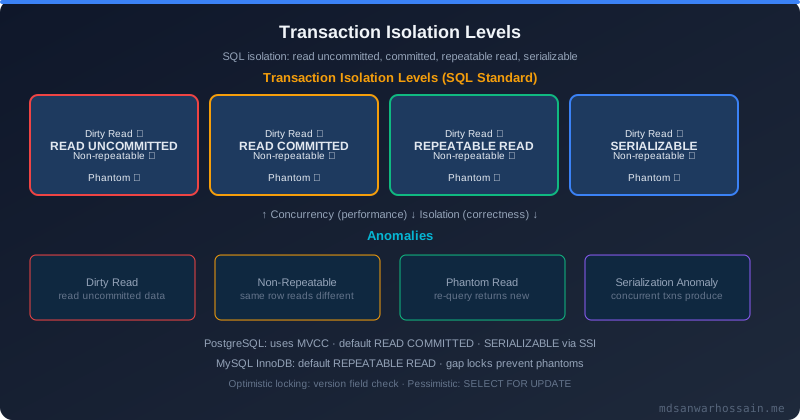
Table of Contents
- The Silent Data Loss Incident
- Propagation Levels: REQUIRED vs REQUIRES_NEW vs NESTED
- Isolation Levels: Dirty Reads, Phantom Reads & Production Impact
- The Self-Invocation Bug
- Readonly Transactions: Performance Gains and Misuse
- Exception Types and Rollback Rules
- Transaction Timeout and Deadlock Prevention
- Production Debugging: Finding Silent Rollbacks
- Key Takeaways
1. The Silent Data Loss Incident: How @Transactional Fails Without Warning
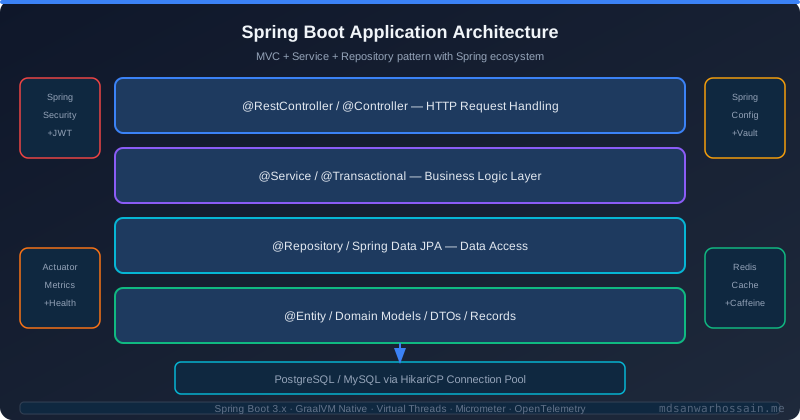
Imagine an e-commerce checkout service that deducts inventory and creates an order record inside a single @Transactional method. Everything works in staging. In production, under load, the inventory is deducted but the order record silently disappears. No exception is thrown. No error in the log. The root cause: a FileNotFoundException (a checked exception) thrown during PDF receipt generation — and Spring's default rollback policy only rolls back on unchecked exceptions. The inventory decrement rolled back, but the PDF generation failure was swallowed, and the database state became inconsistent depending on the exact flow.
This class of bug is especially dangerous because it passes all unit tests — checked exceptions are caught by the test framework, and the transactional boundary is never stressed. Production load, file system errors, and third-party API timeouts are all checked exception sources that trigger this trap. The fix requires understanding how Spring decides when to rollback, which propagation strategy owns the connection, and how isolation levels affect concurrent reads. Let's break each one down.
RuntimeException and Error. Any checked exception thrown inside a @Transactional method will commit the transaction unless you explicitly configure rollbackFor = Exception.class.
2. Propagation Levels: REQUIRED vs REQUIRES_NEW vs NESTED Explained
Spring supports seven propagation levels. The three you will encounter most in production are REQUIRED (the default), REQUIRES_NEW, and NESTED. REQUIRED joins an existing transaction or creates one if none exists — the outer and inner methods share the same physical database connection. REQUIRES_NEW always suspends the current transaction and opens a brand-new connection; the inner transaction commits or rolls back independently of the outer one. NESTED uses a savepoint within the same connection, so an inner rollback returns to the savepoint without rolling back the entire outer transaction — but this requires your database driver to support savepoints.
A canonical use case for REQUIRES_NEW is audit logging. You want to record that a user attempted an operation even if that operation fails. If the audit service participates in the main transaction (REQUIRED), the audit record is rolled back when the main operation fails — defeating the purpose. Using REQUIRES_NEW ensures the audit entry is committed to a separate transaction before control returns to the main flow.
@Service
@RequiredArgsConstructor
public class OrderService {

    private final OrderRepository orderRepository;
    private final AuditService auditService;

    @Transactional  // REQUIRED — main transaction
    public Order placeOrder(OrderRequest request) {
        Order order = orderRepository.save(new Order(request));
        // This always commits, even if placeOrder rolls back
        auditService.recordAttempt(request.getUserId(), "PLACE_ORDER");
        // If this throws, order save is rolled back but audit is NOT
        inventoryService.deduct(request.getItems());
        return order;
    }
}

@Service
public class AuditService {

    private final AuditRepository auditRepository;

    @Transactional(propagation = Propagation.REQUIRES_NEW)
    public void recordAttempt(Long userId, String action) {
        auditRepository.save(new AuditLog(userId, action, Instant.now()));
        // Commits immediately in its own transaction
    }
}
3. Isolation Levels: Dirty Reads, Phantom Reads & Production Impact
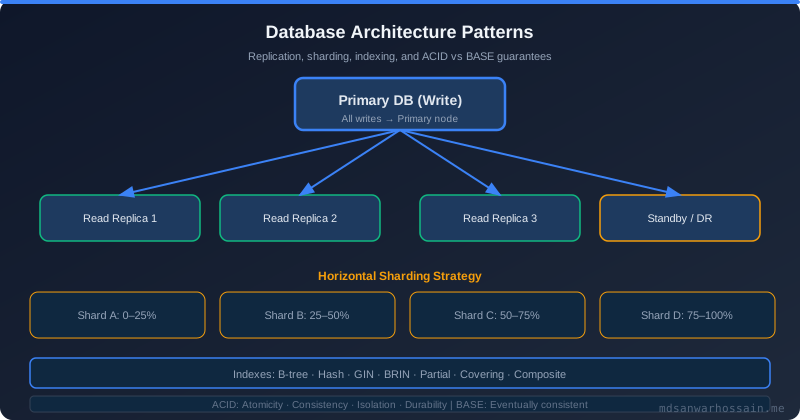
SQL defines four isolation levels: READ_UNCOMMITTED, READ_COMMITTED, REPEATABLE_READ, and SERIALIZABLE. Most production Spring Boot applications rely on the database default, which is READ_COMMITTED for PostgreSQL and REPEATABLE_READ for MySQL/InnoDB. The difference matters enormously for inventory systems.
Under READ_COMMITTED, two reads of the same row within a single transaction can return different values if another transaction commits between those reads — a non-repeatable read. In a flash-sale scenario where you read stock count, apply business logic, and write back the decremented value, a concurrent transaction can decrement the same stock in between your two reads, resulting in overselling. Upgrading to REPEATABLE_READ locks the rows you read for the duration of your transaction, preventing this class of bug at the cost of slightly higher lock contention.
// READ_COMMITTED — risk of overselling under concurrent load
@Transactional(isolation = Isolation.READ_COMMITTED)
public void deductStock(Long productId, int qty) {
    Product p = productRepo.findById(productId).orElseThrow();
    // Another transaction may commit between this read and the save
    if (p.getStock() < qty) throw new InsufficientStockException();
    p.setStock(p.getStock() - qty);
    productRepo.save(p);
}

// REPEATABLE_READ — safer for inventory with pessimistic locking
@Transactional(isolation = Isolation.REPEATABLE_READ)
public void deductStockSafe(Long productId, int qty) {
    // Use SELECT FOR UPDATE to acquire a row-level lock immediately
    Product p = productRepo.findByIdForUpdate(productId).orElseThrow();
    if (p.getStock() < qty) throw new InsufficientStockException();
    p.setStock(p.getStock() - qty);
    productRepo.save(p);
}

// In ProductRepository:
@Lock(LockModeType.PESSIMISTIC_WRITE)
@Query("SELECT p FROM Product p WHERE p.id = :id")
Optional<Product> findByIdForUpdate(@Param("id") Long id);
4. The Self-Invocation Bug: Why @Transactional Breaks on Internal Calls
Spring implements @Transactional via AOP proxies. When you inject an OrderService bean and call its method, you're actually calling a proxy that wraps the method with transaction management. The critical consequence: when a method inside OrderService calls another method in the same class using this.someMethod(), the call bypasses the proxy entirely. The @Transactional annotation on the inner method is silently ignored.
This is one of the most common senior Java interview questions for a reason — it catches many experienced developers off guard. The symptom is an inner method marked @Transactional(propagation = REQUIRES_NEW) that participates in the outer transaction instead of starting its own, causing rollback behavior that contradicts the annotation. There are two clean solutions: self-injection (inject the bean into itself) or extracting the inner method to a separate Spring bean.
// BROKEN — self.internalMethod() bypasses the proxy
@Service
public class PaymentService {

    @Transactional
    public void processPayment(PaymentRequest req) {
        chargeCard(req);
        this.sendReceipt(req); // @Transactional on sendReceipt is IGNORED
    }

    @Transactional(propagation = Propagation.REQUIRES_NEW)
    public void sendReceipt(PaymentRequest req) {
        receiptRepository.save(new Receipt(req));
    }
}

// FIX 1: Self-injection via @Lazy to avoid circular dependency
@Service
public class PaymentService {

    @Autowired @Lazy
    private PaymentService self; // Spring injects the proxy

    @Transactional
    public void processPayment(PaymentRequest req) {
        chargeCard(req);
        self.sendReceipt(req); // Now calls through the proxy — CORRECT
    }

    @Transactional(propagation = Propagation.REQUIRES_NEW)
    public void sendReceipt(PaymentRequest req) {
        receiptRepository.save(new Receipt(req));
    }
}

// FIX 2 (preferred): Extract to a separate bean
@Service
public class ReceiptService {
    @Transactional(propagation = Propagation.REQUIRES_NEW)
    public void sendReceipt(PaymentRequest req) {
        receiptRepository.save(new Receipt(req));
    }
}5. Readonly Transactions: Performance Gains and Misuse
Marking a transaction as read-only with @Transactional(readOnly = true) provides two benefits. First, it is a hint to the JPA provider (Hibernate) to skip dirty-checking — Hibernate will not snapshot entity state at load time or diff it at flush time, saving both CPU cycles and memory. For large batch reads this can reduce overhead by 20–40%. Second, it signals to your database driver or connection pool that the connection can be routed to a read replica.
The common misuse: marking a method that conditionally writes as read-only. If a Hibernate flush is attempted on a read-only session, you get an InvalidDataAccessApiUsageException at runtime. Another misuse is assuming read-only means the data cannot change — other transactions can still modify the rows you read between your reads if you are under READ_COMMITTED isolation. Read-only is a performance optimization, not a consistency guarantee.
6. Exception Types and Rollback Rules: Checked vs Unchecked
By default, Spring rolls back a transaction only on RuntimeException (unchecked) and Error. Checked exceptions — anything that extends Exception but not RuntimeException — cause the transaction to commit. This is a deliberate design decision inherited from EJB, based on the assumption that checked exceptions represent recoverable business errors, not system failures. In modern Spring applications, this default is almost always the wrong choice.
The safe production default is to add rollbackFor = Exception.class to every @Transactional annotation, or to configure a base class annotation. You can also use noRollbackFor to carve out specific exceptions that should commit (e.g., a BusinessValidationException that logs the attempt without undoing the entire transaction). Combining both gives you fine-grained rollback control.
// Default — only rolls back on RuntimeException/Error
@Transactional
public void riskyOperation() throws IOException {
    repo.save(entity);
    // IOException is checked — transaction COMMITS even if this throws!
    externalService.sendFile(entity);
}

// Correct — rolls back on any Exception
@Transactional(rollbackFor = Exception.class)
public void riskyOperationFixed() throws IOException {
    repo.save(entity);
    externalService.sendFile(entity); // Now rolls back on IOException
}

// Fine-grained control
@Transactional(
    rollbackFor = Exception.class,
    noRollbackFor = BusinessValidationException.class
)
public void processWithAudit(Request req) throws Exception {
    auditRepo.save(new AuditEntry(req)); // Commit this even if validation fails
    validateBusinessRules(req);         // May throw BusinessValidationException
    repo.save(new Entity(req));
}
7. Transaction Timeout and Deadlock Prevention
Long-running transactions hold database locks for their entire duration, blocking other transactions and eventually causing connection pool exhaustion. The @Transactional(timeout = 30) attribute sets a 30-second timeout: if the transaction has not completed within that window, Spring throws a TransactionTimedOutException (which extends RuntimeException and therefore triggers a rollback). This is essential protection against slow external calls accidentally placed inside a transactional method.
Deadlocks occur when two transactions each hold a lock the other needs. In Spring Boot applications, the most common cause is acquiring row locks in different orders across concurrent requests. Prevention strategies include: always acquiring locks in a consistent canonical order (e.g., by entity ID ascending), using optimistic locking with @Version for low-contention scenarios, reducing transaction scope to the minimum required, and setting a transaction timeout so deadlocked transactions eventually abort and retry rather than hanging indefinitely.
8. Production Debugging: Finding Silent Rollbacks in Logs
When data silently disappears in production, the first step is enabling Spring transaction logging. Set logging.level.org.springframework.transaction=TRACE in your application properties to see every transaction creation, commit, and rollback decision. For Hibernate, logging.level.org.hibernate.resource.transaction=DEBUG shows the underlying JDBC transaction boundary calls. These logs reveal whether a commit or rollback was triggered and which method owned the transaction.
For production environments where TRACE logging is too noisy, instrument your service layer with custom TransactionSynchronizationAdapter callbacks. Register an afterCompletion callback that logs the final transaction status (committed vs rolled back) along with a correlation ID. This gives you rollback visibility in structured logs without the verbosity of full transaction tracing. Combine this with distributed tracing (OpenTelemetry spans) to correlate silent rollbacks with specific user requests across microservices.
9. Key Takeaways
- Always use
rollbackFor = Exception.classunless you have a specific reason not to. - Self-invocation bypasses Spring AOP proxies — extract inner transactional methods to a separate bean.
- Use
REQUIRES_NEWfor audit logs and side-effects that must persist even on main-transaction failure. - Choose your isolation level deliberately —
REPEATABLE_READwith pessimistic locking for inventory,READ_COMMITTEDfor general CRUD. - Apply
@Transactional(readOnly = true)to all query-only methods for Hibernate dirty-check optimization. - Set
timeouton any transaction that touches external services or runs complex queries. - Enable transaction TRACE logging in lower environments and use
TransactionSynchronizationAdaptercallbacks in production.
Frequently Asked Questions
What is The Silent Data Loss Incident and how does it work?
Imagine an e-commerce checkout service that deducts inventory and creates an order record inside a single @Transactional method. Everything works in staging. In production, under load, the inventory is deducted but the order record silently disappears. No exception is thrown. No error in the log. The root cause: a FileNotFoundException (a checked exception) thrown during PDF receipt generation — and Spring's default rollback policy only rolls back on unchecked exceptions. The inventory decrement rolled back, but the PDF generation failure was swallowed, and the database state became inconsistent depending on the exact flow. This class of bug is especially dangerous because it passes all unit tests — checked exceptions are caught by the test framework, and the transactional boundary is never stressed.
What is Propagation Levels and how does it work?
Spring supports seven propagation levels. The three you will encounter most in production are REQUIRED (the default), REQUIRES_NEW , and NESTED . REQUIRED joins an existing transaction or creates one if none exists — the outer and inner methods share the same physical database connection. REQUIRES_NEW always suspends the current transaction and opens a brand-new connection; the inner transaction commits or rolls back independently of the outer one. NESTED uses a savepoint within the same connection, so an inner rollback returns to the savepoint without rolling back the entire outer transaction — but this requires your database driver to support savepoints. A canonical use case for REQUIRES_NEW is audit logging. You want to record that a user attempted an operation even if that operation fails .
What is Isolation Levels and how does it work?
SQL defines four isolation levels: READ_UNCOMMITTED , READ_COMMITTED , REPEATABLE_READ , and SERIALIZABLE . Most production Spring Boot applications rely on the database default, which is READ_COMMITTED for PostgreSQL and REPEATABLE_READ for MySQL/InnoDB. The difference matters enormously for inventory systems. Under READ_COMMITTED , two reads of the same row within a single transaction can return different values if another transaction commits between those reads — a non-repeatable read. In a flash-sale scenario where you read stock count, apply business logic, and write back the decremented value, a concurrent transaction can decrement the same stock in between your two reads, resulting in overselling. Upgrading to REPEATABLE_READ locks the rows you read for the duration of your transaction, preventing this class of bug at the cost of slightly higher lock contention.
What is The Self-Invocation Bug and how does it work?
Spring implements @Transactional via AOP proxies. When you inject an OrderService bean and call its method, you're actually calling a proxy that wraps the method with transaction management. The critical consequence: when a method inside OrderService calls another method in the same class using this.someMethod() , the call bypasses the proxy entirely. The @Transactional annotation on the inner method is silently ignored. This is one of the most common senior Java interview questions for a reason — it catches many experienced developers off guard. The symptom is an inner method marked @Transactional(propagation = REQUIRES_NEW) that participates in the outer transaction instead of starting its own, causing rollback behavior that contradicts the annotation.
What is Readonly Transactions and how does it work?
Marking a transaction as read-only with @Transactional(readOnly = true) provides two benefits. First, it is a hint to the JPA provider (Hibernate) to skip dirty-checking — Hibernate will not snapshot entity state at load time or diff it at flush time, saving both CPU cycles and memory. For large batch reads this can reduce overhead by 20–40%. Second, it signals to your database driver or connection pool that the connection can be routed to a read replica. The common misuse: marking a method that conditionally writes as read-only. If a Hibernate flush is attempted on a read-only session, you get an InvalidDataAccessApiUsageException at runtime.
Leave a Comment
Related Posts

Software Engineer · Java · Spring Boot · Microservices
Software Engineer · Java · Spring Boot · Microservices