Spring Boot 3.x with GraalVM Native Image: Production Pitfalls & Optimization
A Spring Boot service that starts in 8 seconds on the JVM starts in 80 milliseconds as a GraalVM native image. Memory footprint drops from 512 MB to 60 MB. Container image size shrinks from 400 MB to 40 MB. These numbers are real — but so are the pitfalls that have broken production deployments of teams who attempted the migration without understanding GraalVM's closed-world assumption.
Part of the Java Performance Engineering Series.
Table of Contents
- Introduction
- Real-World Problem: Silent Runtime Failure After Successful Build
- Architecture: JVM vs Native Image
- Spring AOT Processing: What It Does
- Common Production Pitfalls
- Build Configuration
- Optimization Techniques
- Production Deployment Considerations
- When NOT to Use Native Image
- Trade-offs Summary
- Conclusion
Introduction
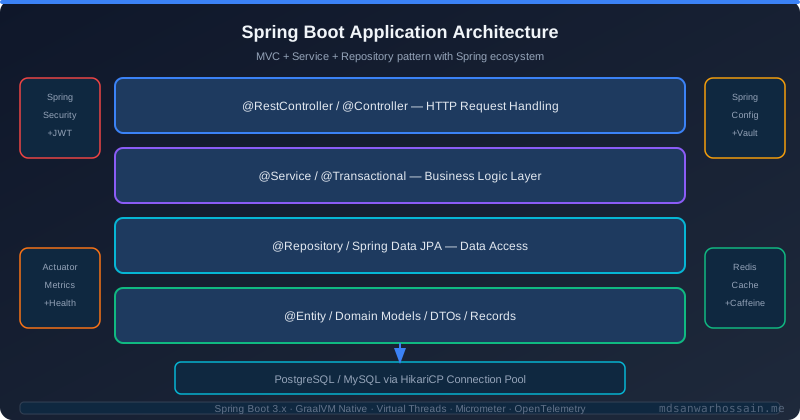
GraalVM Native Image compiles Java applications ahead-of-time (AOT) into standalone native executables. Unlike JVM execution (which JIT-compiles bytecode at runtime), native images are fully compiled before the first request arrives. The result: zero JVM startup overhead, dramatically reduced memory footprint, and instant peak performance from the first request.
Spring Boot 3.x introduced first-class native image support through Spring AOT (Ahead-of-Time) processing. When you build with ./mvnw -Pnative native:compile, the Spring AOT engine analyzes your application context at build time, generates AOT-compatible proxy classes and reflection metadata, and the GraalVM native-image compiler produces a single executable binary. The eco-system support for this has matured significantly — most major Spring ecosystem libraries (Spring Data, Spring Security, Spring Cloud, Micrometer) now ship GraalVM native image hints.
However, native image compilation operates under a fundamentally different constraint: the closed-world assumption. At compile time, the native image compiler must be able to statically determine all classes that will be loaded, all reflective accesses, all dynamic proxies, all serialized types, and all resources needed at runtime. Java's dynamic features — reflection, class loading, JNI, serialization — break this assumption unless explicitly declared in metadata hints.
Real-World Problem: Silent Runtime Failure After Successful Build
A fintech team migrated their transaction processing service from JVM to native image. The build succeeded. Integration tests passed. They deployed to staging. Everything appeared fine. In production, after three days, they noticed that their custom Jackson serializer — registered via a @JsonComponent that used reflection internally to inspect field annotations — was silently falling back to the default serializer for certain transaction types. The output was structurally valid JSON but missing required decimal precision fields. The root cause: the reflective field inspection in the custom serializer was not captured in native image hints, so the reflection call returned empty at runtime. No exception — just silent data loss.
Architecture: JVM vs Native Image
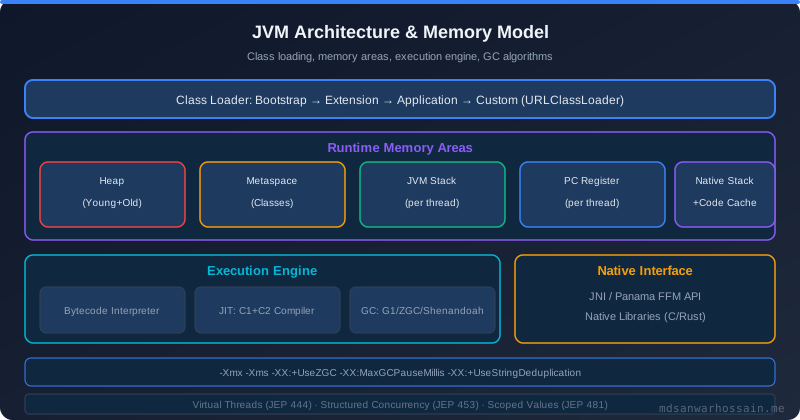
On the JVM: Spring context starts → loads beans via class scanning → creates CGLIB proxies for AOP → JIT compiler warms up over first 10,000 requests → peak throughput reached after 2–5 minutes. On native image: AOT processing runs at build time → generates proxy classes → reflection metadata compiled into binary → binary starts in <100ms → full throughput from first request. The compilation time shifts from startup (JIT) to build time (AOT) — a 3–10 minute native image compilation replaces the JIT warm-up period.
Spring AOT Processing: What It Does
When spring-boot:process-aot runs during the build, it: instantiates a lightweight Spring application context to analyze bean definitions, generates BeanFactoryInitializationAotContribution for each bean, produces reflect-config.json for reflective accesses, proxy-config.json for JDK proxies, resource-config.json for classpath resources, and serialization-config.json for serialized types. Third-party libraries that are not native-image-aware will not generate hints — you must supply them manually.
Common Production Pitfalls
1. Reflection Without Hints
Any code path that uses Class.forName(), Method.invoke(), Field.get(), Constructor.newInstance(), or annotation inspection via reflection will fail at native image runtime if not declared in reflect-config.json. Diagnosis: run native-image-agent against your integration tests to generate hints: java -agentlib:native-image-agent=config-output-dir=src/main/resources/META-INF/native-image -jar app.jar. This agent intercepts reflective accesses at runtime and records them. The output provides a starting set of hints that covers your test scenarios — supplement with production-representative load tests for full coverage.
2. Dynamic Class Loading
Libraries that load classes by name (e.g., JDBC drivers via Class.forName("org.postgresql.Driver"), plugin architectures, scripting engines) require explicit registration. Add @RegisterReflectionForBinding on Spring configuration classes to register specific types. For JDBC drivers, Spring's auto-configuration handles PostgreSQL and H2 natively — but custom JDBC drivers require manual registration in reflect-config.json.
3. CGLIB Proxy Incompatibility
Spring's classic AOP uses CGLIB to create runtime subclass proxies. Native image cannot generate new classes at runtime — CGLIB proxies must be pre-generated at build time. Spring AOT handles this for Spring-managed beans, but third-party libraries that create CGLIB proxies outside of Spring's context (Mockito, Hibernate lazy-load proxies, some caching libraries) require explicit proxy declarations or alternative approaches. For Hibernate: use Hibernate's native proxy mechanism with @LazyCollection replaced by @BatchSize and join fetching. For tests: use @MockBean (Spring-managed mocks) rather than raw Mockito mock() calls where possible.
4. Classpath Resource Resolution
Resources accessed via ClassLoader.getResourceAsStream(), ClassPathResource, or Spring's ResourceLoader must be declared in resource-config.json if they are not under standard Spring resource paths. Common culprits: custom SQL migration scripts, embedded certificate files, XML configuration files loaded programmatically. Add them: @ImportRuntimeHints(MyHints.class) with a custom RuntimeHintsRegistrar that calls hints.resources().registerPattern("db/migration/*.sql").
5. Third-Party Library Compatibility
Check the GraalVM Reachability Metadata Repository (github.com/oracle/graalvm-reachability-metadata) for your dependencies. Major libraries with native image support: Spring Boot 3.x (full support), Spring Data JPA (with Hibernate 6.x), Spring Security, Spring Cloud Gateway, Micrometer, Resilience4j, Kafka clients, Flyway, Liquibase. Libraries with partial or no support: older Hibernate versions (<6), some Apache Commons libraries, JAXB (requires hints), older gRPC implementations. For unsupported libraries, generate hints with the agent or replace with native-image-friendly alternatives.
6. Serialization Surprises
Java serialization (java.io.Serializable) requires types to be registered. Jackson serialization works if Jackson modules are registered and custom serializers use declared reflection. Common issues: Jackson's TypeFactory.constructType() with generic types, polymorphic deserialization (@JsonTypeInfo) requiring all subtypes to be registered, and ObjectMapper configured programmatically via class name strings. Register all Jackson-serialized types: hints.serialization().registerType(OrderEvent.class).
Build Configuration
Maven configuration: add spring-boot-starter-parent 3.x (provides native compilation profile), add native-maven-plugin in the native profile. Key native-image build arguments: --initialize-at-build-time=org.slf4j (initialize logging at build time), --no-fallback (fail the build if a dynamic feature cannot be handled — never deploy a fallback image in production), -H:+ReportExceptionStackTraces (better error messages). For Docker builds: use a multi-stage Dockerfile with ghcr.io/graalvm/native-image-community:21 as the builder stage.
Optimization Techniques
Profile-guided optimization (PGO): GraalVM Enterprise (not Community) supports PGO — run the application under a representative load, collect profiles, recompile with the profiles for better inlining decisions. This typically improves throughput by 10–40% at a cost of two compilation steps. Build-time initialization: Move class initialization from runtime to build time with --initialize-at-build-time=com.example.config.StaticConfig. Static initializers that run at build time reduce startup overhead further. Only safe for stateless, deterministic initializers. CompressedOops: Native images use compressed object references by default for heaps under 32 GB, reducing memory footprint. No configuration needed. G1 GC in native: From GraalVM 21+, native images support serial, epsilon (no-op for batch jobs), and G1 GC. For long-running services, explicitly select G1: -H:+UseG1GC.
Production Deployment Considerations
Platform binding: Native images are compiled for a specific OS and CPU architecture. Your build must target the deployment platform. For Kubernetes on AMD64, build with linux/amd64; for Apple Silicon developers, cross-compile for linux/amd64 in Docker rather than building natively on ARM. No JVM monitoring tools: JMX, JVM Flight Recorder, async-profiler, and heap dump generation are not available in native images. Use OpenTelemetry for distributed tracing, Micrometer for metrics, and structured logging for log-based debugging. Native perf profilers (perf, Instruments, DTrace) can profile the native binary. Debugging: Native image debugging uses DWARF symbols (-g flag). GDB and LLDB can attach to running native image processes.
When NOT to Use Native Image
Native image is not the right choice for every service. Avoid it when: the application uses extensive dynamic class loading or reflection that cannot be statically analyzed (e.g., plugin-based architectures, Groovy DSL engines), the team relies heavily on JVM monitoring tools (JFR, async-profiler, JMC) for production observability, the service runs for hours or days and benefits significantly from JIT warm-up (long-running batch processors), or third-party dependencies lack native image support and are not replaceable.
Trade-offs Summary
Native image wins: startup time (80ms vs 8s), cold-start performance (serverless functions, auto-scaling to zero), memory footprint (60 MB vs 512 MB), container image size (40 MB vs 400 MB), attack surface (no JIT compiler, smaller runtime). Native image loses: build time (5 min compilation vs 30s JAR build), JVM ecosystem compatibility, JIT-optimized peak throughput for heavily loaded steady-state services, debugging tooling, and dynamic language features. The sweet spot: short-lived services, FaaS functions, and microservices where cold-start latency or memory cost matters.
Key Takeaways
- Spring Boot 3.x + Spring AOT provides production-grade native image support — use it for new greenfield services
- Run
native-image-agentagainst your integration tests to auto-generate reflection and resource hints - Never use
--allow-incomplete-classpathor fallback images in production — they indicate unresolved hints - Native images cannot use JFR/JMX — invest in OpenTelemetry and structured logging before migration
- Build for the target platform architecture — native binaries are not portable across OS/CPU combinations
- The closed-world assumption is the fundamental constraint — any dynamic Java feature needs an explicit hint
Conclusion
GraalVM native images represent the most significant improvement in Java deployment characteristics since containers. The startup time and memory reductions are transformative for cloud-native architectures — particularly serverless functions, scale-to-zero microservices, and cost-sensitive deployments. The migration path has never been smoother: Spring Boot 3.x's AOT engine handles most of the complexity automatically. The remaining work — hunting down reflection misses, providing hints for third-party libraries, establishing OpenTelemetry-based observability — is a one-time investment that pays dividends in every deployment thereafter.
Frequently Asked Questions
What is Spring Boot 3.x GraalVM Native Image and why does it matter?
GraalVM Native Image compiles Java applications ahead-of-time (AOT) into standalone native executables. Unlike JVM execution (which JIT-compiles bytecode at runtime), native images are fully compiled before the first request arrives. The result: zero JVM startup overhead, dramatically reduced memory footprint, and instant peak performance from the first request. Spring Boot 3.x introduced first-class native image support through Spring AOT (Ahead-of-Time) processing. When you build with ./mvnw -Pnative native:compile , the Spring AOT engine analyzes your application context at build time, generates AOT-compatible proxy classes and reflection metadata, and the GraalVM native-image compiler produces a single executable binary. The eco-system support for this has matured significantly — most major Spring ecosystem libraries (Spring Data, Spring Security, Spring Cloud, Micrometer) now ship GraalVM native image hints.
What real-world problems does Spring Boot 3.x GraalVM Native Image solve?
A fintech team migrated their transaction processing service from JVM to native image. The build succeeded. Integration tests passed. They deployed to staging. Everything appeared fine. In production, after three days, they noticed that their custom Jackson serializer — registered via a @JsonComponent that used reflection internally to inspect field annotations — was silently falling back to the default serializer for certain transaction types. The output was structurally valid JSON but missing required decimal precision fields. The root cause: the reflective field inspection in the custom serializer was not captured in native image hints, so the reflection call returned empty at runtime. No exception — just silent data loss.
What is Architecture and how does it work?
On the JVM: Spring context starts → loads beans via class scanning → creates CGLIB proxies for AOP → JIT compiler warms up over first 10,000 requests → peak throughput reached after 2–5 minutes. On native image: AOT processing runs at build time → generates proxy classes → reflection metadata compiled into binary → binary starts in <100ms → full throughput from first request. The compilation time shifts from startup (JIT) to build time (AOT) — a 3–10 minute native image compilation replaces the JIT warm-up period.
What is Spring AOT Processing and how does it work?
When spring-boot:process-aot runs during the build, it: instantiates a lightweight Spring application context to analyze bean definitions, generates BeanFactoryInitializationAotContribution for each bean, produces reflect-config.json for reflective accesses, proxy-config.json for JDK proxies, resource-config.json for classpath resources, and serialization-config.json for serialized types. Third-party libraries that are not native-image-aware will not generate hints — you must supply them manually.
What is Reflection Without Hints and how does it work?
Any code path that uses Class.forName() , Method.invoke() , Field.get() , Constructor.newInstance() , or annotation inspection via reflection will fail at native image runtime if not declared in reflect-config.json. Diagnosis: run native-image-agent against your integration tests to generate hints: java -agentlib:native-image-agent=config-output-dir=src/main/resources/META-INF/native-image -jar app.jar . This agent intercepts reflective accesses at runtime and records them. The output provides a starting set of hints that covers your test scenarios — supplement with production-representative load tests for full coverage.
Leave a Comment
Related Posts

Software Engineer · Java · Spring Boot · Microservices