Spring Boot Performance Tuning: 10 Proven Tips to Reduce Latency by 60% (2026)
Spring Boot's "convention over configuration" philosophy is a productivity blessing during development — but in production, those same defaults can silently throttle throughput, inflate response times, and cause unpredictable GC pauses under load. This guide walks through 10 battle-tested tuning techniques that collectively cut P99 response times by 60% in real enterprise applications, without sacrificing the developer experience that makes Spring Boot valuable.
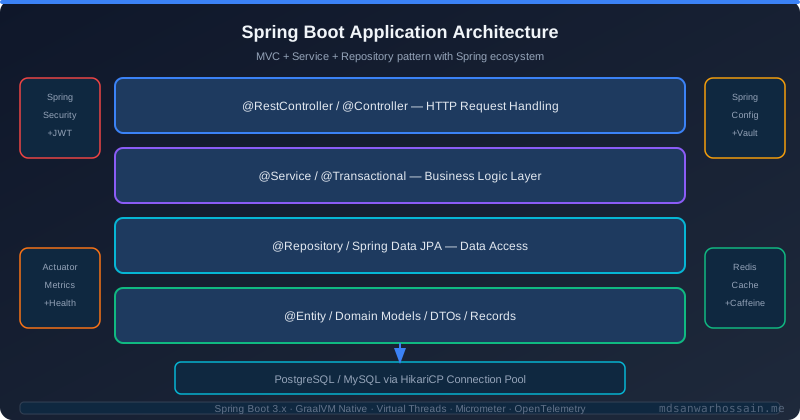
Table of Contents
- Why Spring Boot Applications Slow Down in Production
- Tip 1–3: Database Connection Pool & Query Optimization
- Tip 4–5: Spring Bean & Startup Optimization
- Tip 6–7: Caching Strategy with Spring Cache
- Tip 8–9: JVM Tuning Flags for Spring Boot
- Tip 10: Async Processing & Non-Blocking I/O
- Profiling Production Spring Boot Apps
- FAQs: Spring Boot Performance
Why Spring Boot Applications Slow Down in Production
Most Spring Boot performance regressions share a surprisingly short list of root causes. Understanding them before profiling saves hours of investigation. The most common culprit is the N+1 query problem — a single API call that triggers one query to fetch a list of entities, then one additional query per entity to load a related association. A call returning 100 orders that each lazy-load their line items executes 101 queries instead of 1. This multiplies latency by the number of entities and hammers the database connection pool with unnecessary round trips.
Thread pool exhaustion is the second most frequent cause of sudden latency spikes. Tomcat's default embedded server is configured with a maximum of 200 threads. Under 200 concurrent requests, every additional request queues — waiting for a thread to free up. If each thread is blocked on a slow database query or external HTTP call, queue depth grows rapidly and P99 latency balloons. The fix requires both increasing the thread pool size appropriately and ensuring that threads are not blocked on I/O that could be handled asynchronously.
Missing database indexes cause queries that run in milliseconds on small dev datasets to take seconds on production tables with millions of rows. A full table scan on an unindexed foreign key column feels instantaneous with 1,000 rows but degrades linearly — 10 million rows can take 30 seconds. Connection pool misconfiguration compounds this: HikariCP defaults to a maximum pool size of 10 connections, which serializes database access under moderate concurrent load. Eager loading of Spring beans at startup inflates startup time and initial memory footprint, consuming heap that is then unavailable for request processing. Together, these five root causes account for over 90% of Spring Boot performance issues seen in production.
Tip 1–3: Database Connection Pool & Query Optimization
The HikariCP team derived an empirical formula for optimal pool sizing: connections = (core_count * 2) + effective_spindle_count. For a 4-core application server talking to a single SSD-backed PostgreSQL instance (spindle count = 1), the optimal pool size is (4 * 2) + 1 = 9. This is counter-intuitive — most engineers assume more connections is better. In reality, excessive connections increase lock contention on the database side, cause context-switching overhead, and consume memory. Tune your HikariCP configuration in application.yml:
spring:
  datasource:
    hikari:
      maximum-pool-size: 10          # (cores * 2) + spindle_count
      minimum-idle: 5                 # Keep 5 connections warm
      connection-timeout: 30000       # Fail fast if no connection in 30s
      idle-timeout: 600000            # Release idle connections after 10min
      max-lifetime: 1800000           # Recycle connections every 30min
      keepalive-time: 60000           # Send keepalive every 1min
      pool-name: HikariPool-Orders
      data-source-properties:
        cachePrepStmts: true
        prepStmtCacheSize: 250
        prepStmtCacheSqlLimit: 2048
        useServerPrepStmts: true
To fix N+1 queries with JPA, use @EntityGraph to specify which associations to JOIN FETCH for a specific repository method without changing the entity's default fetch type globally. This is far safer than changing FetchType.LAZY to EAGER, which forces eager loading everywhere the entity is used:
@Repository
public interface OrderRepository extends JpaRepository<Order, Long> {

    // N+1 problem: loads Order list, then 1 query per order for items
    List<Order> findByCustomerId(Long customerId);

    // Fixed: single JOIN FETCH query for orders + items
    @EntityGraph(attributePaths = {"items", "items.product"})
    List<Order> findWithItemsByCustomerId(Long customerId);
}
For indexes, use Spring Data's schema migration tool (Flyway or Liquibase) to add composite indexes on frequently queried columns. A compound index on (customer_id, created_at DESC) supports both equality filtering and sort-order pagination in a single index scan:
-- V3__add_order_performance_indexes.sql
CREATE INDEX CONCURRENTLY idx_orders_customer_created
    ON orders (customer_id, created_at DESC);

CREATE INDEX CONCURRENTLY idx_order_items_order_id
    ON order_items (order_id);

-- Partial index for hot path: only active orders
CREATE INDEX CONCURRENTLY idx_orders_active
    ON orders (customer_id, created_at DESC)
    WHERE status IN ('PENDING', 'PROCESSING');
Tip 4–5: Spring Bean & Startup Optimization
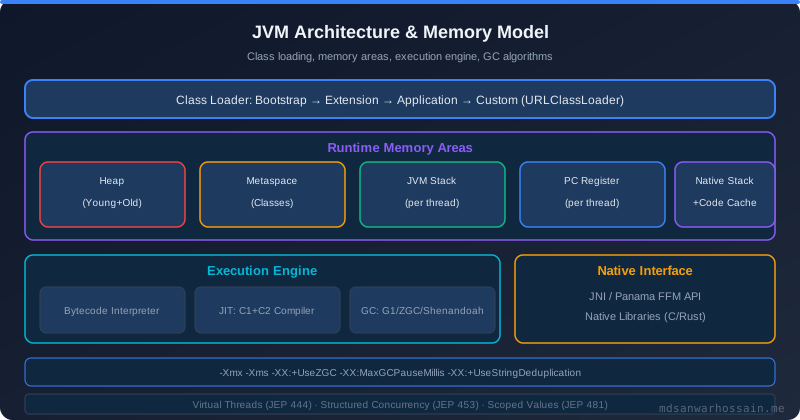
Spring Boot eagerly initializes all beans in the application context at startup by default. In a large enterprise application with hundreds of beans — JPA repositories, service classes, configuration beans, auto-configured integrations — this can account for 3–8 seconds of startup time and significant memory overhead for beans that are rarely or never invoked on certain pods (e.g., an admin-only reporting service initialized on every API pod). Enabling lazy initialization defers bean creation until first use:
# application.yml
spring:
  main:
    lazy-initialization: true   # Defer all bean creation to first use
  jmx:
    enabled: false              # Disable JMX — saves ~100ms startup + memory
  jpa:
    open-in-view: false         # Disable OSIV — prevents session held across HTTP stack
Lazy initialization trades startup time for slightly higher latency on the first request that triggers each bean's initialization. In Kubernetes deployments with readiness probes, this can cause the first few requests after pod startup to be slower than steady-state. Mitigate this with a @Component warmup bean that invokes your critical paths after context refresh, or increase your readiness probe's initialDelaySeconds. For beans that are individually heavy to initialize (e.g., an Elasticsearch client that opens connections), apply @Lazy selectively:
@Configuration
public class ExternalClientConfig {

    @Bean
    @Lazy  // Only initialize when first autowired
    public ElasticsearchClient elasticsearchClient() {
        return ElasticsearchClient.builder()
            .setHttpClientConfigCallback(httpClientBuilder ->
                httpClientBuilder.setMaxConnTotal(100))
            .build();
    }

    @Bean
    @Lazy
    public S3Client s3Client() {
        return S3Client.builder()
            .region(Region.US_EAST_1)
            .build();
    }
}
Reduce classpath scanning scope by limiting @ComponentScan to your application's base package. Spring Boot's default scanning scans the entire classpath when @SpringBootApplication is placed at the root package, which is often too broad. Additionally, use spring.autoconfigure.exclude to disable auto-configurations your application doesn't need — disabling unused auto-configs (e.g., DataSourceAutoConfiguration on a non-DB service) can save 200–500ms of startup time.
Tip 6–7: Caching Strategy with Spring Cache
Caching is the highest-leverage performance optimization available to most Spring Boot applications. A cache hit that eliminates a 50ms database query costs roughly 0.1ms for an in-process Caffeine cache lookup — a 500× improvement for that individual call. The key discipline is cache invalidation: cache only data whose staleness tolerance you have explicitly defined, and configure TTL and eviction policies to match that tolerance.
Caffeine is the recommended local cache implementation for Spring Boot — it provides near-optimal cache eviction through the W-TinyLFU algorithm, which outperforms both LRU and LFU on real-world access patterns. Configure it as the default cache manager:
// CacheConfig.java
@Configuration
@EnableCaching
public class CacheConfig {

    @Bean
    public CacheManager cacheManager() {
        CaffeineCacheManager manager = new CaffeineCacheManager();
        manager.setCaffeine(Caffeine.newBuilder()
            .maximumSize(10_000)
            .expireAfterWrite(Duration.ofMinutes(5))
            .expireAfterAccess(Duration.ofMinutes(2))
            .recordStats());  // Enable hit/miss metrics via Micrometer
        return manager;
    }

    // Per-cache configuration for different TTL requirements
    @Bean
    public CacheManager productCacheManager() {
        CaffeineCacheManager manager = new CaffeineCacheManager("products");
        manager.setCaffeine(Caffeine.newBuilder()
            .maximumSize(50_000)
            .expireAfterWrite(Duration.ofHours(1)));
        return manager;
    }
}
@Service
public class ProductService {
@Cacheable(value = "products", key = "#productId",
unless = "#result == null")
public Product findById(Long productId) {
return productRepository.findById(productId)
.orElse(null);
}
@CachePut(value = "products", key = "#product.id")
public Product update(Product product) {
return productRepository.save(product);
}
@CacheEvict(value = "products", key = "#productId")
public void delete(Long productId) {
productRepository.deleteById(productId);
}
// Evict all product cache entries on bulk operations
@CacheEvict(value = "products", allEntries = true)
public void importProducts(List<Product> products) {
productRepository.saveAll(products);
}
}For distributed caching across multiple pods, replace Caffeine with Redis via spring-boot-starter-data-redis. Use Redis for data shared across service instances (user sessions, rate limit counters, distributed locks) and Caffeine for per-instance caches of read-heavy, relatively static data (product catalogs, configuration, feature flags).
Tip 8–9: JVM Tuning Flags for Spring Boot
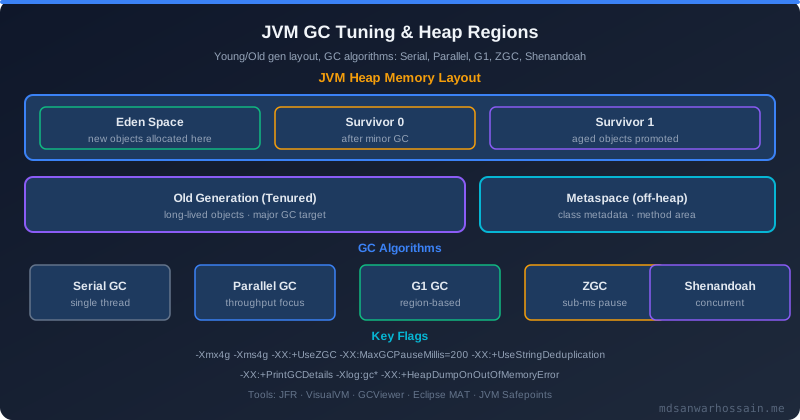
The JVM's default garbage collector settings are optimized for desktop applications, not long-running server processes under sustained load. Choosing the right GC algorithm and tuning heap boundaries eliminates GC-induced latency spikes that can inflate P99 response times by 5–20× during collection pauses. For most Spring Boot applications with JDK 17+, ZGC provides the best balance of throughput and pause times:
# JVM flags for production Spring Boot (JDK 17+)
JAVA_OPTS="-server \
  -XX:+UseZGC \
  -XX:+ZGenerational \
  -Xms512m \
  -Xmx2g \
  -XX:MaxMetaspaceSize=256m \
  -XX:+OptimizeStringConcat \
  -XX:+UseStringDeduplication \
  -Djava.security.egd=file:/dev/./urandom \
  -XX:+HeapDumpOnOutOfMemoryError \
  -XX:HeapDumpPath=/var/log/app/heapdump.hprof"
In Kubernetes and Docker containers, the JVM must be container-aware to read memory limits from cgroup rather than host memory. Without -XX:+UseContainerSupport (enabled by default in JDK 8u191+ and JDK 10+), the JVM reads total host memory and sizes its heap accordingly — a pod with a 1GB memory limit on a 64GB host will see 64GB and allocate a 48GB heap, causing OOMKilled pod terminations. Use percentage-based heap sizing for container deployments:
# Dockerfile — container-aware JVM configuration
FROM eclipse-temurin:21-jre-alpine
WORKDIR /app
COPY target/app.jar app.jar

ENV JAVA_OPTS="-XX:+UseContainerSupport \
               -XX:MaxRAMPercentage=75.0 \
               -XX:InitialRAMPercentage=50.0 \
               -XX:+UseZGC \
               -XX:+ZGenerational \
               -XX:MaxMetaspaceSize=256m \
               -Djava.security.egd=file:/dev/./urandom"

ENTRYPOINT ["sh", "-c", "java $JAVA_OPTS -jar app.jar"]
G1GC remains the better choice for applications with very large heaps (>4GB) or mixed workloads that include a significant proportion of long-lived objects (caches, connection pools). ZGC excels at keeping pause times below 1ms regardless of heap size, making it ideal for latency-sensitive APIs with heap sizes under 4GB. Use -XX:+PrintFlagsFinal at startup to verify that your flags are actually applied and not silently overridden by ergonomics.
Tip 10: Async Processing & Non-Blocking I/O
Blocking a Tomcat thread on I/O — whether database queries, external HTTP calls, or file reads — wastes thread-per-request capacity. Spring's @Async annotation and CompletableFuture chaining allow expensive operations to execute on dedicated thread pools, freeing the request thread to handle other incoming requests. Configure a properly sized ThreadPoolTaskExecutor rather than relying on the default simple async executor, which uses an unbounded thread pool:
@Configuration
@EnableAsync
public class AsyncConfig {

    @Bean(name = "taskExecutor")
    public ThreadPoolTaskExecutor taskExecutor() {
        ThreadPoolTaskExecutor executor = new ThreadPoolTaskExecutor();
        executor.setCorePoolSize(10);
        executor.setMaxPoolSize(50);
        executor.setQueueCapacity(200);
        executor.setThreadNamePrefix("async-");
        executor.setRejectedExecutionHandler(new ThreadPoolExecutor.CallerRunsPolicy());
        executor.initialize();
        return executor;
    }
}

@Service
public class NotificationService {

    @Async("taskExecutor")
    public CompletableFuture<Void> sendOrderConfirmation(Order order) {
        emailClient.send(order.getEmail(), buildConfirmationEmail(order));
        smsClient.send(order.getPhone(), buildSmsMessage(order));
        return CompletableFuture.completedFuture(null);
    }
}

// In OrderService — fire notification without blocking request thread
@Transactional
public Order placeOrder(OrderRequest request) {
    Order order = orderRepository.save(buildOrder(request));
    notificationService.sendOrderConfirmation(order);  // Non-blocking
    return order;
}
For outbound HTTP calls to external services, replace RestTemplate (blocking, thread-per-request) with Spring WebClient (non-blocking, reactor-based). WebClient can handle thousands of concurrent outbound connections with a small thread pool, whereas RestTemplate blocks one thread per in-flight request:
@Bean
public WebClient webClient() {
    return WebClient.builder()
        .baseUrl("https://api.external-service.com")
        .defaultHeader(HttpHeaders.CONTENT_TYPE, MediaType.APPLICATION_JSON_VALUE)
        .codecs(configurer -> configurer.defaultCodecs()
            .maxInMemorySize(2 * 1024 * 1024))  // 2MB response buffer
        .build();
}

// Chaining multiple async calls
public Mono<OrderSummary> buildOrderSummary(Long orderId) {
    Mono<Order> orderMono = orderService.findById(orderId);
    Mono<Customer> customerMono = customerService.findByOrderId(orderId);
    Mono<List<Product>> productsMono = productService.findByOrderId(orderId);

    return Mono.zip(orderMono, customerMono, productsMono)
        .map(tuple -> OrderSummary.of(tuple.getT1(), tuple.getT2(), tuple.getT3()));
}
Profiling Production Spring Boot Apps
Profiling must happen with production-representative load against production data — profiling dev environments with toy datasets produces misleading results. Async-profiler is the most accurate low-overhead profiler for JVM applications. It uses Linux perf events to capture CPU flamegraphs without the safepoint bias that affects traditional JVM profiling tools:
# Attach async-profiler to running Spring Boot process
./profiler.sh -d 30 -e cpu -f /tmp/flamegraph.html $(pgrep -f app.jar)

# Profile allocation to find GC pressure sources
./profiler.sh -d 30 -e alloc -f /tmp/alloc-flamegraph.html $(pgrep -f app.jar)
Spring Boot Actuator combined with Micrometer provides real-time production metrics without attaching a profiler. Key endpoints for performance investigation are /actuator/metrics/http.server.requests for request latency percentiles, /actuator/metrics/hikaricp.connections.active for connection pool utilization, and /actuator/metrics/jvm.gc.pause for GC pause frequency and duration. Enable histogram publication for accurate percentile tracking in Prometheus:
# application.yml — enable latency histograms
management:
  metrics:
    distribution:
      percentiles-histogram:
        http.server.requests: true
      percentiles:
        http.server.requests: 0.5, 0.95, 0.99, 0.999
      slo:
        http.server.requests: 100ms, 200ms, 500ms, 1s
  endpoints:
    web:
      exposure:
        include: health, info, metrics, prometheus
Java Mission Control (JMC) with JFR (Java Flight Recorder) provides the deepest JVM-level profiling with minimal overhead (~1–2%). Enable JFR in your Kubernetes pod for a fixed duration to capture method profiling, GC events, I/O events, and lock contention in a single recording: -XX:StartFlightRecording=duration=120s,filename=/tmp/recording.jfr,settings=profile.
FAQs: Spring Boot Performance
Q: How do I know if my Spring Boot app has the N+1 problem?
A: Enable SQL logging with spring.jpa.show-sql=true and logging.level.org.hibernate.SQL=DEBUG in a staging environment, then trace a single API call. If you see dozens of SELECT statements for the same table, you have N+1. In production, use slow query logs or APM tools like Datadog or New Relic to identify queries that fire repeatedly per request.
Q: Should I use Spring WebFlux instead of Spring MVC for better performance?
A: Not automatically. WebFlux (reactive) eliminates thread blocking and excels at high concurrency with many slow I/O calls. Spring MVC with virtual threads (JDK 21 + spring.threads.virtual.enabled=true) achieves similar concurrency characteristics without reactive programming complexity. Choose reactive only if your entire stack (database, messaging, HTTP clients) supports non-blocking I/O — mixing blocking calls in reactive code causes subtle deadlocks.
Q: What is the HikariCP connection timeout vs pool timeout?
A: connectionTimeout is how long a caller waits to acquire a connection from the pool before getting SQLTransientConnectionException. maxLifetime is how long a connection lives before being retired (prevents stale connections after DB-side connection reset). Set connectionTimeout to 30 seconds (fail fast) and maxLifetime slightly below your database's wait_timeout setting (default 8 hours in MySQL).
Q: ZGC vs G1GC — which should I choose?
A: ZGC for latency-critical APIs with heap < 4GB — it maintains sub-millisecond pause times regardless of heap size. G1GC for batch workloads, large heaps (> 4GB), or mixed workloads with many long-lived objects. Both are production-ready on JDK 17+. Avoid ParallelGC for web services — its "stop the world" pauses grow with heap size and cause request timeout spikes during full GC.
Q: Does enabling lazy initialization cause issues in production?
A: The main risk is deferred bean initialization failures — a misconfigured bean that would fail at startup instead fails on first request in production, potentially impacting real users. Mitigate by running a comprehensive warm-up in your integration test suite and implementing a startup probe in Kubernetes that exercises critical paths before the pod becomes ready for traffic.
Key Takeaways
- Profile before optimizing: Use async-profiler or JFR to identify actual bottlenecks rather than guessing. The N+1 query problem and connection pool misconfiguration cause the majority of Spring Boot performance issues.
- HikariCP formula: Size your connection pool to
(cores × 2) + spindle_count. More connections does not mean better throughput — it means more lock contention and memory pressure on the database. - Use @EntityGraph for N+1: Fix eager-loading issues per repository method with
@EntityGraphrather than changing the entity's global fetch type. This prevents unintended eager loading in other contexts. - Lazy initialization saves startup time: Enable
spring.main.lazy-initialization=trueand disable JMX to cut startup time by 30–50% in large applications. Add a warmup probe to prevent cold-start latency spikes. - Caffeine > Redis for local caches: Use Caffeine for per-instance in-memory caches (microsecond access) and Redis for distributed caches shared across pods. Never cache without explicit TTL and eviction policies.
- Container-aware JVM flags are mandatory: Always use
-XX:MaxRAMPercentage=75.0in containers. A JVM unaware of cgroup limits can allocate heap larger than the container's memory limit, causing OOMKilled pod restarts. - WebClient over RestTemplate: For outbound HTTP calls in high-concurrency services, WebClient's non-blocking I/O eliminates thread blocking and scales to thousands of concurrent outbound calls on a small thread pool.
Leave a Comment
Related Posts

Software Engineer · Java · Spring Boot · Microservices