Java Virtual Threads (Project Loom) in Production: Migration Guide, Pitfalls, and Benchmarks
Java 21 made virtual threads a production-ready feature. For most IO-bound services, they eliminate the need for reactive programming while delivering the throughput of non-blocking I/O with the simplicity of synchronous code.
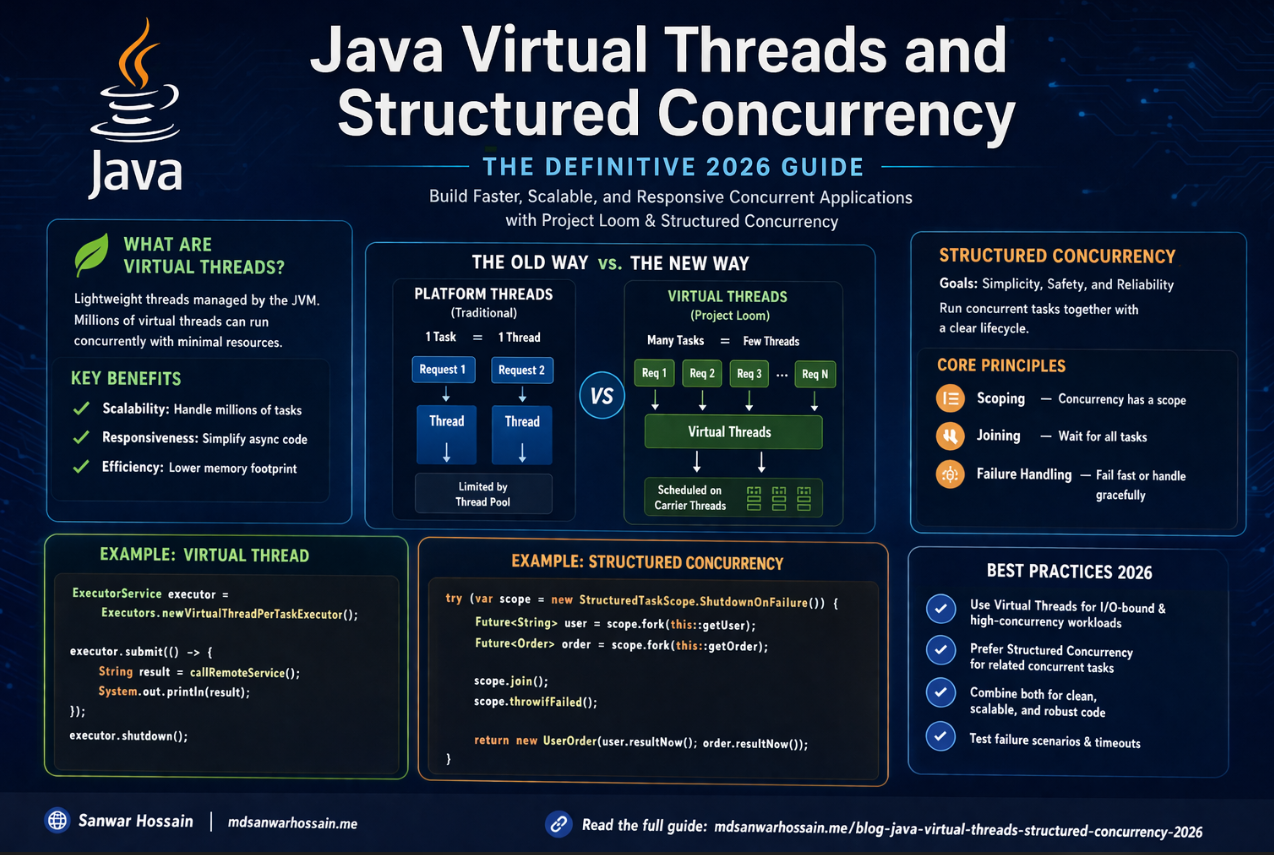
Table of Contents
- Introduction
- Problem Statement: The Thread-Per-Request Bottleneck
- How Virtual Threads Work: The JVM Scheduler
- Spring Boot Integration: Enabling Virtual Threads
- Thread Pinning: The Most Important Pitfall
- JDBC and Connection Pool Considerations
- Structured Concurrency: Composing Virtual Thread Tasks
- Performance Benchmarks: Real-World Numbers
- Pros and Cons
- Common Mistakes
- Conclusion
Introduction
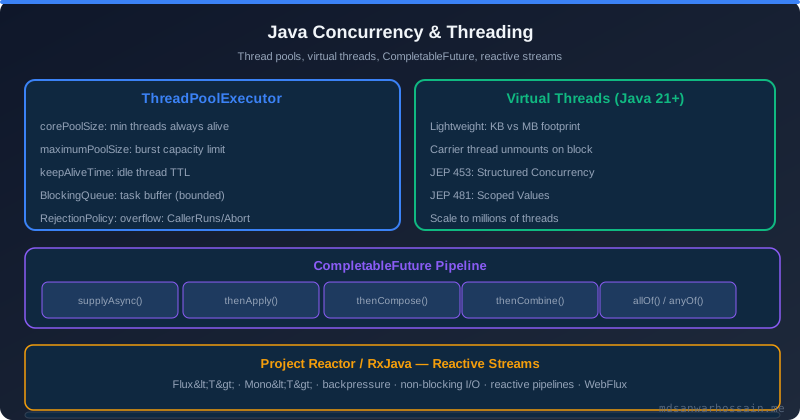
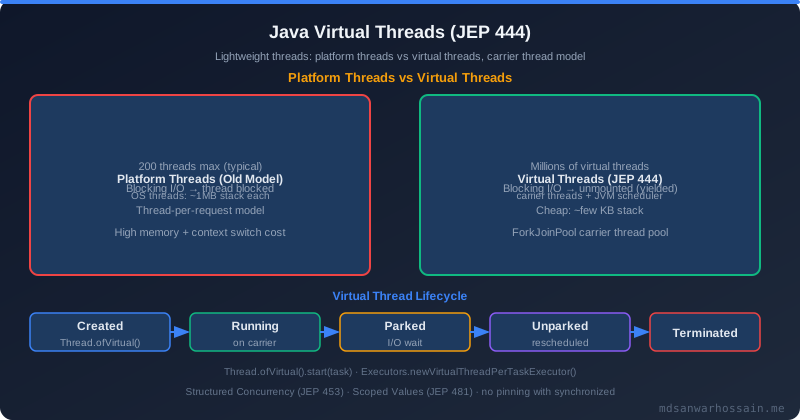
For two decades, Java's concurrency model was dominated by OS threads. Each thread consumes roughly 0.5–2 MB of stack memory and requires a kernel context switch when blocked. This made high-concurrency servers expensive to run: supporting 10,000 simultaneous requests meant either carefully sized thread pools, reactive programming frameworks like Project Reactor or RxJava, or accepting underutilized hardware.
Project Loom, delivered as a standard feature in Java 21, introduces virtual threads — lightweight threads scheduled by the JVM rather than the OS. A single OS thread (called a carrier thread) can multiplex thousands of virtual threads. When a virtual thread blocks on I/O, the carrier thread parks the virtual thread and picks up another one. This is transparent to the application code: you still write straightforward synchronous blocking code, but the JVM handles the scheduling overhead. The result is massive throughput improvement for IO-bound workloads with no change to application logic.
Problem Statement: The Thread-Per-Request Bottleneck
The classic Spring MVC model assigns one OS thread per request. When that thread makes a JDBC call or an HTTP call to a downstream service, it blocks until the response arrives. For latency-sensitive services with many concurrent users, thread pool exhaustion becomes the bottleneck. You tune Tomcat's maxThreads upward, increase heap to support more stack space, and eventually hit diminishing returns where context-switch overhead dominates CPU usage.
Reactive programming solves this by rewriting business logic in a non-blocking, callback-oriented style. It works — systems like Netflix's API gateway handle millions of requests per second with reactive stacks — but the cognitive overhead of reactive pipelines, especially for debugging and exception handling, is significant. Virtual threads offer an alternative path: you get near-identical throughput benefits while writing code that reads like standard synchronous Java.
How Virtual Threads Work: The JVM Scheduler
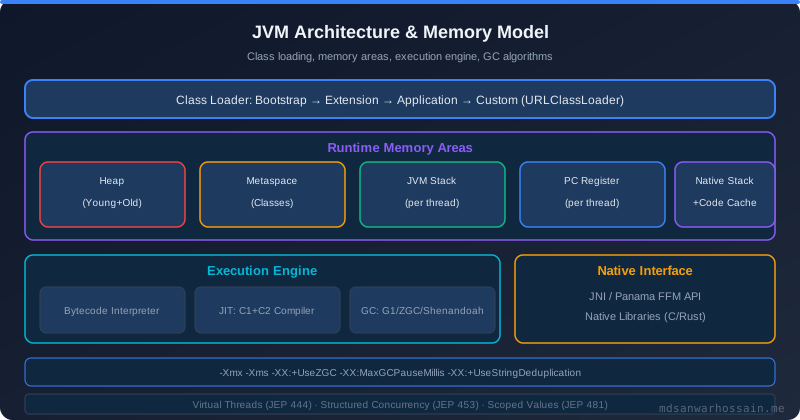
Virtual threads are instances of java.lang.Thread but are not backed by an OS thread one-to-one. The JVM maintains a pool of carrier threads (typically sized to available CPU cores) and mounts virtual threads onto them for execution. When a virtual thread makes a blocking call — JDBC query, HTTP request, file read — the JVM unmounts it from its carrier thread, storing its stack on the heap. The carrier thread is free to execute other virtual threads. When the blocking call completes, the virtual thread is rescheduled for mounting.
The key insight is that virtual thread stacks live on the heap, not in fixed OS stack memory. This means you can create millions of virtual threads without running out of memory in the way you would with OS threads. Creating a virtual thread costs roughly a few hundred bytes initially, growing only as the call stack grows.
Spring Boot Integration: Enabling Virtual Threads
Spring Boot 3.2+ provides first-class support for virtual threads. Enabling them requires a single configuration property:
# application.properties
spring.threads.virtual.enabled=true
When this property is set, Spring Boot configures Tomcat (or Jetty/Undertow) to use a virtual thread executor instead of the traditional thread pool. Every incoming request is handled on a new virtual thread. The application code does not need to change. JDBC calls, RestTemplate calls, and Feign clients all work transparently.
For programmatic usage outside Spring Boot, you create virtual threads using the standard API:
// Java 21: Creating a virtual thread
Thread vt = Thread.ofVirtual().start(() -> {
    // This blocking call yields the carrier thread
    String result = fetchFromDatabase();
    process(result);
});

// Using ExecutorService with virtual threads
try (ExecutorService executor = Executors.newVirtualThreadPerTaskExecutor()) {
    executor.submit(() -> handleRequest(request));
}
Thread Pinning: The Most Important Pitfall
Virtual threads do not always yield their carrier thread when blocking. Two specific cases cause pinning — where the virtual thread holds its carrier thread even while blocked, eliminating the throughput benefit:
1. Synchronized blocks: Code inside synchronized methods or blocks pins the virtual thread to its carrier. If your application uses legacy libraries with heavy synchronized usage, those sections will not benefit from virtual thread multiplexing.
2. Native methods: Calls into native code via JNI can also cause pinning.
To detect pinning, run your application with the JVM flag -Djdk.tracePinnedThreads=full. The JVM will print a stack trace whenever a virtual thread pins. Common offenders include older JDBC drivers, certain Spring Security internal code paths, and legacy ORM libraries. Where possible, replace synchronized with java.util.concurrent.locks.ReentrantLock, which does not cause pinning.
// Pinning risk: synchronized
synchronized (lock) {
    result = jdbcTemplate.queryForObject(sql, String.class);
}

// Better: ReentrantLock does not pin virtual threads
private final ReentrantLock lock = new ReentrantLock();
lock.lock();
try {
    result = jdbcTemplate.queryForObject(sql, String.class);
} finally {
    lock.unlock();
}
JDBC and Connection Pool Considerations
Virtual threads change the economics of database connection pooling. With OS threads, a pool of 50 connections matches a thread pool of 50 threads cleanly. With virtual threads, you might have thousands of concurrent virtual threads but still need to limit active JDBC connections to protect the database. HikariCP works with virtual threads, but you must set maximumPoolSize deliberately — not based on thread count, but on what your database can handle. A typical production setting might be 20–100 connections regardless of how many virtual threads are running concurrently.
Structured Concurrency: Composing Virtual Thread Tasks
Java 21 also introduced Structured Concurrency (in preview), which provides a clean API for coordinating multiple virtual threads launched for a single task. It guarantees that child threads do not outlive their parent scope, making resource leaks and error propagation more predictable:
try (var scope = new StructuredTaskScope.ShutdownOnFailure()) {
    Future<User> user = scope.fork(() -> userService.getUser(id));
    Future<Orders> orders = scope.fork(() -> orderService.getOrders(id));
    scope.join().throwIfFailed();
    return new UserProfile(user.resultNow(), orders.resultNow());
}
If either fork throws, the other is cancelled automatically. This pattern replaces verbose CompletableFuture chains with readable, sequential-looking code.
Performance Benchmarks: Real-World Numbers
In IO-bound benchmarks (simulating JDBC and HTTP calls with realistic latencies), services migrated to virtual threads on Java 21 consistently show 3–10x throughput improvements compared to the same code on fixed thread pools of 200–400 threads. The improvement is most dramatic when individual requests perform multiple sequential IO operations, because virtual thread yielding eliminates idle waiting time entirely.
CPU-bound workloads show no improvement — virtual threads do not increase the number of available CPU cores. For CPU-intensive work, the traditional fork-join pool or reactive schedulers remain appropriate.
Pros and Cons
Pros: Drastically simplifies high-concurrency code compared to reactive programming. No library changes needed for IO-bound work. First-class Spring Boot 3.2+ support. Excellent throughput for JDBC, HTTP, and file IO operations.
Cons: Pinning from synchronized blocks silently eliminates throughput gains in legacy codebases. Thread-local variables can cause unexpected memory retention at scale. Connection pool sizing requires deliberate adjustment. CPU-bound work does not benefit.
Common Mistakes
Assuming all blocking code benefits: Code inside synchronized blocks does not yield. Audit your critical paths with -Djdk.tracePinnedThreads=full before assuming full benefits.
Keeping oversized thread pools: After enabling virtual threads, the old maxThreads settings on Tomcat become irrelevant. Spring Boot's virtual thread mode handles request dispatch automatically. Leaving large explicit executor pools wastes resources.
Ignoring ThreadLocal leaks: At scale, virtual threads that carry expensive objects in ThreadLocals can cause memory pressure. Use ScopedValue (Java 21 preview) as a safer alternative for request-scoped context.
Key Takeaways
- Java 21 virtual threads offer reactive-level throughput for IO-bound workloads with synchronous code.
- Enable them in Spring Boot 3.2+ with a single property:
spring.threads.virtual.enabled=true. - Audit for synchronized pinning using
-Djdk.tracePinnedThreads=full. - Resize JDBC connection pools based on database capacity, not thread count.
- Structured Concurrency (Java 21 preview) further simplifies concurrent task composition.
Conclusion
Virtual threads are the most impactful Java concurrency improvement in a generation. For teams running IO-heavy Spring Boot services, migrating to Java 21 with spring.threads.virtual.enabled=true is one of the lowest-risk, highest-reward upgrades available. The migration is often a one-property change. The tradeoffs — pinning risks and connection pool retuning — are manageable with a day of profiling and testing. If you are still running Java 17 or earlier, Project Loom alone is a compelling reason to upgrade your production fleet to Java 21.
Virtual Threads vs Reactive Programming: When to Use Which
The introduction of virtual threads prompts a fundamental question for Java architects: does Project Loom make reactive programming obsolete? The honest answer is "it depends on your workload and team." Both approaches enable high concurrency for IO-bound services, but they do so through fundamentally different programming models with different performance characteristics, learning curves, and ecosystem support.
Virtual threads shine when your team wants to write familiar, synchronous, blocking code and gain reactive-level throughput without the cognitive overhead of reactive operators. They are particularly powerful for services that make sequential IO calls (fetch user, then fetch orders, then compute result), because each blocking call simply parks the virtual thread at zero OS-thread cost. The Spring MVC + virtual threads combination lets you keep your existing codebase largely unchanged while achieving excellent throughput.
Reactive programming with Project Reactor or RxJava remains superior in specific scenarios: when you need fine-grained backpressure control over data streams, when you are building streaming APIs that push data to consumers over time (Server-Sent Events, WebSocket push), or when you need to compose complex asynchronous pipelines with error recovery, retry, and rate limiting built into the pipeline declaratively. Reactor's operators give you explicit control that imperative virtual thread code cannot match without significant custom scaffolding.
| Dimension | Virtual Threads | Reactive (Reactor/WebFlux) |
|---|---|---|
| Code style | Synchronous, imperative | Declarative pipelines (map, flatMap, filter) |
| Learning curve | Low — familiar Java idioms | High — new mental model, cold/hot publishers |
| IO-bound throughput | Excellent (park+resume) | Excellent (non-blocking event loop) |
| Backpressure | Manual (semaphores, queues) | Built-in via Reactive Streams spec |
| Debugging | Standard stack traces | Complex; reactor-tools helps but adds overhead |
| Best for | Request-response, CRUD, sequential IO | Streaming, event pipelines, push-based systems |
For new greenfield microservices that handle request-response workloads (the vast majority of enterprise Spring Boot services), virtual threads with Spring MVC is the pragmatic choice. For teams that have already invested in WebFlux and are comfortable with reactive patterns, staying reactive is perfectly reasonable — Project Reactor's performance is excellent and the ecosystem is mature. Avoid the trap of mixing both models in the same service without clear boundaries, as it leads to context-switching overhead for developers and subtle bugs at the integration points between synchronous and reactive code paths.
Migrating a Spring Boot Application to Virtual Threads: Step-by-Step
Migration from platform threads to virtual threads in an existing Spring Boot application is typically straightforward, but a methodical approach ensures you catch any pinning issues or pool sizing problems before they reach production. The following sequence is battle-tested for Spring Boot 3.2+ applications running on Java 21.
Step 1: Upgrade to Java 21 and Spring Boot 3.2+. Virtual threads require Java 19 as a preview feature and are finalized in Java 21. Spring Boot 3.2+ provides the spring.threads.virtual.enabled=true property that configures Tomcat, Jetty, Undertow, and Spring's async task executor to use virtual threads. Upgrade the Java toolchain first and verify the application starts and passes all existing tests before enabling virtual threads.
# Step 1: application.properties — enable virtual threads
spring.threads.virtual.enabled=true

# Step 2: If you have an explicit Tomcat thread pool, remove it
# (Virtual threads make maxThreads irrelevant — remove these properties)
# server.tomcat.max-threads=200   <-- DELETE THIS
# server.tomcat.min-spare-threads=10  <-- DELETE THIS
Step 2: Audit for thread pinning. Run your integration test suite with -Djdk.tracePinnedThreads=full to surface all pinning occurrences. Each pinning event prints a stack trace showing exactly which synchronized block is holding the carrier thread. Common sources include older versions of Hikari, some Spring Security internals prior to Spring Boot 3.2, certain Tomcat valve code, and third-party libraries. For each pinning source, evaluate whether you can replace synchronized with ReentrantLock or upgrade to a version that uses non-pinning synchronization.
// Step 2: Start the application with pinning diagnostics
java -Djdk.tracePinnedThreads=full -jar my-service.jar

// Output when pinning is detected:
// Thread[#35,ForkJoinPool-1-worker-1,5,CarrierThreads]
//     com.example.LegacyCache.get(LegacyCache.java:42) <== synchronized block
//     com.example.OrderService.findOrder(OrderService.java:87)
// Fix: replace synchronized with ReentrantLock in LegacyCache
Step 3: Resize connection pools. With virtual threads, request concurrency can be orders of magnitude higher than with platform thread pools. HikariCP's default maximumPoolSize of 10 will become a bottleneck immediately because thousands of virtual threads might concurrently request a connection. Resize the pool based on what the database can handle — not the number of virtual threads. A typical starting point is 20–50 connections for a PostgreSQL database serving a single microservice, adjusted based on pg_stat_activity data and p99 latency under load.
# Step 3: Tune HikariCP for virtual thread workloads
spring.datasource.hikari.maximum-pool-size=50
spring.datasource.hikari.minimum-idle=10
spring.datasource.hikari.connection-timeout=3000
spring.datasource.hikari.idle-timeout=600000
# Remove keepAliveTime if set — virtual threads make idle connections less useful
# spring.datasource.hikari.keepalive-time=30000
Step 4: Load test and compare. Before and after enabling virtual threads, run a load test with the same configuration using k6, Gatling, or Apache Bench. Target the most IO-intensive endpoints — those that make JDBC calls, HTTP calls, or both. Measure p50, p95, p99 latency and throughput at increasing concurrency levels. Virtual threads typically show equivalent or slightly better p50 latency and dramatically better throughput at high concurrency (500+ concurrent requests) compared to platform thread pools of 200 threads. If you do not see improvement, the bottleneck has shifted to the database connection pool or downstream services — neither of which virtual threads can help with.
Debugging and Profiling Virtual Threads with Java Flight Recorder
Java Flight Recorder (JFR) is the built-in, low-overhead profiling and diagnostics tool included in the JDK. Java 21 added dedicated JFR event types for virtual threads, making it possible to observe virtual thread scheduling, parking, and carrier thread usage at runtime with minimal overhead (typically under 2% CPU). JFR is the recommended first tool when investigating virtual thread performance issues in production or staging environments.
The key JFR events for virtual thread analysis are jdk.VirtualThreadStart, jdk.VirtualThreadEnd, jdk.VirtualThreadPinned, and jdk.VirtualThreadSubmitFailed. The pinned event is particularly valuable — it fires whenever a virtual thread is pinned to its carrier thread due to a synchronized block or native call, capturing the stack trace at the moment of pinning. This is more efficient than the -Djdk.tracePinnedThreads=full system property, which writes to stdout and has higher overhead.
# Start JFR recording with virtual thread events (while app is running)
jcmd <pid> JFR.start name=vt-analysis duration=60s \
  settings=profile \
  filename=/tmp/vt-recording.jfr

# Or use jcmd to start and stop manually
jcmd <pid> JFR.start name=vt-profiling
# ... run load test ...
jcmd <pid> JFR.stop name=vt-profiling filename=vt-recording.jfr

# Open the recording in JDK Mission Control (JMC)
jmc vt-recording.jfr
// Enable JFR programmatically for targeted recording in tests
import jdk.jfr.Recording;
import jdk.jfr.consumer.RecordingFile;
Recording recording = new Recording();
recording.enable("jdk.VirtualThreadPinned").withThreshold(Duration.ofMillis(10));
recording.enable("jdk.VirtualThreadSubmitFailed");
recording.start();
// ... run the code under investigation ...
recording.stop();
recording.dump(Path.of("vt-analysis.jfr"));
// Parse pinning events
try (RecordingFile file = new RecordingFile(Path.of("vt-analysis.jfr"))) {
file.readAllEvents().stream()
.filter(e -> e.getEventType().getName().equals("jdk.VirtualThreadPinned"))
.forEach(e -> System.out.println(e.getStackTrace()));
}JDK Mission Control (JMC) provides a graphical view of JFR recordings. The Virtual Threads tab (added in JMC 9) shows a timeline of virtual thread lifecycle events, a histogram of park durations, and a table of pinning events sorted by frequency. The most valuable view for performance investigation is the "carrier thread utilization" chart — if carrier threads are consistently at 100% utilization while many virtual threads are queued waiting for a carrier, it indicates that too many threads are pinned simultaneously and reducing parallelism. This typically points to a hot synchronized block that needs refactoring to ReentrantLock.
For automated regression detection, you can integrate JFR recording into your performance test pipeline. Record a baseline JFR profile, then compare subsequent recordings against the baseline using the jfr command-line tool or a custom parser. Alert when the count of jdk.VirtualThreadPinned events increases above a threshold, indicating that a code change introduced new pinning. This creates an automated safety net against performance regressions from pinning bugs that might not be caught by functional tests.
Virtual Threads in Production: Monitoring, Metrics, and Alerting
Enabling virtual threads in production shifts which metrics matter. Traditional thread pool utilization metrics (tomcat.threads.busy, tomcat.threads.current) become less meaningful because the platform thread pool is replaced by a single ForkJoinPool of carrier threads whose size equals the number of available CPU cores. The metrics that matter are request latency percentiles, carrier thread utilization, and connection pool saturation.
Spring Boot Actuator with Micrometer automatically exposes key metrics when virtual threads are enabled. The executor.pool.size, executor.active, and executor.queue.size metrics for the virtual thread executor provide insight into the scheduler queue depth. A growing queue depth indicates that more virtual threads are being submitted than the carrier thread pool can schedule, which can occur when carrier threads are pinned by synchronized blocks or when CPU-bound work is blocking carrier threads entirely.
// Custom Micrometer metrics for virtual thread health
@Component
public class VirtualThreadMetrics {

    private final MeterRegistry registry;

    public VirtualThreadMetrics(MeterRegistry registry) {
        this.registry = registry;
        registerMetrics();
    }

    private void registerMetrics() {
        // Monitor the ForkJoinPool used by virtual thread scheduler
        ForkJoinPool carrier = (ForkJoinPool) Executors.newVirtualThreadPerTaskExecutor()
            .getClass().getDeclaredField("scheduler")... // via reflection for diagnostics

        // Track active carrier threads
        Gauge.builder("virtual.threads.carrier.active",
                () -> ManagementFactory.getThreadMXBean().getThreadCount())
            .description("Number of active carrier threads")
            .register(registry);

        // Track HikariCP pool wait time — key indicator of pool saturation
        // Hikari auto-registers with Micrometer if spring-boot-actuator is present:
        // hikaricp.connections.pending — threads waiting for a connection
        // hikaricp.connections.active  — connections in use
        // hikaricp.connections.timeout — connection timeout count (alert on this)
    }
}
# Prometheus alerting rules for virtual thread production issues
groups:
- name: virtual-threads
rules:
# Alert when HikariCP connection pool is exhausted
- alert: HikariPoolExhausted
expr: hikaricp_connections_pending{application="order-service"} > 10
for: 2m
labels:
severity: warning
annotations:
summary: "HikariCP connection pool has {{ $value }} pending requests"
runbook: "Increase spring.datasource.hikari.maximum-pool-size or optimize query latency"
# Alert on p99 latency degradation (primary SLA metric)
- alert: HighRequestLatency
expr: histogram_quantile(0.99, http_server_requests_seconds_bucket{uri!="/actuator/**"}) > 2.0
for: 5m
labels:
severity: critical
annotations:
summary: "p99 request latency is {{ $value }}s"The most important production monitoring insight with virtual threads is that latency degradation no longer comes from thread pool exhaustion (the familiar "thread pool full, requests queued" pattern). Instead, it comes from resource contention at the layers that virtual threads actually block on: the database connection pool, downstream HTTP service latency, and carrier thread pinning. Configure alerts on hikaricp_connections_pending, http_client_requests_seconds_bucket (for RestTemplate/WebClient calls), and p99 latency. When these metrics are healthy, virtual thread-based services will handle order-of-magnitude more concurrent requests than their platform-thread predecessors without any application code changes.
For distributed tracing, virtual threads integrate naturally with OpenTelemetry and Micrometer Tracing. Context propagation works automatically because virtual threads use the same ThreadLocal mechanism as platform threads — trace context stored in ThreadLocal is available throughout the lifetime of a virtual thread and is cleaned up when the thread completes. This means distributed tracing requires no changes when migrating from platform threads to virtual threads, and your existing Jaeger or Zipkin dashboards will continue to show accurate end-to-end traces.
Leave a Comment

Software Engineer · Java · Spring Boot · Microservices