Spring Boot with RabbitMQ: AMQP Patterns, Dead Lettering & Retry Strategies
Adding RabbitMQ to a Spring Boot application is easy. Making it production-grade is not. The difference lies in how you handle the inevitable: messages that fail to process. Dead letter exchanges, exponential backoff retry, poison message quarantine, and proper acknowledgement semantics are what separate a fragile message pipeline from a resilient one.
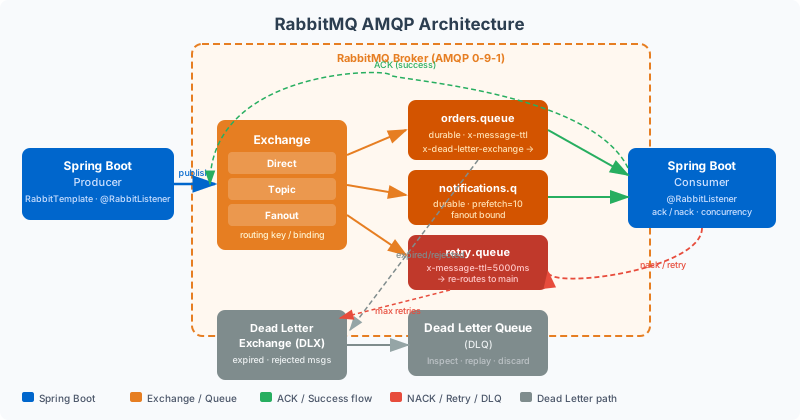
Table of Contents
- Spring AMQP Core Abstractions: RabbitTemplate and RabbitListener
- Exchange and Queue Topology: Designing for Resilience
- Dead Letter Exchange Pattern: Isolating Failed Messages
- Retry with Exponential Backoff Using TTL Queues
- Acknowledgement Modes and Prefetch Count Tuning
- Poison Message Handling and Quarantine Queues
- Publisher Confirms and Transactional Publishing
- Production Monitoring, Metrics, and Observability
Spring AMQP Core Abstractions: RabbitTemplate and RabbitListener
Spring AMQP provides two primary abstractions for working with RabbitMQ: RabbitTemplate for sending messages and @RabbitListener for receiving them. Both are autoconfigured by spring-boot-starter-amqp when RabbitMQ connection properties are present in application.yml. Unlike raw AMQP clients, Spring AMQP handles connection recovery, channel pooling, and serialisation automatically.
RabbitTemplate wraps a ConnectionFactory and provides high-level methods for publishing: convertAndSend(exchange, routingKey, message) serialises the payload using the configured MessageConverter and publishes to the specified exchange. The default converter uses Java serialisation, which is insecure and fragile across service versions — always replace it with Jackson2JsonMessageConverter for JSON serialisation or a Protobuf converter for schema-enforced binary encoding. Configure the converter explicitly in a @Configuration class to ensure consistency across all templates.
The @RabbitListener annotation drives consumer configuration. Spring creates a SimpleMessageListenerContainer (or DirectMessageListenerContainer for higher performance) per listener, managing thread pools, acknowledgement, and error handling. The container's concurrency setting determines how many consumer threads pull from the queue simultaneously. For CPU-bound processing, concurrency should match available CPUs. For I/O-bound processing (external HTTP calls, database writes), concurrency can be much higher — typically 10–50 — to saturate available I/O capacity.
# application.yml - RabbitMQ connection and listener configuration
spring:
  rabbitmq:
    host: ${RABBITMQ_HOST:localhost}
    port: 5672
    username: ${RABBITMQ_USER:guest}
    password: ${RABBITMQ_PASSWORD:guest}
    virtual-host: /
    connection-timeout: 5s
    listener:
      simple:
        acknowledge-mode: manual          # NEVER use auto — you lose messages on crash
        prefetch: 10                      # consumer fetches 10 msgs before acking
        concurrency: 3                    # min 3 consumer threads per listener
        max-concurrency: 10              # scale up to 10 under load
        default-requeue-rejected: false  # don't requeue on exception — route to DLX
        retry:
          enabled: false                 # disable Spring retry — use DLX-based retry instead
Always configure acknowledge-mode: manual. The default auto mode acknowledges messages the moment they are delivered to the consumer thread — before your business logic executes. If the consumer crashes mid-processing, the message is gone. Manual acknowledgement requires explicitly calling channel.basicAck(deliveryTag, false) after successful processing, ensuring the broker only removes the message when the consumer confirms it has been handled.
Exchange and Queue Topology: Designing for Resilience
A production RabbitMQ topology for a Spring Boot microservice typically involves multiple exchanges and queues working together: a primary exchange for routing incoming messages, one or more work queues for consumer processing, a dead letter exchange (DLX) for failed messages, retry queues with TTL for delayed redelivery, and a parking lot queue for messages that exhaust all retry attempts.
Every production queue must be declared as durable (survives broker restart), and messages must be published as persistent (written to disk, not just held in memory). Non-durable queues and non-persistent messages are lost on broker restart or crash. While durable/persistent adds I/O overhead, the reliability guarantee is essential — losing work items because of a planned broker upgrade is unacceptable.
Quorum queues, introduced in RabbitMQ 3.8, replace classic mirrored queues for high-availability scenarios. They use the Raft consensus algorithm to replicate queue state across N nodes, tolerating (N-1)/2 node failures. For any queue that must survive node failures in a multi-node cluster, declare it as a quorum queue using the x-queue-type: quorum argument. Quorum queues have slightly higher write latency than classic queues but eliminate the split-brain risk that plagued classic mirrored queues.
// Complete RabbitMQ topology for order processing
@Configuration
public class OrderQueueConfig {

    // Primary exchange
    public static final String ORDER_EXCHANGE = "order.direct";
    public static final String ORDER_QUEUE = "order.processing.queue";
    public static final String ORDER_ROUTING_KEY = "order.process";

    // Dead letter infrastructure
    public static final String DLX_EXCHANGE = "order.dlx";
    public static final String DLX_QUEUE = "order.dead-letter.queue";

    // Retry queues (TTL-based backoff)
    public static final String RETRY_1_QUEUE = "order.retry.1s.queue";
    public static final String RETRY_2_QUEUE = "order.retry.10s.queue";
    public static final String RETRY_3_QUEUE = "order.retry.60s.queue";

    @Bean
    public DirectExchange orderExchange() {
        return ExchangeBuilder.directExchange(ORDER_EXCHANGE).durable(true).build();
    }

    @Bean
    public DirectExchange deadLetterExchange() {
        return ExchangeBuilder.directExchange(DLX_EXCHANGE).durable(true).build();
    }

    @Bean
    public Queue orderQueue() {
        return QueueBuilder.durable(ORDER_QUEUE)
                .withArgument("x-dead-letter-exchange", DLX_EXCHANGE)
                .withArgument("x-dead-letter-routing-key", "order.failed")
                .withArgument("x-queue-type", "quorum") // HA via Raft
                .build();
    }

    @Bean
    public Queue deadLetterQueue() {
        return QueueBuilder.durable(DLX_QUEUE).build();
    }

    @Bean
    public Binding orderBinding() {
        return BindingBuilder.bind(orderQueue())
                .to(orderExchange())
                .with(ORDER_ROUTING_KEY);
    }
}
Dead Letter Exchange Pattern: Isolating Failed Messages
The Dead Letter Exchange (DLX) pattern is RabbitMQ's built-in mechanism for handling messages that cannot be processed. When a message is negatively acknowledged (basicNack with requeue=false), exceeds its TTL, or is rejected from a queue that has reached its maximum length, RabbitMQ automatically routes it to the configured dead letter exchange. From there, it lands in a dead letter queue where it can be inspected, reprocessed manually, or fed into an automated retry pipeline.
The key configuration is the x-dead-letter-exchange argument on the work queue — not on the exchange. This tells RabbitMQ where to route dead-lettered messages from that specific queue. The optional x-dead-letter-routing-key overrides the original routing key for dead-lettered messages, allowing the DLX to route them to different queues based on failure type. Without this argument, dead-lettered messages retain their original routing key.
RabbitMQ preserves message metadata when dead-lettering: the x-death header array records each time a message has been dead-lettered, including the reason (rejected, expired, maxlen), the timestamp, the original queue name, and the original exchange and routing key. Your dead letter queue consumer can inspect this history to understand exactly why a message failed and how many times it has been retried.
// Consumer with manual ack and dead letter routing
@Component
public class OrderConsumer {

    private static final int MAX_RETRY_COUNT = 3;

    @RabbitListener(queues = OrderQueueConfig.ORDER_QUEUE,
                    ackMode = "MANUAL",
                    concurrency = "3-10")
    public void processOrder(
            Message message,
            Channel channel,
            @Header(AmqpHeaders.DELIVERY_TAG) long deliveryTag) throws IOException {

        try {
            OrderCreatedEvent event = deserialize(message);
            int retryCount = getRetryCount(message);

            if (retryCount >= MAX_RETRY_COUNT) {
                // Exhausted retries — route to parking lot (dead letter queue)
                log.error("Max retries exceeded for order {}, routing to DLQ", event.getOrderId());
                channel.basicNack(deliveryTag, false, false); // nack, no requeue
                return;
            }

            orderService.processOrder(event);
            channel.basicAck(deliveryTag, false); // success

        } catch (RecoverableException e) {
            // Transient failure — route to DLX for retry
            log.warn("Recoverable error processing order, retry count: {}", getRetryCount(message));
            channel.basicNack(deliveryTag, false, false); // dead-letter for retry
        } catch (PoisonMessageException e) {
            // Permanent failure — dead-letter immediately, no retry
            log.error("Poison message detected, routing directly to DLQ");
            channel.basicNack(deliveryTag, false, false);
        }
    }

    private int getRetryCount(Message message) {
        List<Map<String, ?>> xDeath = message.getMessageProperties().getXDeathHeader();
        if (xDeath == null || xDeath.isEmpty()) return 0;
        return ((Long) xDeath.get(0).getOrDefault("count", 0L)).intValue();
    }
}
Retry with Exponential Backoff Using TTL Queues
Immediate retry on failure is almost always wrong. If processing fails because a downstream service is overloaded, retrying instantly hammers the same overloaded service. Exponential backoff — waiting 1s, then 10s, then 60s between retries — gives downstream services time to recover while still ensuring eventual processing. RabbitMQ implements exponential backoff without a scheduler using TTL retry queues: queues with a message TTL that dead-letter back to the main queue when the TTL expires.
The pattern works as follows: when a message fails in the main queue, it is dead-lettered to the DLX. The DLX routes it to a retry queue based on the current retry count. The retry queue has a TTL — messages sit in it for 1 second (retry 1), 10 seconds (retry 2), or 60 seconds (retry 3). When the TTL expires, RabbitMQ dead-letters the message from the retry queue back to the original work queue (because the retry queue has its own x-dead-letter-exchange pointing at the primary exchange). The consumer retries processing. After N retries, the consumer dead-letters to the parking lot queue instead.
// TTL-based retry queue topology
@Bean
public Queue retryQueue1s() {
    return QueueBuilder.durable(OrderQueueConfig.RETRY_1_QUEUE)
            .withArgument("x-message-ttl", 1000L)       // 1 second TTL
            .withArgument("x-dead-letter-exchange", OrderQueueConfig.ORDER_EXCHANGE)
            .withArgument("x-dead-letter-routing-key", OrderQueueConfig.ORDER_ROUTING_KEY)
            .build();
}

@Bean
public Queue retryQueue10s() {
    return QueueBuilder.durable(OrderQueueConfig.RETRY_2_QUEUE)
            .withArgument("x-message-ttl", 10_000L)     // 10 second TTL
            .withArgument("x-dead-letter-exchange", OrderQueueConfig.ORDER_EXCHANGE)
            .withArgument("x-dead-letter-routing-key", OrderQueueConfig.ORDER_ROUTING_KEY)
            .build();
}

@Bean
public Queue retryQueue60s() {
    return QueueBuilder.durable(OrderQueueConfig.RETRY_3_QUEUE)
            .withArgument("x-message-ttl", 60_000L)     // 60 second TTL
            .withArgument("x-dead-letter-exchange", OrderQueueConfig.ORDER_EXCHANGE)
            .withArgument("x-dead-letter-routing-key", OrderQueueConfig.ORDER_ROUTING_KEY)
            .build();
}

// DLX routes to appropriate retry queue based on x-death count
@Bean
public DirectExchange deadLetterExchange() {
    return ExchangeBuilder.directExchange(OrderQueueConfig.DLX_EXCHANGE).durable(true).build();
}

@Bean
public Binding retry1Binding() {
    return BindingBuilder.bind(retryQueue1s())
            .to(deadLetterExchange())
            .with("order.retry.1");
}
The DLX consumer reads the x-death count and routes to the appropriate retry queue by publishing to the DLX with the matching routing key (order.retry.1, order.retry.2, order.retry.3). When the retry count exceeds the maximum, the consumer publishes to the parking lot queue for manual inspection. This topology gives you full control over retry timing without any application-side scheduler, timer threads, or delayed message plugins.
Acknowledgement Modes and Prefetch Count Tuning
RabbitMQ's prefetch count (basicQos) is the most impactful consumer performance setting and the most frequently misconfigured. The prefetch count limits how many unacknowledged messages a consumer channel can hold at once. RabbitMQ will not push more messages to the channel until existing messages are acknowledged, up to this limit.
A prefetch of 1 means the consumer processes one message at a time, acks it, then fetches the next. This provides optimal fairness (no consumer can hoard messages) but minimal throughput (each round-trip to RabbitMQ is synchronous with message processing). A prefetch of 0 (unlimited) means the consumer pulls all available messages immediately — excellent throughput, but one slow consumer can hoard thousands of messages that could have been processed by other instances. For most production workloads, a prefetch of 10–50 provides good throughput while preventing message hoarding.
The optimal prefetch depends on message processing time: for fast processing (sub-millisecond), use higher prefetch (100–250) to keep the pipeline saturated. For slow processing (100ms+ due to I/O), use lower prefetch (5–20) to allow fair distribution across consumer instances and prevent memory buildup on consumer pods. Monitor the rabbitmq_queue_messages_unacknowledged metric — if it is consistently at the prefetch ceiling, the prefetch is too low. If it bounces between 0 and the limit rapidly, the prefetch is well-sized.
Poison Message Handling and Quarantine Queues
A poison message is a message that will never be processed successfully regardless of how many retries occur — typically caused by malformed JSON that cannot be deserialised, business logic invariants that are permanently violated, or data that references non-existent records with no recovery path. Retrying a poison message indefinitely wastes resources and blocks queue processing.
The quarantine queue (also called parking lot queue) pattern isolates poison messages for human inspection. After the maximum retry count is exceeded, the message is routed to a permanent dead letter queue with no further retry processing. Operators can inspect the queue via the RabbitMQ management UI, understand the failure reason from the x-death headers and message payload, manually fix the underlying data issue, and republish corrected messages back to the original work queue for reprocessing.
Implement a dead letter queue consumer that logs poison message details to a structured log or alerting system. This consumer should emit a metric increment and alert on any message entering the parking lot queue — in production, a parking lot message always indicates either a bug or corrupted data that requires investigation. Never let messages accumulate silently in a parking lot queue without alerting: a growing queue depth means systematic failures are being swallowed without visibility.
Publisher Confirms and Transactional Publishing
Publisher confirms ensure the broker has received and persisted a message before the producer considers it sent. Without confirms, a network failure between publish and broker persistence can silently lose messages. Enable confirms on the RabbitTemplate with setConfirmCallback — the callback is invoked asynchronously when the broker acks or nacks the publish. For synchronous confirmation, use rabbitTemplate.invoke() with channel-level confirms inside the lambda.
RabbitMQ also supports AMQP transactions (channel.txSelect(), txCommit(), txRollback()), but these are significantly slower than publisher confirms — transactions are synchronous and blocking, while confirms are asynchronous. Use publisher confirms rather than AMQP transactions for most scenarios. When you need to atomically publish a message and commit a database write, consider the Outbox Pattern: write the event to a database outbox table in the same transaction as the business data, then have a background job publish events from the outbox to RabbitMQ with confirms. This guarantees at-least-once delivery without distributed transactions.
// Publisher confirms with RabbitTemplate
@Configuration
public class RabbitTemplateConfig {

    @Bean
    public RabbitTemplate rabbitTemplate(ConnectionFactory connectionFactory,
                                          Jackson2JsonMessageConverter converter) {
        RabbitTemplate template = new RabbitTemplate(connectionFactory);
        template.setMessageConverter(converter);
        template.setMandatory(true); // return unroutable messages

        // Async confirm callback
        template.setConfirmCallback((correlationData, ack, cause) -> {
            if (!ack) {
                log.error("Message not confirmed by broker: {}, cause: {}",
                    correlationData != null ? correlationData.getId() : "unknown", cause);
                // Trigger retry or alerting here
            }
        });

        // Return callback for unroutable messages
        template.setReturnsCallback(returned -> {
            log.error("Message returned unroutable: exchange={}, routingKey={}, replyCode={}",
                returned.getExchange(), returned.getRoutingKey(), returned.getReplyCode());
        });

        return template;
    }

    @Bean
    public Jackson2JsonMessageConverter jackson2JsonMessageConverter() {
        return new Jackson2JsonMessageConverter();
    }
}
Production Monitoring, Metrics, and Observability
RabbitMQ exposes rich metrics via its management HTTP API and, from version 3.9+, through a native Prometheus exporter plugin. Enable the rabbitmq_prometheus plugin and configure Prometheus to scrape http://rabbitmq-host:15692/metrics. Key metrics to alert on: rabbitmq_queue_messages (total messages ready + unacked — alert when above expected threshold), rabbitmq_queue_messages_ready (ready messages — growing queue indicates consumer lag), rabbitmq_queue_messages_unacked_total (unacknowledged — growing indicates slow consumers or stuck processing), rabbitmq_connections_total and rabbitmq_channels_total (resource leak detection), and rabbitmq_node_disk_free_bytes (disk space for persistent message storage).
Spring AMQP automatically exposes RabbitMQ listener metrics via Micrometer when spring-boot-starter-actuator is on the classpath. The metrics include spring.rabbitmq.listener.*.seconds (listener processing time), available through /actuator/metrics and Prometheus. Add spring.rabbitmq.listener.simple.observation-enabled=true to enable distributed tracing through the listener, propagating trace context from the message headers into your OpenTelemetry or Micrometer Tracing spans. With this configured, every message processed by a @RabbitListener appears as a child span in your distributed trace — making it possible to trace a user request end-to-end through HTTP, RabbitMQ, and the consumer service.
Key Takeaways
- Always use manual acknowledgement: Auto-ack loses messages on consumer crash. Manual ack with
channel.basicAckafter successful processing is the only safe production configuration. - DLX + retry queues replace Spring Retry: TTL-based retry queues (1s, 10s, 60s) give you broker-managed exponential backoff without application-side threads, timers, or memory state.
- Quorum queues over classic mirrored: Quorum queues use Raft for strong consistency and are the correct HA choice for all new RabbitMQ queues in 2026.
- Publisher confirms prevent silent message loss: Enable confirms on
RabbitTemplateand log/alert on nack callbacks. Never assume a published message was received without confirmation. - Tune prefetch to workload speed: High prefetch (100+) for fast consumers, low prefetch (5–20) for slow I/O-bound consumers. Monitor
messages_unacknowledgedto validate the setting. - Alert on parking lot queue depth: A non-zero parking lot queue is always a bug or data issue. Never let it accumulate silently — instrument it with a Prometheus alert that fires immediately.