Spring Security Filter Chain Internals: JWT Refresh Tokens, PKCE & OpenID Connect (2026)
Spring Security 6 rewrote the book on how you configure security in Spring Boot. The old WebSecurityConfigurerAdapter is gone; lambda DSL is the only way. But beyond the API surface, most developers still misunderstand how the filter chain actually executes, where tokens live, and why PKCE matters for SPAs. This deep dive fixes that — with production-grade code for every scenario.
TL;DR
- Spring Security 6 uses SecurityFilterChain beans — no more
WebSecurityConfigurerAdapter. - JWT access tokens should be short-lived (5–15 min); refresh tokens long-lived with rotation + revocation.
- PKCE is mandatory for SPAs and mobile apps — client secrets cannot be stored safely in public clients.
- Use HttpOnly cookies for refresh tokens and in-memory storage for access tokens to minimise XSS exposure.
- Spring Authorization Server 1.x implements RFC-compliant PKCE, OIDC, and token rotation out of the box.
Table of Contents
- Spring Security 6 Architecture Overview
- SecurityFilterChain Configuration (lambda DSL)
- Building a Custom JwtAuthenticationFilter
- Access Token + Refresh Token Strategy
- Token Storage: HttpOnly Cookie vs Authorization Header
- PKCE — Why SPAs Need It
- Spring Authorization Server Setup
- OpenID Connect: ID Token, UserInfo & Claims
- Session Management and CSRF Protection
- Method Security (@PreAuthorize, @PostFilter, @Secured)
- Security Testing (MockMvc, @WithMockUser, WebTestClient)
- Production Hardening Checklist
1. Spring Security 6 Architecture Overview
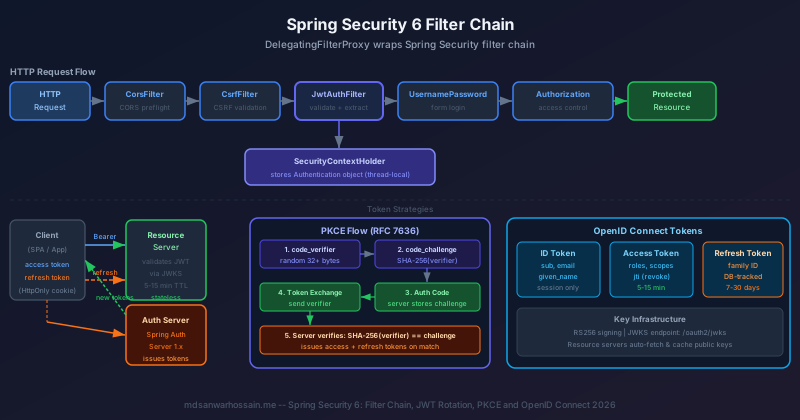
At the lowest level Spring Security is a chain of standard Servlet Filter objects. The entry point is DelegatingFilterProxy — a Spring-aware filter registered with the Servlet container that delegates to the FilterChainProxy bean. FilterChainProxy selects the matching SecurityFilterChain for the current request and runs its filters in order.
The SecurityContextHolder stores the authenticated Authentication object in a thread-local. After authentication succeeds, downstream filters and controllers call SecurityContextHolder.getContext().getAuthentication() to read identity and authorities. At the end of each request the SecurityContextPersistenceFilter (replaced by SecurityContextHolderFilter in Spring Security 6) clears the holder.
| Filter | Purpose | Order |
|---|---|---|
| DisableEncodeUrlFilter | Prevents session IDs in URLs | 100 |
| WebAsyncManagerIntegrationFilter | Propagates SecurityContext to async threads | 200 |
| SecurityContextHolderFilter | Loads/saves SecurityContext | 300 |
| CorsFilter | Handles CORS preflight | 400 |
| CsrfFilter | Validates CSRF token | 500 |
| BearerTokenAuthenticationFilter | Extracts & validates JWTs | 800 |
| AuthorizationFilter | Checks access rules | 1800 |
2. SecurityFilterChain Configuration (Modern Lambda DSL)
Spring Security 6 removed WebSecurityConfigurerAdapter. Every configuration is now done by defining SecurityFilterChain beans using the lambda DSL. This is cleaner, more composable, and avoids the ambiguity of inherited configuration.
@Configuration
@EnableWebSecurity
@EnableMethodSecurity          // replaces @EnableGlobalMethodSecurity
public class SecurityConfig {

    private final JwtAuthenticationFilter jwtFilter;
    private final JwtAuthenticationEntryPoint entryPoint;

    public SecurityConfig(JwtAuthenticationFilter jwtFilter,
                          JwtAuthenticationEntryPoint entryPoint) {
        this.jwtFilter = jwtFilter;
        this.entryPoint = entryPoint;
    }

    @Bean
    public SecurityFilterChain apiFilterChain(HttpSecurity http) throws Exception {
        http
            .securityMatcher("/api/**")
            .csrf(csrf -> csrf.disable())
            .cors(cors -> cors.configurationSource(corsConfigurationSource()))
            .sessionManagement(sm -> sm
                .sessionCreationPolicy(SessionCreationPolicy.STATELESS))
            .authorizeHttpRequests(auth -> auth
                .requestMatchers("/api/auth/**").permitAll()
                .requestMatchers(HttpMethod.GET, "/api/public/**").permitAll()
                .requestMatchers("/api/admin/**").hasRole("ADMIN")
                .anyRequest().authenticated())
            .exceptionHandling(ex -> ex
                .authenticationEntryPoint(entryPoint))
            .addFilterBefore(jwtFilter,
                UsernamePasswordAuthenticationFilter.class);
        return http.build();
    }

    @Bean
    public PasswordEncoder passwordEncoder() {
        return new BCryptPasswordEncoder(12);
    }

    @Bean
    CorsConfigurationSource corsConfigurationSource() {
        CorsConfiguration cfg = new CorsConfiguration();
        cfg.setAllowedOrigins(List.of("https://app.example.com"));
        cfg.setAllowedMethods(List.of("GET","POST","PUT","DELETE","OPTIONS"));
        cfg.setAllowedHeaders(List.of("Authorization","Content-Type"));
        cfg.setAllowCredentials(true);
        cfg.setMaxAge(3600L);
        UrlBasedCorsConfigurationSource source =
            new UrlBasedCorsConfigurationSource();
        source.registerCorsConfiguration("/api/**", cfg);
        return source;
    }
}
Multiple SecurityFilterChain beans can coexist — Spring selects the first one whose securityMatcher matches. This lets you apply different rules to your REST API, Actuator endpoints, and static resources independently.
3. Building a Custom JwtAuthenticationFilter
When you use Spring Security's built-in OAuth2 resource server support, BearerTokenAuthenticationFilter is added automatically. However, for tighter control — custom claims extraction, Redis blacklist checks, multi-tenant key sets — a hand-rolled filter gives you full control.
@Component
@RequiredArgsConstructor
public class JwtAuthenticationFilter extends OncePerRequestFilter {

    private final JwtTokenProvider tokenProvider;
    private final TokenBlacklist blacklist;

    @Override
    protected void doFilterInternal(HttpServletRequest request,
                                    HttpServletResponse response,
                                    FilterChain chain)
            throws ServletException, IOException {

        String token = extractBearerToken(request);

        if (token != null && tokenProvider.validateToken(token)) {
            // Check revocation (Redis O(1) lookup)
            if (blacklist.isBlacklisted(token)) {
                response.sendError(HttpStatus.UNAUTHORIZED.value(),
                    "Token has been revoked");
                return;
            }
            Authentication auth = tokenProvider.getAuthentication(token);
            SecurityContextHolder.getContext().setAuthentication(auth);
        }
        chain.doFilter(request, response);
    }

    private String extractBearerToken(HttpServletRequest req) {
        String header = req.getHeader(HttpHeaders.AUTHORIZATION);
        if (StringUtils.hasText(header) && header.startsWith("Bearer ")) {
            return header.substring(7);
        }
        return null;
    }
}
@Component
public class JwtTokenProvider {

    @Value("${jwt.access-token-expiry:900}")     // 15 min
    private long accessTokenExpiry;

    private final RSAPrivateKey privateKey;
    private final RSAPublicKey  publicKey;

    public String generateAccessToken(UserDetails user) {
        Instant now = Instant.now();
        return JWT.create()
            .withSubject(user.getUsername())
            .withIssuedAt(now)
            .withExpiresAt(now.plusSeconds(accessTokenExpiry))
            .withClaim("roles", user.getAuthorities().stream()
                .map(GrantedAuthority::getAuthority)
                .collect(Collectors.toList()))
            .withJWTId(UUID.randomUUID().toString())   // jti for revocation
            .sign(Algorithm.RSA256(publicKey, privateKey));
    }

    public boolean validateToken(String token) {
        try {
            JWT.require(Algorithm.RSA256(publicKey, null))
               .build()
               .verify(token);
            return true;
        } catch (JWTVerificationException e) {
            return false;
        }
    }

    public Authentication getAuthentication(String token) {
        DecodedJWT jwt = JWT.decode(token);
        List<SimpleGrantedAuthority> authorities =
            jwt.getClaim("roles").asList(String.class).stream()
               .map(SimpleGrantedAuthority::new)
               .collect(Collectors.toList());
        return new UsernamePasswordAuthenticationToken(
            jwt.getSubject(), null, authorities);
    }
}
4. Access Token + Refresh Token Strategy (Rotation & Revocation)
The core idea: access tokens are short-lived and stateless; refresh tokens are long-lived but server-tracked. Every time a refresh token is used it is replaced by a new one — this is refresh token rotation. If the old token is presented again it signals theft; the entire token family is immediately revoked.
@Service
@Transactional
@RequiredArgsConstructor
public class RefreshTokenService {

    private final RefreshTokenRepository repo;
    private final JwtTokenProvider tokenProvider;

    @Value("${jwt.refresh-token-expiry:604800}") // 7 days
    private long refreshExpiry;

    public TokenPair rotate(String incomingRefreshToken) {
        RefreshToken stored = repo.findByToken(incomingRefreshToken)
            .orElseThrow(() -> new InvalidTokenException("Unknown refresh token"));

        if (stored.isRevoked()) {
            // Replay detected — revoke entire family
            repo.revokeAllByFamily(stored.getFamily());
            throw new TokenTheftException("Refresh token reuse detected");
        }

        // Invalidate the used token
        stored.setRevoked(true);
        repo.save(stored);

        // Issue new pair
        String newRefresh = UUID.randomUUID().toString();
        repo.save(RefreshToken.builder()
            .token(newRefresh)
            .family(stored.getFamily())   // preserve family for revocation
            .username(stored.getUsername())
            .expiresAt(Instant.now().plusSeconds(refreshExpiry))
            .revoked(false)
            .build());

        String newAccess = tokenProvider.generateAccessToken(
            loadUserByUsername(stored.getUsername()));

        return new TokenPair(newAccess, newRefresh);
    }

    public RefreshToken issue(String username) {
        String family = UUID.randomUUID().toString();
        return repo.save(RefreshToken.builder()
            .token(UUID.randomUUID().toString())
            .family(family)
            .username(username)
            .expiresAt(Instant.now().plusSeconds(refreshExpiry))
            .revoked(false)
            .build());
    }
}
| Token Type | Expiry | Storage | Revocation |
|---|---|---|---|
| Access Token (JWT) | 5–15 min | JS memory | JTI blocklist (Redis) |
| Refresh Token | 7–30 days | HttpOnly cookie / DB | DB row + family revoke |
| ID Token (OIDC) | Session | Memory / sessionStorage | Short expiry, no revoke |
5. Token Storage: HttpOnly Cookie vs Authorization Header
There is no universally correct choice — the right approach depends on your threat model. The table below captures the trade-offs:
| Approach | XSS Risk | CSRF Risk | Best For |
|---|---|---|---|
| HttpOnly + Secure cookie | Low | Requires mitigation | Refresh tokens in SPAs, traditional apps |
| Authorization: Bearer header | If in localStorage | None (not auto-sent) | Access tokens from JS memory |
| sessionStorage | Medium | None | Short-session web apps |
| BFF (Backend for Frontend) | Very low | Handled server-side | Production SPAs (recommended 2026) |
private void setRefreshTokenCookie(HttpServletResponse response,
                                    String refreshToken) {
    ResponseCookie cookie = ResponseCookie
        .from("refreshToken", refreshToken)
        .httpOnly(true)
        .secure(true)                        // HTTPS only
        .sameSite("Strict")                  // no cross-site sending
        .path("/api/auth/refresh")           // scope to refresh endpoint
        .maxAge(Duration.ofDays(7))
        .build();
    response.addHeader(HttpHeaders.SET_COOKIE, cookie.toString());
}
6. PKCE (Proof Key for Code Exchange) — Why SPAs Need It
PKCE (RFC 7636) was originally designed for mobile apps that cannot safely store a client secret. In 2026 it is required for all public clients including SPAs — OAuth 2.0 Security BCP (RFC 9700) mandates it for all new deployments.
How it works:
- Client generates a cryptographically random
code_verifier(43–128 chars). - Client computes
code_challenge = BASE64URL(SHA-256(code_verifier)). - Client sends
code_challenge+code_challenge_method=S256with the authorization request. - Authorization server stores the challenge alongside the issued authorization code.
- At token exchange, client sends the original
code_verifier. - Authorization server hashes the verifier and compares — mismatch means rejection.
async function generatePkce() {
    const verifier = crypto.getRandomValues(new Uint8Array(32));
    const codeVerifier = btoa(String.fromCharCode(...verifier))
        .replace(/\+/g, '-').replace(/\//g, '_').replace(/=/g, '');

    const data = new TextEncoder().encode(codeVerifier);
    const digest = await crypto.subtle.digest('SHA-256', data);
    const codeChallenge = btoa(
        String.fromCharCode(...new Uint8Array(digest)))
        .replace(/\+/g, '-').replace(/\//g, '_').replace(/=/g, '');

    return { codeVerifier, codeChallenge };
}

// Build authorization URL
const { codeVerifier, codeChallenge } = await generatePkce();
sessionStorage.setItem('pkce_verifier', codeVerifier); // temp only

const authUrl = new URL('https://auth.example.com/oauth2/authorize');
authUrl.searchParams.set('response_type', 'code');
authUrl.searchParams.set('client_id', 'my-spa');
authUrl.searchParams.set('redirect_uri', 'https://app.example.com/callback');
authUrl.searchParams.set('scope', 'openid profile email');
authUrl.searchParams.set('code_challenge', codeChallenge);
authUrl.searchParams.set('code_challenge_method', 'S256');
authUrl.searchParams.set('state', generateState());
7. Spring Authorization Server Setup
Spring Authorization Server 1.x (part of the Spring ecosystem since 2023) provides a production-ready OAuth 2.1 + OIDC authorization server. Add the dependency and configure registered clients, token settings, and the provider chain.
dependencies {
    implementation 'org.springframework.boot:spring-boot-starter-security'
    implementation 'org.springframework.security:spring-security-oauth2-authorization-server:1.3.3'
    implementation 'org.springframework.boot:spring-boot-starter-data-jpa'
    implementation 'org.springframework.boot:spring-boot-starter-data-redis'
}
@Configuration
public class AuthorizationServerConfig {

    @Bean
    @Order(1)
    public SecurityFilterChain authServerFilterChain(HttpSecurity http)
            throws Exception {
        OAuth2AuthorizationServerConfiguration.applyDefaultSecurity(http);
        http.getConfigurer(OAuth2AuthorizationServerConfigurer.class)
            .oidc(Customizer.withDefaults());
        http.exceptionHandling(ex -> ex
            .defaultAuthenticationEntryPointFor(
                new LoginUrlAuthenticationEntryPoint("/login"),
                new MediaTypeRequestMatcher(MediaType.TEXT_HTML)));
        return http.build();
    }

    @Bean
    public RegisteredClientRepository registeredClientRepository() {
        RegisteredClient spa = RegisteredClient
            .withId(UUID.randomUUID().toString())
            .clientId("my-spa")
            .clientAuthenticationMethod(
                ClientAuthenticationMethod.NONE)          // public client
            .authorizationGrantType(
                AuthorizationGrantType.AUTHORIZATION_CODE)
            .authorizationGrantType(AuthorizationGrantType.REFRESH_TOKEN)
            .redirectUri("https://app.example.com/callback")
            .scope(OidcScopes.OPENID)
            .scope(OidcScopes.PROFILE)
            .scope("api.read")
            .clientSettings(ClientSettings.builder()
                .requireProofKey(true)                    // enforce PKCE
                .requireAuthorizationConsent(false)
                .build())
            .tokenSettings(TokenSettings.builder()
                .accessTokenTimeToLive(Duration.ofMinutes(15))
                .refreshTokenTimeToLive(Duration.ofDays(7))
                .reuseRefreshTokens(false)                // rotation
                .build())
            .build();

        return new InMemoryRegisteredClientRepository(spa);
    }

    @Bean
    public JWKSource<SecurityContext> jwkSource() throws Exception {
        KeyPairGenerator gen = KeyPairGenerator.getInstance("RSA");
        gen.initialize(2048);
        KeyPair kp = gen.generateKeyPair();
        RSAKey rsaKey = new RSAKey.Builder((RSAPublicKey) kp.getPublic())
            .privateKey(kp.getPrivate())
            .keyID(UUID.randomUUID().toString())
            .build();
        return new ImmutableJWKSet<>(new JWKSet(rsaKey));
    }

    @Bean
    public AuthorizationServerSettings authorizationServerSettings() {
        return AuthorizationServerSettings.builder()
            .issuer("https://auth.example.com")
            .build();
    }
}
8. OpenID Connect: ID Token, UserInfo Endpoint & Claims Mapping
OpenID Connect (OIDC) is an identity layer on top of OAuth 2.0. After a successful Authorization Code + PKCE flow your app receives three artefacts: an access token (for API calls), a refresh token, and an ID token (JWT asserting who the user is).
@Bean
public OAuth2TokenCustomizer<JwtEncodingContext> tokenCustomizer(
        UserRepository userRepo) {
    return context -> {
        if (OidcParameterNames.ID_TOKEN.equals(
                context.getTokenType().getValue())) {
            String username = context.getPrincipal().getName();
            userRepo.findByUsername(username).ifPresent(user -> {
                context.getClaims()
                    .claim("given_name", user.getFirstName())
                    .claim("family_name", user.getLastName())
                    .claim("email", user.getEmail())
                    .claim("tenant_id", user.getTenantId())
                    .claim("roles", user.getRoles());
            });
        }
    };
}
@Configuration
public class ResourceServerConfig {

    @Bean
    @Order(2)
    public SecurityFilterChain resourceServerChain(HttpSecurity http)
            throws Exception {
        http
            .securityMatcher("/api/**")
            .oauth2ResourceServer(rs -> rs
                .jwt(jwt -> jwt
                    .jwkSetUri("https://auth.example.com/oauth2/jwks")
                    .jwtAuthenticationConverter(jwtAuthConverter())))
            .authorizeHttpRequests(auth -> auth
                .requestMatchers("/api/public/**").permitAll()
                .anyRequest().authenticated())
            .sessionManagement(sm -> sm
                .sessionCreationPolicy(SessionCreationPolicy.STATELESS));
        return http.build();
    }

    private JwtAuthenticationConverter jwtAuthConverter() {
        JwtGrantedAuthoritiesConverter grantedAuthConverter =
            new JwtGrantedAuthoritiesConverter();
        grantedAuthConverter.setAuthoritiesClaimName("roles");
        grantedAuthConverter.setAuthorityPrefix("ROLE_");

        JwtAuthenticationConverter converter = new JwtAuthenticationConverter();
        converter.setJwtGrantedAuthoritiesConverter(grantedAuthConverter);
        return converter;
    }
}
9. Session Management and CSRF Protection
Stateless JWT APIs disable CSRF because the browser never automatically attaches the Authorization header. But if you use cookie-based token delivery (e.g. refreshToken HttpOnly cookie), CSRF protection must be re-enabled for those endpoints.
@Bean
public SecurityFilterChain refreshChain(HttpSecurity http) throws Exception {
    http
        .securityMatcher("/api/auth/refresh")
        .csrf(csrf -> csrf
            .csrfTokenRepository(CookieCsrfTokenRepository.withHttpOnlyFalse())
            .csrfTokenRequestHandler(new CsrfTokenRequestAttributeHandler()))
        .sessionManagement(sm -> sm
            .sessionCreationPolicy(SessionCreationPolicy.STATELESS))
        .authorizeHttpRequests(auth -> auth.anyRequest().permitAll());
    return http.build();
}

// Concurrent session control (traditional web)
@Bean
public SecurityFilterChain webChain(HttpSecurity http) throws Exception {
    http
        .sessionManagement(sm -> sm
            .sessionCreationPolicy(SessionCreationPolicy.IF_REQUIRED)
            .maximumSessions(1)
            .maxSessionsPreventsLogin(false)
            .sessionRegistry(sessionRegistry()))
        .sessionFixation(sf -> sf.migrateSession());
    return http.build();
}

@Bean
public SessionRegistry sessionRegistry() {
    return new SessionRegistryImpl();
}
Always set sessionFixation().migrateSession() for traditional web apps to prevent session fixation attacks after login. For stateless APIs, set SessionCreationPolicy.STATELESS to ensure no JSESSIONID cookie is ever created.
10. Method Security (@PreAuthorize, @PostFilter, @Secured)
Enable method security with @EnableMethodSecurity (replaces deprecated @EnableGlobalMethodSecurity). Spring Security 6 evaluates these annotations using the new AuthorizationManager-based architecture.
@Service
public class OrderService {

    // SpEL: only the order owner or ADMIN may access
    @PreAuthorize("hasRole('ADMIN') or #order.userId == authentication.name")
    public Order getOrder(Order order) { return order; }

    // Filters return list — removes elements user can't see
    @PostFilter("filterObject.userId == authentication.name or hasRole('ADMIN')")
    public List<Order> getOrders() { return orderRepo.findAll(); }

    // Verifies return value after method executes
    @PostAuthorize("returnObject.userId == authentication.name")
    public Order createOrder(OrderRequest req) {
        return orderRepo.save(new Order(req,
            SecurityContextHolder.getContext()
                .getAuthentication().getName()));
    }

    // Requires both roles
    @PreAuthorize("hasRole('ADMIN') and hasRole('AUDIT')")
    public void deleteOrder(Long id) { orderRepo.deleteById(id); }

    // Custom permission evaluator
    @PreAuthorize("@orderPermissionEvaluator.canEdit(authentication, #id)")
    public Order updateOrder(Long id, OrderRequest req) {
        return orderRepo.findById(id)
            .map(o -> { o.update(req); return orderRepo.save(o); })
            .orElseThrow();
    }
}
@Component("orderPermissionEvaluator")
public class OrderPermissionEvaluator {

    private final OrderRepository orderRepo;

    public boolean canEdit(Authentication auth, Long orderId) {
        if (auth.getAuthorities().stream()
                .anyMatch(a -> a.getAuthority().equals("ROLE_ADMIN"))) {
            return true;
        }
        return orderRepo.findById(orderId)
            .map(o -> o.getUserId().equals(auth.getName()))
            .orElse(false);
    }
}
11. Security Testing (MockMvc, @WithMockUser, WebTestClient)
Always test both the happy path and the security rejections. Use @WebMvcTest + @Import(SecurityConfig.class) to load the real filter chain in tests without starting a full server.
@WebMvcTest(OrderController.class)
@Import(SecurityConfig.class)
class OrderControllerSecurityTest {

    @Autowired MockMvc mockMvc;

    @MockBean JwtTokenProvider tokenProvider;
    @MockBean OrderService orderService;

    @Test
    void unauthenticated_returns_401() throws Exception {
        mockMvc.perform(get("/api/orders"))
            .andExpect(status().isUnauthorized());
    }

    @Test
    @WithMockUser(roles = "USER")
    void authenticated_user_gets_200() throws Exception {
        given(orderService.getOrders()).willReturn(List.of());
        mockMvc.perform(get("/api/orders")
                .contentType(MediaType.APPLICATION_JSON))
            .andExpect(status().isOk());
    }

    @Test
    @WithMockUser(roles = "USER")
    void user_cannot_access_admin_endpoint() throws Exception {
        mockMvc.perform(delete("/api/admin/orders/1"))
            .andExpect(status().isForbidden());
    }

    @Test
    void jwt_authentication_test() throws Exception {
        // Use spring-security-test JWT support (SecurityMockMvcRequestPostProcessors)
        mockMvc.perform(get("/api/orders")
                .with(jwt()
                    .jwt(j -> j.claim("sub", "user1")
                               .claim("roles", List.of("ROLE_USER")))
                    .authorities(new SimpleGrantedAuthority("ROLE_USER"))))
            .andExpect(status().isOk());
    }
}
@WebFluxTest(ReactiveOrderController.class)
@Import(ReactiveSecurityConfig.class)
class ReactiveOrderControllerTest {

    @Autowired WebTestClient webTestClient;

    @Test
    void unauthenticated_reactive_returns_401() {
        webTestClient.get().uri("/api/orders")
            .exchange()
            .expectStatus().isUnauthorized();
    }

    @Test
    @WithMockUser(roles = "USER")
    void authenticated_reactive_returns_200() {
        webTestClient.mutateWith(mockUser().roles("USER"))
            .get().uri("/api/orders")
            .exchange()
            .expectStatus().isOk();
    }

    @Test
    void jwt_reactive_test() {
        webTestClient.mutateWith(mockJwt()
                .jwt(j -> j.claim("sub", "user1"))
                .authorities(new SimpleGrantedAuthority("ROLE_USER")))
            .get().uri("/api/orders")
            .exchange()
            .expectStatus().isOk();
    }
}
12. Production Hardening Checklist
Before shipping a Spring Security 6 application to production, verify all items in the following checklist:
- ✅ Use RS256 (asymmetric) for JWT signing — never HS256 in multi-service environments.
- ✅ Rotate JWK signing keys periodically and expose a JWKS endpoint so resource servers self-refresh.
- ✅ Set short access token TTL (5–15 min) and enable refresh token rotation with family revocation.
- ✅ Store refresh tokens in HttpOnly, Secure, SameSite=Strict cookies — never in localStorage.
- ✅ Enforce PKCE for all public clients — set
requireProofKey(true)in RegisteredClient. - ✅ Add security headers:
Content-Security-Policy,X-Frame-Options: DENY,X-Content-Type-Options: nosniff. - ✅ Rate-limit
/api/auth/tokenand/api/auth/refreshwith Bucket4j or resilience4j. - ✅ Log all authentication failures and token rejections to your SIEM / ELK stack.
- ✅ Enable JTI-based blocklist (Redis) for access token revocation on logout.
- ✅ Test with OWASP ZAP and include security tests in your CI pipeline (
@WebMvcTest401/403 assertions). - ✅ Pin your
spring-securityversion and subscribe to Spring Security advisories. - ✅ In Kubernetes, mount JWT signing keys as Kubernetes Secrets (not env vars) and rotate via External Secrets Operator.
http.headers(headers -> headers
    .frameOptions(fo -> fo.deny())
    .xssProtection(xss -> xss.disable())   // rely on CSP instead
    .contentTypeOptions(Customizer.withDefaults())
    .httpStrictTransportSecurity(hsts -> hsts
        .includeSubDomains(true)
        .maxAgeInSeconds(31536000))
    .contentSecurityPolicy(csp -> csp
        .policyDirectives(
            "default-src 'self'; " +
            "script-src 'self'; " +
            "style-src 'self' 'unsafe-inline'; " +
            "frame-ancestors 'none'; " +
            "form-action 'self'"
        ))
    .referrerPolicy(rp -> rp
        .policy(ReferrerPolicyHeaderWriter.ReferrerPolicy
            .STRICT_ORIGIN_WHEN_CROSS_ORIGIN))
);