OAuth 2.0 Flows: Complete Java Developer Guide (2026)
OAuth 2.0 is everywhere — yet most developers still implement it incorrectly. From using the deprecated Implicit flow to skipping PKCE in SPAs to storing client secrets in code, the mistakes are costly. This comprehensive guide walks through every OAuth 2.0 grant type, when to use each, and how to implement them correctly with Spring Boot 3 / Spring Security 6 in 2026.
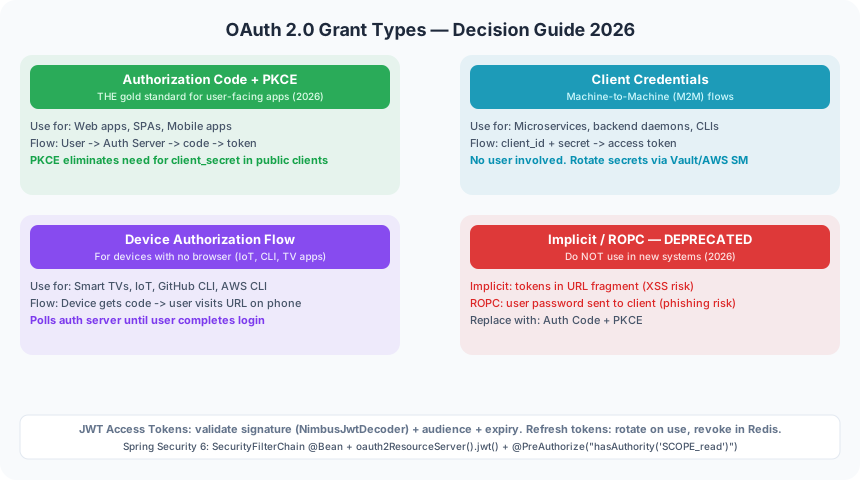
TL;DR — The Rule in One Sentence
"In 2026, use Authorization Code + PKCE for user-facing apps, Client Credentials for M2M/microservices, Device Flow for CLI/IoT. Never use Implicit or ROPC in new systems."
Table of Contents
- OAuth 2.0 in 2026: Why You Still Get It Wrong
- OAuth 2.0 Roles & Terminology
- The 4 Grant Types — Decision Table
- Authorization Code Flow with PKCE — The Gold Standard
- Client Credentials Flow (M2M & Microservices)
- Device Authorization Flow (CLI, IoT, Smart TVs)
- Implicit & Resource Owner Password Grant — Why They're Deprecated
- JWT Tokens: Access Tokens vs Refresh Tokens
- Spring Boot OAuth2 Resource Server Configuration
- Spring Authorization Server: Build Your Own OAuth2 Server
- Common Security Mistakes
- FAQ
- Conclusion & Security Checklist
1. OAuth 2.0 in 2026: Why You Still Get It Wrong
Despite being a 12-year-old standard, OAuth 2.0 remains one of the most consistently misimplemented security protocols in modern software. OWASP's API Security Top 10 still lists broken authentication and improper authorization as leading vulnerabilities — and a significant portion trace back to OAuth misuse.
The most common misconceptions engineers carry into production:
- "OAuth 2.0 is for authentication." — OAuth 2.0 is an authorization framework. It tells you what a client can do, not who the user is. For authentication, you need OpenID Connect (OIDC) on top of OAuth 2.0.
- "The Implicit flow is fine for SPAs." — Implicit was deprecated in OAuth 2.1 draft. It returns access tokens directly in the URL fragment, making them visible in browser history and server logs. Use Authorization Code + PKCE instead.
- "I need a client secret to use OAuth." — Public clients (SPAs, mobile apps) cannot keep secrets. PKCE was designed specifically so they don't need to.
- "JWT = OAuth 2.0." — JWT is a token format. OAuth 2.0 says nothing about token format. You can use opaque tokens with introspection equally well.
- "Refresh tokens are just long-lived access tokens." — Refresh tokens are conceptually different: they are credentials that authorize the issuance of new access tokens. They must be stored more securely and rotated on every use.
- "PKCE is only for mobile apps." — RFC 9700 (OAuth 2.0 Security Best Current Practice) now recommends PKCE for all Authorization Code flow clients, including server-side web apps, as a defense-in-depth measure against code injection attacks.
2. OAuth 2.0 Roles & Terminology
OAuth 2.0 (RFC 6749) defines four roles. Getting these straight before writing a single line of code prevents architectural mistakes that are expensive to unwind later.
Key additional terms you'll encounter:
- Scope: A space-separated list of permissions the client is requesting (e.g.,
read:orders write:orders). The authorization server may grant a subset. - Grant Type: The mechanism used to obtain tokens. Determines the flow (Authorization Code, Client Credentials, Device, etc.).
- Authorization Code: A short-lived, one-time-use code returned to the redirect URI. Exchanged for tokens at the token endpoint.
- Access Token: A credential used to call protected APIs. Short-lived (minutes to hours).
- Refresh Token: Long-lived credential used to get new access tokens. Never sent to the resource server.
- ID Token: OIDC-specific JWT containing user identity claims. Not an access token — never use it to call APIs.
- PKCE (Proof Key for Code Exchange): Security extension that prevents authorization code interception. See Section 4.
3. The 4 Grant Types — Decision Table
The single most important decision in OAuth 2.0 implementation is selecting the right grant type. The wrong choice here introduces fundamental security vulnerabilities that no amount of downstream hardening can fix.
4. Authorization Code Flow with PKCE — The Gold Standard
The Authorization Code flow with PKCE is the universally recommended pattern for any OAuth 2.0 flow involving a human user. It combines the security benefits of the code exchange model (tokens never exposed in URLs) with PKCE's protection against code interception attacks.
Step-by-Step Sequence
User            Browser/App             Authorization Server        Resource Server
  |                  |                          |                         |
  |-- Click Login -->|                          |                         |
  |                  |-- 1. Generate PKCE ----  |                         |
  |                  |   code_verifier (random 43-128 char string)        |
  |                  |   code_challenge = BASE64URL(SHA256(code_verifier))|
  |                  |                          |                         |
  |                  |-- 2. GET /authorize ----->                         |
  |                  |   ?response_type=code                              |
  |                  |   &client_id=myapp                                 |
  |                  |   &redirect_uri=https://app/callback               |
  |                  |   &scope=openid profile read                       |
  |                  |   &state=random_csrf_token                         |
  |                  |   &code_challenge=BASE64URL(SHA256(verifier))      |
  |                  |   &code_challenge_method=S256                      |
  |                  |                          |                         |
  |<-- Login Page ---|<--- Redirect to Login ---|                         |
  |-- Authenticate -->--- Submit credentials --->                         |
  |                  |                          |-- Verify credentials    |
  |                  |<-- 3. Redirect to -----  |   Store code_challenge  |
  |                  |   callback?code=AUTH_CODE|   Issue auth code       |
  |                  |   &state=random_csrf_token                         |
  |                  |                          |                         |
  |                  |-- 4. Verify state ------  |                         |
  |                  |   POST /token            |                         |
  |                  |   grant_type=authorization_code                    |
  |                  |   code=AUTH_CODE                                   |
  |                  |   code_verifier=ORIGINAL_VERIFIER                  |
  |                  |   redirect_uri=...                                 |
  |                  |                          |-- Verify: SHA256(verifier) == stored challenge
  |                  |<-- 5. Token Response ---|                         |
  |                  |   { access_token, refresh_token, id_token }        |
  |                  |                          |                         |
  |                  |-- 6. GET /api/resource -->----- Bearer token ----->|
  |                  |                          |                         |-- Validate JWT
  |<-- Response -----|<--- Protected Resource --|<--- 200 OK -------------|
The critical security properties of this flow:
- Authorization code is short-lived (typically 60 seconds, single-use) — intercepting it is useless without the
code_verifier - Tokens never appear in URLs — only the code is in the redirect, tokens are obtained via back-channel POST
- State parameter prevents CSRF — verify it matches before processing the callback
- PKCE code_verifier — only the originating client can exchange the code (no client secret needed)
✅ Spring Boot Client Registration — Auth Code + PKCE
// application.yml — Spring Boot OAuth2 client configuration
// spring:
//   security:
//     oauth2:
//       client:
//         registration:
//           my-app:
//             client-id: ${OAUTH2_CLIENT_ID}          # from env var
//             client-secret: ${OAUTH2_CLIENT_SECRET}  # from env var (confidential client)
//             authorization-grant-type: authorization_code
//             redirect-uri: "{baseUrl}/login/oauth2/code/{registrationId}"
//             scope: openid, profile, email, read:orders
//             client-authentication-method: client_secret_basic
//         provider:
//           my-app:
//             issuer-uri: ${OAUTH2_ISSUER_URI}        # e.g. https://auth.example.com/realms/myrealm

// ✅ Good: Spring Security 6 SecurityFilterChain — OAuth2 Login with PKCE
@Configuration
@EnableWebSecurity
public class SecurityConfig {

    @Bean
    public SecurityFilterChain securityFilterChain(HttpSecurity http) throws Exception {
        http
            .authorizeHttpRequests(auth -> auth
                .requestMatchers("/", "/public/**").permitAll()
                .anyRequest().authenticated()
            )
            .oauth2Login(oauth2 -> oauth2
                .loginPage("/login")
                .defaultSuccessUrl("/dashboard", true)
            )
            .oauth2Client(Customizer.withDefaults());

        return http.build();
    }
}

// ✅ Good: PKCE is automatically applied by Spring Security for public clients
// For confidential clients (server-side), use ClientRegistrationRepository bean:
@Bean
public ClientRegistrationRepository clientRegistrationRepository() {
    ClientRegistration registration = ClientRegistration
        .withRegistrationId("my-app")
        .clientId(System.getenv("OAUTH2_CLIENT_ID"))
        .clientSecret(System.getenv("OAUTH2_CLIENT_SECRET"))
        .authorizationGrantType(AuthorizationGrantType.AUTHORIZATION_CODE)
        .redirectUri("{baseUrl}/login/oauth2/code/{registrationId}")
        .scope("openid", "profile", "read:orders")
        .authorizationUri("https://auth.example.com/oauth2/authorize")
        .tokenUri("https://auth.example.com/oauth2/token")
        .userInfoUri("https://auth.example.com/userinfo")
        .build();
    return new InMemoryClientRegistrationRepository(registration);
}
5. Client Credentials Flow (Machine-to-Machine)
The Client Credentials grant is the correct pattern for any server-to-server communication where no human user is involved: microservice-to-microservice calls, batch jobs, daemons, background workers, and internal API gateways.
The flow is simple — the client presents its client_id and client_secret directly to the authorization server's token endpoint and receives an access token. No user interaction, no redirect, no refresh token (just request a new access token when the current one expires).
❌ Bad: Hardcoded client_secret in Java Code
// ❌ BAD: Never hardcode credentials in source code
@Service
public class OrderServiceClient {

    private static final String CLIENT_ID = "order-service";
    private static final String CLIENT_SECRET = "super-secret-password-123"; // ❌ Exposed in VCS!
    private static final String TOKEN_URL = "https://auth.example.com/oauth2/token";

    public String getAccessToken() {
        // This secret is now in git history — rotate immediately if seen
        RestTemplate restTemplate = new RestTemplate();
        MultiValueMap<String, String> params = new LinkedMultiValueMap<>();
        params.add("grant_type", "client_credentials");
        params.add("client_id", CLIENT_ID);
        params.add("client_secret", CLIENT_SECRET); // ❌ Hardcoded
        // ...
    }
}
✅ Good: Externalized Config + Feign Client with OAuth2 Bearer Token
// ✅ GOOD: Credentials via environment variables / Spring Cloud Vault / AWS Secrets Manager

// application.yml:
// spring:
//   security:
//     oauth2:
//       client:
//         registration:
//           inventory-service:
//             client-id: ${INVENTORY_CLIENT_ID}
//             client-secret: ${INVENTORY_CLIENT_SECRET}   # injected by K8s secret / Vault
//             authorization-grant-type: client_credentials
//             scope: inventory:read, inventory:write
//         provider:
//           inventory-service:
//             token-uri: ${OAUTH2_TOKEN_URI}

// ✅ GOOD: Feign Client with automatic OAuth2 token injection
@FeignClient(name = "inventory-service",
             url = "${inventory.service.url}",
             configuration = OAuth2FeignConfig.class)
public interface InventoryClient {

    @GetMapping("/api/inventory/{productId}")
    @PreAuthorize("hasAuthority('SCOPE_inventory:read')")
    InventoryResponse getInventory(@PathVariable String productId);
}

// OAuth2 Feign interceptor — handles token acquisition and caching automatically
@Configuration
public class OAuth2FeignConfig {

    @Bean
    public RequestInterceptor oauth2FeignRequestInterceptor(
            OAuth2AuthorizedClientManager authorizedClientManager) {

        return requestTemplate -> {
            OAuth2AuthorizeRequest authorizeRequest = OAuth2AuthorizeRequest
                .withClientRegistrationId("inventory-service")
                .principal("inventory-service-principal")
                .build();

            OAuth2AuthorizedClient authorizedClient =
                authorizedClientManager.authorize(authorizeRequest);

            if (authorizedClient != null) {
                String accessToken = authorizedClient.getAccessToken().getTokenValue();
                requestTemplate.header(HttpHeaders.AUTHORIZATION, "Bearer " + accessToken);
            }
        };
    }

    @Bean
    public OAuth2AuthorizedClientManager authorizedClientManager(
            ClientRegistrationRepository clientRegistrationRepository,
            OAuth2AuthorizedClientRepository authorizedClientRepository) {

        OAuth2AuthorizedClientProvider provider =
            OAuth2AuthorizedClientProviderBuilder.builder()
                .clientCredentials()   // handles token refresh automatically
                .build();

        DefaultOAuth2AuthorizedClientManager manager =
            new DefaultOAuth2AuthorizedClientManager(
                clientRegistrationRepository, authorizedClientRepository);
        manager.setAuthorizedClientProvider(provider);
        return manager;
    }
}
6. Device Authorization Flow (CLI, Smart TVs, IoT)
The Device Authorization Grant (RFC 8628) solves a specific problem: how to authenticate a user on a device that has no browser or no convenient way to enter a URL and credentials (CLI tools, smart TVs, gaming consoles, IoT devices, Raspberry Pi scripts).
How It Works
- The device sends its
client_idandscopeto the device authorization endpoint - The server responds with a
device_code, a shortuser_code(e.g.,BDWD-HQPK), and averification_uri - The device displays: "Visit https://example.com/activate and enter code BDWD-HQPK"
- The user opens the URL on their phone/laptop, logs in, enters the code, and approves
- Meanwhile, the device polls the token endpoint with the
device_code(respecting theinterval) - Once the user approves, the next poll returns the access token and refresh token
This is exactly how GitHub CLI (gh auth login), Google Cloud SDK (gcloud auth login), and AWS SSO work. The pattern is now the standard for all headless or input-constrained devices.
Security note: User codes should be short (6–8 characters), easy to type, expire quickly (≤15 minutes), and use a character set that avoids visually ambiguous characters (no 0/O, 1/I). The device must implement exponential back-off on polling to avoid rate limiting.
7. Implicit & Resource Owner Password Grant — Why They're Deprecated
Implicit Flow — Token in the URL Fragment
The Implicit flow was designed in 2012 for SPAs that couldn't safely hold a client secret and couldn't make cross-origin POST requests for token exchange. The authorization server returns the access token directly in the URL fragment (#access_token=...) of the redirect.
Why it's dangerous:
- Access tokens appear in browser history, server access logs (via Referer headers), and browser extensions
- No way to bind the token to the client — anyone who intercepts the redirect can use the token
- No refresh token support — tokens expire and users must re-authenticate
- Deprecated in OAuth 2.0 Security Best Current Practice (RFC 9700) and removed from OAuth 2.1 draft
Migration path: Replace with Authorization Code + PKCE. Modern browsers support CORS, so the token exchange POST is not a problem. Spring Security handles this transparently.
Resource Owner Password Credentials (ROPC) — Trust Nobody
ROPC requires the user to give their username and password directly to the client application, which then exchanges them for tokens. This completely breaks OAuth 2.0's fundamental security model — the user's credentials are now in the client application, not in the authorization server.
- Phishing risk: any malicious app can look like your first-party app
- No MFA support — password-only authentication
- No consent screen — users can't see what scopes are being requested
- Client sees the password — impossible to rotate credentials independently
- Deprecated in OAuth 2.1 — even for first-party apps, use Device Flow or Auth Code
8. JWT Tokens: Access Tokens vs Refresh Tokens
JWT Structure & Validation Checklist
A JWT has three parts: header.payload.signature. When validating access tokens at your resource server, you must check all of the following:
- Signature: Verify using the authorization server's public key (fetched from JWKS endpoint)
- Algorithm (
alg): Must be RS256, RS384, or ES256 — never acceptalg: none - Issuer (
iss): Must match your configured authorization server URL - Audience (
aud): Must contain your resource server's identifier - Expiry (
exp): Must not be in the past (with small clock-skew tolerance) - Not Before (
nbf): If present, token is not valid before this time - Scope/Claims: Verify the token has the required scopes for the operation
Refresh Token Rotation
Enable refresh token rotation: every time a refresh token is used to get a new access token, the authorization server should issue a new refresh token AND invalidate the old one. If a stolen refresh token is used, the legitimate user's next refresh attempt will fail, alerting the system. Implement refresh token family invalidation — if an already-used token is presented, invalidate the entire family.
9. Spring Boot OAuth2 Resource Server Configuration
Your backend API is the resource server. It must validate every incoming access token before serving any request. Spring Security 6 makes this straightforward but there are critical configuration choices to get right.
❌ Bad: Not Validating JWT Signature
// ❌ BAD: Manually parsing JWT without signature verification
@RestController
public class OrderController {

    @GetMapping("/api/orders")
    public List<Order> getOrders(HttpServletRequest request) {
        String token = request.getHeader("Authorization").replace("Bearer ", "");
        // ❌ DANGEROUS: Decoding without signature verification!
        // An attacker can craft ANY payload — e.g., change "role":"user" to "role":"admin"
        String[] parts = token.split("\\.");
        String payload = new String(Base64.getDecoder().decode(parts[1]));
        JSONObject claims = new JSONObject(payload);
        String userId = claims.getString("sub"); // ❌ Not verified!
        return orderService.getOrdersForUser(userId);
    }
}
✅ Good: Spring Security OAuth2 Resource Server with Proper JWT Validation
// application.yml:
// spring:
//   security:
//     oauth2:
//       resourceserver:
//         jwt:
//           issuer-uri: ${OAUTH2_ISSUER_URI}   # Spring auto-fetches JWKS from /.well-known endpoint
//           # OR specify JWKS directly:
//           # jwk-set-uri: ${OAUTH2_JWKS_URI}

// ✅ GOOD: SecurityFilterChain — resource server with JWT validation
@Configuration
@EnableWebSecurity
@EnableMethodSecurity  // enables @PreAuthorize
public class ResourceServerSecurityConfig {

    @Bean
    public SecurityFilterChain securityFilterChain(HttpSecurity http) throws Exception {
        http
            .csrf(csrf -> csrf.disable())  // stateless API — CSRF not needed
            .sessionManagement(session ->
                session.sessionCreationPolicy(SessionCreationPolicy.STATELESS))
            .authorizeHttpRequests(auth -> auth
                .requestMatchers("/actuator/health", "/actuator/info").permitAll()
                .anyRequest().authenticated()
            )
            .oauth2ResourceServer(oauth2 -> oauth2
                .jwt(jwt -> jwt.decoder(jwtDecoder()))  // custom decoder with extra validation
            );

        return http.build();
    }

    // ✅ GOOD: NimbusJwtDecoder with explicit issuer and audience validation
    @Bean
    public JwtDecoder jwtDecoder() {
        String issuerUri = System.getenv("OAUTH2_ISSUER_URI");

        NimbusJwtDecoder decoder = NimbusJwtDecoder
            .withIssuerLocation(issuerUri)
            .build();

        // Additional validators beyond the defaults
        OAuth2TokenValidator<Jwt> audienceValidator = token -> {
            List<String> audiences = token.getAudience();
            if (audiences.contains("order-service")) {
                return OAuth2TokenValidatorResult.success();
            }
            return OAuth2TokenValidatorResult.failure(
                new OAuth2Error("invalid_token", "Token not intended for this service", null));
        };

        OAuth2TokenValidator<Jwt> withIssuer =
            JwtValidators.createDefaultWithIssuer(issuerUri);
        OAuth2TokenValidator<Jwt> withAudience =
            new DelegatingOAuth2TokenValidator<>(withIssuer, audienceValidator);

        decoder.setJwtValidator(withAudience);
        return decoder;
    }

    // ✅ GOOD: Map JWT scopes to Spring Security GrantedAuthority
    @Bean
    public JwtAuthenticationConverter jwtAuthenticationConverter() {
        JwtGrantedAuthoritiesConverter grantedAuthoritiesConverter =
            new JwtGrantedAuthoritiesConverter();
        grantedAuthoritiesConverter.setAuthoritiesClaimName("scope");
        grantedAuthoritiesConverter.setAuthorityPrefix("SCOPE_");

        JwtAuthenticationConverter converter = new JwtAuthenticationConverter();
        converter.setJwtGrantedAuthoritiesConverter(grantedAuthoritiesConverter);
        return converter;
    }
}

// ✅ GOOD: Protect endpoints with scope-based authorization
@RestController
@RequestMapping("/api/orders")
public class OrderController {

    @GetMapping
    @PreAuthorize("hasAuthority('SCOPE_read:orders')")
    public List<Order> getOrders(JwtAuthenticationToken authentication) {
        String userId = authentication.getToken().getSubject(); // verified, safe to use
        return orderService.getOrdersForUser(userId);
    }

    @PostMapping
    @PreAuthorize("hasAuthority('SCOPE_write:orders')")
    public Order createOrder(@RequestBody OrderRequest request,
                             JwtAuthenticationToken authentication) {
        return orderService.createOrder(request, authentication.getToken().getSubject());
    }
}
10. Spring Authorization Server: Building Your Own OAuth2 Server
Spring Authorization Server (SAS) is the official Spring project for building OAuth 2.1 / OIDC authorization servers. It reached GA with version 1.0 in 2023 and is now the recommended choice for teams that need a self-hosted authorization server on the JVM.
When to Build vs Buy
- Use a managed service (Auth0, Okta, Cognito, Google) when: you want zero operational overhead, SLAs matter, and you're building a SaaS product. The cost is justified by the reduction in engineering hours.
- Use Keycloak when: you need a production-grade, open-source, self-hosted solution with a UI, and you have ops capacity to manage it.
- Use Spring Authorization Server when: you need deep integration with your Spring ecosystem, custom token customization, or a lightweight embedded authorization server in a microservices platform.
// Spring Authorization Server minimal configuration
// pom.xml dependency:
// <dependency>
//   <groupId>org.springframework.security</groupId>
//   <artifactId>spring-security-oauth2-authorization-server</artifactId>
// </dependency>

@Configuration
@EnableWebSecurity
public class AuthorizationServerConfig {

    @Bean
    @Order(1)
    public SecurityFilterChain authorizationServerSecurityFilterChain(
            HttpSecurity http) throws Exception {

        OAuth2AuthorizationServerConfiguration.applyDefaultSecurity(http);
        http.getConfigurer(OAuth2AuthorizationServerConfigurer.class)
            .oidc(Customizer.withDefaults()); // enable OIDC
        http.exceptionHandling(ex -> ex
            .defaultAuthenticationEntryPointFor(
                new LoginUrlAuthenticationEntryPoint("/login"),
                new MediaTypeRequestMatcher(MediaType.TEXT_HTML)));
        return http.build();
    }

    @Bean
    public RegisteredClientRepository registeredClientRepository() {
        // ✅ Web app client — Authorization Code + PKCE
        RegisteredClient webClient = RegisteredClient
            .withId(UUID.randomUUID().toString())
            .clientId("my-web-app")
            .clientSecret("{bcrypt}" + new BCryptPasswordEncoder().encode(
                System.getenv("WEB_APP_CLIENT_SECRET")))
            .clientAuthenticationMethod(ClientAuthenticationMethod.CLIENT_SECRET_BASIC)
            .authorizationGrantType(AuthorizationGrantType.AUTHORIZATION_CODE)
            .authorizationGrantType(AuthorizationGrantType.REFRESH_TOKEN)
            .redirectUri("https://myapp.example.com/login/oauth2/code/my-web-app")
            .scope(OidcScopes.OPENID)
            .scope(OidcScopes.PROFILE)
            .scope("read:orders")
            .clientSettings(ClientSettings.builder()
                .requireProofKey(true)           // enforce PKCE
                .requireAuthorizationConsent(true)
                .build())
            .tokenSettings(TokenSettings.builder()
                .accessTokenTimeToLive(Duration.ofMinutes(15))
                .refreshTokenTimeToLive(Duration.ofDays(7))
                .reuseRefreshTokens(false)       // refresh token rotation
                .build())
            .build();

        // ✅ Service client — Client Credentials
        RegisteredClient serviceClient = RegisteredClient
            .withId(UUID.randomUUID().toString())
            .clientId("inventory-service")
            .clientSecret("{bcrypt}" + new BCryptPasswordEncoder().encode(
                System.getenv("INVENTORY_SERVICE_SECRET")))
            .clientAuthenticationMethod(ClientAuthenticationMethod.CLIENT_SECRET_BASIC)
            .authorizationGrantType(AuthorizationGrantType.CLIENT_CREDENTIALS)
            .scope("inventory:read")
            .scope("inventory:write")
            .tokenSettings(TokenSettings.builder()
                .accessTokenTimeToLive(Duration.ofMinutes(5))
                .build())
            .build();

        return new InMemoryRegisteredClientRepository(webClient, serviceClient);
        // In production: use JdbcRegisteredClientRepository backed by PostgreSQL
    }

    @Bean
    public JWKSource<SecurityContext> jwkSource() {
        RSAKey rsaKey = generateRsa();  // load from KeyStore in production
        JWKSet jwkSet = new JWKSet(rsaKey);
        return (jwkSelector, securityContext) -> jwkSelector.select(jwkSet);
    }

    @Bean
    public AuthorizationServerSettings authorizationServerSettings() {
        return AuthorizationServerSettings.builder()
            .issuer("https://auth.example.com")
            .build();
    }
}
11. Common Security Mistakes
Token Leakage via Logging
Never log Authorization headers. Configure your logging framework to mask token values. In Spring Boot, add a filter to redact Bearer tokens from MDC and access logs. One token in a log file can compromise an entire user session if logs are indexed in Elasticsearch without proper access control.
Missing State Parameter (CSRF)
The state parameter in the authorization request must be a cryptographically random value (at least 128 bits) stored in the user's session. When the callback arrives, verify the state matches before proceeding. Spring Security does this automatically — don't disable it.
Open Redirect in redirect_uri
Authorization servers must validate redirect_uri against an exact pre-registered allowlist — not prefix matching or regex. An open redirect vulnerability in your OAuth flow allows attackers to redirect authorization codes to their server. Never allow wildcard redirect URIs in production.
Storing Tokens in localStorage
For SPAs, storing access tokens in localStorage makes them accessible to any JavaScript on the page — including XSS payloads. The recommended pattern for SPAs in 2026 is the BFF (Backend for Frontend) pattern: a thin server-side proxy holds the tokens in an HttpOnly, SameSite=Strict, Secure cookie. The SPA never sees raw tokens.
Over-Permissive Scopes
Request only the scopes you need. A service that needs read:orders should not be issued a token with write:orders admin:all. Implement fine-grained scopes (not a single broad api:access scope) and enforce them at the resource server with @PreAuthorize.
12. FAQ
What is the difference between OAuth 2.0 and OIDC?
OAuth 2.0 is an authorization framework — it answers "what can this client do?" OpenID Connect (OIDC) is an identity layer on top of OAuth 2.0 that answers "who is the user?" OIDC adds an ID Token (JWT) containing user identity claims (sub, name, email), a /userinfo endpoint, and standardized discovery (/.well-known/openid-configuration). Use OAuth 2.0 for API authorization. Use OIDC when you need to authenticate users (login/SSO). In practice, most modern identity systems implement both.
What is the difference between an access token and a refresh token?
An access token is a short-lived credential (5–60 minutes) that you include in API calls (Authorization: Bearer <token>). A refresh token is a long-lived credential (days to weeks) stored securely client-side, used only to request new access tokens from the authorization server when the current one expires. The resource server never sees the refresh token. Refresh tokens should be rotated on every use and stored in an HttpOnly cookie (SPA) or secure system keychain (native apps).
How do you revoke OAuth 2.0 tokens?
Token revocation is defined in RFC 7009. POST to the authorization server's /revoke endpoint with token and optional token_type_hint. For opaque tokens, this removes them from the database. For JWTs (stateless), the resource server cannot easily know a token was revoked — mitigation strategies include: (1) short access token TTL (5–15 min), (2) a Redis blocklist checked on every request for high-security operations, (3) use opaque tokens for access tokens and JWTs only for internal trusted calls.
Is JWT required for OAuth 2.0?
No. OAuth 2.0 is completely agnostic about token format. Access tokens can be opaque random strings (e.g., a UUID stored in a database). The resource server validates them by calling the authorization server's introspection endpoint (RFC 7662) — a POST that returns the token's metadata. JWTs are popular because they enable stateless validation at the resource server without a network call, improving performance and resilience. The tradeoff is that JWTs are harder to revoke immediately. Many production systems use JWTs for short-lived access tokens and opaque tokens for refresh tokens.
What is PKCE and why is it required?
PKCE (Proof Key for Code Exchange, RFC 7636) prevents authorization code interception attacks. Before starting the flow, the client generates a random code_verifier (43–128 chars) and computes code_challenge = BASE64URL(SHA256(code_verifier)). The challenge is sent with the authorization request. When exchanging the authorization code for tokens, the client sends the original verifier. The authorization server verifies SHA256(verifier) == stored_challenge. This means even if an attacker intercepts the authorization code (via a malicious app registered for the same redirect URI scheme on mobile), they cannot exchange it without the verifier, which never left the legitimate client. OAuth 2.1 requires PKCE for all Authorization Code flows.
13. Conclusion & Security Checklist
OAuth 2.0 is a mature, flexible framework — but flexibility is a double-edged sword. The spec intentionally leaves many implementation choices to the developer, and each wrong choice is a potential vulnerability. The good news: Spring Security 6 and Spring Authorization Server make the right choices much easier to implement correctly.
The direction of travel is clear: OAuth 2.1 consolidates the best practices — mandatory PKCE, no Implicit, no ROPC, refresh token rotation, exact redirect URI matching — into a single cleaner spec. If you implement these today, you're already OAuth 2.1-ready.
OAuth 2.0 Security Checklist
| Area | Checklist Item | Priority |
|---|---|---|
| Grant Type | Use Authorization Code + PKCE for all user-facing apps | Critical |
| Grant Type | Never use Implicit or ROPC in new systems | Critical |
| Credentials | No client_secret in source code — use env vars / Vault / Secrets Manager | Critical |
| JWT Validation | Validate signature, iss, aud, exp, alg (never allow alg:none) | Critical |
| State Param | Generate cryptographically random state, verify on callback | High |
| Redirect URI | Exact match allowlist — no wildcards, no prefix matching | High |
| Token Storage | HttpOnly + SameSite=Strict cookies; avoid localStorage for access tokens | High |
| Refresh Tokens | Enable rotation; invalidate family on replay detection | High |
| Token TTL | Access tokens ≤15 min; refresh tokens ≤7 days | Medium |
| Scopes | Fine-grained scopes; enforce with @PreAuthorize at method level | Medium |
| Logging | Mask/redact Bearer tokens in all log output and access logs | Medium |
| HTTPS | All OAuth endpoints must use TLS — no HTTP in production | Critical |
Leave a Comment
Related Posts
Spring Security OAuth2 Resource Server with Keycloak
Configure Spring Boot as an OAuth2 resource server backed by Keycloak with JWT validation and role mapping.
Spring Boot Security with JWT
Complete guide to implementing JWT-based authentication and authorization in Spring Boot 3 applications.
API Security Beyond JWT: mTLS & HMAC
Advanced API security patterns including mutual TLS and HMAC request signing with Spring Boot.
Zero Trust Microservices with mTLS, SPIFFE & SPIRE
Implement zero-trust networking for microservices using workload identity and mutual TLS.
