Core Web Vitals Optimization: Complete LCP, INP, CLS Guide for 2026
Google's Core Web Vitals are a direct ranking signal — yet most teams still treat them as an afterthought. This comprehensive guide walks you through every metric, every threshold, and every proven optimization technique to achieve a Lighthouse 100 score and keep it there in 2026, even as INP replaces FID and user expectations continue to rise.
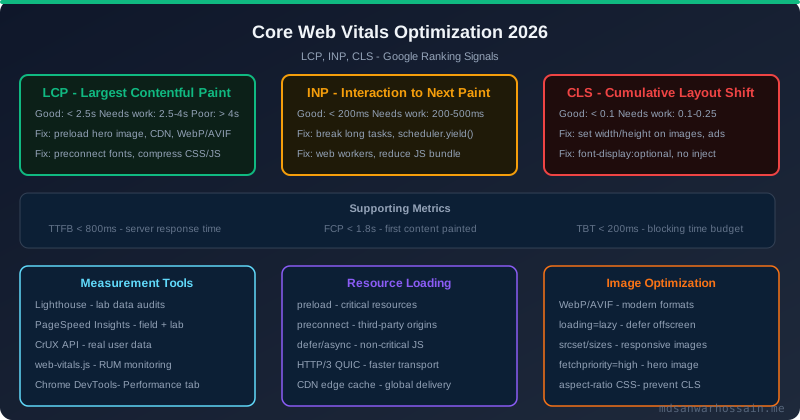
TL;DR — The Single Most Important Shift in 2026
"INP replaced FID in March 2024 as the official interaction responsiveness Core Web Vital. Every click, tap, and keyboard interaction is now measured end-to-end — not just the first one. If your site has any JavaScript-heavy interactions, INP is your #1 ranking risk right now. Target INP < 200 ms, LCP < 2.5 s, and CLS < 0.1 to pass Google's 'Good' threshold on all three Core Web Vitals."
Table of Contents
- What Are Core Web Vitals & Why They're a Ranking Signal
- LCP (Largest Contentful Paint): Measuring & Optimizing
- INP (Interaction to Next Paint): The 2024 FID Replacement
- CLS (Cumulative Layout Shift): Causes & Fixes
- TTFB & FCP as Supporting Metrics
- Measuring Core Web Vitals: Tools & APIs
- LCP Optimization Techniques
- INP Optimization Techniques
- CLS Optimization Techniques
- Resource Loading Optimization
- JavaScript Performance & Bundle Optimization
- Server-Side Performance (CDN, Compression, HTTP/3)
- Monitoring Core Web Vitals in Production
- Framework-Specific Tips (React, Next.js, Angular)
- Complete Core Web Vitals Audit Checklist
1. What Are Core Web Vitals & Why They're a Google Ranking Signal
Core Web Vitals (CWV) are a subset of Google's Web Vitals initiative — a set of real-world, user-centered performance metrics that measure loading, interactivity, and visual stability. Since the Page Experience Update of 2021, these metrics are factored directly into Google Search ranking. Sites that score "Good" across all three Core Web Vitals gain a modest but measurable ranking advantage over competitors who don't.
The three Core Web Vitals for 2026 are:
- LCP (Largest Contentful Paint): How fast does the largest above-the-fold element load? Measures perceived loading speed.
- INP (Interaction to Next Paint): How quickly does the page visually respond to user interactions? Replaced FID in March 2024. Measures interaction responsiveness.
- CLS (Cumulative Layout Shift): Do elements jump around during page load? Measures visual stability.
Google evaluates Core Web Vitals using field data collected from real Chrome users via the Chrome User Experience Report (CrUX). Lab data from tools like Lighthouse is useful for diagnosis but does not directly affect rankings. You need at least 75% of your real-user sessions to pass the "Good" threshold for each metric.
Why CWV Directly Impacts Revenue
The business case for CWV optimization is well-documented. Google's own research shows that as page load time increases from 1s to 3s, the probability of a mobile user bouncing increases by 32%. Vodafone improved LCP by 31% and saw an 8% uplift in sales. Netzwelt improved CWV scores and saw a 27% increase in organic traffic. Every 100ms of LCP improvement translates to measurable conversion improvements in e-commerce.
2. LCP (Largest Contentful Paint): Understanding, Measuring & Optimizing
LCP measures the render time of the largest image or text block visible in the viewport, relative to when the page first started loading. Candidates for the LCP element include: <img> elements, <image> inside SVG, <video> poster images, elements with a background image, and block-level text elements.
LCP Thresholds
| Rating | LCP Value | Action |
|---|---|---|
| ✅ Good | < 2.5 seconds | Passes Google's CWV threshold |
| ⚠️ Needs Improvement | 2.5 s – 4.0 s | Optimization required |
| ❌ Poor | > 4.0 seconds | Ranking penalty risk |
LCP Breakdown: The Four Sub-Parts
Google decomposed LCP into four phases to help diagnose where time is lost:
- Time to First Byte (TTFB): How fast the server sends the first byte. Aim for < 600 ms.
- Resource load delay: Time from TTFB to when the browser starts loading the LCP resource. Minimize with preload hints.
- Resource load duration: Time to download the LCP resource. Use WebP/AVIF, compress, and serve from CDN.
- Element render delay: Time from resource download completion to actual LCP paint. Eliminate render-blocking scripts and CSS.
3. INP (Interaction to Next Paint): The 2024 Replacement for FID
INP measures the latency of all click, tap, and keyboard interactions that occur during the entire page lifecycle — not just the first one like its predecessor First Input Delay (FID). The INP score is the worst-case interaction latency observed (with some outlier tolerance), making it a much stricter signal of true interaction responsiveness.
INP measures the time from when a user initiates an interaction to when the browser renders the next frame in response. This includes input delay (waiting for the main thread), processing time (event handler execution), and presentation delay (rendering pipeline latency).
INP Thresholds
| Rating | INP Value | User Experience |
|---|---|---|
| ✅ Good | < 200 ms | Feels instantaneous |
| ⚠️ Needs Improvement | 200 ms – 500 ms | Noticeable lag |
| ❌ Poor | > 500 ms | Feels broken / unresponsive |
Why INP Is Harder to Pass Than FID
FID only measured the first user interaction and only the input delay phase. Many sites had a "good" FID score even though subsequent interactions were sluggish. INP covers every interaction, measures the full response time including rendering, and uses the worst-case percentile. Sites with heavy client-side JavaScript frameworks — React SPAs, Angular apps — are most at risk. Google's CrUX data shows that roughly 12% of mobile pages globally fail the INP "Good" threshold.
4. CLS (Cumulative Layout Shift): Causes, Measurement & Fixes
CLS quantifies how much visible page content unexpectedly shifts during the page's entire lifespan. It is calculated as the sum of all individual layout shift scores, where each score = impact fraction × distance fraction. A score of 0.1 means that at most 10% of the viewport area shifted by at most 10% of the viewport height.
CLS Thresholds
| Rating | CLS Score | Impact |
|---|---|---|
| ✅ Good | < 0.1 | Visually stable |
| ⚠️ Needs Improvement | 0.1 – 0.25 | Noticeable shifting |
| ❌ Poor | > 0.25 | Users accidentally click wrong elements |
Top Causes of High CLS
- Images without explicit width/height: Browser can't reserve space before the image loads, causing reflow.
- Ads, embeds, and iframes: Injected dynamically above existing content pushes everything down.
- Web fonts causing FOUT/FOIT: Font swap causes text to re-render at a different size, shifting surrounding content.
- Dynamically injected content: Cookie banners, newsletter popups, chat widgets inserted above the fold.
- CSS animations that trigger layout: Animating
width,height,top, ormargininstead oftransform.
5. TTFB & FCP as Supporting Metrics
While TTFB and FCP are not Core Web Vitals themselves, they are critical diagnostic metrics that directly influence your LCP score.
Time to First Byte (TTFB)
TTFB measures the time between a browser's request for a page and when it receives the first byte of the response. It reflects server processing time, network latency, and caching efficiency. Google's guidance: TTFB < 800 ms is "Good"; > 1800 ms is "Poor". Since TTFB is the very first thing that happens, a slow TTFB directly delays LCP — often accounting for 50–70% of LCP time on server-rendered pages.
First Contentful Paint (FCP)
FCP marks the point when any part of the page's content (text, image, canvas) is first painted. It measures the first visual feedback the user gets. FCP < 1.8 s is "Good". FCP and LCP are related but distinct — FCP fires on the first bit of content while LCP fires on the largest element. A fast FCP doesn't guarantee a fast LCP if the hero image loads late.
6. Measuring Core Web Vitals: Tools & APIs
Accurate measurement is the foundation of optimization. Use both lab tools (for debugging) and field tools (for real-user data that affects rankings).
Lab Tools
- Lighthouse (Chrome DevTools / CLI / CI): Simulated lab environment. Scores all Web Vitals metrics, provides waterfall breakdown, and gives prioritized recommendations. Run with
lighthouse https://yoursite.com --view. - PageSpeed Insights: Combines Lighthouse lab data with real CrUX field data for the URL. The gold standard for checking your actual ranking-relevant scores at pagespeed.web.dev.
- Chrome DevTools Performance Panel: Record and inspect the main thread frame-by-frame. Essential for diagnosing INP — identify long tasks, forced reflows, and rendering bottlenecks.
- WebPageTest: Advanced waterfall analysis with filmstrip view, multi-step testing, and real device/browser testing from global locations.
Field Tools (Real User Monitoring)
- web-vitals.js library: The official Google library for measuring CWV in real user sessions. Drop it in and send metrics to your analytics.
- Chrome User Experience Report (CrUX): Aggregated anonymized field data from Chrome users, powering PageSpeed Insights and Search Console. Queryable via BigQuery or the CrUX API.
- Google Search Console (Core Web Vitals report): Groups your pages by URL pattern and shows which pass/fail each CWV. The most direct view of ranking impact.
- Commercial RUM solutions: Datadog, New Relic, SpeedCurve, Calibre — for continuous monitoring with alerting, segmentation by country/device/page type.
Measuring CWV with web-vitals.js
import { onLCP, onINP, onCLS, onFCP, onTTFB } from 'web-vitals';

function sendToAnalytics({ name, value, id, delta, rating }) {
  // Send to your analytics endpoint
  fetch('/api/vitals', {
    method: 'POST',
    body: JSON.stringify({ name, value, id, delta, rating }),
    headers: { 'Content-Type': 'application/json' }
  });
}

onLCP(sendToAnalytics);
onINP(sendToAnalytics);
onCLS(sendToAnalytics);
onFCP(sendToAnalytics);
onTTFB(sendToAnalytics);
7. LCP Optimization Techniques
LCP optimization comes down to one principle: get the largest content element on screen as fast as physically possible. Here are the highest-impact techniques.
Preload the LCP Image
The single highest-impact LCP fix for image-dominated pages: add a <link rel="preload"> for your hero image in the <head>. This tells the browser to start fetching the image immediately, before it even parses the HTML body where the <img> tag appears.
<!-- In <head>: preload the LCP hero image -->
<link rel="preload"
      href="/images/hero.avif"
      as="image"
      fetchpriority="high"
      imagesrcset="/images/hero-400.avif 400w, /images/hero-800.avif 800w, /images/hero.avif 1200w"
      imagesizes="(max-width:600px) 100vw, 50vw">

<!-- Mark the LCP image with fetchpriority="high" -->
<img src="/images/hero.avif"
     fetchpriority="high"
     loading="eager"
     width="1200" height="630"
     alt="Hero image">
Use Modern Image Formats (WebP / AVIF)
AVIF provides 50% smaller files than JPEG at equivalent visual quality. WebP provides 30–35% savings. Use <picture> with srcset for automatic format selection:
<picture>
  <source type="image/avif" srcset="hero.avif">
  <source type="image/webp" srcset="hero.webp">
  <img src="hero.jpg" alt="Hero" width="1200" height="630"
       fetchpriority="high" loading="eager">
</picture>
Eliminate Render-Blocking Resources
- Inline critical CSS above the fold; lazy-load the rest with
media="print" onload="this.media='all'". - Add
deferorasyncto all non-critical scripts. - Move analytics, tag manager, and chat widget scripts to load after the LCP element is painted.
- Use
<link rel="preconnect">for third-party origins (fonts, CDNs) to reduce DNS + TCP + TLS overhead.
Serve Images & Assets from a CDN
Serving the LCP image from a CDN edge node close to the user can reduce image load time by 50–200ms alone. Use a CDN with image optimization support (Cloudflare Images, Fastly, Imgix, Cloudinary) that automatically serves AVIF/WebP, resizes responsively, and sets long-lived cache headers.
8. INP Optimization Techniques
INP is caused by the main thread being too busy to respond to user input. The root cause is almost always long tasks — JavaScript tasks that block the main thread for more than 50 ms. The fix is to break those tasks up or move them off the main thread.
Break Up Long Tasks with scheduler.yield()
The new scheduler.yield() API (Chrome 129+) lets you yield back to the browser's task queue, allowing it to process pending user interactions between chunks of work:
async function processLargeList(items) {
  const CHUNK_SIZE = 50;
  for (let i = 0; i < items.length; i += CHUNK_SIZE) {
    const chunk = items.slice(i, i + CHUNK_SIZE);
    processChunk(chunk);

    // Yield to the main thread between chunks
    if ('scheduler' in globalThis && 'yield' in scheduler) {
      await scheduler.yield();
    } else {
      // Fallback: yield via setTimeout
      await new Promise(resolve => setTimeout(resolve, 0));
    }
  }
}
Defer Expensive Event Handler Work
Split event handler work into two phases: (1) fast synchronous UI update to give visual feedback, and (2) deferred expensive logic via requestAnimationFrame or setTimeout:
button.addEventListener('click', (e) => {
  // Phase 1: Immediate visual feedback (fast)
  button.classList.add('loading');
  button.disabled = true;

  // Phase 2: Defer expensive work
  requestAnimationFrame(() => {
    setTimeout(() => {
      performExpensiveCalculation();
      button.classList.remove('loading');
      button.disabled = false;
    }, 0);
  });
});
Move Work to Web Workers
Computationally expensive logic — data parsing, sorting, encryption, image processing — should run in a Web Worker, completely off the main thread. The main thread stays free for user interactions:
// main.js
const worker = new Worker('./data-worker.js');
worker.postMessage({ data: largeDataset });
worker.onmessage = ({ data: result }) => {
  updateUI(result); // Only UI updates on main thread
};

// data-worker.js
self.onmessage = ({ data: { data } }) => {
  const result = heavyProcessing(data); // Off main thread
  self.postMessage(result);
};
Reduce JavaScript Execution Time
- Profile with Chrome DevTools Performance panel → identify long tasks and the functions within them.
- Remove unused polyfills and legacy compatibility code.
- Debounce/throttle scroll, resize, and input event handlers.
- Avoid layout thrashing: batch DOM reads and writes; never alternate read/write in a loop.
- Use
content-visibility: autoon off-screen sections to skip rendering of below-the-fold content.
9. CLS Optimization Techniques
Always Set Explicit Image Dimensions
The single most impactful CLS fix: add width and height attributes on all <img> and <video> elements. Browsers use the aspect ratio from these attributes to reserve space before the media loads. Use the CSS aspect-ratio property for responsive images:
<!-- Always specify width and height -->
<img src="hero.jpg" width="1200" height="630" alt="Hero">

/* CSS: let it scale responsively */
img {
  max-width: 100%;
  height: auto;
  aspect-ratio: attr(width) / attr(height);
}
Reserve Space for Ads & Dynamic Content
Ad slots and dynamically loaded embeds are a top CLS culprit. Reserve fixed space with a min-height placeholder before the content loads. For ad slots, use the IAB-standard ad sizes:
.ad-slot {
  min-height: 250px; /* Reserve space for 300x250 ad */
  min-width: 300px;
  background: #f5f5f5; /* Placeholder background */
  display: flex;
  align-items: center;
  justify-content: center;
}
Fix Web Font Layout Shifts
Use font-display: optional to completely prevent FOUT (Flash of Unstyled Text) — the browser will only use the web font if it's already cached, otherwise falls back immediately to the system font. Pair with size-adjust and ascent-override to match the fallback font metrics:
@font-face {
  font-family: 'Inter';
  src: url('/fonts/inter.woff2') format('woff2');
  font-display: optional; /* No FOUT — eliminates CLS from fonts */
  font-weight: 400;
}

/* Override fallback font metrics to match Inter */
@font-face {
  font-family: 'Inter-fallback';
  src: local('Arial');
  size-adjust: 107%;
  ascent-override: 90%;
}
Use CSS Transforms for Animations
Only animate transform and opacity — they run on the GPU compositor thread without triggering layout reflow. Animating width, height, top, left, or margin causes layout shifts and contributes to CLS.
10. Resource Loading Optimization
Resource Hints: preconnect, preload, prefetch
| Hint | What It Does | Use For |
|---|---|---|
preconnect |
Opens DNS + TCP + TLS connection early | Google Fonts, CDN origins, APIs |
preload |
Fetches resource at high priority immediately | LCP image, critical fonts, above-fold CSS |
prefetch |
Low-priority fetch for likely next page | Next page JS/CSS, pagination targets |
dns-prefetch |
DNS lookup only (no TCP) | Many third-party domains (analytics, ads) |
<!-- Preconnect to critical third-party origins -->
<link rel="preconnect" href="https://fonts.googleapis.com">
<link rel="preconnect" href="https://fonts.gstatic.com" crossorigin>
<link rel="preconnect" href="https://cdn.yoursite.com">

<!-- Preload LCP image -->
<link rel="preload" href="/hero.avif" as="image" fetchpriority="high">

<!-- Prefetch next page for instant navigation -->
<link rel="prefetch" href="/about.html">
Lazy Loading Below-the-Fold Images
Native lazy loading is now supported in all modern browsers. Use loading="lazy" on all images and iframes that are not above the fold. Never use it on the LCP image — that will hurt your score.
HTTP/3 & QUIC
HTTP/3 (based on QUIC protocol over UDP) eliminates TCP head-of-line blocking and provides faster connection establishment — especially beneficial on high-latency mobile networks. Cloudflare, AWS CloudFront, and most modern CDNs support HTTP/3 automatically. Enable it at the infrastructure level and verify with curl --http3 or Chrome DevTools Network panel (look for "h3" in the Protocol column).
11. JavaScript Performance & Bundle Optimization
Code Splitting & Lazy Loading Routes
Never ship a monolithic JS bundle. Split by route, by component, and by feature. Modern bundlers (Vite, webpack 5, Rollup) support dynamic imports natively. The goal: only ship the JS needed for the current page view.
// React: lazy-load route components
import { lazy, Suspense } from 'react';
const Dashboard = lazy(() => import('./Dashboard'));
const Settings = lazy(() => import('./Settings'));

function App() {
  return (
    <Suspense fallback={<Spinner />}>
      <Routes>
        <Route path="/dashboard" element={<Dashboard />} />
        <Route path="/settings" element={<Settings />} />
      </Routes>
    </Suspense>
  );
}
Tree Shaking & Dead Code Elimination
- Use ES modules (
import/export) — they are statically analyzable and enable tree shaking. CommonJS (require) cannot be tree-shaken. - Import only what you use from large libraries:
import { debounce } from 'lodash-es'notimport _ from 'lodash'. - Use bundlephobia.com to check the cost of dependencies before adding them.
- Run
webpack-bundle-analyzeror Vite'srollup-plugin-visualizerto find the biggest bundle contributors.
defer, async, and modulepreload
defer: Downloads in parallel with HTML parsing, executes in order after parsing completes. Best for most page scripts.async: Downloads in parallel, executes immediately when downloaded (before or after parsing). Use only for independent scripts (analytics).<link rel="modulepreload">: Preloads ES module scripts and their dependencies. Eliminates the "module waterfall" problem in ESM apps.
Third-Party Script Management
Third-party scripts (analytics, ads, chat widgets, social share buttons) are the #1 source of INP regressions in production. Audit them ruthlessly:
- Load all third-party scripts with
deferor afterloadevent fires. - Use a facade pattern: show a lightweight placeholder until the user interacts (e.g., YouTube embed facade with a thumbnail until click).
- Use Partytown to run third-party scripts in a Web Worker.
- Regularly audit with WebPageTest's "Block" feature to measure each script's isolated impact.
12. Server-Side Performance: CDN, Compression & HTTP/2
Edge Caching & CDN Configuration
Cache HTML at the CDN edge for anonymous users to cut TTFB from 400ms (origin) to under 50ms (edge). Use stale-while-revalidate for semi-dynamic content. Set correct Cache-Control headers:
# Static assets: cache for 1 year (immutable with content hash)
Cache-Control: public, max-age=31536000, immutable

# HTML pages: short cache + stale-while-revalidate
Cache-Control: public, max-age=60, stale-while-revalidate=3600

# API responses: no cache (or short TTL)
Cache-Control: no-cache, no-store, must-revalidate
Brotli & Gzip Compression
Enable Brotli (br) compression — it achieves 15–25% better compression than Gzip for text assets (HTML, CSS, JS, SVG). All modern browsers support Brotli. Configure at the CDN or web server level:
# Nginx: enable Brotli (with ngx_brotli module)
brotli on;
brotli_comp_level 6;
brotli_types text/html text/css application/javascript application/json image/svg+xml;

# Or pre-compress at build time (Vite / webpack)
# Serve .br files directly — no CPU overhead at runtime
Server-Side Rendering & Streaming HTML
SSR dramatically improves LCP for content-heavy pages by serving rendered HTML instead of requiring JavaScript to fetch and render content. Streaming SSR (React 18 Suspense streaming, Node.js renderToPipeableStream) allows the server to send the page header (including the LCP element) before slow data fetches complete, further improving FCP and LCP.
13. Monitoring Core Web Vitals in Production
Optimization without monitoring is guesswork. You need continuous real-user visibility into your CWV scores to catch regressions before they impact rankings.
Sending CWV to Google Analytics 4
import { onLCP, onINP, onCLS } from 'web-vitals';

function sendToGA4({ name, value, id, rating }) {
  gtag('event', name, {
    event_category: 'Web Vitals',
    event_label: id,
    value: Math.round(name === 'CLS' ? value * 1000 : value),
    non_interaction: true,
    cwv_rating: rating // 'good', 'needs-improvement', 'poor'
  });
}

onLCP(sendToGA4, { reportAllChanges: false });
onINP(sendToGA4, { reportAllChanges: false });
onCLS(sendToGA4, { reportAllChanges: false });
CrUX API for Programmatic Monitoring
// Fetch CrUX field data for your URL
const response = await fetch(
  'https://chromeuxreport.googleapis.com/v1/records:queryRecord?key=YOUR_KEY',
  {
    method: 'POST',
    body: JSON.stringify({
      url: 'https://yoursite.com/',
      metrics: ['largest_contentful_paint', 'interaction_to_next_paint', 'cumulative_layout_shift']
    })
  }
);
const data = await response.json();
console.log('LCP p75:', data.record.metrics.largest_contentful_paint.percentiles.p75);
Set Up Alerting
- Alert when any CWV metric exceeds "Needs Improvement" threshold for more than 5% of sessions.
- Alert on Lighthouse score regressions > 5 points in your CI/CD pipeline using
lighthouse-ci. - Set up weekly CrUX API pulls to a dashboard (Grafana, Looker Studio) for trend visibility.
- Monitor separately by page template type (homepage, PDP, blog post) — different templates have different CWV profiles.
14. Framework-Specific CWV Tips
Next.js
- Use
next/image— automatically handles WebP/AVIF, responsive srcsets, explicit dimensions, lazy loading, andpriorityprop for LCP images. - Use
next/font— eliminates CLS from font loading by inlining optimized CSS with correctsize-adjust. - Use React Server Components (App Router) to eliminate client-side JS for static content, radically improving INP.
- Use
next/scriptwithstrategy="afterInteractive"or"lazyOnload"for third-party scripts. - Enable Partial Prerendering (PPR) in Next.js 15 to serve static shell instantly with streaming dynamic content.
React (CRA / Vite SPA)
- Use
React.lazy()+Suspensefor all route-level components. - Profile with React DevTools Profiler to identify excessive re-renders; memoize with
React.memo,useMemo,useCallback. - Avoid state updates that trigger full-tree re-renders — use Zustand, Jotai, or Redux Toolkit with selector optimization.
- Use
useTransitionandstartTransitionto mark non-urgent state updates, improving INP on interactions that trigger expensive renders.
Angular
- Use
ChangeDetectionStrategy.OnPushon all components — dramatically reduces unnecessary change detection cycles that cause INP regressions. - Use
NgOptimizedImagedirective (Angular 15+) for automatic LCP image optimization. - Enable Angular SSR (Universal) for improved LCP and FCP on content pages.
- Use lazy-loaded feature modules for all non-critical routes.
- Use Angular Signals (Angular 17+) to replace Observable-driven change detection with fine-grained reactivity.
Plain HTML / Static Sites
- Inline all critical above-the-fold CSS; link stylesheet with
media="print"trick for async loading. - Minify HTML, CSS, and JS at build time.
- Deploy to a CDN with edge nodes globally (Netlify, Cloudflare Pages, Vercel) — these give sub-50ms TTFB worldwide for static files.
- Use Speculation Rules API for instant prerendering of likely next pages.
15. Complete Core Web Vitals Audit Checklist
LCP Checklist
- ☐ Identified the LCP element on every key page template (use DevTools or Lighthouse)
- ☐ Added
<link rel="preload">for the LCP image in<head> - ☐ Added
fetchpriority="high"on the LCP image element - ☐ LCP image served in AVIF or WebP format
- ☐ LCP image served from a CDN with edge caching
- ☐ No render-blocking CSS or scripts above the LCP element
- ☐ TTFB < 600 ms (edge cache, server optimization, CDN)
- ☐ LCP < 2.5 s on both mobile and desktop in field data
INP Checklist
- ☐ No long tasks (>50 ms) on the main thread during page interactions
- ☐ Event handlers execute <50 ms of synchronous JS
- ☐ Long tasks broken up with
scheduler.yield()orsetTimeout - ☐ Heavy computation moved to Web Workers
- ☐ Third-party scripts load after page is interactive
- ☐ React/Angular rendering optimized (OnPush, useTransition, memoization)
- ☐ INP < 200 ms at p75 in field data
CLS Checklist
- ☐ All images and videos have explicit
widthandheightattributes - ☐ Ad slots have min-height/min-width reservations
- ☐ Web fonts use
font-display: optionalor preloaded - ☐ No content injected above existing content after load
- ☐ All animations use
transformandopacityonly - ☐ Cookie consent / popups don't shift page content
- ☐ CLS < 0.1 in field data
Monitoring Checklist
- ☐
web-vitals.jsinstalled and reporting to analytics - ☐ Google Search Console Core Web Vitals report reviewed weekly
- ☐ Lighthouse CI integrated in CI/CD pipeline with budget thresholds
- ☐ CrUX API or RUM tool configured for production monitoring
- ☐ Alerts configured for metric regressions
Achieving and maintaining "Good" status across all three Core Web Vitals is an ongoing discipline, not a one-time fix. Every new feature, every third-party script, every A/B test carries the risk of a regression. Build CWV monitoring into your CI/CD pipeline, review field data weekly in Search Console, and treat performance as a first-class engineering concern — the same way you treat security and reliability.
Leave a Comment
Related Posts

Software Engineer · Java · Spring Boot · Microservices · Web Performance