Angular Performance Optimization: Lazy Loading, OnPush & Bundle Size
Angular applications can suffer from poor performance for two main reasons: large JavaScript bundles that delay initial load, and excessive change detection cycles that slow runtime rendering. Both are solvable with the right patterns — lazy loading defers code until it's needed, OnPush change detection makes Angular smarter about when to re-render, and esbuild makes your builds dramatically faster.
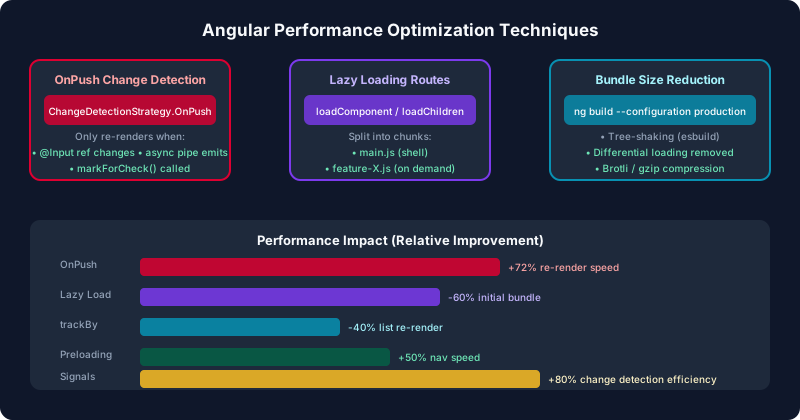
Table of Contents
Why Bundle Size and Change Detection Matter
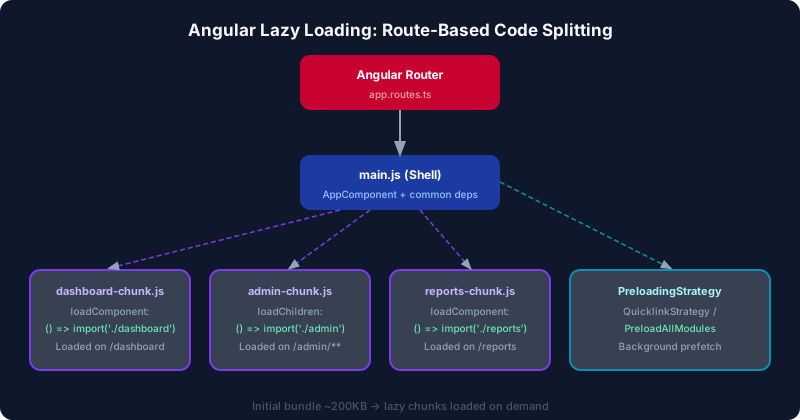
Every millisecond of JavaScript parse time costs user experience. Google's research shows that 53% of mobile users abandon sites that take more than 3 seconds to load. For Angular, the main bundle — including the framework, your feature code, and all eagerly loaded dependencies — is parsed and executed before the app becomes interactive.
A typical Angular enterprise app without optimization can weigh 2–5 MB of JavaScript. Even on a fast connection that means 200–500ms of parse/compile time before a single pixel renders. On a mid-range Android device, JavaScript execution is 4–5x slower than a MacBook Pro benchmark, pushing that to 1–2 seconds of blocking main thread time.
Change detection adds runtime cost. Angular's default change detection runs on every browser event: mouse clicks, keyboard input, timer callbacks, HTTP responses, WebSocket messages. In a component tree with 300 components, every click event can trigger 300 component checks. At 60 frames per second, that budget is only 16ms per frame — one excessive change detection cycle can drop frames and cause jank.
Route-Level Lazy Loading with loadComponent
Angular's router supports lazy loading at the route level without NgModules. Use loadComponent for single components and loadChildren for groups of routes defined in a separate file. The Angular build system automatically code-splits these into separate chunks downloaded only when the route is first navigated to.
// app.routes.ts
import { Routes } from '@angular/router';
import { authGuard } from './core/guards/auth.guard';

export const routes: Routes = [
  {
    path: '',
    loadComponent: () =>
      import('./features/home/home.component').then(m => m.HomeComponent),
  },
  {
    path: 'dashboard',
    canActivate: [authGuard],
    loadComponent: () =>
      import('./features/dashboard/dashboard.component')
        .then(m => m.DashboardComponent),
  },
  {
    path: 'admin',
    canActivate: [authGuard],
    // Entire admin feature loads as one chunk
    loadChildren: () =>
      import('./features/admin/admin.routes').then(m => m.adminRoutes),
  },
  {
    path: 'reports',
    loadChildren: () =>
      import('./features/reports/reports.routes').then(m => m.reportsRoutes),
  },
];

// features/admin/admin.routes.ts
export const adminRoutes: Routes = [
  {
    path: '',
    loadComponent: () =>
      import('./admin-shell.component').then(m => m.AdminShellComponent),
    children: [
      {
        path: 'users',
        loadComponent: () =>
          import('./users/users.component').then(m => m.UsersComponent),
      },
      {
        path: 'settings',
        loadComponent: () =>
          import('./settings/settings.component').then(m => m.SettingsComponent),
      },
    ],
  },
];
Each dynamic import() creates a separate webpack/esbuild chunk. The key insight: the code for AdminShellComponent, UsersComponent, and all their dependencies (including Angular Material modules they import) is excluded from the initial bundle and only fetched when the user navigates to /admin.
OnPush Change Detection Strategy
ChangeDetectionStrategy.OnPush tells Angular to skip change detection for a component unless one of three conditions is met: an @Input() reference changes, an event originates from the component or its children, or the component explicitly marks itself dirty with ChangeDetectorRef.markForCheck(). With signals, Angular extends this further — a signal-based component with OnPush only re-renders when a signal it reads actually changes value.
// product-list.component.ts — optimal OnPush + Signals pattern
import {
  Component, ChangeDetectionStrategy, signal,
  computed, inject, OnInit
} from '@angular/core';
import { ProductService } from '../product.service';
import { ProductCardComponent } from './product-card/product-card.component';
import { FormsModule } from '@angular/forms';

@Component({
  selector: 'app-product-list',
  standalone: true,
  imports: [ProductCardComponent, FormsModule],
  changeDetection: ChangeDetectionStrategy.OnPush,
  template: `
    <input [(ngModel)]="searchTerm" placeholder="Search...">
    <p>Showing {{ filteredProducts().length }} of {{ products().length }}</p>
    @for (product of filteredProducts(); track product.id) {
      <app-product-card [product]="product" />
    }
  `
})
export class ProductListComponent implements OnInit {
  private productService = inject(ProductService);

  products = signal<Product[]>([]);
  searchTerm = signal('');

  filteredProducts = computed(() => {
    const term = this.searchTerm().toLowerCase();
    return this.products().filter(p =>
      p.name.toLowerCase().includes(term)
    );
  });

  ngOnInit() {
    this.productService.getAll().subscribe(p => this.products.set(p));
  }
}
Notice that filteredProducts is a computed signal derived from both products and searchTerm. Angular only re-renders the template when either of those signals changes — not on every keystroke in unrelated inputs elsewhere in the app. With 300 components all using OnPush and signals, a signal change in one component will not trigger checking the other 299.
TrackBy Functions and NgFor Optimization
When Angular re-renders a list, it needs to determine which DOM nodes to reuse and which to recreate. Without a tracking identity, Angular destroys and recreates all DOM nodes on every list update — even if only one item changed. The track expression in the new @for syntax (or trackBy with *ngFor) provides the identity key Angular uses to map existing DOM nodes to updated list items.
// ✅ Modern @for with track (Angular 17+)
@for (user of users(); track user.id) {
  <app-user-card [user]="user" />
}

// ✅ *ngFor with trackBy for older codebases
<app-user-card
  *ngFor="let user of users; trackBy: trackById"
  [user]="user"
/>

// In component class:
trackById(index: number, user: User): number {
  return user.id;  // stable identity — same id = reuse DOM node
}

// ❌ Never use index as track for mutable lists
@for (user of users(); track $index) { /* BAD — causes full re-render */ }

// ✅ For lists that never reorder, $index is fine:
@for (step of steps(); track $index) {
  <li>{{ step }}</li>
}
The performance impact compounds with list size. A table with 500 rows updating one item: without track, Angular destroys and creates 500 <tr> elements; with track user.id, Angular touches only the one changed row. For virtualized lists (Angular CDK Viewport), proper tracking is essential for the virtual scroll to correctly maintain component state.
Angular esbuild Builder and Build Optimization
Angular 16 introduced the esbuild-based build system as opt-in; it became the default in Angular 17. esbuild is 10–100x faster than Webpack for cold builds and dramatically faster for incremental rebuilds during development. Switching is a one-line change in angular.json:
// angular.json — switch to esbuild (already default in Angular 17+)
{
  "projects": {
    "my-app": {
      "architect": {
        "build": {
          "builder": "@angular-devkit/build-angular:application",
          "options": {
            "outputPath": "dist/my-app",
            "index": "src/index.html",
            "browser": "src/main.ts",
            "polyfills": ["zone.js"],
            "tsConfig": "tsconfig.app.json",
            "assets": ["src/favicon.ico", "src/assets"],
            "styles": ["src/styles.scss"],
            "scripts": [],
            "budgets": [
              {
                "type": "initial",
                "maximumWarning": "500kB",
                "maximumError": "1MB"
              },
              {
                "type": "anyComponentStyle",
                "maximumWarning": "4kB",
                "maximumError": "8kB"
              }
            ]
          }
        }
      }
    }
  }
}
The budgets configuration enforces bundle size limits at build time. Set maximumWarning at your target and maximumError at the absolute limit — the build fails if a chunk exceeds the error threshold, preventing accidental bundle bloat from reaching production.
Additional esbuild optimizations to enable for production:
// Additional build options for maximum optimization
{
  "configurations": {
    "production": {
      "optimization": true,
      "outputHashing": "all",
      "sourceMap": false,
      "namedChunks": false,
      "aot": true,
      "buildOptimizer": true,
      "serviceWorker": false,
      "extractLicenses": true
    }
  }
}

// package.json scripts for build analysis
{
  "scripts": {
    "build:prod": "ng build --configuration production",
    "build:stats": "ng build --stats-json",
    "analyze": "npx source-map-explorer dist/my-app/browser/*.js"
  }
}
Preloading Strategies
Lazy loading splits bundles but creates a delay when the user first navigates to a route — the browser must fetch, parse, and execute the chunk before the route renders. Preloading strategies solve this by downloading lazy chunks in the background after the initial page load, so they're already cached when needed.
// Custom preloading strategy — preload only marked routes
import { PreloadingStrategy, Route } from '@angular/router';
import { Observable, of } from 'rxjs';

export class SelectivePreloadingStrategy implements PreloadingStrategy {
  preload(route: Route, load: () => Observable<unknown>): Observable<unknown> {
    return route.data?.['preload'] === true ? load() : of(null);
  }
}

// Mark routes to preload
export const routes: Routes = [
  {
    path: 'dashboard',
    data: { preload: true },  // preload this chunk
    loadComponent: () => import('./dashboard/dashboard.component')
      .then(m => m.DashboardComponent),
  },
  {
    path: 'reports',
    // data.preload not set — only loaded on navigation
    loadChildren: () => import('./reports/reports.routes')
      .then(m => m.reportsRoutes),
  },
];

// Register in app.config.ts
provideRouter(
  routes,
  withPreloading(SelectivePreloadingStrategy)
)
Use PreloadAllModules for small apps where all routes are likely to be visited. Use a custom strategy for large apps where you want control — typically preload the features most users navigate to immediately after login (dashboard, profile) but defer admin and rare features.
Bundle Analysis with source-map-explorer
You cannot optimize what you cannot measure. source-map-explorer generates an interactive treemap showing exactly which modules contribute to each bundle — invaluable for finding unexpected large dependencies like moment.js (330KB), lodash (full bundle instead of individual methods), or duplicate Angular Material imports.
# Install source-map-explorer
npm install -g source-map-explorer

# Build with source maps enabled (temporarily, for analysis only)
ng build --configuration production --source-map

# Analyze the main bundle
npx source-map-explorer 'dist/my-app/browser/main*.js'

# Analyze all chunks including lazy routes
npx source-map-explorer 'dist/my-app/browser/*.js'

# Alternative: webpack-bundle-analyzer (if using webpack)
npm install -g webpack-bundle-analyzer
ng build --stats-json
npx webpack-bundle-analyzer dist/my-app/browser/stats.json
Common findings and fixes from bundle analysis:
- moment.js (330KB): Replace with
date-fns(tree-shakeable) or the nativeIntl.DateTimeFormatAPI. - lodash (71KB): Use
lodash-eswith individual imports:import { groupBy } from 'lodash-es'. - @angular/material (full): Import only the specific Material modules you use. Never import
MatLegacyModule. - Duplicate rxjs operators: Usually caused by multiple versions of rxjs in node_modules — run
npm dedupe.
Key Takeaways
- Use
loadComponentandloadChildren: Every eagerly loaded route adds to the initial bundle. Route-level lazy loading is the highest-ROI performance optimization in Angular. - Default to
ChangeDetectionStrategy.OnPush: Combine with signals for surgical re-rendering. Angular only checks components whose signal dependencies changed. - Always use
trackin@for: Track by a stable entity ID (user.id), not array index, to enable DOM reuse. - Configure build budgets: The
budgetsarray inangular.jsoncatches bundle bloat before it reaches production. - Analyze before optimizing: Use
source-map-explorerto find the actual largest contributors to your bundle. Don't guess.
Frequently Asked Questions
Why Bundle Size and Change Detection Matter?
Every millisecond of JavaScript parse time costs user experience. Google's research shows that 53% of mobile users abandon sites that take more than 3 seconds to load. For Angular, the main bundle — including the framework, your feature code, and all eagerly loaded dependencies — is parsed and executed before the app becomes interactive. A typical Angular enterprise app without optimization can weigh 2–5 MB of JavaScript. Even on a fast connection that means 200–500ms of parse/compile time before a single pixel renders. On a mid-range Android device, JavaScript execution is 4–5x slower than a MacBook Pro benchmark, pushing that to 1–2 seconds of blocking main thread time. Change detection adds runtime cost.
What is Route-Level Lazy Loading with loadComponent and how does it work?
Angular's router supports lazy loading at the route level without NgModules. Use loadComponent for single components and loadChildren for groups of routes defined in a separate file. The Angular build system automatically code-splits these into separate chunks downloaded only when the route is first navigated to. // app.routes.ts import { Routes } from '@angular/router'; import { authGuard } from './core/guards/auth.guard'; export const routes: Routes = [ { path: '', loadComponent: () => import('./features/home/home.component').then(m => m.HomeComponent), }, { path: 'dashboard', canActivate: [authGuard], loadComponent: () => import('./features/dashboard/dashboard.component') .then(m => m.DashboardComponent), }, { path: 'admin', canActivate: [authGuard], // Entire admin feature loads as one chunk loadChildren: () => import('./features/admin/admin.routes').then(m => m.adminRoutes), }, { path: 'reports', loadChildren: () => import('./features/reports/reports.routes').then(m => m.reportsRoutes), }, ]; // features/admin/admin.routes.ts export const adminRoutes: Routes = [ { path:.
How does the OnPush Change Detection Strategy work?
ChangeDetectionStrategy.OnPush tells Angular to skip change detection for a component unless one of three conditions is met: an @Input() reference changes, an event originates from the component or its children, or the component explicitly marks itself dirty with ChangeDetectorRef.markForCheck() . With signals, Angular extends this further — a signal-based component with OnPush only re-renders when a signal it reads actually changes value. // product-list.component.ts — optimal OnPush + Signals pattern import { Component, ChangeDetectionStrategy, signal, computed, inject, OnInit } from '@angular/core'; import { ProductService } from '../product.service'; import { ProductCardComponent } from './product-card/product-card.component'; import { FormsModule } from '@angular/forms'; @Component({ selector: 'app-product-list', standalone: true, imports: [ProductCardComponent, FormsModule], changeDetection: ChangeDetectionStrategy.OnPush, template: ` <input [(ngModel)]="searchTerm" placeholder="Search..."> <p>Showing {{ filteredProducts().length }} of {{ products().length }}</p> @for (product of filteredProducts(); track product.id) { <app-product-card.
How do you improve TrackBy Functions and NgFor Optimization?
When Angular re-renders a list, it needs to determine which DOM nodes to reuse and which to recreate. Without a tracking identity, Angular destroys and recreates all DOM nodes on every list update — even if only one item changed. The track expression in the new @for syntax (or trackBy with *ngFor ) provides the identity key Angular uses to map existing DOM nodes to updated list items. // ✅ Modern @for with track (Angular 17+) @for (user of users(); track user.id) { <app-user-card [user]="user" /> } // ✅ *ngFor with trackBy for older codebases <app-user-card *ngFor="let user of users; trackBy: trackById" [user]="user" /> // In component class: trackById(index: number, user: User): number { return user.id; // stable identity — same id = reuse DOM node } // ❌ Never.
How do you improve Angular esbuild Builder and Build Optimization?
Angular 16 introduced the esbuild-based build system as opt-in; it became the default in Angular 17. esbuild is 10–100x faster than Webpack for cold builds and dramatically faster for incremental rebuilds during development. Switching is a one-line change in angular.json : // angular.json — switch to esbuild (already default in Angular 17+) { "projects": { "my-app": { "architect": { "build": { "builder": "@angular-devkit/build-angular:application", "options": { "outputPath": "dist/my-app", "index": "src/index.html", "browser": "src/main.ts", "polyfills": ["zone.js"], "tsConfig": "tsconfig.app.json", "assets": ["src/favicon.ico", "src/assets"], "styles": ["src/styles.scss"], "scripts": [], "budgets": [ { "type": "initial", "maximumWarning": "500kB", "maximumError": "1MB" }, { "type": "anyComponentStyle", "maximumWarning": "4kB", "maximumError": "8kB" } ] } } } } } } The budgets configuration enforces bundle size limits at build time.
Leave a Comment
Related Posts

Software Engineer · Angular · Spring Boot · Full-Stack