WebSocket in Spring Boot: Real-Time Chat, Notifications & Horizontal Scaling (2026)
Build production-grade real-time applications with Spring Boot and WebSocket: STOMP protocol, SockJS fallback, JWT authentication at the STOMP layer, user-specific queues, Redis pub/sub for multi-instance scaling, presence indicators, and production tuning.
1. WebSocket vs SSE vs Long Polling
| Technique | Direction | Protocol | Use Case | Server Load |
|---|---|---|---|---|
| Long Polling | Server → Client | HTTP | Simple notifications | High (N open connections) |
| SSE | Server → Client only | HTTP/2 | Live feeds, dashboards | Low |
| WebSocket | ⚡ Bidirectional | WS (upgrade from HTTP) | Chat, collab, gaming | Low (persistent conn) |
2. Spring Boot Setup: STOMP Config
@Override
public void configureMessageBroker(MessageBrokerRegistry registry) {
    registry.enableSimpleBroker("/topic", "/queue");  // In-memory only!
    registry.setApplicationDestinationPrefixes("/app");
}
@Configuration
@EnableWebSocketMessageBroker
public class WebSocketConfig implements WebSocketMessageBrokerConfigurer {

    @Override
    public void configureMessageBroker(MessageBrokerRegistry registry) {
        // External broker relay (RabbitMQ with STOMP plugin) — survives restarts, scales
        registry.enableStompBrokerRelay("/topic", "/queue")
            .setRelayHost("rabbitmq.internal")
            .setRelayPort(61613)
            .setClientLogin("ws-user")
            .setClientPasscode("ws-password")
            .setSystemLogin("system")
            .setSystemPasscode("system-password")
            .setVirtualHost("/")
            .setHeartbeatSendInterval(10000)
            .setHeartbeatReceiveInterval(10000);
        registry.setApplicationDestinationPrefixes("/app");
        registry.setUserDestinationPrefix("/user");
    }

    @Override
    public void registerStompEndpoints(StompEndpointRegistry registry) {
        registry.addEndpoint("/ws")
            .setAllowedOriginPatterns("https://*.myapp.com")
            .withSockJS()    // fallback for browsers that don't support WebSocket
            .setHeartbeatTime(25_000);
    }
}
3. STOMP Protocol: Message Flow
- SUBSCRIBE /topic/chat-room-1 → receive all messages published to that topic
- SEND /app/chat.send → routed to @MessageMapping("/chat.send") handler
- @SendTo("/topic/chat-room-1") → broadcast to all subscribers of that topic
- @SendToUser("/queue/reply") → sends only to the authenticated user who sent the message
SimpMessagingTemplate→ programmatically send to any destination from any Spring component
4. Real-Time Chat Application
@Controller
public class ChatController {
    @Autowired private SimpMessagingTemplate messagingTemplate;
    @Autowired private MessageRepository messageRepository;

    @MessageMapping("/chat.send")
    @SendTo("/topic/chat-room-{roomId}")    // broadcast to room
    public ChatMessage sendMessage(@DestinationVariable String roomId,
                                   @Payload ChatMessage message,
                                   Principal principal) {
        message.setSenderId(principal.getName());
        message.setTimestamp(Instant.now());
        // Async persist to DB (don't block WebSocket thread)
        CompletableFuture.runAsync(() -> messageRepository.save(message));
        return message;
    }

    @MessageMapping("/chat.typing")
    public void typingIndicator(@DestinationVariable String roomId,
                                 @Payload TypingEvent event, Principal principal) {
        event.setUserId(principal.getName());
        messagingTemplate.convertAndSend("/topic/chat-room-" + roomId + "/typing", event);
    }
}

@Component
public class WebSocketEventListener {
    @Autowired private SimpMessageSendingOperations messagingTemplate;

    @EventListener
    public void handleWebSocketConnectListener(SessionConnectedEvent event) {
        StompHeaderAccessor sha = StompHeaderAccessor.wrap(event.getMessage());
        log.info("User connected: {}", sha.getUser().getName());
    }

    @EventListener
    public void handleWebSocketDisconnectListener(SessionDisconnectEvent event) {
        StompHeaderAccessor sha = StompHeaderAccessor.wrap(event.getMessage());
        ChatMessage leaveMessage = ChatMessage.builder()
            .type(MessageType.LEAVE)
            .senderId(sha.getUser().getName())
            .build();
        messagingTemplate.convertAndSend("/topic/public", leaveMessage);
    }
}
5. JWT Authentication for WebSocket
@Component
public class JwtChannelInterceptor implements ChannelInterceptor {
    @Autowired private JwtDecoder jwtDecoder;

    @Override
    public Message<?> preSend(Message<?> message, MessageChannel channel) {
        StompHeaderAccessor accessor = MessageHeaderAccessor.getAccessor(
            message, StompHeaderAccessor.class);

        if (StompCommand.CONNECT.equals(accessor.getCommand())) {
            // JWT passed in STOMP CONNECT header (not HTTP Authorization header)
            String token = accessor.getFirstNativeHeader("Authorization");
            if (token != null && token.startsWith("Bearer ")) {
                try {
                    Jwt jwt = jwtDecoder.decode(token.substring(7));
                    UsernamePasswordAuthenticationToken auth =
                        new UsernamePasswordAuthenticationToken(
                            jwt.getSubject(), null, extractAuthorities(jwt));
                    accessor.setUser(auth);  // set Principal for @SendToUser
                } catch (JwtException e) {
                    throw new MessagingException("Invalid JWT: " + e.getMessage());
                }
            } else {
                throw new MessagingException("Missing JWT in CONNECT frame");
            }
        }
        return message;
    }

    @Override
    public void configureClientInboundChannel(ChannelRegistration registration) {
        registration.interceptors(new JwtChannelInterceptor());
    }
}
6. User-Specific Queues: Private Messages
// Client subscribes to: /user/queue/direct-messages
// (STOMP prefix /user + username + /queue/direct-messages)

@MessageMapping("/dm.send")
public void sendDirectMessage(@Payload DirectMessage dm, Principal sender) {
    dm.setSenderId(sender.getName());
    dm.setTimestamp(Instant.now());

    // Send to recipient only (even if connected to different server instance)
    messagingTemplate.convertAndSendToUser(
        dm.getRecipientId(),         // username
        "/queue/direct-messages",    // destination
        dm                           // payload
    );

    // Also send back to sender (for their own chat window)
    messagingTemplate.convertAndSendToUser(
        sender.getName(),
        "/queue/direct-messages",
        dm
    );
    // Async persist
    messageRepository.save(dm);
}
7. Horizontal Scaling with Redis Pub/Sub
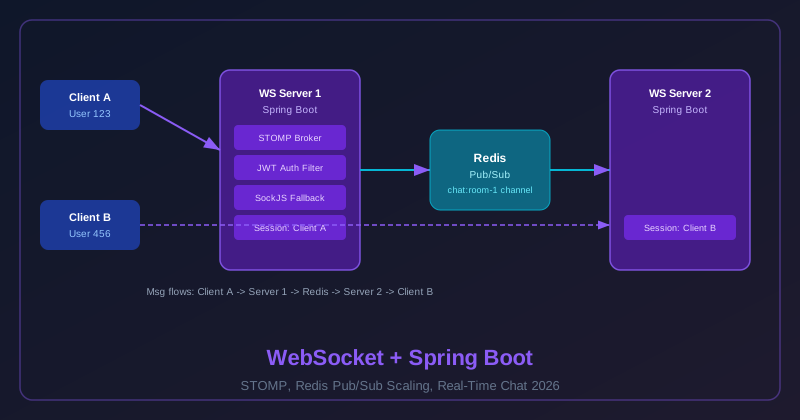
The problem: User A connects to Server 1. User B connects to Server 2. If User A sends a message, Server 1 can only deliver it to clients connected to Server 1 — User B never receives it.
Solution: All servers subscribe to a Redis pub/sub channel. When any server receives a message, it publishes to Redis; all servers receive it and forward to their locally connected clients.
@Configuration
public class RedisWebSocketRelay {
    @Autowired private SimpMessagingTemplate messagingTemplate;

    @Bean
    public MessageListenerAdapter messageListenerAdapter() {
        return new MessageListenerAdapter(new RedisMessageDelegate(messagingTemplate));
    }

    @Bean
    public RedisMessageListenerContainer redisListenerContainer(
            RedisConnectionFactory connectionFactory,
            MessageListenerAdapter listenerAdapter) {
        RedisMessageListenerContainer container = new RedisMessageListenerContainer();
        container.setConnectionFactory(connectionFactory);
        // Subscribe to all chat channel patterns
        container.addMessageListener(listenerAdapter, new PatternTopic("chat:*"));
        return container;
    }
}

@Service
public class ChatBroadcastService {
    @Autowired private RedisTemplate<String, ChatMessage> redisTemplate;
    @Autowired private SimpMessagingTemplate wsTemplate;

    public void broadcast(String roomId, ChatMessage message) {
        // Publish to Redis — all instances will receive and forward to WS clients
        redisTemplate.convertAndSend("chat:" + roomId, message);
    }
}

class RedisMessageDelegate {
    private final SimpMessagingTemplate wsTemplate;

    public void handleMessage(ChatMessage message, String channel) {
        String roomId = channel.replace("chat:", "");
        wsTemplate.convertAndSend("/topic/chat-room-" + roomId, message);
    }
}
8. Presence & Typing Indicators
@Service
public class PresenceService {
    @Autowired private RedisTemplate<String, String> redisTemplate;
    private static final int PRESENCE_TTL_SECONDS = 35;  // slightly > heartbeat interval

    public void userConnected(String roomId, String userId) {
        String key = "presence:" + roomId;
        redisTemplate.opsForSet().add(key, userId);
        redisTemplate.expire(key, PRESENCE_TTL_SECONDS, TimeUnit.SECONDS);  // auto-cleanup on crash
        broadcastPresence(roomId);
    }

    public void userDisconnected(String roomId, String userId) {
        redisTemplate.opsForSet().remove("presence:" + roomId, userId);
        broadcastPresence(roomId);
    }

    // Called on each heartbeat to refresh TTL
    public void refreshPresence(String roomId, String userId) {
        redisTemplate.opsForSet().add("presence:" + roomId, userId);
        redisTemplate.expire("presence:" + roomId, PRESENCE_TTL_SECONDS, TimeUnit.SECONDS);
    }

    public Set<String> getOnlineUsers(String roomId) {
        return redisTemplate.opsForSet().members("presence:" + roomId);
    }
}
9. Production Tuning & Connection Limits
| Config | Default | Production | Notes |
|---|---|---|---|
| Max text message size | 64KB | 128KB | For rich messages with metadata |
| Max binary message size | 512KB | 1MB | Adjust per use case |
| Connections per JVM | ~65K theoretical | 20-30K safe | ~10KB memory per idle conn |
| SockJS heartbeat | 25s | 25s | Keep alive through proxies/LBs |
10. Interview Questions & Production Checklist
- Use external broker relay for production clustering
- JWT auth on STOMP CONNECT frame
- Redis pub/sub for multi-instance message delivery
- Presence tracking with Redis TTL
- Client reconnect with exponential backoff
- SockJS fallback for load balancer compatibility
- Heartbeat to keep connections alive through proxies
- Graceful shutdown drain before pod restart
11. At BRAC IT: Real-Time Loan Status Notifications
At BRAC IT, we manage a microfinance platform that processes loan applications for hundreds of thousands of borrowers across Bangladesh. When we first launched the platform, loan applicants had no way to know the status of their application without repeatedly polling our REST API. The mobile app refreshed every 30 seconds — adding unnecessary server load and still leaving users with stale data. During peak periods our polling endpoints were handling 400+ req/sec of status-check traffic, with 95% of those returning "no change."
We replaced polling with a WebSocket notification system. When a loan officer approves or rejects an application, or when the automated scoring engine produces a result, a domain event is published to Kafka. A notification microservice consumes the event and pushes the update directly to the applicant's open WebSocket connection. The mobile app now shows a real-time status banner — "Your loan application has been approved!" — the moment the decision is made.
System Architecture
At peak usage we sustain 15,000 concurrent WebSocket connections — one per active loan applicant session. We run three notification service pods, each holding roughly 5,000 connections. The key architectural challenge: when a loan decision event arrives at any pod, the borrower's WebSocket connection might be on a different pod. A simple in-process SimpMessagingTemplate.convertAndSendToUser() would only work if the event arrived at the same pod that holds that user's connection.
The solution: configure Spring's message broker relay using Redis pub/sub as the shared message bus. Every pod subscribes to the same Redis channel. When any pod receives a domain event, it publishes to Redis, and all pods receive it. Each pod checks whether it holds a connection for that user — if yes, it delivers locally. This removes the need for sticky session routing at the load balancer level.
@Configuration
@EnableWebSocketMessageBroker
public class LoanNotificationWebSocketConfig implements WebSocketMessageBrokerConfigurer {

    @Value("${redis.host}") private String redisHost;
    @Value("${redis.port}") private int    redisPort;

    @Override
    public void configureMessageBroker(MessageBrokerRegistry registry) {
        // External Redis relay — shared across all pods
        registry.enableStompBrokerRelay("/topic", "/queue")
            .setRelayHost(redisHost)
            .setRelayPort(redisPort)
            .setClientLogin("borrower-svc")
            .setClientPasscode("${REDIS_PASSWORD}")
            .setSystemLogin("borrower-svc-system")
            .setSystemPasscode("${REDIS_PASSWORD}")
            // Heartbeat between gateway and Redis broker
            .setSystemHeartbeatSendInterval(10_000)
            .setSystemHeartbeatReceiveInterval(10_000);

        registry.setApplicationDestinationPrefixes("/app");
        registry.setUserDestinationPrefix("/user");
    }

    @Override
    public void registerStompEndpoints(StompEndpointRegistry registry) {
        registry.addEndpoint("/ws/notifications")
            .setAllowedOriginPatterns("https://*.bracit.com.bd")
            .withSockJS()
            .setHeartbeatTime(25_000)
            .setDisconnectDelay(5_000);
    }
}

// Kafka consumer that pushes events to WebSocket clients
@Component
@Slf4j
public class LoanDecisionEventConsumer {

    @Autowired private SimpMessagingTemplate messagingTemplate;
    @Autowired private LoanNotificationMapper mapper;

    @KafkaListener(topics = "loan.decisions", groupId = "notification-service",
                   containerFactory = "loanDecisionListenerFactory")
    public void handleLoanDecision(LoanDecisionEvent event) {
        LoanStatusNotification notification = mapper.toNotification(event);

        // Push to the specific borrower — works regardless of which pod holds the connection
        // Spring + Redis relay routes it to the correct pod automatically
        messagingTemplate.convertAndSendToUser(
            event.getBorrowerId(),          // Spring prefixes this to /user/{borrowerId}/queue/
            "/queue/loan-status",
            notification
        );

        log.info("Pushed loan decision to borrower={} status={} loanId={}",
            event.getBorrowerId(), event.getStatus(), event.getLoanId());
    }
}
Session Affinity: Why We Moved Away From It
Our first scaling attempt used sticky sessions at the AWS ALB level — each client was pinned to one pod via a cookie. This created uneven load distribution: some pods had 8,000 connections while others had 2,000. More critically, when a pod was restarted for a deployment, all 8,000 sticky connections dropped simultaneously, causing a reconnection storm. The Redis relay approach distributes reconnections evenly across pods since there's no affinity requirement.
12. WebSocket vs SSE vs Long Polling: When to Use Each
The choice between WebSocket, Server-Sent Events (SSE), and long polling has significant implications for server resource usage, browser compatibility, proxy behavior, and development complexity. Use this comparison table to make an informed decision before reaching for WebSocket by default:
| Dimension | WebSocket | Server-Sent Events (SSE) | Long Polling |
|---|---|---|---|
| Protocol | ws:// / wss:// (TCP upgrade) | HTTP/1.1 or HTTP/2 streaming | Standard HTTP |
| Direction | Full-duplex bidirectional | Server → Client only | Server → Client (via poll) |
| Browser Support | All modern browsers (with SockJS fallback for older) | All modern; IE needs polyfill | Universal — plain HTTP |
| Proxy / Firewall | Some corporate proxies block WS upgrades; SockJS mitigates | Works through all HTTP proxies | Works through all HTTP proxies |
| Server Load | One persistent connection per client; ~10KB idle memory | One persistent HTTP stream per client | One thread blocked per client poll (high for many clients) |
| Latency | Sub-millisecond (persistent socket) | Sub-millisecond (persistent stream) | Up to poll timeout (1–30s) |
| Best For | Chat, collaborative editing, gaming, trading dashboards | Live feeds, notifications, log streaming, progress bars | Legacy environments, simple notifications with rare updates |
| Spring Support | Full: @EnableWebSocketMessageBroker, STOMP, SockJS |
Full: SseEmitter in MVC, Flux<ServerSentEvent> in WebFlux |
Standard MVC: DeferredResult, Callable |
Recommendation: Use WebSocket when you need client-to-server messages in addition to server-to-client (e.g., chat, where clients send messages back). Use SSE when traffic is strictly one-directional from server to client and you want the simplest possible implementation — SSE reuses standard HTTP, works through every proxy, and reconnects automatically on the client side without any client-side library. Use long polling only as a last resort for legacy environments or when you need maximum compatibility with no persistent connection infrastructure.
// Spring MVC SSE — great for progress bars, notifications, log tailing
@GetMapping(value = "/api/loans/{id}/status-stream",
            produces = MediaType.TEXT_EVENT_STREAM_VALUE)
public SseEmitter streamLoanStatus(@PathVariable String id) {
    SseEmitter emitter = new SseEmitter(300_000L); // 5 min timeout
    loanStatusService.subscribe(id, emitter);
    return emitter;
}

// Spring WebFlux SSE — fully reactive, backpressure-aware
@GetMapping(value = "/api/loans/{id}/status-stream",
            produces = MediaType.TEXT_EVENT_STREAM_VALUE)
public Flux<ServerSentEvent<LoanStatus>> streamLoanStatusReactive(
        @PathVariable String id) {
    return loanStatusService.getStatusFlux(id)
        .map(status -> ServerSentEvent.<LoanStatus>builder()
            .id(UUID.randomUUID().toString())
            .event("loan-status-update")
            .data(status)
            .build());
}
13. Handling Reconnection and Message Delivery Guarantees
WebSocket connections are not TCP streams — they can drop at any moment due to network flaps, mobile device sleep, battery optimization, or backend pod restarts. A production WebSocket system must be designed with the assumption that connections will drop and implement both client-side reconnection and server-side message buffering to prevent message loss.
Client-Side: Exponential Backoff Reconnection
Never reconnect immediately on disconnect — a "thundering herd" of clients all reconnecting at the same moment (e.g., after a pod restart) can overwhelm the server. Implement exponential backoff with jitter:
class ReconnectableStompClient {
    constructor(url, token, onMessage) {
        this.url        = url;
        this.token      = token;
        this.onMessage  = onMessage;
        this.attempt    = 0;
        this.maxDelay   = 30_000;   // cap at 30 seconds
        this.baseDelay  = 500;      // start at 500ms
        this.client     = null;
        this.connect();
    }

    connect() {
        const socket = new SockJS(this.url);
        this.client  = Stomp.over(socket);
        this.client.debug = null; // suppress debug logs in production

        const headers = { Authorization: `Bearer ${this.token}` };

        this.client.connect(headers,
            (frame) => {
                console.log('Connected:', frame);
                this.attempt = 0; // reset backoff on success
                this.client.subscribe('/user/queue/loan-status',
                    (msg) => this.onMessage(JSON.parse(msg.body)));
            },
            (error) => {
                console.warn('Connection lost, reconnecting...', error);
                this.scheduleReconnect();
            }
        );
    }

    scheduleReconnect() {
        // Exponential backoff: 500ms, 1s, 2s, 4s, 8s, 16s, 30s (capped)
        const exponential = this.baseDelay * Math.pow(2, this.attempt);
        const jitter      = Math.random() * 1000;   // up to 1s random jitter
        const delay       = Math.min(exponential + jitter, this.maxDelay);
        this.attempt++;
        console.log(`Reconnecting in ${Math.round(delay)}ms (attempt ${this.attempt})`);
        setTimeout(() => this.connect(), delay);
    }
}
Server-Side: Message Buffering for Reconnecting Clients
If a loan decision arrives while a borrower's connection is dropped, the message would be lost without buffering. We store pending messages in Redis with a 5-minute TTL. When a client reconnects and sends a STOMP CONNECT frame, an interceptor checks Redis for any buffered messages and drains them immediately:
@Service
@Slf4j
public class MessageBufferService {

    private static final Duration BUFFER_TTL = Duration.ofMinutes(5);
    private final RedisTemplate<String, LoanStatusNotification> redisTemplate;
    private final SimpMessagingTemplate messagingTemplate;

    // Called when no active WebSocket connection for this user
    public void bufferMessage(String userId, LoanStatusNotification notification) {
        String key = "ws:buffer:" + userId;
        redisTemplate.opsForList().rightPush(key, notification);
        redisTemplate.expire(key, BUFFER_TTL);
        log.debug("Buffered notification for offline user={} loanId={}",
            userId, notification.getLoanId());
    }

    // Called when user reconnects — drain buffer to their session
    public void drainBuffer(String userId) {
        String key = "ws:buffer:" + userId;
        List<LoanStatusNotification> buffered =
            redisTemplate.opsForList().range(key, 0, -1);

        if (buffered != null && !buffered.isEmpty()) {
            log.info("Delivering {} buffered messages to reconnected user={}",
                buffered.size(), userId);
            buffered.forEach(notification ->
                messagingTemplate.convertAndSendToUser(
                    userId, "/queue/loan-status", notification));
            redisTemplate.delete(key);  // clear buffer after delivery
        }
    }
}

// Channel interceptor — drain buffer on CONNECT
@Component
public class ReconnectDrainInterceptor implements ChannelInterceptor {

    @Autowired private MessageBufferService bufferService;

    @Override
    public Message<?> preSend(Message<?> message, MessageChannel channel) {
        StompHeaderAccessor accessor = MessageHeaderAccessor.getAccessor(
            message, StompHeaderAccessor.class);

        if (StompCommand.CONNECT.equals(accessor.getCommand())) {
            // JWT validation happens in JwtChannelInterceptor (runs first)
            // At this point, accessor.getUser() is already set
        }
        if (StompCommand.CONNECTED.equals(accessor.getCommand())
                && accessor.getUser() != null) {
            // Drain any buffered messages after successful authentication
            bufferService.drainBuffer(accessor.getUser().getName());
        }
        return message;
    }
}
14. WebSocket Security: Beyond JWT
JWT authentication on the STOMP CONNECT frame is the first line of defence, but a hardened production WebSocket service needs additional security controls. Three areas that are commonly overlooked: CSRF for WebSocket endpoints, rate limiting per connection to prevent message flooding, and payload size limits to prevent memory exhaustion attacks.
CSRF for WebSocket
Cross-origin WebSocket connections are not subject to the same-origin policy in the same way as XHR requests, but browsers do send cookies (including session cookies) on the WebSocket HTTP upgrade request. A malicious site could therefore initiate a WebSocket connection to your server using the victim's session cookies. The defense: validate the Origin header on the WebSocket upgrade request and use token-based authentication (JWT in STOMP CONNECT) rather than cookie-based sessions.
@Configuration
@EnableWebSecurity
public class WebSocketSecurityConfig {

    @Bean
    public SecurityFilterChain filterChain(HttpSecurity http) throws Exception {
        http
            // CSRF for WebSocket endpoints is handled via Origin check + JWT
            // not via CSRF tokens (which can't be injected into WS handshake easily)
            .csrf(csrf -> csrf
                .ignoringRequestMatchers("/ws/**"))
            .headers(headers -> headers
                .frameOptions(f -> f.deny()));
        return http.build();
    }
}

// Validate Origin in the WebSocket config itself
@Override
public void registerStompEndpoints(StompEndpointRegistry registry) {
    registry.addEndpoint("/ws/notifications")
        // ONLY allow connections from our own domains — blocks cross-origin WS abuse
        .setAllowedOriginPatterns(
            "https://*.bracit.com.bd",
            "https://mobileapp.bracit.com.bd"
        )
        .withSockJS();
}
Rate Limiting Per Connection: Preventing Message Flooding
A connected client can send STOMP frames as fast as the connection allows. Without rate limiting, a single malicious or buggy client could flood your server with messages, consuming thread pool capacity and degrading service for all other users. We implement a per-user message rate limiter using a sliding window counter stored in Redis:
@Component
@Slf4j
public class MessageRateLimitingInterceptor implements ChannelInterceptor {

    private static final int MAX_MESSAGES_PER_SECOND = 10;
    private final RedisTemplate<String, Long> redisTemplate;

    @Override
    public Message<?> preSend(Message<?> message, MessageChannel channel) {
        StompHeaderAccessor accessor = MessageHeaderAccessor.getAccessor(
            message, StompHeaderAccessor.class);

        // Only rate-limit SEND frames (client sending messages to server)
        if (!StompCommand.SEND.equals(accessor.getCommand())) {
            return message;
        }

        if (accessor.getUser() == null) {
            throw new MessagingException("Unauthenticated message rejected");
        }

        String userId = accessor.getUser().getName();
        if (isRateLimited(userId)) {
            log.warn("Message rate limit exceeded for user={}", userId);
            throw new MessagingException("Rate limit exceeded: max "
                + MAX_MESSAGES_PER_SECOND + " messages per second");
        }

        return message;
    }

    private boolean isRateLimited(String userId) {
        String key      = "ws:ratelimit:" + userId;
        long   now      = System.currentTimeMillis();
        long   windowMs = 1000L;

        // Sliding window: increment counter, set TTL on first message
        Long count = redisTemplate.opsForValue().increment(key);
        if (count != null && count == 1L) {
            redisTemplate.expire(key, Duration.ofMillis(windowMs));
        }
        return count != null && count > MAX_MESSAGES_PER_SECOND;
    }
}

// Register interceptor in WebSocket config
@Override
public void configureClientInboundChannel(ChannelRegistration registration) {
    registration.interceptors(
        jwtChannelInterceptor,          // auth first
        messageRateLimitingInterceptor  // then rate limit
    );
}
Additionally, configure Spring's built-in message size limits to prevent individual messages from exhausting heap memory. A single large message can cause an OOM error if the buffer size is not capped:
@Override
public void configureWebSocketTransport(WebSocketTransportRegistration registration) {
    registration
        .setMessageSizeLimit(64 * 1024)         // max 64KB per STOMP message
        .setSendBufferSizeLimit(512 * 1024)      // max 512KB per-session send buffer
        .setSendTimeLimit(20_000)                // disconnect if send takes >20s
        .setTimeToFirstMessage(30_000);          // disconnect if no CONNECT within 30s
}
15. Performance Tuning WebSocket Connections
Sustaining 15,000 concurrent connections at BRAC IT required careful tuning of heartbeats, thread pools, buffer sizes, and JVM parameters. The defaults are designed for correctness at low scale; production needs deliberate configuration for high connection density.
Heartbeat Configuration
STOMP heartbeats keep connections alive through load balancers and proxies that have idle connection timeouts. AWS ALB drops idle connections after 60 seconds by default. Our heartbeat interval of 25 seconds ensures the connection is never idle long enough to be dropped:
spring:
  websocket:
    # No direct YAML config for message broker — use Java config
    # These affect the underlying Tomcat/Netty connector

server:
  tomcat:
    threads:
      max: 400         # Handle WS upgrade HTTP requests + REST endpoints
      min-spare: 20
    connection-timeout: 20000
    max-connections: 20000     # Tomcat max WS + HTTP connections

---
# JVM flags for high connection density (add to JAVA_OPTS in pod spec)
# -Xms2g -Xmx4g
# -XX:+UseG1GC
# -XX:MaxGCPauseMillis=100
# -Djava.net.preferIPv4Stack=true
# Increase file descriptor limit in container: ulimit -n 100000
@Override
public void configureMessageBroker(MessageBrokerRegistry registry) {
    registry.enableSimpleBroker("/topic", "/queue")
        // STOMP heartbeat: server sends every 10s, expects client every 10s
        // If client misses 2 consecutive heartbeats (20s) → session dropped
        .setHeartbeatValue(new long[]{10_000, 10_000})
        // Thread pool for broadcasting messages to subscribers
        .setTaskScheduler(heartbeatTaskScheduler());

    registry.setApplicationDestinationPrefixes("/app");
}

@Bean
public TaskScheduler heartbeatTaskScheduler() {
    ThreadPoolTaskScheduler scheduler = new ThreadPoolTaskScheduler();
    // Size based on: concurrent heartbeat + scheduled tasks
    // Rule of thumb: 1 thread per 5,000 connections for heartbeat checks
    scheduler.setPoolSize(5);
    scheduler.setThreadNamePrefix("ws-heartbeat-");
    return scheduler;
}

@Override
public void configureClientInboundChannel(ChannelRegistration registration) {
    // Thread pool that processes STOMP frames from clients
    // Under load: one thread can handle ~500 msgs/sec of simple routing
    registration.taskExecutor()
        .corePoolSize(8)
        .maxPoolSize(20)
        .queueCapacity(500)
        .keepAliveSeconds(60);
}

@Override
public void configureClientOutboundChannel(ChannelRegistration registration) {
    // Thread pool for sending messages to clients
    // Should be at least as large as inbound to avoid back-pressure
    registration.taskExecutor()
        .corePoolSize(8)
        .maxPoolSize(20)
        .queueCapacity(1000)
        .keepAliveSeconds(60);
}
Performance Summary: BRAC IT Numbers
| Config | Default | Our Production | Notes |
|---|---|---|---|
| STOMP heartbeat interval | 0 (disabled) | 10,000ms | Detect dead connections; stay under ALB 60s timeout |
| Max message size | 64KB | 32KB | Our loan notifications are <1KB; smaller cap prevents abuse |
| Send buffer per session | 512KB | 128KB | Reduced to save memory with 15K connections (~1.9GB total) |
| Inbound thread pool | 1 core | 8 core / 20 max | Handles concurrent STOMP frame processing from all sessions |
| Connections per pod | No explicit limit | ~5,000 | Load balanced; ~10KB memory per idle connection |
| Reconnection jitter window | N/A (client-side) | 0–1,000ms random | Prevents thundering herd on pod restarts |
One critical operational lesson: monitor the WebSocket outbound send buffer queue depth. When a slow client (poor network) can't consume messages fast enough, the outbound buffer fills up. Without a send time limit, the server thread stays blocked trying to send to that one slow client. Setting setSendTimeLimit(20_000) ensures that a slow client gets disconnected rather than blocking server resources indefinitely. The client reconnects with exponential backoff and receives any missed messages from the Redis buffer.