Agentic AI for Data Analysis: Text-to-SQL & Autonomous Analytics Pipelines in 2026
Business teams drown in data requests that take days to answer. Text-to-SQL AI agents eliminate the BI analyst bottleneck by converting natural language questions directly into validated, safe SQL queries — executed on read-only replicas with plain-English result summaries returned in seconds. This deep-dive covers the complete production architecture: schema RAG, prompt design, validation loops, PII safety, RBAC, and continuous evaluation.
TL;DR — Production Pattern in One Sentence
"Text-to-SQL agents convert natural language questions into validated SQL queries, execute them on read-only replicas, and return plain-English answers with chart suggestions — eliminating the need for BI analyst bottlenecks. The production-ready pattern uses schema RAG + few-shot examples + validator loop + PII masking + audit log."
Table of Contents
- The Problem: BI Analyst Bottlenecks at Scale
- Text-to-SQL Architecture Overview
- Schema Representation & RAG
- LLM Prompt Design for SQL Generation
- SQL Validation & Safety Layer
- Agentic Retry & Error Recovery
- Result Post-Processing & NL Explanation
- PII Safety & RBAC Integration
- Production Deployment & Monitoring
- Evaluation: Measuring Text-to-SQL Quality
- Conclusion & Production Checklist
1. The Problem: BI Analyst Bottlenecks at Scale
Modern data teams are drowning. A typical mid-size company generates 200+ ad-hoc analytics requests per week — from product managers who want funnel conversion rates, to finance wanting revenue breakdowns by region, to operations asking about delivery SLA compliance. The data team has three analysts. The average time to fulfill a request: three business days. The backlog never clears.
This bottleneck is not a staffing problem — it's an interface problem. Business users cannot write SQL. They speak in natural language: "How many users signed up last week who completed onboarding within 24 hours?" Translating that into a multi-table JOIN with date arithmetic is a skilled task that currently requires a human. Text-to-SQL AI agents solve this by automating the translation entirely.
Industry Adoption & Benchmarks
Self-service natural language analytics is no longer experimental. Stripe, Uber, Airbnb, and Salesforce all have internal NL-to-SQL tooling. Stripe's internal "Ask Stripe" tool answers data questions for non-technical employees in seconds. Uber's QueryGPT enables product managers to query their data warehouse directly. Airbnb's Minerva semantic layer serves as the schema backbone for their NL query system.
On the benchmark front, the DEFOG SQL research benchmark shows that GPT-4o achieves 84% execution accuracy on the Spider benchmark in 2026 — a dramatic improvement from 67% in 2023. The Spider benchmark covers 200+ databases across 138 domains and tests complex multi-table queries. However, benchmark performance does not translate directly to production, where databases have 500+ tables, ambiguous column names, denormalized schemas, and business-specific terminology that no general benchmark captures.
Remaining Hard Challenges
- Multi-table joins: Queries spanning 4+ tables with complex join conditions remain error-prone. LLMs tend to miss bridge tables or invert join directions.
- Ambiguous queries: "Show me top customers" — by revenue? by order count? by recency? Business context needed to resolve ambiguity is often implicit.
- Hallucinated column names: Models confidently generate column names that don't exist in the schema, causing runtime errors. Schema grounding via RAG is the primary mitigation.
- Dialect differences: PostgreSQL DATE_TRUNC vs MySQL DATE_FORMAT vs BigQuery DATE_DIFF — LLMs must know which dialect to generate for each database.
- Implicit business logic: "Active users" might mean different things to different teams. Business metric definitions must be embedded in the schema or prompt context.
2. Text-to-SQL Architecture Overview
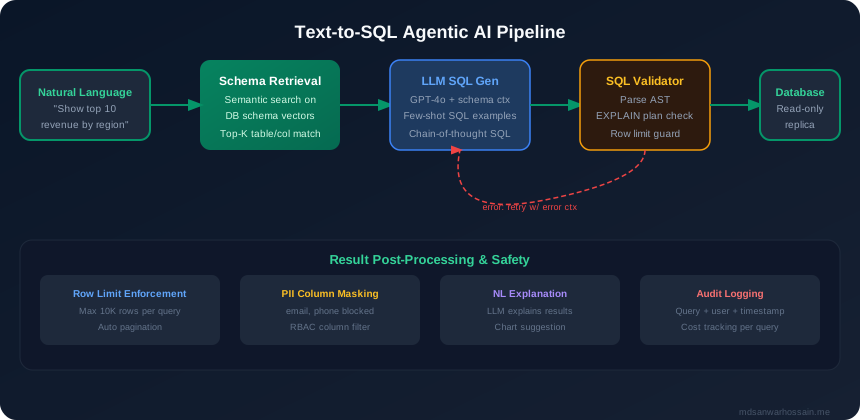
The production Text-to-SQL system is not a simple prompt → execute pipeline. It is a multi-stage agentic loop with validation gates, safety checks, and result post-processing at each step. Understanding each stage helps you design for failure modes before they hit production.
Seven-Stage Pipeline
| Stage | Component | Key Decisions |
|---|---|---|
| 1. NL Query | User input parsing | Detect ambiguity, clarify intent if needed |
| 2. Schema Retrieval | RAG on schema vector store | Top-K tables, FK relationships, sample values |
| 3. SQL Generation | LLM (GPT-4o / Claude) | Few-shot, CoT, dialect, temp=0 |
| 4. SQL Validation | sqlglot + EXPLAIN + column check | Block dangerous keywords, row limit guard |
| 5. DB Execution | Read-only replica pool | 30s timeout, pg_terminate_backend fallback |
| 6. Post-Processing | Result formatting + NL summary | Pagination, chart suggestion, CSV download |
| 7. NL Answer | LLM explanation | Plain English + chart type recommendation |
Key Architectural Decisions
- Read-only replica, never the write DB: Text-to-SQL agents must never connect to the primary database. Use a dedicated read replica or analytical replica (Redshift, BigQuery) with a read-only service account. This is a non-negotiable security constraint.
- Schema vector store updated nightly: Schema changes (new columns, renamed tables, deprecated views) must be reflected in the vector store promptly or the agent will hallucinate old column names. Nightly re-indexing with change detection is the standard approach.
- Per-user RBAC on column access: Not every user should see every column. A finance analyst should not see raw PII; an executive should not see individual salary data. Column-level access control must be enforced before the SQL is executed.
Single Agent vs Multi-Agent Architecture
For most teams, a single orchestrating agent (schema retrieval → SQL gen → validate → execute → explain) is the right starting point. It is simpler to debug, has fewer failure modes, and is fast enough for most use cases (p95 < 10s). The multi-agent variant makes sense when:
- Your schema is so large (500+ tables) that schema retrieval requires a dedicated schema agent with its own memory and search strategy
- You need parallel sub-query generation across multiple databases simultaneously
- Validation logic is complex enough to warrant a dedicated validator agent with specialized knowledge (e.g., query cost estimation, query plan analysis)
The multi-agent variant — schema agent + SQL-writer agent + validator agent + explainer agent — provides better separation of concerns but adds latency (each agent hop adds 1–3s) and increases debugging complexity significantly. Start single-agent and migrate specific components to sub-agents only when measured bottlenecks demand it.
3. Schema Representation & RAG
The single biggest driver of Text-to-SQL accuracy is not the LLM model choice — it is schema quality and retrieval precision. A large enterprise database with 500+ tables cannot fit its full schema into any context window. Even with 1M-token context windows, injecting the entire schema wastes tokens, degrades attention on relevant tables, and slows inference. Schema RAG is the solution.
Schema Indexing Strategy
Each table in the database is embedded as a rich document combining:
- Table name and description: Human-written one-paragraph descriptions of what the table contains and when to use it
- Column DDL: CREATE TABLE syntax including all column names, data types, NOT NULL constraints, and default values
- Column comments: Business-level explanations — "status: order lifecycle state; values: pending, processing, shipped, delivered, cancelled"
- Sample values (3 rows): Representative data that shows the LLM what real values look like — critical for date format detection, enum values, and NULL patterns
- Foreign key relationships: Explicit FK declarations help the LLM construct correct JOIN conditions without guessing
CREATE TABLE DDL format is superior to JSON for LLMs. Research and practitioner experience consistently show that LLMs trained on large code corpora have a strong prior toward interpreting SQL DDL syntax. JSON schema representations produce worse SQL generation quality for the same model. Always serialize your schema as DDL, not JSON or YAML.
Schema Retrieval Implementation
from openai import OpenAI
import chromadb

client = OpenAI()
chroma = chromadb.Client()
schema_collection = chroma.create_collection("schema")

def retrieve_relevant_schema(nl_query: str, top_k: int = 5) -> str:
    query_embedding = client.embeddings.create(
        input=nl_query,
        model="text-embedding-3-small"
    ).data[0].embedding

    results = schema_collection.query(
        query_embeddings=[query_embedding],
        n_results=top_k
    )
    return "\n\n".join(results["documents"][0])
Schema Version Tracking
Schema changes are a silent killer of Text-to-SQL accuracy. When a column is renamed from user_id to account_id, the vector store will still return the old schema document until re-indexed. Implement schema version tracking with a hash of each table's DDL stored in metadata. On nightly re-indexing, compare hashes and update only changed tables. Additionally, invalidate any cached NL→SQL pairs that reference updated tables to prevent stale cache hits serving incorrect queries.
4. LLM Prompt Design for SQL Generation
SQL generation prompts are one of the most structured prompt engineering challenges in production LLM systems. Unlike open-ended generation, SQL must be syntactically valid, semantically correct, and safe — all at once. The prompt design has a direct, measurable impact on execution accuracy.
System Prompt Components
- Database type declaration: Explicitly state "You are generating PostgreSQL 15 SQL" — this anchors the model to the correct dialect and prevents MySQL or BigQuery syntax from bleeding in
- Schema context (retrieved DDL): The top-K DDL documents from the schema RAG step, formatted as CREATE TABLE statements with comments and sample values
- Few-shot NL→SQL examples: 5–10 examples from your golden dataset, selected by embedding similarity to the current query — not random examples
- Output format constraint: "Output ONLY the SQL query inside a code block. No explanation, no preamble." Enforce this with structured output parsing
- Safety rules: "Never generate INSERT, UPDATE, DELETE, DROP, or ALTER statements. Generate only SELECT queries."
Chain-of-Thought SQL Generation
For complex multi-table queries, instruct the model to reason through the join structure before writing SQL. A two-step CoT approach: first identify which tables are needed and how they relate (in a scratchpad/think block), then generate the SQL. This reduces multi-table join errors by approximately 25–35% in practice, at the cost of 2× more output tokens and 1–2s additional latency.
Few-Shot Example Selection
Static few-shot examples in the system prompt are far less effective than dynamically retrieved few-shot examples similar to the current query. Maintain a golden dataset of 200+ manually verified NL→SQL pairs. At query time, embed the incoming query and retrieve the 5 most similar golden examples. Including similar examples dramatically improves accuracy on "query types" the model sees patterns of — date range aggregations, funnel calculations, cohort analysis.
Temperature, Self-Consistency & Dialect
- Temperature 0.0: SQL generation should be fully deterministic. Temperature > 0 introduces random variation in SQL syntax that serves no purpose and can break caching.
- Self-consistency sampling: For high-stakes queries, generate 3 SQL variants independently (with different few-shot orderings) and select the most common structure via majority voting. Adds latency but improves accuracy on ambiguous queries by 8–15%.
- Dialect handling: Maintain separate prompt templates per database dialect. PostgreSQL uses
DATE_TRUNC('month', created_at), MySQL usesDATE_FORMAT(created_at, '%Y-%m'), BigQuery usesDATE_TRUNC(created_at, MONTH). A single generic template produces dialect-mixed SQL that fails silently on execution.
5. SQL Validation & Safety Layer
Never execute LLM-generated SQL without a validation layer. The validation pipeline is your primary defense against incorrect queries, dangerous operations, and performance disasters. Implement validation as a series of ordered gates — fail fast at the cheapest check before running expensive ones.
Validation Gate Order
Gate 1: Dangerous Keyword Filter (instant, pre-parse)
Regex scan for DROP, DELETE, INSERT, UPDATE, ALTER, TRUNCATE, EXECUTE, GRANT, REVOKE. Reject immediately with a "read-only queries only" error message. This is the cheapest check and catches the most catastrophic failures.
Gate 2: AST Parse Validation (sqlglot)
Use sqlglot to parse the generated SQL into an Abstract Syntax Tree. If parsing fails, the SQL is syntactically invalid — trigger a retry with the parse error message injected into the next LLM call. sqlglot supports 20+ SQL dialects and is the industry standard for dialect-aware SQL parsing in Python.
Gate 3: Column Existence Check
Extract all column references from the parsed AST and verify each exists in the retrieved schema context. This catches the "hallucinated column name" failure mode — the most common LLM SQL error. Columns not present in the schema context trigger a retry with the specific missing column identified in the error message.
Gate 4: EXPLAIN Plan & Row Estimation
Run EXPLAIN (not EXECUTE) to get the query plan. Extract the estimated row count from the planner output. If estimated rows exceed 1 million without a LIMIT clause, reject with an instruction to add LIMIT. If the plan shows a sequential scan on a table exceeding 10M rows, warn and require the query to be scoped with a date range or other selective filter.
Gate 5: Injection Prevention Check
Verify that no user-supplied string literals are concatenated directly into the SQL — the LLM should generate parameterized queries or queries that contain only schema-derived identifiers. Since the SQL is LLM-generated and not from user string concatenation at the application layer, this gate validates structural SQL injection patterns in the AST rather than input sanitization.
Query timeout: Every query runs with a hard 30-second timeout enforced at both the application layer (SQLAlchemy connection timeout) and the database layer (statement_timeout = '30s' in the read-replica's connection pool config). The fallback is pg_terminate_backend(pid) to kill runaway queries immediately.
6. Agentic Retry & Error Recovery
A Text-to-SQL agent that gives up on the first error is not production-ready. The agentic retry loop is what separates a prototype from a system engineers trust. When execution fails, the error message is itself valuable signal — feed it back into the LLM with the original SQL and let the model reason about how to fix its own mistake.
Error Classification & Fix Strategy
| Error Type | Cause | Fix Strategy |
|---|---|---|
| SyntaxError | Invalid SQL grammar | Regenerate with parse error injected into prompt |
| ColumnNotFound | Hallucinated column name | Re-retrieve schema, inject column list into retry prompt |
| PermissionDenied | RBAC block on column or table | No retry — return user message explaining access restriction |
| Timeout | Query too expensive | Inject "Add LIMIT, add date filter, simplify aggregation" |
| AmbiguousColumn | Missing table alias on column | Inject "Qualify all column references with table alias" |
Retry Loop Implementation
import sqlglot
from openai import OpenAI

client = OpenAI()
MAX_RETRIES = 3

def generate_and_execute_sql(nl_query: str, schema_context: str,
                              few_shot_examples: str) -> dict:
    sql = None
    error_history = []

    for attempt in range(MAX_RETRIES):
        error_context = ""
        if error_history:
            last_error = error_history[-1]
            error_context = (
                f"\n\nThe previous SQL attempt failed:\n"
                f"SQL: {last_error['sql']}\n"
                f"Error: {last_error['error']}\n"
                f"Fix the SQL to resolve this error."
            )

        prompt = build_sql_prompt(
            nl_query, schema_context, few_shot_examples, error_context
        )
        response = client.chat.completions.create(
            model="gpt-4o",
            messages=[{"role": "user", "content": prompt}],
            temperature=0.0
        )
        sql = extract_sql_from_response(response.choices[0].message.content)

        validation_result = validate_sql(sql, schema_context)
        if not validation_result["valid"]:
            error_history.append({"sql": sql, "error": validation_result["error"]})
            continue

        try:
            result = execute_on_read_replica(sql, timeout=30)
            return {"success": True, "sql": sql, "result": result, "attempts": attempt + 1}
        except Exception as e:
            error_history.append({"sql": sql, "error": str(e)})

    return {"success": False, "sql": sql, "error": error_history[-1]["error"],
            "attempts": MAX_RETRIES}
The retry prompt template is critical: include the original natural language query, the full schema context, the previous failed SQL, the error message, and a specific instruction about what to fix. Generic "fix this SQL" instructions produce poor results — targeted error-specific guidance ("The column 'user_email' does not exist. Available columns in users table: id, email, created_at, status") dramatically improves first-retry success rates.
7. Result Post-Processing & NL Explanation
Raw tabular query results are not user-friendly for non-technical business users. The final stage of the pipeline transforms raw rows and columns into an insight narrative that answers the user's original question in plain English, paired with an appropriate chart visualization recommendation.
NL Summary Generation
After successful query execution, pass the following to a second LLM call for plain-English explanation:
- The original natural language question
- The generated SQL query (for grounding)
- The first 20 rows of results (truncated for token efficiency)
- Aggregate statistics (row count, total, min/max where applicable)
The explanation prompt: "Given the following SQL query and its results, write a 2–3 sentence plain English explanation of what the data shows. Be specific about numbers. Do not hedge or qualify excessively." This produces crisp, fact-grounded summaries like: "In Q1 2026, your top 10 customers generated $4.2M in revenue, representing 38% of total company revenue. The highest-revenue customer (Acme Corp) accounted for $820K alone."
Chart Type Recommendation
Automatically classify the result shape to suggest the most appropriate visualization:
- Time series (date column + numeric column): Recommend line chart or area chart
- Categorical + numeric (e.g., product name + revenue): Recommend horizontal bar chart
- Two numeric columns (scatter-friendly): Recommend scatter plot
- Single aggregate value (COUNT, SUM with no GROUP BY): Recommend KPI card
- Distribution (histogram-like): Recommend histogram or box plot
Chart rendering itself is handled client-side with Chart.js or Plotly.js — the backend returns a chart configuration JSON object along with the data, and the frontend renders it. This keeps the backend stateless and avoids server-side image generation overhead.
Large Result Pagination & Download
When queries return more than 100 rows, return only the first 100 with a clear message: "Showing first 100 of 15,234 rows." Provide a one-click download link for the full CSV export, generated asynchronously and stored in S3/GCS with a short-lived pre-signed URL (15 minute TTL). This keeps API response sizes manageable while still giving users access to the full dataset when needed.
8. PII Safety & RBAC Integration
Data access governance is non-negotiable for enterprise Text-to-SQL deployments. A system that allows any authenticated user to query any column — including salary data, health information, or customer PII — is a compliance and legal liability, regardless of how accurate the SQL generation is. Privacy and access controls must be architecturally enforced, not just prompting conventions.
Column-Level RBAC
Each user or user role is associated with an allowed-columns list stored in your authorization service. Before any SQL is executed — even before the LLM generates it — the user's allowed columns are computed from their role and passed into the schema context. Tables with restricted columns are either omitted from the schema context entirely (preventing the LLM from generating queries referencing them) or presented with the restricted columns removed from the DDL. This is the most effective prevention: the LLM cannot generate queries for columns it does not know exist.
PII Masking by Column Pattern
Even with RBAC, some users legitimately access tables containing PII columns for aggregate analysis but should not see raw PII values in query results. Implement result-level PII masking triggered by column name pattern matching:
- Email columns (name matches:
email,email_address,user_email): Mask tou****@domain.com - Phone columns (name matches:
phone,mobile,phone_number): Mask to***-***-1234 - SSN/Tax ID columns: Mask to
***-**-6789 - Credit card columns: Mask to
**** **** **** 4242
Row-Level Security for Multi-Tenant Data
For multi-tenant databases where each organization's data lives in the same tables partitioned by tenant_id, automatically inject a WHERE tenant_id = :user_tenant_id clause into every generated query before execution. This is implemented as a post-generation SQL rewrite, not a prompting instruction — rewriting the AST guarantees enforcement even if the LLM omits the filter. Use sqlglot's AST transformation API for safe, dialect-aware WHERE clause injection.
Compliance & Audit Logging
GDPR Article 25 (Privacy by Design) and CCPA require that data systems apply appropriate technical safeguards at the architecture level. Every Text-to-SQL query must generate an audit log entry containing: user ID, timestamp, original NL question, generated SQL, tables accessed, columns accessed, row count returned, and whether any PII columns were included in the result set. Store audit logs in an immutable append-only log (CloudWatch Logs, BigQuery audit table, or dedicated audit database). Retention minimum: 90 days for GDPR compliance, 1 year recommended.
9. Production Deployment & Monitoring
A Text-to-SQL system combines LLM inference latency (2–8s) with database query latency (0.1–30s). The sum often exceeds acceptable synchronous API timeout thresholds. The production deployment pattern is always async, with status polling or webhooks for result delivery.
Async API Design
# POST /query
# Request: {"nl_query": "...", "user_id": "u123", "context": {...}}
# Response: 202 Accepted + {"task_id": "tsk_abc123", "status_url": "/query/tsk_abc123"}

# GET /query/{task_id}
# Response when pending: {"status": "processing", "queued_at": "..."}
# Response when done:    {"status": "complete", "sql": "...", "results": [...],
#                         "explanation": "...", "chart_config": {...}}
# Response when failed:  {"status": "failed", "error": "...", "attempts": 3}
Queue Architecture
Use Celery + Redis for async query task processing. Each incoming NL query is enqueued as a Celery task. Workers pull tasks from the queue, run the full pipeline (schema RAG → SQL gen → validate → execute → post-process), and write results to Redis (TTL: 1 hour). The client polls the status endpoint until the result is available. For real-time streaming interfaces, WebSocket connections can push results as they complete each pipeline stage — useful for progressive rendering (show the SQL first, then show results as they stream in).
Rate Limiting & Cost Controls
- Per-user rate limit: 10 queries per minute. Users who hit the limit receive a 429 with a Retry-After header
- Global rate limit: 100 concurrent queries system-wide, enforced by the Celery concurrency setting
- Cost monitoring: Log input token count + output token count + LLM cost estimate per query. Set daily budget alerts at 80% and hard kill at 100%
- Latency SLA: p95 end-to-end latency < 10s including LLM inference + DB execution. Alert at p95 > 8s; page on-call at p95 > 15s
Query Result Caching
Implement two layers of caching. Exact-match NL cache: hash the normalized NL query string and cache the full response in Redis with a 1-hour TTL. Catches identical repeated questions instantly. Semantic similarity cache: embed the incoming query and check cosine similarity against cached queries — if similarity exceeds 0.95, return the cached response with a "similar question answered" note. This reduces LLM API calls by 20–35% on FAQ-type workloads. Note: cache invalidation must be triggered when the underlying data changes significantly (e.g., daily data loads that change aggregates).
10. Evaluation: Measuring Text-to-SQL Quality
You cannot improve what you do not measure. Text-to-SQL systems require a rigorous, automated evaluation pipeline to track quality across model changes, schema changes, prompt iterations, and retrieval improvements. Without evaluation infrastructure, every change is flying blind.
Core Evaluation Metrics
| Metric | Definition | Target |
|---|---|---|
| Execution Accuracy | % of queries that execute without error | > 95% |
| Result Accuracy | % of results matching golden expected answer | > 80% |
| SQL Validity Rate | % of generated SQL that is parseable valid SQL | > 98% |
| First-Attempt Success Rate | % of queries succeeding without retry | > 75% |
| Explanation Quality | LLM-as-judge score for NL explanation quality | > 4.0/5.0 |
Golden Dataset
Build and maintain a golden dataset of 200+ manually verified NL→SQL pairs that covers the full range of your analytics use cases. Golden dataset categories should include: simple single-table filters, multi-table JOINs, GROUP BY aggregations, date range queries, subqueries, window functions, and HAVING clauses. Manually verify each golden pair by running the expected SQL against the database and confirming the result is correct. Every schema change must trigger a golden dataset audit — columns renamed or removed will break golden queries and must be updated.
LLM-as-Judge Evaluation
For nuanced quality assessment beyond binary correct/incorrect, use GPT-4o as an evaluation judge. The judge prompt receives: the original NL question, the generated SQL, the query result, and the expected ground truth answer. It returns a score from 1–5 with a brief rationale. Run the LLM judge on every golden dataset query as part of your CI evaluation pipeline. Score regressions of more than 0.2 points on the aggregate should block deployment of prompt or schema changes.
A/B Testing & External Benchmarks
When evaluating model upgrades (GPT-4o vs Claude 3.5 Sonnet vs a fine-tuned SQL-specific model), run parallel A/B evaluations on the same golden dataset query set with the same schema context. Compare Execution Accuracy, Result Accuracy, first-attempt success rate, and average latency. Use the DEFOG SQL benchmark (a maintained, publicly available Text-to-SQL benchmark) for external validation of absolute quality levels — a system scoring below the DEFOG community average for your model tier warrants prompt and schema RAG investigation. Additionally, establish a human review pipeline: queries with LLM-judge scores below 3.5 are flagged for human QA review to identify systematic failure patterns requiring prompt engineering or schema documentation improvements.
11. Conclusion & Production Checklist
Text-to-SQL AI agents represent one of the highest-ROI AI investments available to data-driven organizations in 2026. The technology eliminates the BI analyst bottleneck for ad-hoc queries, democratizes data access for non-technical stakeholders, and pays back its implementation cost within weeks in analyst time saved. But shipping a reliable production system requires far more than "prompt GPT-4 with your schema" — the architecture presented in this post — schema RAG, safety validation, RBAC, PII masking, agentic retry, async processing, and continuous evaluation — is what separates a demo from a system that engineers and business users trust.
The key architectural principle is defense in depth: each layer of the pipeline has its own safety and quality gate so that failures in one layer are caught before causing downstream damage. Schema RAG prevents hallucinated columns. Validation gates prevent dangerous queries. RBAC prevents unauthorized data access. PII masking prevents compliance violations. The retry loop handles transient LLM and database errors gracefully. Evaluation infrastructure detects quality regressions before they reach users.
Production Readiness Checklist
- ☐ Schema vector store built with DDL + column comments + sample values + FK relationships
- ☐ Nightly schema re-indexing with hash-based change detection and cache invalidation
- ☐ SQL generation prompt includes DB dialect, dynamic few-shot examples, output format constraint
- ☐ Temperature set to 0.0 for deterministic SQL generation
- ☐ Dangerous keyword filter (DROP, DELETE, INSERT, UPDATE, ALTER) enforced pre-parse
- ☐ sqlglot AST validation for syntax correctness
- ☐ Column existence check against retrieved schema context
- ☐ EXPLAIN plan row estimation with 1M row guard and LIMIT enforcement
- ☐ 30-second query timeout with pg_terminate_backend fallback
- ☐ Agentic retry loop with max 3 attempts and error-specific retry prompts
- ☐ Column-level RBAC with allowed-columns list filtered into schema context
- ☐ PII masking on email, phone, SSN, credit card columns in results
- ☐ Row-level security WHERE clause injection for multi-tenant data
- ☐ Immutable audit log for every query (user, timestamp, SQL, columns, row count)
- ☐ Async API with Celery + Redis queue and task status polling
- ☐ Per-user rate limiting (10/min) and global concurrency limit
- ☐ LLM cost monitoring per query with daily budget alerts
- ☐ Exact-match and semantic similarity NL query caching (1h TTL)
- ☐ Golden dataset of 200+ verified NL→SQL pairs covering all query types
- ☐ Automated evaluation pipeline running on every schema or prompt change
- ☐ LLM-as-judge scoring with quality regression alerts blocking deployments
Start with a narrow use case: one business team, one database, 50 golden queries. Ship it, measure it, iterate on schema documentation quality and few-shot examples. The accuracy improvements from better schema documentation consistently outperform switching to a more expensive model. Once the foundation is solid, expand coverage to additional databases and query types. The investment in evaluation infrastructure pays dividends at every future iteration: you always know if a change made things better or worse.
