AI Coding Assistants in 2026: Best Practices for High-Quality Delivery
AI coding tools can dramatically accelerate delivery—but only when teams pair them with clear guardrails, strict review standards, and measurable quality targets. Without structure, they create fast-moving technical debt.
TL;DR
"AI coding assistants in 2026: best practices, tools, real-world use cases, and guardrails for high-quality software delivery."
Picture this: a developer opens their editor, types a comment describing a REST endpoint, and within seconds a working implementation appears. They accept it, run the tests, and ship the feature in under an hour. Sounds ideal. Now fast-forward three months: the codebase is riddled with inconsistent patterns, subtle security gaps, and untestable spaghetti code—all generated at AI speed. This is the story of AI coding assistants without guardrails.
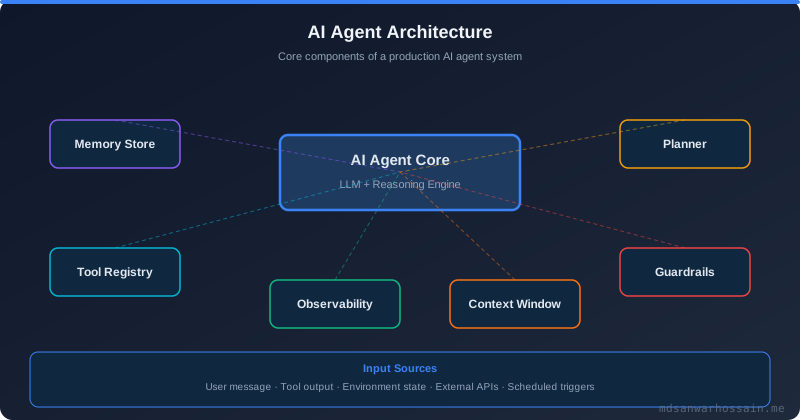
In 2026, the difference between teams that thrive with AI coding tools and those that accumulate crushing technical debt comes down to operating discipline. GitHub Copilot, Cursor, Amazon CodeWhisperer, and next-generation agentic coding agents can genuinely compress development time—but only when teams treat them as powerful junior contributors who need code review, not as infallible oracle machines. This guide covers the practical standards and workflows that make AI-assisted development work in real production environments.
Table of Contents
Why AI Coding Assistants Are Transforming Software Engineering
AI coding assistants have evolved far beyond simple autocomplete. Modern tools understand entire codebases, reason across multiple files, generate comprehensive test suites, propose architectural refactors, and explain legacy code in plain English. GitHub Copilot Enterprise integrates directly with pull request workflows. Cursor's Composer can edit multiple files simultaneously based on a natural-language description. Agentic tools like Devin, SWE-agent, and OpenAI Codex can autonomously work through multi-step engineering tasks.
The productivity data is compelling. Surveys consistently report 20–40% faster feature delivery when developers use well-integrated AI assistants. But raw speed is not the whole story. Teams that ignore quality guardrails see escaped-defect rates climb and refactoring costs rise proportionally. The goal is not just faster code—it is faster good code.
Real-World Use Cases
Boilerplate and scaffolding generation
AI assistants excel at generating repetitive code: DTOs, REST clients, migration scripts, CRUD controllers, and test fixtures. This is where they deliver the highest ROI with the lowest risk. Developers describe what they want, review the generated structure, and move on—eliminating the mechanical work that drains creative energy.
Test suite acceleration
Writing unit tests is essential but time-consuming. AI tools can generate comprehensive test cases, including edge cases and failure scenarios that developers might overlook. Teams that use AI for test generation consistently reach higher code coverage without sacrificing development velocity.
Legacy code comprehension
Inheriting a large, undocumented codebase is one of the most challenging situations in software engineering. AI assistants can summarize complex functions, explain obscure business logic, identify dependencies, and generate documentation from existing code—compressing onboarding time from weeks to days.
Code review and refactoring assistance
AI tools integrated into pull request workflows can catch common bugs, suggest naming improvements, flag security anti-patterns, and recommend more idiomatic solutions. This supplements human reviewers without replacing the judgment they bring for architectural decisions and business logic correctness.
Tools & Technologies
- GitHub Copilot Enterprise — Deep repository context, PR review integration, multi-file editing
- Cursor — Editor with Composer for multi-file AI-driven edits and codebase-aware chat
- Amazon CodeWhisperer — Inline suggestions with built-in security scanning for AWS workloads
- Tabnine — Privacy-focused enterprise AI coding with on-premise deployment options
- Continue.dev — Open-source AI coding assistant with local model support and custom context
- Devin / SWE-agent — Agentic coding assistants that autonomously handle multi-step engineering tasks
- Sourcegraph Cody — Context-aware coding assistant with enterprise codebase search integration
Best Practices for Teams
1) Define allowed and restricted use cases explicitly
Not all code is equal. Use AI assistants freely for scaffolding, test generation, boilerplate, and documentation. Apply stricter human oversight for authentication logic, payment processing, data validation, and any code touching personally identifiable information. Create a one-page internal guide that developers can reference quickly. Ambiguity leads to inconsistent behavior across teams.
2) Tag AI-assisted pull requests and apply enhanced review checklists
When a pull request contains AI-generated code, reviewers need to apply extra scrutiny. Tag these PRs clearly and use a specialized review checklist that covers: correctness, security, domain consistency, test quality, and adherence to internal coding conventions. AI tools are trained on public code, not your specific business rules. Human reviewers must fill that gap.
3) Never skip security validation for AI-generated code
AI coding assistants can and do generate code with SQL injection vulnerabilities, insecure deserialization patterns, and incorrect input validation. Run static analysis, dependency scanning, and SAST tools on every pull request regardless of whether code was human- or AI-generated. Security checks are non-negotiable.
4) Keep your codebase conventions in the context window
Most AI coding tools allow you to provide project-level instructions: preferred libraries, naming conventions, error handling patterns, logging formats, and architectural constraints. Invest time in writing these instructions. A well-instructed assistant generates code that fits your existing style and reduces review friction significantly.
5) Measure outcomes, not just velocity
Track cycle time improvement alongside escaped-defect rate, code review comment density, and post-release bug frequency. If AI tools improve delivery speed but increase production incidents, the net outcome is negative. Establish a quarterly review of these metrics so teams can adjust AI usage policies based on evidence rather than intuition.
6) Train developers to review, not just accept
The most dangerous habit developers can form with AI assistants is passive acceptance—reviewing generated code at surface level without understanding the underlying logic. Run internal workshops that practice critically evaluating AI output. Encourage developers to ask: "Would I have written this? Is it correct? Is it secure? Does it match our patterns?"
Agentic AI: The Next Level of Coding Assistance
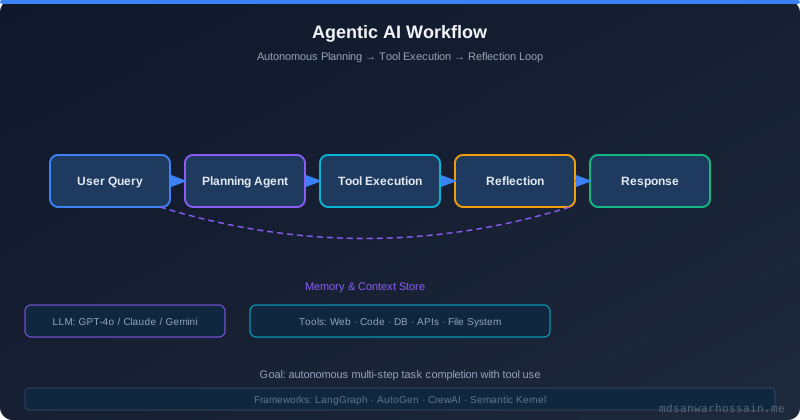
Standard AI coding assistants respond to prompts one at a time. Agentic coding tools take autonomous multi-step actions: they read requirements, explore the codebase, write code across multiple files, run tests, fix failures, and submit pull requests—all without constant human intervention. Tools like Devin and SWE-agent represent this new frontier.
For engineering teams, agentic coding agents are most valuable for well-defined, bounded tasks: migrating a library, adding a new API endpoint following an existing pattern, or upgrading dependencies across a monorepo. The key is narrow scope with clear acceptance criteria. Unleashing an agent on an open-ended problem without checkpoints leads to unpredictable results.
Governance matters more with agentic tools than with inline assistants. Require human approval before agents push code or open pull requests. Define explicit tool permissions—what repositories, APIs, and commands the agent can access. Log all agent actions for auditability. The productivity upside is real, but so is the blast radius if something goes wrong at scale.
Future Trends
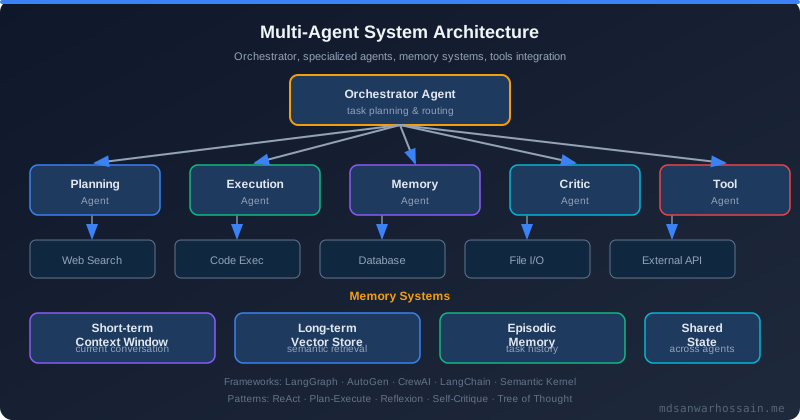
In the coming years, AI coding assistants will become even more deeply integrated into the software development lifecycle. Expect AI agents that manage entire feature backlogs, automatically fix failing tests in CI, and perform continuous refactoring to maintain code health metrics. Multi-agent collaboration—where specialized agents for testing, security, and documentation work together on a shared codebase—will become increasingly common.
Voice-driven coding and natural language architecture specification will blur the boundary between software design and implementation. Developers will spend more time on high-level intent and judgment, while AI handles the mechanical translation into working code.
Conclusion
AI coding assistants are one of the most powerful leverage tools available to modern software engineers. The teams that win with them are not those who use AI the most—they are the ones who use it most responsibly. Define clear policies, invest in review culture, measure quality outcomes, and treat agentic tools with the same governance rigor as any production system. When you combine AI speed with human judgment, you get the best of both worlds: faster delivery and higher-quality software.
As a software engineer with expertise in Angular, React, Java, and modern architecture, I have seen firsthand how AI coding assistants transform developer productivity when used with discipline. The tools will keep getting better. The teams that invest in responsible usage practices today will have a significant competitive advantage tomorrow.
Integrating AI Assistants into Your IDE and Workflow
The productivity gains from AI coding assistants depend heavily on how deeply they are integrated into the daily development workflow. A tool that requires context-switching — copying code into a web browser chat interface, waiting for a response, and pasting it back — captures only a fraction of the potential benefit. The highest-value integrations work inline: suggestions appear as ghost text while you type, refactoring commands run in the current file with a keystroke, and AI-powered search finds relevant code patterns across the entire repository without leaving the editor.
GitHub Copilot integrates into VS Code, JetBrains IDEs, and Neovim with minimal configuration. Beyond inline completions, Copilot Chat lets you ask questions about your open file, selected code block, or the entire workspace. GitHub Copilot Enterprise extends this with repository-level context — the assistant understands your organization's coding patterns, internal libraries, and documentation without any additional setup. For teams already on GitHub, this is the lowest-friction starting point.
Cursor takes a different approach, rebuilding the IDE from the ground up around AI capabilities. Its Composer feature accepts a natural-language description of a change and edits multiple files simultaneously, making it particularly effective for refactoring tasks that span a feature module. Cursor's codebase indexing lets the AI answer questions about code you haven't opened yet, reducing the cognitive overhead of navigating an unfamiliar repository. Teams with polyglot codebases or complex domain models tend to see the largest productivity gains with Cursor.
For teams with strict data residency requirements or who work with proprietary models, Continue.dev provides an open-source AI assistant that connects to any OpenAI-compatible endpoint — including locally hosted models via Ollama or LM Studio. This enables full AI assistance with zero data leaving the corporate network, satisfying the compliance requirements of financial services, healthcare, and government organizations that cannot send source code to external APIs.
// .continue/config.json — local model configuration for privacy-sensitive teams
{
  "models": [
    {
      "title": "Local CodeLlama",
      "provider": "ollama",
      "model": "codellama:34b",
      "apiBase": "http://localhost:11434"
    },
    {
      "title": "Internal GPT-4",
      "provider": "openai",
      "model": "gpt-4o",
      "apiBase": "https://your-org-openai-proxy.internal/v1",
      "apiKey": "${INTERNAL_API_KEY}"
    }
  ],
  "contextProviders": [
    { "name": "codebase" },
    { "name": "docs", "params": { "urls": ["https://internal-wiki.yourorg.com"] } }
  ]
}
Workflow integration beyond the IDE amplifies the value further. Configure your AI assistant to read your project's .github/copilot-instructions.md or equivalent context file, which documents coding conventions, preferred libraries, architectural patterns, and common pitfalls. This persistent context means every engineer on the team — including new hires — starts their AI interactions with the same organizational knowledge, reducing onboarding time and improving output consistency from day one.
Prompt Engineering for Code Generation
Effective prompting is a learnable skill that dramatically improves the quality of AI-generated code. Engineers who treat AI coding assistants as sophisticated autocomplete — providing minimal context and accepting the first output — leave most of the value on the table. Engineers who prompt deliberately — providing rich context, specifying constraints, and iterating on outputs — consistently get production-quality results that require minimal revision.
The most important prompt engineering principle for code generation is context richness. Before asking for an implementation, provide: the existing patterns the new code should follow (paste a representative example), the constraints it must satisfy (error handling style, performance requirements, test coverage expectations), and the interfaces it must conform to (method signatures, data models). The more context you provide, the less the model has to infer — and inferences are where hallucinations and style mismatches occur.
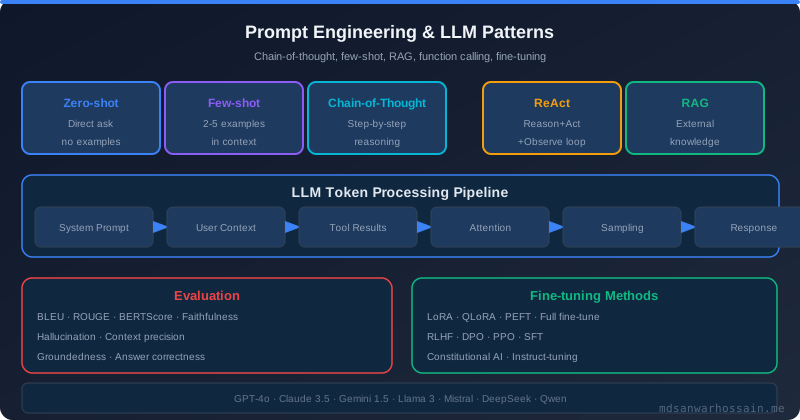
Zero-shot prompts — asking for an implementation without examples — work well for standard patterns (CRUD endpoints, simple algorithms) where the model's training data includes thousands of examples. Few-shot prompts — providing two or three examples of similar code from your codebase before asking for the new implementation — dramatically improve output quality for domain-specific or idiomatic patterns. When asking an AI to generate a Spring Boot service that follows your team's specific error handling and logging conventions, provide two existing services as examples rather than trying to describe the conventions in prose.
// Zero-shot prompt (works for standard patterns)
"Write a Spring Boot REST controller for managing Product resources.
Use @RestController, @RequestMapping('/api/v1/products'), standard HTTP methods.
Return ResponseEntity<?> for all endpoints. Include proper exception handling."

// Few-shot prompt (better for domain-specific patterns)
"Here are two existing controllers in our codebase that follow our conventions:
[paste UserController.java]
[paste OrderController.java]

Following exactly the same patterns — error handling, logging, response wrapping,
and validation approach — write a ProductController with the same CRUD operations."
Chain-of-thought prompting improves results for complex implementation tasks. Instead of asking for a complete implementation in one shot, ask the model to first explain its approach, then generate the code. The explanation step forces the model to reason about the problem before writing code, catching logical errors before they appear in the implementation. For architecturally significant decisions, ask for two alternative approaches with trade-off analysis before requesting the implementation — this surfaces options you might not have considered.
Constraint prompting — explicitly stating what the AI should not do — is underutilized. When you need code that avoids a specific anti-pattern, uses only approved libraries, or must not introduce new dependencies, state these constraints explicitly. "Do not use Lombok annotations," "use only Java standard library — no external dependencies," and "follow our existing error handling pattern exactly — do not introduce a new exception type" are all constraints that save significant review time by preventing the AI from generating valid but convention-violating code.
Quality Metrics: Measuring ROI of AI Assistants
Engineering leaders who adopt AI coding assistants face a common challenge: demonstrating concrete return on investment beyond anecdotal productivity improvements. Rigorous measurement requires selecting the right metrics and establishing baselines before tool adoption. Measuring only output volume — lines of code written, stories completed per sprint — produces misleading signals. Fast code generation that increases technical debt or escaped defects has a negative net ROI even if it appears productive in the short term.
The most informative leading indicator is AI suggestion acceptance rate — the percentage of AI-generated suggestions that developers accept without modification. GitHub Copilot and similar tools report this metric natively. A healthy acceptance rate of 30–40% indicates that the tool is generating relevant suggestions; rates above 60% suggest developers may be accepting code passively without adequate review; rates below 15% suggest the tool's context or configuration needs tuning. Track acceptance rate per developer and per code area to identify where the tool adds most and least value.
Cycle time reduction is the most commonly cited ROI metric and the easiest to demonstrate to business stakeholders. Measure the median time from ticket assignment to PR merge for a representative sample of feature tickets, establishing a pre-adoption baseline over at least three months. After tool adoption, measure the same metric over the same time period. Control for confounding variables — team size changes, sprint scope changes, and infrastructure improvements that would have reduced cycle time independently. A well-implemented AI assistant adoption typically produces a 20–35% cycle time reduction for tasks that involve significant boilerplate or well-established patterns.
Developer satisfaction surveys are an undervalued quality signal. Engineers know when a tool is making them more effective versus creating friction. Conduct quarterly surveys covering: perceived time saved per week, confidence in reviewing AI-generated code, quality of suggestions for their specific work area, and overall recommendation score. Low satisfaction scores are leading indicators of tool abandonment and can identify training or configuration gaps before they become adoption failures.
Governance and Compliance Considerations
AI coding assistants introduce governance dimensions that engineering leaders must address before organization-wide adoption. The most pressing concerns are intellectual property risk, data privacy, license compliance, and regulatory obligations in industries such as financial services, healthcare, and government. Addressing these proactively builds organizational confidence in the tools and prevents costly remediation after the fact.
Intellectual property risk arises from the possibility that AI models generate code that closely resembles training data under a restrictive open-source license. GitHub Copilot includes a "duplication detection" filter that blocks suggestions matching public code verbatim; enabling this filter is strongly recommended for enterprise use. Establish a policy that developers review any AI suggestion longer than 20 lines for potential similarity to known open-source code before merging, particularly for security-sensitive or commercially critical code paths. Tools like TLDR Legal and FOSSA can automate license scanning in CI pipelines.
Data privacy is critical for AI assistants that send code to external APIs. Understand exactly which data leaves your network: does the tool send the entire file, just the cursor context, or the full repository? GitHub Copilot Business and Enterprise include contractual commitments that customer code is not used to train future models — a requirement in regulated industries. For teams with strict data residency requirements, on-premise or private-cloud deployments of models like CodeLlama, StarCoder, or a corporate-hosted GPT-4 instance provide AI assistance without any data leaving controlled infrastructure.
In regulated industries — banking, insurance, healthcare, government — AI-generated code may require additional documentation for audit purposes. Establish a policy for tagging AI-assisted pull requests and retaining the prompts used to generate significant code sections. Some compliance frameworks (SOC 2, ISO 27001) require demonstrating that all code is reviewed by a qualified human before deployment; ensure your AI adoption practices maintain this requirement rather than inadvertently circumventing it with autonomous agents. Document your AI tool usage policy as a formal addendum to your software development lifecycle (SDLC) documentation, reviewed annually.
"AI coding assistants are productivity tools, not compliance shortcuts. The same quality gates that apply to human-written code apply doubly to AI-generated code — because the AI does not share accountability for the outcome."
Leave a Comment
Related Posts

Software Engineer · Java · Spring Boot · Microservices