AI-Driven Software Development: 12 Practical Tricks for Faster, Higher-Quality Delivery
AI can make strong engineers faster, but only when teams pair automation with clear architecture, secure coding standards, and disciplined review habits. The best teams treat AI as a leverage tool, not an autopilot.
TL;DR
"AI-driven software development tricks for modern engineering teams: prompt patterns, review workflows, secure coding checks, and release practices."
In 2026, the difference between average and high-performing engineering teams is not whether they use AI tools; it is how intentionally they use them. Many teams start with excitement, generate a lot of code, and quickly hit a wall of regressions, inconsistent style, and security gaps. Other teams adopt AI with a practical operating model: clear prompt templates, strict test expectations, architecture guardrails, and measurable output quality. This guide shares the patterns that consistently work in production environments.
1) Start with architecture context before code prompts
When an AI assistant does not know your service boundaries, domain language, and non-functional requirements, it generates code that “looks right” but does not fit your system. Include short architecture context in every complex prompt: service ownership, data model constraints, performance targets, and compliance requirements. If your product has PII boundaries, mention them explicitly. If your API must remain backward compatible, say that up front.
A good prompt is not long; it is precise. Instead of writing “build user registration endpoint,” write “build a Spring Boot endpoint in the identity service, persist idempotently with unique email constraint, return RFC 7807 errors, and keep P95 below 150ms under 200 RPS.” With that framing, AI output is immediately closer to production quality.
2) Use AI to create test cases before implementation
For risky workflows, generate test scenarios first. Ask AI for happy path, edge cases, failure handling, and concurrency cases. Then implement. This reverses the common failure mode where teams generate large code blocks first and discover missing behaviors later. Testing-first prompts also force better requirement clarity and reduce debate during review because expected behavior is already written down.
Ask for test names that encode intent. For example: shouldRejectExpiredTokenWhenClockSkewExceedsThreshold is much better than testToken. Intent-rich tests become living documentation and make onboarding easier for new engineers.
3) Keep a reusable prompt playbook for recurring tasks
Most engineering work repeats: build CRUD endpoints, write migrations, add observability, improve performance hotspots, and refactor legacy modules. Create reusable prompt templates for these workflows. Your template should include coding standards, error response structure, logging conventions, and required tests. Teams that standardize prompts see less variance in generated code quality and spend less time in cleanup.
A prompt playbook also reduces individual hero dependency. Any team member can start with the same baseline quality bar, making delivery more predictable.
4) Ask AI for two alternatives and compare trade-offs
Do not accept the first output for architectural work. Ask for at least two valid alternatives and a trade-off table that compares latency, complexity, operational burden, and failure blast radius. This simple pattern improves design decisions dramatically. For example, if one approach uses synchronous fan-out and another uses event-driven choreography, evaluate tail latency, retry semantics, and debugging complexity before coding.
Teams that force alternative generation avoid local optimum decisions and learn faster because they see multiple patterns side by side.
5) Enforce human approval on security-sensitive code
AI can accelerate secure coding, but it can also introduce subtle vulnerabilities: weak input validation, insecure deserialization, broad IAM permissions, or accidental secret handling. Define a policy: any authentication, authorization, payment, cryptography, or infrastructure-as-code change needs senior human review. Ask AI to propose a threat model checklist, then verify each item manually.
Use a secure coding checklist in pull requests: input validation, output encoding, least privilege, dependency risk, secret handling, and audit logging. AI can draft the checklist, but engineers must own the decision.
6) Use AI for refactoring legacy code in small slices
Large legacy rewrites fail because risk is hidden and scope explodes. Instead, use AI for micro-refactors: extract a method, isolate side effects, rename ambiguous classes, add contract tests, and move from implicit to explicit dependencies. Each small change becomes reviewable and reversible.
A practical sequence is: generate characterization tests, refactor one bounded area, run tests, and then repeat. AI is highly effective when you keep feedback loops tight and scope narrow.
7) Improve code review quality with AI-assisted reviewer prompts
Review quality is often inconsistent because reviewers focus on style while missing architecture and reliability concerns. Use AI to generate review prompts for each PR category. For API changes: check backward compatibility, error semantics, and pagination behavior. For data changes: check migration safety, lock contention risk, and rollback strategy. For concurrency changes: check idempotency, retries, and race conditions.
This turns review from subjective opinion to structured engineering validation.
8) Connect AI-generated code to observability from day one
A common anti-pattern is generating business logic first and adding telemetry later. Instead, ask AI to include logs, metrics, and traces in the first implementation. Good default telemetry includes request IDs, operation names, duration metrics, dependency call counters, and structured error fields. If your on-call team cannot diagnose failures quickly, speed of initial coding does not matter.
9) Use AI to draft operational runbooks and incident playbooks
When incidents happen, teams lose time because response steps are unclear. AI can transform design docs and dashboards into concise runbooks: symptom patterns, likely root causes, immediate mitigations, escalation paths, and post-incident checks. Keep runbooks versioned with your services and validate them through game days.
Operational documentation is often neglected because it feels non-urgent. AI reduces that documentation tax and improves recovery speed during real incidents.
10) Build release confidence with AI-generated change summaries
Before deployment, ask AI to summarize what changed, which components are affected, and what could fail. Add this summary to your release note template. Include rollback steps and monitoring focus points for the first 30 minutes after release. This practice helps both engineering and support teams anticipate issues and respond quickly.
11) Track quality metrics, not just output volume
Some teams measure AI success by lines of code generated. That is misleading. Track signal metrics instead: defect escape rate, review rework ratio, lead time to production, and incident frequency after releases. If generated code volume increases but defect rates worsen, your process is not improving. Use metrics to tune prompt standards and review gates.
12) Treat AI skills as a team capability, not individual magic
Long-term success comes from shared capability: internal workshops, prompt libraries, architecture examples, and postmortems on AI-related defects. Encourage engineers to share what works and what fails. The goal is not to create a few “AI experts,” but to raise baseline engineering quality across the organization.
Used well, AI shortens the distance between idea and reliable software. Used poorly, it simply moves bugs faster. The practical path is clear: define standards, codify workflows, keep human accountability on critical decisions, and continuously measure outcomes. If your team follows these habits, AI becomes a force multiplier for quality, speed, and engineering confidence.
Table of Contents
AI-Assisted Development Workflow
The following table maps each development phase to the most effective AI application and the human gate that should remain:
Conclusion
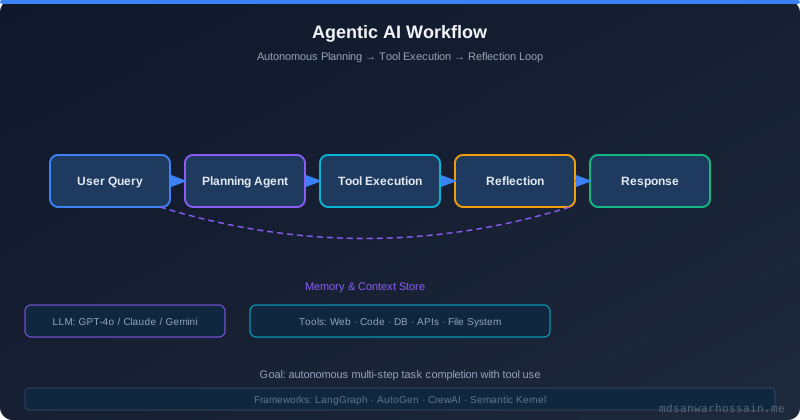
AI-driven development is most effective when treated as a systems problem, not a tool problem. The 12 tricks above are not independent tips — they form a workflow: start with context, generate tests before code, validate with alternatives, enforce human review gates on sensitive paths, instrument everything, and measure outcomes with signal metrics instead of output volume.
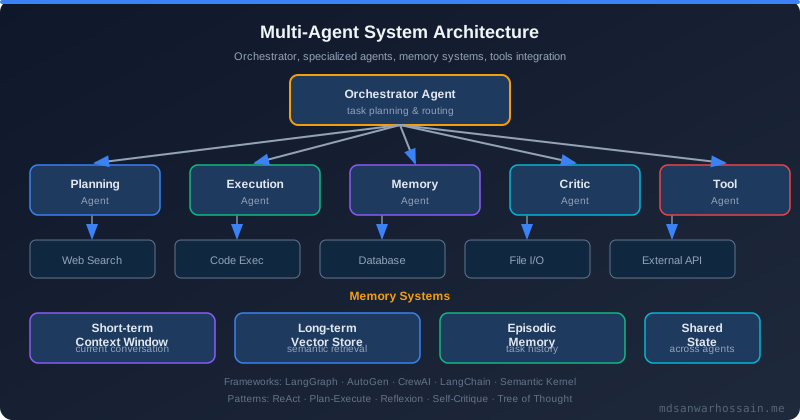
Teams that operationalise these habits consistently ship faster with fewer regressions. The teams that struggle treat AI as a shortcut that removes the need for engineering discipline. Build a shared prompt playbook, run workshops, and make AI quality a team-level metric. That is the path from AI experimentation to AI as a genuine engineering multiplier.
Advanced Prompt Patterns for Senior Engineers
Senior engineers interact with AI assistants differently than junior developers. While a junior developer might ask "write a function that does X," a senior engineer provides deep context, explicit constraints, and architectural intent — and knows when to reject the output and prompt again. Mastering advanced prompt patterns transforms AI from a boilerplate generator into a genuine thought partner for complex engineering decisions.
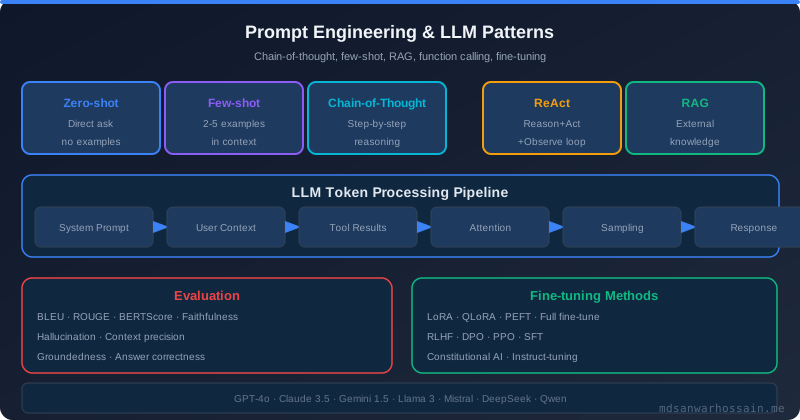
Chain-of-thought prompting is the single highest-value technique for complex problems. Instead of asking for a solution directly, ask the AI to first reason through the problem space: list constraints, identify trade-offs between approaches, and flag potential edge cases before producing any code. This forces the model to surface its assumptions, making them visible and correctable before they become bugs. Add the phrase "reason step by step before producing any code" to prompts for any task involving concurrency, distributed systems, or security-sensitive logic.
Role-based prompting assigns the AI a specific expert persona before making a request. "Act as a Java concurrency expert reviewing this code for race conditions" produces fundamentally different output than "review this code." The persona activates relevant training patterns and constrains the response to the domain where precision matters most. Useful expert roles for backend engineers include: senior security reviewer, performance optimization specialist, API design reviewer, database query optimizer, and distributed systems architect. Combine role-based prompting with chain-of-thought for the strongest results on difficult problems.
Constraint prompting explicitly states what the solution must not do. This is especially powerful for code generation where the AI might reach for an obvious solution that violates a project-specific rule. Examples: "solve this without introducing any new dependencies," "follow our existing error handling pattern exactly — do not introduce a Result type," "do not use reflection," or "implement this using only Java standard library collections." Constraints reduce the review burden by eliminating an entire class of conventional-but-wrong outputs before generation.
// Example: advanced prompt combining role, chain-of-thought, and constraints
/*
 * ROLE: You are a distributed systems architect specializing in event-driven
 * microservices with 10+ years of experience with Kafka and Spring Boot.
 *
 * TASK: Design the consumer group configuration for the following scenario:
 * [describe scenario]
 *
 * CONSTRAINTS:
 * - Do not use Kafka Streams — use plain @KafkaListener
 * - Do not introduce new Spring dependencies beyond spring-kafka
 * - The solution must handle consumer rebalancing without message loss
 * - Must work with Kafka 3.6+
 *
 * PROCESS: Before writing any code, list:
 * 1. The key trade-offs in consumer group design for this scenario
 * 2. The failure modes we need to guard against
 * 3. Your recommended approach and why
 * Then provide the implementation.
 */
Iterative refinement is the most underused prompt pattern. Engineers who accept the first AI output and move on miss the compounding quality gains from a second or third iteration. After receiving an initial implementation, prompt with: "What are the three weakest aspects of this implementation? Improve them." Or: "A security auditor is reviewing this code. What concerns would they raise?" These follow-up prompts surface problems that the initial generation glossed over and produce notably higher-quality final outputs.
Building a Team Prompt Library
Individual engineers discovering effective prompts in isolation is inefficient. When one developer finds a prompt pattern that reliably produces high-quality REST controllers following team conventions, every developer on the team should benefit from that discovery. A shared prompt library captures this institutional knowledge, standardizes AI interactions across the team, and dramatically reduces the learning curve for new team members adopting AI tools.
Structure the prompt library as a versioned repository — a dedicated Git repo or a well-organized section of your engineering wiki. Organize prompts by category: code generation (CRUD endpoints, domain entities, DTOs, repository interfaces), testing (unit tests, integration tests, contract tests, performance tests), code review (security review, performance review, architecture review), documentation (API documentation, ADR drafting, runbook generation), and refactoring (extract method, remove duplication, improve naming). Each prompt entry should include the prompt template itself, an example output, and notes on when to use it and what to watch out for.
Prompt templates should use variable placeholders that engineers fill in for their specific context. A template for generating a Spring Boot service layer might look like: "Following the pattern in [EXAMPLE_SERVICE], create a service class for [ENTITY_NAME] that handles [OPERATIONS]. Apply [ERROR_HANDLING_PATTERN]. Do not introduce new dependencies." Templates reduce the cognitive overhead of prompt writing and ensure the team consistently provides the context variables that most improve output quality.
Maintain the prompt library with the same rigor as production code. Run prompt reviews when team conventions change — if you adopt a new error handling pattern, update the generation prompts that reference the old one. Track which prompts are used most frequently and prioritize improving them. Deprecate prompts that consistently produce poor results and document why. Consider adding a lightweight contribution process: engineers submit new prompts via pull request, a designated "prompt librarian" reviews and merges them, and the team discusses notable additions in a monthly engineering meeting.
AI for Architecture and Design Reviews
Most engineers use AI assistants at the implementation level — generating functions, writing tests, explaining code. Far fewer leverage AI at the design level — reviewing architecture decisions, identifying structural anti-patterns, and stress-testing proposed designs before a line of code is written. This is a high-leverage application because catching a bad architectural decision during design costs orders of magnitude less than refactoring it after implementation.
AI assistants are effective architecture reviewers when given sufficient context. Before your next architecture review meeting, draft a description of the proposed system design: the components, their responsibilities, the communication patterns between them, the data flows, and the key trade-offs you made. Then prompt: "Act as a distributed systems architect. Review this design for scalability bottlenecks, single points of failure, operational complexity, and adherence to the stated non-functional requirements. Be direct about weaknesses." The output often surfaces concerns that async technical discussions miss — not because the AI has superhuman architectural knowledge, but because the exercise of describing the design clearly and getting structured feedback is itself valuable.
Anti-pattern detection is another high-value AI application at the design level. Describe a code module or service interaction and ask the AI to identify which well-known anti-patterns it exhibits: distributed monolith, chatty service communication, anemic domain model, god service, or shared mutable state. Knowing that a design exhibits a specific named anti-pattern triggers targeted research and discussion rather than vague unease. Anti-pattern awareness also improves the quality of design feedback in code reviews — engineers who can name the problem communicate more precisely than those who can only describe a vague bad feeling.
Architecture decision records (ADRs) are an important practice that AI can accelerate. After making a significant architectural decision, prompt: "Given this context [describe the situation] and the decision we made [describe it], draft an ADR in standard format covering: status, context, decision, consequences (positive and negative), and alternatives considered." The AI produces a complete draft in seconds that you refine and commit to the repository. Teams that use AI to lower the friction of ADR writing end up with more complete decision documentation than teams who write ADRs entirely from scratch.
Avoiding Common AI-Assisted Development Pitfalls
Over-reliance on AI-generated code is the most pervasive pitfall. Engineers who accept AI suggestions without thoroughly understanding them accumulate a subtle but dangerous technical liability: code that works but that no one on the team fully understands. When this code breaks in production at 2am, the incident response is slower and more stressful because the engineer on call cannot reason through the code confidently. The discipline of understanding before accepting is the single most important habit for sustainable AI-assisted development.
Blind acceptance — pressing Tab on every suggestion without reading it — degrades code quality over time in ways that are difficult to measure in the short term. AI assistants sometimes generate correct-looking code that subtly misunderstands the domain model: using the wrong transaction boundary, applying an optimization that works for small datasets but degrades at scale, or violating an implicit invariant that the existing codebase relies on. These bugs often escape both automated testing and code review, surfacing only as production incidents weeks or months later. Establishing a team norm of "understand every line before merging, regardless of source" prevents this category of defect.
Context collapse occurs when engineers provide insufficient context to the AI and receive generic output that doesn't fit the specific codebase. The most common form is asking for an implementation without providing examples of existing similar implementations. The AI generates valid Java, but it uses a different logging pattern, a different exception hierarchy, a different DTO naming convention, or a different approach to transaction management than the rest of the codebase. This inconsistency creates review friction, increases onboarding complexity, and gradually erodes the coherence of the codebase. The fix is discipline about context provision: always show the AI what similar existing code looks like before asking it to generate new code.
Prompt addiction — engineers who cannot write code without AI assistance — is an emerging concern for team capability development. While AI assistance is genuinely productive for experienced engineers who can evaluate the output critically, it can impede skill development in junior engineers who have not yet built the mental models needed to recognize when AI output is subtly wrong. Balance AI usage with deliberate practice: set aside time for coding exercises and code reading without AI assistance, particularly for less-experienced team members. The goal is engineers who are more capable with AI, not engineers who are dependent on it.
"The highest-leverage AI skill is not prompt writing — it is knowing when to reject the output, ask a better question, and iterate until you have something worth shipping."
Leave a Comment

Software Engineer · Java · Spring Boot · Microservices