Angular 18 Signals & Standalone Components: The Complete Production Guide
Angular Signals are the most significant change to Angular's reactivity model since its inception — replacing Zone.js-based dirty checking with a fine-grained, synchronous reactive primitive. Combined with Standalone Components that eliminate NgModule boilerplate, Angular 18 makes it possible to build smaller, faster, and more maintainable applications than ever before.
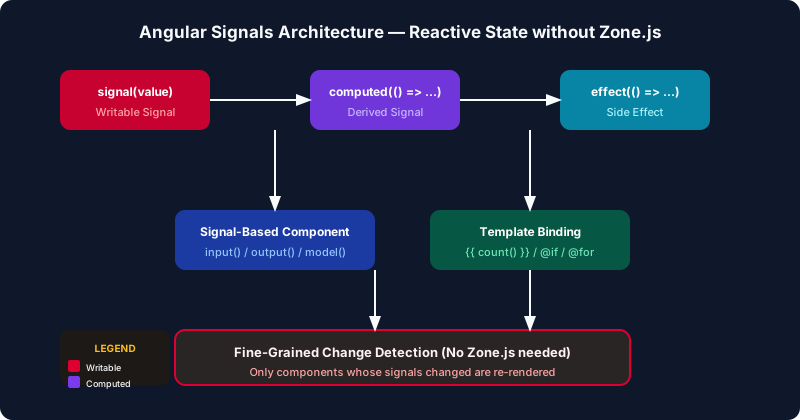
Table of Contents
- The Problem with Zone.js Change Detection
- Angular Signals Deep Dive: signal(), computed(), effect()
- Standalone Components Revolution
- Signal-Based Inputs, Outputs, and Two-Way Binding
- Advanced Signal Patterns: toSignal, toObservable, and rxResource
- Migrating from NgModules to Standalone
- Testing Signal-Based Components
- Production Performance Impact
The Problem with Zone.js Change Detection
Angular has historically used Zone.js to detect changes — a library that monkey-patches every async API (setTimeout, Promise, XHR, addEventListener) in the browser to notify Angular whenever something might have changed. Angular then runs change detection from the root of the component tree downward, checking every component even if only one deep in the tree actually changed.
This approach works but has fundamental limitations. First, Zone.js adds ~100KB to your bundle and adds overhead to every async operation. Second, change detection runs globally even for isolated changes, causing unnecessary checks on hundreds of components. Third, Zone.js makes debugging harder — errors that originate inside Zone.js wrapped code show confusing stack traces. Fourth, some Web APIs (like ResizeObserver in some browsers) cannot be patched by Zone.js, requiring NgZone.run() workarounds.
The real-world impact becomes visible at scale. A dashboard with 200 components, each displaying live data updates from WebSockets, causes Angular to run change detection across all 200 components every time any single value changes. Even with ChangeDetectionStrategy.OnPush, you must carefully manage all inputs as immutable references. One mutable object mutation and your component never updates.
Angular Signals solve this by replacing implicit Zone.js-based detection with an explicit reactive graph. When you read a signal inside a template or computed function, Angular registers a dependency. When the signal's value changes, only the consumers that actually read that signal are re-evaluated — no traversal of the component tree, no Zone.js patching required.
Angular Signals Deep Dive: signal(), computed(), effect()
Angular Signals are introduced via three primitives. A signal is a reactive value holder that tracks its consumers and notifies them synchronously when its value changes. A computed signal derives its value from other signals and re-evaluates lazily only when read after a dependency changed. An effect runs a side effect whenever its signal dependencies change.
import { Component, signal, computed, effect } from '@angular/core';

@Component({
  selector: 'app-counter',
  standalone: true,
  template: `
    <p>Count: {{ count() }}</p>
    <p>Double: {{ double() }}</p>
    <p>Status: {{ status() }}</p>
    <button (click)="increment()">Increment</button>
    <button (click)="reset()">Reset</button>
  `
})
export class CounterComponent {
  count = signal(0);
  double = computed(() => this.count() * 2);
  status = computed(() => this.count() >= 10 ? 'High' : 'Low');

  constructor() {
    effect(() => {
      console.log(`Count changed to: ${this.count()}`);
      // Auto-runs whenever count changes
    });
  }

  increment() { this.count.update(c => c + 1); }
  reset() { this.count.set(0); }
}
Notice that signals are called as functions — count() reads the current value and registers the calling context as a consumer. This is the mechanism Angular uses to build the reactive dependency graph: when double is evaluated, it calls this.count(), registering double as a consumer of count. When count changes, Angular knows to invalidate double.
The three mutation methods on writable signals have distinct semantics. set(value) replaces the value entirely. update(fn) computes the new value from the current value — critical for arrays and objects where you want to derive the new state from the old. mutate(fn) was removed in Angular 17; instead, use update to produce a new reference.
// Signal with objects — always produce new references
const users = signal<User[]>([]);

// ❌ Mutating in-place (signal won't notify consumers)
users().push(newUser);

// ✅ Produce new array reference
users.update(list => [...list, newUser]);

// For complex updates, use structural patterns:
const selectedUser = signal<User | null>(null);
users.update(list =>
  list.map(u => u.id === updated.id ? updated : u)
);
Computed signals are lazy and memoized. They only re-execute when read after a dependency changed. If nothing reads double() in the template after count changes, the computation never runs. This is a fundamental performance advantage over RxJS combineLatest which eagerly re-evaluates on every source emission.
Effects run at least once on creation to establish dependencies, then re-run whenever any read signal changes. They are the correct place for synchronizing state to external systems: updating local storage, calling analytics APIs, or synchronizing with non-Angular libraries. Crucially, you must not set signals inside effects unconditionally — this can create infinite loops. Use untracked() to read signals inside effects without creating dependencies:
effect(() => {
  const current = this.count();        // tracked dependency
  const user = untracked(() => this.currentUser()); // not tracked
  analytics.track('counter_changed', { count: current, userId: user.id });
});
Standalone Components Revolution
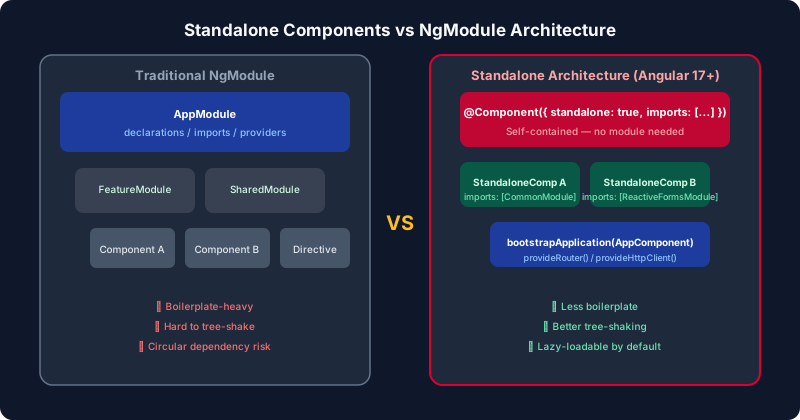
NgModules have been the bedrock of Angular applications since 2016. Every component, directive, and pipe had to be declared in exactly one module. To use a component in another module, you had to export it from its declaring module and import that module. This creates a complex, error-prone declaration graph that grows quadratically with application size.
Standalone components, stable since Angular 15 and the default since Angular 17, eliminate this entirely. A standalone component declares its own dependencies directly in its @Component decorator:
import { Component, signal } from '@angular/core';
import { CommonModule } from '@angular/common';
import { ReactiveFormsModule } from '@angular/forms';
import { RouterLink } from '@angular/router';
import { UserCardComponent } from './user-card.component';
import { MatButtonModule } from '@angular/material/button';

@Component({
  selector: 'app-user-list',
  standalone: true,
  imports: [
    CommonModule,
    ReactiveFormsModule,
    RouterLink,
    UserCardComponent,     // other standalone component
    MatButtonModule
  ],
  templateUrl: './user-list.component.html',
  styleUrls: ['./user-list.component.scss']
})
export class UserListComponent {
  users = signal<User[]>([]);
}
The imports array replaces the NgModule declaration model. You import exactly what you need directly. This enables tree-shaking at the component level — Angular's compiler can statically determine which components, directives, and pipes each component actually uses and eliminate everything else from the bundle.
Bootstrapping changes from platformBrowserDynamic().bootstrapModule(AppModule) to bootstrapApplication(AppComponent, config). The configuration object replaces module-level providers:
// main.ts
import { bootstrapApplication } from '@angular/platform-browser';
import { provideRouter, withPreloading, PreloadAllModules } from '@angular/router';
import { provideHttpClient, withInterceptors } from '@angular/common/http';
import { provideAnimations } from '@angular/platform-browser/animations';
import { AppComponent } from './app/app.component';
import { routes } from './app/app.routes';
import { authInterceptor } from './app/auth.interceptor';

bootstrapApplication(AppComponent, {
  providers: [
    provideRouter(routes, withPreloading(PreloadAllModules)),
    provideHttpClient(withInterceptors([authInterceptor])),
    provideAnimations(),
  ]
});
Notice how each provider function (provideRouter, provideHttpClient) accepts feature flags that enable optional capabilities. This allows tree-shaking of features you don't use — if you don't call withPreloading, the preloading code is not included in your bundle.
Signal-Based Inputs, Outputs, and Two-Way Binding
Angular 17.1+ introduces signal-based component APIs: input(), output(), and model(). These replace the traditional @Input(), @Output(), and two-way binding decorators while integrating natively with the signal reactive graph.
import { Component, input, output, model, computed } from '@angular/core';

@Component({
  selector: 'app-product-card',
  standalone: true,
  template: `
    <div [class.selected]="isSelected()">
      <h3>{{ product().name }}</h3>
      <p>{{ formattedPrice() }}</p>
      <button (click)="onSelect()">Select</button>
      <input type="number" [ngModel]="quantity()"
             (ngModelChange)="quantity.set($event)">
    </div>
  `
})
export class ProductCardComponent {
  // Signal-based inputs — read as signals in template and code
  product = input.required<Product>();
  isSelected = input(false);              // with default

  // Signal-based output
  selected = output<Product>();

  // Two-way binding signal (replaces @Input + @Output pattern)
  quantity = model(1);

  // Derived computed from input signal
  formattedPrice = computed(() =>
    `$${this.product().price.toFixed(2)}`
  );

  onSelect() {
    this.selected.emit(this.product());
  }
}
The critical difference from @Input() is that input() returns a Signal<T>. This means you can use it inside computed() and effect() to reactively derive state from parent-provided values without any manual subscription management. When the parent updates the product input, all computed values that depend on product() automatically re-evaluate.
model() creates a signal that supports two-way data binding from the parent. When the child calls quantity.set(2), it both updates the local signal and emits a quantityChange event (by convention) allowing the parent to bind with [(quantity)]="cartItem.qty". This replaces the common pattern of pairing an @Input() with an @Output() valueChange = new EventEmitter().
Advanced Signal Patterns: toSignal, toObservable, and rxResource
Most Angular applications use RxJS extensively for HTTP calls, routing, and event streams. Angular provides bridge utilities to integrate signals with the RxJS world without forcing a full rewrite.
import { toSignal, toObservable } from '@angular/core/rxjs-interop';
import { rxResource } from '@angular/core/rxjs-interop';
import { inject } from '@angular/core';
import { HttpClient } from '@angular/common/http';

@Component({ standalone: true, /* ... */ })
export class ProductListComponent {
  private http = inject(HttpClient);

  // Convert Observable to Signal — manages subscription lifecycle automatically
  private route = inject(ActivatedRoute);
  categoryId = toSignal(
    this.route.paramMap.pipe(map(p => p.get('categoryId'))),
    { initialValue: null }
  );

  // rxResource — Angular 19 experimental: resource driven by signal
  productsResource = rxResource({
    request: () => ({ category: this.categoryId() }),
    loader: ({ request }) =>
      this.http.get<Product[]>(`/api/products?category=${request.category}`)
  });

  // Use in template:
  // @if (productsResource.isLoading()) { <spinner/> }
  // @for (p of productsResource.value(); track p.id) { ... }
  // @if (productsResource.error()) { <error-msg/> }
}
toSignal subscribes to an Observable and exposes its latest value as a signal. The subscription is automatically cleaned up when the injection context (component) is destroyed. The initialValue option provides the value before the Observable emits — important for avoiding the Signal<T | undefined> type when you know an initial value makes sense.
rxResource (experimental in Angular 19) goes further: it creates a resource backed by an Observable that automatically re-executes when the request signal changes. When categoryId() changes, rxResource cancels any in-flight request and starts a new one — all without manual subscription management or switchMap chains.
Migrating from NgModules to Standalone
Angular provides an automated migration schematics to convert NgModule-based applications to standalone. Run the migration command and review each change — it handles most cases automatically but requires manual review for complex module hierarchies:
# Run the standalone migration schematic
ng generate @angular/core:standalone

# Select migration type when prompted:
# 1. Convert all components, directives and pipes to standalone
# 2. Remove unnecessary NgModules
# 3. Bootstrap the application using standalone APIs

# Run each step in sequence, then run tests:
ng test --watch=false
Common migration challenges: components that are declared in multiple modules (not valid — fix before migrating), lazy loaded modules that need to become lazy loaded routes with loadComponent, and test files using TestBed.configureTestingModule with module-based setup that needs updating to import standalone components directly.
For teams with large codebases, migrate incrementally. NgModules and standalone components can coexist — a standalone component can be imported by an NgModule using its imports array, and an NgModule can be imported by a standalone component. You do not need a big-bang migration.
Testing Signal-Based Components
Signal-based components simplify testing because their state is explicit and synchronous. No need to trigger change detection manually with fixture.detectChanges() after every change — signals propagate synchronously:
import { TestBed, ComponentFixture } from '@angular/core/testing';
import { CounterComponent } from './counter.component';

describe('CounterComponent', () => {
  let component: CounterComponent;
  let fixture: ComponentFixture<CounterComponent>;

  beforeEach(async () => {
    await TestBed.configureTestingModule({
      imports: [CounterComponent]  // import standalone component directly
    }).compileComponents();
    fixture = TestBed.createComponent(CounterComponent);
    component = fixture.componentInstance;
    fixture.detectChanges();
  });

  it('increments count and updates computed', () => {
    expect(component.count()).toBe(0);
    expect(component.double()).toBe(0);

    component.increment();
    expect(component.count()).toBe(1);
    expect(component.double()).toBe(2);
    expect(component.status()).toBe('Low');
  });

  it('marks status as High when count reaches 10', () => {
    for (let i = 0; i < 10; i++) component.increment();
    expect(component.status()).toBe('High');
    fixture.detectChanges();
    const el = fixture.nativeElement.querySelector('p:nth-child(3)');
    expect(el.textContent).toContain('High');
  });
});
Notice that you test the signal values directly with component.count() before even needing to inspect the DOM. This makes unit testing dramatically faster and more readable. For async scenarios using toSignal, use TestBed.flushEffects() (Angular 19+) to flush pending effects and fakeAsync/tick for async operations.
Production Performance Impact
Real-world Angular applications that have migrated to signals report significant improvements. A typical data-dense dashboard application with 150+ components can see change detection cycles drop from 45ms to under 8ms per user interaction when using signal-based change detection with ChangeDetectionStrategy.OnPush. This is because only the 3–5 components that actually consumed the changed signal re-evaluate, instead of all 150.
Bundle size improvements from standalone components are less dramatic than performance wins but still meaningful. Removing NgModule declarations eliminates the module registration overhead and allows the compiler to tree-shake unused imported declarations. A typical enterprise application sees 15–25% bundle size reduction when fully migrating from NgModule to standalone — the biggest wins come from feature modules that previously imported SharedModule wholesale but only used a fraction of its exports.
The zoneless experimental mode (Angular 18+) takes signals to their logical conclusion by removing Zone.js entirely. With zoneless, change detection only triggers when a signal changes, dramatically reducing the number of change detection cycles for event-heavy applications. Enable it experimentally with provideExperimentalZonelessChangeDetection() in your bootstrap configuration, but be prepared to audit any code that relies on implicit Zone.js wrapping of callbacks.
Key Takeaways
- Signals replace Zone.js-based detection: Use
signal(),computed(), andeffect()as the primary reactive primitives for component state. Read signals as functions:count(). - Always produce new references: Use
signal.update(arr => [...arr, item])for arrays and objects. Mutating in-place silently breaks reactivity. - Standalone components are the Angular default: Use
standalone: trueand declare imports directly in@Component. UsebootstrapApplication()withprovideRouter()andprovideHttpClient(). - Signal inputs enable reactive derived state: Replace
@Input()withinput()to use parent-provided values insidecomputed()without manual wiring. - Bridge RxJS with
toSignal(): Convert Observables to signals at the component boundary. Let signals drive templates; keep RxJS for business logic pipelines. - Migrate incrementally: NgModules and standalone components coexist. Use
ng generate @angular/core:standalonefor automated migration assistance.
Leave a Comment
Related Posts

Software Engineer · Angular · Spring Boot · Full-Stack