Angular + Spring Boot Full-Stack: JWT Auth & REST API Integration
Building a full-stack application with Angular 18 and Spring Boot is one of the most powerful combinations in modern web development — Angular's reactive component model pairs perfectly with Spring Boot's opinionated, production-ready REST API framework. The authentication layer is usually the first integration challenge, and JWT (JSON Web Token) authentication is the industry standard for stateless, scalable auth in single-page applications.
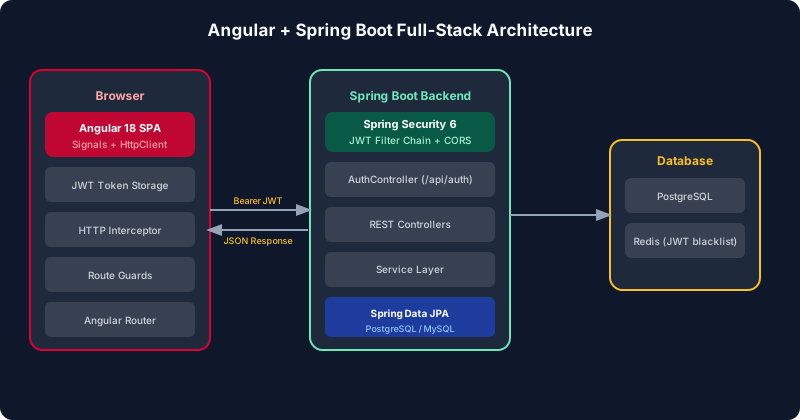
Table of Contents
Spring Boot REST API Architecture
The full-stack architecture separates concerns clearly: Spring Boot owns the REST API layer, database access via JPA, and security enforcement. Angular owns the presentation layer, client-side routing, and state management. They communicate exclusively via HTTP with JSON payloads — no server-side rendering, no shared session state.
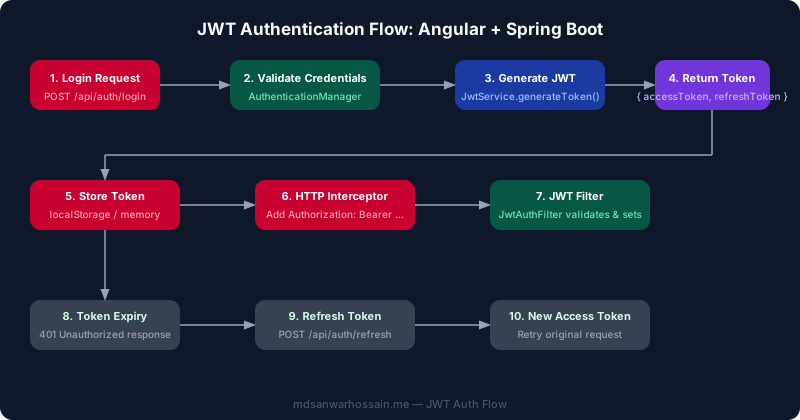
Define your authentication endpoints in a dedicated AuthController. The login endpoint accepts credentials and returns a JWT access token plus a refresh token. The refresh endpoint validates the refresh token and issues a new access token without requiring the user to re-enter credentials.
// AuthController.java
@RestController
@RequestMapping("/api/auth")
public class AuthController {

    private final AuthService authService;

    public AuthController(AuthService authService) {
        this.authService = authService;
    }

    @PostMapping("/login")
    public ResponseEntity<AuthResponse> login(@Valid @RequestBody LoginRequest req) {
        AuthResponse response = authService.authenticate(req);
        return ResponseEntity.ok(response);
    }

    @PostMapping("/refresh")
    public ResponseEntity<AuthResponse> refresh(@RequestBody RefreshRequest req) {
        AuthResponse response = authService.refreshToken(req.getRefreshToken());
        return ResponseEntity.ok(response);
    }

    @PostMapping("/logout")
    public ResponseEntity<Void> logout(@RequestBody RefreshRequest req) {
        authService.revokeRefreshToken(req.getRefreshToken());
        return ResponseEntity.noContent().build();
    }
}

// AuthResponse.java (record for immutability)
public record AuthResponse(
    String accessToken,
    String refreshToken,
    long expiresIn,
    String tokenType
) {}
The AuthService uses Spring Security's AuthenticationManager to validate credentials and JwtService to generate tokens. Keep the access token short-lived (15 minutes) and the refresh token long-lived (7 days) stored in a database for revocation support.
// AuthService.java
@Service
public class AuthService {

    private final AuthenticationManager authManager;
    private final JwtService jwtService;
    private final RefreshTokenRepository refreshRepo;
    private final UserRepository userRepo;

    public AuthResponse authenticate(LoginRequest req) {
        authManager.authenticate(
            new UsernamePasswordAuthenticationToken(req.email(), req.password())
        );
        UserDetails user = userRepo.findByEmail(req.email())
            .orElseThrow(() -> new UsernameNotFoundException("User not found"));

        String accessToken = jwtService.generateAccessToken(user);
        String refreshToken = jwtService.generateRefreshToken();
        refreshRepo.save(new RefreshToken(refreshToken, user, Instant.now().plusSeconds(604800)));

        return new AuthResponse(accessToken, refreshToken, 900, "Bearer");
    }
}
Spring Security JWT Configuration
Spring Security 6 uses a functional security configuration style with SecurityFilterChain beans. The JWT filter intercepts every request, extracts the token from the Authorization header, validates it, and populates the security context. Public endpoints (login, refresh, actuator health) are explicitly permitted; all other endpoints require authentication.
// SecurityConfig.java
@Configuration
@EnableWebSecurity
@EnableMethodSecurity
public class SecurityConfig {

    private final JwtAuthFilter jwtAuthFilter;

    @Bean
    public SecurityFilterChain filterChain(HttpSecurity http) throws Exception {
        return http
            .csrf(AbstractHttpConfigurer::disable)
            .sessionManagement(s -> s.sessionCreationPolicy(STATELESS))
            .authorizeHttpRequests(auth -> auth
                .requestMatchers("/api/auth/**", "/actuator/health").permitAll()
                .requestMatchers(HttpMethod.GET, "/api/products/**").permitAll()
                .anyRequest().authenticated()
            )
            .addFilterBefore(jwtAuthFilter, UsernamePasswordAuthenticationFilter.class)
            .build();
    }

    @Bean
    public PasswordEncoder passwordEncoder() {
        return new BCryptPasswordEncoder(12);
    }

    @Bean
    public AuthenticationManager authManager(AuthenticationConfiguration config)
            throws Exception {
        return config.getAuthenticationManager();
    }
}

// JwtAuthFilter.java
@Component
public class JwtAuthFilter extends OncePerRequestFilter {

    private final JwtService jwtService;
    private final UserDetailsService userDetailsService;

    @Override
    protected void doFilterInternal(HttpServletRequest req, HttpServletResponse res,
                                    FilterChain chain) throws IOException, ServletException {
        String authHeader = req.getHeader("Authorization");
        if (authHeader == null || !authHeader.startsWith("Bearer ")) {
            chain.doFilter(req, res);
            return;
        }
        String token = authHeader.substring(7);
        String username = jwtService.extractUsername(token);
        if (username != null && SecurityContextHolder.getContext().getAuthentication() == null) {
            UserDetails user = userDetailsService.loadUserByUsername(username);
            if (jwtService.isTokenValid(token, user)) {
                var authToken = new UsernamePasswordAuthenticationToken(
                    user, null, user.getAuthorities()
                );
                authToken.setDetails(new WebAuthenticationDetailsSource().buildDetails(req));
                SecurityContextHolder.getContext().setAuthentication(authToken);
            }
        }
        chain.doFilter(req, res);
    }
}
CSRF protection is disabled because JWT authentication is stateless — there is no session cookie that an attacker could exploit with a CSRF attack. The STATELESS session policy instructs Spring Security never to create or use an HTTP session, so every request must carry its own JWT. Placing JwtAuthFilter before UsernamePasswordAuthenticationFilter ensures token validation happens first; if the token is invalid or absent, the security context remains empty and any @PreAuthorize-protected endpoint will return 403 without reaching your controller code.
For production hardening, add a dedicated JwtAuthenticationEntryPoint that returns a structured JSON 401 response instead of Spring's default HTML error page. Also consider adding brute-force protection at the login endpoint using a rate limiter such as Bucket4j — Spring Security's filter chain is the right place to intercept repeated failed attempts before they reach the service layer.
Angular HttpClient and Environment Setup
Angular's environment files separate configuration per build target. Keep the Spring Boot base URL in the environment and use it throughout the application via injection rather than hardcoding. With Angular 15+, environments are optional but remain the cleanest approach for per-target configuration.
// src/environments/environment.ts (development)
export const environment = {
  production: false,
  apiUrl: 'http://localhost:8080/api',
};

// src/environments/environment.prod.ts
export const environment = {
  production: true,
  apiUrl: 'https://api.yourapp.com/api',
};

// Provide as injection token for testability
import { InjectionToken } from '@angular/core';

export const API_URL = new InjectionToken<string>('API_URL', {
  providedIn: 'root',
  factory: () => environment.apiUrl,
});
Configure provideHttpClient with functional interceptors in app.config.ts. The functional interceptor API (introduced in Angular 15) replaces class-based HttpInterceptor and integrates cleanly with standalone components:
// app.config.ts
import { ApplicationConfig } from '@angular/core';
import { provideRouter } from '@angular/router';
import { provideHttpClient, withInterceptors } from '@angular/common/http';
import { routes } from './app.routes';
import { authInterceptor } from './core/auth/auth.interceptor';
import { errorInterceptor } from './core/auth/error.interceptor';

export const appConfig: ApplicationConfig = {
  providers: [
    provideRouter(routes),
    provideHttpClient(withInterceptors([authInterceptor, errorInterceptor])),
  ],
};
JWT AuthInterceptor Implementation
The functional HTTP interceptor reads the access token from the auth service and attaches it as a Bearer token to every outgoing request — except for auth endpoints themselves, which must be excluded to prevent circular dependencies and unnecessary token attachment during login.
// auth.interceptor.ts
import { HttpInterceptorFn, HttpRequest, HttpHandlerFn } from '@angular/common/http';
import { inject } from '@angular/core';
import { AuthService } from './auth.service';
import { environment } from '../../../environments/environment';

export const authInterceptor: HttpInterceptorFn = (
  req: HttpRequest<unknown>,
  next: HttpHandlerFn
) => {
  const authService = inject(AuthService);
  const token = authService.accessToken();

  // Skip auth endpoints to avoid circular dependency
  const isAuthUrl = req.url.includes('/api/auth/');
  if (!token || isAuthUrl) {
    return next(req);
  }

  const authReq = req.clone({
    setHeaders: { Authorization: `Bearer ${token}` },
  });
  return next(authReq);
};

// error.interceptor.ts — handle 401 with token refresh
import { catchError, switchMap, throwError } from 'rxjs';

export const errorInterceptor: HttpInterceptorFn = (req, next) => {
  const authService = inject(AuthService);

  return next(req).pipe(
    catchError(error => {
      if (error.status === 401 && !req.url.includes('/auth/')) {
        return authService.refreshAccessToken().pipe(
          switchMap(() => {
            const newToken = authService.accessToken();
            const retryReq = req.clone({
              setHeaders: { Authorization: `Bearer ${newToken}` },
            });
            return next(retryReq);
          }),
          catchError(refreshError => {
            authService.logout();
            return throwError(() => refreshError);
          })
        );
      }
      return throwError(() => error);
    })
  );
};
The error interceptor handles silent token refresh transparently — when a 401 arrives, it exchanges the refresh token for a new access token and retries the original request automatically. This prevents users from being signed out just because their short-lived access token expired mid-session. A common production problem occurs when multiple concurrent requests all fail with 401 simultaneously: each one independently triggers a refresh call, generating multiple refresh tokens. Guard against this by using a shared RxJS BehaviorSubject as a mutex — the first 401 triggers the refresh, subsequent ones wait on the same Observable, and all retry together once the new token is available.
Excluding auth URLs with req.url.includes('/auth/') prevents a circular refresh loop: if the refresh endpoint itself returns 401 (because the refresh token is expired or revoked), the error interceptor must not attempt another refresh. In that case, it catches the inner error, calls logout() to clear local tokens, and redirects the user to the login page.
Login Flow and Token Storage
The AuthService manages tokens using Angular signals for reactive state. Tokens are stored in localStorage for persistence across browser sessions. For higher security requirements, consider storing the access token in memory only (a JavaScript variable) and the refresh token in an HttpOnly cookie — this protects against XSS attacks stealing tokens from localStorage.
// auth.service.ts
import { Injectable, signal, computed, inject } from '@angular/core';
import { HttpClient } from '@angular/common/http';
import { Router } from '@angular/router';
import { tap } from 'rxjs/operators';
import { API_URL } from '../../environments/api-url.token';

interface AuthResponse {
  accessToken: string;
  refreshToken: string;
  expiresIn: number;
}

@Injectable({ providedIn: 'root' })
export class AuthService {
  private http = inject(HttpClient);
  private router = inject(Router);
  private apiUrl = inject(API_URL);

  private _accessToken = signal<string | null>(
    localStorage.getItem('access_token')
  );
  private _refreshToken = signal<string | null>(
    localStorage.getItem('refresh_token')
  );

  accessToken = this._accessToken.asReadonly();
  isLoggedIn = computed(() => !!this._accessToken());

  login(email: string, password: string) {
    return this.http.post<AuthResponse>(`${this.apiUrl}/auth/login`, { email, password })
      .pipe(tap(res => this.storeTokens(res)));
  }

  refreshAccessToken() {
    const refreshToken = this._refreshToken();
    return this.http.post<AuthResponse>(`${this.apiUrl}/auth/refresh`, { refreshToken })
      .pipe(tap(res => this.storeTokens(res)));
  }

  logout() {
    const refreshToken = this._refreshToken();
    if (refreshToken) {
      this.http.post(`${this.apiUrl}/auth/logout`, { refreshToken }).subscribe();
    }
    localStorage.removeItem('access_token');
    localStorage.removeItem('refresh_token');
    this._accessToken.set(null);
    this._refreshToken.set(null);
    this.router.navigate(['/login']);
  }

  private storeTokens(res: AuthResponse) {
    localStorage.setItem('access_token', res.accessToken);
    localStorage.setItem('refresh_token', res.refreshToken);
    this._accessToken.set(res.accessToken);
    this._refreshToken.set(res.refreshToken);
  }
}
The login component uses Angular's reactive forms for validation and subscribes to the login Observable. On success, it navigates to the protected dashboard. On error, it displays a user-friendly message using a signal:
// login.component.ts
@Component({
  selector: 'app-login',
  standalone: true,
  imports: [ReactiveFormsModule, RouterLink],
  templateUrl: './login.component.html',
})
export class LoginComponent {
  private authService = inject(AuthService);
  private router = inject(Router);
  private fb = inject(FormBuilder);

  form = this.fb.group({
    email: ['', [Validators.required, Validators.email]],
    password: ['', [Validators.required, Validators.minLength(8)]],
  });

  loading = signal(false);
  error = signal<string | null>(null);

  onSubmit() {
    if (this.form.invalid) return;
    this.loading.set(true);
    this.error.set(null);
    const { email, password } = this.form.value;
    this.authService.login(email!, password!).subscribe({
      next: () => this.router.navigate(['/dashboard']),
      error: (e) => {
        this.error.set(e.status === 401 ? 'Invalid email or password' : 'Login failed');
        this.loading.set(false);
      },
    });
  }
}
Token Refresh and CORS Configuration
CORS must be configured in Spring Boot to allow the Angular development server and production domain to make cross-origin requests. Use @Configuration rather than @CrossOrigin on individual controllers — this provides a single, auditable CORS policy for the entire application.
// CorsConfig.java
@Configuration
public class CorsConfig {

    @Value("${app.cors.allowed-origins}")
    private String[] allowedOrigins;

    @Bean
    public CorsConfigurationSource corsConfigurationSource() {
        CorsConfiguration config = new CorsConfiguration();
        config.setAllowedOrigins(Arrays.asList(allowedOrigins));
        config.setAllowedMethods(Arrays.asList("GET", "POST", "PUT", "DELETE", "OPTIONS"));
        config.setAllowedHeaders(Arrays.asList("Authorization", "Content-Type", "Accept"));
        config.setAllowCredentials(true);
        config.setMaxAge(3600L);

        UrlBasedCorsConfigurationSource source = new UrlBasedCorsConfigurationSource();
        source.registerCorsConfiguration("/api/**", config);
        return source;
    }
}
In application.properties, separate dev and prod CORS origins using Spring profiles:
# application.properties
app.cors.allowed-origins=http://localhost:4200

# application-prod.properties
app.cors.allowed-origins=https://yourapp.com,https://www.yourapp.com

# JWT settings
app.jwt.secret=${JWT_SECRET}
app.jwt.access-token-expiry=900000
app.jwt.refresh-token-expiry=604800000
Note that setAllowCredentials(true) is required when Angular sends cookies alongside JWT — for example, if you store the refresh token in an HttpOnly cookie for XSS resistance. When allowCredentials is true, the allowed-origins list cannot contain a wildcard (*); every origin must be explicitly named. The setMaxAge(3600L) setting caches the preflight OPTIONS response in the browser for one hour, significantly reducing CORS overhead for APIs with many endpoint types and high request volumes.
Environment Variables and Production Deployment
Use Docker Compose to run both services locally with a shared network. The Angular build produces static files served by Nginx; Spring Boot runs as a containerized JAR. Environment variables configure the JWT secret and database URL — never commit these to version control.
# docker-compose.yml
version: '3.9'
services:
  backend:
    build: ./backend
    ports:
      - "8080:8080"
    environment:
      SPRING_PROFILES_ACTIVE: prod
      JWT_SECRET: ${JWT_SECRET}
      SPRING_DATASOURCE_URL: jdbc:postgresql://db:5432/appdb
      SPRING_DATASOURCE_USERNAME: ${DB_USER}
      SPRING_DATASOURCE_PASSWORD: ${DB_PASS}
    depends_on:
      db:
        condition: service_healthy

  frontend:
    build:
      context: ./frontend
      args:
        API_URL: https://api.yourapp.com
    ports:
      - "80:80"

  db:
    image: postgres:16-alpine
    environment:
      POSTGRES_DB: appdb
      POSTGRES_USER: ${DB_USER}
      POSTGRES_PASSWORD: ${DB_PASS}
    healthcheck:
      test: ["CMD-SHELL", "pg_isready -U ${DB_USER}"]
      interval: 10s
      retries: 5

# frontend/Dockerfile (multi-stage)
FROM node:20-alpine AS builder
WORKDIR /app
COPY package*.json ./
RUN npm ci
COPY . .
ARG API_URL
ENV NG_APP_API_URL=$API_URL
RUN npm run build -- --configuration production

FROM nginx:alpine
COPY --from=builder /app/dist/frontend/browser /usr/share/nginx/html
COPY nginx.conf /etc/nginx/conf.d/default.conf
In the multi-stage Docker build, the Angular CLI injects the API URL at build time via an ARG/ENV combination. This replaces the runtime environment.prod.ts lookup with a build argument, enabling the same Dockerfile to target any backend URL without rebuilding the Angular source. Store JWT_SECRET, DB_USER, and DB_PASS in a .env file at project root and add .env to .gitignore — use Docker secrets or a secrets manager like AWS Secrets Manager in production to avoid storing sensitive values in environment variables that can be inspected with docker inspect.
The Nginx configuration should proxy API requests on /api/** to the Spring Boot backend when both services share the same domain. This eliminates CORS entirely in production since Angular and the API share the same origin, and simplifies SSL termination to a single Nginx instance. Configure proper cache-control headers for static Angular assets — immutable hashed bundles can be cached for one year, while index.html should be set to no-cache so new deployments take effect immediately.
Key Takeaways
- Use short-lived access tokens (15 min) with long-lived refresh tokens (7 days): This limits exposure if a token is stolen while keeping the user experience seamless.
- Functional interceptors in Angular 15+: Replace class-based
HttpInterceptorwith theHttpInterceptorFntype and register viawithInterceptors([]). - Store tokens using signals:
_accessToken = signal<string | null>()makes authentication state reactive and composable withcomputed(). - Single CORS configuration: Use
CorsConfigurationSourcebean rather than@CrossOriginto maintain a centralized, auditable CORS policy. - Never commit secrets: Use environment variables for
JWT_SECRET, database credentials, and API URLs. Inject them viaapplication-prod.propertiesor Docker secrets.
Leave a Comment
Related Posts

Software Engineer · Angular · Spring Boot · Full-Stack