Angular State Management: NgRx vs Signals vs Services in 2026
State management is one of the most debated topics in Angular development. With the introduction of Angular Signals in Angular 16 and the @ngrx/signals package in Angular 17, the landscape has fundamentally shifted. The classic NgRx pattern — actions, reducers, effects, selectors — remains powerful for complex enterprise applications, but Signal-based state management offers a simpler mental model for most use cases.
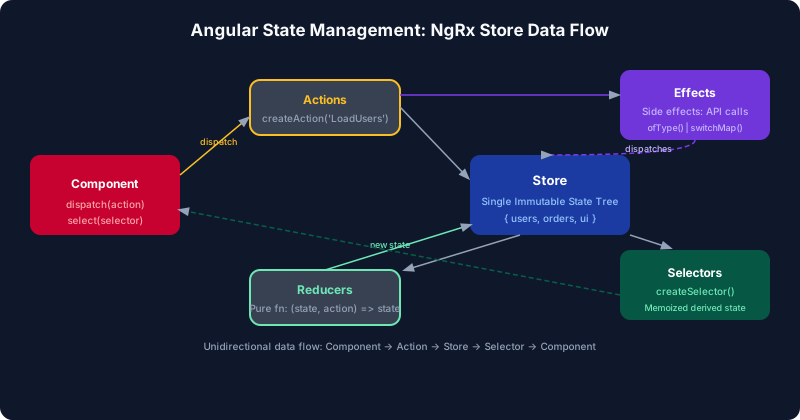
Table of Contents
The Angular State Management Landscape in 2026
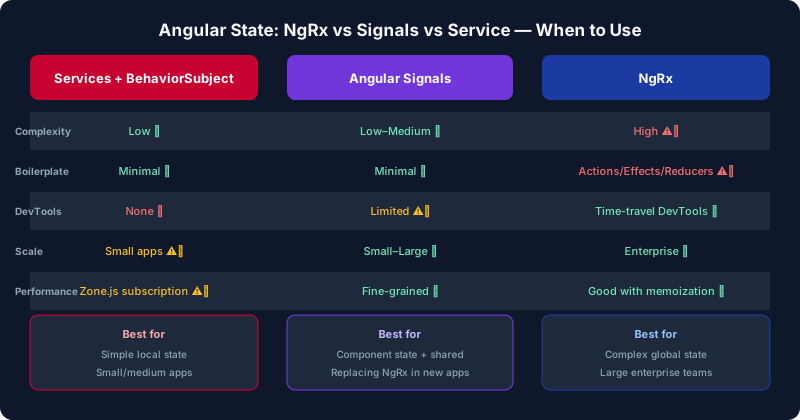
In 2026, Angular developers have three mature choices for state management: NgRx (classic redux-style), @ngrx/signals (signal-based store), and reactive services using BehaviorSubject or raw signal(). Each occupies a different position on the complexity-vs-power spectrum.
NgRx classic remains the gold standard for large teams with complex shared state, time-travel debugging requirements, and sophisticated async side-effect management. The @ngrx/signals package provides a middle ground — the same Redux DevTools support and team conventions as NgRx, but with a dramatically simpler API built on Angular signals. Plain reactive services remain the right choice for small-to-medium apps or feature-scoped state that doesn't need to be shared across distant parts of the component tree.
The biggest mistake teams make is cargo-culting NgRx into small apps because "it's what you're supposed to use." NgRx adds meaningful boilerplate — for every piece of state you need actions, a reducer case, selectors, and often an effect. For a feature with 5 state properties, that's typically 4–6 files. Signals can express the same thing in one file with 30 lines of code.
NgRx Classic: Actions, Reducers, Effects, Selectors
NgRx classic follows the Redux pattern strictly. The Store holds a single immutable state tree. Components dispatch Actions. Reducers compute the new state from current state + action. Effects intercept actions to perform async work (HTTP calls) and dispatch result actions. Selectors compute derived values from the store with memoization.
// products.actions.ts
import { createAction, props } from '@ngrx/store';

export const loadProducts = createAction('[Products] Load Products');
export const loadProductsSuccess = createAction(
  '[Products] Load Products Success',
  props<{ products: Product[] }>()
);
export const loadProductsFailure = createAction(
  '[Products] Load Products Failure',
  props<{ error: string }>()
);
export const addToCart = createAction(
  '[Products] Add To Cart',
  props<{ productId: number; quantity: number }>()
);

// products.reducer.ts
import { createReducer, on } from '@ngrx/store';

export interface ProductsState {
  products: Product[];
  loading: boolean;
  error: string | null;
}

const initialState: ProductsState = {
  products: [],
  loading: false,
  error: null,
};

export const productsReducer = createReducer(
  initialState,
  on(loadProducts, state => ({ ...state, loading: true, error: null })),
  on(loadProductsSuccess, (state, { products }) =>
    ({ ...state, loading: false, products })),
  on(loadProductsFailure, (state, { error }) =>
    ({ ...state, loading: false, error }))
);

// products.effects.ts
import { Injectable } from '@angular/core';
import { Actions, createEffect, ofType } from '@ngrx/effects';
import { switchMap, map, catchError, of } from 'rxjs';

@Injectable()
export class ProductsEffects {
  loadProducts$ = createEffect(() =>
    this.actions$.pipe(
      ofType(loadProducts),
      switchMap(() =>
        this.productService.getAll().pipe(
          map(products => loadProductsSuccess({ products })),
          catchError(err => of(loadProductsFailure({ error: err.message })))
        )
      )
    )
  );
  constructor(private actions$: Actions, private productService: ProductService) {}
}

// products.selectors.ts
import { createFeatureSelector, createSelector } from '@ngrx/store';

const selectProductsState = createFeatureSelector<ProductsState>('products');

export const selectAllProducts = createSelector(
  selectProductsState, state => state.products
);
export const selectProductsLoading = createSelector(
  selectProductsState, state => state.loading
);
export const selectProductsByCategory = (category: string) =>
  createSelector(selectAllProducts, products =>
    products.filter(p => p.category === category)
  );
In the component, the store is injected and state is accessed via selectors using store.selectSignal() (NgRx 17+) for signal-based access:
// product-list.component.ts (NgRx classic)
@Component({ standalone: true, /* ... */ })
export class ProductListComponent {
  private store = inject(Store);

  products = this.store.selectSignal(selectAllProducts);
  loading = this.store.selectSignal(selectProductsLoading);

  ngOnInit() {
    this.store.dispatch(loadProducts());
  }

  addToCart(productId: number) {
    this.store.dispatch(addToCart({ productId, quantity: 1 }));
  }
}
The NgRx pattern's strict separation of concerns pays dividends at enterprise scale: every state change is fully traceable through the Redux DevTools time-travel debugger, making incident diagnosis and replay straightforward. The convention of naming actions with source-context prefixes like [Products] Load Products gives teams a consistent, searchable audit trail across large codebases with many feature modules. Effects intercept actions as an RxJS stream, making complex orchestration — such as debouncing search input, retrying failed requests with exponential back-off, or cancelling in-flight HTTP calls on navigation — composable with standard RxJS operators rather than ad-hoc imperative logic scattered across services.
@ngrx/signals: The Signal Store
The @ngrx/signals package provides signalStore() — a composable store factory that replaces actions, reducers, and selectors with a more direct API. The same state is reactive and integrates with Redux DevTools, but without the boilerplate of explicit actions for every state transition.
// products.store.ts
import { signalStore, withState, withComputed, withMethods } from '@ngrx/signals';
import { rxMethod } from '@ngrx/signals/rxjs-interop';
import { computed, inject } from '@angular/core';
import { tapResponse } from '@ngrx/operators';
import { switchMap, pipe, tap } from 'rxjs';

interface ProductsState {
  products: Product[];
  loading: boolean;
  error: string | null;
  selectedCategory: string | null;
}

const initialState: ProductsState = {
  products: [],
  loading: false,
  error: null,
  selectedCategory: null,
};

export const ProductsStore = signalStore(
  { providedIn: 'root' },
  withState(initialState),

  withComputed(({ products, selectedCategory }) => ({
    filteredProducts: computed(() => {
      const cat = selectedCategory();
      return cat ? products().filter(p => p.category === cat) : products();
    }),
    totalCount: computed(() => products().length),
  })),

  withMethods((store, productService = inject(ProductService)) => ({
    loadProducts: rxMethod<void>(
      pipe(
        tap(() => patchState(store, { loading: true, error: null })),
        switchMap(() =>
          productService.getAll().pipe(
            tapResponse({
              next: products => patchState(store, { products, loading: false }),
              error: (err: Error) =>
                patchState(store, { error: err.message, loading: false }),
            })
          )
        )
      )
    ),

    selectCategory(category: string | null) {
      patchState(store, { selectedCategory: category });
    },
  }))
);

// Usage in component — zero boilerplate
@Component({ standalone: true, providers: [ProductsStore], /* ... */ })
export class ProductListComponent {
  store = inject(ProductsStore);

  ngOnInit() { this.store.loadProducts(); }
}
// Template: {{ store.filteredProducts() }}, {{ store.loading() }}
Notice the dramatic reduction in boilerplate. There are no separate action files, no reducer switch cases, no effect registration. The store expresses state, computed values, and methods in a single composable unit. patchState() performs immutable state updates with automatic change notifications.
BehaviorSubject Services Pattern
For small-to-medium features or feature-scoped state that doesn't need Redux DevTools, a reactive service with signal() or BehaviorSubject is the simplest solution. This pattern requires zero dependencies beyond Angular core and is the right default for most applications:
// cart.service.ts — signal-based reactive service
@Injectable({ providedIn: 'root' })
export class CartService {
  private http = inject(HttpClient);

  private _items = signal<CartItem[]>([]);
  private _loading = signal(false);

  // Public read-only signals
  items = this._items.asReadonly();
  loading = this._loading.asReadonly();

  // Derived computed values
  totalItems = computed(() =>
    this._items().reduce((sum, item) => sum + item.quantity, 0)
  );
  totalPrice = computed(() =>
    this._items().reduce((sum, item) => sum + item.price * item.quantity, 0)
  );

  addItem(product: Product, quantity = 1) {
    this._items.update(items => {
      const existing = items.find(i => i.productId === product.id);
      if (existing) {
        return items.map(i =>
          i.productId === product.id
            ? { ...i, quantity: i.quantity + quantity }
            : i
        );
      }
      return [...items, { productId: product.id, name: product.name,
                          price: product.price, quantity }];
    });
  }

  removeItem(productId: number) {
    this._items.update(items => items.filter(i => i.productId !== productId));
  }

  clearCart() {
    this._items.set([]);
  }

  checkout() {
    this._loading.set(true);
    return this.http.post('/api/orders', { items: this._items() }).pipe(
      tap(() => { this.clearCart(); this._loading.set(false); }),
    );
  }
}
The key production trade-off with signal-based services is that state changes are not automatically recorded in Redux DevTools — debugging relies on component template expressions and explicit console logging rather than a visual state history. Because private signals are only mutable via the service's own methods, the service naturally enforces an encapsulation boundary without requiring actions or reducers. When multiple components across a feature share the same injected service instance, signals propagate changes reactively and synchronously, making reactive services the right default for feature-scoped state that does not need cross-feature replay or time-travel debugging.
When to Use Each Approach
The decision framework is based on state complexity, team size, and tooling requirements:
| Factor | NgRx Classic | @ngrx/signals | Reactive Service |
|---|---|---|---|
| Team size | 10+ devs | 5–20 devs | 1–10 devs |
| Complexity | High | Medium | Low |
| DevTools | Full support | Full support | None |
| Boilerplate | High (5+ files) | Low (1 file) | Minimal |
A common mistake is treating these approaches as mutually exclusive. Production Angular applications often use all three simultaneously: NgRx classic for cross-cutting global state such as authentication tokens and feature flags, signal stores for complex feature modules with rich derived state, and reactive services for UI-local state like modal visibility or form submission status. The decision should be driven by how widely the state is shared and how critical time-travel debugging is, not by team convention alone. Over-applying NgRx classic to purely local UI state creates unnecessary boilerplate and makes components harder to test in isolation.
Migration Path from NgRx to Signals
Migrating from NgRx classic to @ngrx/signals is incremental — both can coexist. Start by migrating isolated feature stores that have no cross-feature action dependencies. The pattern is: create a signalStore(), move state and computed selectors to withState/withComputed, move effects to rxMethod within withMethods, then update components to inject the store directly instead of the NgRx Store.
// Step 1: Create the signal store alongside the NgRx slice
export const ProductsStore = signalStore(
  withState({ products: [] as Product[], loading: false }),
  withMethods((store, service = inject(ProductService)) => ({
    load: rxMethod<void>(pipe(
      switchMap(() => service.getAll().pipe(
        tapResponse({
          next: products => patchState(store, { products }),
          error: () => patchState(store, { loading: false }),
        })
      ))
    )),
  }))
);

// Step 2: Update component to use signal store (feature-flagged during transition)
// Step 3: Remove NgRx actions, reducer, effects for this feature
// Step 4: Remove StoreModule.forFeature('products', ...) registration
During the migration window, both the NgRx Store and the signal store will coexist in the application. To avoid dual writes, use the withHooks() lifecycle from @ngrx/signals to synchronise state from the NgRx store into the signal store via a selector subscription until the NgRx slice is fully removed. This allows component migration to proceed file-by-file with zero risk of state divergence between old and new consumers. Ensure that end-to-end tests cover the migrated feature and produce identical results before deleting the corresponding NgRx actions, reducer, and effects registration from the module.
Testing State Management Code
Testing signal stores is considerably simpler than testing NgRx — there are no action dispatching seams to test, no effect isolation boilerplate. Test the store by creating an instance and calling its methods directly:
// products.store.spec.ts
import { TestBed } from '@angular/core/testing';
import { ProductsStore } from './products.store';
import { ProductService } from './product.service';
import { of, throwError } from 'rxjs';

describe('ProductsStore', () => {
  let store: InstanceType<typeof ProductsStore>;
  let mockService: jasmine.SpyObj<ProductService>;

  beforeEach(() => {
    mockService = jasmine.createSpyObj('ProductService', ['getAll']);

    TestBed.configureTestingModule({
      providers: [
        ProductsStore,
        { provide: ProductService, useValue: mockService },
      ],
    });
    store = TestBed.inject(ProductsStore);
  });

  it('loads products on loadProducts() call', () => {
    const products = [{ id: 1, name: 'Widget', price: 9.99, category: 'tools' }];
    mockService.getAll.and.returnValue(of(products));

    store.loadProducts();

    expect(store.products()).toEqual(products);
    expect(store.loading()).toBeFalse();
  });

  it('filters products by category', () => {
    const products = [
      { id: 1, name: 'Hammer', price: 12, category: 'tools' },
      { id: 2, name: 'Pen', price: 2, category: 'office' },
    ];
    mockService.getAll.and.returnValue(of(products));
    store.loadProducts();

    store.selectCategory('tools');
    expect(store.filteredProducts().length).toBe(1);
    expect(store.filteredProducts()[0].name).toBe('Hammer');
  });
});
Because signal store tests interact with the store through its public method interface rather than dispatched actions, they are resilient to internal refactoring — changing how state is computed inside the store does not break the test contract. The TestBed approach shown above exercises the full dependency injection graph, making it straightforward to swap the real service for a spy and verify both the intermediate loading state transitions and the final state values in a single synchronous test. For computed signals like filteredProducts, always drive the test through the methods that set state rather than calling patchState directly, so the test reflects real usage patterns and catches regressions in the method logic itself.
Key Takeaways
- Default to reactive services: Use signal-based services (
signal()+computed()) for most application state. Add NgRx only when you genuinely need Redux DevTools or large team conventions. - @ngrx/signals is the sweet spot: For medium-complexity apps requiring Redux DevTools support, the Signal Store gives you structure without the action/reducer/effect boilerplate of NgRx classic.
- NgRx classic for enterprise scale: Large teams benefit from NgRx's strict separation of concerns, strong typing via
createAction/props, and built-in Redux DevTools time-travel debugging. - Migration is incremental: NgRx classic and @ngrx/signals coexist in the same application. Migrate feature by feature, starting with isolated slices.
- Signal stores are easy to test: Unlike NgRx effects,
signalStoremethods can be tested by calling them directly and reading signal values — no action dispatch or effect subscription boilerplate required.
Leave a Comment
Related Posts

Software Engineer · Angular · Spring Boot · Full-Stack