Angular Micro Frontends with Module Federation: Shell & Remote Apps
Micro frontend architecture extends microservices thinking to the frontend — each team owns, deploys, and maintains their own Angular application independently. Webpack Module Federation, introduced in Webpack 5, makes this practical by allowing JavaScript bundles to share modules at runtime without build-time coupling. The shell application loads remote applications dynamically, enabling true independent deployment.
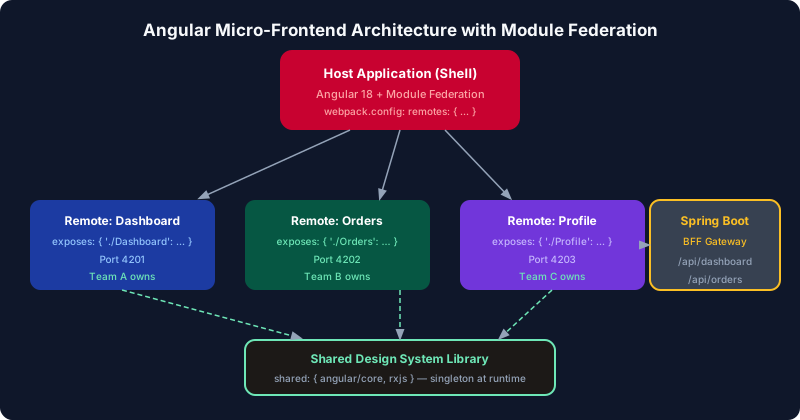
Table of Contents
Why Micro Frontends and Module Federation
Traditional monolithic Angular applications become problematic at scale: long build times affect every team, a bug in one team's code can block all other teams' deployments, and coordinating releases requires synchronizing dozens of developers. Micro frontends solve this by decomposing the frontend application along team ownership boundaries.
Module Federation (Webpack 5, or esbuild via @module-federation/enhanced) enables runtime module sharing. Without it, each micro frontend would need to duplicate all shared dependencies (Angular, RxJS, Angular Material) in every bundle — inflating load times. With Module Federation's shared configuration, only one copy of Angular loads in the browser regardless of how many remote apps are active.
The two roles in Module Federation: the shell (host) application provides the outer frame — navigation, authentication, global state. Remote applications expose specific components or routes. The shell dynamically fetches remote entry points at runtime, enabling remotes to be deployed independently without redeploying the shell.
Setting Up the Shell Application
The shell uses @angular-architects/module-federation which wraps Webpack Module Federation with Angular-specific helpers. Install it and generate the shell configuration:
# Install the module federation schematic
ng add @angular-architects/module-federation --project shell --port 4200 --type host

# This generates webpack.config.js and updates angular.json
# shell/webpack.config.js
const { shareAll, withModuleFederationPlugin } = require('@angular-architects/module-federation/webpack');

module.exports = withModuleFederationPlugin({
  remotes: {
    // Static remotes — known at build time
    'orders': 'http://localhost:4201/remoteEntry.js',
    'inventory': 'http://localhost:4202/remoteEntry.js',
  },

  shared: {
    ...shareAll({
      singleton: true,
      strictVersion: true,
      requiredVersion: 'auto',
    }),
  },
});
The shareAll helper shares all packages listed in package.json with singleton: true — meaning only one copy loads even if multiple remotes declare the same dependency. strictVersion: true causes a runtime warning (but not an error) if a remote requires a different version than what's available. Use requiredVersion: 'auto' to automatically read the version from package.json.
// shell/src/main.ts — bootstrap must be deferred for Module Federation
// The dynamic import is required for Module Federation to work correctly
import('./bootstrap').then().catch(err => console.error(err));

// shell/src/bootstrap.ts
import { bootstrapApplication } from '@angular/platform-browser';
import { AppComponent } from './app/app.component';
import { appConfig } from './app/app.config';

bootstrapApplication(AppComponent, appConfig)
  .catch(err => console.error(err));
The deferred bootstrap in main.ts is critical. Module Federation requires the host to load before bootstrapping so that the shared scope (where singleton modules are registered) is initialized. Without this deferral, Angular may bootstrap before the shared scope is ready, causing "Shared module is not available for eager consumption" errors.
Creating Remote Applications
Each remote application is a full Angular application configured to expose specific routes or components. The remote exposes a remoteEntry.js file that the shell loads to discover what the remote provides:
# Generate remote app configuration
ng add @angular-architects/module-federation --project orders --port 4201 --type remote

# orders/webpack.config.js
const { shareAll, withModuleFederationPlugin } = require('@angular-architects/module-federation/webpack');

module.exports = withModuleFederationPlugin({
  name: 'orders',
  exposes: {
    // Key: the import path the shell uses
    // Value: the file to expose
    './OrdersRoutes': './src/app/orders/orders.routes.ts',
    './OrderDetailComponent': './src/app/orders/order-detail/order-detail.component.ts',
  },
  shared: {
    ...shareAll({ singleton: true, strictVersion: true, requiredVersion: 'auto' }),
  },
});

// orders/src/app/orders/orders.routes.ts — exposed routes
import { Routes } from '@angular/router';

export const ordersRoutes: Routes = [
  {
    path: '',
    loadComponent: () =>
      import('./orders-list/orders-list.component').then(m => m.OrdersListComponent),
  },
  {
    path: ':id',
    loadComponent: () =>
      import('./order-detail/order-detail.component').then(m => m.OrderDetailComponent),
  },
];
Dynamic Remote Loading at Runtime
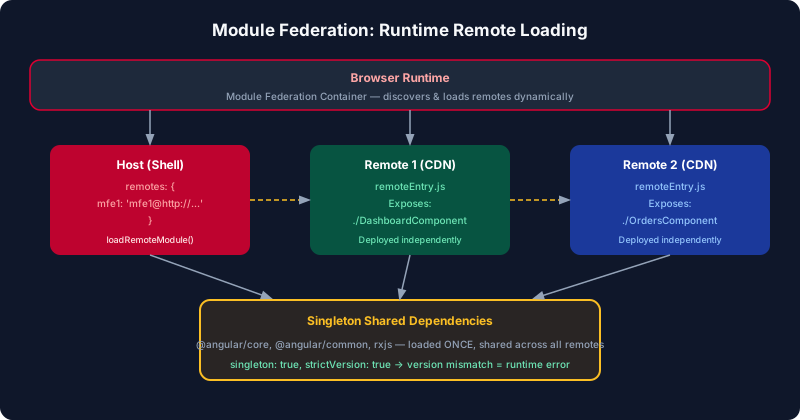
Dynamic remote loading reads remote URLs from a configuration service (often a backend API or environment config) at runtime rather than hardcoding them in webpack.config.js. This allows the shell to load different remote versions in different environments without rebuilding the shell itself.
// shell/src/app/app.routes.ts
import { loadRemoteModule } from '@angular-architects/module-federation';
import { Routes } from '@angular/router';

// Remote configs — can be loaded from an API
const remoteConfig = {
  orders: {
    remoteEntry: 'http://localhost:4201/remoteEntry.js',
    remoteName: 'orders',
    exposedModule: './OrdersRoutes',
  },
  inventory: {
    remoteEntry: 'http://localhost:4202/remoteEntry.js',
    remoteName: 'inventory',
    exposedModule: './InventoryRoutes',
  },
};

export const appRoutes: Routes = [
  { path: '', loadComponent: () => import('./home/home.component').then(m => m.HomeComponent) },
  {
    path: 'orders',
    loadChildren: () =>
      loadRemoteModule(remoteConfig.orders).then(m => m.ordersRoutes),
  },
  {
    path: 'inventory',
    loadChildren: () =>
      loadRemoteModule(remoteConfig.inventory).then(m => m.inventoryRoutes),
  },
];

// Dynamic config loading from API — for true runtime composition
async function buildRoutes(): Promise<Routes> {
  const res = await fetch('/api/micro-frontend-config');
  const configs = await res.json();

  return configs.map((config: RemoteFrontendConfig) => ({
    path: config.routePath,
    loadChildren: () =>
      loadRemoteModule({
        remoteEntry: config.remoteEntry,
        remoteName: config.remoteName,
        exposedModule: config.exposedModule,
      }).then(m => m[config.routesExport]),
  }));
}
The dynamic API-driven approach enables true runtime composition — you can point different environments at different remote versions (e.g., canary deployments) without touching the shell bundle. The shell fetches the remote manifest, builds routes dynamically, and Angular's lazy loading handles the rest. One important gotcha: Angular's router requires that routes be registered before navigation occurs, so the dynamic route registration must complete before the router initializes — use a APP_INITIALIZER token to delay bootstrap until the config is fetched. Also cache the config response aggressively with a short TTL to prevent the shell from being blocked on a slow config API for every page load.
Shared Dependencies and Version Conflicts
The most common Module Federation production issue is mismatched shared dependency versions. When the shell declares Angular 18.2.0 and a remote declares Angular 18.1.0, Module Federation with strictVersion: true logs a warning but loads the 18.2.0 version (from the shell). With strictVersion: false (more lenient), a separate copy of the mismatched version may load, breaking the singleton contract.
// Explicit version pinning for critical singletons
// shell/webpack.config.js
module.exports = withModuleFederationPlugin({
  shared: {
    '@angular/core': {
      singleton: true,
      strictVersion: true,
      requiredVersion: '~18.0.0',  // allow patch versions
    },
    '@angular/router': {
      singleton: true,
      strictVersion: true,
      requiredVersion: '~18.0.0',
    },
    '@angular/common': {
      singleton: true,
      strictVersion: true,
      requiredVersion: '~18.0.0',
    },
    // Non-singleton: each remote can have its own version
    'date-fns': {
      singleton: false,
      requiredVersion: 'auto',
    },
  },
});

// Version audit script — run in CI to detect mismatches
// package.json
{
  "scripts": {
    "audit:versions": "node scripts/check-mf-versions.js"
  }
}
A systematic approach to shared dependency management is to define the shared configuration in a single workspace-level file and import it in every remote's webpack.config.js. This ensures that version bumps are made in one place rather than across all remotes. The requiredVersion: 'auto' shorthand reads the version from the consuming app's package.json, which works well during development but can cause subtle version drift in production if remotes are built at different times. For critical singletons like Angular core, always pin with a semver range (~18.0.0) and run the version audit script in CI to catch mismatches before deployment. Non-singleton libraries like date-fns or lodash can safely have per-remote versions since they carry no global state.
Angular Routing Integration
The shell's router handles navigation between micro frontends seamlessly. Each remote's routes are loaded as children of a shell route. The shell provides the router outlet; remotes provide the route configuration and components. Since all apps share the singleton Angular router, navigation feels like a single application:
// shell/src/app/app.component.ts
@Component({
  selector: 'app-root',
  standalone: true,
  imports: [RouterOutlet, RouterLink, AsyncPipe],
  template: `
    <nav>
      <a routerLink="/">Home</a>
      <a routerLink="/orders">Orders</a>      <!-- remote 1 -->
      <a routerLink="/inventory">Inventory</a> <!-- remote 2 -->
    </nav>
    <router-outlet />  <!-- remotes render here -->
  `,
})
export class AppComponent {}

// Sharing authentication state between shell and remotes
// Use a singleton service from the shell's shared scope
// shell/src/app/core/auth/auth.service.ts — exported as shared module
// Both shell and remotes import AuthService; Module Federation ensures
// only one instance exists across all micro frontends
Authentication state sharing works because the AuthService is declared as a singleton in the shell's shared scope — Module Federation ensures all remotes that declare @angular/core as a singleton reuse the same service instance. This means a login triggered in the orders remote automatically reflects in the shell's navigation bar and in the inventory remote without any pub-sub or localStorage workaround. If a remote team wants to test authentication flows in isolation (without the shell), they need a local AuthService stub — configure webpack to serve the remote standalone with a development shell that provides mock auth state.
NX Workspace for Monorepo Management
Managing multiple Angular applications in a single repository is dramatically easier with NX. NX provides generators for Module Federation setup, dependency graph visualization, affected-build detection (only rebuild changed apps), and distributed task execution:
# Create NX workspace with Module Federation
npx create-nx-workspace@latest my-mfe-workspace --preset=angular
cd my-mfe-workspace

# Generate shell app
nx generate @nx/angular:host shell --remotes=orders,inventory

# Generate remote apps (this also updates the shell's remotes config)
nx generate @nx/angular:remote orders --host=shell --port=4201
nx generate @nx/angular:remote inventory --host=shell --port=4202

# Serve all apps together
nx run-many --target=serve --projects=shell,orders,inventory

# Build only affected apps (CI optimization)
nx affected --target=build --base=main

# Visualize the dependency graph
nx graph

# Run tests only for affected projects
nx affected --target=test --base=main --head=HEAD
NX's affected detection means a change in the orders remote only triggers rebuilding and testing orders — not inventory or the shell (unless they have a dependency on the changed code). For large monorepos with 10+ micro frontends, this can reduce CI time from 30 minutes to under 5 minutes.
Independent CI/CD Deployment
The key value of micro frontends is independent deployment. Each remote has its own CI/CD pipeline that builds, tests, and deploys only that remote. The shell does not need to be redeployed when a remote changes. Use container-based deployment for each remote with Nginx serving the built assets:
# orders/Dockerfile
FROM node:20-alpine AS builder
WORKDIR /app
COPY package*.json ./
RUN npm ci
COPY . .
RUN npx nx build orders --configuration=production

FROM nginx:alpine
COPY --from=builder /app/dist/orders /usr/share/nginx/html
COPY orders/nginx.conf /etc/nginx/conf.d/default.conf
EXPOSE 80

# orders/nginx.conf — CORS headers for remoteEntry.js
server {
    listen 80;
    root /usr/share/nginx/html;
    index index.html;

    # CORS for Module Federation remoteEntry.js
    location ~* \.(js|json)$ {
        add_header Access-Control-Allow-Origin *;
        add_header Cache-Control "public, max-age=31536000, immutable";
        try_files $uri =404;
    }

    # No caching for remoteEntry.js — it must always be fresh
    location = /remoteEntry.js {
        add_header Access-Control-Allow-Origin *;
        add_header Cache-Control "no-cache, no-store, must-revalidate";
    }

    location / {
        try_files $uri $uri/ /index.html;
    }
}

# GitHub Actions — orders/.github/workflows/deploy.yml
name: Deploy Orders Remote
on:
  push:
    branches: [main]
    paths: ['orders/**']
jobs:
  deploy:
    runs-on: ubuntu-latest
    steps:
      - uses: actions/checkout@v4
      - uses: actions/setup-node@v4
        with: { node-version: '20' }
      - run: npm ci
      - run: npx nx build orders --configuration=production
      - name: Deploy to CDN
        run: aws s3 sync dist/orders s3://my-app-orders --delete
Key Takeaways
- Defer bootstrap in main.ts: The dynamic import pattern (
import('./bootstrap')) is required for Module Federation's shared scope initialization. Without it, Angular bootstraps before shared modules are registered. - Always use singleton: true for Angular packages: Multiple Angular instances in one browser window cause routing, injection, and change detection to break. Angular, RxJS, and Angular Material must be singletons.
- Never cache remoteEntry.js: Set
Cache-Control: no-cacheonremoteEntry.jsbut use long-cache headers for all other assets (which are content-hashed). This enables instant rollout of new remote versions without shell redeployment. - Use NX for monorepo management: NX's affected detection, workspace generators, and dependency graph visualization make managing 5+ Angular micro frontends practical.
- Dynamic remote config from API: Load
remoteEntryURLs from a backend API rather than hardcoding in webpack.config.js — this enables environment-specific remote versions without shell rebuilds.
Leave a Comment
Related Posts

Software Engineer · Angular · Spring Boot · Full-Stack