Angular SSR & Hydration: Server-Side Rendering with Angular Universal
Angular's default client-side rendering model sends a nearly empty HTML shell to the browser, then bootstraps the application with JavaScript. This is fast after the first load, but terrible for SEO (search engines see empty content) and for First Contentful Paint on slow connections. Angular SSR (Server-Side Rendering) with Angular Universal renders your application on the server, sending fully-populated HTML to the client — dramatically improving Core Web Vitals and search engine visibility.
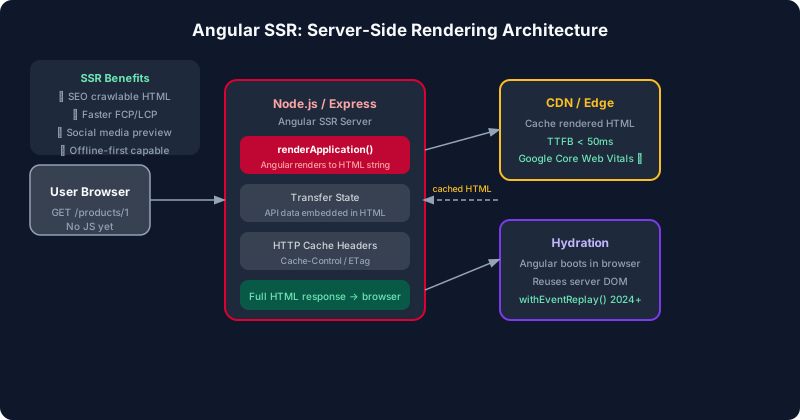
Table of Contents
- Why Server-Side Rendering Matters for Angular
- Setting Up Angular Universal with ng add
- provideClientHydration() and Full App Hydration
- Transfer State for Server-to-Client Data
- isPlatformBrowser and isPlatformServer Guards
- Prerendering Static Routes
- Node.js Express Server Configuration
- Deployment on Vercel, Netlify, and Fly.io
Why Server-Side Rendering Matters for Angular
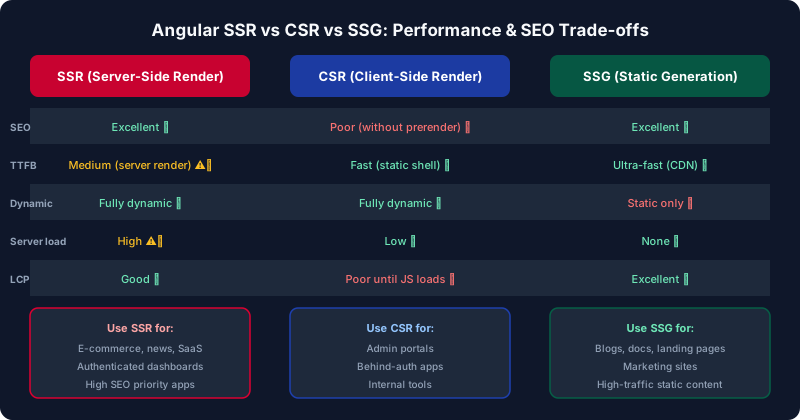
Google's Core Web Vitals directly impact search rankings. The three primary metrics — Largest Contentful Paint (LCP), Interaction to Next Paint (INP), and Cumulative Layout Shift (CLS) — are all significantly improved by SSR. With client-side rendering, LCP is delayed until JavaScript downloads, parses, executes, and makes API calls. With SSR, the HTML already contains the rendered content when the browser receives it — LCP can be under 1 second.
For e-commerce, SEO impact is especially significant. Google's crawler can execute JavaScript, but it may take days to re-render and re-index a JavaScript-heavy page after a content update. With SSR, Google sees the fully-rendered HTML immediately. Bing, DuckDuckGo, and other search engines have much weaker JavaScript execution — they effectively cannot index client-side-only Angular apps.
Social media crawlers (Twitter, Facebook, LinkedIn, Slack) do not execute JavaScript at all. An Angular app without SSR shows a blank page preview when shared — with SSR, the server sends proper Open Graph meta tags and populated HTML content to these crawlers. The improvement in link preview quality alone can justify SSR for marketing-focused applications.
Setting Up Angular Universal with ng add
Angular's SSR integration is now first-party and built into the Angular CLI. The @angular/ssr package replaces the older community @nguniversal/express-engine package. Setup is a single command:
# Add SSR to an existing Angular app
ng add @angular/ssr

# For new projects, SSR is prompted during ng new
ng new my-ssr-app --ssr

# Files generated/modified:
# server.ts           — Express server entry point
# app.config.server.ts — Server-specific providers
# src/app/app.config.ts — Updated with provideClientHydration()
# angular.json         — Added server build target
# package.json         — Added serve:ssr and prerender scripts
The generated file structure separates client and server configurations. The client app.config.ts provides browser-only features; the server app.config.server.ts merges client config with server-specific providers using mergeApplicationConfig:
// src/app/app.config.ts (client)
import { ApplicationConfig } from '@angular/core';
import { provideRouter } from '@angular/router';
import { provideClientHydration } from '@angular/platform-browser';
import { provideHttpClient, withFetch } from '@angular/common/http';
import { routes } from './app.routes';

export const appConfig: ApplicationConfig = {
  providers: [
    provideRouter(routes),
    provideClientHydration(),
    provideHttpClient(withFetch()),  // withFetch() is required for SSR HTTP
  ],
};

// src/app/app.config.server.ts (server-only)
import { mergeApplicationConfig, ApplicationConfig } from '@angular/core';
import { provideServerRendering } from '@angular/platform-server';
import { appConfig } from './app.config';

const serverConfig: ApplicationConfig = {
  providers: [
    provideServerRendering(),
  ],
};

export const config = mergeApplicationConfig(appConfig, serverConfig);
provideClientHydration() and Full App Hydration
Before Angular 16, SSR had a fundamental UX problem: after the server sent the rendered HTML, the Angular bootstrap on the client would destroy and recreate all the DOM nodes. This caused a flash of blank content (FOBC) as the client-rendered app replaced the server-rendered HTML. With full app hydration (provideClientHydration()), Angular reuses the server-rendered DOM nodes instead of destroying them — the client "takes over" the existing DOM invisibly.
// provideClientHydration with optional features
import { provideClientHydration, withEventReplay, withIncrementalHydration } from '@angular/platform-browser';

export const appConfig: ApplicationConfig = {
  providers: [
    provideClientHydration(
      withEventReplay(),           // Replay user events that happened before hydration
      withIncrementalHydration(),  // Experimental: defer hydrating off-screen components
    ),
    // ...
  ],
};
withEventReplay() captures user interactions (clicks, form input) that happen during hydration and replays them once Angular takes over — critical for fast networks where users may click before JavaScript finishes loading. withIncrementalHydration() (experimental, Angular 19+) allows components to opt out of initial hydration using @defer (hydrate on viewport), saving CPU time for off-screen content.
<!-- Incremental hydration — hydrate only when scrolled into view -->
@defer (hydrate on viewport) {
  <app-product-recommendations [userId]="userId()" />
}

@defer (hydrate on interaction) {
  <app-comments-section [postId]="postId()" />
}

@defer (hydrate never) {
  <app-purely-static-content />
}
Transfer State for Server-to-Client Data
Without transfer state, Angular SSR has a double-fetch problem: the server makes an HTTP call to render the page, then the client Angular bootstrap makes the same HTTP call again. Users see the correct server-rendered content, then a flash as the client re-fetches and re-renders the same data. TransferState serializes server-side fetched data into the HTML and the client reads it on bootstrap — eliminating the duplicate request.
// product.service.ts — SSR-aware service with TransferState
import { Injectable, inject, PLATFORM_ID, TransferState, makeStateKey } from '@angular/core';
import { HttpClient } from '@angular/common/http';
import { isPlatformServer } from '@angular/common';
import { Observable, of } from 'rxjs';
import { tap } from 'rxjs/operators';

const PRODUCTS_KEY = makeStateKey<Product[]>('products');

@Injectable({ providedIn: 'root' })
export class ProductService {
  private http = inject(HttpClient);
  private transferState = inject(TransferState);
  private platformId = inject(PLATFORM_ID);

  getProducts(): Observable<Product[]> {
    // Check if data was transferred from server
    if (this.transferState.hasKey(PRODUCTS_KEY)) {
      const products = this.transferState.get(PRODUCTS_KEY, []);
      this.transferState.remove(PRODUCTS_KEY);  // clean up
      return of(products);
    }

    return this.http.get<Product[]>('/api/products').pipe(
      tap(products => {
        // Only store in transfer state when running on server
        if (isPlatformServer(this.platformId)) {
          this.transferState.set(PRODUCTS_KEY, products);
        }
      })
    );
  }
}
Angular 17+ simplifies this pattern with withFetch() + HttpClient — when you use the standard Angular HTTP client with withFetch(), Angular automatically handles transfer state for HTTP GET requests without any manual TransferState code. The automatic transfer caching is enabled by default with provideHttpClient(withFetch()):
// Angular 17+ automatic HTTP transfer state — no manual code needed
// Just use HttpClient as normal in your services
@Injectable({ providedIn: 'root' })
export class ProductService {
  private http = inject(HttpClient);

  // Angular automatically prevents duplicate HTTP calls between SSR and client
  getProducts() {
    return this.http.get<Product[]>('/api/products');
  }
}
isPlatformBrowser and isPlatformServer Guards
Some browser APIs — window, document, localStorage, navigator, IntersectionObserver — do not exist in Node.js. Accessing them during SSR causes your server to crash with "window is not defined". Guard all browser-specific code with platform checks:
import { Component, inject, PLATFORM_ID, OnInit } from '@angular/core';
import { isPlatformBrowser, isPlatformServer } from '@angular/common';

@Component({
  selector: 'app-analytics',
  standalone: true,
  template: `<ng-container />`,
})
export class AnalyticsComponent implements OnInit {
  private platformId = inject(PLATFORM_ID);

  ngOnInit() {
    if (isPlatformBrowser(this.platformId)) {
      // Safe to use browser APIs
      this.initAnalytics();
      this.setupIntersectionObserver();
    }

    if (isPlatformServer(this.platformId)) {
      // Server-only logic (logging, server-side analytics, etc.)
      console.log('Rendering on server');
    }
  }

  private initAnalytics() {
    // window, document, localStorage are safe here
    const userId = localStorage.getItem('userId');
    window.gtag?.('config', 'GA_MEASUREMENT_ID', { user_id: userId });
  }

  private setupIntersectionObserver() {
    const observer = new IntersectionObserver(entries => {
      entries.forEach(entry => {
        if (entry.isIntersecting) {
          this.trackImpression(entry.target.id);
        }
      });
    });
    document.querySelectorAll('[data-track]').forEach(el => observer.observe(el));
  }

  private trackImpression(elementId: string) {
    console.log('Impression:', elementId);
  }
}
The injection token approach is cleaner in services. Angular provides afterNextRender() and afterRender() (Angular 17+) as a platform-safe alternative — they only run in the browser and replace many patterns that previously used ngAfterViewInit + isPlatformBrowser:
import { Component, afterNextRender, ElementRef, viewChild } from '@angular/core';

@Component({ standalone: true, /* ... */ })
export class ChartComponent {
  chartCanvas = viewChild<ElementRef>('chartCanvas');

  constructor() {
    // afterNextRender only executes in the browser — safe for DOM manipulation
    afterNextRender(() => {
      const canvas = this.chartCanvas()?.nativeElement;
      if (canvas) {
        // Initialize chart library (browser-only)
        new Chart(canvas, { type: 'bar', data: this.chartData });
      }
    });
  }
}
Prerendering Static Routes
Static prerendering generates HTML files at build time for routes with known, stable content — blog posts, documentation, product pages. The result is served as static files from a CDN with zero server compute. Configure prerendering in angular.json:
// angular.json — prerender configuration
{
  "prerender": {
    "builder": "@angular-devkit/build-angular:prerender",
    "options": {
      "routes": [
        "/",
        "/about",
        "/blog",
        "/products",
        "/products/widget-pro",
        "/products/gadget-x"
      ],
      "routesFile": "routes.txt"
    }
  }
}

// routes.txt — for large numbers of routes (loaded from file)
/blog/angular-signals
/blog/spring-boot-jwt
/blog/micro-frontends
/products/category/electronics
/products/category/tools

// package.json scripts
{
  "scripts": {
    "build:ssr": "ng build --configuration production && ng run my-app:server",
    "prerender": "ng run my-app:prerender",
    "serve:ssr": "node dist/my-app/server/server.mjs"
  }
}
For content-driven sites where routes are database-driven, use a script to generate routes.txt from your API before building:
// scripts/generate-routes.js — generate prerender routes from API
const fetch = require('node-fetch');
const fs = require('fs');

async function generateRoutes() {
  const [products, posts] = await Promise.all([
    fetch('https://api.myapp.com/products').then(r => r.json()),
    fetch('https://api.myapp.com/blog/posts').then(r => r.json()),
  ]);

  const routes = [
    '/',
    '/about',
    '/blog',
    ...products.map(p => `/products/${p.slug}`),
    ...posts.map(p => `/blog/${p.slug}`),
  ];

  fs.writeFileSync('routes.txt', routes.join('\n'));
  console.log(`Generated ${routes.length} routes`);
}

generateRoutes();
Node.js Express Server Configuration
The generated server.ts uses Express to serve both SSR (dynamic rendering) and static assets. Customize it to add compression, security headers, caching, and API proxying:
// server.ts — production-ready Express SSR server
import 'zone.js/node';
import { APP_BASE_HREF } from '@angular/common';
import { CommonEngine } from '@angular/ssr';
import express from 'express';
import compression from 'compression';
import helmet from 'helmet';
import { fileURLToPath } from 'node:url';
import { dirname, join, resolve } from 'node:path';
import bootstrap from './src/main.server';

export function app(): express.Express {
  const server = express();
  const serverDistFolder = dirname(fileURLToPath(import.meta.url));
  const browserDistFolder = resolve(serverDistFolder, '../browser');
  const indexHtml = join(serverDistFolder, 'index.server.html');

  const commonEngine = new CommonEngine();

  // Security and compression
  server.use(helmet({ contentSecurityPolicy: false }));
  server.use(compression());

  // Static assets — long cache with immutable (content-hashed files)
  server.get('*.*', express.static(browserDistFolder, {
    maxAge: '1y',
    immutable: true,
  }));

  // SSR handler — all other routes
  server.get('*', (req, res, next) => {
    const { protocol, originalUrl, baseUrl, headers } = req;

    commonEngine
      .render({
        bootstrap,
        documentFilePath: indexHtml,
        url: `${protocol}://${headers.host}${originalUrl}`,
        publicPath: browserDistFolder,
        providers: [{ provide: APP_BASE_HREF, useValue: baseUrl }],
      })
      .then(html => {
        // Cache SSR responses at CDN layer
        res.set('Cache-Control', 'public, max-age=60, s-maxage=300, stale-while-revalidate=600');
        res.send(html);
      })
      .catch(err => next(err));
  });

  return server;
}

function run(): void {
  const port = process.env['PORT'] || 4000;
  const server = app();
  server.listen(port, () => {
    console.log(`Node Express server listening on http://localhost:${port}`);
  });
}

run();
Another SSR production concern is memory pressure under concurrent rendering. Each server-side render allocates transient objects, so configure horizontal autoscaling based on memory and request latency, not just CPU. Instrument render duration percentiles and cache-hit ratios for prerendered/static routes to detect when Node instances are saturating. If your app uses client-only libraries (charts, map SDKs, analytics scripts), isolate them behind platform guards and lazy-load them after hydration to avoid server crashes and hydration mismatch warnings. Establish a regression check in CI that compares rendered HTML snapshots for key routes; this catches accidental SSR breakage when upgrading Angular or third-party components.
Deployment on Vercel, Netlify, and Fly.io
Angular SSR applications are Node.js servers that require a runtime. The three most common deployment targets for Angular SSR in 2026 are Vercel (easiest), Netlify (good for SSR + serverless functions), and Fly.io (for full control with Docker):
# Vercel deployment (zero config for Angular SSR)
# Install Vercel CLI and deploy
npm install -g vercel
vercel

# vercel.json — configure the build and routes
{
  "buildCommand": "npm run build:ssr",
  "outputDirectory": "dist/my-app",
  "framework": null,
  "routes": [
    { "src": "/(.*)\\.(.+)", "dest": "/browser/$1.$2" },
    { "src": "/(.*)", "dest": "/server/server.mjs" }
  ]
}

# Fly.io deployment — Docker-based
# Dockerfile
FROM node:20-alpine AS builder
WORKDIR /app
COPY package*.json ./
RUN npm ci
COPY . .
RUN npm run build:ssr

FROM node:20-alpine
WORKDIR /app
COPY --from=builder /app/dist/my-app ./dist/my-app
COPY --from=builder /app/node_modules ./node_modules
ENV PORT=8080
EXPOSE 8080
CMD ["node", "dist/my-app/server/server.mjs"]

# fly.toml
app = "my-angular-ssr-app"
primary_region = "sin"

[build]
  dockerfile = "Dockerfile"

[http_service]
  internal_port = 8080
  force_https = true
  auto_stop_machines = true
  auto_start_machines = true

[[vm]]
  memory = "512mb"
  cpu_kind = "shared"
  cpus = 1
# package.json — unified build and serve scripts
{
  "scripts": {
    "build": "ng build",
    "build:ssr": "ng build && ng run my-app:server",
    "prerender": "ng run my-app:prerender",
    "serve:ssr": "node dist/my-app/server/server.mjs",
    "dev:ssr": "ng run my-app:serve-ssr"
  }
}
Key Takeaways
- Use
ng add @angular/ssr: The first-party SSR integration is far simpler than the old@nguniversalapproach. It generatesserver.ts,app.config.server.ts, and updatesangular.jsonautomatically. provideClientHydration()eliminates FOBC: Enable it unconditionally with SSR. It reuses server-rendered DOM nodes instead of destroying and recreating them on client bootstrap.- Use
withFetch()for automatic transfer state:provideHttpClient(withFetch())prevents double HTTP fetching between server and client automatically — no manualTransferStatecode needed in Angular 17+. - Guard browser APIs with
isPlatformBrowser()orafterNextRender(): Any use ofwindow,document,localStorage, ornavigatorwithout a guard will crash your Node.js SSR server. - Prerender static routes at build time: Blog posts, product pages, and documentation with stable content should be prerendered to static HTML and served from a CDN — zero server compute, maximum cache efficiency.
- Set proper cache headers on the Express server: Use long-cache with
immutablefor content-hashed static assets and short CDN cache (s-maxage=300) withstale-while-revalidatefor SSR responses.
Leave a Comment
Related Posts

Software Engineer · Angular · Spring Boot · Full-Stack