AWS RDS PostgreSQL Performance Tuning for Java Spring Boot Applications
Most teams accept RDS PostgreSQL defaults and then wonder why their Spring Boot application struggles at scale. The truth is that a correctly tuned RDS instance with properly sized HikariCP pools, strategically placed read replicas, and RDS Proxy can make a 4× throughput difference on the same instance class — without spending a cent more on hardware.
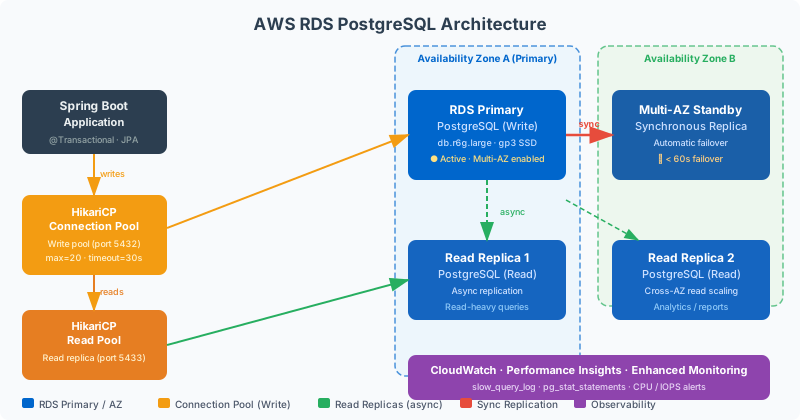
Table of Contents
- Why AWS RDS PostgreSQL Underperforms Without Tuning
- Choosing the Right RDS Instance Class and Storage
- HikariCP Connection Pool Tuning for RDS
- RDS Proxy: Solving Connection Pooling at Scale
- PostgreSQL Query Optimization on RDS
- Read Replicas and Multi-AZ for Spring Boot
- Parameter Groups and PostgreSQL Configuration
- CloudWatch Monitoring and Performance Insights
Why AWS RDS PostgreSQL Underperforms Without Tuning
When a Spring Boot application is first deployed against Amazon RDS PostgreSQL, performance often looks fine under light load. P99 latencies sit at 20–30ms, throughput is adequate, and nothing trips alarms. Then traffic grows — a marketing campaign, a product launch, Black Friday — and the system reveals its ceiling. Connection wait times spike. Query latencies jump to 200ms, 500ms, then seconds. The application begins timing out. The instinct is to scale the RDS instance vertically, but the real problem is almost always configuration, not capacity.
The most common culprit is connection pool misconfiguration. A default Spring Boot application using HikariCP with the default pool size of 10 connections will saturate at surprisingly low traffic levels. PostgreSQL on an db.r6g.xlarge instance supports over 1,000 connections, but each connection consumes roughly 5–10 MB of RAM on the database server. With 10 pods, each holding 10 connections, you already have 100 concurrent connections — and with 50 pods, you have 500. At this scale, connection establishment overhead and PostgreSQL's process-per-connection architecture become real bottlenecks that HikariCP alone cannot solve.
The second common issue is that RDS uses the same parameter group defaults for every instance size. A shared_buffers value appropriate for a db.t3.medium is wildly wrong for a db.r6g.4xlarge. PostgreSQL's work_mem default of 4MB means complex sorts and hash joins spill to disk even when the instance has 128GB RAM available. effective_cache_size guides the query planner — set it too low and the planner avoids index scans in favour of sequential scans on tables that should be cached. These parameter mismatches are invisible in small-scale testing and devastating in production.
The third issue is the absence of read replicas. Most CRUD-heavy Spring Boot applications have a 70-90% read-to-write ratio. Sending all reads to the primary writer instance is unnecessary and wasteful — every SELECT competes with INSERT/UPDATE/DELETE for I/O and connection slots. RDS read replicas replicate asynchronously from the primary and can serve read traffic with millisecond lag in the same region. Routing reads to replicas halves or triples the effective database capacity at no change to the primary instance.
Fourth, storage type matters dramatically. The default gp2 storage provides a baseline of 3 IOPS per GB with burst credits. A 100 GB gp2 volume gets 300 baseline IOPS — enough for dev workloads, catastrophic for production OLTP. Modern gp3 storage provides 3,000 baseline IOPS regardless of size and can be provisioned up to 16,000 IOPS independently of storage capacity at a fraction of the cost of io1. Migrating from gp2 to gp3 is a non-disruptive operation that takes minutes to configure in the AWS console and can immediately resolve I/O-bound performance degradation.
Finally, the lack of observability is what allows all these problems to persist. Without CloudWatch Enhanced Monitoring, RDS Performance Insights, and Slow Query Log analysis, engineers are flying blind. Performance Insights shows which SQL statements are consuming the most DB load, which wait events are dominating, and which users/hosts are driving the load — in a visual timeline that makes it possible to correlate database load with application deployments and traffic spikes.
Choosing the Right RDS Instance Class and Storage
RDS instance selection should be driven by the workload's primary bottleneck: compute, memory, network, or I/O. Understanding which bottleneck applies requires monitoring, not guessing. For OLTP Spring Boot workloads, memory is almost always the primary constraint — the more of the working dataset that fits in PostgreSQL's buffer pool (shared_buffers), the fewer disk reads occur. Memory-optimized instances in the r family (r6g, r7g on Graviton) provide 8 GiB per vCPU, compared to 4 GiB per vCPU for the general-purpose m family.
The Graviton-based r6g and r7g instance types offer up to 35% better price/performance than equivalent x86 instances for PostgreSQL workloads. AWS Graviton3 processors provide higher memory bandwidth, which directly benefits PostgreSQL's buffer pool management. For new deployments, always default to the latest Graviton generation unless you have a specific requirement for x86 compatibility (which PostgreSQL does not).
For storage, gp3 is the correct default for virtually all RDS workloads in 2026. It provides 3,000 IOPS and 125 MiB/s throughput as the baseline for any volume size, with independent scaling up to 16,000 IOPS and 1,000 MiB/s throughput. Storage autoscaling should always be enabled with a reasonable maximum threshold — setting max_allocated_storage to 2× your initial allocation prevents surprise storage exhaustion without requiring manual intervention during unexpected data growth events.
| Instance Family | vCPU:RAM Ratio | Best For | Max Connections (approx) | Storage Recommendation |
|---|---|---|---|---|
| db.t3/t4g | 2–8 GiB | Dev / low traffic | ~100–300 | gp3 20–100 GB |
| db.m6g/m7g | 4 GiB/vCPU | Balanced OLTP | ~500–2000 | gp3 with 6,000+ IOPS |
| db.r6g/r7g | 8 GiB/vCPU | Memory-heavy OLTP | ~1000–5000 | gp3 or io1/io2 |
| db.x2g | 16 GiB/vCPU | Large working sets | ~5000+ | io2 Block Express |
Multi-AZ deployment should be mandatory for any production RDS instance. Multi-AZ maintains a synchronous standby replica in a different Availability Zone, providing automatic failover in 60–120 seconds for infrastructure failures, AZ outages, and OS patching. The performance overhead of Multi-AZ is minimal (synchronous replication adds 1–2ms to write latency at most), and the resilience benefit is enormous. Never operate production databases on Single-AZ — the cost savings are not worth the blast radius of an AZ failure.
HikariCP Connection Pool Tuning for RDS
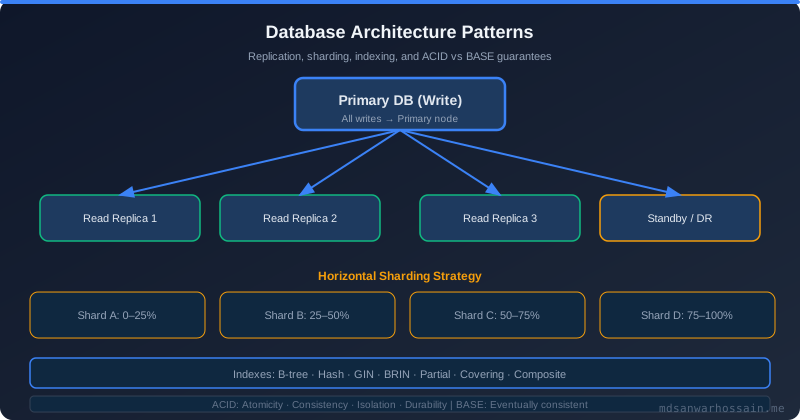
HikariCP is Spring Boot's default JDBC connection pool and one of the highest-performance connection pools available for the JVM. However, its defaults are conservative and designed for local development. For production RDS deployments, several parameters require explicit tuning to match the deployed infrastructure and traffic patterns.
The most important configuration decision is pool size. A common misconception is that larger pools equal better throughput. The reality, as documented in HikariCP's own guidelines (referencing the "pool sizing" research by PostgreSQL contributor Craig Kerstiens), is that for I/O-bound database workloads, the optimal pool size is often much smaller than intuition suggests: pool_size = (core_count * 2) + effective_spindle_count. For a 4-vCPU application instance connecting to an SSD-backed RDS instance, the formula yields roughly 9–12 connections per application pod. More connections beyond this point increases contention rather than parallelism.
Critical timeouts must be configured to match RDS behaviour. The connectionTimeout must be shorter than the ECS task or pod's readiness probe timeout — if acquiring a connection takes longer than the readiness threshold, the pod will cycle out of rotation before the pool stabilises. The maxLifetime must be set shorter than RDS's wait_timeout (which defaults to 8 hours on PostgreSQL via tcp_keepalives_idle) to prevent "connection already closed" errors. Setting maxLifetime to 14 minutes (840 seconds) and keepaliveTime to 30 seconds ensures connections are proactively refreshed before RDS tears them down.
# application-prod.yml — HikariCP for RDS PostgreSQL
spring:
  datasource:
    url: jdbc:postgresql://${RDS_ENDPOINT}:5432/${DB_NAME}?sslmode=require&tcpKeepAlive=true
    username: ${DB_USERNAME}
    password: ${DB_PASSWORD}
    driver-class-name: org.postgresql.Driver
    hikari:
      pool-name: HikariPool-Primary
      maximum-pool-size: 10          # per-pod; tune to (2 * vCPU) + 1
      minimum-idle: 5                # keep warm connections ready
      connection-timeout: 3000       # 3s max wait for a connection
      idle-timeout: 600000           # 10min idle before eviction
      max-lifetime: 1800000          # 30min; must be < RDS tcp_keepalives_idle
      keepalive-time: 30000          # send keepalive every 30s
      connection-test-query: SELECT 1
      leak-detection-threshold: 10000 # warn if connection held >10s
      data-source-properties:
        cachePrepStmts: true
        prepStmtCacheSize: 250
        prepStmtCacheSqlLimit: 2048
        useServerPrepStmts: true
The cachePrepStmts and prepStmtCacheSize properties enable server-side prepared statement caching at the JDBC driver level. For Spring Data JPA applications that issue the same parameterised queries repeatedly (which is virtually every production app), this caches the query parse tree on the server, eliminating repeated query planning overhead. With a cache size of 250 statements and a 2,048-character SQL length limit, the most common queries will be served from the plan cache at every execution.
Enable leak detection in production. Setting leakDetectionThreshold to 10,000ms means HikariCP will log a warning if any connection is held for more than 10 seconds without being returned to the pool. This catches the most common source of pool exhaustion in Spring applications: a transaction that performs a time-consuming external call (HTTP, messaging, file I/O) while holding a database connection open. These leaks are invisible until the pool exhausts completely and all subsequent requests time out waiting for a connection.
RDS Proxy: Solving Connection Pooling at Scale
When your application runs many pods — 50, 100, or more — each holding a HikariCP pool of 10 connections, the total connections hitting RDS can exceed 500–1,000. PostgreSQL's process-per-connection model means each of those connections spawns a backend process, consuming memory and CPU for connection management regardless of whether the connection is actively executing a query. At this scale, RDS Proxy becomes essential.
Amazon RDS Proxy is a fully managed connection pooler that sits between your application and RDS. It maintains a pool of long-lived connections to RDS and multiplexes many short-lived application connections over them. When an application connection is idle (between transactions), RDS Proxy can reuse that underlying RDS connection for another application. This dramatically reduces the number of actual connections hitting PostgreSQL — from potentially 1,000 application connections down to 50–100 actual RDS connections.
| Attribute | Without RDS Proxy | With RDS Proxy |
|---|---|---|
| Connections to RDS | pods × pool_size (e.g., 1,000) | Proxy pool (e.g., 50–100) |
| Lambda compatibility | Connection storms on cold start | Pooled, no storm risk |
| Failover time | 60–120s application reconnect | <30s transparent failover |
| IAM authentication | Optional, per-connection | Native IAM token-based auth |
| Secrets rotation | Causes connection errors | Transparent, zero-downtime |
RDS Proxy also provides native integration with AWS Secrets Manager, so database credentials are never stored in application configuration or environment variables — the Proxy authenticates to RDS using secrets that rotate automatically via Secrets Manager, while the application authenticates to the Proxy using IAM roles. This eliminates the most common source of database credential exposure in cloud applications.
To use RDS Proxy from Spring Boot, simply point the JDBC URL at the Proxy endpoint instead of the RDS endpoint. The Proxy endpoint is visible in the RDS console. No code changes are required — the Proxy is transparent to the JDBC driver. However, set HikariCP's maximumPoolSize lower than you would without the Proxy, since the Proxy itself handles pooling on the RDS side. A pool of 5–10 connections per pod is often sufficient when backed by RDS Proxy.
PostgreSQL Query Optimization on RDS
Even with a perfectly sized connection pool and correct instance type, poorly written queries are the most common cause of degraded RDS PostgreSQL performance. The good news is that PostgreSQL's EXPLAIN ANALYZE combined with RDS Performance Insights makes it straightforward to identify and fix the most expensive queries.
Enable the PostgreSQL slow query log via the RDS parameter group. Set log_min_duration_statement to 100 (milliseconds) to capture all queries exceeding 100ms. Set log_lock_waits to on to capture queries blocked on lock waits — lock contention is a common but invisible source of P99 latency spikes. These logs are automatically sent to CloudWatch Logs if log_exports is configured for postgresql in the RDS cluster settings.
-- Find queries missing indexes on RDS PostgreSQL
-- Run via psql or RDS Query Editor

-- Check for sequential scans on large tables
SELECT schemaname, tablename, seq_scan, seq_tup_read,
       idx_scan, idx_tup_fetch
FROM pg_stat_user_tables
WHERE seq_scan > idx_scan AND seq_tup_read > 10000
ORDER BY seq_tup_read DESC;

-- Find slow queries from pg_stat_statements (enable via parameter group)
SELECT query,
       calls,
       total_exec_time / calls AS avg_ms,
       rows / calls AS avg_rows,
       100.0 * shared_blks_hit / NULLIF(shared_blks_hit + shared_blks_read, 0) AS hit_rate_pct
FROM pg_stat_statements
WHERE calls > 100
ORDER BY avg_ms DESC
LIMIT 20;
Composite indexes are the most impactful optimization for Spring Boot JPA applications. JPA's query generation often produces WHERE clauses like WHERE status = ? AND created_at > ? ORDER BY created_at DESC. A single-column index on status alone will not satisfy this query efficiently — PostgreSQL will use the status index but then perform a filter on created_at and a sort. A composite index on (status, created_at DESC) allows PostgreSQL to satisfy the entire query from the index, potentially eliminating the sort step entirely.
Partial indexes can dramatically reduce index size and maintenance overhead for common filtering patterns. If your application consistently queries for WHERE status = 'PENDING', a partial index CREATE INDEX idx_orders_pending ON orders (created_at DESC) WHERE status = 'PENDING' indexes only the pending rows — potentially 1% of the table — making it tiny and fast to scan. PostgreSQL will use this index automatically when the query's WHERE clause matches the partial index condition.
-- Composite index for common Spring Boot JPA queries
CREATE INDEX CONCURRENTLY idx_orders_status_created
    ON orders (status, created_at DESC);

-- Partial index for hot path queries
CREATE INDEX CONCURRENTLY idx_orders_pending_created
    ON orders (created_at DESC)
    WHERE status = 'PENDING';

-- Covering index eliminates table heap access entirely
CREATE INDEX CONCURRENTLY idx_orders_user_covering
    ON orders (user_id, status)
    INCLUDE (total_amount, created_at);
CONCURRENTLY is essential when creating indexes on production tables. Without CONCURRENTLY, PostgreSQL holds an exclusive lock on the table for the duration of the index build, blocking all writes. With CONCURRENTLY, the build takes longer but uses only a brief lock at the start and end, allowing writes to continue throughout. Never create indexes on production RDS tables without CONCURRENTLY.
Read Replicas and Multi-AZ for Spring Boot
RDS read replicas replicate from the primary writer asynchronously and can serve read-only queries with typical replication lag of milliseconds to a few seconds in the same AWS region. For Spring Boot applications with heavy read traffic — dashboards, reporting, list APIs, search endpoints — routing reads to replicas is the most cost-effective way to scale database capacity without upgrading the primary instance.
Spring Boot with Spring Data JPA supports read/write routing through Spring's AbstractRoutingDataSource. By defining separate datasources for the primary and replica and implementing a ReplicationRoutingDataSource that returns the replica datasource for read-only transactions, you can transparently route queries without changing any repository or service code.
// ReplicationRoutingDataSource.java
public class ReplicationRoutingDataSource extends AbstractRoutingDataSource {

    public static final String PRIMARY = "primary";
    public static final String REPLICA = "replica";

    @Override
    protected Object determineCurrentLookupKey() {
        return TransactionSynchronizationManager.isCurrentTransactionReadOnly()
               ? REPLICA : PRIMARY;
    }
}

// DataSourceConfig.java
@Configuration
public class DataSourceConfig {

    @Bean
    @ConfigurationProperties("spring.datasource.primary.hikari")
    public DataSource primaryDataSource() {
        return DataSourceBuilder.create().type(HikariDataSource.class).build();
    }

    @Bean
    @ConfigurationProperties("spring.datasource.replica.hikari")
    public DataSource replicaDataSource() {
        return DataSourceBuilder.create().type(HikariDataSource.class).build();
    }

    @Bean
    @Primary
    public DataSource routingDataSource(
            @Qualifier("primaryDataSource") DataSource primary,
            @Qualifier("replicaDataSource") DataSource replica) {

        ReplicationRoutingDataSource routing = new ReplicationRoutingDataSource();
        Map<Object, Object> sources = new HashMap<>();
        sources.put(ReplicationRoutingDataSource.PRIMARY, primary);
        sources.put(ReplicationRoutingDataSource.REPLICA, replica);
        routing.setTargetDataSources(sources);
        routing.setDefaultTargetDataSource(primary);
        return routing;
    }
}
With this configuration, annotating service methods with @Transactional(readOnly = true) automatically routes them to the replica. Spring Data JPA repositories have a default of readOnly = true on findById, findAll, and other read methods — so the routing often works with no changes to existing code. Only write operations (save, delete, custom update queries) must use the primary connection.
One important caveat: replica lag means that reads immediately after writes may not see the written data. This is fine for eventually consistent use cases (user profiles, product catalogs, analytics) but incorrect for read-your-writes scenarios (showing the user their own just-submitted order). For these cases, always route the subsequent read to the primary, or accept the tradeoff and add a brief delay before redirecting to a read page.
Parameter Groups and PostgreSQL Configuration
RDS parameter groups expose hundreds of PostgreSQL configuration parameters. The critical ones for performance require explicit override from defaults. Create a custom parameter group (never modify the default — it cannot be changed and changes take immediate effect on all instances sharing it) and apply these high-impact settings.
shared_buffers should be set to 25% of the instance's total RAM. For a db.r6g.2xlarge with 64 GB RAM, that is 16 GB. RDS automatically calculates {DBInstanceClassMemory/32768} in 8KB pages for this parameter. effective_cache_size should be 75% of total RAM — this tells the query planner how much memory is available for caching, influencing it to prefer index scans over sequential scans when the data is likely cached. work_mem controls per-sort and per-hash-join memory — for complex OLAP queries, increase to 64MB or 128MB, but remember it applies per sort operation per connection, so very high values can OOM the instance under concurrent load.
max_connections controls the upper bound on connections. For instances using RDS Proxy, set this lower than you might expect — 200 connections is often adequate when the Proxy handles multiplexing. Without the Proxy, max_connections should be set in the parameter group based on the instance class memory: a rough formula is LEAST(DBInstanceClassMemory/9531392, 5000). checkpoint_completion_target should be 0.9 to spread checkpoint writes over 90% of the checkpoint interval, reducing I/O spikes. wal_buffers at 16MB reduces WAL write latency for write-heavy workloads.
CloudWatch Monitoring and Performance Insights
RDS Performance Insights is the single most powerful diagnostic tool for RDS PostgreSQL performance problems. It shows a time-series graph of database load measured in Average Active Sessions (AAS), broken down by wait event. When AAS exceeds the number of vCPUs on your instance, queries are queuing rather than executing — this is the real definition of database saturation. The breakdown shows whether load is CPU-bound (the database is computing), I/O-bound (waiting on disk reads), or lock-bound (waiting for row locks from concurrent writes).
Enable Performance Insights on every production RDS instance. Set the retention window to at least 7 days (the free tier provides 7 days; longer retention requires a per-vCPU-hour charge). The Top SQL tab shows the specific queries driving the most load — clicking any query shows its execution plan, call count, average latency, and which wait events it hits. This is the fastest path from "the database is slow" to "this specific query on this specific table is the problem."
# CloudWatch Logs Insights — find slow queries from PostgreSQL log
fields @timestamp, @message
| filter @message like /duration:/
| parse @message "duration: * ms" as duration_ms
| filter duration_ms > 500
| stats count() as query_count, avg(duration_ms) as avg_ms, max(duration_ms) as max_ms by bin(5m)
| sort avg_ms desc
Configure CloudWatch alarms for the key RDS metrics: DatabaseConnections (alert when approaching max_connections), FreeStorageSpace (alert at 20% remaining), ReadLatency and WriteLatency (alert when P99 exceeds your SLO threshold), CPUUtilization (alert above 80% sustained), and ReplicaLag on any read replicas (alert when lag exceeds 5 seconds). Enhanced Monitoring, enabled at a 1-second granularity, provides operating system-level metrics (CPU steal, memory pressure, file system utilisation) that CloudWatch's native metrics do not capture.
Key Takeaways
- Tune HikariCP for production: Set
maximum-pool-sizeto(2 × vCPU) + 1per pod, configuremaxLifetimebelow RDS keepalive thresholds, and enable prepared statement caching. - Use RDS Proxy at scale: When running 20+ pods, RDS Proxy reduces actual database connections by 10×, enables IAM-based authentication, and cuts failover time to under 30 seconds.
- Storage matters more than instance size: Migrate from gp2 to gp3 for immediate IOPS improvement at no extra cost. Enable storage autoscaling to prevent capacity surprises.
- Read replicas double your read capacity: Route
@Transactional(readOnly = true)methods to replicas usingAbstractRoutingDataSource— zero code changes in repositories. - Composite and partial indexes are the highest-ROI optimization: Identify sequential scans via
pg_stat_user_tablesand eliminate them with targeted CONCURRENTLY-built indexes. - Performance Insights is non-negotiable: Enable it on every production instance. The Top SQL view alone is worth more than any other RDS observability feature for diagnosing performance regressions.