AWS Lambda with Java: Cold Start Optimization, SnapStart & Spring Boot Integration
Java is a first-class citizen on AWS Lambda, but cold starts have historically been its Achilles' heel. An unoptimized Java 17 Lambda with Spring Boot can take 8–12 seconds to cold-start — an eternity for user-facing APIs. With SnapStart, GraalVM Native Image, and deliberate initialization architecture, you can bring that to under one second and unlock the full promise of serverless Java at scale.
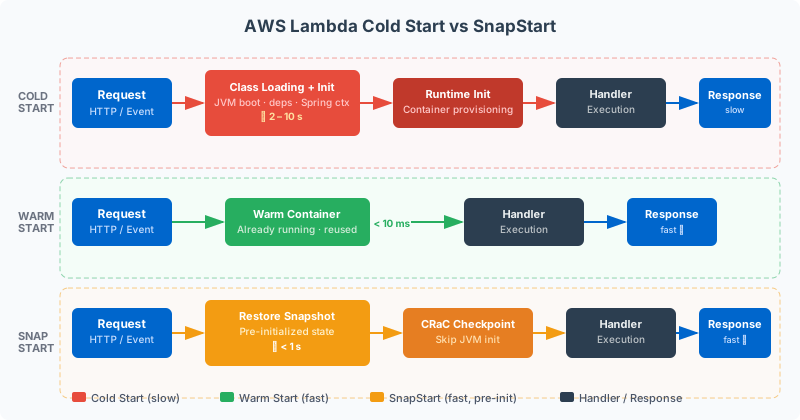
Table of Contents
- Why Cold Starts Kill Java Lambda Applications
- Understanding the Java Cold Start Lifecycle
- SnapStart: AWS's First-Class Cold Start Solver
- Spring Boot on Lambda: The Real Cost and How to Reduce It
- GraalVM Native Image for Lambda
- Optimizing Lambda Memory and Timeout Configuration
- Observability: Measuring Cold Starts in Production
- When to Choose Lambda vs Always-On Services
Why Cold Starts Kill Java Lambda Applications
A cold start occurs whenever AWS Lambda must provision a new execution environment for your function — either because the function has never been invoked, its previous environment was reclaimed during idle periods, or concurrency is scaling up to handle a traffic spike. During a cold start, Lambda must download your deployment package, initialize the runtime, and execute your handler's initialization code before it can process the first request. For interpreted runtimes like Python and Node.js, this takes 100–400ms. For Java on the JVM, the same process historically took 3–15 seconds.
The JVM's cold start penalty is not a bug — it is the cost of the JVM's design philosophy. The Java Virtual Machine prioritizes steady-state throughput over startup time. It loads classes lazily, performs just-in-time (JIT) compilation of hot code paths after observing execution patterns, and initializes garbage collectors with complex heap structures. These activities happen during the first seconds of execution and are precisely what makes JVM applications run blazing fast after warmup. But in Lambda's execution model, every cold start is a fresh JVM that must repeat all of this initialization work.
To understand the severity, consider concrete numbers. A minimal Java 21 Corretto Lambda with a simple request handler and no framework takes approximately 800ms–1.2s to cold-start. Add Spring Boot's application context initialization — component scanning, dependency injection wiring, auto-configuration processing — and that rises to 6–12 seconds for a full Spring Boot application with a moderate number of beans. In contrast, Python and Node.js Lambda functions cold-start in 150–400ms, and Go functions in 50–150ms. This gap makes naive Java Lambda deployments non-competitive for synchronous user-facing APIs where latency SLAs are below two seconds.
Cold starts disproportionately affect certain traffic patterns. APIs with bursty traffic — morning load spikes, weekend traffic waves, or seasonal peaks — trigger the most cold starts because Lambda scales out by adding new execution environments. The first request to each new environment experiences the full cold start penalty. A traffic spike from 10 to 100 concurrent requests means Lambda must initialize 90 new execution environments simultaneously, each imposing its cold start cost on a real user request. Low-traffic functions that go idle between requests (such as cron jobs running every 15 minutes) cold-start on virtually every invocation because Lambda reclaims idle environments after roughly 5–15 minutes of inactivity.
The business impact is measurable. A 10-second cold start on a checkout API causes immediate cart abandonment. A slow-starting Lambda behind an API Gateway will breach the 29-second timeout limit for integrations during extended cold starts with complex frameworks. Monitoring dashboards that show average latency of 250ms can be deceptive if 5% of requests — all cold starts — take 8+ seconds, destroying P99 latency SLAs. Cold starts are not a theoretical concern; they are a production SLA problem that must be engineered away for Java Lambda to be viable in latency-sensitive workloads.
The good news is that the Java cold start problem is now largely solved through a combination of AWS SnapStart, architectural discipline around initialization code, GraalVM Native Image, and careful memory configuration. Teams that apply these techniques report Java Lambda cold starts in the 200–800ms range — competitive with interpreted runtimes and, in the case of GraalVM native, often faster. This post walks through each technique, its trade-offs, and when to apply it.
Understanding the Java Cold Start Lifecycle
Before optimizing cold starts, you must understand precisely what happens during one. Lambda's cold start lifecycle has four distinct phases, each with different optimization leverage. Knowing which phase consumes the most time in your specific function determines which optimization technique delivers the highest return.
The first phase is Environment Provisioning: AWS allocates a microVM (using Firecracker), assigns CPU and memory resources, and prepares the execution environment. This phase is entirely managed by AWS and not directly optimizable. It typically takes 50–200ms and is consistent across runtimes. The only indirect lever is memory configuration — higher memory allocation gives the environment more CPU proportionally, slightly reducing subsequent phases.
The second phase is Runtime Initialization: the Java 21 Corretto runtime starts, the JVM boots, and the Lambda runtime agent connects to the Lambda service's internal API to receive invocations. For Java, this includes JVM startup, class loader initialization, and bootstrap class loading. This phase takes approximately 300–600ms for Java 21 and is dominated by JVM bootstrap time.
The third and most variable phase is Handler Initialization: your static initializers, constructor code, and any code in the Lambda handler class's initialization path runs. This is the phase where Spring Boot's ApplicationContext, Quarkus's CDI container, or Micronaut's DI framework initializes. It is the phase most within your control and where optimization has the greatest impact. For a bare Java Lambda handler this is near zero; for a full Spring Boot application this is 5–11 seconds.
The fourth phase is First Invocation: after initialization, Lambda delivers the queued invocation event to your handler. The JVM has not yet JIT-compiled any of your application's hot paths, so the first few invocations run in interpreted mode and are slower than steady-state. This "JIT warmup" effect means even after a cold start completes, the first 10–50 invocations may run at 2–5× slower than warmed-up throughput.
You can measure each phase independently. Lambda's CloudWatch Logs include an INIT_DURATION line in the REPORT log entry for cold starts: REPORT RequestId: abc-123 Duration: 245.12 ms Billed Duration: 246 ms Memory Size: 1024 MB Max Memory Used: 312 MB Init Duration: 7823.45 ms. The Init Duration field precisely measures phases 2 and 3 combined — everything before your handler processes its first event. This is the number to track and minimize.
Understanding initialization versus invocation time also informs architectural decisions. If your function's Init Duration is 8 seconds but request Duration is 50ms, you have a 160:1 ratio of initialization cost to execution cost. This means even a moderate cold start frequency — say 1% of invocations — has a disproportionate impact on P99 latency. It also means SnapStart's approach of amortizing initialization cost across all invocations is particularly high-value for this type of function.
SnapStart: AWS's First-Class Cold Start Solver
AWS SnapStart, released in November 2022 and significantly expanded in 2023–2024, is the most impactful cold start optimization available for Java Lambda. It works by executing your function's initialization phase once during deployment, taking a snapshot of the resulting JVM memory and disk state using a mechanism called CRIU (Checkpoint/Restore In Userspace), and restoring that snapshot when new execution environments are needed. Instead of re-running 8 seconds of Spring Boot initialization on every cold start, Lambda restores a pre-initialized memory snapshot in under 200ms.
The performance improvement is dramatic and measured. AWS's own benchmarks show SnapStart reduces Java Lambda cold starts from an average of 8–12 seconds (for typical Spring Boot applications) to consistently under 1 second — typically in the 200–600ms range. In real-world measurements, teams report Init Duration dropping from 9,000ms to 400ms on the same application binary without any code changes, purely from enabling SnapStart. This brings Java Lambda performance within 2–3× of Python/Node.js cold starts and makes Java viable for synchronous user-facing APIs.
SnapStart requires Java 11 Corretto or later (Java 21 Corretto is recommended), and as of 2024 is supported on arm64 (Graviton2) in addition to x86_64. To enable it, set the SnapStart property on your Lambda function with ApplyOn: PublishedVersions and publish a version. SnapStart only activates on published versions — it does not apply to $LATEST. This means your CI/CD pipeline must publish a new version on every deployment for SnapStart to take effect.
# AWS SAM template with SnapStart enabled
AWSTemplateFormatVersion: '2010-09-09'
Transform: AWS::Serverless-2016-10-31

Globals:
  Function:
    Runtime: java21
    Architectures: [arm64]
    MemorySize: 1024
    Timeout: 30
    SnapStart:
      ApplyOn: PublishedVersions

Resources:
  OrderProcessorFunction:
    Type: AWS::Serverless::Function
    Properties:
      Handler: com.example.OrderHandler::handleRequest
      CodeUri: target/order-processor.jar
      AutoPublishAlias: live
      Environment:
        Variables:
          SPRING_PROFILES_ACTIVE: prod
          AWS_REGION: us-east-1
      Events:
        ApiGateway:
          Type: HttpApi
          Properties:
            Path: /orders
            Method: POST
SnapStart introduces a subtle but critical constraint: your initialization code must be idempotent with respect to the restored execution environment. When Lambda restores a snapshot, the JVM state (heap, thread state, class metadata) is identical to what it was when the snapshot was taken — but the execution environment (network interfaces, file descriptors, random seeds, system clocks) is different. This means any initialization code that captures environment-specific state — such as generating a UUID during static initialization, establishing database connections, or caching the current timestamp — will capture stale values that become incorrect after snapshot restoration.
AWS provides two lifecycle hooks, CRaC (Coordinated Restore at Checkpoint) compatible interfaces, for handling this: beforeCheckpoint and afterRestore. Code in beforeCheckpoint runs before the snapshot is taken and should release resources that cannot survive snapshot-restore (open sockets, file locks). Code in afterRestore runs after the snapshot is restored and should re-establish those resources. The aws-lambda-java-core library exposes these hooks through the SnapStartInitializer interface.
import com.amazonaws.services.lambda.runtime.Context;
import com.amazonaws.services.lambda.runtime.RequestHandler;
import org.crac.Core;
import org.crac.Resource;
import software.amazon.awssdk.services.dynamodb.DynamoDbClient;
import software.amazon.awssdk.services.ssm.SsmClient;

public class OrderHandler implements RequestHandler<APIGatewayProxyRequestEvent, APIGatewayProxyResponseEvent>, Resource {

    private static DynamoDbClient dynamoDbClient;
    private static String configValue;

    static {
        // Safe: registering for CRaC lifecycle hooks
        Core.getGlobalContext().register(new OrderHandler());
        // Safe: config fetched at init — will be refreshed in afterRestore
        configValue = System.getenv("FEATURE_FLAGS");
    }

    @Override
    public void beforeCheckpoint(org.crac.Context<? extends Resource> context) {
        // Release connections that cannot survive snapshot-restore
        if (dynamoDbClient != null) {
            dynamoDbClient.close();
            dynamoDbClient = null;
        }
    }

    @Override
    public void afterRestore(org.crac.Context<? extends Resource> context) {
        // Re-establish connections with fresh credentials after restore
        dynamoDbClient = DynamoDbClient.builder()
            .region(Region.of(System.getenv("AWS_REGION")))
            .build();
        // Refresh any time-sensitive config
        configValue = System.getenv("FEATURE_FLAGS");
    }

    @Override
    public APIGatewayProxyResponseEvent handleRequest(
            APIGatewayProxyRequestEvent event, Context context) {
        // dynamoDbClient is guaranteed fresh after afterRestore
        return processOrder(event, dynamoDbClient);
    }

    private APIGatewayProxyResponseEvent processOrder(
            APIGatewayProxyRequestEvent event, DynamoDbClient client) {
        // Business logic here
        return new APIGatewayProxyResponseEvent()
            .withStatusCode(200)
            .withBody("{\"status\":\"accepted\"}");
    }
}
One important operational consideration: SnapStart snapshots are tied to a specific published Lambda version. When you deploy a new version, Lambda re-runs initialization on the new code, creates a new snapshot, and associates it with the new version. This means deployments for SnapStart-enabled functions take longer — typically 30–90 extra seconds during which AWS runs your initialization and captures the snapshot. Factor this into your CI/CD pipeline SLAs. The tradeoff is worthwhile: slower deployments that are invisible to users versus fast deployments with 8-second cold starts that affect real traffic.
SnapStart is not available in all regions and has specific limitations: it does not support provisioned concurrency (though you rarely need both — SnapStart eliminates the need for provisioned concurrency in most cases), and it requires your function to tolerate the CRaC lifecycle hooks pattern. Lambda layers and VPC configuration are fully supported. For the vast majority of Spring Boot Lambda functions, SnapStart is the single highest-impact optimization available and should be the first technique applied.
Spring Boot on Lambda: The Real Cost and How to Reduce It
Spring Boot's application context initialization is the dominant driver of Java Lambda cold start times. Understanding precisely what Spring Boot does during startup — and what you can skip for a serverless workload — reveals significant optimization opportunities beyond SnapStart. Even with SnapStart enabled, optimizing Spring Boot initialization reduces the time to take and restore snapshots, improves memory footprint, and makes your Lambda more resilient to environments where SnapStart may not be available.
The aws-serverless-java-container library from AWS provides the recommended approach for running Spring Boot applications as Lambda functions. It wraps Spring Boot's SpringApplication in a Lambda-compatible handler, translating API Gateway events into HttpServletRequest objects that Spring MVC can process. The key insight is that you initialize the Spring ApplicationContext once during the Lambda handler's static initialization, and reuse it across all invocations of the same execution environment — turning the cold start cost into a one-time fixed cost amortized over the lifetime of the execution environment.
import com.amazonaws.serverless.exceptions.ContainerInitializationException;
import com.amazonaws.serverless.proxy.model.*;
import com.amazonaws.serverless.proxy.spring.SpringBootLambdaContainerHandler;
import com.amazonaws.services.lambda.runtime.Context;
import com.amazonaws.services.lambda.runtime.RequestStreamHandler;
import java.io.*;

public class StreamLambdaHandler implements RequestStreamHandler {

    private static SpringBootLambdaContainerHandler<AwsProxyRequest, AwsProxyResponse> handler;

    static {
        try {
            // ApplicationContext initialized once at class load time
            handler = SpringBootLambdaContainerHandler.getAwsProxyHandler(Application.class);
            // Warm up Spring's DispatcherServlet on first init
            handler.onStartup(null);
        } catch (ContainerInitializationException e) {
            throw new RuntimeException("Could not initialize Spring Boot application", e);
        }
    }

    @Override
    public void handleRequest(InputStream inputStream, OutputStream outputStream, Context context)
            throws IOException {
        handler.proxyStream(inputStream, outputStream, context);
    }
}
Spring Boot's component scanning is one of the largest contributors to initialization time. By default, Spring scans all classes on the classpath looking for @Component, @Service, @Repository, and @Controller annotations. In a Lambda function with 20MB of JAR dependencies, this scan can process thousands of classes. Restrict component scanning to your application's own packages: @SpringBootApplication(scanBasePackages = "com.example.orders"). This alone can reduce initialization time by 500ms–2s on complex classpaths.
Spring Boot's auto-configuration — the magic behind spring-boot-autoconfigure — evaluates hundreds of @ConditionalOn* conditions during startup to decide which beans to create. For a Lambda function, many auto-configurations are irrelevant: you do not need embedded Tomcat (you are not listening on a port), Spring MVC's view resolvers (you are returning JSON), or Spring Boot's actuator endpoints (you have no long-running process to monitor). Disable unnecessary auto-configurations explicitly:
@SpringBootApplication(
    scanBasePackages = "com.example.orders",
    exclude = {
        DataSourceAutoConfiguration.class,
        DataSourceTransactionManagerAutoConfiguration.class,
        HibernateJpaAutoConfiguration.class,
        WebMvcAutoConfiguration.class,
        TaskExecutionAutoConfiguration.class,
        WebFluxAutoConfiguration.class,
        ReactiveWebServerFactoryAutoConfiguration.class,
        ManagementWebServerFactoryAutoConfiguration.class
    }
)
public class Application {
    public static void main(String[] args) {
        SpringApplication app = new SpringApplication(Application.class);
        app.setWebApplicationType(WebApplicationType.NONE);
        app.run(args);
    }
}
Setting WebApplicationType.NONE is particularly impactful: it tells Spring Boot not to create a web server context at all, skipping Tomcat/Jetty/Netty initialization entirely. Combined with the exclusions above, this can reduce initialization time by 1–3 seconds on a typical Spring Boot Lambda function. The trade-off is that you lose Spring MVC's request mapping, meaning your handler method must manually deserialize the Lambda event payload and serialize the response — but this is exactly the right separation of concerns for a Lambda function.
Lazy bean initialization (spring.main.lazy-initialization=true) is another lever: beans are created only when first accessed rather than eagerly at context startup. For Lambda, this defers bean creation to the first invocation rather than initialization, which can improve Init Duration at the cost of slightly slower first invocations. With SnapStart, lazy initialization is counterproductive — you want maximum pre-warming during initialization (snapshot time) so that the restored snapshot has all beans pre-created and ready. Without SnapStart, lazy initialization helps cold starts but creates variability in first-invocation latency.
Class data sharing (CDS) and AppCDS are JVM features that cache parsed class bytecode in a shared archive, reducing class loading time on subsequent JVM starts. On Lambda, you can include an AppCDS archive in your deployment package: build the archive during the Maven/Gradle build, include it in your ZIP or JAR, and configure the JVM to use it via _JAVA_OPTIONS=-XX:SharedArchiveFile=app-cds.jsa in your Lambda environment variables. This reduces class loading time by 20–40% and is orthogonal to SnapStart — useful as a complement or as the primary technique when SnapStart is unavailable.
GraalVM Native Image for Lambda
GraalVM Native Image compiles Java code ahead-of-time into a native executable using static analysis to determine which classes, methods, and fields are reachable. The resulting binary starts in milliseconds (50–250ms) and uses 30–70% less memory than an equivalent JVM application — both properties ideal for AWS Lambda. On Lambda, GraalVM native executables are deployed using the provided.al2023 custom runtime, where your native binary acts as the Lambda bootstrap executable.
The cold start comparison between approaches is stark:
Spring Boot 3.x with its built-in GraalVM native image support (Spring AOT) is the recommended path for GraalVM native Lambda deployments. Spring Boot 3's AOT engine runs at build time, analyzing your application context configuration and generating optimized initialization code that replaces runtime reflection and classpath scanning with pre-computed metadata. This is what makes Spring Boot 3 native images practical — without AOT, GraalVM native compilation of a Spring Boot application fails or requires extensive manual reflection configuration.
Building a Spring Boot 3 native image for Lambda requires a multi-stage Docker build using GraalVM Community Edition (or Mandrel, Red Hat's GraalVM distribution optimized for Linux container builds). The Maven build uses the native profile provided by spring-boot-starter-parent:
# Multi-stage Dockerfile for Spring Boot 3 GraalVM Native Lambda
FROM ghcr.io/graalvm/native-image-community:21 AS builder
WORKDIR /build

COPY pom.xml .
COPY src ./src

# Run Spring AOT processing and GraalVM native compilation
# Build takes 5-15 minutes; result is a ~40MB standalone binary
RUN mvn -Pnative -Dnative.skipTests=true \
    -Dspring.aot.enabled=true \
    native:compile -q

# Custom Lambda runtime image using Amazon Linux 2023
FROM public.ecr.aws/lambda/provided:al2023
COPY --from=builder /build/target/order-processor ${LAMBDA_TASK_ROOT}/bootstrap
CMD ["bootstrap"]
The resulting native executable is deployed as a container image Lambda function using the provided.al2023 runtime. The native binary starts in 50–250ms — comparable to Go — while retaining all the Java ecosystem libraries your application depends on. The trade-off is significant build complexity: native image compilation takes 5–15 minutes, requires 4–8GB of memory during the build, and demands explicit reflection configuration for any libraries that use dynamic class loading (which is common in Java). Any code path reachable through reflection must be declared in a reflect-config.json file or via Spring AOT's compile-time annotations.
GraalVM native image also has a critical limitation: it does not support JIT compilation. The native executable runs entirely in ahead-of-time compiled mode, which means it lacks the dynamic optimization capabilities of the JVM's C2 JIT compiler. For CPU-intensive workloads, GraalVM native can underperform a warmed JVM by 10–30% at steady state. For Lambda functions where requests are short-lived (under 500ms) and JIT warmup never fully occurs anyway, this trade-off is favorable — you get fast cold starts without sacrificing steady-state performance relative to what you would actually achieve in Lambda's execution model.
Optimizing Lambda Memory and Timeout Configuration
Lambda's memory configuration has a non-obvious relationship with cold start performance. AWS allocates CPU proportionally to memory: a 128MB function receives 0.08 vCPU, a 1024MB function receives 0.64 vCPU, and a 1769MB function receives approximately 1 full vCPU. More memory means more CPU, which directly accelerates JVM class loading, JIT compilation, and Spring Boot initialization — all CPU-intensive operations that dominate cold start time.
Empirically, increasing memory from 512MB to 1024MB typically reduces Java Lambda cold start times by 35–50%. Increasing from 1024MB to 2048MB provides an additional 15–25% reduction. The diminishing returns above 2048MB for cold start optimization are real, but the cost increase is proportional — Lambda billing is memory × duration, so a 2× memory increase that reduces cold start duration by 50% has roughly neutral cost impact. The sweet spot for most Java Spring Boot Lambda functions is 1024–2048MB, where cold start times and costs are both acceptable.
Timeout configuration is a related but separate concern. Lambda's default timeout is 3 seconds, which is insufficient for Java cold starts — your function will time out during initialization before even processing the first request. Set timeouts generously during development (30 seconds) and tune down during optimization once you have Init Duration baselines. A good heuristic: set timeout to 3× your observed P99 Init Duration + P99 handler duration. For a function with 800ms cold starts and 200ms handler execution, a 3-second timeout is appropriate for warmed invocations but may kill occasional cold starts — use 5 seconds to provide adequate headroom.
Provisioned Concurrency eliminates cold starts entirely by pre-initializing a specified number of execution environments and keeping them warm. It is the nuclear option: expensive but completely eliminates cold start latency for the pre-warmed capacity. With SnapStart available for Java 11+, provisioned concurrency is rarely the right choice for Java functions — SnapStart achieves similar cold start reduction at a fraction of the cost. Reserve provisioned concurrency for functions where even 200ms cold start is unacceptable (real-time trading systems, emergency dispatch APIs) or for functions that cannot use SnapStart due to technical constraints.
Lambda Power Tuning is an open-source AWS Step Functions state machine that automatically benchmarks your Lambda function at multiple memory configurations and identifies the optimal setting for your target (minimum cost, minimum duration, or a balanced trade-off). Run it as part of your deployment pipeline to calibrate memory settings whenever your function's code or dependencies change significantly. The tool invokes your function multiple times at each memory setting (128MB, 256MB, 512MB, 1024MB, 2048MB, 3008MB) and generates a report with cost and performance trade-off curves.
Observability: Measuring Cold Starts in Production
Effective cold start optimization requires accurate measurement. Without observability, you cannot tell whether your optimization techniques are working, whether cold start frequency is acceptable for your traffic pattern, or whether a new deployment introduced a regression. Lambda provides first-class cold start telemetry through CloudWatch, but extracting actionable insights requires deliberate configuration.
The most direct signal is the Init Duration field in Lambda's REPORT log lines, which appears only on cold start invocations. You can extract it with a CloudWatch Logs Insights query and create a dashboard tracking cold start frequency and duration over time:
-- CloudWatch Logs Insights query for cold start analysis
fields @timestamp, @requestId, @duration, @initDuration, @memorySize, @maxMemoryUsed
| filter ispresent(@initDuration)
| stats
    count() as coldStarts,
    avg(@initDuration) as avgInitMs,
    pct(@initDuration, 50) as p50InitMs,
    pct(@initDuration, 95) as p95InitMs,
    pct(@initDuration, 99) as p99InitMs,
    max(@initDuration) as maxInitMs
  by bin(5m)
| sort @timestamp desc
Lambda also publishes a ColdStart custom metric via CloudWatch EMF (Embedded Metrics Format) when you use the AWS Lambda Powertools for Java library. Powertools is the recommended observability library for Java Lambda and provides structured logging, custom metrics, and distributed tracing with X-Ray integration through simple annotations:
import software.amazon.lambda.powertools.logging.Logging;
import software.amazon.lambda.powertools.metrics.Metrics;
import software.amazon.lambda.powertools.tracing.Tracing;
import software.amazon.lambda.powertools.metrics.MetricsUtils;
import software.amazon.cloudwatchlogs.emf.model.DimensionSet;

public class OrderHandler implements RequestHandler<APIGatewayProxyRequestEvent, APIGatewayProxyResponseEvent> {

    @Logging(logEvent = true, samplingRate = 0.1)
    @Tracing(captureMode = CaptureMode.RESPONSE_AND_ERROR)
    @Metrics(namespace = "OrderService", service = "OrderProcessor")
    @Override
    public APIGatewayProxyResponseEvent handleRequest(
            APIGatewayProxyRequestEvent event, Context context) {

        MetricsUtils.withSingleMetric("OrderProcessed", 1, Unit.COUNT, "OrderService",
            metric -> metric.addDimension(DimensionSet.of("Environment", "prod")));

        return processOrder(event);
    }
}
AWS X-Ray provides distributed tracing across the entire request path — from API Gateway through Lambda into downstream services like DynamoDB and SQS. X-Ray automatically captures Lambda cold start duration as a separate subsegment in the trace, making it easy to correlate cold starts with downstream latency and identify which downstream call is the bottleneck during initialization. Enable X-Ray active tracing on your Lambda function and downstream AWS SDK calls to build a complete latency picture.
Alarm on cold start rate and duration separately. A CloudWatch alarm that fires when P95 Init Duration exceeds 2 seconds over a 5-minute period catches SnapStart degradation (which happens when snapshots become stale after code changes) and initialization regressions from new dependencies. A separate alarm on cold start count percentage (cold starts / total invocations > 5%) catches traffic pattern changes that may require adjusting provisioned concurrency or investigating idle periods.
Beyond Lambda-specific metrics, instrument your initialization code with timing spans to understand where time is spent during cold starts. A custom @PostConstruct timing block in each Spring component reveals which beans are slowest to initialize and guides refactoring efforts. Track these timings in CloudWatch custom metrics and you will have a precise breakdown of initialization time across your entire Spring context — invaluable when a new library dependency suddenly adds 500ms to your cold starts.
When to Choose Lambda vs Always-On Services
AWS Lambda is not the right compute platform for every Java workload, and understanding when to choose Lambda versus ECS, EKS, or EC2 is as important as knowing how to optimize Lambda performance. The cold start problem — even when mitigated by SnapStart and GraalVM — represents a fundamental architectural constraint that makes Lambda inappropriate for certain workload classes.
Lambda is an excellent choice for event-driven processing workloads: S3 event triggers, SQS message processing, DynamoDB Streams consumers, EventBridge rule handlers, and SNS subscribers. These workloads are inherently asynchronous; the consumer that calls your Lambda is not blocking a user request, so even a 1-second cold start has no user-visible impact. Lambda's automatic scaling from zero to thousands of concurrent invocations without any infrastructure management is uniquely valuable here. A DynamoDB Streams processor that fires on every write scales seamlessly to handle millions of records per second without any capacity planning.
Lambda is also well-suited for infrequently invoked APIs with relaxed latency requirements. If your admin portal processes 50 requests per day, paying for always-on ECS containers running 24/7 is wasteful. A Lambda function that cold-starts on the first request and serves subsequent requests from a warm environment is orders of magnitude cheaper. The break-even point between Lambda and always-on ECS typically occurs at around 3–5 million monthly invocations for compute-cost calculations — below this, Lambda is almost always cheaper even at higher memory allocations.
Lambda becomes problematic for synchronous, user-facing APIs with strict P99 latency SLAs below 500ms. Even with SnapStart reducing cold starts to 200–600ms, P99 latency will be dominated by cold start events during traffic spikes. If your API SLA requires P99 under 200ms, Lambda with JVM runtime cannot reliably meet it without provisioned concurrency. GraalVM native can achieve 50–150ms cold starts, making 200ms P99 feasible, but at significant build and operational complexity. For truly latency-sensitive APIs at scale, always-on ECS/EKS with proper horizontal pod autoscaling often delivers better P99 reliability.
Long-running operations are a poor fit for Lambda's 15-minute maximum execution time limit. Batch jobs that process large datasets, machine learning inference pipelines, or video transcoding tasks that routinely run for 20–60 minutes are better served by AWS Batch, ECS tasks, or EC2 Spot instances. Similarly, stateful services that maintain in-memory state across requests — real-time collaborative document editors, long-lived WebSocket connections, or multiplayer game servers — cannot be implemented on Lambda, which provides no guarantee that the same execution environment handles consecutive requests from the same client.
The practical decision framework: start with Lambda for new Java microservices if the workload is event-driven or if you have uncertainty about traffic volume. Enable SnapStart immediately for any function using Spring Boot. Migrate to ECS/EKS when you observe consistent cold start rates above 10% of invocations (indicating Lambda is not keeping environments warm), when P99 latency SLAs cannot be met with SnapStart, or when your function consistently runs for more than 5 minutes. The serverless architecture's operational simplicity — no cluster management, no capacity planning, no OS patching — is a genuine competitive advantage worth preserving as long as the workload characteristics allow it.
A hybrid approach is often optimal at the system level: use Lambda for event-driven background processing (order fulfillment, notifications, data pipeline steps) alongside always-on ECS for the synchronous user-facing API layer. This combines Lambda's cost efficiency and operational simplicity for async workloads with ECS's consistent low latency for synchronous APIs. The Spring Boot codebase can be shared between both deployment targets — the same @Service and @Repository classes deploy as Lambda handlers or as ECS container workloads by swapping the entry point and removing or keeping the embedded Tomcat, respectively.
Key Takeaways
- Enable SnapStart first: For Spring Boot Lambda functions on Java 11+, SnapStart reduces cold starts from 8–12s to under 600ms with no code changes. It is the highest-impact, lowest-effort optimization available and should be the default for all new Java Lambda deployments.
- Implement CRaC lifecycle hooks: Any initialization code that captures environment-specific state (connections, timestamps, random seeds) must be moved to
afterRestorehooks. Failing to do so produces subtle bugs where stale state from the snapshot is used in restored environments. - Disable unnecessary Spring auto-configurations: Set
WebApplicationType.NONE, exclude irrelevant auto-configurations, and restrict component scanning to your application packages. These changes can reduce Init Duration by 1–3 seconds and are effective whether or not SnapStart is used. - Size memory at 1024–2048MB: Lambda's CPU allocation is proportional to memory. Underallocated functions (128–512MB) suffer disproportionately long cold starts because JVM initialization is CPU-bound. The 1024MB tier is often the cost-optimal configuration for Java Lambda functions.
- Choose GraalVM native for sub-100ms cold starts: GraalVM Native Image with Spring Boot 3 AOT achieves 50–250ms cold starts at the cost of 5–15 minute build times and reflection configuration overhead. Use it when SnapStart's 200–600ms is insufficient and provisioned concurrency costs are prohibitive.
- Instrument with Powertools and X-Ray: Lambda Powertools for Java provides structured logging, EMF metrics, and X-Ray tracing through annotations. Always measure Init Duration separately from handler Duration in CloudWatch Logs Insights to track optimization progress.
- Know when Lambda is wrong: Lambda is ideal for event-driven and infrequent workloads; it struggles for synchronous APIs with sub-200ms P99 SLAs, stateful services, and operations exceeding 15 minutes. Match the runtime model to the workload characteristics.
Leave a Comment
Related Posts

Software Engineer · Java · Spring Boot · Microservices