HikariCP Connection Pool Exhaustion in Spring Boot: Diagnosis, Tuning, and Production Fixes
Connection pool exhaustion is one of the most disruptive database failures in production Spring Boot services. Requests queue up, threads pile on, and a 30-second timeout cascade turns a minor traffic spike into a full outage. This guide walks through real diagnosis, root cause analysis, and production-proven HikariCP configuration that prevents these failures. Part of the Java Performance Engineering series.
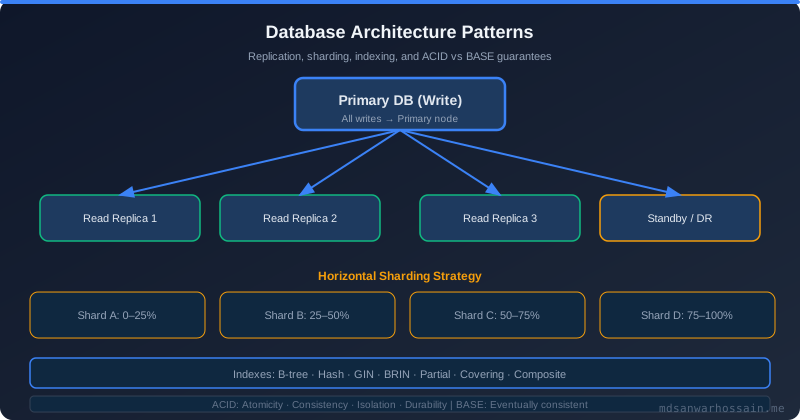
Table of Contents
The Production Incident
Black Friday. 11:42 AM. The e-commerce checkout service starts shedding orders. Monitoring dashboards go red. The error flooding the logs is unmistakable:
com.zaxxer.hikari.pool.HikariPool$PoolInitializationException:
  Failed to initialize pool: Connection is not available, request timed out after 30000ms.
    at com.zaxxer.hikari.pool.HikariPool.checkFailFast(HikariPool.java:576)
    at com.example.CheckoutService.processOrder(CheckoutService.java:87)
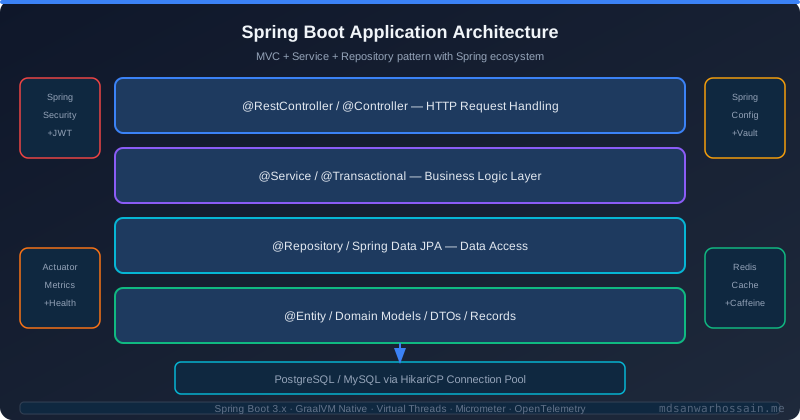
The first instinct is to call the DBA. The DBA checks and reports back: the PostgreSQL server has only 40 active connections out of a configured maximum of 200. The database is not under pressure. Queries are running in under 10ms. And yet HikariCP is throwing SQLTransientConnectionException: Connection is not available, request timed out after 30000ms on every checkout attempt.
What is actually happening? The pool is sized at 10 connections. Under the Black Friday traffic spike, all 10 connections are occupied. New requests join a wait queue inside HikariCP. Each waiting thread holds its HTTP worker thread for up to 30 seconds (the default connectionTimeout) before giving up. Within seconds, all 200 HTTP worker threads are blocked waiting for a connection. The thread pool itself is exhausted. New incoming requests cannot even get a thread to start processing — they are rejected immediately with connection timeout errors before they ever touch the database.
The 30-second connectionTimeout was the accelerant. Instead of failing fast and shedding load gracefully, the long timeout allowed the failure queue to grow until the entire server was catatonic. The fix involved three changes: detecting and patching a connection leak in an exception path inside a @Transactional method, increasing maximum-pool-size from 10 to 20, and reducing connectionTimeout from 30,000ms to 3,000ms. After the change was deployed, the service recovered within seconds of the next traffic spike — requests that could not get a connection now failed fast within 3 seconds, allowing the load balancer to route them elsewhere instead of building an unbounded wait queue.
How HikariCP Works Internally
HikariCP's performance advantage over older pools (C3P0, DBCP2, Tomcat Pool) comes primarily from its connection tracking data structure: ConcurrentBag. A ConcurrentBag is a lock-minimizing, thread-local-cached concurrent collection that tracks each connection in one of three states: STATE_NOT_IN_USE (idle, available for borrowing), STATE_IN_USE (borrowed by an application thread), and STATE_RESERVED (being added or removed from the pool).
When a thread requests a connection, HikariCP follows this decision path:
[Connection Request]
    → [ConcurrentBag: scan thread-local list for idle connection]
        → Idle connection found? → return immediately (no locking)
        → No idle connection, pool size < maximumPoolSize? → create new connection → return
        → No idle connection, pool size = maximumPoolSize? → wait up to connectionTimeout
            → Connection returned by another thread? → return it
            → connectionTimeout elapsed with no connection? → throw SQLTransientConnectionException
The thread-local caching of previously used connections is a key HikariCP optimization. A thread that recently returned a connection is likely to request one again soon. ConcurrentBag preferentially returns that same connection to the same thread, eliminating lock contention on the shared pool structure for the common case. This is why HikariCP benchmarks often show 2–4× better throughput than DBCP2 under high concurrency, despite both implementing the same JDBC pooling contract.
HikariCP also validates connections before returning them using a fast isValid() check (or the configured connectionTestQuery). The keepalive-time property periodically sends keepalive packets on idle connections to prevent network firewalls and AWS security groups from silently dropping TCP connections that have been idle too long — a source of cryptic SocketException: connection reset errors that appear unrelated to pooling but trace directly to stale idle connections being returned from the pool.
Connection Pool Exhaustion: Root Causes
Pool exhaustion almost always has one of five root causes. Understanding which applies to your situation determines which fix to apply.
1. Long-running transactions holding connections. Every @Transactional method holds a database connection from the first SQL statement until the method returns. If the method makes an external API call while the transaction is open, the connection is held idle for the duration of that call — typically 100ms to 5 seconds. Under concurrency, this multiplies: 20 concurrent requests each holding a connection for 2 seconds blocks all 20 pool connections for 2 seconds, causing pool exhaustion even though the database itself is doing almost no work.
2. Connection leaks. An exception in a @Transactional method may — in rare bug scenarios — exit the method without the connection being properly returned. Unclosed ResultSet objects in JDBC code, or methods that bypass Spring's transaction management, can hold connections indefinitely. Leaked connections accumulate over time until the pool is exhausted, then the application fails and must be restarted.
3. Pool sized below actual concurrency. A pool of 10 connections serving 200 concurrent HTTP threads will exhaust immediately when more than 10 threads simultaneously need database access. The default HikariCP pool size is 10 — appropriate for development or low-traffic services, but dangerously undersized for production APIs.
4. Database server at max_connections. HikariCP may be configured correctly, but if the database server's max_connections is set too low or is shared with other services, HikariCP may fail to open new connections even when the pool has capacity. This produces a different error (connection refused at the TCP or authentication level) but the symptom is the same from the application perspective.
5. Slow queries holding connections longer than expected. A query that normally runs in 5ms and suddenly runs in 5 seconds (due to a missing index, lock contention, or a full table scan introduced by a data volume increase) effectively reduces connection throughput by 1000×. The pool that was adequate for 5ms queries is wildly inadequate for 5-second queries.
The most common anti-pattern is holding a transaction open during an external service call. Here is what it looks like and why it is dangerous:
// BAD: connection held for entire duration of external API call
@Transactional
public void processPayment(Order order) {
    orderRepo.save(order);           // gets DB connection
    paymentGateway.charge(order);    // holds DB connection while waiting 5 seconds for payment API
    orderRepo.updateStatus(order);   // finally releases connection
}
Under 20 concurrent checkout requests, this keeps 20 connections occupied for ~5 seconds each — the entire default pool for the duration of every payment API call. The fix is to split the external call out of the transaction boundary:
// GOOD: minimize connection hold time
public void processPayment(Order order) {
    Long orderId = saveOrder(order);           // own @Transactional, releases quickly
    paymentGateway.charge(order);              // external call WITHOUT holding connection
    updateOrderStatus(orderId, "PAID");        // own @Transactional, releases quickly
}

@Transactional
private Long saveOrder(Order order) { return orderRepo.save(order).getId(); }

@Transactional
private void updateOrderStatus(Long id, String status) { orderRepo.updateStatus(id, status); }
Each of the two database operations now holds a connection only for the duration of its own SQL statement — typically under 10ms — instead of for the 5-second payment gateway round trip. Connection throughput increases by roughly 500× for the same pool size.
Diagnosing with HikariCP Metrics and Logs
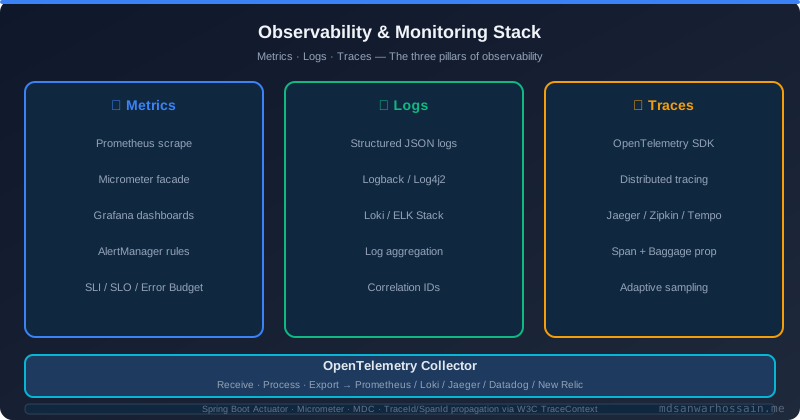
Diagnosing pool exhaustion requires visibility into pool state. HikariCP integrates with Micrometer out of the box in Spring Boot. Enable metrics and JMX beans in application.yml:
# application.yml
spring:
  datasource:
    hikari:
      pool-name: MyPool
      register-mbeans: true
management:
  metrics:
    export:
      prometheus:
        enabled: true
With this configuration, Spring Boot Actuator exposes the following HikariCP metrics via /actuator/prometheus (or /actuator/metrics):
hikaricp.connections.active— connections currently checked out by application threads. Sustained nearmaximumPoolSizeindicates the pool is running hot.hikaricp.connections.idle— connections sitting idle in the pool. If this is always 0 while active is at max, the pool is exhausted.hikaricp.connections.pending— threads currently waiting for a connection. Any value > 0 means the pool is exhausted right now. A Prometheus alert onhikaricp_connections_pending > 0 for 30sis the single most useful HikariCP production alert you can configure.hikaricp.connections.acquire— histogram of connection acquisition time. P99 acquisition time above 100ms is a leading indicator of impending exhaustion.hikaricp.connections.timeout.total— cumulative count of connection timeout events. Any non-zero value in production is a problem.
For connection leak detection, add the leak-detection-threshold setting:
spring.datasource.hikari.leak-detection-threshold: 2000 # ms
HikariCP will log a warning with a full stack trace if any connection is held by application code for more than 2,000ms without being returned. This catches the long-transaction-holding-external-API-call pattern immediately:
[2026-03-22T10:45:23.001+0000] WARN  c.z.h.p.ProxyLeakTask - Connection leak detection triggered for
conn: HikariProxyConnection@1234567890 on thread http-nio-8080-exec-3, stack trace follows
    at com.example.CheckoutService.processPayment(CheckoutService.java:87)
The stack trace points directly at the offending line of application code. In production, set leak-detection-threshold to a value slightly above your expected longest legitimate transaction duration — typically 2,000–5,000ms. Set it too low and normal slow queries will flood the logs with false positives; too high and real leaks take longer to surface.
Optimal Pool Size Formula
The HikariCP team's recommended formula for pool sizing is:
pool_size = Tn × (Cm - 1) + 1
Where Tn is the number of threads that can simultaneously access the database, and Cm is the maximum number of simultaneous connections a single thread can hold (typically 1 for most Spring Boot services, sometimes 2 for nested transactions). For a service with 20 threads each holding 1 connection: 20 × (1 - 1) + 1 = 1 — obviously wrong for most use cases. This formula is the theoretical minimum to avoid deadlock, not the optimal operating size.
The more practical formula comes from the PostgreSQL wiki, validated empirically across many database workloads:
pool_size = (core_count × 2) + effective_spindle_count
For a typical Spring Boot service on a 4-core application server communicating with a single PostgreSQL instance on SSDs: (4 × 2) + 1 = 9 connections. Round up to 10. This accounts for the mix of CPU-bound query execution and I/O-bound wait time on the database server side.
The counter-intuitive insight from HikariCP's own benchmarks: a smaller pool often outperforms a larger pool. In controlled benchmarks with a PostgreSQL database on a 4-core server, a pool of 10 connections achieved 16,000 transactions per second. Increasing the pool to 100 connections dropped throughput to 9,000 TPS — a 44% regression. The cause is database-side CPU context switching overhead: with 100 active connections, the database CPU spends proportionally more time switching between connection contexts and less time actually executing queries.
For production Spring Boot services, start with maximum-pool-size between 10 and 20. Monitor hikaricp.connections.pending and hikaricp.connections.acquire P99 under peak load. Increase pool size only if pending connections are consistently above 0 and acquisition P99 is above 100ms — and only after ruling out connection leaks and long-running transactions as the true root cause.
Connection Leak Detection
Connection leaks are insidious because they accumulate slowly. The application works fine for hours or days, then begins failing as leaked connections fill the pool. By the time the failure is visible, the leak may have been occurring since the last deployment. Three approaches help detect leaks before they cause outages.
Approach 1: HikariCP leakDetectionThreshold. As described in the metrics section, this built-in feature logs a stack trace for any connection held beyond the threshold. It is the fastest way to identify the offending code path. Enable it with a 2–5 second threshold in all environments, including production.
Approach 2: Prometheus alerting on pending connections. Configure an alert that fires when hikaricp_connections_pending > 0 persists for more than 30 seconds. The pending metric crossing zero means the pool is exhausted — either a sudden traffic spike or a slow accumulation of leaked connections. Combine with hikaricp_connections_timeout_total rate to distinguish transient spikes from leaks.
Approach 3: Thread dump analysis. When the application is in a pool-exhausted state, take a thread dump using jcmd <pid> Thread.print or via /actuator/threaddump. Look for threads blocked in HikariCP's connection acquisition path:
"http-nio-8080-exec-42" #87 daemon prio=5
    java.lang.Thread.State: WAITING
    at com.zaxxer.hikari.pool.HikariPool.getConnection(HikariPool.java:213)
    at com.example.OrderService.findById(OrderService.java:45)
    - waiting to lock <0x000000076b1a2d40> (a java.util.concurrent.locks.ReentrantLock)
Multiple threads blocked in HikariPool.getConnection() confirms pool exhaustion. The frames above the HikariCP call in each thread dump entry show which application code is waiting for a connection. Cross-referencing with threads that have connections (those in active database calls) reveals which code path is holding connections for too long — these are your suspects for both leaks and long-running transactions.
For long-running connection holds that are not leaks (transactions legitimately taking 5+ seconds), the fix is architectural: break the transaction into shorter segments as shown in the bad/good code example above, or investigate whether the slow database operation can be optimized with query tuning, indexing, or caching.
Advanced HikariCP Configuration
The following configuration represents a production-hardened HikariCP setup for a Spring Boot service handling high-traffic workloads. Each parameter is chosen with a specific failure mode in mind:
spring:
  datasource:
    hikari:
      maximum-pool-size: 20
      minimum-idle: 5
      connection-timeout: 3000       # 3s — fail fast, don't queue 30s
      idle-timeout: 600000           # 10 min idle before removing
      max-lifetime: 1800000          # 30 min max connection lifetime
      keepalive-time: 30000          # 30s TCP keepalive
      validation-timeout: 1000       # 1s connection validation
      connection-test-query: "SELECT 1"
      leak-detection-threshold: 2000 # log stack trace if connection held > 2s
      data-source-properties:
        cachePrepStmts: true
        prepStmtCacheSize: 250
        prepStmtCacheSqlLimit: 2048
        useServerPrepStmts: true      # MySQL only
connection-timeout: 3000 is the most critical change from the default 30,000ms. A 3-second timeout means that when the pool is exhausted, requests fail fast — the caller gets an error in 3 seconds instead of occupying a thread for 30 seconds. This prevents the cascading thread exhaustion scenario from the opening incident. Set this to the highest value your SLA allows while still being shorter than your load balancer's connection idle timeout and your upstream service's read timeout.
max-lifetime: 1800000 (30 minutes) is a critical setting often overlooked. HikariCP proactively retires connections that have been alive for longer than max-lifetime, replacing them with fresh connections. This prevents the "Communications link failure" error that occurs when a database server closes a connection that HikariCP believes is still valid. Cloud-hosted databases (Amazon RDS, Cloud SQL, Azure Database) typically close idle connections at 10–30 minutes. Set max-lifetime to at least 60 seconds less than the database server's wait_timeout (MySQL default: 28,800 seconds / 8 hours, but often overridden to 1,800 seconds / 30 minutes in managed cloud services). For MySQL on RDS, setting max-lifetime: 1740000 (29 minutes) when wait_timeout = 1800 (30 minutes) is a safe margin.
keepalive-time: 30000 sends a lightweight keepalive query on idle connections every 30 seconds. Without this, AWS NAT gateways and stateful firewalls silently drop TCP connections that have been idle for more than 60–350 seconds (vendor-dependent). The next query on the dropped connection produces an exception that must be retried. The keepalive prevents the drop in the first place by ensuring idle connections periodically generate TCP traffic.
minimum-idle: 5 keeps 5 connections warm even during off-peak hours. When traffic spikes, these pre-warmed connections are available immediately without the 50–200ms overhead of establishing a new TCP connection and completing the TLS and database authentication handshake. For services with predictable traffic spikes (e.g., business hours), setting minimum-idle = maximum-pool-size creates a fixed-size pool that eliminates cold-start latency entirely at the cost of holding open connections during idle periods.
Failure Scenarios and Trade-offs
Each HikariCP configuration parameter has a failure mode on both extremes. Understanding these trade-offs allows you to tune for your specific reliability requirements.
connectionTimeout too high (30,000ms default): Threads queue up for 30 seconds before failing. Under sustained pool exhaustion, all HTTP worker threads become occupied waiting for connections. The server becomes completely unresponsive to new requests. Memory usage climbs as queued requests accumulate. The service requires a restart to recover. This is the failure mode from the opening incident.
connectionTimeout too low (100ms): Requests fail fast, which is generally desirable, but legitimate bursts cause false failures. A 100ms timeout cannot tolerate a momentary traffic spike that causes 150ms of pool contention. Tune this value based on your actual P99 connection acquisition time under peak load — set the timeout to 3–5× that observed P99.
maximumPoolSize too large (e.g., 200): With 200 open connections, the database server's CPU is consumed handling connection context switches. Query throughput degrades despite the additional parallelism. On a 4-core database server, above approximately 16–20 active connections, additional connections reduce rather than increase throughput. This is the database-side congestion collapse described in the pool size formula section.
minimumIdle = maximumPoolSize (fixed pool): No cold-start overhead, but the pool holds the maximum number of connections open even at 3 AM with zero traffic. On shared database infrastructure or services with strict per-connection licensing costs, this wastes resources. For services running in Kubernetes with variable replica counts, fixed pools may exceed the database's max_connections during scale-out events.
minimumIdle < maximumPoolSize (elastic pool): HikariCP shrinks the pool during off-peak hours (controlled by idle-timeout) and expands during bursts. The expansion incurs connection creation latency on the first requests after a quiet period — typically 50–200ms per new connection. For latency-sensitive services, this initial burst latency may be visible in P99 metrics. Configure minimumIdle high enough to satisfy baseline traffic without cold-start effects.
When NOT to Increase Pool Size
Increasing maximumPoolSize is the reflexive response to connection pool exhaustion. It is almost never the correct first action. Before touching pool size, answer these diagnostic questions:
Are there connection leaks? Enable leak-detection-threshold: 2000 and watch the logs for 24 hours. A single connection leak that escapes once per minute will exhaust any pool size given enough time. Fix leaks before tuning pool size.
Are transactions holding connections unnecessarily? Review @Transactional methods that call external services, send emails, process files, or perform any operation that is not purely database work. Restructure these as described in the bad/good code example. Reducing average connection hold time from 1,000ms to 10ms multiplies the effective capacity of your existing pool by 100×.
Is the database itself the bottleneck? If queries are taking 5 seconds instead of 5 milliseconds, adding more pool connections just means more threads waiting on slow queries simultaneously. Check slow query logs on the database server. Adding the right index often eliminates pool exhaustion without any HikariCP changes.
Are you above 2× core_count on the database server? Increasing pool size above this threshold reliably degrades database throughput due to context switching overhead. If your pool is already at this limit, the solution is horizontal database scaling (read replicas with separate connection pools for read-heavy workloads, or database connection proxying tools like PgBouncer for write paths) — not a larger pool pointing at the same database instance.
Increasing pool size is appropriate only when: leak detection is clean, transactions are short and DB-only, queries are fast, and monitoring shows hikaricp.connections.pending > 0 during legitimate traffic peaks that match expected concurrency levels. Even then, increase incrementally — from 10 to 15, observe metrics, then to 20 if needed — rather than jumping to an arbitrarily large number.
Key Takeaways
- Reduce
connectionTimeoutto 3,000ms: The default 30-second timeout creates cascading thread exhaustion during pool saturation. Fail fast to protect the thread pool and allow upstream load balancers to shed load effectively. - Never hold a
@Transactionalconnection across external service calls: Restructure code so that database transactions open and close around pure SQL operations only, keeping connection hold time under 50ms per transaction in the hot path. - Enable
leak-detection-threshold: 2000in all environments: HikariCP will log a stack trace pointing exactly at the code holding a connection for more than 2 seconds. This is the fastest path to finding leaks and long-running transactions. - Start with
maximum-pool-size: 10–20and measure: Counter-intuitively, larger pools reduce database throughput. Monitorhikaricp.connections.pendingunder peak load and increase pool size conservatively only when pending connections persist above zero. - Set
max-lifetimebelow the database'swait_timeout: Cloud-managed databases close idle connections at 10–30 minutes. Withoutmax-lifetimeconfigured below this threshold, HikariCP will return stale connections to application threads, producing"Communications link failure"errors on the first query. - Alert on
hikaricp.connections.pending > 0for 30 seconds: This single Prometheus alert catches pool exhaustion before it becomes a user-visible outage — fix the underlying cause (leak, slow query, traffic spike) before the pool fills completely.
Leave a Comment
Related Posts

Software Engineer · Java · Spring Boot · Microservices