CI/CD with GitHub Actions: Building Production-Grade Pipelines for Java Microservices
A mature CI/CD pipeline is not just about running tests — it is about encoding your team's quality, security, and deployment standards into automation that runs consistently on every code change. GitHub Actions makes this accessible without managing CI infrastructure, but building a production-grade pipeline requires deliberate design.
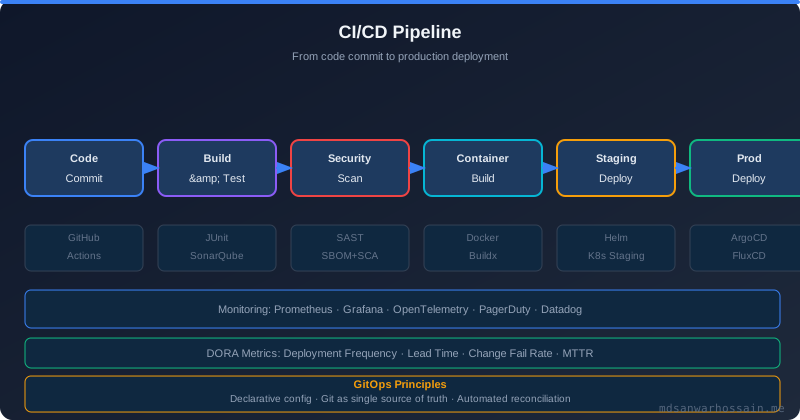
Table of Contents
- Why GitHub Actions for Java Microservices?
- Pipeline Architecture: The Four Stages
- Branch Strategy and Environment Mapping
- Optimizing Pipeline Speed
- Real-World Problem: The Slow, Unreliable Pipeline
- Deep Dive: Secrets Management and Environment Promotion
- Solution Approach: Test Strategy for Fast Feedback
- Optimization: Matrix Builds and Parallel Execution
- Common Pitfalls to Avoid
- Conclusion
Why GitHub Actions for Java Microservices?
GitHub Actions is the dominant CI/CD platform for teams already hosting code on GitHub. Its native integration with pull requests, branches, and deployments, combined with a rich marketplace of pre-built actions and free minutes for public repositories, makes it a compelling choice for Java microservices projects. Unlike Jenkins, GitHub Actions requires no infrastructure to maintain. Unlike GitLab CI, it does not require migrating your repository. For greenfield projects in 2026, it is the default choice for teams without an existing CI investment.
For Java specifically, GitHub Actions provides hosted runners with Java pre-installed and first-class support for Maven and Gradle dependency caching, which dramatically reduces pipeline execution time on subsequent runs.
Pipeline Architecture: The Four Stages
A production-grade Java microservices pipeline should have four distinct stages that run in sequence, each gating the next: Build & Test, Security Scan, Container Build & Push, Deploy.
Stage 1: Build and Test
The build stage compiles the application and runs all automated tests. For Java Spring Boot services, this means Maven or Gradle builds with unit tests, integration tests, and code quality checks. The critical investment here is dependency caching — saving the Maven/Gradle dependency cache between runs transforms a 3-minute cache warm-up into a 10-second cache restore.
# .github/workflows/ci-cd.yml
name: CI/CD Pipeline
on:
  push:
    branches: [main, develop]
  pull_request:
    branches: [main]
jobs:
  build-and-test:
    runs-on: ubuntu-latest
    steps:
      - uses: actions/checkout@v4
      - name: Set up Java 21
        uses: actions/setup-java@v4
        with:
          java-version: '21'
          distribution: 'temurin'
          cache: maven
      - name: Run tests with coverage
        run: mvn verify -B --no-transfer-progress
        env:
          SPRING_DATASOURCE_URL: jdbc:h2:mem:testdb
      - name: Publish test report
        uses: dorny/test-reporter@v1
        if: always()
        with:
          name: Maven Tests
          path: target/surefire-reports/*.xml
          reporter: java-junit
      - name: Check code coverage (80% minimum)
        run: mvn jacoco:check -B --no-transfer-progress
Stage 2: Security Scanning
Security scanning runs in parallel with or immediately after the build stage. Three types of scans are essential for production pipelines. SAST (Static Application Security Testing) with tools like CodeQL or Semgrep scans source code for vulnerability patterns. SCA (Software Composition Analysis) with tools like Dependabot, Snyk, or OWASP Dependency-Check scans third-party dependencies for known CVEs. Secret scanning checks for accidentally committed API keys, passwords, and certificates.
  security-scan:
    runs-on: ubuntu-latest
    needs: build-and-test
    steps:
      - uses: actions/checkout@v4
      - name: OWASP Dependency Check
        uses: dependency-check/Dependency-Check_Action@main
        with:
          project: 'user-service'
          path: '.'
          format: 'HTML'
          args: '--failOnCVSS 7 --enableRetired'
      - name: Initialize CodeQL
        uses: github/codeql-action/init@v3
        with:
          languages: java
      - name: Perform CodeQL Analysis
        uses: github/codeql-action/analyze@v3
Stage 3: Container Build and Push
Once tests pass and security scans are clean, build the Docker image and push it to a container registry. Use multi-stage Docker builds to keep the final image minimal — only the JRE and the application JAR. Tag images with the Git commit SHA for immutable traceability: you can always determine exactly what code is running in production.
  build-image:
    runs-on: ubuntu-latest
    needs: security-scan
    if: github.ref == 'refs/heads/main'
    steps:
      - uses: actions/checkout@v4
      - name: Set up Docker Buildx
        uses: docker/setup-buildx-action@v3
      - name: Login to Container Registry
        uses: docker/login-action@v3
        with:
          registry: ghcr.io
          username: ${{ github.actor }}
          password: ${{ secrets.GITHUB_TOKEN }}
      - name: Build and push Docker image
        uses: docker/build-push-action@v5
        with:
          context: .
          push: true
          tags: |
            ghcr.io/${{ github.repository }}/user-service:${{ github.sha }}
            ghcr.io/${{ github.repository }}/user-service:latest
          cache-from: type=gha
          cache-to: type=gha,mode=max
      - name: Scan container image for vulnerabilities
        uses: aquasecurity/trivy-action@master
        with:
          image-ref: 'ghcr.io/${{ github.repository }}/user-service:${{ github.sha }}'
          format: 'sarif'
          exit-code: '1'
          severity: 'CRITICAL,HIGH'
Stage 4: Deploy to Kubernetes
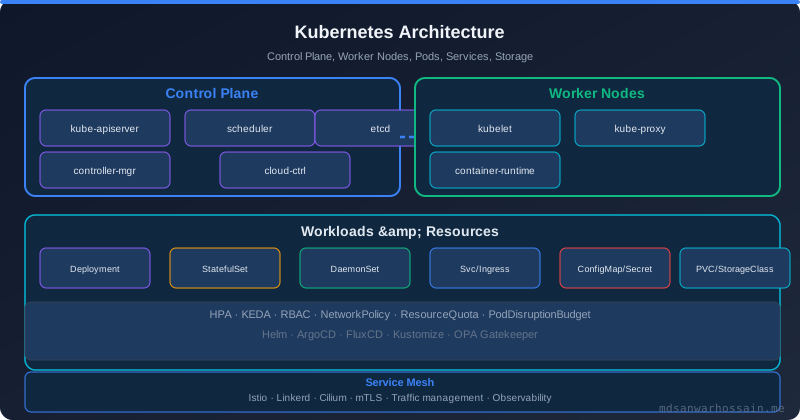
The final stage deploys the new image to Kubernetes. For production deployments, use GitOps with ArgoCD or Flux: the pipeline updates the image tag in a Kubernetes manifest repository, and ArgoCD automatically reconciles the cluster state. This separates deployment approval (managed in the GitOps repo) from the CI pipeline, enabling environment-specific approval workflows without modifying pipeline code.
  deploy-staging:
    runs-on: ubuntu-latest
    needs: build-image
    environment:
      name: staging
      url: https://staging.example.com
    steps:
      - uses: actions/checkout@v4
        with:
          repository: your-org/k8s-manifests
          token: ${{ secrets.GITOPS_TOKEN }}
      - name: Update image tag in manifests
        run: |
          sed -i "s|image: ghcr.io/.*/user-service:.*|image: ghcr.io/${{ github.repository }}/user-service:${{ github.sha }}|" \
            services/user-service/staging/deployment.yaml
      - name: Commit and push manifest update
        run: |
          git config user.email "ci@yourorg.com"
          git config user.name "CI Pipeline"
          git add .
          git commit -m "deploy: user-service ${{ github.sha }} to staging"
          git push
Branch Strategy and Environment Mapping
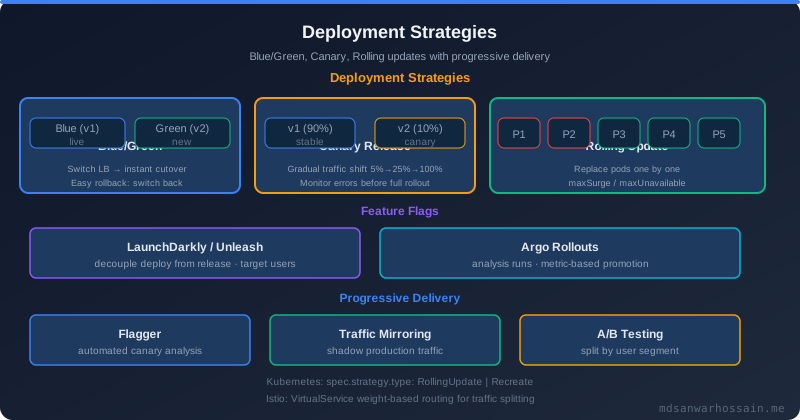
Map your Git branch strategy to deployment environments explicitly. Pull requests trigger build + test + security scan only. Merges to develop trigger deploy to the staging environment. Merges to main (after a PR approval) trigger deploy to the production environment with a required manual approval step using GitHub Environments. This ensures no code reaches production without both automated quality gates and a human reviewer's approval.
Optimizing Pipeline Speed
Fast pipelines encourage developers to commit frequently and discourage shortcuts. Key optimizations: Maven/Gradle dependency caching (saves 2–3 minutes per run); Docker layer caching with BuildKit; running security scans and integration tests in parallel using needs with multiple parents; using test splitting to parallelize test execution across multiple runners for large test suites; and using self-hosted runners for consistent hardware if cloud runner variability is causing flaky tests.
"A CI/CD pipeline that takes more than 10 minutes will be bypassed by developers under pressure. Speed is not optional — it is a feature of your quality gate."
Key Takeaways
- A production-grade pipeline has four stages: Build & Test, Security Scan, Container Build & Push, Deploy.
- Dependency caching is the single highest-ROI optimization for Java CI pipelines.
- Tag Docker images with Git commit SHAs for immutable, traceable deployments.
- Use GitOps (ArgoCD/Flux) to separate CI pipeline logic from deployment approvals.
- Use GitHub Environments with required reviewers to enforce human approval for production deployments.
Real-World Problem: The Slow, Unreliable Pipeline
A common failure mode in growing Java teams is a CI/CD pipeline that starts simple but degrades over time into a slow, unreliable bottleneck. The pattern is familiar: the initial pipeline runs unit tests in 5 minutes. Then integration tests are added without parallelism — now it runs in 12 minutes. Then container builds are added serially — now it is 20 minutes. A developer triggers three runs before lunch and all three are blocked behind each other in a queue. By the time feedback arrives, context has switched completely.
One real production team tracked their change lead time at 4 hours on average — not because deployment was slow, but because their pipeline was serialized and their container cache was cold on every run. After restructuring with parallel stages, Docker BuildKit caching, and dedicated self-hosted runners, they reduced pipeline duration from 22 minutes to 7 minutes. Deployment frequency doubled within two sprints.
Deep Dive: Secrets Management and Environment Promotion
One of the most dangerous gaps in production pipelines is poor secrets management. Hardcoded credentials in workflow YAML, secrets printed in pipeline logs, and overly permissive GITHUB_TOKEN scopes are common in teams that built their pipelines quickly under pressure. The correct pattern is layered: use GitHub Environments to restrict which branches can access which secrets, use OIDC federation to authenticate with AWS or GCP without storing long-lived credentials, and audit secret access in your pipeline logs regularly.
  deploy-production:
    permissions:
      id-token: write  # Required for OIDC
      contents: read
    steps:
      - name: Configure AWS credentials via OIDC
        uses: aws-actions/configure-aws-credentials@v4
        with:
          role-to-assume: arn:aws:iam::123456789:role/github-actions-deploy
          aws-region: us-east-1
          # No long-lived access keys required
Solution Approach: Test Strategy for Fast Feedback
The fastest pipelines use a test pyramid strategy deliberately. Unit tests run in under 30 seconds and block the PR from merging. Integration tests run against an in-memory H2 database or Testcontainers and take 2–4 minutes — these run on every push but do not block developers from continuing work. End-to-end tests run on merge to main only and trigger deployment to staging. Contract tests with Pact verify API compatibility between services without requiring live service dependencies.
Splitting slow integration tests with JUnit 5's @Tag and Maven Surefire's -Dgroups parameter lets you run fast tests first and defer the slow ones to a parallel job, providing early feedback without sacrificing coverage.
Optimization: Matrix Builds and Parallel Execution
GitHub Actions' matrix strategy enables running the same job across multiple configurations simultaneously. For Java services, this means running tests across multiple JDK versions, or splitting a large test suite into N parallel shards. A team with 2,000 unit tests can split them into four groups using a hash of the test class name and run them on four parallel runners, reducing test execution time by 75%.
  test-matrix:
    strategy:
      matrix:
        java-version: ['21', '17']
        test-group: ['unit', 'integration']
    runs-on: ubuntu-latest
    steps:
      - uses: actions/setup-java@v4
        with:
          java-version: ${{ matrix.java-version }}
      - run: mvn test -Dgroups=${{ matrix.test-group }} -B
Common Pitfalls to Avoid
- Pinning actions to a branch instead of a SHA:
uses: actions/checkout@mainis a supply chain risk. Pin to a specific commit SHA likeactions/checkout@11bd71901bbe5b1630ceea73d27597364c9af683. - Running security scans only on the main branch: Vulnerabilities should be caught on feature branches before merge. Run OWASP Dependency-Check on every PR, not just after merge.
- Not caching Docker layers across workflow runs: Every container build is a full rebuild without
cache-from: type=gha. Docker layer caching saves 3–8 minutes per container build run. - Storing secrets in environment variables visible to all steps: Scope secrets to only the steps that need them using
envat the step level, not the job level. - No rollback workflow: Every deployment workflow should have a corresponding rollback workflow that can be triggered with a single click from the Actions UI, not a manual process requiring an engineer to construct git revert commands under pressure.
Conclusion
A production-grade GitHub Actions pipeline for Java microservices is not a one-time setup — it is a living system that requires ongoing investment. The teams that get the most value from CI/CD treat their pipelines as products: monitoring pipeline health metrics, tracking flaky test rates, measuring cache hit ratios, and reviewing pipeline execution time trends in retrospectives. When the pipeline is fast, reliable, and visible, developers trust it and use it as a genuine safety net rather than an obstacle to route around. That trust is the ultimate goal of any CI/CD investment.
Frequently Asked Questions
Why GitHub Actions for Java Microservices?
GitHub Actions is the dominant CI/CD platform for teams already hosting code on GitHub. Its native integration with pull requests, branches, and deployments, combined with a rich marketplace of pre-built actions and free minutes for public repositories, makes it a compelling choice for Java microservices projects. Unlike Jenkins, GitHub Actions requires no infrastructure to maintain. Unlike GitLab CI, it does not require migrating your repository. For greenfield projects in 2026, it is the default choice for teams without an existing CI investment. For Java specifically, GitHub Actions provides hosted runners with Java pre-installed and first-class support for Maven and Gradle dependency caching, which dramatically reduces pipeline execution time on subsequent runs.
What is Pipeline Architecture and how does it work?
A production-grade Java microservices pipeline should have four distinct stages that run in sequence, each gating the next: Build & Test, Security Scan, Container Build & Push, Deploy.
What is Stage 1 and how does it work?
The build stage compiles the application and runs all automated tests. For Java Spring Boot services, this means Maven or Gradle builds with unit tests, integration tests, and code quality checks. The critical investment here is dependency caching — saving the Maven/Gradle dependency cache between runs transforms a 3-minute cache warm-up into a 10-second cache restore.
What is Stage 2 and how does it work?
Security scanning runs in parallel with or immediately after the build stage. Three types of scans are essential for production pipelines. SAST (Static Application Security Testing) with tools like CodeQL or Semgrep scans source code for vulnerability patterns. SCA (Software Composition Analysis) with tools like Dependabot, Snyk, or OWASP Dependency-Check scans third-party dependencies for known CVEs. Secret scanning checks for accidentally committed API keys, passwords, and certificates.
What is Stage 3 and how does it work?
Once tests pass and security scans are clean, build the Docker image and push it to a container registry. Use multi-stage Docker builds to keep the final image minimal — only the JRE and the application JAR. Tag images with the Git commit SHA for immutable traceability: you can always determine exactly what code is running in production.
Leave a Comment
Related Posts

Software Engineer · Java · Spring Boot · Microservices