Infrastructure as Code with Terraform: Best Practices for Cloud-Native Teams
Infrastructure as Code is not just a convenience — it is the foundation of reproducible, auditable, and disaster-resilient cloud environments. Terraform has become the universal language for describing cloud infrastructure, but using it well in production requires discipline around modules, state, and team workflows.
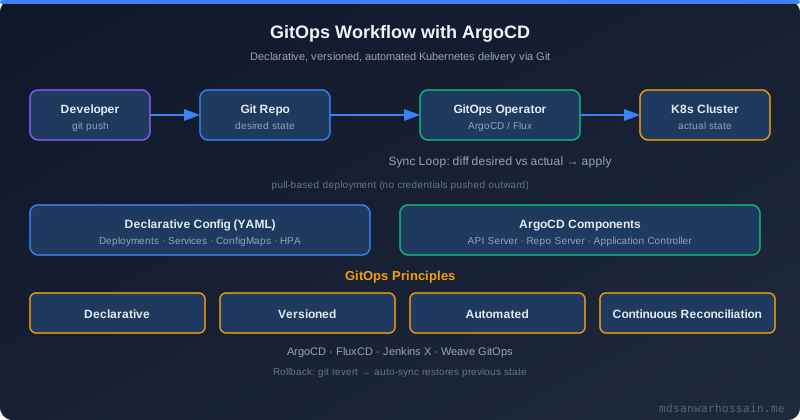
Table of Contents
- Why Terraform in 2026?
- Repository Structure: Modules and Environments
- Remote State and State Locking
- Writing Production-Grade Modules
- The Terraform Workflow in a Team
- Common Mistakes to Avoid
- Real-World Problem: Configuration Drift and Emergency Rebuilds
- Solution Approach: Automated Testing for Infrastructure
- Architecture: Multi-Region Terraform with Workspaces
- Optimization: Reducing Apply Time and Blast Radius
- Conclusion
Why Terraform in 2026?
Terraform by HashiCorp (now OpenTofu as the CNCF-governed open-source fork) remains the dominant multi-cloud IaC tool. Its declarative HCL syntax describes the desired state of infrastructure — provider resources, networking, compute, databases — and the Terraform plan/apply workflow calculates and executes the changes required to move from the current state to the desired state. This approach provides the core IaC benefits: version-controlled infrastructure changes, code review for every modification, repeatable environment provisioning, and documented infrastructure that survives team member turnover.
In 2026, the distinction between Terraform and OpenTofu is important to acknowledge. OpenTofu, the BSL-license-free fork initiated after HashiCorp's licensing change in 2023, is now fully stable and recommended for greenfield projects. The migration from Terraform to OpenTofu is generally straightforward. This guide uses standard HCL that is compatible with both.
Repository Structure: Modules and Environments
The most consequential early decision in a Terraform project is how to organize code across modules and environments. The recommended structure separates reusable modules from environment-specific configurations.
infrastructure/
├── modules/
│   ├── eks-cluster/        # Reusable EKS module
│   │   ├── main.tf
│   │   ├── variables.tf
│   │   └── outputs.tf
│   ├── rds-postgres/       # Reusable RDS PostgreSQL module
│   ├── vpc/                # Reusable VPC module
│   └── alb/                # Reusable ALB module
└── environments/
    ├── dev/
    │   ├── main.tf         # Instantiates modules with dev config
    │   ├── terraform.tfvars
    │   └── backend.tf
    ├── staging/
    └── production/
Modules are the abstraction layer. A well-designed module encapsulates a logical infrastructure component (a Kubernetes cluster, a database, a VPC) with clearly defined input variables and output values. Environments are compositions of modules, providing environment-specific variable values. This structure enables the same infrastructure design to be deployed identically across dev, staging, and production with only the sizing and configuration changing.
Remote State and State Locking
Terraform's state file is the ground truth for what infrastructure exists. Storing state locally is fine for learning but catastrophic for teams: simultaneous applies from different machines will corrupt state. Production Terraform must use a remote backend with state locking. The recommended pattern for AWS is an S3 backend with a DynamoDB table for state locking.
# backend.tf — remote state with locking
terraform {
  backend "s3" {
    bucket         = "mycompany-terraform-state"
    key            = "environments/production/terraform.tfstate"
    region         = "us-east-1"
    encrypt        = true
    dynamodb_table = "terraform-state-lock"
  }
}
State files often contain sensitive data (database passwords, certificates, private keys) written as outputs. Always enable S3 server-side encryption and restrict bucket access to CI/CD roles and senior engineers only. Consider using Terraform's sensitive variable marking to prevent secrets from appearing in plan output.
Writing Production-Grade Modules
A good Terraform module has three qualities: it is reusable across environments, it exposes only the variables that genuinely need to vary between uses, and it outputs the values that callers typically need to pass to other modules.
# modules/rds-postgres/variables.tf
variable "identifier" {
  description = "Unique identifier for this RDS instance"
  type        = string
}
variable "instance_class" {
  description = "RDS instance type (e.g. db.t3.medium)"
  type        = string
  default     = "db.t3.medium"
}
variable "allocated_storage_gb" {
  description = "Initial storage in GB"
  type        = number
  default     = 50
}
variable "multi_az" {
  description = "Enable Multi-AZ for high availability"
  type        = bool
  default     = false  # default off; production sets true
}
variable "vpc_security_group_ids" {
  description = "Security groups that control inbound access"
  type        = list(string)
}
variable "subnet_ids" {
  description = "Private subnet IDs for the DB subnet group"
  type        = list(string)
}
variable "database_name" { type = string }
variable "master_username" { type = string }
variable "master_password" {
  type      = string
  sensitive = true
}
# modules/rds-postgres/main.tf
resource "aws_db_subnet_group" "this" {
  name       = "${var.identifier}-subnet-group"
  subnet_ids = var.subnet_ids
}
resource "aws_db_instance" "this" {
  identifier              = var.identifier
  engine                  = "postgres"
  engine_version          = "16.3"
  instance_class          = var.instance_class
  allocated_storage       = var.allocated_storage_gb
  max_allocated_storage   = var.allocated_storage_gb * 5  # auto-scaling
  storage_encrypted       = true
  multi_az                = var.multi_az
  deletion_protection     = true
  backup_retention_period = 7
  skip_final_snapshot     = false
  final_snapshot_identifier = "${var.identifier}-final"
  db_name  = var.database_name
  username = var.master_username
  password = var.master_password
  db_subnet_group_name   = aws_db_subnet_group.this.name
  vpc_security_group_ids = var.vpc_security_group_ids
  tags = {
    Environment = terraform.workspace
    ManagedBy   = "terraform"
  }
}
The Terraform Workflow in a Team
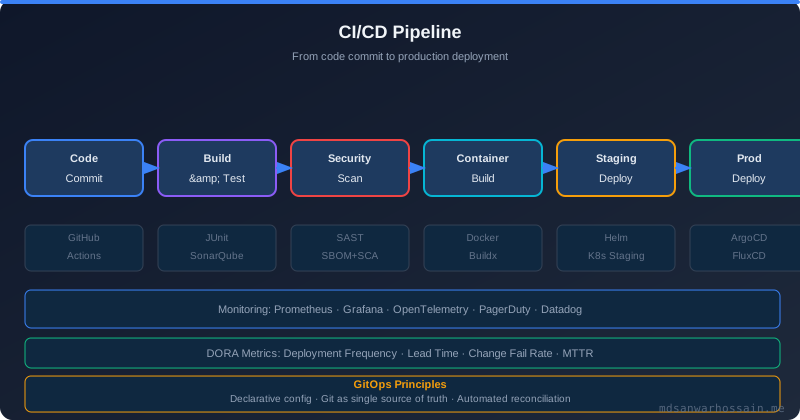
Solo Terraform is straightforward. Team Terraform requires process discipline to avoid state conflicts, accidental applies, and configuration drift. The recommended workflow: infrastructure changes are proposed as pull requests containing Terraform code. CI runs terraform fmt --check, terraform validate, and terraform plan on every PR, posting the plan output as a PR comment. Human reviewers review both the code and the plan. Merging the PR triggers terraform apply automatically via CI. Nothing is ever applied manually — all changes flow through the PR pipeline.
Tools like Atlantis (self-hosted) or Terraform Cloud automate this workflow. Atlantis runs as a service that responds to PR comments with atlantis plan and atlantis apply commands, posting plan output and requiring approvals before applying.
Common Mistakes to Avoid
Storing secrets in tfvars files committed to Git: Use AWS Secrets Manager, HashiCorp Vault, or GitHub Actions secrets to inject sensitive values at apply time. Never commit passwords to version control.
Manual state manipulation with terraform state commands: State surgery should be a last resort. If you find yourself regularly manipulating state, it indicates a structural problem with your module design.
Not pinning provider versions: Always specify provider version constraints. A provider upgrade can introduce breaking changes that silently alter resource behavior.
Creating giant monolithic root modules: A single 5,000-line main.tf is unmaintainable and causes full plan recalculation for every change. Decompose into focused modules and separate environment stacks.
"Treat your Terraform code with the same rigor as application code: code review, automated testing, version control, and a clear promotion path from dev to production."
Key Takeaways
- Separate reusable modules from environment-specific compositions in your repository structure.
- Always use a remote backend with state locking; local state is not viable for teams.
- Enforce the full PR workflow — plan in CI, human review, automated apply on merge.
- Pin provider versions to prevent silent breaking changes.
- Never store secrets in committed files; inject them at apply time from secrets managers.
Real-World Problem: Configuration Drift and Emergency Rebuilds
A Series B startup experienced a catastrophic data center failure that forced them to rebuild their entire AWS infrastructure from scratch. Without Infrastructure as Code, the process took 11 days, involved three senior engineers working full time, and resulted in subtle configuration differences from the original environment that took months to discover. After the incident, they adopted Terraform. When they simulated another rebuild six months later, they restored the full environment in 4 hours with zero configuration drift.
Configuration drift is an equally common problem in teams that start with Terraform but allow manual modifications via the AWS console. An engineer adds a security group rule manually to unblock a critical issue. Six months later, terraform plan shows a destructive change that would remove that rule — which is now load-bearing. The fix is strict access control: revoke console write access for production resources and require all changes to flow through Terraform. Tools like AWS Config and Terraform Drift Detection can alert when out-of-band changes occur.
Solution Approach: Automated Testing for Infrastructure
Terraform code is code and deserves the same testing discipline as application code. Static analysis with tflint catches misconfigurations and deprecated syntax. Policy-as-code with Open Policy Agent (OPA) or Sentinel enforces organizational standards — for example, ensuring all S3 buckets have encryption enabled or all RDS instances have deletion protection set. Integration testing with Terratest or the newer terraform test (native to Terraform 1.6+) provisions real infrastructure in a test account, runs assertions against it, and tears it down.
# terraform test — native testing (Terraform 1.6+)
# tests/rds_module_test.tftest.hcl
run "creates_rds_with_encryption" {
  variables {
    identifier   = "test-db"
    multi_az     = false
    master_password = "TestPassword123!"
  }
  assert {
    condition     = aws_db_instance.this.storage_encrypted == true
    error_message = "RDS storage must be encrypted"
  }
  assert {
    condition     = aws_db_instance.this.deletion_protection == true
    error_message = "Deletion protection must be enabled"
  }
}
Architecture: Multi-Region Terraform with Workspaces
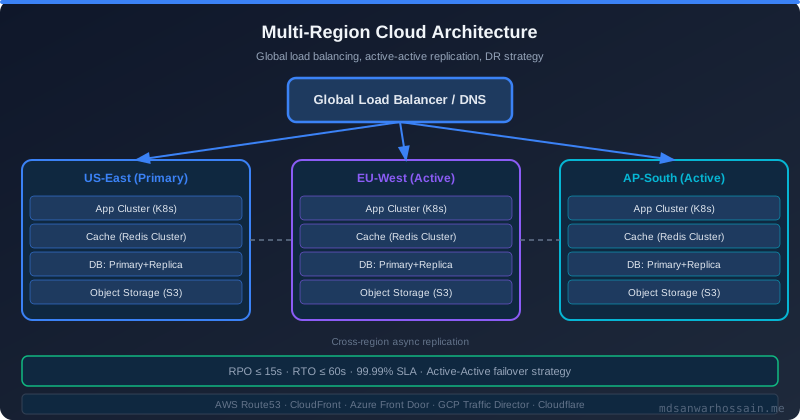
For teams deploying to multiple AWS regions, Terraform workspaces combined with region-specific variable files provide a clean pattern. Each environment-region combination gets its own workspace and backend state key, preventing cross-environment state pollution. The workspace name is injected as a variable prefix for all resource names, ensuring global uniqueness of resource identifiers like S3 bucket names and IAM role names.
# environments/production/main.tf
terraform {
  required_providers {
    aws = {
      source  = "hashicorp/aws"
      version = "~> 5.0"
    }
  }
}
# Primary region
provider "aws" {
  region = "us-east-1"
}
# DR region
provider "aws" {
  alias  = "eu-west-1"
  region = "eu-west-1"
}
module "eks_primary" {
  source       = "../../modules/eks-cluster"
  cluster_name = "prod-primary"
  region       = "us-east-1"
}
module "eks_dr" {
  source       = "../../modules/eks-cluster"
  providers    = { aws = aws.eu-west-1 }
  cluster_name = "prod-dr"
  region       = "eu-west-1"
}
Optimization: Reducing Apply Time and Blast Radius
Large Terraform root modules with hundreds of resources have two problems: plan and apply are slow (Terraform refreshes every resource's state on every plan), and a misconfiguration can affect many unrelated resources in a single apply. The solution is decomposition: split your infrastructure into multiple independently managed stacks. A network stack manages VPCs, subnets, and route tables and changes rarely. A platform stack manages Kubernetes clusters and core databases and changes monthly. An application stack manages service-specific resources and changes daily. Each stack is applied independently with its own state file and pipeline.
Use terraform plan -target=module.rds_postgres for emergency targeted changes when you need to apply a single module without touching the rest of the stack. Use this sparingly — it can leave state inconsistent — but it is invaluable for urgent production fixes.
Conclusion
Terraform and OpenTofu are not merely tools for provisioning infrastructure — they are the foundation of operational confidence in cloud-native teams. When infrastructure is code, every change is reviewable, every environment is reproducible, and every incident has a faster recovery path. The investment in proper module design, remote state management, automated testing, and team workflow pays compound dividends as the infrastructure footprint grows. The teams that treat IaC as a first-class engineering discipline are the ones that sleep better during on-call rotations.
Frequently Asked Questions
Why Terraform in 2026?
Terraform by HashiCorp (now OpenTofu as the CNCF-governed open-source fork) remains the dominant multi-cloud IaC tool. Its declarative HCL syntax describes the desired state of infrastructure — provider resources, networking, compute, databases — and the Terraform plan/apply workflow calculates and executes the changes required to move from the current state to the desired state. This approach provides the core IaC benefits: version-controlled infrastructure changes, code review for every modification, repeatable environment provisioning, and documented infrastructure that survives team member turnover. In 2026, the distinction between Terraform and OpenTofu is important to acknowledge. OpenTofu, the BSL-license-free fork initiated after HashiCorp's licensing change in 2023, is now fully stable and recommended for greenfield projects. The migration from Terraform to OpenTofu is generally straightforward.
What is Repository Structure and how does it work?
The most consequential early decision in a Terraform project is how to organize code across modules and environments. The recommended structure separates reusable modules from environment-specific configurations. infrastructure/ ├── modules/ │ ├── eks-cluster/ # Reusable EKS module │ │ ├── main.tf │ │ ├── variables.tf │ │ └── outputs.tf │ ├── rds-postgres/ # Reusable RDS PostgreSQL module │ ├── vpc/ # Reusable VPC module │ └── alb/ # Reusable ALB module └── environments/ ├── dev/ │ ├── main.tf # Instantiates modules with dev config │ ├── terraform.tfvars │ └── backend.tf ├── staging/ └── production/ Modules are the abstraction layer. A well-designed module encapsulates a logical infrastructure component (a Kubernetes cluster, a database, a VPC) with clearly defined input variables and output values.
What is Remote State and State Locking and how does it work?
Terraform's state file is the ground truth for what infrastructure exists. Storing state locally is fine for learning but catastrophic for teams: simultaneous applies from different machines will corrupt state. Production Terraform must use a remote backend with state locking. The recommended pattern for AWS is an S3 backend with a DynamoDB table for state locking. # backend.tf — remote state with locking terraform { backend "s3" { bucket = "mycompany-terraform-state" key = "environments/production/terraform.tfstate" region = "us-east-1" encrypt = true dynamodb_table = "terraform-state-lock" } } State files often contain sensitive data (database passwords, certificates, private keys) written as outputs. Always enable S3 server-side encryption and restrict bucket access to CI/CD roles and senior engineers only. Consider using Terraform's sensitive variable marking to prevent secrets from appearing in plan output.
What are the production considerations for Writing Production-Grade Modules?
A good Terraform module has three qualities: it is reusable across environments, it exposes only the variables that genuinely need to vary between uses, and it outputs the values that callers typically need to pass to other modules.
What is The Terraform Workflow in a Team and how does it work?
Solo Terraform is straightforward. Team Terraform requires process discipline to avoid state conflicts, accidental applies, and configuration drift. The recommended workflow: infrastructure changes are proposed as pull requests containing Terraform code. CI runs terraform fmt --check , terraform validate , and terraform plan on every PR, posting the plan output as a PR comment. Human reviewers review both the code and the plan. Merging the PR triggers terraform apply automatically via CI. Nothing is ever applied manually — all changes flow through the PR pipeline. Tools like Atlantis (self-hosted) or Terraform Cloud automate this workflow. Atlantis runs as a service that responds to PR comments with atlantis plan and atlantis apply commands, posting plan output and requiring approvals before applying.
Leave a Comment
Related Posts

Software Engineer · Java · Spring Boot · Microservices