Context Engineering for LLM Agents: Beyond Prompt Engineering — Structuring Windows, Memory & Tool Schemas in Production
Most LLM failures in production are not model failures — they are context failures. Context engineering is the next frontier beyond prompt engineering: the disciplined practice of deciding what goes into the context window, in what order, at what token cost. This guide gives you the frameworks, patterns, and production checklists to master it.
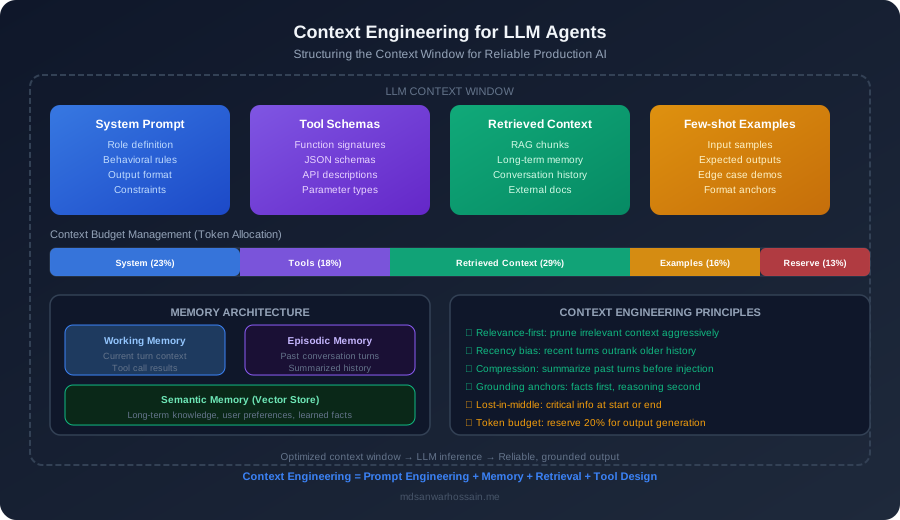
TL;DR — The Core Insight
"Prompt engineering asks 'what instruction do I write?' Context engineering asks 'what does the model need to know, remember, and access — and how do I fit it all within the token budget without losing the signal?' Every production LLM agent is gated by context quality, not model capability."
Table of Contents
- What Is Context Engineering?
- Anatomy of the LLM Context Window
- System Prompt Engineering: The Foundation
- Tool Schema Design for Agents
- Memory Architecture: Working, Episodic & Semantic
- Retrieval & Context Injection
- Context Budget Management
- Production Context Engineering Patterns
- Failure Modes & Debugging
- When Context Engineering Beats Fine-Tuning
- Conclusion & Checklist
1. What Is Context Engineering?
Context engineering is the systematic practice of designing, populating, and managing everything that enters an LLM's context window — with the explicit goal of maximizing output quality while minimizing token spend and latency. It is the discipline that separates production-grade LLM systems from demos.
Prompt engineering focuses narrowly on instruction wording — how you phrase a directive. Context engineering is the broader discipline that encompasses instruction design, memory management, tool schema selection, retrieval injection, conversation history windowing, and token budget allocation. Think of it this way:
Prompt Engineering vs. Context Engineering
- Prompt Engineering: "Write a better system message" — craft wording, tone, constraints, and examples inside the system prompt.
- Context Engineering: "Decide the entire composition of the context window" — what goes in, how much token budget each component gets, what gets compressed or evicted, how memory flows across turns.
The Four Layers of Context
Every LLM agent context window can be decomposed into four distinct layers, each with its own engineering concerns:
- Static context: The system prompt, persona definition, and hard-coded behavioral constraints. This is the most stable part — it rarely changes between requests. Design it once, version-control it rigorously.
- Dynamic context: Retrieved documents, tool outputs, computed facts, and injected background knowledge. This changes every request based on the current query and agent state.
- Conversational context: The history of prior turns in a multi-turn dialogue or agentic loop. This grows unbounded and must be actively managed through windowing, summarization, or selective eviction.
- Structural context: Tool schemas (function definitions), output format specifications, and typed constraints passed to the model. Often overlooked — yet poor schema design wastes hundreds of tokens per request and confuses the model.
Context engineering treats all four layers as first-class engineering concerns with measurable quality metrics, explicit budget allocations, and automated monitoring. When any layer is neglected, the agent degrades unpredictably — often in ways that look like model failures but are actually context failures.
2. Anatomy of the LLM Context Window
A production LLM agent's context window is not a single blob of text — it is a carefully composed sequence of components, each consuming a measurable number of tokens and contributing differently to output quality. Understanding this anatomy is the prerequisite for effective budget management.
The Six Components
- System prompt: Defines agent identity, task scope, behavioral constraints, output format rules, and safety guardrails. Typically 200–800 tokens in a lean production agent. This anchors the model's entire behavior.
- Tool schemas: JSON Schema definitions for every function or tool the agent can call. Each tool schema costs tokens — a detailed schema with 5 tools can consume 500–1,500 tokens before the user has said a word.
- Retrieved context: Documents, database rows, or API responses fetched via RAG or tool calls and injected as background knowledge. This is the most variable component — from 0 tokens (cached answer) to 8,000+ tokens (large doc chunks).
- Conversation history: Prior turns in the current session. In a long agentic loop, this grows rapidly — 20 turns × 200 tokens/turn = 4,000 tokens before any new content. Must be actively managed.
- Few-shot examples: Labeled input/output pairs that teach the model desired output format and style. Typically 300–1,200 tokens for 3–6 examples. High ROI early in deployment, often evicted first as context pressure grows.
- Output reservation: You must reserve enough tokens for the model's response. A model with a 128K context limit and a 2,000-token output requirement effectively has a 126K input budget. Failing to reserve output tokens causes truncated responses.
Token Budget Allocation by Agent Type
| Context Component | Chatbot (8K budget) | RAG Agent (32K budget) | Agentic Loop (128K budget) |
|---|---|---|---|
| System Prompt | 200–400 (5%) | 400–800 (2.5%) | 600–1,200 (1%) |
| Tool Schemas | 0–300 (0–4%) | 500–1,500 (3–5%) | 1,000–3,000 (1–2%) |
| Retrieved Context | 0–2,000 (0–25%) | 4,000–12,000 (13–38%) | 10,000–40,000 (8–31%) |
| Conversation History | 2,000–4,000 (25–50%) | 3,000–8,000 (9–25%) | 8,000–30,000 (6–23%) |
| Few-Shot Examples | 300–800 (4–10%) | 600–2,000 (2–6%) | 0–1,500 (optional) |
| Output Reservation | 500–1,000 (min 12%) | 1,000–2,000 (min 3%) | 2,000–8,000 (min 2%) |
Key insight: The percentages shift dramatically as context windows grow. In a 128K agent, conversation history and retrieved context dominate — yet most engineers only optimize the system prompt. The leverage is in managing the dynamic components.
3. System Prompt Engineering: The Foundation
The system prompt is the most leveraged token in your entire context window. Every subsequent decision — retrieval, tool use, response format — is filtered through the behavioral contract established here. A weak system prompt creates an agent that retrieves correctly but synthesizes poorly; a strong one makes even mediocre retrieval produce good outputs.
The Role–Task–Constraints–Format Pattern
Every production system prompt should contain four explicitly structured sections:
- Role: Who is this agent? What expertise and persona does it embody? Be specific — "You are an expert Java backend engineer specializing in Spring Boot microservices" outperforms "You are a helpful assistant" on every Java-related task.
- Task: What is the agent's primary mission? State it unambiguously. Include what the agent should and should not do. For multi-tool agents, specify the preferred tool selection order.
- Constraints: What guardrails apply? Format restrictions, factual grounding rules ("only use provided context"), escalation triggers ("if uncertain, say so explicitly"), language requirements, length limits.
- Format: Specify output structure precisely — JSON schema, markdown headers, bullet depth, code block language tags. The more explicit, the fewer parse failures in downstream automation.
Production System Prompt Checklist
- ✅ Explicit role definition with domain expertise and persona
- ✅ Task scope bounded — what the agent does AND what it refuses
- ✅ Output format specified with a concrete example in the prompt
- ✅ Grounding instruction for RAG agents: "Answer only using the provided context; say 'I don't know' if not found"
- ✅ Tone, language level, and verbosity guidelines
- ✅ Prompt stored in version-controlled config, not hardcoded
- ✅ Evaluated against a golden test set on every prompt update
- ✅ Token count tracked — alert if system prompt exceeds budget threshold
Example: Spring AI Agent System Prompt (Java)
// Spring AI — SystemPromptTemplate with structured sections
import org.springframework.ai.chat.messages.SystemMessage;
import org.springframework.ai.chat.prompt.PromptTemplate;

public class AgentSystemPromptFactory {

    private static final String SYSTEM_PROMPT_TEMPLATE = """
        ## ROLE
        You are a senior Java backend engineer assistant specializing in Spring Boot,
        Kubernetes, and AWS cloud architecture. You have 10+ years of production
        experience building high-throughput microservices.

        ## TASK
        Answer technical questions about Java backend systems. When given a code snippet,
        identify bugs, performance issues, or design smells. Suggest concrete improvements
        with example code. Prefer idiomatic Spring Boot solutions.

        ## CONSTRAINTS
        - Ground ALL answers in the provided context documents when available
        - If the context does not contain the answer, explicitly state: "I cannot find
          this in the provided context. Based on general knowledge: ..."
        - Never fabricate API signatures or library versions
        - Limit responses to {maxTokens} tokens unless the user requests elaboration
        - Always include a "Confidence: High/Medium/Low" line at the end

        ## OUTPUT FORMAT
        For code reviews: use markdown headers — ## Issues, ## Improvements, ## Example
        For Q&A: use concise prose, then bullet key takeaways under "## Key Points"
        Code blocks must specify language: ```java, ```yaml, ```bash
        """;

    public SystemMessage buildSystemMessage(int maxTokens) {
        PromptTemplate template = new PromptTemplate(SYSTEM_PROMPT_TEMPLATE);
        return new SystemMessage(
            template.render(Map.of("maxTokens", String.valueOf(maxTokens)))
        );
    }
}
4. Tool Schema Design for Agents
Every tool you expose to an LLM agent costs tokens — and those tokens are spent before the model processes even the first word of the user's request. Tool schema bloat is one of the most common and least recognized sources of context window waste in production agents. An agent with 15 verbose tool schemas can burn 3,000–6,000 tokens on function definitions alone.
Function Calling Schema Best Practices
- Minimize description verbosity: Tool descriptions should be 1–2 sentences maximum. The model infers parameter semantics from names and types — over-describing wastes tokens.
- Use precise parameter names:
customerIdinstead ofid;isoDateStringinstead ofdate. Self-documenting names reduce description token cost. - Mark required parameters explicitly: Use the JSON Schema
"required"array. This reduces hallucinated optional parameter usage. - Avoid enum explosion: An enum with 50 possible values consumes ~150 tokens. Prefer a string type with a short description when the space is large.
- Limit exposed tools to what's needed: Dynamically inject only relevant tools per request using a tool router. A billing query agent should not see the code execution tool.
- Use strict mode (OpenAI): Setting
"strict": trueon function definitions reduces malformed function call outputs significantly in production.
Schema Verbosity vs. Token Cost
| Schema Pattern | Tokens per Tool | Recommendation | Model Accuracy Impact |
|---|---|---|---|
| Minimal (name + type only) | 30–60 | ❌ Too sparse | High error rate on complex tools |
| Lean (name + 1-sentence desc + types) | 80–150 | ✅ Recommended | Best balance for GPT-4o / Claude Sonnet |
| Verbose (name + paragraphs + examples) | 300–600 | ⚠️ Use sparingly | Marginal gain, high token cost |
| Enum-heavy (20+ values) | 200–500+ | ❌ Avoid | Replace with string + dynamic lookup |
In a production agent handling 1M daily requests with 10 tools averaging 300 tokens each — switching to lean 120-token schemas saves 1.8B tokens per day. At GPT-4o pricing of $2.50/1M input tokens, that's a $4,500/day reduction from schema optimization alone.
5. Memory Architecture: Working, Episodic & Semantic
LLM agents have no persistent memory by default — every context window is stateless. To build agents that remember users, maintain task context across sessions, and accumulate knowledge over time, you must engineer memory explicitly. Memory in LLM systems maps to three architectural tiers borrowed from cognitive science.
Working Memory — The Active Context Window
Working memory is the context window itself — what the model can "see" right now. It is bounded, fast, and expensive per token. Everything in the active context competes for this finite space. Key engineering decisions for working memory:
- Recency bias management: LLMs exhibit primacy (strong attention to the start) and recency (strong attention to the end) effects. Critical instructions and the current query should be at the extremes; supporting context goes in the middle.
- Turn compression: As conversation grows, compress older turns to summaries. A 5-turn exchange averages 1,500 tokens; a compressed 1-sentence summary of the same exchange costs 25 tokens with ~80% information retention for most tasks.
- Scratchpad pattern: Reserve a section of the context for chain-of-thought reasoning — explicitly marked so the model and any parsers know to ignore it in the final answer extraction.
Episodic Memory — Session and Task History
Episodic memory stores what happened in past sessions or steps of a long-running task. It lives outside the context window (in a database or file) and is selectively retrieved into working memory. Implementation options:
- Session summaries: At session end, use the LLM to generate a structured summary (user preferences, facts learned, decisions made, open tasks). Store as JSON. Inject as 200–500 tokens at the next session start.
- Event log retrieval: Store all significant agent actions and observations as timestamped events. Use semantic search to retrieve the k most relevant past events for the current query.
- Hierarchical summarization: Summarize at multiple time granularities — last 5 turns (verbatim), last hour (compressed), last week (key facts only). Inject the appropriate level based on query type.
Semantic Memory — Long-Term Knowledge Store
Semantic memory is the agent's accumulated world knowledge — user facts, domain expertise, learned preferences — stored in a vector database and retrieved on demand. This is the RAG layer applied to memory rather than documents. Key patterns:
- Entity extraction and storage: After each session, extract named entities (people, products, decisions, code patterns) and store them with embeddings. The next query for "the customer I helped yesterday" can retrieve the correct user record via semantic similarity.
- Temporal decay: Weight memory retrieval scores by recency — information from last week should score higher than information from last year for most agent tasks.
- Memory consolidation: Periodically merge similar or overlapping memory items using the LLM as a consolidator. This prevents memory fragmentation and redundant retrieval.
6. Retrieval & Context Injection
Retrieval-Augmented Generation is not just an architecture — it is a context engineering problem. How you chunk, embed, retrieve, rank, and inject documents into the context window determines whether RAG augments the model or dilutes it.
Chunk Sizing: The Goldilocks Problem
Chunk size is the most impactful RAG parameter for context quality:
- Too small (50–100 tokens): High retrieval precision, but chunks lack surrounding context. The model receives fragments that are factually correct but semantically incomplete. Common symptom: answers that are technically right but miss the point.
- Too large (1,000–2,000 tokens): Chunks contain sufficient context, but retrieval recall drops — a large chunk often only partially matches the query. You waste tokens on irrelevant surrounding text. Common symptom: answers buried under padding.
- Recommended sweet spot (200–512 tokens): Balances precision and context completeness for most document types. Use 100-token overlapping windows to prevent splitting key concepts across chunk boundaries.
- Parent-child chunking: Store large parent chunks (512–1,024 tokens) and embed small child summaries (64–128 tokens). Retrieve by child embedding; inject the parent chunk. This maximizes both retrieval signal and context quality — the current best practice in 2026.
The Lost-in-the-Middle Problem
Research published by Liu et al. (2023) and replicated consistently in production systems shows that LLMs perform significantly worse at retrieving facts placed in the middle of a long context compared to facts at the beginning or end. For a 32K-token context, information at positions 40–60% from the start can see a 20–35% performance degradation on recall tasks.
Mitigation strategies:
- Place the most relevant retrieved chunks first and last — never in the exact middle.
- Use reranking (cross-encoder models) to ensure the top-1 most relevant chunk is always first.
- For critical facts, inject them both in the retrieved context section AND briefly restate in the task instruction: "The current inventory level is 42 units (see document 1 for full context)."
- Reduce total injected context length — fewer, higher-relevance chunks outperform many mediocre chunks for long-context recall.
Practical Injection Limits
Based on production deployments across multiple enterprise RAG systems, these injection limits optimize the cost/quality tradeoff: inject at most 5–8 chunks per query (2,000–4,000 tokens for 400-token chunks), use a reranker to select the best k from a retrieved set of 20–50 candidates, and cap total retrieved context at 30% of the available context budget.
7. Context Budget Management
Context budget management is the practice of allocating, tracking, and dynamically adjusting the token budget across all context components to stay within model limits while maximizing the information density delivered to the model. It is to LLM engineering what memory management is to systems programming.
The Token Budget Formula
Available Input Budget
available_input = model_context_limit − max_output_tokens
static_budget = system_prompt_tokens + tool_schema_tokens + few_shot_tokens
dynamic_budget = available_input − static_budget − conversation_history_tokens
retrieval_allocation = min(dynamic_budget × 0.7, max_retrieval_tokens)
safety_margin = available_input × 0.05 ← never use 100% of budget
Dynamic Windowing Strategies
- FIFO eviction: Drop the oldest conversation turns first when the budget is exceeded. Simple but loses important early-turn context in long conversations (e.g., user preferences set at session start).
- Priority-weighted eviction: Tag turns with priority scores (system instructions = 10, user facts = 8, AI explanations = 5, acknowledgments = 1). Evict low-priority turns first regardless of age.
- Summarize-before-evict: Before evicting a batch of turns, generate a 50-token summary of the most important facts from those turns and inject the summary as a synthetic "memory" message. Preserves 70–80% of information at 3–5% of token cost.
- Adaptive compression: Monitor budget utilization per request. When utilization exceeds 80%, trigger aggressive compression — remove tool call traces, shorten retrieved chunks to extracted key sentences, switch few-shot examples to a single compact representative.
Context Compression Techniques
- LLMLingua / LLMLingua-2: Token-level compression models that remove redundant tokens from long documents while preserving semantic meaning. Achieves 2–5× compression with <5% quality degradation for retrieval-heavy contexts.
- Extractive summarization: Use a lightweight model (GPT-4o-mini, local sentence-transformer) to extract the k most important sentences from a long retrieved document. Faster and cheaper than abstractive summarization.
- Selective tool trace retention: In agentic loops, keep only the final result of each tool call, not the full observation. A web search might return 2,000 tokens of raw content — compress to a 100-token extracted answer.
- Progressive context loading: Start with only the most essential context; expand incrementally if the model signals uncertainty or requests more information ("I need more context to answer this accurately").
8. Production Context Engineering Patterns
These four patterns are the workhorses of production context management. Each addresses a distinct failure mode, and most mature LLM systems combine two or more.
Sliding Window
Use case: Conversational agents with a fixed, bounded history window
Mechanism: Keep only the most recent N turns; evict older turns on FIFO basis
Best for: Customer support bots, simple Q&A agents
Limitation: Loses early session context (user preferences, initial task scope)
Summary Buffer
Use case: Long conversations where early context matters
Mechanism: Maintain a running LLM-generated summary of evicted turns; inject as system context
Best for: Research assistants, document editing co-pilots, multi-step planning agents
Limitation: Summarization adds latency and cost; summary quality varies
Entity Memory
Use case: Personalized agents that need to track named entities
Mechanism: Extract entities (people, products, preferences) to a key-value store; retrieve relevant entities per turn
Best for: Personal assistants, CRM bots, knowledge workers
Limitation: Entity extraction can miss novel types; storage grows over time
Token-Aware Compression
Use case: Agents where context budget is the primary constraint
Mechanism: Continuously monitor token usage; dynamically compress content when budget thresholds are crossed
Best for: Cost-sensitive production deployments, smaller context models
Limitation: Adds engineering complexity; compression can degrade nuanced information
Pattern Comparison Table
| Pattern | Token Efficiency | Long-Term Memory | Implementation Complexity | Latency Overhead |
|---|---|---|---|---|
| Sliding Window | High | None | Low | ~0ms |
| Summary Buffer | Very High | Good (compressed) | Medium | 200–800ms (summarization) |
| Entity Memory | High | Excellent (structured) | High | 100–400ms (retrieval) |
| Token-Aware Compression | Maximum | Good (compressed) | Very High | Variable (50–1,000ms) |
Python Implementation: Token-Aware Context Manager
import tiktoken
from dataclasses import dataclass, field
from typing import List, Optional

@dataclass
class ContextBudget:
    model_limit: int = 128_000
    max_output_tokens: int = 4_096
    system_prompt_tokens: int = 0
    tool_schema_tokens: int = 0

    @property
    def available_input(self) -> int:
        return self.model_limit - self.max_output_tokens

    @property
    def dynamic_budget(self) -> int:
        return (self.available_input
                - self.system_prompt_tokens
                - self.tool_schema_tokens
                - int(self.available_input * 0.05))  # 5% safety margin


class TokenAwareContextManager:
    """Manages conversation history within a token budget using
    sliding window + summarize-before-evict strategy."""

    def __init__(self, budget: ContextBudget, model_name: str = "gpt-4o"):
        self.budget = budget
        self.enc = tiktoken.encoding_for_model(model_name)
        self.turns: List[dict] = []
        self.summary: Optional[str] = None

    def _count(self, text: str) -> int:
        return len(self.enc.encode(text))

    def _total_history_tokens(self) -> int:
        return sum(self._count(t["content"]) for t in self.turns)

    def add_turn(self, role: str, content: str) -> None:
        self.turns.append({"role": role, "content": content})
        self._enforce_budget()

    def _enforce_budget(self) -> None:
        retrieval_allocation = int(self.budget.dynamic_budget * 0.6)
        history_budget = self.budget.dynamic_budget - retrieval_allocation

        while self._total_history_tokens() > history_budget and len(self.turns) > 2:
            # Summarize the oldest 4 turns before evicting
            oldest = self.turns[:4]
            summary_prompt = (
                "Summarize these conversation turns in 2 sentences, preserving "
                "key facts and decisions:\n"
                + "\n".join(f"{t['role']}: {t['content']}" for t in oldest)
            )
            # In production: call your LLM here for the summary
            # summary = llm.complete(summary_prompt)
            # self.summary = summary
            self.turns = self.turns[4:]  # evict after summarization

    def build_context(self, retrieved_chunks: List[str]) -> List[dict]:
        messages = []
        if self.summary:
            messages.append({
                "role": "system",
                "content": f"[Prior session summary] {self.summary}"
            })
        for chunk in retrieved_chunks:
            messages.append({"role": "system", "content": f"[Context] {chunk}"})
        messages.extend(self.turns)
        return messages
9. Failure Modes & Debugging
Context engineering failures are insidious because they look like model failures. An agent that "randomly" ignores instructions, fabricates facts despite having correct retrieved context, or produces inconsistent outputs across nearly identical queries is almost always experiencing a context failure, not a capability limit of the underlying model.
The Four Major Failure Modes
1. Context Overflow & Truncation
Symptoms: Agent ignores recent user messages; responses seem "out of step" with the conversation; tool calls use stale arguments.
Root cause: Total context exceeds the model's limit; the provider silently truncates from the middle or end of the input.
Fix: Implement pre-flight token counting before every API call. Alert and compress when utilization exceeds 85%. Never assume the model "saw" the full context.
2. Instruction Dilution
Symptoms: Agent follows instructions inconsistently; ignores format rules mid-conversation; "forgets" constraints after many turns.
Root cause: Critical instructions in the system prompt are buried under thousands of tokens of history or retrieved content. The model's attention effectively dilutes instruction weight.
Fix: Repeat critical constraints in the human turn prefix ("Remember: always respond in JSON format"). Use the final system message position for time-critical instructions in multi-message formats.
3. Position Bias Degradation
Symptoms: Agent correctly uses information from early and late context but misses facts placed in the middle; accuracy correlates with position, not relevance.
Root cause: The "lost-in-the-middle" attention pattern in transformers. Facts at positions 30–70% of the context length receive systematically lower attention weight.
Fix: Rerank retrieved chunks by relevance; inject top-ranked chunks at the beginning and end. For critical facts, cite them explicitly in the instruction section.
4. Hallucination from Stale Context
Symptoms: Agent states outdated facts confidently; contradicts retrieved content with model priors; cites documents that have been updated but are cached in session history.
Root cause: Retrieved context from prior turns is stale; the model's parametric knowledge overrides injected context when the two conflict.
Fix: Timestamp all retrieved context. Invalidate and re-retrieve on every turn for time-sensitive data. Use explicit grounding instructions: "The retrieved context supersedes your training knowledge."
Context Engineering Diagnosis Checklist
- ☐ Log total input token count per request — is any request >85% of the model limit?
- ☐ Log which context components were included and their token costs — visualize the breakdown
- ☐ Run the same query 5× with identical context — output variance >20% suggests position instability
- ☐ Test with the last user message moved to the very end of context — does accuracy improve?
- ☐ Remove all retrieved context — if quality improves, your retrieval is injecting noise
- ☐ Measure format compliance rate — low compliance (<90%) usually indicates instruction dilution
- ☐ Check for hallucinated facts that exist in the model's training data but contradict your retrieved context — stale injection symptom
10. When Context Engineering Beats Fine-Tuning
A common engineering mistake is reaching for fine-tuning when the actual problem is poor context design. Before investing weeks and thousands of dollars in a fine-tuning pipeline, the question to ask is: "Have we exhausted context engineering?" In most cases, the answer is no.
The 3-Tier Rule
Try These Tiers in Order
- Tier 1 — Context Engineering: Fix the system prompt structure, optimize tool schemas, improve retrieval quality, add memory layers. Ships in hours. Zero additional inference cost. Solves ~65% of "model failure" cases.
- Tier 2 — Retrieval Augmentation (RAG): Add or improve the knowledge retrieval layer when the problem is knowledge access, not model behavior. Ships in days. Moderate infra cost. Solves ~25% of remaining cases.
- Tier 3 — Fine-Tuning: Only when Tier 1 and Tier 2 are exhausted and the failure is genuinely behavioral — the model cannot follow the task even with perfect context. Ships in weeks. Highest cost and maintenance burden.
Decision Matrix: Context Engineering vs. RAG vs. Fine-Tuning
| Problem Type | Context Eng. | RAG | Fine-Tuning |
|---|---|---|---|
| Model ignores instructions | ✅ Fix first | — | ⚠️ Last resort |
| Needs private/live knowledge | — | ✅ Primary choice | ❌ Knowledge goes stale |
| Wrong output format at scale | ✅ Fix with few-shot + strict mode | — | ⚠️ If prompt fails consistently |
| Specialized domain vocabulary | ⚠️ Glossary injection | ✅ Domain corpus retrieval | ✅ For deep semantic tasks |
| Cost reduction at scale | ✅ Schema + compression | — | ✅ Smaller model after fine-tune |
| Inconsistent persona/tone | ✅ System prompt redesign | — | ⚠️ Only if very rigid style needed |
| Hallucination of known facts | ✅ Explicit grounding instructions | ✅ Fact retrieval injection | ❌ Rarely fixes hallucination |
The table reveals a critical insight: fine-tuning is almost never the right answer for hallucination. Hallucination is primarily a context quality problem — the model lacks correct grounding. Injecting accurate context via RAG or explicit instructions solves it faster, cheaper, and without the risk of baking new errors into model weights.
11. Conclusion & Checklist
Context engineering is the discipline that separates an LLM demo from a production LLM system. Every real-world agent that ships reliably at scale has an explicit context engineering strategy — even if the engineers didn't call it that. The engineers who master context engineering ship faster, debug more reliably, and spend far less on token costs than those who treat the context window as an afterthought.
The key principles to internalize:
- The context window is a shared resource — every component competes for tokens; manage the budget explicitly.
- Position matters as much as content — the "lost-in-the-middle" problem is real; the most important context goes first and last.
- Tool schemas are not free — bloated schemas are a hidden tax on every request; lean schemas with precise names cut cost dramatically.
- Memory is not the context window — build explicit working, episodic, and semantic memory layers; don't let conversation history grow unbounded.
- Retrieval quality determines generation quality — the best LLM cannot compensate for noisy, irrelevant, or stale injected context.
- Instrument everything — you cannot optimize what you cannot measure; log token usage, component breakdown, and quality metrics per request.
Pre-Deployment Context Engineering Checklist
- ☐ System prompt follows Role–Task–Constraints–Format structure with token count measured
- ☐ Tool schemas use lean descriptions (<150 tokens per tool) with precise parameter names
- ☐ Pre-flight token counting implemented — requests exceeding 85% budget trigger compression
- ☐ Conversation history managed via a named pattern (sliding window, summary buffer, or entity memory)
- ☐ Retrieved context limited to 5–8 reranked chunks; total retrieval ≤ 30% of dynamic budget
- ☐ Critical instructions appear at context start AND are reinforced in the human turn prefix
- ☐ Stale context invalidation strategy defined for time-sensitive retrieved data
- ☐ Token usage per component logged to observability system (Langfuse, Helicone, or custom)
- ☐ Golden test set with 50+ representative inputs run against every context config change
- ☐ Output reservation calculated and subtracted from input budget before retrieval allocation
