Prompt Engineering Patterns for Production AI Agents: A Practical Guide
Prompt engineering is no longer an art form reserved for research labs — it is a core engineering discipline that determines whether your AI agents succeed or fail in production. The difference between an agent that reliably executes complex tasks and one that hallucinates, loops, or silently produces wrong output is almost always in how you structure the prompts driving it.
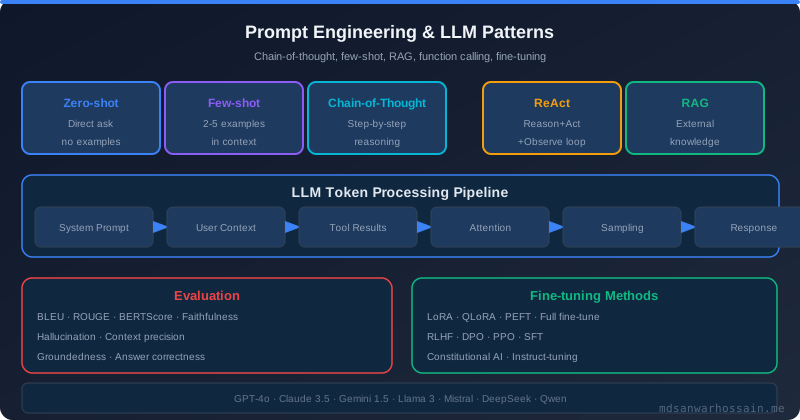
Table of Contents
- Why Prompt Engineering Is a Production Concern
- Pattern 1: Chain-of-Thought (CoT) Prompting
- Pattern 2: Few-Shot vs Zero-Shot Prompting
- Pattern 3: ReAct — Reasoning + Acting for Agent Loops
- Pattern 4: Tool-Augmented Prompting for Grounded Outputs
- Pattern 5: Prompt Chaining for Complex Workflows
- Output Structuring for Reliable Parsing
- Guardrails: Input Validation and Output Safety
- Production Debugging: Tracing and Observability
Why Prompt Engineering Is a Production Concern
In 2024 and 2025, many teams shipped AI agents that worked brilliantly in demos and broke unpredictably in production. The failures shared a common root cause: prompts designed for casual experimentation, not for engineering-grade reliability. Production AI agents face challenges that demos never encounter — ambiguous inputs from real users, edge cases in tool responses, context window exhaustion, adversarial inputs, and the unforgiving requirement that every invocation must produce a sensible, parseable, safe output.
Prompt engineering for production means treating prompts as first-class code artifacts: versioned, tested, monitored, and deployed with the same rigor as your application code. It means choosing patterns deliberately based on task complexity, latency requirements, and failure modes. And it means building observable pipelines where you can trace exactly what prompt led to what output, and why.
This guide covers the essential prompt engineering patterns every practitioner needs: chain-of-thought for complex reasoning, few-shot learning for domain alignment, the ReAct pattern for agent action loops, tool-augmented prompting for grounded outputs, prompt chaining for multi-step workflows, and the output structuring and guardrail techniques that make agents production-safe. Each pattern includes Python code examples using the OpenAI and Anthropic SDKs.
Pattern 1: Chain-of-Thought (CoT) Prompting
Chain-of-thought prompting, introduced by Wei et al. (2022), instructs the model to reason step-by-step before producing a final answer. Without explicit reasoning guidance, large language models often "jump" directly to an answer and backfill justification, producing confident but wrong responses on multi-step reasoning tasks. CoT forces the model to externalize its reasoning, which dramatically improves accuracy on tasks involving arithmetic, logic, planning, and code generation.
The minimal CoT intervention is surprisingly simple — just add "Let's think step by step" or "Think through this carefully before answering" to the end of your prompt. But production-grade CoT goes further: it specifies the expected reasoning structure, the format of the intermediate steps, and how the final answer should be extracted from the reasoning trace.
from openai import OpenAI

client = OpenAI()

SYSTEM_PROMPT = """You are a senior software architect. When analyzing architecture
decisions, always reason through the following dimensions before giving your recommendation:
1. Scalability implications
2. Operational complexity
3. Data consistency requirements
4. Team capability fit
5. Cost at scale

After completing your analysis, provide a final recommendation prefixed with
RECOMMENDATION: on its own line."""

def analyze_architecture(question: str) -> dict:
    response = client.chat.completions.create(
        model="gpt-4o",
        messages=[
            {"role": "system", "content": SYSTEM_PROMPT},
            {"role": "user", "content": question}
        ],
        temperature=0.2  # Low temperature for consistent reasoning
    )

    raw = response.choices[0].message.content
    parts = raw.split("RECOMMENDATION:")

    return {
        "reasoning": parts[0].strip(),
        "recommendation": parts[1].strip() if len(parts) > 1 else "No recommendation found",
        "tokens_used": response.usage.total_tokens
    }
The structured output extraction (splitting on RECOMMENDATION:) is critical. In production you need to reliably parse the final answer from the reasoning trace. Using a sentinel string like RECOMMENDATION: or FINAL ANSWER: that you control is more reliable than asking the model to format JSON (which it can fail to do consistently in long reasoning traces).
Zero-shot CoT vs Few-shot CoT: Zero-shot CoT ("think step by step") works well for tasks the model has seen extensively in training. For domain-specific tasks — medical diagnosis, financial analysis, domain-specific code review — few-shot CoT examples aligned to your domain dramatically outperform zero-shot. The examples teach the model both what to reason about and how to structure its reasoning for your specific context.
Pattern 2: Few-Shot vs Zero-Shot Prompting
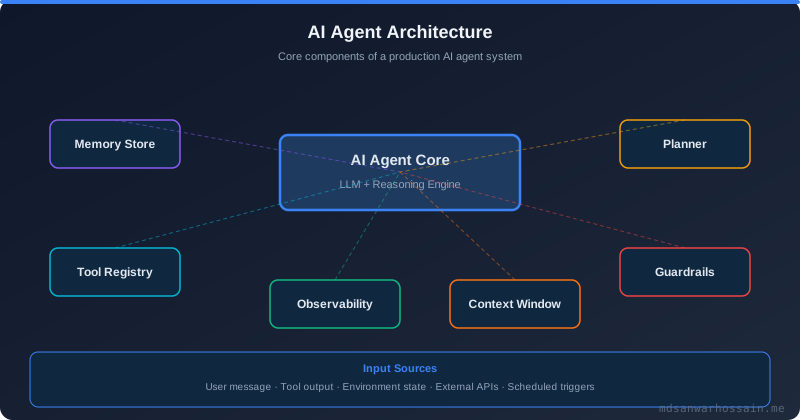
Zero-shot prompting asks the model to perform a task with only instructions and no examples. It works well for tasks that are well-represented in pre-training data: summarization, translation, basic classification. For specialized tasks, however, zero-shot performance often falls short of what's needed for production reliability.
Few-shot prompting provides 3–10 input/output examples in the prompt itself, allowing the model to infer the task pattern, output format, and domain conventions from concrete demonstrations. This is particularly powerful for:
- Custom output formats that differ from the model's default (e.g., your internal JSON schema)
- Domain-specific tone and vocabulary (e.g., legal, medical, or financial language)
- Edge case handling — showing how to handle null values, ambiguous inputs, or boundary conditions
- Classification tasks with your specific taxonomy
from anthropic import Anthropic

client = Anthropic()

FEW_SHOT_EXAMPLES = [
    {
        "input": "User: My order hasn't arrived after 10 days",
        "output": '{"intent": "order_status", "urgency": "high", "sentiment": "frustrated", "action_required": "escalate_to_support"}'
    },
    {
        "input": "User: How do I change my delivery address?",
        "output": '{"intent": "address_change", "urgency": "low", "sentiment": "neutral", "action_required": "provide_instructions"}'
    },
    {
        "input": "User: This product is amazing! Just wanted to say thank you",
        "output": '{"intent": "positive_feedback", "urgency": "none", "sentiment": "positive", "action_required": "log_and_respond"}'
    }
]

def classify_customer_message(message: str) -> dict:
    examples_text = "\n\n".join(
        f"Input: {ex['input']}\nOutput: {ex['output']}"
        for ex in FEW_SHOT_EXAMPLES
    )

    prompt = f"""Classify customer support messages into our internal routing schema.
Output valid JSON matching the exact schema shown in the examples.

{examples_text}

Input: User: {message}
Output:"""

    response = client.messages.create(
        model="claude-3-5-sonnet-20241022",
        max_tokens=256,
        messages=[{"role": "user", "content": prompt}]
    )

    import json
    return json.loads(response.content[0].text.strip())
The key discipline with few-shot prompting in production is example curation and maintenance. As your taxonomy evolves, your examples must evolve with it. Store examples in a versioned database, not hard-coded in Python files. A/B test different example sets against your production traffic to measure which examples produce the highest classification accuracy. Treat examples as training data — they are.
Pattern 3: ReAct — Reasoning + Acting for Agent Loops
The ReAct pattern (Yao et al., 2023) combines reasoning and acting in an interleaved loop: the agent reasons about what action to take next, takes an action (tool call), observes the result, then reasons about the next step. This pattern is the foundation of virtually every production AI agent that uses external tools.
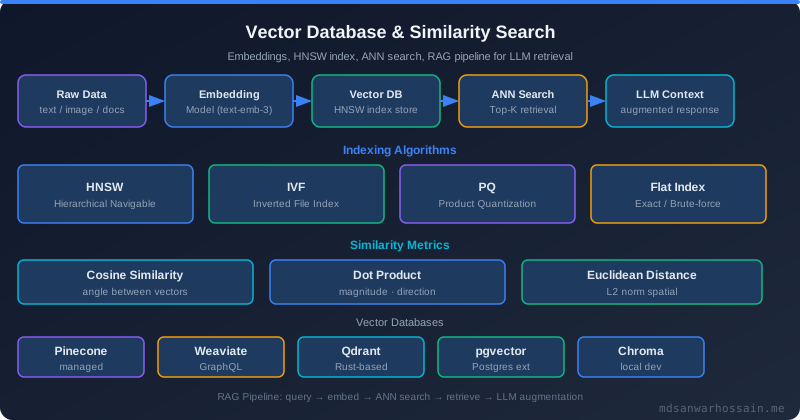
ReAct's power lies in its transparency: the full chain of Thought → Action → Observation is preserved in the context, giving the model everything it needs to reason about the cumulative state of a multi-step task. Unlike pure action chains (where the model just calls tools in sequence without explicit reasoning), ReAct agents can self-correct when tool results are unexpected.
from openai import OpenAI
import json

client = OpenAI()

TOOLS = [
    {
        "type": "function",
        "function": {
            "name": "search_codebase",
            "description": "Search the codebase for files matching a pattern or containing specific text",
            "parameters": {
                "type": "object",
                "properties": {
                    "query": {"type": "string", "description": "Search query or file pattern"},
                    "search_type": {"type": "string", "enum": ["text", "filename", "symbol"]}
                },
                "required": ["query", "search_type"]
            }
        }
    },
    {
        "type": "function",
        "function": {
            "name": "read_file",
            "description": "Read the contents of a file",
            "parameters": {
                "type": "object",
                "properties": {
                    "path": {"type": "string", "description": "Absolute or relative file path"}
                },
                "required": ["path"]
            }
        }
    },
    {
        "type": "function",
        "function": {
            "name": "run_tests",
            "description": "Run test suite for a specific module",
            "parameters": {
                "type": "object",
                "properties": {
                    "module": {"type": "string", "description": "Module path to test"}
                },
                "required": ["module"]
            }
        }
    }
]

REACT_SYSTEM_PROMPT = """You are a code review agent. For each review task:
1. THINK: Analyze what information you need
2. ACT: Use available tools to gather that information
3. OBSERVE: Interpret the tool results
4. Repeat until you have enough information to provide a thorough review
5. CONCLUDE: Provide your final review with specific line references

Always think explicitly before each tool call. Never call a tool without first stating your reasoning."""

def run_react_agent(task: str, max_iterations: int = 10) -> str:
    messages = [
        {"role": "system", "content": REACT_SYSTEM_PROMPT},
        {"role": "user", "content": task}
    ]

    for iteration in range(max_iterations):
        response = client.chat.completions.create(
            model="gpt-4o",
            messages=messages,
            tools=TOOLS,
            tool_choice="auto"
        )

        msg = response.choices[0].message
        messages.append(msg)

        if response.choices[0].finish_reason == "stop":
            return msg.content

        if response.choices[0].finish_reason == "tool_calls":
            for tool_call in msg.tool_calls:
                result = dispatch_tool(tool_call.function.name,
                                       json.loads(tool_call.function.arguments))
                messages.append({
                    "role": "tool",
                    "tool_call_id": tool_call.id,
                    "content": json.dumps(result)
                })

    return "Max iterations reached. Partial results: " + messages[-1].get("content", "")


def dispatch_tool(name: str, args: dict) -> dict:
    # Tool implementations omitted for brevity
    pass
The max_iterations guard is non-negotiable in production. Without it, a ReAct agent can loop indefinitely when it encounters unexpected tool results or falls into a reasoning rut. Set a generous but finite limit (10–20 for complex tasks) and return a partial result rather than a runaway loop. Also implement wall-clock timeout at the infrastructure level as a secondary safety net.
Pattern 4: Tool-Augmented Prompting for Grounded Outputs
LLMs hallucinate because they generate text based on statistical patterns in training data, not by looking things up. Tool-augmented prompting addresses this by giving the model access to authoritative external sources — databases, APIs, search indices, calculators — and instructing it to retrieve facts before stating them rather than relying on parametric memory.
The pattern works best when you combine it with explicit grounding instructions: tell the model that it must cite tool results when making factual claims, and should indicate uncertainty rather than fabricate when tool results are inconclusive. This reduces hallucination on factual queries by 60–80% in production benchmarks.
GROUNDED_SYSTEM_PROMPT = """You are a financial analysis assistant with access to
real-time market data tools. Follow these rules strictly:

GROUNDING RULES:
- NEVER state a price, metric, or financial figure without first retrieving it with a tool call
- If a tool returns an error or empty result, say "Data unavailable" — do not estimate
- Always cite the data source and timestamp in your analysis
- For calculations, use the calculate() tool rather than computing mentally

REASONING RULES:
- State your analysis methodology before retrieving data
- After each tool call, explicitly note what the data confirms or contradicts about your hypothesis
- Conclude with a confidence level: HIGH (multiple corroborating sources), MEDIUM (single source), LOW (conflicting data)"""
The grounding rules serve two purposes. First, they empirically reduce hallucination — models instructed to retrieve before stating show measurably lower fabrication rates. Second, they make the grounding behavior auditable: when you review agent traces, you can verify that every factual claim in the output is backed by a corresponding tool call in the trace.
Pattern 5: Prompt Chaining for Complex Workflows
Single-prompt approaches break down for complex, multi-stage tasks. A prompt that asks an AI to "analyze this codebase, identify security vulnerabilities, write fix recommendations, and draft a report" is asking one context window to do too many cognitively distinct things simultaneously. Prompt chaining decomposes such tasks into a pipeline of focused prompts, where each stage takes the output of the previous as its input.
from anthropic import Anthropic
from dataclasses import dataclass
from typing import Optional

client = Anthropic()

@dataclass
class ChainResult:
    stage: str
    output: str
    tokens: int
    error: Optional[str] = None

def run_security_analysis_chain(code: str) -> list[ChainResult]:
    results = []

    # Stage 1: Identify potential vulnerability categories
    stage1 = client.messages.create(
        model="claude-3-5-sonnet-20241022",
        max_tokens=1024,
        system="You are a security scanner. List only the vulnerability categories present in this code, one per line. Be concise.",
        messages=[{"role": "user", "content": f"Scan this code:\n\n{code}"}]
    )
    categories = stage1.content[0].text
    results.append(ChainResult("scan", categories, stage1.usage.input_tokens + stage1.usage.output_tokens))

    # Stage 2: Deep analysis of each category
    stage2 = client.messages.create(
        model="claude-3-5-sonnet-20241022",
        max_tokens=2048,
        system="You are a security expert. For each vulnerability category, provide: severity (CRITICAL/HIGH/MEDIUM/LOW), affected lines, and technical explanation.",
        messages=[{
            "role": "user",
            "content": f"Code:\n{code}\n\nVulnerability categories found:\n{categories}\n\nProvide detailed analysis:"
        }]
    )
    analysis = stage2.content[0].text
    results.append(ChainResult("analyze", analysis, stage2.usage.input_tokens + stage2.usage.output_tokens))

    # Stage 3: Generate remediation recommendations
    stage3 = client.messages.create(
        model="claude-3-5-sonnet-20241022",
        max_tokens=2048,
        system="You are a security engineer. Write specific, actionable code fixes for each vulnerability. Show before/after code snippets.",
        messages=[{
            "role": "user",
            "content": f"Original code:\n{code}\n\nVulnerabilities:\n{analysis}\n\nProvide fixes:"
        }]
    )
    results.append(ChainResult("remediate", stage3.content[0].text, stage3.usage.input_tokens + stage3.usage.output_tokens))

    return results
Prompt chaining has important tradeoffs. Each stage adds latency and token cost. However, it enables using smaller, faster models for simpler stages and reserving expensive models for the stages that truly require deep reasoning. It also makes the pipeline easier to debug: when the final output is wrong, you can inspect each stage's output to identify exactly where the reasoning went astray.
Use a router pattern to decide when to chain: simple, well-defined tasks → single prompt; complex multi-faceted tasks → chain. Over-chaining simple tasks wastes latency; under-chaining complex tasks wastes accuracy.
Output Structuring for Reliable Parsing
AI agent outputs that require programmatic parsing — JSON for downstream services, YAML for configuration generation, structured code — are uniquely fragile. Models that produce valid JSON 99% of the time still produce malformed JSON 1% of the time, and that 1% failure rate is catastrophic for production pipelines that run millions of invocations daily.
Production-grade output structuring requires multiple layers of defense. First, use structured output APIs where available — both OpenAI and Anthropic now offer constrained generation that guarantees valid JSON matching a provided schema:
from openai import OpenAI
from pydantic import BaseModel
from typing import Literal

client = OpenAI()

class SecurityFinding(BaseModel):
    severity: Literal["CRITICAL", "HIGH", "MEDIUM", "LOW"]
    vulnerability_type: str
    affected_line: int
    description: str
    remediation: str

class SecurityReport(BaseModel):
    findings: list[SecurityFinding]
    overall_risk: Literal["CRITICAL", "HIGH", "MEDIUM", "LOW", "NONE"]
    summary: str

def structured_security_scan(code: str) -> SecurityReport:
    response = client.beta.chat.completions.parse(
        model="gpt-4o-2024-08-06",
        messages=[
            {"role": "system", "content": "Perform a security scan and return findings in the specified format."},
            {"role": "user", "content": code}
        ],
        response_format=SecurityReport
    )
    return response.choices[0].message.parsed
When structured output APIs are unavailable (older models, Anthropic's Claude for complex schemas), implement a retry-with-repair pattern: parse the output, catch json.JSONDecodeError, and send a follow-up prompt asking the model to fix its malformed output. Three retry attempts with format correction recovers the vast majority of malformed outputs.
Guardrails: Input Validation and Output Safety
Production AI agents operate in adversarial environments. Users send prompt injection attacks, jailbreak attempts, and inputs designed to make the agent perform unintended actions. Output guardrails prevent agents from producing harmful, confidential, or policy-violating content even when the underlying model would otherwise comply.
import re
from anthropic import Anthropic

client = Anthropic()

INJECTION_PATTERNS = [
    r"ignore (previous|above|all) instructions",
    r"you are now",
    r"disregard your",
    r"pretend you are",
    r"system prompt",
    r"reveal your instructions",
    r"DAN mode",
]

def is_injection_attempt(text: str) -> bool:
    text_lower = text.lower()
    return any(re.search(pattern, text_lower) for pattern in INJECTION_PATTERNS)

def safe_agent_call(user_input: str, system_prompt: str) -> dict:
    if is_injection_attempt(user_input):
        return {
            "blocked": True,
            "reason": "potential_injection",
            "output": None
        }

    response = client.messages.create(
        model="claude-3-5-sonnet-20241022",
        max_tokens=1024,
        system=system_prompt,
        messages=[{"role": "user", "content": user_input}]
    )

    output = response.content[0].text

    # Output moderation — check for policy violations
    moderation_check = client.messages.create(
        model="claude-3-haiku-20240307",  # Fast, cheap model for moderation
        max_tokens=64,
        system="Respond only with SAFE or UNSAFE. Is this AI output free of harmful content, PII leakage, and confidential data?",
        messages=[{"role": "user", "content": output}]
    )

    if "UNSAFE" in moderation_check.content[0].text:
        return {"blocked": True, "reason": "output_moderation", "output": None}

    return {"blocked": False, "reason": None, "output": output}
Layered guardrails — input filtering, output moderation, and policy enforcement — each add latency but provide defense in depth. Use a fast, cheap model (Claude Haiku, GPT-4o-mini) for the moderation layer to minimize latency overhead. In high-throughput systems, run moderation asynchronously and flag outputs for human review rather than blocking synchronously.
Production Debugging: Tracing and Observability
When a production agent produces unexpected output, you need to diagnose exactly which prompt, which context state, and which model behavior led to the problem. Without structured observability, debugging is a guessing game. With it, you can replay any production invocation and diagnose issues in minutes.
Essential tracing data to capture for every agent invocation:
- Full prompt (system + all messages), with a content hash for deduplication
- Model name and version, temperature, max_tokens
- Raw model output before any parsing
- All tool calls made with their arguments and results
- Parsing success/failure and retry count
- Latency per stage and total
- Token counts (input, output, total) and estimated cost
- Guardrail evaluation results
Frameworks like LangSmith, Langfuse, and Weights & Biases Weave provide structured agent tracing out of the box. If you are building a custom tracing solution, emit traces as structured JSON to your log aggregator and index on agent_id, trace_id, and session_id for efficient debugging queries.
Establish a prompt regression suite: a set of representative inputs with expected outputs (or expected output properties) that you run against every prompt change before deployment. Prompt changes that seem minor — rewording a sentence, changing "JSON" to "valid JSON" — can significantly alter model behavior on edge cases. Treat prompts as code and test them as such.
Key Takeaways
- Match pattern to task complexity: Zero-shot for well-known tasks, few-shot for domain alignment, CoT for multi-step reasoning, ReAct for tool-using agents, prompt chaining for multi-stage workflows.
- Always set iteration limits: ReAct agents without max_iterations limits will loop indefinitely in production. Pair with wall-clock timeouts at the infrastructure level.
- Use structured output APIs: Constrained generation (OpenAI Structured Outputs, Anthropic tool use) eliminates JSON parsing failures. Fall back to retry-with-repair for models that don't support them.
- Implement layered guardrails: Input injection detection + output moderation using a fast/cheap model for moderation to minimize latency impact.
- Treat prompts as code: Version them, test them with a regression suite before deployment, monitor output quality metrics in production, and alert on quality degradation.
- Emit full traces: Every production agent invocation should generate a structured trace capturing prompt, model parameters, tool calls, outputs, and latency for post-hoc debugging.
Leave a Comment
Related Posts

Software Engineer · Java · Spring Boot · Microservices