Docker Compose for Spring Boot Microservices: Multi-Service, Health Checks & Profiles (2026)
Master Docker Compose for Spring Boot microservices: multi-service orchestration with Postgres, Redis & Kafka, health check conditions, dev/test/prod profiles, secrets management, custom networks, volume persistence, CI/CD integration, and a full production readiness checklist.
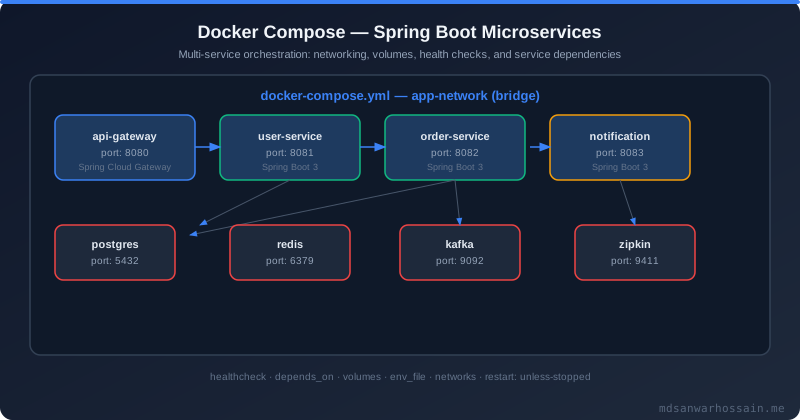
version key), define healthcheck + depends_on: condition: service_healthy to guarantee startup order, leverage profiles for dev/test/prod variants, and store secrets in .env files (never in YAML). In CI, run docker compose -f docker-compose.test.yml up --abort-on-container-exit for integration tests.
1. Docker Compose v3 vs v2 (Compose Spec)
Docker Compose has evolved significantly. Understanding which version to use in 2026 prevents subtle misconfigurations and broken CI pipelines.
- v2 (2014–2017): Introduced long-form syntax, named volumes, named networks. Used
version: "2"header. Thedepends_onkey existed but only checked container start, not readiness. - v3 (2016–2020): Added
deploykey for Docker Swarm (replicas, resource limits, update config). Removed some v2-only options. Caused confusion becausedeploywas silently ignored bydocker-compose(v1 CLI). - Compose Specification (2020+): The unified, version-agnostic standard maintained at
compose-spec/compose-spec. Used by thedocker composeplugin (v2 CLI). Drop theversionkey entirely — it is now optional and ignored.
| Feature | v2 | v3 | Compose Spec |
|---|---|---|---|
healthcheck | ✓ | ✓ | ✓ |
depends_on: condition: service_healthy | ✓ (2.1+) | ✕ removed | ✅ restored |
profiles | ✕ | ✕ | ✅ |
secrets (file-based) | ✕ | ✓ (Swarm) | ✅ local + external |
deploy (Swarm) | ✕ | ✓ | ✓ (optional) |
version header | Required | Required | Optional / ignored |
include (file composition) | ✕ | ✕ | ✅ |
2026 Recommendation: Use the Compose Specification with the docker compose CLI plugin (not the legacy docker-compose Python tool). Omit the version key. You get profiles, healthy conditions, and secrets without version lock-in.
2. Multi-Service Spring Boot Setup (API + DB + Redis + Kafka)
A complete docker-compose.yml for a Spring Boot order-service with Postgres, Redis, Kafka, and Zookeeper — demonstrating dependencies, networks, and volumes:
services:

  order-service:
    build:
      context: .
      dockerfile: Dockerfile
      args:
        JAR_FILE: target/order-service-*.jar
    image: order-service:latest
    container_name: order-service
    ports:
      - "8080:8080"
    environment:
      SPRING_DATASOURCE_URL: jdbc:postgresql://postgres:5432/orders
      SPRING_DATASOURCE_USERNAME: orders_user
      SPRING_DATASOURCE_PASSWORD: ${DB_PASSWORD}
      SPRING_DATA_REDIS_HOST: redis
      SPRING_DATA_REDIS_PORT: 6379
      SPRING_KAFKA_BOOTSTRAP_SERVERS: kafka:9092
      SPRING_PROFILES_ACTIVE: docker
    depends_on:
      postgres:
        condition: service_healthy
      redis:
        condition: service_healthy
      kafka:
        condition: service_healthy
    networks:
      - backend
      - data
    restart: unless-stopped
    healthcheck:
      test: ["CMD", "curl", "-f", "http://localhost:8080/actuator/health"]
      interval: 30s
      timeout: 10s
      retries: 5
      start_period: 60s

  postgres:
    image: postgres:16-alpine
    container_name: postgres
    environment:
      POSTGRES_DB: orders
      POSTGRES_USER: orders_user
      POSTGRES_PASSWORD: ${DB_PASSWORD}
    volumes:
      - postgres_data:/var/lib/postgresql/data
      - ./db/init.sql:/docker-entrypoint-initdb.d/init.sql:ro
    ports:
      - "5432:5432"
    networks:
      - data
    healthcheck:
      test: ["CMD-SHELL", "pg_isready -U orders_user -d orders"]
      interval: 10s
      timeout: 5s
      retries: 5
      start_period: 30s

  redis:
    image: redis:7-alpine
    container_name: redis
    command: redis-server --requirepass ${REDIS_PASSWORD} --maxmemory 256mb --maxmemory-policy allkeys-lru
    ports:
      - "6379:6379"
    volumes:
      - redis_data:/data
    networks:
      - data
    healthcheck:
      test: ["CMD", "redis-cli", "-a", "${REDIS_PASSWORD}", "ping"]
      interval: 10s
      timeout: 5s
      retries: 5

  zookeeper:
    image: confluentinc/cp-zookeeper:7.6.0
    container_name: zookeeper
    environment:
      ZOOKEEPER_CLIENT_PORT: 2181
      ZOOKEEPER_TICK_TIME: 2000
    networks:
      - data
    healthcheck:
      test: ["CMD-SHELL", "echo ruok | nc localhost 2181 | grep imok"]
      interval: 10s
      timeout: 5s
      retries: 5

  kafka:
    image: confluentinc/cp-kafka:7.6.0
    container_name: kafka
    ports:
      - "9092:9092"
    environment:
      KAFKA_BROKER_ID: 1
      KAFKA_ZOOKEEPER_CONNECT: zookeeper:2181
      KAFKA_ADVERTISED_LISTENERS: PLAINTEXT://kafka:9092
      KAFKA_OFFSETS_TOPIC_REPLICATION_FACTOR: 1
      KAFKA_AUTO_CREATE_TOPICS_ENABLE: "true"
    volumes:
      - kafka_data:/var/lib/kafka/data
    depends_on:
      zookeeper:
        condition: service_healthy
    networks:
      - data
    healthcheck:
      test: ["CMD-SHELL", "kafka-topics --bootstrap-server localhost:9092 --list"]
      interval: 15s
      timeout: 10s
      retries: 10
      start_period: 30s

networks:
  backend:
    driver: bridge
  data:
    driver: bridge

volumes:
  postgres_data:
  redis_data:
  kafka_data:
Services on the same network resolve each other by container name (DNS). order-service connects to both backend and data networks. Infrastructure services (postgres, redis, kafka) only join data — they are not directly reachable from the host except via published ports.
3. Build Context & Dockerfile Best Practices for Spring
A well-optimised multi-stage Dockerfile for Spring Boot dramatically reduces image size and build time by exploiting Docker layer caching:
# ---- Stage 1: Dependency resolution (cached unless pom.xml changes) ----
FROM eclipse-temurin:21-jdk-alpine AS deps
WORKDIR /build
COPY .mvn/ .mvn/
COPY mvnw pom.xml ./
# Download dependencies only — cache this layer separately
RUN ./mvnw dependency:go-offline -B -q

# ---- Stage 2: Build ----
FROM deps AS build
COPY src/ src/
RUN ./mvnw package -DskipTests -B -q
# Extract layered JAR for optimal runtime image
RUN java -Djarmode=layertools -jar target/*.jar extract --destination extracted

# ---- Stage 3: Runtime (minimal JRE image) ----
FROM eclipse-temurin:21-jre-alpine AS runtime
WORKDIR /app

# Security: run as non-root user
RUN addgroup -S appgroup && adduser -S appuser -G appgroup
USER appuser

# Copy layered JAR in dependency order (most stable layers first)
COPY --from=build /build/extracted/dependencies/ ./
COPY --from=build /build/extracted/spring-boot-loader/ ./
COPY --from=build /build/extracted/snapshot-dependencies/ ./
COPY --from=build /build/extracted/application/ ./

# JVM flags optimised for containers (respect cgroup memory/CPU limits)
ENV JAVA_TOOL_OPTIONS="-XX:+UseContainerSupport \
    -XX:MaxRAMPercentage=75.0 \
    -XX:+UseG1GC \
    -XX:+ExitOnOutOfMemoryError \
    -Djava.security.egd=file:/dev/./urandom"

EXPOSE 8080
HEALTHCHECK --interval=30s --timeout=10s --start-period=60s --retries=3 \
  CMD wget -qO- http://localhost:8080/actuator/health || exit 1

ENTRYPOINT ["java", "org.springframework.boot.loader.launch.JarLauncher"]
BuildKit for parallel builds: Enable Docker BuildKit to unlock parallel stage execution and better caching:
DOCKER_BUILDKIT=1 docker build --target runtime -t order-service:latest .

# Or via docker compose (BuildKit auto-enabled)
docker compose build --parallel

# .dockerignore — exclude files to minimise build context
.git
.mvn/wrapper/maven-wrapper.jar
target/
*.md
.env
*.log
4. Health Checks: depends_on with condition
The most common Docker Compose pitfall: starting a Spring Boot service before the database is accepting connections. The condition: service_healthy pattern solves this correctly:
depends_on:
  - postgres    # only waits for container START, not readiness
                # Spring Boot fails with "Connection refused" on first attempt
# PostgreSQL healthcheck
postgres:
  image: postgres:16-alpine
  healthcheck:
    test: ["CMD-SHELL", "pg_isready -U ${POSTGRES_USER} -d ${POSTGRES_DB}"]
    interval: 10s
    timeout: 5s
    retries: 5
    start_period: 30s   # grace period before health checks begin

# Redis healthcheck
redis:
  image: redis:7-alpine
  healthcheck:
    test: ["CMD", "redis-cli", "ping"]
    interval: 10s
    timeout: 3s
    retries: 5

# Kafka healthcheck
kafka:
  image: confluentinc/cp-kafka:7.6.0
  healthcheck:
    test: ["CMD-SHELL",
           "kafka-topics --bootstrap-server localhost:9092 --list 2>&1 | grep -v '^$'"]
    interval: 15s
    timeout: 10s
    retries: 10
    start_period: 30s

# Spring Boot service — waits for ALL dependencies to be healthy
order-service:
  depends_on:
    postgres:
      condition: service_healthy
    redis:
      condition: service_healthy
    kafka:
      condition: service_healthy
  healthcheck:
    test: ["CMD", "curl", "-f", "http://localhost:8080/actuator/health/readiness"]
    interval: 30s
    timeout: 10s
    retries: 5
    start_period: 60s
Spring Boot Actuator readiness vs liveness: Use /actuator/health/readiness in the Compose healthcheck — it returns DOWN if datasource, Redis, or Kafka connections fail, making the container unhealthy before traffic reaches it.
management:
  endpoint:
    health:
      probes:
        enabled: true      # enables /actuator/health/liveness and /readiness
      show-details: always
  health:
    readinessstate:
      enabled: true
    livenessstate:
      enabled: true
    db:
      enabled: true
    redis:
      enabled: true
    kafka:
      enabled: true
5. Named Networks and Service Discovery
Docker Compose creates a default network for the project, but explicit named networks give you fine-grained control over which services can communicate:
- Bridge network (default): Services on the same bridge network discover each other by
container_nameor service name via embedded DNS. A service namedpostgresis reachable atpostgres:5432from any service on the same network. - Host network: Container shares the host's network stack (Linux only). Useful for high-throughput testing but eliminates isolation — avoid in production.
- None network: Complete network isolation. Use for batch jobs that should have no network access.
services:
  nginx:              # public-facing reverse proxy
    image: nginx:alpine
    ports:
      - "80:80"
    networks:
      - frontend      # can reach api-gateway
    depends_on:
      - api-gateway

  api-gateway:        # Spring Cloud Gateway — bridges frontend and backend
    image: api-gateway:latest
    networks:
      - frontend      # reachable from nginx
      - backend       # can reach microservices

  order-service:
    image: order-service:latest
    networks:
      - backend       # reachable from api-gateway
      - data          # can reach postgres, redis, kafka

  postgres:
    image: postgres:16-alpine
    networks:
      - data          # isolated: only services on 'data' network can connect
                      # nginx and api-gateway CANNOT reach postgres directly

networks:
  frontend:
    driver: bridge
  backend:
    driver: bridge
  data:
    driver: bridge
    internal: true    # no external internet access for data network (extra security)
DNS resolution: Within a compose network, services resolve by service name AND container_name. Use service names in application.yml (e.g., spring.datasource.url: jdbc:postgresql://postgres:5432/orders). Aliases let you use multiple hostnames for one service.
6. Volumes for Persistence
Without volumes, all data is lost when containers restart. Choose the right volume type for each use case:
# ✅ Named volumes — managed by Docker, best for databases
volumes:
  postgres_data:      # Docker manages location; survives 'docker compose down'
    driver: local     # default; can also use nfs, local-persist plugin

services:
  postgres:
    volumes:
      - postgres_data:/var/lib/postgresql/data  # named volume (recommended)

  # ✅ Bind mounts — useful for init scripts and dev hot-reload
  postgres:
    volumes:
      - postgres_data:/var/lib/postgresql/data
      - ./db/init.sql:/docker-entrypoint-initdb.d/init.sql:ro   # read-only bind mount
      - ./db/seed.sql:/docker-entrypoint-initdb.d/seed.sql:ro

  # ✅ Source code bind mount for Spring Boot dev with devtools hot-reload
  order-service-dev:
    volumes:
      - ./src:/app/src          # source bind mount (dev only, use profile)
      - maven_cache:/root/.m2   # cache Maven dependencies between runs
    profiles: [dev]
# Backup PostgreSQL named volume
docker compose exec postgres pg_dump -U orders_user orders > backup-$(date +%Y%m%d).sql

# Restore
docker compose exec -T postgres psql -U orders_user orders < backup-20260411.sql

# Inspect volume location (for manual backup)
docker volume inspect my-portfolio_postgres_data
Note: docker compose down stops and removes containers but preserves named volumes. Add -v flag to also remove volumes — use this in CI for a clean test environment, but never in production without a backup.
7. Compose Profiles (dev/test/prod)
Profiles allow a single docker-compose.yml to serve multiple environments without duplication:
services:
  # ── Core services (no profile = always started) ──────────────────────
  order-service:
    image: order-service:latest
    # ... (no profiles key = starts in all modes)

  postgres:
    image: postgres:16-alpine
    # ... (no profiles key)

  # ── Dev-only: mock external payment service ───────────────────────────
  payment-mock:
    image: wiremock/wiremock:3.5.0
    container_name: payment-mock
    ports:
      - "8089:8080"
    volumes:
      - ./wiremock/mappings:/home/wiremock/mappings
    profiles: [dev]   # only starts when --profile dev is specified

  # ── Dev-only: MailHog for email testing ───────────────────────────────
  mailhog:
    image: mailhog/mailhog:v1.0.1
    ports:
      - "1025:1025"
      - "8025:8025"
    profiles: [dev]

  # ── Observability stack (dev + staging) ───────────────────────────────
  jaeger:
    image: jaegertracing/all-in-one:1.55
    ports:
      - "16686:16686"
      - "4318:4318"
    profiles: [dev, observability]

  prometheus:
    image: prom/prometheus:v2.50.0
    ports:
      - "9090:9090"
    volumes:
      - ./prometheus.yml:/etc/prometheus/prometheus.yml:ro
    profiles: [dev, observability]

  # ── Test-only: ephemeral test database ───────────────────────────────
  postgres-test:
    image: postgres:16-alpine
    environment:
      POSTGRES_DB: orders_test
      POSTGRES_USER: test_user
      POSTGRES_PASSWORD: test_pass
    profiles: [test]
# Start core + dev services (mocks, mailhog)
docker compose --profile dev up -d

# Start core + observability (jaeger, prometheus)
docker compose --profile observability up -d

# Start multiple profiles
docker compose --profile dev --profile observability up -d

# Or use COMPOSE_PROFILES env var (useful in CI)
COMPOSE_PROFILES=test docker compose up --abort-on-container-exit

# Override pattern: keep base + merge environment-specific overrides
docker compose -f docker-compose.yml -f docker-compose.prod.yml up -d
8. Environment Variables and .env Files
Variable substitution in Compose files keeps configuration flexible across environments:
# .env
DB_PASSWORD=supersecret123
REDIS_PASSWORD=redispass456
APP_VERSION=2.1.0
COMPOSE_PROJECT_NAME=order-platform   # sets the project name prefix

# .env.example — COMMIT this file as documentation (no real secrets)
DB_PASSWORD=change_me
REDIS_PASSWORD=change_me
APP_VERSION=latest
COMPOSE_PROJECT_NAME=order-platform
services:
  order-service:
    image: order-service:${APP_VERSION:-latest}   # default to 'latest' if unset
    environment:
      DB_PASSWORD: ${DB_PASSWORD}                 # required — fails if unset
      REDIS_PASSWORD: ${REDIS_PASSWORD:?REDIS_PASSWORD must be set}  # explicit error
      APP_ENV: ${APP_ENV:-development}            # default value
      LOG_LEVEL: ${LOG_LEVEL:-INFO}
    env_file:
      - .env                  # load from .env file
      - .env.${APP_ENV}       # environment-specific overrides (e.g. .env.staging)
Variable precedence (highest to lowest): Shell environment → --env-file CLI flag → .env file → environment key in compose file → image defaults. This means CI secrets set as shell env vars always override the .env file — ideal for CI/CD pipelines.
9. Secrets Management (Docker Secrets vs Env Vars)
Environment variables are visible in docker inspect output and process listings. Docker secrets mount as files in /run/secrets/ — more secure for production:
services:
  order-service:
    image: order-service:latest
    environment:
      # Tell Spring where to find the secret files
      SPRING_DATASOURCE_PASSWORD_FILE: /run/secrets/db_password
    secrets:
      - db_password
      - jwt_secret

secrets:
  db_password:
    file: ./secrets/db_password.txt    # local file (dev/test only)
  jwt_secret:
    file: ./secrets/jwt_secret.txt

# For Docker Swarm production:
# secrets:
#   db_password:
#     external: true    # created with: docker secret create db_password -
// application-docker.yml — Spring Boot reads secret files automatically
// with spring.config.import=optional:file:/run/secrets/
spring:
  config:
    import:
      - optional:file:/run/secrets/db_password[.txt]
      - optional:file:/run/secrets/jwt_secret[.txt]
  datasource:
    password: ${db_password}   # resolved from /run/secrets/db_password.txt

# Alternative: Spring Boot + AWS Secrets Manager (production)
# Add dependency: spring-cloud-aws-secrets-manager-config
spring:
  cloud:
    aws:
      secretsmanager:
        import-keys:
          - /prod/order-service/db-credentials
      region:
        static: us-east-1
Secret hierarchy for production: Use AWS Secrets Manager / HashiCorp Vault for cloud deployments. Inject via init containers or the Vault Agent Injector sidecar, not as plain env vars. Reserve Docker secrets for single-host Docker Swarm deployments.
10. Compose for Integration Testing (Testcontainers Alternative)
Docker Compose provides a simpler alternative to Testcontainers for teams that want reproducible integration test environments managed outside Java code:
services:
  postgres-test:
    image: postgres:16-alpine
    environment:
      POSTGRES_DB: orders_test
      POSTGRES_USER: test_user
      POSTGRES_PASSWORD: testpass
    healthcheck:
      test: ["CMD-SHELL", "pg_isready -U test_user -d orders_test"]
      interval: 5s
      timeout: 3s
      retries: 10

  redis-test:
    image: redis:7-alpine
    healthcheck:
      test: ["CMD", "redis-cli", "ping"]
      interval: 5s
      timeout: 3s
      retries: 10

  order-service-test:
    build:
      context: .
      target: build     # stop at build stage — run tests inside container
    command: ./mvnw verify -Pintegration-tests -B
    environment:
      SPRING_DATASOURCE_URL: jdbc:postgresql://postgres-test:5432/orders_test
      SPRING_DATASOURCE_USERNAME: test_user
      SPRING_DATASOURCE_PASSWORD: testpass
      SPRING_DATA_REDIS_HOST: redis-test
      SPRING_PROFILES_ACTIVE: test
    depends_on:
      postgres-test:
        condition: service_healthy
      redis-test:
        condition: service_healthy
    networks:
      - test-net

networks:
  test-net:
    driver: bridge
docker compose -f docker-compose.test.yml up \
  --abort-on-container-exit \
  --exit-code-from order-service-test

# Clean up after tests (including volumes)
docker compose -f docker-compose.test.yml down -v --remove-orphans
| Aspect | Docker Compose | Testcontainers |
|---|---|---|
| Configuration | YAML file | Java code |
| Startup overhead | Higher (cold start) | Lower (reuse with ryuk) |
| IDE integration | Manual startup | ✅ Auto-starts in tests |
| CI reproducibility | ✅ Identical to local | ✅ Good |
| Spring Boot 3 support | Manual compose | ✅ @ServiceConnection auto-config |
11. Docker Compose in CI/CD
GitHub Actions with Docker Compose for end-to-end integration testing in CI:
name: Integration Tests

on: [push, pull_request]

jobs:
  integration-test:
    runs-on: ubuntu-latest
    steps:
      - uses: actions/checkout@v4

      # Cache Docker layers to speed up builds
      - name: Set up Docker Buildx
        uses: docker/setup-buildx-action@v3

      - name: Cache Docker layers
        uses: actions/cache@v4
        with:
          path: /tmp/.buildx-cache
          key: ${{ runner.os }}-buildx-${{ hashFiles('Dockerfile', 'pom.xml') }}
          restore-keys: |
            ${{ runner.os }}-buildx-

      - name: Cache Maven packages
        uses: actions/cache@v4
        with:
          path: ~/.m2/repository
          key: ${{ runner.os }}-maven-${{ hashFiles('**/pom.xml') }}
          restore-keys: ${{ runner.os }}-maven-

      - name: Build application image
        run: |
          docker buildx build \
            --cache-from type=local,src=/tmp/.buildx-cache \
            --cache-to type=local,dest=/tmp/.buildx-cache-new,mode=max \
            --load -t order-service:ci .
          mv /tmp/.buildx-cache-new /tmp/.buildx-cache

      - name: Run integration tests
        env:
          DB_PASSWORD: ${{ secrets.TEST_DB_PASSWORD }}
          REDIS_PASSWORD: ${{ secrets.TEST_REDIS_PASSWORD }}
        run: |
          docker compose -f docker-compose.test.yml up \
            --abort-on-container-exit \
            --exit-code-from order-service-test \
            --build

      - name: Collect test reports
        if: always()
        run: |
          docker compose -f docker-compose.test.yml \
            cp order-service-test:/build/target/surefire-reports ./test-reports
        continue-on-error: true

      - name: Upload test results
        uses: actions/upload-artifact@v4
        if: always()
        with:
          name: test-results
          path: test-reports/

      - name: Cleanup
        if: always()
        run: docker compose -f docker-compose.test.yml down -v --remove-orphans
Key CI patterns: Always use --abort-on-container-exit with --exit-code-from to propagate the test exit code. Use if: always() on cleanup steps to ensure volumes are removed even on failure. Cache Docker layers and Maven artifacts to keep builds under 3 minutes.
12. Production Checklist
- ✅ Use Compose Specification — omit the
versionkey entirely - ✅ Pin all image tags (no
:latestin production) — e.g.,postgres:16.3-alpine - ✅ Define
healthcheckfor every service; usecondition: service_healthyindepends_on - ✅ Use
restart: unless-stopped(oron-failure:5) for automatic recovery - ✅ Set
mem_limitandcpusresource constraints to prevent noisy neighbours - ✅ Run Spring Boot containers as non-root user (add
USER appuserin Dockerfile) - ✅ Store secrets in
.env(local dev) or Docker secrets / Vault (production) — never in YAML - ✅ Add
.envandsecrets/to.gitignoreand commit.env.example - ✅ Use named volumes for all stateful data (Postgres, Redis, Kafka)
- ✅ Enable
internal: trueon data networks for database isolation - ✅ Use multi-stage Dockerfile with
-XX:+UseContainerSupportJVM flag - ✅ Enable Spring Boot Actuator readiness & liveness probes for health checks
- ✅ Use profiles to keep dev/test services out of production compose files
- ✅ Add
loggingconfiguration (driver: json-file withmax-size: 50m,max-file: 3) - ✅ Set
COMPOSE_PROJECT_NAMEto avoid naming collisions on shared hosts - ✅ Test startup order failures: kill postgres mid-startup and verify service restarts
- ✅ Run
docker compose configto validate interpolated compose file before deploy - ✅ Automate volume backups — schedule
pg_dumpvia a sidecar cron container