Kubernetes Helm Charts for Spring Boot: Templates, Values, Rolling Updates & Production (2026)
A comprehensive guide to deploying Spring Boot applications on Kubernetes using Helm: chart structure, Go templates, values.yaml hierarchy with environment overrides, ConfigMap & Secret management, liveness/readiness/startup probes via Spring Actuator, HorizontalPodAutoscaler, rolling update strategy, Helm hooks for database migrations, and a production hardening checklist.
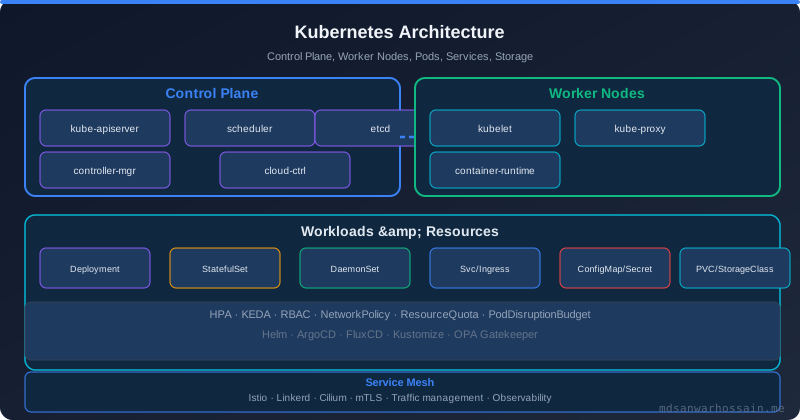
maxUnavailable: 0 for zero-downtime, and pre-upgrade hooks for Flyway/Liquibase migrations.
1. Helm Concepts: Chart, Release & Repository
Helm is the package manager for Kubernetes — it bundles all the Kubernetes manifests for your application into a versioned, reusable package called a Chart, and manages the lifecycle of deployments from install to rollback.
- Chart: A collection of Kubernetes manifest templates and default values, versioned and packaged as a
.tgztarball. Like a Dockerfile for your entire application stack. - Release: A running instance of a chart installed into a cluster. You can install the same chart multiple times with different release names (e.g.,
myapp-staging,myapp-prod). - Repository: A registry of charts (e.g., Artifact Hub, OCI registries, Nexus). Add repos with
helm repo add. - Helm 3 vs Helm 2: Helm 3 removed the server-side Tiller component. It uses your kubeconfig credentials directly — no cluster-wide admin pod needed, and release state is stored as Kubernetes Secrets in the release namespace.
| Command | Description |
|---|---|
helm install myapp ./chart -f values-prod.yaml | Install a release from a local chart directory |
helm upgrade --install myapp ./chart --set image.tag=v2 | Upgrade if exists, install if new (idempotent — ideal for CI/CD) |
helm rollback myapp 1 | Rollback release to revision 1 |
helm uninstall myapp | Remove all Kubernetes resources for this release |
helm list -n production | List all releases in the production namespace |
helm history myapp | Show revision history for a release |
2. Chart Structure: Chart.yaml, values.yaml, templates/
A well-structured Spring Boot Helm chart directory looks like this:
springboot-app/
├── Chart.yaml            # Chart metadata
├── values.yaml           # Default values
├── values-staging.yaml   # Staging overrides
├── values-prod.yaml      # Production overrides
├── values.schema.json    # JSON Schema for values validation
└── templates/
    ├── _helpers.tpl      # Named template helpers
    ├── deployment.yaml
    ├── service.yaml
    ├── ingress.yaml
    ├── configmap.yaml
    ├── secret.yaml
    ├── hpa.yaml
    ├── pdb.yaml
    ├── serviceaccount.yaml
    ├── NOTES.txt         # Post-install notes shown to user
    └── tests/
        └── test-connection.yaml
apiVersion: v2
name: springboot-app
description: A Helm chart for a Spring Boot microservice
type: application
version: 1.4.0          # Chart version (semver)
appVersion: "2.3.1"     # Application version (your Spring Boot release)
keywords:
  - spring-boot
  - java
  - microservice
dependencies:
  - name: postgresql
    version: "14.x.x"
    repository: https://charts.bitnami.com/bitnami
    condition: postgresql.enabled
replicaCount: 2

image:
  repository: my-registry/springboot-app
  tag: "latest"
  pullPolicy: IfNotPresent

imagePullSecrets: []

service:
  type: ClusterIP
  port: 80
  targetPort: 8080

ingress:
  enabled: true
  className: nginx
  host: myapp.example.com
  tls: true

resources:
  requests:
    cpu: 250m
    memory: 512Mi
  limits:
    cpu: 1000m
    memory: 1Gi

autoscaling:
  enabled: true
  minReplicas: 2
  maxReplicas: 10
  targetCPUUtilizationPercentage: 70

app:
  profile: production
  datasource:
    url: jdbc:postgresql://postgres:5432/mydb
  jvmOpts: "-XX:+UseContainerSupport -XX:MaxRAMPercentage=75.0"
3. Deployment Template for Spring Boot
The Deployment template is the heart of your chart. It uses Go templating with {{ .Values.* }} to inject values at deploy time:
apiVersion: apps/v1
kind: Deployment
metadata:
  name: {{ include "springboot-app.fullname" . }}
  labels:
    {{- include "springboot-app.labels" . | nindent 4 }}
spec:
  replicas: {{ .Values.replicaCount }}
  selector:
    matchLabels:
      {{- include "springboot-app.selectorLabels" . | nindent 6 }}
  strategy:
    type: RollingUpdate
    rollingUpdate:
      maxSurge: 1
      maxUnavailable: 0
  template:
    metadata:
      labels:
        {{- include "springboot-app.selectorLabels" . | nindent 8 }}
      annotations:
        checksum/config: {{ include (print $.Template.BasePath "/configmap.yaml") . | sha256sum }}
    spec:
      {{- with .Values.imagePullSecrets }}
      imagePullSecrets:
        {{- toYaml . | nindent 8 }}
      {{- end }}
      securityContext:
        runAsNonRoot: true
        runAsUser: 1000
        fsGroup: 1000
      terminationGracePeriodSeconds: 60
      containers:
        - name: {{ .Chart.Name }}
          image: "{{ .Values.image.repository }}:{{ .Values.image.tag }}"
          imagePullPolicy: {{ .Values.image.pullPolicy }}
          ports:
            - name: http
              containerPort: 8080
              protocol: TCP
          env:
            - name: SPRING_PROFILES_ACTIVE
              value: {{ .Values.app.profile | quote }}
            - name: JAVA_OPTS
              value: {{ .Values.app.jvmOpts | quote }}
            - name: DB_PASSWORD
              valueFrom:
                secretKeyRef:
                  name: {{ include "springboot-app.fullname" . }}-secret
                  key: db-password
          envFrom:
            - configMapRef:
                name: {{ include "springboot-app.fullname" . }}-config
          resources:
            {{- toYaml .Values.resources | nindent 12 }}
          livenessProbe:
            httpGet:
              path: /actuator/health/liveness
              port: 8080
            initialDelaySeconds: 30
            periodSeconds: 10
            failureThreshold: 3
          readinessProbe:
            httpGet:
              path: /actuator/health/readiness
              port: 8080
            initialDelaySeconds: 20
            periodSeconds: 5
            failureThreshold: 3
          startupProbe:
            httpGet:
              path: /actuator/health/liveness
              port: 8080
            initialDelaySeconds: 10
            periodSeconds: 10
            failureThreshold: 30   # allow up to 300s for JVM startup
{{- define "springboot-app.fullname" -}}
{{- printf "%s-%s" .Release.Name .Chart.Name | trunc 63 | trimSuffix "-" }}
{{- end }}

{{- define "springboot-app.labels" -}}
helm.sh/chart: {{ .Chart.Name }}-{{ .Chart.Version }}
app.kubernetes.io/name: {{ .Chart.Name }}
app.kubernetes.io/instance: {{ .Release.Name }}
app.kubernetes.io/version: {{ .Chart.AppVersion | quote }}
app.kubernetes.io/managed-by: {{ .Release.Service }}
{{- end }}

{{- define "springboot-app.selectorLabels" -}}
app.kubernetes.io/name: {{ .Chart.Name }}
app.kubernetes.io/instance: {{ .Release.Name }}
{{- end }}
4. Service and Ingress Templates
apiVersion: v1
kind: Service
metadata:
  name: {{ include "springboot-app.fullname" . }}
  labels:
    {{- include "springboot-app.labels" . | nindent 4 }}
spec:
  type: {{ .Values.service.type }}   # ClusterIP | LoadBalancer | NodePort
  ports:
    - port: {{ .Values.service.port }}
      targetPort: {{ .Values.service.targetPort }}
      protocol: TCP
      name: http
  selector:
    {{- include "springboot-app.selectorLabels" . | nindent 4 }}
{{- if .Values.ingress.enabled }}
apiVersion: networking.k8s.io/v1
kind: Ingress
metadata:
  name: {{ include "springboot-app.fullname" . }}
  labels:
    {{- include "springboot-app.labels" . | nindent 4 }}
  annotations:
    nginx.ingress.kubernetes.io/rewrite-target: /
    nginx.ingress.kubernetes.io/proxy-connect-timeout: "30"
    nginx.ingress.kubernetes.io/proxy-read-timeout: "60"
    nginx.ingress.kubernetes.io/proxy-body-size: "10m"
    nginx.ingress.kubernetes.io/ssl-redirect: "true"
    {{- if .Values.ingress.tls }}
    cert-manager.io/cluster-issuer: letsencrypt-prod
    {{- end }}
spec:
  ingressClassName: {{ .Values.ingress.className }}
  {{- if .Values.ingress.tls }}
  tls:
    - hosts:
        - {{ .Values.ingress.host }}
      secretName: {{ include "springboot-app.fullname" . }}-tls
  {{- end }}
  rules:
    - host: {{ .Values.ingress.host }}
      http:
        paths:
          - path: /api
            pathType: Prefix
            backend:
              service:
                name: {{ include "springboot-app.fullname" . }}
                port:
                  number: {{ .Values.service.port }}
{{- end }}
For Traefik, replace nginx annotations with traefik.ingress.kubernetes.io/router.entrypoints: websecure and traefik.ingress.kubernetes.io/router.tls: "true". The ingressClassName field selects the ingress controller — use nginx, traefik, or alb (AWS Load Balancer Controller) as needed.
5. ConfigMap and Secret Management with Helm
apiVersion: v1
kind: ConfigMap
metadata:
  name: {{ include "springboot-app.fullname" . }}-config
  labels:
    {{- include "springboot-app.labels" . | nindent 4 }}
data:
  SPRING_DATASOURCE_URL: {{ .Values.app.datasource.url | quote }}
  SPRING_PROFILES_ACTIVE: {{ .Values.app.profile | quote }}
  MANAGEMENT_ENDPOINTS_WEB_EXPOSURE_INCLUDE: "health,info,prometheus"
  MANAGEMENT_HEALTH_LIVENESSSTATE_ENABLED: "true"
  MANAGEMENT_HEALTH_READINESSSTATE_ENABLED: "true"
  # Full application.yml can be embedded as a file:
  application.yml: |
    spring:
      datasource:
        url: {{ .Values.app.datasource.url }}
      jpa:
        hibernate:
          ddl-auto: validate
    management:
      endpoint:
        health:
          probes:
            enabled: true
apiVersion: v1
kind: Secret
metadata:
  name: {{ include "springboot-app.fullname" . }}-secret
  labels:
    {{- include "springboot-app.labels" . | nindent 4 }}
type: Opaque
data:
  db-password: {{ .Values.app.dbPassword | b64enc | quote }}
  jwt-secret: {{ .Values.app.jwtSecret | b64enc | quote }}
Production recommendation: Never commit raw secrets in values.yaml. Use one of these approaches:
- Helm Secrets plugin (
helm secrets): Encrypts values files with SOPS + AWS KMS/GPG. Decrypt at deploy time viahelm secrets upgrade. - External Secrets Operator: Syncs secrets from AWS Secrets Manager, Vault, or GCP Secret Manager into Kubernetes Secrets automatically — no secrets in Git at all.
- sealed-secrets: Encrypt Kubernetes Secrets with a cluster-specific key. The encrypted
SealedSecretCRD is safe to commit to Git.
apiVersion: external-secrets.io/v1beta1
kind: ExternalSecret
metadata:
  name: {{ include "springboot-app.fullname" . }}-external-secret
spec:
  refreshInterval: 1h
  secretStoreRef:
    name: aws-secrets-store
    kind: ClusterSecretStore
  target:
    name: {{ include "springboot-app.fullname" . }}-secret
  data:
    - secretKey: db-password
      remoteRef:
        key: production/myapp/db
        property: password
6. Values Hierarchy: default / env-specific / --set override
Helm merges multiple values sources in order of increasing precedence — later sources override earlier ones:
| Source | Precedence | Usage |
|---|---|---|
values.yaml (chart default) | Lowest | Safe defaults, committed to Git |
-f values-staging.yaml | Medium | Environment-specific overrides |
-f values-prod.yaml | Higher | Production tuning (replicas, resources) |
--set image.tag=v1.2.3 | Highest | CI/CD runtime overrides (image tags) |
replicaCount: 4

resources:
  requests:
    cpu: 500m
    memory: 1Gi
  limits:
    cpu: 2000m
    memory: 2Gi

autoscaling:
  minReplicas: 4
  maxReplicas: 20

app:
  profile: production
  jvmOpts: "-XX:+UseContainerSupport -XX:MaxRAMPercentage=75.0 -XX:+UseZGC"
helm upgrade --install myapp ./chart \
  -f values.yaml \
  -f values-prod.yaml \
  --set image.tag=${GITHUB_SHA::8} \
  --set image.repository=my-registry/springboot-app \
  --namespace production \
  --create-namespace \
  --wait \
  --timeout 5m
{
  "$schema": "http://json-schema.org/draft-07/schema",
  "type": "object",
  "required": ["image", "resources"],
  "properties": {
    "image": {
      "type": "object",
      "required": ["repository", "tag"],
      "properties": {
        "repository": {"type": "string"},
        "tag": {"type": "string", "minLength": 1}
      }
    },
    "replicaCount": {
      "type": "integer",
      "minimum": 1,
      "maximum": 50
    }
  }
}
7. Liveness, Readiness & Startup Probes for Spring Boot
Kubernetes uses three types of probes to manage container health and traffic routing:
- Liveness probe: Is the container alive? Failure triggers a container restart. Use for deadlock or unrecoverable state detection.
- Readiness probe: Is the container ready to serve traffic? Failure removes the pod from Service endpoints (no traffic) but does not restart it. Use for temporary busyness or warm-up.
- Startup probe: Has the container finished starting? Disables liveness and readiness checks until the startup probe succeeds. Critical for Spring Boot with slow JVM warm-up — prevents premature restarts.
Spring Boot 3 auto-configures Actuator liveness and readiness endpoints when deployed in Kubernetes (detected via KUBERNETES_SERVICE_HOST env var):
management:
  endpoint:
    health:
      probes:
        enabled: true          # enables /actuator/health/liveness and /readiness
      show-details: always
  health:
    livenessstate:
      enabled: true
    readinessstate:
      enabled: true
  endpoints:
    web:
      exposure:
        include: health,info,prometheus,metrics
startupProbe:
  httpGet:
    path: /actuator/health/liveness
    port: 8080
  initialDelaySeconds: 10
  periodSeconds: 10
  failureThreshold: 30    # 10s * 30 = 5 min max startup time (JVM + Flyway)
  successThreshold: 1

readinessProbe:
  httpGet:
    path: /actuator/health/readiness
    port: 8080
  initialDelaySeconds: 0   # startup probe handles the delay
  periodSeconds: 5
  failureThreshold: 3      # 15s unhealthy before removed from load balancer
  successThreshold: 1

livenessProbe:
  httpGet:
    path: /actuator/health/liveness
    port: 8080
  initialDelaySeconds: 0
  periodSeconds: 10
  failureThreshold: 3      # 30s before container is restarted
  successThreshold: 1
@Component
public class GracefulShutdownHandler {

    @Autowired
    private ApplicationContext context;

    @PreDestroy
    public void onShutdown() {
        // Signal Kubernetes to stop sending traffic before shutdown begins
        AvailabilityChangeEvent.publish(context,
            ReadinessState.REFUSING_TRAFFIC);

        // Wait for in-flight requests (terminationGracePeriodSeconds in pod spec)
        Thread.sleep(10_000);
    }
}
8. HorizontalPodAutoscaler (HPA) Configuration
HPA automatically scales the number of Pod replicas based on observed CPU/memory utilization or custom metrics:
{{- if .Values.autoscaling.enabled }}
apiVersion: autoscaling/v2
kind: HorizontalPodAutoscaler
metadata:
  name: {{ include "springboot-app.fullname" . }}
  labels:
    {{- include "springboot-app.labels" . | nindent 4 }}
spec:
  scaleTargetRef:
    apiVersion: apps/v1
    kind: Deployment
    name: {{ include "springboot-app.fullname" . }}
  minReplicas: {{ .Values.autoscaling.minReplicas }}
  maxReplicas: {{ .Values.autoscaling.maxReplicas }}
  metrics:
    - type: Resource
      resource:
        name: cpu
        target:
          type: Utilization
          averageUtilization: {{ .Values.autoscaling.targetCPUUtilizationPercentage }}
    - type: Resource
      resource:
        name: memory
        target:
          type: Utilization
          averageUtilization: 80
  behavior:
    scaleUp:
      stabilizationWindowSeconds: 60
      policies:
        - type: Pods
          value: 2
          periodSeconds: 60
    scaleDown:
      stabilizationWindowSeconds: 300   # wait 5m before scaling down
      policies:
        - type: Pods
          value: 1
          periodSeconds: 120
{{- end }}
KEDA (Kubernetes Event-Driven Autoscaling) extends HPA with event-source metrics — Kafka consumer lag, SQS queue depth, Prometheus queries:
apiVersion: keda.sh/v1alpha1
kind: ScaledObject
metadata:
  name: {{ include "springboot-app.fullname" . }}-keda
spec:
  scaleTargetRef:
    name: {{ include "springboot-app.fullname" . }}
  minReplicaCount: 1
  maxReplicaCount: 20
  triggers:
    - type: kafka
      metadata:
        bootstrapServers: kafka:9092
        consumerGroup: order-processor-group
        topic: order-events
        lagThreshold: "100"     # scale up when lag exceeds 100 messages
        offsetResetPolicy: latest
9. Rolling Update Strategy (maxSurge / maxUnavailable)
Kubernetes supports two update strategies for Deployments. RollingUpdate (default) is the right choice for Spring Boot microservices:
| Strategy | Behaviour | Downtime | Use case |
|---|---|---|---|
| RollingUpdate | Gradually replaces old pods with new ones | Zero (with correct settings) | ✅ All stateless Spring Boot services |
| Recreate | Kills all old pods, then starts new ones | Yes (gap in availability) | Only for services that cannot run two versions simultaneously |
strategy:
  type: RollingUpdate
  rollingUpdate:
    maxSurge: 1         # temporarily allow 5 pods (4 + 1) during update
    maxUnavailable: 0   # never reduce below 4 running pods — zero downtime

# PodDisruptionBudget: protects against node drains killing too many pods at once
---
apiVersion: policy/v1
kind: PodDisruptionBudget
metadata:
  name: {{ include "springboot-app.fullname" . }}-pdb
spec:
  minAvailable: 2       # always keep at least 2 pods running
  selector:
    matchLabels:
      {{- include "springboot-app.selectorLabels" . | nindent 6 }}
# Check current status
helm status myapp -n production

# View revision history
helm history myapp -n production

# Rollback to revision 3
helm rollback myapp 3 -n production

# Rollback to immediately previous revision
helm rollback myapp -n production

# Verify rollback
kubectl rollout status deployment/myapp-springboot-app -n production
Key settings for zero-downtime: Always set maxUnavailable: 0 so at least replicaCount pods are running throughout the update. Set terminationGracePeriodSeconds: 60 so pods finishing in-flight requests are not killed abruptly. Configure preStop hook with a sleep to let the load balancer remove the pod from endpoints before SIGTERM is sent.
10. Helm Hooks for DB Migrations
Helm hooks run Kubernetes Jobs at specific points in the release lifecycle. Use pre-upgrade and pre-install hooks to run Flyway or Liquibase migrations before new application pods start:
apiVersion: batch/v1
kind: Job
metadata:
  name: {{ include "springboot-app.fullname" . }}-db-migrate-{{ .Release.Revision }}
  labels:
    {{- include "springboot-app.labels" . | nindent 4 }}
  annotations:
    "helm.sh/hook": pre-install,pre-upgrade
    "helm.sh/hook-weight": "-5"          # lower number runs first
    "helm.sh/hook-delete-policy": before-hook-creation,hook-succeeded
spec:
  backoffLimit: 2
  activeDeadlineSeconds: 300
  template:
    spec:
      restartPolicy: Never
      containers:
        - name: db-migrate
          image: "{{ .Values.image.repository }}:{{ .Values.image.tag }}"
          command: ["java", "-cp", "app.jar",
                    "org.springframework.boot.loader.JarLauncher",
                    "--spring.profiles.active=migrate-only"]
          env:
            - name: SPRING_FLYWAY_ENABLED
              value: "true"
            - name: SPRING_JPA_HIBERNATE_DDL_AUTO
              value: "validate"
            - name: DB_PASSWORD
              valueFrom:
                secretKeyRef:
                  name: {{ include "springboot-app.fullname" . }}-secret
                  key: db-password
Hook annotations explained:
helm.sh/hook: pre-install,pre-upgrade— run before install and before every upgradehelm.sh/hook-weight: "-5"— lower weights run first; use to order multiple hookshelm.sh/hook-delete-policy: before-hook-creation,hook-succeeded— delete old job before creating new one, and clean up on success (keeps failed jobs for debugging)
spring:
  flyway:
    enabled: true
    locations: classpath:db/migration
    validate-on-migrate: true
    out-of-order: false
  jpa:
    hibernate:
      ddl-auto: validate
  autoconfigure:
    exclude:
      # Don't start HTTP server — just run migration and exit
      - org.springframework.boot.autoconfigure.web.servlet.WebMvcAutoConfiguration
11. Helm Test and Validation
apiVersion: v1
kind: Pod
metadata:
  name: {{ include "springboot-app.fullname" . }}-test-connection
  labels:
    {{- include "springboot-app.labels" . | nindent 4 }}
  annotations:
    "helm.sh/hook": test
    "helm.sh/hook-delete-policy": hook-succeeded
spec:
  restartPolicy: Never
  containers:
    - name: test-connection
      image: curlimages/curl:8.6.0
      command:
        - sh
        - -c
        - |
          set -e
          echo "Testing health endpoint..."
          curl -sf http://{{ include "springboot-app.fullname" . }}:{{ .Values.service.port }}/actuator/health/readiness
          echo ""
          echo "Testing API endpoint..."
          curl -sf http://{{ include "springboot-app.fullname" . }}:{{ .Values.service.port }}/api/ping
          echo "All tests passed!"
# 1. Lint the chart (detect syntax and value errors)
helm lint ./chart -f values.yaml -f values-prod.yaml

# 2. Dry-run: render templates and validate against live cluster
helm upgrade --install myapp ./chart -f values-prod.yaml \
  --dry-run --debug 2>&1 | head -100

# 3. Render templates to stdout (no cluster needed — great for CI)
helm template myapp ./chart -f values-prod.yaml \
  --set image.tag=v1.2.3 | kubectl apply --dry-run=client -f -

# 4. Helm diff plugin — show what will change before upgrading
helm plugin install https://github.com/databus23/helm-diff
helm diff upgrade myapp ./chart -f values-prod.yaml --set image.tag=v1.2.3

# 5. Run post-deploy tests
helm test myapp -n production --logs
Integrate helm lint and helm template | kubectl apply --dry-run=client into your pull request checks. The helm diff plugin generates a git-diff-style output of the changes — add it to your PR description so reviewers see exactly what will change in the cluster before approving the deploy.
12. Production Checklist
- Resource
requestsandlimitsset on all containers - Startup, liveness, and readiness probes configured
- Spring Actuator health probes enabled (
probes.enabled: true) - HPA configured with CPU + memory targets
- PodDisruptionBudget (
minAvailable: 1) for HA - RollingUpdate with
maxUnavailable: 0 terminationGracePeriodSeconds: 60for graceful shutdown- PreStop hook sleep to drain load balancer connections
- Secrets from Vault/AWS SM via External Secrets Operator
- No secrets in Git or container images
- ConfigMap
checksum/configannotation for auto-restart on config change securityContext: runAsNonRoot: true- Read-only root filesystem (
readOnlyRootFilesystem: true) - Non-root user (
runAsUser: 1000) - Image signed & scanned (Cosign + Trivy)
- Network Policies limiting pod-to-pod traffic
- ServiceAccount with minimal RBAC permissions
- Helm hooks for DB migrations (
pre-upgrade) - values.schema.json for deploy-time validation
- Helm diff plugin in CI PR checks
- Ingress with TLS + cert-manager auto-renewal
- JVM container support flags (
UseContainerSupport) - Pod anti-affinity for multi-zone HA
- Image pull policy
IfNotPresent(notAlways)
spec:
  affinity:
    podAntiAffinity:
      preferredDuringSchedulingIgnoredDuringExecution:
        - weight: 100
          podAffinityTerm:
            topologyKey: topology.kubernetes.io/zone
            labelSelector:
              matchLabels:
                {{- include "springboot-app.selectorLabels" . | nindent 16 }}
  containers:
    - name: {{ .Chart.Name }}
      securityContext:
        allowPrivilegeEscalation: false
        readOnlyRootFilesystem: true
        runAsNonRoot: true
        runAsUser: 1000
        capabilities:
          drop: ["ALL"]
      volumeMounts:
        - name: tmp-dir
          mountPath: /tmp   # Spring Boot needs writable /tmp
  volumes:
    - name: tmp-dir
      emptyDir: {}