Feature Flags in Production: Dark Launches, Canary Releases, and Kill Switches
Feature flags are the safest path between writing code and running it in production for all users. They decouple deployment from release, enabling dark launches, progressive canary rollouts, instant kill switches, and controlled experiments — all without a single code deployment. Every production engineering team that has survived a Black Friday outage eventually learns to love them.
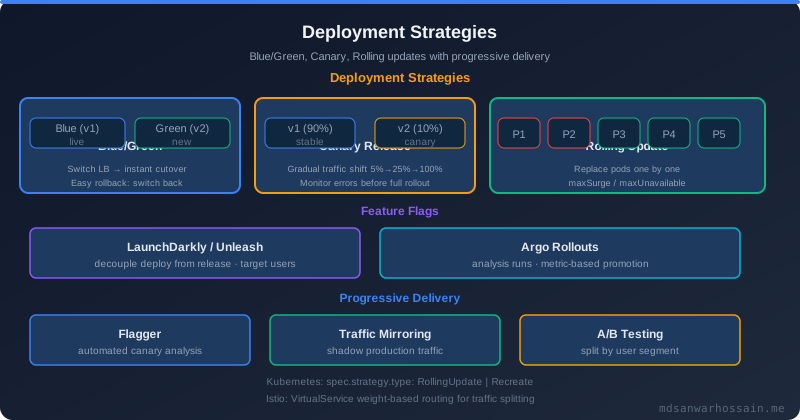
Table of Contents
- The Real-World Problem: The Feature That Broke Black Friday
- What Are Feature Flags?
- Pattern 1: Dark Launches — Running New Code Without Showing Results
- Pattern 2: Canary Releases with Feature Flags
- Pattern 3: Kill Switches for Production Safety
- Pattern 4: A/B Testing and Experimentation Flags
- Feature Flag Management Platforms
- Spring Boot Integration
- Architecture: How Flag Changes Propagate
- Flag Lifecycle Management
- Failure Scenarios
- Trade-offs
- When NOT to Use Feature Flags
The Real-World Problem: The Feature That Broke Black Friday
In late November, an e-commerce platform's engineering team completed a major checkout flow redesign — a new multi-step form with real-time inventory validation and a faster payment confirmation screen. The feature was developed over three months, thoroughly tested in staging, and passed all integration test suites. The team was proud of it. They enabled it for 100% of production users two days before Black Friday.
At 11:42 PM on Black Friday Eve, checkout failures began appearing in the error logs. Not a dramatic spike — a slow, creeping increase. By 11:55 PM the error rate on checkout completions had reached 34%. The new checkout flow contained a race condition between the inventory validation step and the order creation step that only manifested when two users simultaneously attempted to purchase the same last-in-stock item. In staging, inventory was seeded generously and this scenario never occurred. In production, at peak traffic with real scarcity, the race condition triggered constantly.
Engineers spent 15 minutes diagnosing before reverting via a code deployment — a process that itself took 8 minutes to build and roll out. Total impact: 23 minutes of degraded checkout, representing hundreds of thousands of dollars in abandoned carts at peak traffic.
The entire incident would have lasted under 30 seconds with a kill switch. A feature flag tied to the new checkout flow, evaluated at runtime, could have been flipped to false in the LaunchDarkly dashboard before the engineer even finished reading the error alert. No deployment, no rollback, no build pipeline — just a flag evaluation that instantly fell back to the old checkout path for every user in production. This is the production safety case for feature flags.
What Are Feature Flags?
A feature flag (also called a feature toggle, feature switch, or feature gate) is a conditional branch in code controlled by configuration rather than by a code deployment. At its simplest, it is an if statement whose condition reads from an external source — a database, a configuration service, or a feature flag platform — instead of being hardcoded.
Pete Hodgson's taxonomy from Martin Fowler's canonical essay identifies four distinct types of feature flags, each with different lifespans and use cases. Release flags are short-lived toggles that wrap incomplete or risky features during development. They are enabled incrementally during rollout and deleted after the feature is fully released — typically alive for days to weeks. Experiment flags (A/B testing flags) split users into cohorts for controlled experiments, measuring which variant drives better business outcomes. They live for the duration of the experiment, typically days to weeks. Ops flags control operational behavior — rate limiting thresholds, circuit breaker parameters, feature degradation modes — and are long-lived, potentially permanent infrastructure controls that ops teams toggle in response to production conditions. Permission flags gate features by user segment, subscription tier, or geography, and are effectively permanent business logic controls that never get cleaned up.
Understanding which type a flag is matters because it determines the appropriate flag management strategy, lifecycle expectations, and cleanup discipline. Release flags that are not cleaned up after release become the zombie flags that rot your codebase over time.
Pattern 1: Dark Launches — Running New Code Without Showing Results
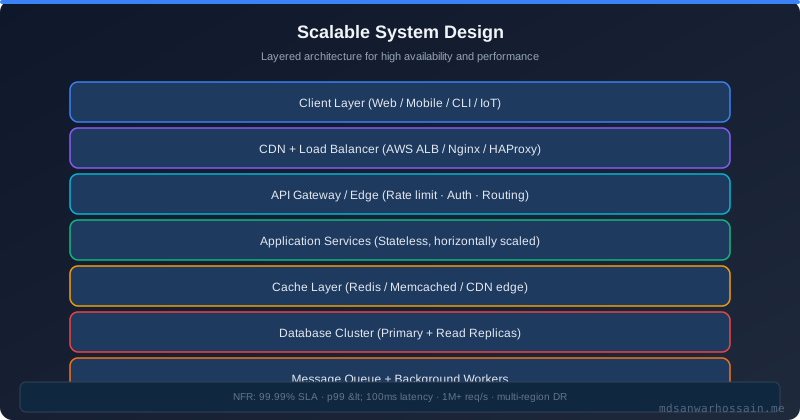
A dark launch is the most conservative form of production testing: you send real production traffic through new code but discard the result, showing the user the output of the existing code path. The new code runs in the shadow — receiving the same inputs, executing against the same production data, producing real outputs — but those outputs are thrown away. Only metrics (latency, error rate, CPU, memory) are kept.
The canonical use case is a database migration or algorithm replacement. Before cutting over to a new search ranking algorithm, you can dark-launch it on every search query: the user sees the old ranking, but both the old and new algorithms execute and their latency and error rates are recorded and compared. If the new algorithm shows a 2× latency increase on 5% of queries, you discover this from telemetry before any user is affected.
Dark launches are also essential for dual-writing during data store migrations. When migrating from a monolithic database to a service with its own data store, you dark-launch writes to the new store alongside writes to the old store. The old store remains authoritative; reads still come from it. The new store receives shadow writes and can be validated for consistency before the cutover. This is far safer than a big-bang migration cutover.
@Service
public class SearchService {

    private final LegacySearchEngine legacyEngine;
    private final NewSearchEngine newEngine;
    private final LDClient ldClient;
    private final MeterRegistry meterRegistry;

    public SearchResults search(String query, LDUser user) {
        SearchResults legacyResult = legacyEngine.search(query);

        boolean darkLaunchEnabled = ldClient.boolVariation(
            "new-search-engine-dark-launch", user, false);

        if (darkLaunchEnabled) {
            // Run new engine in background — do not block the response
            CompletableFuture.runAsync(() -> {
                try {
                    long start = System.currentTimeMillis();
                    SearchResults newResult = newEngine.search(query);
                    long latency = System.currentTimeMillis() - start;

                    meterRegistry.timer("search.dark_launch.latency",
                        "engine", "new").record(latency, TimeUnit.MILLISECONDS);

                    // Compare result quality metrics (not shown to user)
                    int resultCountDiff = Math.abs(
                        newResult.getTotal() - legacyResult.getTotal());
                    meterRegistry.gauge("search.dark_launch.result_count_diff",
                        resultCountDiff);
                } catch (Exception ex) {
                    meterRegistry.counter("search.dark_launch.errors",
                        "engine", "new").increment();
                    log.warn("Dark launch error in new search engine: {}", ex.getMessage());
                }
            });
        }

        return legacyResult; // Always return the authoritative legacy result
    }
}
The key invariant of a dark launch: it must never affect the user-facing response. The shadow execution must be isolated — running in a separate thread, with its own timeout, with errors fully swallowed — so that failures in the dark path cannot contaminate the production path. The CompletableFuture.runAsync pattern above achieves this, but you must also set an explicit timeout on the async task to prevent unbounded thread consumption in your executor pool.
Pattern 2: Canary Releases with Feature Flags
A canary release uses a feature flag to expose new functionality to a progressively increasing percentage of users while monitoring error rates, latency, and business metrics. If any metric degrades beyond a threshold at a given percentage, the rollout is halted or rolled back — still with no code deployment required.
The standard percentage ladder for a canary rollout is: 0.1% → 1% → 10% → 50% → 100%, with a validation period (typically 30 minutes to 24 hours depending on traffic volume and risk level) at each step. The decision to advance, hold, or roll back at each step is ideally automated via metrics gates — but must be supported by manual override in either direction.
User-segment targeting is the most important enhancement to simple percentage rollout. Rather than selecting 1% of users randomly, you target 1% of your least critical users first: internal employees, beta testers, users in low-revenue time zones. This ensures that if a bug exists, it affects users who are most likely to report it clearly and least likely to generate a revenue incident. As confidence grows, the canary expands to broader segments.
The rollback vs rollforward decision at each canary stage is not always obvious. If error rate increases by 0.2% at the 10% stage, is that a bug in the new feature or natural variance in a low-traffic period? Establish your threshold criteria before starting the rollout — do not set them in the middle of an incident under pressure. A common rule: if error rate or P99 latency increases by more than 10% relative to baseline at any canary stage, roll back immediately. If the increase is between 5–10%, hold and investigate. Below 5%, advance to the next stage.
# Unleash percentage rollout configuration YAML
apiVersion: 1
kind: feature
name: new-checkout-flow
description: "Redesigned checkout flow with real-time inventory validation"
enabled: true
strategies:
  - name: gradualRolloutUserId
    parameters:
      percentage: "10"          # Start at 10%
      groupId: checkout-flow-v2 # Consistent hashing — same user always gets same variant
  - name: userWithId
    parameters:
      userIds: "internal-qa-1,internal-qa-2,beta-tester-group"
variants:
  - name: new-checkout
    weight: 1000
    weightType: variable
    stickiness: userId
impressionData: true
The groupId in Unleash's gradualRolloutUserId strategy ensures that a user who sees the new checkout at 10% rollout will continue to see it at 50% and 100% — they are not randomly reassigned at each page load. Consistent user experience during a canary is essential: a user who experiences both the old and new checkout on different page loads will be confused and is more likely to abandon the cart or contact support.
Pattern 3: Kill Switches for Production Safety
A kill switch is a boolean ops flag that disables a feature immediately in production, without any code deployment, typically in under 30 seconds. It is the production safety equivalent of a physical emergency stop — present for the moment you need it, operated without hesitation, and designed so that any engineer with dashboard access can trigger it without escalation.
Every non-trivial feature that touches payment flows, order processing, user data, or high-traffic read paths should ship with a kill switch. The cost of adding a flag evaluation is microseconds. The cost of not having one during a Black Friday incident is measured in minutes of downtime and hundreds of thousands of dollars.
Kill switches are a specific form of the circuit-breaker-as-a-flag pattern: rather than automatically tripping based on error rate metrics, they are manually operated by humans with full situational awareness. They complement automated circuit breakers — automated breakers handle the machine-detectable failure modes (error rate threshold, latency spike), while kill switches handle the human-judgment failure modes (unexpected business behavior, wrong UX, security concern).
@RestController
@RequestMapping("/api/checkout")
public class CheckoutController {

    private final CheckoutService checkoutService;
    private final LDClient ldClient;

    @PostMapping
    public ResponseEntity<CheckoutResponse> checkout(
            @RequestBody CheckoutRequest request,
            @AuthenticationPrincipal LDUser user) {

        // Kill switch check — evaluated first, before any business logic
        boolean newCheckoutEnabled = ldClient.boolVariation(
            "checkout-flow-v2-kill-switch", user, false);

        if (newCheckoutEnabled) {
            return ResponseEntity.ok(checkoutService.processV2(request));
        }
        return ResponseEntity.ok(checkoutService.processV1(request));
    }
}
Note the flag default value of false: this is the fail-safe default. If the LaunchDarkly SDK cannot reach the flag service (network partition, SDK initialization failure), it falls back to false, routing all traffic to the stable V1 path. This fail-closed behavior is correct for new, unproven features. For well-established features where the new path is now the stable path, invert the logic: flag name becomes legacy-checkout-fallback-enabled with a default of false, and the flag is only enabled when you need to fall back.
Pattern 4: A/B Testing and Experimentation Flags
Experiment flags split users into statistically independent cohorts and measure the causal impact of a change on business metrics. Unlike canary releases (which ask "is the new code safe?"), experiments ask "does the new behavior drive better outcomes?" — conversion rate, add-to-cart rate, session duration, revenue per user.
The critical requirement for valid experimentation is consistent user bucketing. A user assigned to the treatment group must remain in the treatment group for the duration of the experiment. If a user sees control on Monday and treatment on Wednesday, their data is unusable for causal inference. Feature flag platforms implement this via deterministic hashing: the user ID is hashed with the flag name to produce a stable bucket assignment that does not change between evaluations.
Statistical significance is non-negotiable. Running an experiment for two days and declaring victory because the treatment group shows a 3% lift is a common mistake that leads to false positives and wasted engineering effort. Use a minimum detectable effect (MDE) calculation before starting the experiment to determine the required sample size, then run for at least the calculated duration regardless of early results. Most feature flag platforms provide built-in experiment analysis with p-value calculation and confidence intervals.
// LaunchDarkly experiment flag evaluation with variant tracking
LDUser user = new LDUser.Builder(userId)
    .email(userEmail)
    .custom("subscription_tier", "premium")
    .custom("region", "us-east")
    .build();

EvaluationDetail<String> detail = ldClient.stringVariationDetail(
    "checkout-button-copy-experiment", user, "control");

String variant = detail.getValue(); // "control" or "treatment-urgent-cta"

// Track exposure for experiment analysis
ldClient.track("experiment-exposure", user,
    LDValue.buildObject()
        .put("flag", "checkout-button-copy-experiment")
        .put("variant", variant)
        .build());

// Track conversion event — tied back to variant in LaunchDarkly's experiment report
if (checkoutCompleted) {
    ldClient.track("checkout-completed", user, LDValue.ofNull(), 1.0);
}
The EvaluationDetail API provides not just the variant value but also the reason for the evaluation result — useful for debugging why a user received a particular variant (targeting rule match, percentage rollout, flag off, etc.).
Feature Flag Management Platforms
The feature flag platform is the infrastructure that stores flag definitions, evaluates flags, and propagates changes to SDK instances across your service fleet. The choice of platform determines your operational model, latency profile, and total cost of ownership.
LaunchDarkly is the enterprise standard. Flags are evaluated by a local SDK that maintains a streaming connection to LaunchDarkly's edge infrastructure, receiving flag changes in real time via Server-Sent Events (SSE). Flag evaluations are in-memory — sub-millisecond — because the SDK caches the full flag ruleset locally. The tradeoff is cost: LaunchDarkly pricing is seat-based and can become significant at scale. Its analytics, experimentation, and targeting capabilities are best-in-class, and it supports every major language and framework.
Unleash is the leading open-source alternative, self-hosted on your own infrastructure. It provides the same core functionality — percentage rollouts, user targeting, variant flags, metrics — without the SaaS cost. The operational burden shifts to your team: you run the Unleash server, manage its database, and handle scaling. For organizations with strong infrastructure teams and cost constraints at scale, Unleash is an excellent choice.
Flagsmith is an open-source flag platform (also available as SaaS) that emphasizes simplicity and a clean REST API for flag evaluation. It supports remote config — flags that carry arbitrary JSON values rather than just booleans — making it useful for feature configuration as well as feature toggling.
Flipt is a Git-backed, Kubernetes-native flag platform that stores flag definitions as YAML in a Git repository. This gives you full auditability of flag changes through Git history and the ability to deploy flag configuration changes via GitOps pipelines — the same workflow as infrastructure-as-code.
| Platform | Hosting | Propagation | Experimentation | Cost |
|---|---|---|---|---|
| LaunchDarkly | SaaS | SSE / <500ms | Built-in | $$$ (seat-based) |
| Unleash | Self-hosted / SaaS | Polling / 10s default | Metrics only | Free / OSS |
| Flagsmith | Self-hosted / SaaS | REST polling | Basic | Free / OSS |
| Flipt | Self-hosted / K8s | Git push / gRPC | None | Free / OSS |
Spring Boot Integration
For Spring Boot services, FF4J (Feature Flipping for Java) provides an annotation-driven feature flag framework that integrates with Spring's dependency injection and auto-configuration. For teams using LaunchDarkly, the Java server-side SDK provides an idiomatic integration with Spring Boot through a simple configuration bean.
// LaunchDarkly Java SDK — Spring Boot configuration bean
@Configuration
public class LaunchDarklyConfig {

    @Value("${launchdarkly.sdk-key}")
    private String sdkKey;

    @Bean
    public LDClient ldClient() throws Exception {
        LDConfig config = new LDConfig.Builder()
            .events(Components.sendEvents()
                .flushInterval(Duration.ofSeconds(5)))
            .dataSource(Components.streamingDataSource()
                .initialReconnectDelay(Duration.ofMillis(500)))
            .build();

        LDClient client = new LDClient(sdkKey, config);

        if (!client.isInitialized()) {
            throw new IllegalStateException(
                "LaunchDarkly SDK failed to initialize — check SDK key and network");
        }
        return client;
    }

    @PreDestroy
    public void closeLdClient() throws IOException {
        ldClient().close();
    }
}
For teams that want a declarative, annotation-driven approach similar to Spring's @ConditionalOn* family, a custom @ConditionalOnFlag annotation can be implemented using Spring AOP and a custom Condition:
// Custom @ConditionalOnFlag annotation
@Target({ElementType.METHOD, ElementType.TYPE})
@Retention(RetentionPolicy.RUNTIME)
@Documented
public @interface ConditionalOnFlag {
    String value();           // Flag name
    boolean enabledByDefault() default false;
}

// AOP interceptor for @ConditionalOnFlag
@Aspect
@Component
@RequiredArgsConstructor
public class FeatureFlagAspect {

    private final LDClient ldClient;
    private final FeatureFlagContextHolder contextHolder; // holds current LDUser

    @Around("@annotation(conditionalOnFlag)")
    public Object aroundFlaggedMethod(
            ProceedingJoinPoint joinPoint,
            ConditionalOnFlag conditionalOnFlag) throws Throwable {

        LDUser user = contextHolder.getCurrentUser();
        boolean enabled = ldClient.boolVariation(
            conditionalOnFlag.value(),
            user,
            conditionalOnFlag.enabledByDefault());

        if (enabled) {
            return joinPoint.proceed();
        }

        // Return null for void methods, empty Optional for Optional return types
        Class<?> returnType = ((MethodSignature) joinPoint.getSignature())
            .getReturnType();
        if (returnType.equals(Optional.class)) {
            return Optional.empty();
        }
        return null;
    }
}

// Usage
@Service
public class RecommendationService {

    @ConditionalOnFlag("ml-recommendations-v2")
    public List<Product> getMLRecommendations(String userId) {
        return mlRecommendationEngine.recommend(userId);
    }
}
For simpler use cases — feature flags that are purely environment-based and do not require user targeting — Spring Boot's built-in @ConditionalOnProperty and environment profiles provide a zero-dependency alternative. The tradeoff is that changing the flag requires an application restart (environment variable change) rather than a real-time SDK update.
Architecture: How Flag Changes Propagate
Understanding the propagation architecture explains both the latency profile and the failure modes of feature flag systems. The flow is: Feature Flag Service → SDK in each service → Flag evaluation (local cache) → Telemetry back to platform.
When a flag is changed in the management UI (LaunchDarkly dashboard, Unleash admin, Flipt), the change is written to the flag service's database and immediately broadcast to all connected SDK instances via Server-Sent Events (LaunchDarkly) or WebSocket (some platforms). SDK instances maintain a persistent streaming connection to the flag service and receive the change within milliseconds — typically under 500ms from dashboard click to updated evaluation in every running service instance.
The SDK caches the full flag ruleset in memory. Flag evaluations themselves involve zero network calls — they are pure in-memory computations using the cached ruleset. This is why LaunchDarkly flag evaluations add only microseconds of latency to request processing, not milliseconds. The network is used only for the initial ruleset fetch on startup and for receiving incremental change events.
SDK instances periodically flush evaluation events (which flag was evaluated, for which user, what result was returned) back to the flag platform for analytics, experiment tracking, and debugging. LaunchDarkly defaults to flushing every 5 seconds with a batch size of 100 events. This creates an eventual-consistency model for analytics data — the flag itself is consistent (SSE push), but the analytics data is delayed by the flush interval.
Flag Lifecycle Management
The most underappreciated problem in feature flag management is cleanup. Release flags that are never removed after the feature ships become zombie flags — dead code branches that clutter the codebase, add to the test matrix, and confuse new engineers trying to understand what the system actually does. A codebase with 200 zombie feature flags is as hard to understand as one with 200 stale feature branches.
Enforce a TTL (time-to-live) on every release flag when it is created. A flag that controls a new feature during canary rollout should have a 30-day TTL: if the flag has not been deleted within 30 days, the flag platform sends an alert to the creating team. Most teams should clean up release flags within 2 weeks of reaching 100% rollout.
The flag lifecycle has four phases: Create (flag defined in platform, defaulting to off, wrapped around new code); Canary (progressively enable for 0.1% → 100% with monitoring at each stage); Full Release (100% enabled, but flag still exists); Cleanup (flag deleted, code simplified to remove the branch). The cleanup phase is the one that gets skipped. Make it a definition of done — a feature is not complete until the release flag is removed and the dead code path is deleted.
Permission flags and ops flags are not subject to the same TTL rules — they are intentionally permanent. But they should be explicitly tagged as such in the flag platform to distinguish them from release flags that should have been cleaned up months ago.
Failure Scenarios
Flag service down — fail open vs fail closed: When the flag service is unreachable and the SDK cannot fetch the flag ruleset, it falls back to the default value configured in the SDK call. This is your most important design decision per flag. New, unproven features should default to false (fail closed) — service disruption disables the new feature, routing to the stable path. Established features that are now the primary path should default to true (fail open) — service disruption keeps the feature running rather than accidentally disabling it.
Flag evaluation latency: In-memory SDK evaluation adds microseconds, not milliseconds. However, if your architecture evaluates flags via a remote API call on every request (a common mistake in early implementations), you add a network round trip to every request. Always use an SDK with local caching; never implement feature flag evaluation as a synchronous HTTP call to an internal flag service on the hot path.
Inconsistent flag state across instances: During a flag change propagation window (the 0–500ms between dashboard click and all SDK instances receiving the change), some instances see the new value and some see the old. For most features this is acceptable. For features with strict consistency requirements (e.g., a flag that controls whether writes go to the old or new database), design your system to tolerate this brief inconsistency or use a synchronous flag fetch at the critical decision point.
Flag targeting race condition: If a user's attributes change (subscription upgrade, region change) between flag evaluations during a single session, they may switch flag variants mid-session. Design targeting rules to be stable for the duration of a session, or use session-scoped attribute capture rather than real-time attribute lookup.
Trade-offs
Feature flags are not free. Operational overhead includes maintaining the flag platform (if self-hosted), managing flag configurations, onboarding engineers to the platform, and establishing governance around flag creation and cleanup. Code complexity increases with each flag: a method with three flags controlling three variants has eight possible execution paths. Testing all combinations is theoretically required but practically infeasible beyond a small number of flags per code path. Test matrix explosion is a real problem in services with many concurrent release flags — integration tests that exercise all flag combinations grow exponentially. Debugging complexity increases because the behavior a user experiences depends not only on the code they hit but also on their flag evaluation results — reproducing a production bug requires knowing the exact flag state the user experienced, which requires good flag evaluation logging.
These costs are worth paying for high-risk features in high-traffic systems. They are not worth paying for simple CRUD endpoints in internal services with low traffic and well-understood behavior.
When NOT to Use Feature Flags
Simple CRUD services with no canary risk, no experimentation requirements, and no need for instant rollback do not benefit from feature flags. The operational overhead exceeds the value. A straightforward code deployment with a tested rollback procedure is sufficient.
Teams without flag discipline will accumulate zombie flags faster than they can clean them up. Before introducing feature flags, establish: who owns cleanup, what the TTL policy is, how flags are reviewed, and how zombie flags are tracked. Without this governance, feature flags make the codebase worse, not better.
When branch-by-abstraction is simpler: For large architectural changes (replacing a data store, rewriting a core service), the branch-by-abstraction pattern — implementing the new behavior behind an interface, deploying the interface change separately from the implementation swap — can be cleaner than a feature flag. The abstraction boundary itself documents the seam; a feature flag wrapping complex initialization logic can be harder to follow.
Database schema changes cannot be controlled by feature flags alone. A schema migration that adds a non-nullable column cannot be rolled back by flipping a flag — the column is already in the database. Feature flags control application behavior; schema changes require their own migration tooling (Flyway, Liquibase) and expand-contract patterns.
Key Takeaways
- Kill switches are non-negotiable for high-risk features: Any feature touching payment flows, order processing, or high-traffic read paths should ship with a kill switch. The cost is a single boolean flag evaluation; the benefit is 30-second incident recovery instead of 20-minute deployments.
- Default values are your safety net: Design flag default values to be safe for the scenario where the flag service is unreachable. New features default to
false; stable features default to their stable behavior. - Percentage rollouts with consistent user bucketing: Use
groupIdor equivalent consistent hashing to ensure users see a stable experience throughout a canary rollout. Random re-assignment per evaluation is a confusing user experience and pollutes experiment data. - Clean up release flags: Enforce TTLs. A release flag not cleaned up within 30 days of full rollout is a zombie. Delete the flag and remove the dead code branch — this is part of shipping the feature.
- Prefer SDK-based evaluation over API calls: In-memory SDK evaluation adds microseconds. A synchronous HTTP call to a flag service on every request adds milliseconds and creates a new dependency in your critical path.
- Tag flags by type: Release, experiment, ops, permission flags have different lifecycles and governance rules. Tag them correctly in your platform to drive appropriate automation and cleanup.
Leave a Comment
Related Posts

Software Engineer · Java · Spring Boot · Microservices