Git Branching Strategies: GitFlow vs GitHub Flow vs Trunk-Based Development in 2026
Your branching strategy is the backbone of your team's delivery velocity. Get it wrong and you'll spend more time resolving merge conflicts and managing releases than shipping features. This comprehensive guide compares GitFlow, GitHub Flow, and Trunk-Based Development with a battle-tested decision framework — plus deep dives into merge vs rebase, monorepo strategies, and CI/CD pipeline integration.
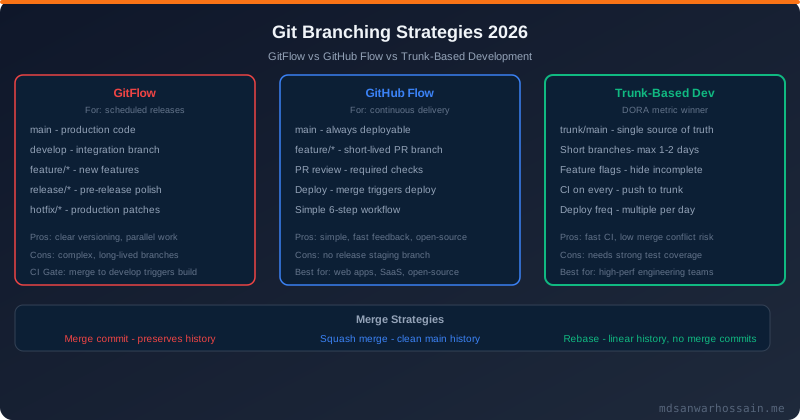
TL;DR — Decision Rule in One Sentence
"Small teams with CI/CD and daily deployments → Trunk-Based Development. Teams with scheduled releases and multiple production versions → GitFlow. Open-source projects and GitHub-native teams aiming for simplicity → GitHub Flow."
Table of Contents
- Why Your Branching Strategy Matters
- Git Core Concepts Refresher
- GitFlow: Complete Guide
- GitHub Flow: Simplicity for Continuous Delivery
- Trunk-Based Development: The DORA Metric Winner
- GitLab Flow & Environment Branches
- Merge vs Rebase vs Squash: When to Use Each
- Handling Long-Running Features
- Release Management & Versioning
- Git Branching for Monorepos
- CI/CD Integration: Matching Branch Strategy to Pipeline
- Code Review Workflow & PR Best Practices
- Migration Guide: GitFlow to Trunk-Based
- Decision Framework: Choosing the Right Strategy
1. Why Your Branching Strategy Matters
A branching strategy isn't a Git configuration detail — it's a delivery architecture decision that cascades across your CI/CD pipeline, team communication, release planning, and incident response. The wrong choice creates compounding friction.
Release Risk & Merge Conflicts
Long-lived branches accumulate merge debt. A feature branch that diverges from main for two weeks will require hours of conflict resolution at merge time. Studies of enterprise teams show that merge conflicts alone account for 8–15% of engineering time when using strategies with branches older than 5 days. The cost compounds exponentially as team size grows.
- Deployment frequency: DORA's 2024 State of DevOps Report shows elite teams deploy 973× more frequently than low performers. Branching strategy is the primary enabler or blocker.
- Change failure rate: Teams using trunk-based development have a 3× lower change failure rate than teams with complex branching models.
- Mean time to restore: When a production bug occurs, your branching strategy determines whether a hotfix takes 15 minutes or 3 hours.
- Cognitive load: Complex branch policies create decision fatigue — developers spend mental energy on "which branch do I use?" instead of solving business problems.
The Cost of Choosing Wrong
Teams that adopt GitFlow for a small startup product end up with a labyrinthine network of branches nobody understands. Teams that adopt trunk-based development without feature flags end up shipping half-finished features to production. The right strategy must match your team size, release cadence, and operational maturity.
2. Git Core Concepts Refresher
Before diving into strategies, let's establish a shared vocabulary. These primitives underpin every branching workflow.
Branches, Commits, and Tags
- Branch: A lightweight, movable pointer to a commit. Creating a branch is O(1) in Git — it's just a 41-byte file. The cost of branching is near-zero; the cost is in the merge.
- Commit: An immutable, content-addressed snapshot of the entire working tree, not a diff. Each commit stores a reference to its parent(s), enabling the DAG (Directed Acyclic Graph) of history.
- Tag: An immutable reference to a specific commit. Annotated tags include a message, tagger, and GPG signature — the correct way to mark releases.
- HEAD: A symbolic reference pointing to the current branch (or commit in detached HEAD state). Understanding HEAD is essential for advanced operations like rebasing and cherry-picking.
- Remote tracking branches: Local copies of remote branches (e.g.,
origin/main). Fetching updates these without changing your local branches.
Merge, Rebase, and Cherry-Pick
# Merge: creates a merge commit, preserves history
git checkout main
git merge feature/login

# Rebase: replays commits on top of base, linear history
git checkout feature/login
git rebase main

# Cherry-pick: apply a specific commit to another branch
git checkout main
git cherry-pick abc1234

# Squash merge: collapse feature branch into single commit
git checkout main
git merge --squash feature/login
git commit -m "feat: add login feature"
Fast-forward merge occurs when the target branch has no new commits since the feature branch was created — Git simply moves the pointer forward without creating a merge commit. Use --no-ff to force a merge commit and preserve branch history in GitFlow.
3. GitFlow: Complete Guide
GitFlow was introduced by Vincent Driessen in 2010 and became the dominant enterprise branching model for the next decade. It defines a strict branching structure designed for software with scheduled release cycles.
Branch Structure
- main (or master): Always reflects production-ready code. Only updated via release branches and hotfixes. Every commit is tagged with a version number.
- develop: The integration branch. All feature branches merge here. Nightly builds and integration tests run against develop.
- feature/*: Short-lived branches for individual features or tasks. Branched from
develop, merged back todevelopwhen complete. Example:feature/TICKET-123-user-auth - release/*: Stabilization branch for an upcoming release. Branched from
develop, merged to bothmainanddevelopon completion. Only bug fixes allowed; no new features. - hotfix/*: Emergency fixes for production bugs. Branched from
main, merged back to bothmainanddevelop. Example:hotfix/1.2.1-payment-null-pointer
Step-by-Step GitFlow Workflow
# Initialize GitFlow (using git-flow extension)
git flow init

# Start a new feature
git flow feature start user-authentication
# ... develop ...
git flow feature finish user-authentication

# Start a release
git flow release start 1.3.0
# ... stabilize, bump version, update changelog ...
git flow release finish 1.3.0
# Tags main as v1.3.0, merges to develop

# Emergency hotfix
git flow hotfix start 1.3.1
# ... fix the bug ...
git flow hotfix finish 1.3.1
# Tags main as v1.3.1, merges to develop
GitFlow Pros & Cons
| Advantages | Disadvantages |
|---|---|
| Clear separation of concerns (feature/release/hotfix) | Complex branch graph — hard to visualize and manage |
| Ideal for versioned software and scheduled releases | Accumulated merge debt on long-running feature branches |
| Multiple release versions can coexist (v1.x, v2.x) | CI/CD integration is complex — multiple branches need pipelines |
| Well-understood by enterprise teams | Slows deployment frequency — antithetical to continuous delivery |
| Tooling support: git-flow CLI, SourceTree, GitKraken | Vincent Driessen himself recommends trunk-based for web apps |
Best for: Mobile apps with App Store releases, SDK/library versioning (npm packages, Java artifacts), enterprise software with compliance gates, teams maintaining multiple major versions simultaneously.
4. GitHub Flow: Simplicity for Continuous Delivery
GitHub Flow was formalized by GitHub in 2011 as a radically simpler alternative to GitFlow. It has exactly one long-lived branch (main) and everything else is a short-lived feature branch that ships directly to production via PR.
The Six-Step GitHub Flow
- Branch: Create a descriptive branch from
main. Example:add-oauth-google-loginorfix-cart-total-rounding - Commit: Make small, focused commits with clear messages. Push frequently — your branch is your backup.
- Pull Request: Open a PR as soon as you have something to discuss, even if it's a draft. PRs are the collaboration layer in GitHub Flow.
- Review: Team members review, CI runs automated checks. Discussions happen in the PR thread, not in Slack.
- Deploy: Deploy the feature branch to a staging environment before merging. GitHub Deployments API integrates this natively.
- Merge: Merge to
mainand deploy immediately.mainis always production-ready.
# GitHub Flow daily commands
git checkout main && git pull
git checkout -b feat/google-oauth

# ... develop, commit frequently ...
git push -u origin feat/google-oauth

# Open PR via GitHub UI or CLI
gh pr create --title "feat: Google OAuth login" \
             --body "Closes #142" \
             --reviewer alice,bob

# After approval, merge and auto-delete branch
gh pr merge --squash --delete-branch
GitHub Flow Pros & Cons
- Pro: Extremely simple — new engineers understand it in 5 minutes.
- Pro: Forces continuous integration — branches stay short-lived by design.
- Pro: Native GitHub integration: PR templates, branch protection, required reviews.
- Con: No built-in release branch mechanism — harder for versioned releases.
- Con: Requires robust feature flags for "dark launching" features mid-sprint.
- Con: Can create deployment thrash if multiple features land simultaneously without coordination.
Best for: Open-source projects on GitHub, SaaS products with continuous deployment, small-to-medium teams (2–30 engineers), web apps that can deploy multiple times per day.
5. Trunk-Based Development: The DORA Metric Winner
Trunk-Based Development (TBD) is the practice used by Google, Facebook, Netflix, and other high-performing engineering organizations. Developers commit directly to main (the "trunk") or merge short-lived branches (less than 2 days old) multiple times per day.
The 2023 DORA State of DevOps Report identified trunk-based development as the top predictor of software delivery performance — above cloud adoption, test automation, and even team culture metrics.
Core Practices
- Commit directly to trunk (for solo contributors or pair programmers) or merge branches within 1–2 days maximum.
- Feature flags: Decouple deploy from release. Code lands in trunk but is gated behind a flag (
if (featureFlags.isEnabled("new-checkout"))) until ready. - Branch by abstraction: Introduce an abstraction layer alongside the old implementation, migrate incrementally, then delete the old code.
- Comprehensive CI: Every commit triggers the full test suite. The build is the gatekeeper — trunk is always green.
- Release from trunk: Tag the commit, cut a release branch only if you need to patch an older version.
TBD Workflow in Practice
# Morning sync
git checkout main && git pull --rebase

# Work in small increments — commit multiple times per day
git add -p  # Stage hunks, not whole files
git commit -m "refactor: extract PaymentService interface"
git push

# Feature flag usage (Java example)
if (featureFlags.isEnabled("new-payment-flow", userId)) {
    return newPaymentService.process(order);
} else {
    return legacyPaymentService.process(order);
}

# Short-lived branch (if team prefers PR reviews)
git checkout -b fix/null-check-user-profile  # max 1-2 days
# ... fix, test ...
git push && gh pr create
# Merge within hours, not days
DORA Metrics & TBD Correlation
| DORA Metric | GitFlow Teams | TBD Elite Teams |
|---|---|---|
| Deployment Frequency | Weekly to monthly | Multiple times per day |
| Lead Time for Changes | 1 week – 1 month | Less than 1 hour |
| Change Failure Rate | 15–30% | 0–5% |
| Mean Time to Restore | Days | Less than 1 hour |
Best for: High-performing product teams, microservices, SaaS, any team targeting continuous deployment. Requires mature CI/CD, feature flag infrastructure, and high test coverage (>80%).
6. GitLab Flow & Environment Branches
GitLab Flow is a pragmatic middle ground introduced by GitLab in 2014. It adds environment branches and upstream-first merging to GitHub Flow's simplicity, making it suitable for teams that need staging/production environment control without GitFlow's complexity.
Environment Branch Model
- main: Development integration branch. CI runs here continuously.
- pre-production: Mirrors staging environment. Code flows from
main→pre-productionvia MR. - production: Mirrors production. Code flows from
pre-production→production. Only merges forward — never backwards.
# GitLab Flow: upstream-first principle
# Bug fix must go into main first
git checkout main
git merge fix/critical-bug

# Then cherry-pick or MR to pre-production
git checkout pre-production
git cherry-pick abc1234

# Then cherry-pick or MR to production
git checkout production
git cherry-pick abc1234
GitLab Flow also supports release branches for versioned software — you create 1-3-stable, 1-4-stable, etc., and cherry-pick critical fixes from main. This gives teams the versioning power of GitFlow without the develop branch overhead.
7. Merge vs Rebase vs Squash: When to Use Each
This is one of the most debated topics in Git workflows. Each approach makes a different tradeoff between history clarity and honesty.
Merge Commit
Creates a merge commit that preserves the complete branch history. The DAG shows exactly when branches diverged and rejoined.
- Use when: You want an accurate historical record of when features were integrated. GitFlow mandates
--no-ffmerges for this reason. - Avoid when: Feature branches contain noisy "WIP" commits — the noise pollutes the main branch history.
- Command:
git merge --no-ff feature/login
Rebase
Replays commits on top of the base branch, creating a linear history. Rewrites commit SHAs — the commits appear as if they were always made on top of the current main.
- Use when: You want a clean, linear history that's easy to bisect. Great for keeping feature branches up to date with main.
- Avoid when: The branch is shared with others — rewriting shared history causes diverged branches for all collaborators.
- Golden rule: Never rebase commits that have been pushed to a shared remote branch.
- Command:
git rebase main(from the feature branch)
Squash Merge
Collapses all commits from the feature branch into one commit on main. The feature branch history is lost; only the squashed commit remains.
- Use when: Feature branches have messy commit history ("fix typo", "WIP", "more fixes") and you want main to have one clean commit per feature.
- Use when: Open-source projects want consistent commit quality on main regardless of contributor's commit hygiene.
- Avoid when: You need to bisect within a feature to find a bug — squashing makes that impossible.
- Command:
git merge --squash feature/login && git commit
| Method | History | Bisect Friendly | Best For |
|---|---|---|---|
| Merge commit | Accurate DAG | Yes | GitFlow, audit trails |
| Rebase | Linear, clean | Yes | TBD, clean history |
| Squash merge | One commit per PR | At PR level only | GitHub Flow, OSS projects |
8. Handling Long-Running Features
The biggest challenge in trunk-based development is large features that take weeks or months. Long-lived branches are the enemy. Here are three proven techniques to ship incrementally without exposing incomplete features.
Feature Flags (Feature Toggles)
Feature flags decouple deployment from release. Code ships to production continuously but the new behavior is hidden behind a flag until you're ready to launch. There are four types:
- Release toggles: Enable/disable an in-development feature. Short-lived — should be removed post-launch. Most common type.
- Experiment toggles: A/B testing flags. Route a percentage of users to variant A vs B. Tools: LaunchDarkly, Unleash, Flagsmith, AWS AppConfig.
- Ops toggles: Kill switches for operational control. "Disable recommendation engine during Black Friday traffic spike."
- Permission toggles: Enable features for specific user segments (beta users, enterprise tier, internal employees).
// LaunchDarkly Java SDK example
LDClient ldClient = new LDClient("sdk-key");
LDUser user = new LDUser.Builder(userId).build();

boolean showNewCheckout = ldClient.boolVariation(
    "new-checkout-flow", user, false
);

if (showNewCheckout) {
    return newCheckoutController.process(request);
} else {
    return legacyCheckoutController.process(request);
}
Branch by Abstraction
Use this pattern when replacing a large subsystem (e.g., migrating from a monolith to microservices, or swapping databases). The steps:
- Introduce an abstraction (interface) over the existing implementation.
- Route all existing callers through the abstraction — no behavior change.
- Build the new implementation behind the abstraction on trunk.
- Gradually migrate callers to the new implementation (using a flag or config).
- Delete the old implementation when fully migrated.
Strangler Fig Pattern for Incremental Migration
Named after the strangler fig tree that grows around its host, this pattern applies to Git workflows by incrementally replacing modules, one endpoint at a time. Each increment ships to production and is validated before the next replaces more of the old system. New code and old code coexist on trunk simultaneously, gated by routing rules at the API Gateway or load balancer layer.
9. Release Management & Versioning
Regardless of branching strategy, consistent release management practices are essential. Semantic versioning and automated changelog generation are table stakes for professional software teams.
Semantic Versioning (SemVer)
SemVer uses the format MAJOR.MINOR.PATCH:
- MAJOR: Incompatible API changes (breaking changes). Increment when you remove or change existing behavior consumers depend on.
- MINOR: New backward-compatible functionality. Adding endpoints, new optional fields, new features.
- PATCH: Backward-compatible bug fixes. No new features, no breaking changes.
- Pre-release:
1.3.0-alpha.1,1.3.0-rc.2for pre-release identifiers.
Conventional Commits & Automated Changelogs
# Conventional Commits format
# <type>[optional scope]: <description>

feat(auth): add Google OAuth2 login         # → MINOR bump
fix(cart): correct decimal rounding error   # → PATCH bump
feat!: redesign payment API                 # → MAJOR bump (breaking)
docs: update API reference for v2           # → no version bump
chore: upgrade Spring Boot to 3.3.0         # → no version bump
refactor(db): extract repository interfaces # → no version bump

# Automated release with semantic-release
npx semantic-release  # analyzes commits, bumps version,
                      # generates CHANGELOG.md, tags, publishes
Release Automation Tools
- semantic-release: Full automation — analyzes commits, bumps SemVer, generates CHANGELOG, creates GitHub release, publishes artifacts.
- release-please (Google): Creates a "Release PR" that aggregates commits. Team merges when ready to release. Popular for Go, Java, Python packages.
- changesets (Atlassian): Developer-driven changelogs — each PR includes a changeset file describing the change. Popular in JavaScript monorepos.
- goreleaser: Go-focused release automation with cross-compilation, Docker image building, and Homebrew tap updates.
10. Git Branching for Monorepos
Monorepos — single repositories containing multiple services, libraries, or applications — require special consideration for branching strategies. Standard branching workflows create too much noise and too many unnecessary CI builds when changes are scattered across dozens of packages.
Affected-Build Strategies
The core challenge: how do you run only the CI for the packages actually changed? Tools that solve this:
- Nx (Nrwl): Computes the dependency graph and runs only affected projects.
nx affected --target=testruns tests only for changed packages and their dependents. Remote caching with Nx Cloud. - Turborepo: Incrementally builds and caches at the task level. Supports remote caching. Native to JavaScript/TypeScript monorepos.
- Bazel (Google): The original monorepo build tool, powering Google's mono-repository with billions of lines of code. Language-agnostic but steep learning curve.
- Pants: Python-first build tool with strong monorepo support and dependency inference.
- Buck2 (Meta): Meta's open-source monorepo build system, successor to Buck.
Google's Trunk-Based Monorepo Approach
Google's monorepo contains 2 billion lines of code across 9 million source files. Their branching strategy:
- Single trunk — no GitFlow, no develop branch. Everything commits to
main. - Automated testing at massive scale — over 150 million test runs per day.
- Read/write access control at the directory level, not the branch level.
- Presubmit checks (unit tests, lint, build) run before every commit lands on trunk.
- Release branches cut from trunk for stable release lines — patches cherry-picked from trunk downstream.
Monorepo PR Strategy
# CODEOWNERS for per-package review enforcement
# .github/CODEOWNERS
/packages/payment-service/   @payments-team
/packages/auth-service/      @security-team
/packages/shared-ui/         @platform-team

# Path filters in CI (GitHub Actions)
on:
  push:
    paths:
      - 'packages/payment-service/**'
      - 'packages/shared/**'

# Nx affected commands in CI
- name: Test affected
  run: npx nx affected --target=test --base=origin/main~1
11. CI/CD Integration: Matching Branch Strategy to Pipeline Design
Your CI/CD pipeline design must mirror your branching strategy. Mismatches — like running the same pipeline on every branch regardless of purpose — waste resources and slow feedback loops.
Pipeline Design by Strategy
| Branch | GitFlow Pipeline | GitHub Flow / TBD Pipeline |
|---|---|---|
main |
Deploy to production, tag | Deploy to production (TBD: on every commit) |
develop |
Build, test, deploy to dev/staging | N/A |
feature/* |
Build, unit tests only | Full CI + deploy to ephemeral environment |
release/* |
Full test suite, deploy to staging | N/A |
hotfix/* |
Expedited test suite, fast deploy | N/A |
GitHub Actions: Branch-Conditional Pipelines
name: CI/CD Pipeline

on:
  push:
    branches: [main, develop, 'release/**', 'hotfix/**']
  pull_request:
    branches: [main, develop]

jobs:
  test:
    runs-on: ubuntu-latest
    steps:
      - uses: actions/checkout@v4
      - uses: actions/setup-java@v4
        with: { java-version: '21', distribution: 'temurin' }
      - run: ./mvnw verify

  deploy-staging:
    needs: test
    if: github.ref == 'refs/heads/develop'
    runs-on: ubuntu-latest
    steps:
      - run: echo "Deploy to staging..."

  deploy-production:
    needs: test
    if: github.ref == 'refs/heads/main'
    environment: production  # requires manual approval
    runs-on: ubuntu-latest
    steps:
      - run: echo "Deploy to production..."
Ephemeral Preview Environments
A powerful pattern for GitHub Flow and TBD: spin up a complete preview environment for every pull request. Tools: Vercel Preview, Netlify Deploy Previews, Argo CD ApplicationSets, Kubernetes namespace-per-PR with Helm. This enables reviewers to test changes live before merging — transforming PR reviews from code reading to functional testing.
12. Code Review Workflow & PR Best Practices
Regardless of branching strategy, pull/merge requests are the primary collaboration mechanism. High-functioning teams treat PRs as a product, not a formality.
PR Size: The Most Important Metric
Google's engineering data shows that PRs under 200 lines receive thorough reviews; PRs over 400 lines are rubber-stamped. Keep PRs small and focused. If a feature is large, decompose it into a sequence of small PRs, each independently shippable.
- Ideal PR size: 50–200 lines changed (excluding generated code).
- PR scope: One logical change per PR. Don't mix refactoring with feature work.
- PR description: Why this change? What did you try? How to test? Link the ticket.
- Draft PRs: Open early for feedback on direction, not just implementation.
- Review SLA: Top teams target <4 hours for first review response.
Branch Protection Rules
# Recommended branch protection for main
Require a pull request before merging: ✓
  Required approvals: 1 (small team) or 2 (critical services)
  Dismiss stale pull request approvals: ✓
  Require review from Code Owners: ✓
Require status checks to pass: ✓
  Required: build, unit-tests, integration-tests, security-scan
Require branches to be up to date: ✓
Require conversation resolution: ✓
Do not allow bypassing: ✓ (even for admins on production services)
13. Migration Guide: Moving from GitFlow to Trunk-Based
This is the most common migration teams undertake in 2026 — escaping the GitFlow complexity trap. The migration is not a single cutover but a phased transition over 4–8 weeks.
Phase 1: Foundation (Weeks 1–2)
- Invest in test coverage — get to >70% before changing branching. TBD is unsafe without a strong test suite.
- Set up feature flag infrastructure (LaunchDarkly, Unleash, or homegrown). Start with a single flag for a low-risk feature.
- Harden your CI pipeline — build must complete in under 10 minutes. Parallelize test runs. Fix flaky tests.
- Document the new workflow and rationale. Change management is 50% of the migration.
Phase 2: Pilot (Weeks 3–4)
- One team adopts TBD while others continue with GitFlow. Share learnings weekly.
- Enforce max branch age: branches must merge within 2 days or be rebased against main.
- Introduce the
developbranch elimination — route feature merges directly tomainbehind flags. - Set up automated deployment to staging on every push to main.
Phase 3: Cutover (Weeks 5–8)
- Archive/delete the
developbranch. Update branch protection rules onmain. - Create release branches on demand (e.g.,
release/1.4) when a production version needs patching. - Run a retrospective after first 30 days. Measure: deploy frequency, lead time, PR age, incident rate.
- Update CODEOWNERS, CI/CD pipelines, documentation, and onboarding guides.
⚠️ Warning: Don't attempt TBD migration without feature flags. Without feature flags, unfinished features will leak into production. This is the #1 reason TBD migrations fail. Invest in feature flag infrastructure before changing any branching policies.
14. Decision Framework: Choosing the Right Strategy
Use this decision matrix to identify the right branching strategy for your team's context.
| Factor | GitFlow | GitHub Flow | Trunk-Based |
|---|---|---|---|
| Team size | Any (5–500+) | Small–medium (2–30) | Any (Google uses TBD at 30,000+) |
| Release cadence | Scheduled (weekly–monthly) | Continuous or near-daily | Multiple times per day |
| Multiple versions | ✅ Native support | ❌ Requires workarounds | ⚠️ Release branches only |
| CI/CD maturity | Low–medium | Medium | High (required) |
| Test coverage | Low acceptable | Medium (50%+) | High (70%+ recommended) |
| Feature flags | Optional | Recommended | Required |
| DORA performance | Low–medium | Medium–high | Elite |
The Flowchart Decision
- Are you building a mobile app, versioned SDK, or product with compliance-gated releases? → GitFlow
- Are you maintaining multiple production versions (v1.x and v2.x simultaneously)? → GitFlow
- Are you a small open-source project or SaaS team prioritizing simplicity? → GitHub Flow
- Do you deploy to production multiple times a day and have mature CI/CD? → Trunk-Based Development
- Do you need environment promotion gates (dev → staging → production) without GitFlow complexity? → GitLab Flow
Branching Strategy Adoption Checklist
- ☐ Have I defined branch naming conventions and documented them?
- ☐ Are branch protection rules configured on
main(required reviews, status checks)? - ☐ Is my CI pipeline fast enough (<10 min) to give quick feedback on PRs?
- ☐ Do I have feature flag infrastructure if choosing TBD or GitHub Flow?
- ☐ Are CODEOWNERS configured for automated reviewer assignment?
- ☐ Is Conventional Commits enforced (commitlint, husky) for automated changelogs?
- ☐ Are release tags and SemVer applied consistently?
- ☐ Is the team trained on the chosen strategy and merge method (merge/rebase/squash)?
- ☐ Are ephemeral preview environments set up for PR review?
- ☐ Are DORA metrics being tracked (deployment frequency, lead time, CFR, MTTR)?
Every mature engineering team eventually simplifies their branching strategy as they gain confidence in their CI/CD and testing infrastructure. The trend in 2026 is clear: high-performing teams are moving toward trunk-based development, supported by feature flags, comprehensive test automation, and deployment pipelines that give instant feedback. Start with the simplest strategy that solves your current problems, measure your DORA metrics, and evolve from there.
