GitHub Actions Advanced: Reusable Workflows, Composite Actions & OIDC 2026
Basic GitHub Actions workflows are straightforward — but large engineering organisations quickly hit the limits of copy-pasted YAML across dozens of repositories. Reusable workflows, composite actions, OIDC keyless authentication, and matrix strategies are the advanced patterns that separate maintainable, secure CI/CD at scale from a tangled mess of duplicated configuration.
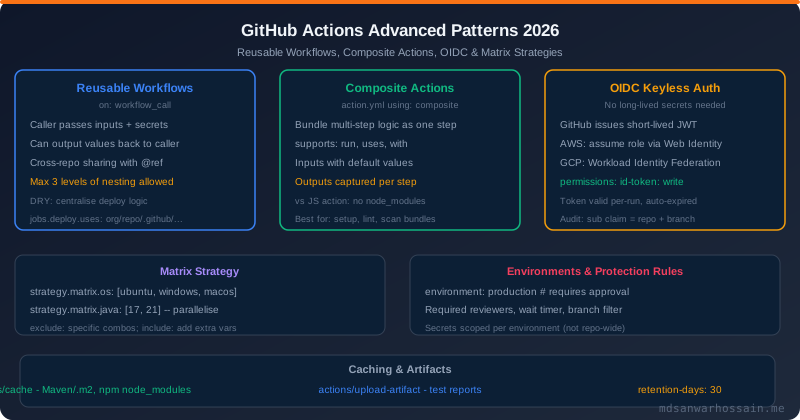
TL;DR — The Three Advanced Patterns You Must Know
"Reusable workflows eliminate duplicated CI/CD logic across repos. OIDC eliminates long-lived secrets from your workflows entirely. Composite actions bundle multi-step logic into reusable units without spinning up containers or running Node. Together, they enable enterprise-grade CI/CD that is DRY, secure, and maintainable."
Table of Contents
- Reusable Workflows (workflow_call)
- Composite Actions: Bundle Steps as Reusable Units
- Custom Actions: JavaScript and Docker
- OIDC Keyless Authentication: AWS, GCP & Azure
- Matrix Strategies: Parallel Multi-Dimension Testing
- Environments, Protection Rules & Secrets
- Caching: Maven, npm, Go, and Custom Caches
- Artifacts: Sharing Build Outputs Between Jobs
- Concurrency Control and Cancel-in-Progress
- Workflow Security Hardening
- Best Practices & Enterprise Patterns
1. Reusable Workflows (workflow_call)
Reusable workflows let you define a workflow in one repository and call it from many others. They are triggered by the workflow_call event and accept inputs, secrets, and can return outputs. This is the primary mechanism for standardising CI/CD across multiple repositories in an organization.
Defining a Reusable Workflow (the "called" workflow)
# .github/workflows/deploy-java-service.yml
# In: org/shared-workflows repository

on:
  workflow_call:
    inputs:
      service-name:
        required: true
        type: string
        description: "Name of the Java service to deploy"
      environment:
        required: true
        type: string
        description: "Target environment: staging or production"
      java-version:
        required: false
        type: string
        default: "21"
    secrets:
      ECR_ROLE_ARN:
        required: true
        description: "AWS IAM role ARN for ECR push"
    outputs:
      image-tag:
        description: "Docker image tag that was deployed"
        value: ${{ jobs.deploy.outputs.image-tag }}

jobs:
  build-and-test:
    runs-on: ubuntu-latest
    steps:
      - uses: actions/checkout@v4
      - uses: actions/setup-java@v4
        with:
          java-version: ${{ inputs.java-version }}
          distribution: temurin
          cache: maven
      - run: mvn verify -DskipITs=false

  deploy:
    needs: build-and-test
    runs-on: ubuntu-latest
    environment: ${{ inputs.environment }}
    outputs:
      image-tag: ${{ steps.build-image.outputs.tag }}
    steps:
      - uses: actions/checkout@v4
      - name: Configure AWS credentials via OIDC
        uses: aws-actions/configure-aws-credentials@v4
        with:
          role-to-assume: ${{ secrets.ECR_ROLE_ARN }}
          aws-region: ap-southeast-1
      - name: Build and push Docker image
        id: build-image
        run: |
          TAG="${{ inputs.service-name }}-$(git rev-parse --short HEAD)"
          docker build -t $ECR_URI:$TAG .
          docker push $ECR_URI:$TAG
          echo "tag=$TAG" >> $GITHUB_OUTPUT
Calling a Reusable Workflow (the "caller" workflow)
# .github/workflows/ci.yml
# In: org/order-service repository

on:
  push:
    branches: [main]
  pull_request:
    branches: [main]

jobs:
  deploy-staging:
    uses: org/shared-workflows/.github/workflows/deploy-java-service.yml@main
    with:
      service-name: order-service
      environment: staging
      java-version: "21"
    secrets:
      ECR_ROLE_ARN: ${{ secrets.ECR_ROLE_ARN }}

  deploy-production:
    needs: deploy-staging
    if: github.ref == 'refs/heads/main'
    uses: org/shared-workflows/.github/workflows/deploy-java-service.yml@main
    with:
      service-name: order-service
      environment: production
    secrets: inherit   # pass all caller secrets to the called workflow
Reusable Workflow Rules and Limitations
- Nesting limit: Maximum 3 levels deep (caller → reusable → reusable → no further nesting)
- Secrets passing: Use
secrets: inheritto pass all caller secrets, or list them individually - Environment variables: Caller's
envcontext is not available in the called workflow - Output propagation: Jobs in a called workflow can return outputs accessible in the caller's needs context
- Visibility: By default, reusable workflows in private repos can only be called by repos in the same organization
- Pinning versions: Always reference reusable workflows with a full SHA or tag, never
@mainin production
2. Composite Actions: Bundle Steps as Reusable Units
Composite actions bundle multiple steps into a single reusable unit that can be used as a step in any workflow. Unlike reusable workflows, composite actions don't spin up a new runner — they run in the calling job's runner environment. This makes them faster and simpler for reusable setup logic.
# .github/actions/setup-java-env/action.yml
# A composite action for Java environment setup

name: "Setup Java Environment"
description: "Set up JDK, Maven cache, and tool versions"
inputs:
  java-version:
    description: "JDK version to install"
    required: false
    default: "21"
  maven-args:
    description: "Extra Maven arguments"
    required: false
    default: ""
outputs:
  java-home:
    description: "Path to Java home directory"
    value: ${{ steps.setup-java.outputs.path }}

runs:
  using: "composite"
  steps:
    - name: Set up JDK
      id: setup-java
      uses: actions/setup-java@v4
      with:
        java-version: ${{ inputs.java-version }}
        distribution: temurin
        cache: maven

    - name: Print Java version
      shell: bash
      run: java -version

    - name: Configure Maven settings
      shell: bash
      run: |
        mkdir -p ~/.m2
        cat > ~/.m2/settings.xml <<EOF
        <settings>
          <mirrors>
            <mirror>
              <id>central</id>
              <url>https://repo.maven.apache.org/maven2</url>
              <mirrorOf>*</mirrorOf>
            </mirror>
          </mirrors>
        </settings>
        EOF
Using the Composite Action in a Workflow
jobs:
  build:
    runs-on: ubuntu-latest
    steps:
      - uses: actions/checkout@v4

      # Use composite action from same repo:
      - uses: ./.github/actions/setup-java-env
        with:
          java-version: "21"

      # Use composite action from another repo (pinned to SHA):
      - uses: org/shared-actions/.github/actions/setup-java-env@abc1234
        with:
          java-version: "21"

      - run: mvn verify
Composite Actions vs Reusable Workflows: Decision Guide
| Use Case | Composite Action | Reusable Workflow |
|---|---|---|
| Environment setup (JDK, Python, Node) | ✅ Ideal | Overkill |
| Full build-test-deploy pipeline | Not suitable | ✅ Ideal |
| Shared scanning / linting step | ✅ Good fit | Can work but heavier |
| Environment protection (approvals) | Not available | ✅ Via environment: |
| Parallel matrix jobs | Not available | ✅ With strategy.matrix |
3. Custom Actions: JavaScript and Docker
When composite actions aren't powerful enough — you need to call APIs, parse complex outputs, or run platform-independent logic — custom JavaScript or Docker container actions are the answer.
JavaScript Action Structure
# action.yml
name: "Notify Slack on Deploy"
description: "Posts deploy status to Slack"
inputs:
  slack-token:
    required: true
  channel:
    required: true
  message:
    required: true
  status:
    required: false
    default: "success"
outputs:
  message-ts:
    description: "Slack message timestamp for threading"
runs:
  using: "node20"
  main: "dist/index.js"   # must be bundled — no node_modules at runtime

# src/index.js (simplified)
const core = require("@actions/core");
const { WebClient } = require("@slack/web-api");

async function run() {
  const token = core.getInput("slack-token", { required: true });
  const channel = core.getInput("channel");
  const message = core.getInput("message");
  const status = core.getInput("status");

  const icon = status === "success" ? ":white_check_mark:" : ":x:";
  const client = new WebClient(token);

  const result = await client.chat.postMessage({
    channel,
    text: `${icon} ${message}`,
    blocks: [{ type: "section", text: { type: "mrkdwn", text: `${icon} *${message}*` } }]
  });

  core.setOutput("message-ts", result.ts);
}

run().catch(core.setFailed);
Docker Container Action
# action.yml for Docker action
name: "Run Integration Tests in Container"
runs:
  using: "docker"
  image: "Dockerfile"   # or a public Docker image
  args:
    - ${{ inputs.test-suite }}

# Dockerfile
FROM eclipse-temurin:21-jdk
WORKDIR /app
COPY entrypoint.sh /entrypoint.sh
RUN chmod +x /entrypoint.sh
ENTRYPOINT ["/entrypoint.sh"]

# entrypoint.sh
#!/bin/bash
echo "Running test suite: $1"
mvn test -Dtest="$1" -pl integration-tests
4. OIDC Keyless Authentication: AWS, GCP & Azure
OpenID Connect (OIDC) is the most significant GitHub Actions security improvement in recent years. Instead of storing long-lived cloud credentials as repository secrets, GitHub issues a short-lived JWT token per workflow run, which can be exchanged for temporary cloud credentials. The token expires automatically, is scoped to the exact repository and branch, and leaves no static secrets to rotate or leak.
OIDC Flow Diagram
- Step 1: Workflow requests a JWT from GitHub's OIDC provider (
permissions: id-token: writerequired) - Step 2: GitHub issues a signed JWT containing claims:
sub(repo:org/repo:ref:refs/heads/main),aud,iss - Step 3: AWS/GCP/Azure verifies the JWT signature against GitHub's JWKS endpoint
- Step 4: Cloud provider issues short-lived credentials (AWS STS temporary credentials, GCP access token)
- Step 5: Workflow uses temporary credentials for the remainder of the job
OIDC with AWS: Setup and Usage
# 1. Create OIDC Identity Provider in AWS IAM (one time):
# Provider URL: https://token.actions.githubusercontent.com
# Audience: sts.amazonaws.com

# 2. Create an IAM role with trust policy:
# (terraform example)
resource "aws_iam_role" "github_actions_deploy" {
  name = "github-actions-deploy-order-service"
  assume_role_policy = jsonencode({
    Version = "2012-10-17"
    Statement = [{
      Effect = "Allow"
      Principal = {
        Federated = "arn:aws:iam::ACCOUNT_ID:oidc-provider/token.actions.githubusercontent.com"
      }
      Action = "sts:AssumeRoleWithWebIdentity"
      Condition = {
        StringEquals = {
          "token.actions.githubusercontent.com:aud" = "sts.amazonaws.com"
          # Restrict to specific repo and branch:
          "token.actions.githubusercontent.com:sub" = "repo:org/order-service:ref:refs/heads/main"
        }
      }
    }]
  })
}

# 3. Use in GitHub Actions workflow (NO secret needed!):
jobs:
  deploy:
    runs-on: ubuntu-latest
    permissions:
      id-token: write    # REQUIRED for OIDC token
      contents: read
    steps:
      - uses: actions/checkout@v4
      - name: Configure AWS credentials
        uses: aws-actions/configure-aws-credentials@v4
        with:
          role-to-assume: arn:aws:iam::123456789:role/github-actions-deploy-order-service
          aws-region: ap-southeast-1
          role-session-name: github-actions-${{ github.run_id }}
      - run: aws s3 ls   # uses temporary credentials automatically
OIDC with GCP: Workload Identity Federation
jobs:
  deploy-gcp:
    runs-on: ubuntu-latest
    permissions:
      id-token: write
      contents: read
    steps:
      - uses: actions/checkout@v4
      - id: auth
        name: Authenticate to Google Cloud
        uses: google-github-actions/auth@v2
        with:
          workload_identity_provider: projects/123/locations/global/workloadIdentityPools/pool/providers/github
          service_account: deploy@my-project.iam.gserviceaccount.com
      - uses: google-github-actions/setup-gcloud@v2
      - run: gcloud run deploy order-service --image gcr.io/my-project/order-service
5. Matrix Strategies: Parallel Multi-Dimension Testing
Matrix strategies let a single job definition spawn multiple parallel jobs with different variable combinations — perfect for cross-platform testing, multi-version support, and shard-based test parallelism.
jobs:
  test:
    strategy:
      matrix:
        os: [ubuntu-latest, windows-latest, macos-latest]
        java: ["17", "21"]
        # Exclude specific combinations:
        exclude:
          - os: macos-latest
            java: "17"
        # Add extra variables to specific combinations:
        include:
          - os: ubuntu-latest
            java: "21"
            run-integration: true
      fail-fast: false    # don't cancel other jobs if one fails
      max-parallel: 4     # limit concurrent runners
    runs-on: ${{ matrix.os }}
    steps:
      - uses: actions/checkout@v4
      - uses: actions/setup-java@v4
        with:
          java-version: ${{ matrix.java }}
          distribution: temurin
      - run: mvn test
      - if: ${{ matrix.run-integration }}
        run: mvn verify -P integration-tests
Dynamic Matrix: Generating Matrix from Script
jobs:
  # Job 1: Generate the matrix dynamically
  setup-matrix:
    runs-on: ubuntu-latest
    outputs:
      matrix: ${{ steps.generate.outputs.matrix }}
    steps:
      - uses: actions/checkout@v4
      - id: generate
        run: |
          # Discover changed services dynamically
          SERVICES=$(git diff --name-only HEAD~1 HEAD | \
            grep '^services/' | cut -d/ -f2 | sort -u | \
            jq -R -s -c 'split("\n") | map(select(length > 0))')
          echo "matrix={\"service\":$SERVICES}" >> $GITHUB_OUTPUT

  # Job 2: Deploy only changed services
  deploy:
    needs: setup-matrix
    if: ${{ needs.setup-matrix.outputs.matrix != '{"service":[]}' }}
    strategy:
      matrix: ${{ fromJson(needs.setup-matrix.outputs.matrix) }}
    runs-on: ubuntu-latest
    steps:
      - run: echo "Deploying ${{ matrix.service }}"
6. Environments, Protection Rules & Secrets
Environments add governance controls to deployment workflows. You can require human approval before deploying to production, restrict deployments to specific branches, and scope secrets to individual environments instead of the whole repository.
jobs:
  deploy-production:
    runs-on: ubuntu-latest
    environment:
      name: production
      url: https://api.myservice.com   # shown in GitHub UI after deploy
    steps:
      # This job pauses here until required reviewers approve in GitHub UI
      - uses: actions/checkout@v4
      - run: ./deploy.sh ${{ secrets.PROD_DB_URL }}
      # secrets.PROD_DB_URL is scoped to "production" environment only
      # Not accessible to staging jobs or other workflows
Environment Protection Rule Best Practices
- ✅ Require reviewers for production — at least 2 engineers should approve production deployments
- ✅ Branch filter — allow production deploys only from
mainbranch, never from feature branches - ✅ Wait timer — add a 5-minute wait before production to allow last-minute abort
- ✅ Scope production secrets to the environment — never store production credentials as repo-level secrets
- ✅ Deployment tracking — the
urlfield on environments creates a deployment record in GitHub's Deployments page
7. Caching: Maven, npm, Go, and Custom Caches
Effective caching can cut GitHub Actions build times by 60-80%. The actions/cache action stores directories between runs and restores them based on a cache key.
# Maven cache (also available as built-in via setup-java cache: maven)
- uses: actions/cache@v4
  with:
    path: ~/.m2/repository
    key: maven-${{ runner.os }}-${{ hashFiles('**/pom.xml') }}
    restore-keys: |
      maven-${{ runner.os }}-

# npm cache:
- uses: actions/cache@v4
  with:
    path: ~/.npm
    key: npm-${{ runner.os }}-${{ hashFiles('**/package-lock.json') }}
    restore-keys: npm-${{ runner.os }}-

# Go module cache:
- uses: actions/cache@v4
  with:
    path: ~/go/pkg/mod
    key: go-${{ runner.os }}-${{ hashFiles('**/go.sum') }}

# Custom Docker layer cache:
- uses: docker/setup-buildx-action@v3
- uses: docker/build-push-action@v5
  with:
    cache-from: type=gha     # GitHub Actions cache for Docker layers
    cache-to: type=gha,mode=max

# Cache key best practices:
# 1. Include OS in key for cross-platform jobs
# 2. Hash the lockfile (pom.xml, package-lock.json) as the key
# 3. Use restore-keys as fallback to avoid total cache miss
# 4. Cache size limit: 10 GB per repo; evicted after 7 days of no use
8. Artifacts: Sharing Build Outputs Between Jobs
Artifacts persist files between jobs in the same workflow run and can be downloaded manually from the GitHub Actions UI. Use them for test reports, binaries, coverage reports, and deployment manifests.
jobs:
  build:
    runs-on: ubuntu-latest
    steps:
      - uses: actions/checkout@v4
      - run: mvn package -DskipTests
      - uses: actions/upload-artifact@v4
        with:
          name: order-service-jar
          path: target/order-service-*.jar
          retention-days: 30   # keep for 30 days (default: 90)

  test:
    runs-on: ubuntu-latest
    steps:
      - uses: actions/checkout@v4
      - run: mvn test
      - uses: actions/upload-artifact@v4
        if: always()    # upload even if tests fail
        with:
          name: test-results
          path: |
            target/surefire-reports/
            target/site/jacoco/

  deploy:
    needs: [build, test]
    runs-on: ubuntu-latest
    steps:
      - uses: actions/download-artifact@v4
        with:
          name: order-service-jar
          path: ./deploy
      - run: ls ./deploy  # jar file available here
9. Concurrency Control and Cancel-in-Progress
Without concurrency controls, every push to a PR triggers a new workflow run, leaving old runs queued or running in parallel. The concurrency key limits runs and optionally cancels in-progress ones.
# Cancel previous in-progress run for the same PR:
concurrency:
  group: ${{ github.workflow }}-${{ github.ref }}
  cancel-in-progress: true

# For deployments: queue but don't cancel (use false):
concurrency:
  group: deploy-production
  cancel-in-progress: false  # wait for current deploy to finish

# Per-PR + per-workflow granularity:
concurrency:
  group: ci-${{ github.workflow }}-${{ github.event.pull_request.number || github.sha }}
  cancel-in-progress: ${{ github.ref != 'refs/heads/main' }}
  # Cancel in-progress for PRs, but not for main branch deploys
10. Workflow Security Hardening
GitHub Actions workflows are attack surfaces. Follow these hardening practices to prevent supply chain attacks, secret leakage, and privilege escalation:
# 1. Pin actions to full commit SHA (not tags that can be moved):
- uses: actions/checkout@11bd71901bbe5b1630ceea73d27597364c9af683  # v4.2.2

# 2. Restrict permissions at workflow and job level:
permissions:
  contents: read     # minimal: read-only access to repo
  packages: write    # only grant what this workflow needs

# 3. Use OIDC instead of long-lived secrets (see Section 4)

# 4. Avoid using pull_request_target with untrusted code:
# pull_request_target has write permissions and access to secrets.
# Never checkout and run untrusted PR code in pull_request_target.

# 5. Sanitise inputs in run: steps (injection prevention):
- name: Safe input usage
  run: |
    # DANGEROUS — direct interpolation allows injection:
    echo "Hello ${{ github.event.issue.title }}"
    # SAFE — pass through environment variable:
    TITLE="${{ github.event.issue.title }}"
    echo "Hello ${TITLE}"

# 6. Use GitHub's security features:
# - Require code review for workflow changes
# - Enable "Require approval for all outside collaborators"
# - Enable secret scanning to catch leaked tokens in workflow files
11. Best Practices & Enterprise Patterns
Repository Organisation
- Create a dedicated
shared-workflowsrepository in your org - Version reusable workflows with semantic tags (v1, v2)
- Keep reusable workflows generic via inputs, not hardcoded
- Document each workflow's inputs, outputs, and required secrets
Runner Performance
- Use the built-in
cache:input of setup actions - Split large test suites across matrix shards
- Use self-hosted runners for heavy builds (eliminates cold start)
- Set
timeout-minuteson all jobs to prevent runaway builds
Secret Management
- Always prefer OIDC over static secrets for cloud providers
- Use environment-scoped secrets for production credentials
- Enable secret scanning with push protection on all repos
- Rotate any secret that appears in workflow logs
Observability
- Use
::group::and::endgroup::to fold log output - Emit
::notice::,::warning::,::error::annotations - Use GitHub's built-in deployment tracking via
environment.url - Monitor workflow minutes with GitHub's billing insights
GitHub Actions Mastery Checklist
- ✅ Reusable workflows centralise build/deploy logic across 10+ repositories
- ✅ Composite actions bundle common setup steps used in every workflow
- ✅ OIDC configured for AWS and GCP — no static cloud credentials in secrets
- ✅ Matrix strategy runs tests on all supported Java/OS combinations in parallel
- ✅ Production environment requires approval and is branch-restricted
- ✅ All actions pinned to full SHA hashes
- ✅ Concurrency groups cancel stale PR runs automatically
- ✅ Workflow permissions set to minimum required
Leave a Comment
Related Posts
CI/CD with GitHub Actions
Build a complete Java microservices pipeline with GitHub Actions from first principles.
GitHub Security: Dependabot, CodeQL & Secret Scanning
Complete supply chain security guide for GitHub repositories in 2026.
GitOps with ArgoCD: Kubernetes CD at Scale
Deploy Kubernetes workloads declaratively with ArgoCD and GitOps principles.
