GitHub Security: Dependabot, CodeQL & Secret Scanning — Complete Guide 2026
Software supply chain attacks surged 742% between 2019 and 2025 (Sonatype State of the Software Supply Chain). Your repository is not just source code — it is an attack surface. GitHub's integrated security features, from Dependabot to CodeQL to secret scanning, provide a layered defence-in-depth strategy that catches vulnerabilities before they reach production.
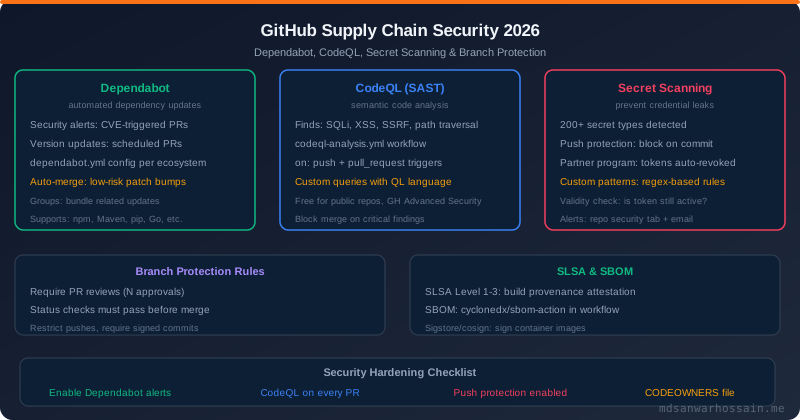
TL;DR — Minimum Viable GitHub Security Posture
"Enable these five controls today: Dependabot security alerts + version updates to patch vulnerable dependencies automatically. CodeQL default setup for SAST on every PR. Secret scanning with push protection to block credentials before they are committed. Branch protection on main requiring PR reviews. CODEOWNERS for mandatory review by domain experts. These five controls stop the majority of real-world supply chain attacks."
Table of Contents
- Software Supply Chain: The Threat Model
- Dependabot: Automated Dependency Security
- CodeQL: Static Application Security Testing (SAST)
- Secret Scanning and Push Protection
- Branch Protection Rules: Governance at Scale
- CODEOWNERS: Mandatory Domain Expert Review
- Signed Commits and Tags: Commit Identity Verification
- SLSA: Supply Chain Levels for Software Artifacts
- GitHub Advanced Security: Enterprise Features
- Complete GitHub Security Hardening Checklist
1. Software Supply Chain: The Threat Model
Modern applications depend on hundreds or thousands of open-source packages. The average Java application has 150+ direct and transitive dependencies. Each dependency is a potential attack vector — vulnerable, malicious, or both. The supply chain attack surface includes:
- Vulnerable dependencies: Libraries with known CVEs (Log4Shell, Spring4Shell, OpenSSL vulnerabilities)
- Typosquatting: Malicious packages with names similar to popular libraries (e.g.,
requetsinstead ofrequests) - Compromised maintainer accounts: Attacker gains control of a popular package and injects malware
- Leaked secrets: AWS keys, API tokens, database passwords committed to version control
- Unverified contributors: Pull requests with malicious code changes
- Build system compromise: Malicious code injected during the build pipeline itself
GitHub's integrated security features address each of these attack vectors. Understanding the threat model helps you prioritise which controls to enable first.
2. Dependabot: Automated Dependency Security
Dependabot is GitHub's automated dependency update service. It has two distinct modes that are often confused:
- Security alerts: Free for all repos. GitHub detects known CVEs in your dependencies via the GitHub Advisory Database and creates alerts in the Security tab. Dependabot automatically opens PRs to remediate critical/high severity vulnerabilities.
- Version updates: Configurable via
.github/dependabot.yml. Dependabot opens PRs to keep all dependencies (not just vulnerable ones) up-to-date on a schedule.
Dependabot Configuration Reference
# .github/dependabot.yml
version: 2
updates:
  # Maven (Java) dependencies:
  - package-ecosystem: "maven"
    directory: "/"
    schedule:
      interval: "weekly"
      day: "monday"
      time: "09:00"
      timezone: "Asia/Dhaka"
    # Limit PR count to avoid overwhelming the team:
    open-pull-requests-limit: 5
    # Group minor/patch updates into a single PR:
    groups:
      spring-framework:
        patterns: ["org.springframework*"]
      aws-sdk:
        patterns: ["software.amazon.awssdk*"]
    # Require review from CODEOWNERS:
    reviewers:
      - "platform-team"
    labels:
      - "dependencies"
      - "automated"
    commit-message:
      prefix: "chore(deps)"
      include: "scope"
    # Ignore major version upgrades for stable deps:
    ignore:
      - dependency-name: "org.springframework*"
        update-types: ["version-update:semver-major"]

  # npm (Node/frontend):
  - package-ecosystem: "npm"
    directory: "/frontend"
    schedule:
      interval: "weekly"
    groups:
      react-ecosystem:
        patterns: ["react", "react-*", "@types/react*"]

  # GitHub Actions:
  - package-ecosystem: "github-actions"
    directory: "/"
    schedule:
      interval: "weekly"
    # Auto-merge patch/minor updates (safe for actions):
    open-pull-requests-limit: 10
Auto-Merging Safe Dependabot PRs
# .github/workflows/dependabot-auto-merge.yml
on:
  pull_request:

permissions:
  contents: write
  pull-requests: write

jobs:
  auto-merge:
    runs-on: ubuntu-latest
    if: github.actor == 'dependabot[bot]'
    steps:
      - name: Fetch Dependabot metadata
        id: meta
        uses: dependabot/fetch-metadata@v2
        with:
          github-token: ${{ secrets.GITHUB_TOKEN }}

      # Auto-merge patch and minor updates:
      - name: Approve and merge safe updates
        if: |
          steps.meta.outputs.update-type == 'version-update:semver-patch' ||
          steps.meta.outputs.update-type == 'version-update:semver-minor'
        run: gh pr review --approve "$PR_URL" && gh pr merge --auto --squash "$PR_URL"
        env:
          PR_URL: ${{ github.event.pull_request.html_url }}
GH_TOKEN: ${{ secrets.GITHUB_TOKEN }}3. CodeQL: Static Application Security Testing (SAST)
CodeQL is GitHub's semantic code analysis engine. Unlike pattern-matching linters, CodeQL builds a relational database of your code's abstract syntax tree and data flows, then runs queries against it. This enables it to detect complex vulnerabilities like SQL injection across multiple function calls, XSS through indirect data paths, and insecure cryptographic API misuse — things simple regex-based tools miss entirely.
Enabling CodeQL: Default vs Advanced Setup
# Method 1: Default setup (easiest, recommended for most teams)
# Enable via: Security tab → Code scanning → Set up code scanning
# GitHub automatically detects language and runs default queries.
# Results appear as PR annotations and in Security → Code scanning alerts.

# Method 2: Advanced setup for customisation:
# .github/workflows/codeql.yml

name: "CodeQL Security Analysis"
on:
  push:
    branches: [main, develop]
  pull_request:
    branches: [main]
  schedule:
    - cron: "30 2 * * 1"  # Weekly scan at 2:30 AM Monday

jobs:
  analyze:
    name: Analyze (${{ matrix.language }})
    runs-on: ubuntu-latest
    permissions:
      security-events: write   # required for uploading results
      actions: read
      contents: read
    strategy:
      fail-fast: false
      matrix:
        language: [java-kotlin, javascript-typescript]
    steps:
      - uses: actions/checkout@v4
      - name: Initialize CodeQL
        uses: github/codeql-action/init@v3
        with:
          languages: ${{ matrix.language }}
          # Use extended query suite (includes more security checks):
          queries: security-extended
          # Add custom queries:
          config: |
            query-filters:
              - exclude:
                  id: java/tainted-path   # suppress if you have mitigations

      # For Java: build the project so CodeQL can analyze compiled code
      - uses: actions/setup-java@v4
        with:
          java-version: "21"
          distribution: temurin
          cache: maven
      - run: mvn compile -DskipTests

      - name: Perform CodeQL Analysis
        uses: github/codeql-action/analyze@v3
        with:
          category: "/language:${{ matrix.language }}"
Key CodeQL Vulnerability Categories for Java
| Vulnerability | CodeQL Query | Example |
|---|---|---|
| SQL Injection | java/sql-injection | User input directly in SQL string |
| Path Traversal | java/path-injection | ../../etc/passwd via file API |
| SSRF | java/ssrf | User-controlled URL in HTTP client |
| Deserialization | java/unsafe-deserialization | ObjectInputStream with untrusted data |
| Weak Cryptography | java/weak-cryptographic-algorithm | MD5, SHA-1, DES usage |
| Log Injection | java/log-injection | User input in log statements (Log4Shell pattern) |
4. Secret Scanning and Push Protection
Secret scanning detects credentials, API keys, tokens, and other sensitive strings committed to your repository. GitHub partners with 100+ service providers (AWS, Azure, GCP, Stripe, Twilio, Slack, etc.) to identify valid tokens and alert both you and the provider automatically — enabling token revocation within minutes of a leak.
Push Protection: The Most Important Feature
Regular secret scanning alerts you after a secret is committed and potentially accessible in history. Push protection (GitHub Advanced Security) blocks the push before the commit enters the repository — preventing the secret from ever reaching a public or internal system. This is the gold standard for credential protection.
# Push protection workflow (what happens when a developer pushes a secret):
$ git push origin feature/payment
remote: GH013: Repository rule violations found for refs/heads/feature/payment.
remote: Review the following errors before continuing:
remote:
remote: — Commits will be blocked by GitHub because they contain a potential secret.
remote:   — Push cannot contain secrets
remote:     Location: src/config/application.properties
remote:     Secret: AWS Access Key ID (AKIAIOSFODNN7EXAMPLE)
remote:
remote: To push despite this block, navigate to:
remote:   https://github.com/org/repo/security/secret-scanning/unblock

# The developer must either:
# 1. Remove the secret, use an environment variable, and recommit
# 2. Navigate to GitHub UI to justify bypassing (logged for audit)

# Correct approach: Use environment variables, never hardcode:
# BAD:
aws.accessKeyId=AKIAIOSFODNN7EXAMPLE

# GOOD (application.properties):
aws.accessKeyId=${AWS_ACCESS_KEY_ID}
# Set via: GitHub Actions secret → OIDC → no static key needed at all!
Custom Secret Patterns
# Define custom patterns for org-specific secrets in Security settings
# Example: internal service tokens starting with "myco_sk_":
# Pattern: myco_sk_[A-Za-z0-9]{32}
# Test string: myco_sk_AbCdEfGhIjKlMnOpQrStUvWxYz012345

# Custom patterns can be added per-repo or org-wide
# They appear in push protection and historical scanning alerts

# GitHub API: list secret scanning alerts programmatically:
$ gh api repos/org/repo/secret-scanning/alerts --jq '.[].secret_type'
5. Branch Protection Rules: Governance at Scale
Branch protection rules prevent direct pushes to critical branches and enforce quality gates before merging. Configure via Settings → Branches → Add rule. For organisations, use the newer Repository Rulesets (available since 2023) which can be inherited across repositories and have better bypass control.
| Rule | Purpose | Recommended Setting |
|---|---|---|
| Require pull request reviews | No direct pushes; all changes reviewed | Min 1-2 reviewers; dismiss stale on push |
| Require status checks | CI must pass before merge | Require all CI jobs; require branch up-to-date |
| Require conversation resolution | All review comments addressed before merge | Enabled for main; optional for dev branches |
| Require signed commits | GPG/SSH-signed commits only | Enable for regulated/compliance repos |
| Restrict force pushes | Prevent history rewriting | Always enable on main/release branches |
| Restrict deletions | Prevent accidental branch deletion | Always enable on main/release branches |
6. CODEOWNERS: Mandatory Domain Expert Review
The CODEOWNERS file defines who must approve changes to specific files or directories. When combined with branch protection's "Require review from Code Owners" setting, changes to sensitive areas (auth, payment, infra) require sign-off from domain experts — not just any reviewer.
# .github/CODEOWNERS
# Format: path pattern  owner(s)

# Global default: everything needs approval from platform-lead:
*                    @platform-lead

# Auth and security code — security team must review:
/src/auth/           @org/security-team
/src/security/       @org/security-team
/.github/workflows/  @org/security-team @org/platform-team

# Payment processing — payment team leads only:
/src/payment/        @payment-lead @cto

# Database migrations — data team and DBA:
/db/migrations/      @org/data-team

# Infrastructure as Code — SRE team:
/terraform/          @org/sre-team
/k8s/                @org/sre-team

# Shared library — library maintainers:
/libs/               @org/platform-team

# CI/CD configuration — DevOps team:
/.github/            @org/devops-team

# Documentation — anyone on the docs team:
/docs/               @org/docs-team

# Package files — platform team reviews dependency changes:
**/pom.xml           @org/platform-team
**/package.json      @org/platform-team
CODEOWNERS Best Practices
- ✅ Keep CODEOWNERS small — large lists create bottlenecks; prefer teams over individuals
- ✅ Create GitHub teams for code owners (e.g.,
@org/security-team) to simplify onboarding/offboarding - ✅ Review the CODEOWNERS file itself in CODEOWNERS — the platform team should own it
- ✅ Store CODEOWNERS at root,
.github/, ordocs/— all three locations are supported - ✅ Test your CODEOWNERS patterns using GitHub's "Who reviews changes in this file?" feature
7. Signed Commits and Tags: Commit Identity Verification
Git allows setting any name and email address as the author of a commit — there is no built-in identity verification. Signed commits use GPG or SSH keys to cryptographically prove that a commit was made by a specific key holder. GitHub displays a green "Verified" badge for commits signed with a registered key.
# Option 1: GPG signing (traditional, works everywhere)
$ gpg --full-generate-key    # RSA 4096 or Ed25519 recommended
$ gpg --list-secret-keys --keyid-format=long
# Copy the key ID (after rsa4096/ or ed25519/)
$ git config --global user.signingkey KEYID
$ git config --global commit.gpgsign true
$ git config --global tag.gpgsign true

# Export public key to add to GitHub:
$ gpg --armor --export KEYID
# Paste in: Settings → SSH and GPG keys → New GPG key

# Option 2: SSH signing (simpler, GitHub supported since 2022)
$ git config --global gpg.format ssh
$ git config --global user.signingkey ~/.ssh/id_ed25519.pub
$ git config --global commit.gpgsign true
# Add the SSH key to GitHub: Settings → SSH and GPG keys → New SSH key (signing type)

# Verify a commit's signature:
$ git verify-commit HEAD
$ git log --show-signature -1

# Verify a tag signature:
$ git verify-tag v1.0.0

# Batch verify all commits on a branch:
$ git log --show-signature main | grep "^gpg:"
Requiring Signed Commits via Branch Protection
Enable "Require signed commits" in branch protection rules to block unverified commits from being merged into protected branches. Note: this also prevents merges using the GitHub UI unless the user has a registered signing key — requiring all team members to have GPG or SSH keys configured before enabling this rule.
8. SLSA: Supply Chain Levels for Software Artifacts
SLSA (Supply-chain Levels for Software Artifacts, pronounced "salsa") is an open security framework that defines integrity requirements for the software build process. It has four levels:
| Level | Name | Requirements | Threat Addressed |
|---|---|---|---|
| SLSA 1 | Documented | Build scripted; provenance generated | Accidental mistakes |
| SLSA 2 | Consistent | Versioned; hosted build service; signed provenance | Unauthorised code changes |
| SLSA 3 | Verified | Hardened build environment; two-party review | Compromised build worker |
| SLSA 4 | Assured | Hermetic + reproducible builds; all deps SLSA 3+ | Sophisticated insider attacks |
# Generate SLSA provenance for a GitHub Actions build (SLSA 3):
# Uses: slsa-framework/slsa-github-generator

jobs:
  build:
    outputs:
      hashes: ${{ steps.hash.outputs.hashes }}
    runs-on: ubuntu-latest
    steps:
      - uses: actions/checkout@v4
      - run: mvn package -DskipTests
      - name: Generate artifact hash
        id: hash
        run: |
          HASH=$(sha256sum target/app.jar | base64 -w0)
          echo "hashes=$HASH" >> $GITHUB_OUTPUT

  provenance:
    needs: [build]
    permissions:
      actions: read
      id-token: write   # OIDC for signing provenance
      contents: write   # upload to release
    uses: slsa-framework/slsa-github-generator/.github/workflows/generator_generic_slsa3.yml@v2.0.0
    with:
      base64-subjects: "${{ needs.build.outputs.hashes }}"
      upload-assets: true  # attach .intoto.jsonl to GitHub release
9. GitHub Advanced Security: Enterprise Features
GitHub Advanced Security (GHAS) unlocks additional features for private repositories on Teams/Enterprise plans. Public repositories get all GHAS features for free. Key GHAS-exclusive features:
Secret Scanning + Push Protection
Push protection blocks commits containing known credential patterns before they ever enter the repo. Covers 200+ token types from 100+ service providers. Enterprise customers get custom pattern support.
Code Scanning (CodeQL)
SAST on every PR. Results annotated directly on diff lines. Custom CodeQL queries for org-specific security rules. AI-powered autofix suggestions (Copilot Autofix) for detected vulnerabilities.
Dependency Review
PR-level dependency review shows new vulnerabilities introduced by dependency changes before merge. Action available for CI enforcement with fail thresholds by severity.
Security Overview Dashboard
Org-level dashboard aggregating security alerts across all repositories. Filter by severity, ecosystem, alert type. Enables security teams to prioritise remediation at scale.
10. Complete GitHub Security Hardening Checklist
Repository Level
- ✅ Enable Dependabot security alerts (free, automatic)
- ✅ Configure dependabot.yml for weekly version updates with grouping
- ✅ Set up auto-merge for Dependabot patch/minor PRs with passing CI
- ✅ Enable CodeQL default setup for all applicable languages
- ✅ Enable secret scanning + push protection
- ✅ Create CODEOWNERS with team-based ownership
- ✅ Add dependency-review-action to CI for PR-level vulnerability gates
Branch Protection (main/release branches)
- ✅ Require at least 1 PR review (2 for production repos)
- ✅ Require Code Owner review for CODEOWNERS-matched paths
- ✅ Dismiss stale reviews when new commits are pushed
- ✅ Require all CI checks to pass
- ✅ Require branch to be up-to-date before merge
- ✅ Restrict force pushes (admin bypass only)
- ✅ Restrict branch deletions
GitHub Actions Security
- ✅ Pin all third-party actions to SHA hashes
- ✅ Use OIDC instead of long-lived cloud credentials
- ✅ Set minimal permissions at workflow and job level
- ✅ Never use
pull_request_targetto check out untrusted PR code - ✅ Use environment variables for user input in
run:steps to prevent injection - ✅ Enable "Require approval for all outside collaborators" in Actions settings
- ✅ Restrict which Actions can run (allow only org-verified + SHA-pinned)
Identity and Access
- ✅ Require 2FA for all organization members
- ✅ Enable SSO with SAML for enterprise accounts
- ✅ Require signed commits for compliance repos
- ✅ Audit organisation member permissions quarterly
- ✅ Remove departing employees promptly; use teams not individuals in CODEOWNERS
- ✅ Use fine-grained PATs (not classic) when personal access tokens are needed
Leave a Comment
Related Posts
GitHub Actions Advanced: Reusable Workflows & OIDC
Reusable workflows, composite actions, and OIDC keyless authentication for cloud deploys.
Advanced Git: Interactive Rebase, Cherry-Pick & Bisect
Master Git power-user commands for clean history, backporting fixes, and finding regressions.
Zero Trust Microservices: mTLS, SPIFFE & SPIRE
Implement zero trust security with mutual TLS and workload identity in microservices.
