Grails 6 Production Guide: GORM Performance, Plugins & Microservices Migration
Running Grails in production without tuning GORM is like running Hibernate without tuning — technically functional, practically painful. This guide covers the performance optimizations, plugin configurations, and observability practices that separate a Grails app that struggles at 500 req/min from one that handles 5,000 req/min — and the incremental migration path to microservices when your monolith has done its job.

TL;DR
"Production guide for Grails 6: GORM performance tuning, second-level caching, N+1 prevention, plugin configuration, connection pool tuning, and."
Table of Contents
- Grails 6 + Spring Boot 3: What Changed
- GORM Performance: The N+1 Problem
- GORM Second-Level Cache with Redis
- HikariCP Connection Pool Tuning
- Read-Only Transactions for Query-Heavy Endpoints
- GORM Batch Processing for Bulk Operations
- Key Grails 6 Plugins for Production
- Observability: Metrics & Health Checks
- Microservices Migration: The Strangler Fig Pattern
- GORM Performance Checklist for Production
- Grails Deployment: Docker & Kubernetes
- Conclusion
Grails 6 + Spring Boot 3: What Changed
Grails 6 is built on top of Spring Boot 3.x and Hibernate 6, which brings:
- Jakarta EE namespace —
javax.*→jakarta.*. Update any third-party JAR that importsjavax.persistence.* - Hibernate 6 + GORM 9 — improved schema generation, better type mapping, and native UUID support
- Java 17+ baseline — records, sealed classes, and text blocks work in Groovy 4 via interop
- HikariCP 5 — the default connection pool (replaced DBCP2)
- Micronaut for Grails — optional AOT-compiled dependency injection for faster startup
Upgrading build.gradle for Grails 6
// build.gradle
plugins {
    id "groovy"
    id "org.grails.grails-web" version "6.2.0"
    id "org.grails.grails-gsp" version "6.2.0"
    id "com.github.erdi.webdriver-binaries" version "3.2"
    id "war"
    id "idea"
    id "com.bertramlabs.asset-pipeline" version "4.3.0"
}

grails {
    plugins {
        implementation "org.grails.plugins:cache:5.0.1"
        implementation "org.grails.plugins:spring-security-core:6.1.0"
        implementation "org.grails.plugins:grails-rest:2.3.0"
    }
}

dependencies {
    implementation "org.springframework.boot:spring-boot-starter-data-jpa"
    implementation "org.springframework.boot:spring-boot-starter-security"
    runtimeOnly "com.mysql:mysql-connector-j"
    runtimeOnly "com.h2database:h2" // test
}
GORM Performance: The N+1 Problem
The N+1 query problem is the most common Grails performance killer. It occurs when loading a collection property triggers N additional SQL queries instead of one JOIN.
Diagnosing N+1 with SQL Logging
# grails-app/conf/logback.groovy
appender("STDOUT", ConsoleAppender) {
    encoder(PatternLayoutEncoder) {
        pattern = "%level %logger - %msg%n"
    }
}
logger("org.hibernate.SQL", DEBUG, ["STDOUT"])
logger("org.hibernate.type.descriptor.sql.BasicBinder", TRACE, ["STDOUT"])
root(ERROR, ["STDOUT"])
Solving N+1 with Eager Loading and Fetch Joins
// Domain class — default is lazy loading (triggers N+1)
class Order {
    Customer customer
    List<OrderItem> items

    static hasMany = [items: OrderItem]
}

// GORM query that triggers N+1:
def orders = Order.findAll()
orders.each { order ->
    println order.customer.name  // N additional SELECT per order — BAD
}

// Fix 1: Eager fetch using criteria
def orders = Order.createCriteria().list {
    fetchMode "customer", FetchMode.JOIN
    fetchMode "items", FetchMode.JOIN
}

// Fix 2: HQL fetch join
def orders = Order.executeQuery("""
    SELECT DISTINCT o FROM Order o
    JOIN FETCH o.customer
    LEFT JOIN FETCH o.items
""")

// Fix 3: Static mapping with batch size (best for collections)
class Order {
    Customer customer
    List<OrderItem> items

    static hasMany = [items: OrderItem]
    static mapping = {
        items batchSize: 25   // loads items in batches of 25 — reduces N+1 to N/25+1
        customer fetch: "join" // always join-fetch the customer
    }
}
Choosing the right fix depends on access patterns: fetchMode JOIN is best for many-to-one associations that are always needed alongside the parent, but it causes Cartesian product row multiplication for one-to-many collections, which can produce more data than a series of batched queries. For collections, batchSize is the safer choice — it reduces N+1 to ⌈N/batchSize⌉+1 queries while avoiding result set explosion. Always verify the fix under a realistic data volume using Hibernate SQL logging, since aggressive eager-fetching of large collections can transfer more data per request than the N+1 pattern it was meant to replace.
GORM Second-Level Cache with Redis
Hibernate's first-level cache (session cache) only lasts for the duration of a request. The second-level cache persists across requests and dramatically reduces database load for frequently read, rarely updated entities.
# grails-app/conf/application.yml
hibernate:
  cache:
    use_second_level_cache: true
    use_query_cache: true
    region:
      factory_class: org.hibernate.cache.jcache.JCacheRegionFactory
  javax:
    cache:
      provider: org.redisson.jcache.JCachingProvider
      uri: classpath:redisson.yaml
# redisson.yaml
singleServerConfig:
address: "redis://localhost:6379"
connectionPoolSize: 10
idleConnectionTimeout: 10000// Enable caching on domain class
class Product {
String sku
String name
BigDecimal price
boolean active
static mapping = {
cache true // second-level cache
cache usage: 'read-write' // or 'nonstrict-read-write' for lower consistency
}
}
// GORM query cache — cache the result set of a query
def popularProducts = Product.findAllByActive(true, [cache: true])
// Programmatic cache eviction when product is updated
productService.clearProductCache() // call this in your service after updates
// Service-level cache eviction
class ProductService {
def sessionFactory
void clearProductCache() {
sessionFactory.cache.evictEntityData(Product)
sessionFactory.cache.evictQueryRegions()
}
}Cache invalidation is the critical correctness concern with second-level caching: using cache usage: 'read-write' provides pessimistic locking semantics during cache updates and is the safest option for entities that are occasionally modified. The lighter 'nonstrict-read-write' strategy avoids locking overhead and is appropriate where brief staleness is acceptable, such as a product catalog that updates a few times per day. Always call evictEntityData() and evictQueryRegions() within the same transaction scope as any write to prevent stale cache entries from serving out-of-date data to concurrent requests in high-throughput environments.
HikariCP Connection Pool Tuning
The default HikariCP configuration works for development but will cause connection pool exhaustion under production load. Tune these settings based on your database tier and traffic profile:
# grails-app/conf/application.yml
dataSource:
  pooled: true
  url: jdbc:mysql://prod-db:3306/myapp?useSSL=true&serverTimezone=UTC
  username: ${DB_USER}
  password: ${DB_PASSWORD}
  driverClassName: com.mysql.cj.jdbc.Driver
  properties:
    # HikariCP tuning — critical for production
    maximumPoolSize: 20          # (CPU cores × 2) + effective_spindle_count
    minimumIdle: 5               # keep 5 connections warm
    connectionTimeout: 30000     # 30s — time to wait for a connection from pool
    idleTimeout: 600000          # 10min — remove idle connections
    maxLifetime: 1800000         # 30min — recycle connections before MySQL's wait_timeout
    keepaliveTime: 60000         # 60s — test idle connections (avoids broken pipe)
    connectionTestQuery: "SELECT 1"  # for MySQL; remove for PostgreSQL (uses JDBC ping)
leakDetectionThreshold: 60000 # 60s — log connection leaks in dev/stagingWarning: maximumPoolSize should not exceed your database's max_connections divided by the number of application instances. For a MySQL RDS db.t3.medium with default 151 connections and 3 app instances, set maximumPoolSize to no more than 45.
A frequently overlooked setting is keepaliveTime: without periodic connection validation, idle connections that exceed the database server's wait_timeout are silently closed, causing the next request to receive a broken connection from the pool and fail with a cryptic JDBC error. Setting maxLifetime to at least 30 seconds less than MySQL's wait_timeout ensures HikariCP retires connections before the server closes them. In containerised environments, also account for firewall or load balancer idle connection timeouts — these are often shorter than the database server's own timeout and will terminate connections that keepaliveTime alone does not protect against.
Read-Only Transactions for Query-Heavy Endpoints
Hibernate's dirty-check mechanism snapshots every entity on load and compares it to the snapshot on flush. For read-only operations, this is pure overhead. Mark your read-heavy services as @Transactional(readOnly = true):
import org.springframework.transaction.annotation.Transactional

class ReportService {

    // readOnly = true skips dirty-check, disables entity tracking
    // Can improve throughput by 10–30% for complex queries
    @Transactional(readOnly = true)
    List<OrderSummary> monthlySummary(int year, int month) {
        Order.executeQuery("""
            SELECT new com.example.OrderSummary(
                o.status, COUNT(o), SUM(o.total)
            )
            FROM Order o
            WHERE YEAR(o.createdAt) = :year AND MONTH(o.createdAt) = :month
            GROUP BY o.status
        """, [year: year, month: month])
    }

    // NEVER use readOnly = true if the method writes to the database
    // Hibernate skips flushing on readOnly transactions — writes will be silently ignored
    @Transactional
    void completeOrder(Long orderId) {
        def order = Order.get(orderId)
        order.status = 'COMPLETED'
        order.save(flush: true) // explicit flush to guarantee persistence
    }
}
The readOnly = true hint propagates to the JDBC driver, allowing Spring to route these transactions to a read replica when AbstractRoutingDataSource is configured — providing database-level read scaling with no additional application changes beyond the annotation. The most dangerous pitfall is annotating an entire service class with @Transactional(readOnly = true) and later adding a write method to the same class without an explicit @Transactional override: Hibernate will suppress the flush and the write will be silently discarded without any exception, making this a difficult bug to diagnose in production. Apply readOnly at the method level rather than the class level to avoid this class of silent data-loss bugs.
GORM Batch Processing for Bulk Operations
Loading thousands of records into memory and processing them one by one causes heap exhaustion. Use withBatch and scroll cursors for bulk operations:
// Batch insert — avoid N INSERT statements
import grails.gorm.transactions.Transactional

@Transactional
void bulkCreateProducts(List<ProductDto> dtos) {
    // GORM withBatch groups inserts into batch statements
    Product.withBatch(50) { session ->
        dtos.each { dto ->
            new Product(sku: dto.sku, name: dto.name, price: dto.price)
                .save(validate: false) // skip validation for trusted ETL data
            if (i++ % 50 == 0) {
                session.flush()
                session.clear() // clear session to free memory
            }
        }
    }
}

// Scroll cursor for large result sets — avoids loading all rows into memory
void exportAllOrders(OutputStream out) {
    Order.withStatelessSession { session ->
        def criteria = session.createCriteria(Order)
        criteria.setFetchSize(100)
        criteria.scroll(ScrollMode.FORWARD_ONLY).each { Order order ->
            out.write(orderToCsvRow(order))
        }
    }
}
The periodic session.flush() and session.clear() calls inside the batch loop are mandatory: without them, Hibernate's first-level cache accumulates every entity in memory and dirty-checks all of them on each flush cycle, causing heap exhaustion and exponentially degrading performance as the batch grows. The withStatelessSession approach for bulk reads bypasses the first-level cache entirely, eliminating dirty-checking overhead, but it disables lazy loading and automatic change tracking — choose it for sequential export and reporting tasks where you are only reading data, never for operations that require association navigation or entity updates.
Key Grails 6 Plugins for Production
1. Spring Security Core 6.x
# grails-app/conf/application.yml
grails:
  plugin:
    springsecurity:
      userLookup:
        userDomainClassName: com.example.User
        authorityJoinClassName: com.example.UserRole
      authority:
        className: com.example.Role
      filterChain:
        chainMap:
          - pattern: /api/**
            filters: JOINED_FILTERS,-exceptionTranslationFilter,-authenticationProcessingFilter,-securityContextPersistenceFilter,-rememberMeAuthenticationFilter
          - pattern: /**
            filters: JOINED_FILTERS
      rest:
        token:
          storage:
            useSession: false
          validation:
            headerName: Authorization
            enableAnonymousAccess: true
2. Grails REST + JSON Views
// grails-app/views/api/book/_book.gson  — JSON view
import com.example.Book

model {
    Book book
}

json {
    id book.id
    title book.title
    author book.author
    price book.price
    createdAt book.dateCreated?.format("yyyy-MM-dd'T'HH:mm:ss'Z'")
}
3. Grails Async Plugin
// Asynchronous service method using Promises
import static grails.async.Promises.*

class EmailService {
    def mailService

    void sendWelcomeEmailAsync(User user) {
        task {
            // Runs in a background thread from Grails async thread pool
            mailService.sendMail {
                to user.email
                subject "Welcome to our platform!"
                body view: "/emails/welcome", model: [user: user]
            }
        }.onError { Throwable t ->
            log.error "Failed to send welcome email to ${user.email}", t
        }
    }
}
Spring Security Core 6.x integrates directly with GORM domain classes, so roles and users are queried via Hibernate with full second-level cache support — no custom UserDetailsService implementation is required for standard RBAC patterns. The JSON Views (GSON) plugin renders serialisation templates into compiled Groovy classes at build time, making them significantly faster than runtime reflection-based Jackson serialisation for high-volume API responses. The Grails Async plugin uses a configurable thread pool backed by RxJava or GPars, keeping the Grails request-handling thread free for new requests while background work — such as PDF generation, bulk email delivery, or third-party API calls — executes independently without blocking the servlet container thread pool.
Observability: Metrics & Health Checks
Grails 6 inherits Spring Boot Actuator endpoints. Enable and secure them for production monitoring:
# application.yml
management:
  endpoints:
    web:
      exposure:
        include: health, info, metrics, prometheus
      base-path: /actuator
  endpoint:
    health:
      show-details: when-authorized
      probes:
        enabled: true  # /actuator/health/liveness and /actuator/health/readiness
  metrics:
    export:
      prometheus:
        enabled: true
  security:
    enabled: true
// Custom GORM health indicator
import org.springframework.boot.actuate.health.Health
import org.springframework.boot.actuate.health.HealthIndicator
import org.springframework.stereotype.Component
@Component
class GormHealthIndicator implements HealthIndicator {
@Override
Health health() {
try {
def count = Product.count()
Health.up().withDetail("productCount", count).build()
} catch (Exception e) {
Health.down().withException(e).build()
}
}
}The custom GormHealthIndicator performs a live database query on every health check invocation, so it should use a dedicated JDBC connection that does not compete with application traffic — ensure the HikariCP pool reserves capacity for health checks. In Kubernetes, the liveness probe should point to a lightweight endpoint that checks only JVM heap availability, while the readiness probe invokes the full health check including database connectivity: an unhealthy database should take the pod out of load balancer rotation without triggering a container restart. Prometheus metrics at /actuator/prometheus feed Grafana dashboards that track JDBC pool saturation, Hibernate second-level cache hit rates, and HTTP response time percentiles — set alert thresholds before a production deployment, not after an outage.
Microservices Migration: The Strangler Fig Pattern
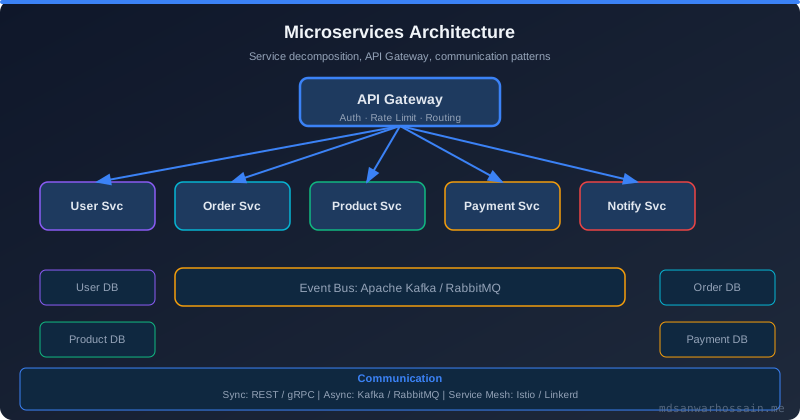
The Strangler Fig is the safest way to migrate a Grails monolith to microservices. New capabilities are built as standalone services; the monolith is hollowed out one domain at a time.
Phase 1: Expose the Monolith as an Internal API
// grails-app/controllers/api/v1/BookController.groovy
// Expose internal domain as a versioned REST API — consumed by new microservices

import grails.rest.RestfulController

class BookController extends RestfulController<Book> {

    static responseFormats = ['json']

    BookController() {
        super(Book)
    }

    // Add custom endpoints beyond CRUD
    def search() {
        def results = Book.findAllByTitleLike("%${params.q}%", [max: 20])
        respond results
    }
}

// UrlMappings.groovy
class UrlMappings {
    static mappings = {
        "/api/v1/$controller/$action?/$id?(.$format)?"() {
            namespace = "api.v1"
            constraints { id matches: /\d+/ }
        }
    }
}
Phase 2: New Microservices Call the Monolith
// New Spring Boot microservice — calls Grails monolith via REST
@Service
public class BookCatalogClient {
    private final WebClient webClient;

    public BookCatalogClient(@Value("${grails.base-url}") String baseUrl, WebClient.Builder builder) {
        this.webClient = builder.baseUrl(baseUrl).build();
    }

    public Mono<BookDto> findById(Long id) {
        return webClient.get()
            .uri("/api/v1/books/{id}", id)
            .retrieve()
            .onStatus(HttpStatusCode::is4xxClientError, resp ->
                Mono.error(new BookNotFoundException(id)))
            .bodyToMono(BookDto.class);
    }

    public Flux<BookDto> search(String query) {
        return webClient.get()
            .uri(uriBuilder -> uriBuilder
                .path("/api/v1/books/search")
                .queryParam("q", query)
                .build())
            .retrieve()
            .bodyToFlux(BookDto.class);
    }
}
Phase 3: API Gateway Traffic Splitting
# Spring Cloud Gateway — split traffic between Grails monolith and new microservices
spring:
  cloud:
    gateway:
      routes:
        # New microservice handles inventory — route there first
        - id: inventory-service
          uri: http://inventory-service:8081
          predicates:
            - Path=/api/v2/inventory/**

        # New microservice handles reviews
        - id: review-service
          uri: http://review-service:8082
          predicates:
            - Path=/api/v2/reviews/**

        # Everything else goes to Grails monolith
        - id: grails-monolith
          uri: http://grails-app:8080
          predicates:
            - Path=/**
          filters:
            - StripPrefix=0
Phase 4: Domain Event Publishing (Event-Driven Decoupling)
// Grails domain class publishes domain events to Kafka
// Keeps the monolith as source of truth while microservices react to changes
class Order {
    String status
    BigDecimal total
    Customer customer

    def afterInsert() {
        publishEvent(new OrderCreatedEvent(this))
    }

    def afterUpdate() {
        if (isDirty('status')) {
            publishEvent(new OrderStatusChangedEvent(this, getPersistentValue('status'), status))
        }
    }
}

// Event publisher Grails service
class DomainEventPublisher {
    def kafkaTemplate // Spring Kafka autowired by Spring Boot

    void publishEvent(Object event) {
        def payload = new ObjectMapper().writeValueAsString(event)
        kafkaTemplate.send("domain-events", payload)
    }
}
Domain event publishing via Kafka is the architectural key to safe, incremental decoupling: new microservices subscribe to domain events and maintain their own read models rather than calling the monolith synchronously, which eliminates distributed transaction complexity and coupling to monolith schema changes. The API gateway traffic-splitting configuration allows you to shift specific URL paths to new services one route at a time, with the ability to roll back by simply removing the new route entry without any code changes or redeployment. Each migration phase should include a parallel-run period where both the monolith and the new service process the same requests, with response data compared to validate correctness before the monolith's corresponding code is deleted.
GORM Performance Checklist for Production
| Area | Action | Impact |
|---|---|---|
| N+1 Queries | Use fetchMode JOIN or batchSize |
Very High |
| 2nd Level Cache | Enable Redis cache for read-heavy entities | Very High |
| Read-Only TX | @Transactional(readOnly=true) on queries |
High |
| Connection Pool | Tune HikariCP maximumPoolSize |
High |
| Bulk Ops | Use withBatch + session.clear() |
High |
| Query Cache | Enable query cache for static lookup tables | Medium |
| SQL Logging | Log slow queries (Hibernate statistics) | Diagnostic |
| Projection Queries | Use DTO projections instead of full entities | Medium |
Address the items in order of impact: eliminating N+1 queries and enabling the second-level cache typically deliver 5–10× throughput improvements before any infrastructure changes are needed. Connection pool tuning prevents the most common form of production outage — pool exhaustion under sudden traffic spikes — and must be validated under load testing before go-live. Use Hibernate statistics (hibernate.generate_statistics: true) in a staging environment to measure cache hit rates and query execution counts; target a second-level cache hit rate above 90% for frequently read entities before enabling query caching, since query cache invalidation on every write can reduce performance for write-heavy tables.
Grails Deployment: Docker & Kubernetes
# Dockerfile — multi-stage Grails 6 build
FROM eclipse-temurin:21-jdk AS builder
WORKDIR /app
COPY . .
RUN ./gradlew bootJar --no-daemon -q

FROM eclipse-temurin:21-jre-alpine
WORKDIR /app
RUN addgroup -S grails && adduser -S grails -G grails
COPY --from=builder /app/build/libs/*.jar app.jar
USER grails
EXPOSE 8080
ENTRYPOINT ["java", \
  "-XX:+UseG1GC", \
  "-XX:MaxRAMPercentage=75.0", \
  "-Dfile.encoding=UTF-8", \
  "-jar", "app.jar"]
# Kubernetes deployment with health probes
apiVersion: apps/v1
kind: Deployment
metadata:
name: grails-app
spec:
replicas: 3
selector:
matchLabels:
app: grails-app
template:
metadata:
labels:
app: grails-app
spec:
containers:
- name: grails-app
image: myregistry/grails-app:6.2.0
ports:
- containerPort: 8080
env:
- name: DB_USER
valueFrom:
secretKeyRef:
name: db-credentials
key: username
- name: DB_PASSWORD
valueFrom:
secretKeyRef:
name: db-credentials
key: password
readinessProbe:
httpGet:
path: /actuator/health/readiness
port: 8080
initialDelaySeconds: 30
periodSeconds: 10
livenessProbe:
httpGet:
path: /actuator/health/liveness
port: 8080
initialDelaySeconds: 60
periodSeconds: 15
resources:
requests:
memory: "512Mi"
cpu: "250m"
limits:
memory: "1Gi"
cpu: "1000m"The multi-stage Dockerfile discards the Gradle build cache and full JDK after compilation, keeping the final image lean with only the JRE and the compiled fat JAR — significantly reducing the attack surface and the container pull time in CI/CD pipelines. Using -XX:MaxRAMPercentage=75.0 instead of a fixed -Xmx makes the JVM heap adaptive to the Kubernetes memory limit, which is critical when the same image is deployed to different pod sizes across environments. The separate readiness and liveness probes map correctly to Spring Boot Actuator health groups: the readiness probe failing on a broken database connection removes the pod from the Service load balancer without triggering a container restart, while the liveness probe only kills and restarts the pod if the JVM itself is deadlocked or completely unresponsive.
Conclusion
Grails 6 in production is not a liability — it is a powerful, mature framework that will serve you well if you know its performance knobs. Eliminate N+1 queries with fetch joins and batch sizes, enable Redis-backed second-level caching for read-heavy entities, tune HikariCP for your database tier, and use read-only transactions everywhere you are only reading data.
When the time comes to extract microservices, the Strangler Fig pattern lets you do it incrementally — exposing the monolith as an internal REST API, building new capabilities as independent services, and routing traffic via an API gateway. The Grails community is smaller than Spring Boot's but it is loyal, active, and deeply knowledgeable. You will not be alone.
Leave a Comment
Related Posts

Software Engineer · Java · Spring Boot · Grails · GORM