Helm Chart Best Practices for Production Kubernetes: Subcharts, Testing & GitOps Rollout
Helm is the de-facto standard for packaging and deploying Kubernetes applications, but the gap between a working chart and a production-ready chart is enormous. This guide covers the patterns, tooling, and discipline that distinguish charts that survive contact with reality from those that cause outages.
Table of Contents
Chart Structure and Naming Conventions
A production Helm chart is a deliberate directory structure, not just a collection of YAML files. Every template filename should reflect the Kubernetes resource kind it defines: deployment.yaml, service.yaml, hpa.yaml. Partials — named templates shared across files — live in _helpers.tpl. This naming convention is enforced by the Helm linter and makes templates scannable without opening each file.
mychart/
├── Chart.yaml
├── values.yaml
├── values.schema.json
├── charts/
└── templates/
    ├── _helpers.tpl
    ├── deployment.yaml
    ├── service.yaml
    ├── hpa.yaml
    ├── ingress.yaml
    ├── serviceaccount.yaml
    └── tests/
        └── test-connection.yaml
Every named template in _helpers.tpl should be prefixed with the chart name to avoid collisions when the chart is used as a subchart. The convention mychart.labels prevents subtle template-name collisions at the parent chart level.
{{- define "mychart.labels" -}}
helm.sh/chart: {{ include "mychart.chart" . }}
app.kubernetes.io/name: {{ include "mychart.name" . }}
app.kubernetes.io/instance: {{ .Release.Name }}
app.kubernetes.io/version: {{ .Chart.AppVersion | quote }}
app.kubernetes.io/managed-by: {{ .Release.Service }}
{{- end }}
Values Schema Validation with JSON Schema
Adding a values.schema.json file to a Helm chart is one of the highest-leverage production improvements available. Without it, any typo in a values override silently deploys with incorrect configuration — a missing replica count becomes zero, a malformed resource limit creates an invalid pod spec only discovered at runtime. With JSON Schema, Helm validates values at install and upgrade time and produces a clear error before any Kubernetes API call is made.
{
  "$schema": "http://json-schema.org/draft-07/schema",
  "type": "object",
  "required": ["image", "replicaCount"],
  "properties": {
    "replicaCount": {
      "type": "integer",
      "minimum": 1
    },
    "image": {
      "type": "object",
      "required": ["repository", "tag"],
      "properties": {
        "repository": { "type": "string" },
        "tag": { "type": "string" },
        "pullPolicy": {
          "type": "string",
          "enum": ["Always", "IfNotPresent", "Never"]
        }
      }
    }
  }
}
Schema validation catches the most common production incident caused by Helm: an operator intends to set image.tag=v1.2.3 but mistakenly sets image.Tag=v1.2.3. Without schema validation, Helm silently deploys the previous image tag. With schema validation, it fails immediately with a descriptive error.
Managing Subchart Dependencies
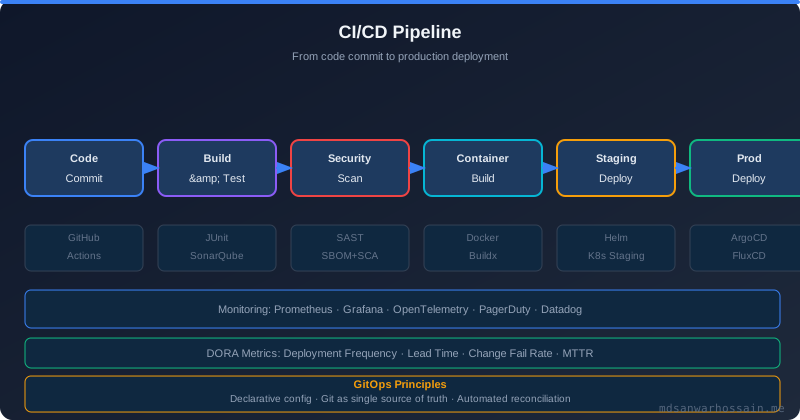
Subcharts allow composing charts from reusable components. A service that depends on PostgreSQL and Redis declares those as subchart dependencies in Chart.yaml. The condition field is essential for production use — it allows operators to disable a subchart when an external managed service is used instead, such as Amazon RDS or ElastiCache.
# Chart.yaml
apiVersion: v2
name: payment-service
version: 1.4.2
appVersion: "2.1.0"
dependencies:
  - name: postgresql
    version: "12.x.x"
    repository: "https://charts.bitnami.com/bitnami"
    condition: postgresql.enabled
  - name: redis
    version: "17.x.x"
    repository: "https://charts.bitnami.com/bitnami"
    condition: redis.enabled
Use global values for cross-chart configuration like image pull secrets, registry URLs, or environment labels that all subcharts must read. Values for subcharts are namespaced under the subchart name in values.yaml.
# values.yaml
global:
  imageRegistry: "registry.example.com"
  imagePullSecrets:
    - name: registry-credentials

postgresql:
  enabled: true
  auth:
    database: payments
    existingSecret: postgres-credentials

redis:
  enabled: true
  architecture: standalone
Helm Hooks for Lifecycle Management
Helm hooks execute Jobs or other resources at specific points in the release lifecycle. The most critical production hook is the database migration job: running migrations as a pre-upgrade hook ensures the schema is updated before the new application version starts, preventing the application from running against an incompatible schema.
# templates/migrations-job.yaml
apiVersion: batch/v1
kind: Job
metadata:
  name: {{ include "mychart.fullname" . }}-migrations
  annotations:
    "helm.sh/hook": pre-upgrade,pre-install
    "helm.sh/hook-weight": "-5"
    "helm.sh/hook-delete-policy": before-hook-creation,hook-succeeded
spec:
  ttlSecondsAfterFinished: 300
  backoffLimit: 3
  template:
    spec:
      restartPolicy: Never
      containers:
        - name: migrations
          image: "{{ .Values.image.repository }}:{{ .Values.image.tag }}"
          command: ["java", "-jar", "app.jar", "--spring.profiles.active=migrate-only"]
          env:
            - name: SPRING_DATASOURCE_URL
              valueFrom:
                secretKeyRef:
                  name: {{ .Values.database.secretName }}
                  key: url
The hook-delete-policy: before-hook-creation,hook-succeeded combination deletes the previous hook Job before creating a new one (preventing re-run conflicts) and cleans up successful Jobs so they do not accumulate in the cluster. Failed Jobs are retained for debugging.
Chart Testing with helm-unittest and ct
Two complementary tools cover the Helm chart testing surface: helm-unittest for unit-testing rendered templates without a cluster, and the Chart Testing tool (ct) for integration testing against a live cluster in CI.
helm-unittest renders templates with given values and asserts on the output. Write unit tests for every conditional in your templates and every values-driven behaviour:
# tests/deployment_test.yaml
suite: deployment tests
templates:
  - deployment.yaml
tests:
  - it: should set the correct replica count
    set:
      replicaCount: 3
    asserts:
      - equal:
          path: spec.replicas
          value: 3
  - it: should use custom image tag
    set:
      image.tag: "v2.5.1"
    asserts:
      - matchRegex:
          path: spec.template.spec.containers[0].image
          pattern: ":v2.5.1$"
  - it: should disable HPA when autoscaling is off
    set:
      autoscaling.enabled: false
    templates:
      - hpa.yaml
    asserts:
      - hasDocuments:
          count: 0
Chart Testing (ct) integrates with GitHub Actions to lint, install, and test changed charts on every pull request:
# .github/workflows/chart-test.yaml
name: Chart Testing
on: [pull_request]
jobs:
  chart-test:
    runs-on: ubuntu-latest
    steps:
      - uses: actions/checkout@v4
        with: { fetch-depth: 0 }
      - uses: helm/chart-testing-action@v2.6.1
      - run: ct lint --config ct.yaml
      - uses: helm/kind-action@v1.9.0
      - run: ct install --config ct.yaml
Multi-Cluster GitOps Rollout with Argo CD
The Argo CD ApplicationSet controller enables multi-cluster Helm chart rollout from a single source of truth. A single ApplicationSet resource expands into per-cluster Application resources, each pointing at the same chart version with environment-specific values:
apiVersion: argoproj.io/v1alpha1
kind: ApplicationSet
metadata:
  name: payment-service
  namespace: argocd
spec:
  generators:
    - list:
        elements:
          - cluster: staging
            url: https://kubernetes.staging.example.com
            valuesFile: values-staging.yaml
          - cluster: production-eu
            url: https://kubernetes.eu.example.com
            valuesFile: values-production-eu.yaml
  template:
    metadata:
      name: "payment-service-{{cluster}}"
    spec:
      source:
        repoURL: https://charts.example.com
        chart: payment-service
        targetRevision: "1.4.2"
        helm:
          valueFiles: ["{{valuesFile}}"]
      destination:
        server: "{{url}}"
        namespace: payments
      syncPolicy:
        automated:
          prune: true
          selfHeal: true
        syncOptions:
          - CreateNamespace=true
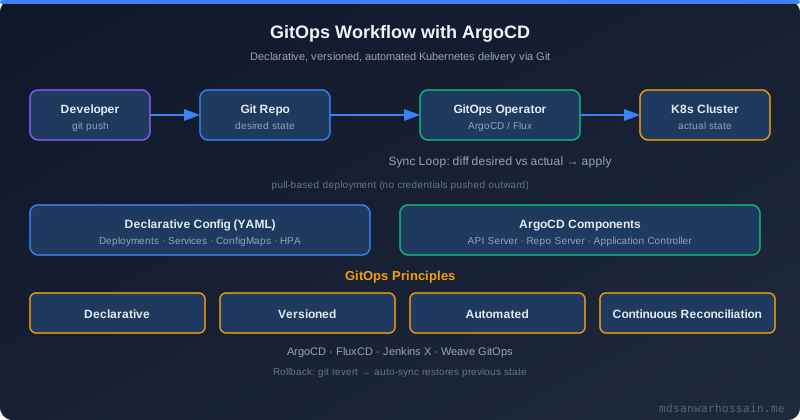
With selfHeal: true, Argo CD continuously reconciles cluster state to Git state. Manual changes to the cluster are reverted within seconds, enforcing the Git repository as the single authoritative source of truth for every environment.
Security Hardening in Helm Charts
Production Helm charts must encode security best practices by default. Make the secure configuration the default and require explicit override to deviate from it. The most impactful defaults are non-root user, read-only root filesystem, and dropped Linux capabilities:
securityContext:
  runAsNonRoot: true
  runAsUser: {{ .Values.podSecurityContext.runAsUser | default 1000 }}
  fsGroup: {{ .Values.podSecurityContext.fsGroup | default 1000 }}
  seccompProfile:
    type: RuntimeDefault
containers:
  - name: {{ .Chart.Name }}
    securityContext:
      allowPrivilegeEscalation: false
      readOnlyRootFilesystem: true
      capabilities:
        drop: [ALL]
For secrets, use the existingSecret pattern: the chart accepts a Kubernetes Secret name and mounts it via secretKeyRef. The secret itself is managed outside Helm by External Secrets Operator or Vault Agent Injector. This prevents sensitive values from ever appearing in Helm release history stored as Kubernetes Secrets in the cluster.
"A Helm chart is an operational contract. The best production charts encode your organization's security posture, resource constraints, and lifecycle hooks so every deployment inherits them automatically — not because operators remember to add them."
Key Takeaways
- Add
values.schema.jsonto validate inputs at install and upgrade time and prevent silent misconfiguration. - Declare subchart dependencies with
conditionflags to support both bundled and external managed services. - Use
pre-upgradehooks for database migrations withhook-delete-policy: before-hook-creation,hook-succeeded. - Test every template conditional with
helm-unittestbefore opening a pull request; usectfor cluster integration tests in CI. - Use Argo CD ApplicationSets for multi-cluster rollout from a single Git source of truth with automated sync and self-healing.
- Default to secure: non-root user, read-only root filesystem, dropped Linux capabilities, and the
existingSecretpattern for credentials.
Conclusion
The difference between a Helm chart that works in a demo and one that runs reliably in production comes down to four areas of discipline: validation (JSON schema, lint, unit tests), lifecycle management (hooks for migrations and cleanup), security defaults (non-root, secret references), and GitOps integration (ApplicationSets, automated sync). Investing in these patterns early pays compound returns as the fleet grows: every environment that consumes the chart inherits the same operational baseline, reducing both toil and outage risk.
Treat Helm charts as first-class deliverables reviewed with the same rigour as application code. A chart review that checks for schema validation, security context defaults, and hook policies prevents exactly the category of incidents that generic code review cannot catch: silent misconfigurations that surface only under production load.
Helm Chart Versioning and Release Management
Every Helm chart carries two independent version fields in Chart.yaml: version and appVersion. The version field is the chart's own semantic version — it tracks changes to templates, default values, schema, hooks, and any other chart-level concern. The appVersion field is informational metadata describing the version of the application being deployed. This distinction matters enormously in practice. Incrementing appVersion from 2.1.0 to 2.2.0 to track an application release does not require incrementing version if no chart internals changed. Conversely, refactoring a hook template or adding a new values field must bump version even if the application code is unchanged. Teams that conflate these two fields end up either over-releasing the chart or missing breaking changes in downstream consumers.
Apply semantic versioning strictly to the chart version. A MAJOR bump signals a breaking change: a required values key was renamed, a default was changed in a way that alters behaviour, or a hook was redesigned. A MINOR bump adds optional new values keys or new optional Kubernetes resources (like an HPA or a PodMonitor) that are off by default. A PATCH bump fixes a template bug, corrects a typo in a resource annotation, or improves a helper without altering the rendered output for existing values. Documenting this policy in the chart's CONTRIBUTING.md prevents the common failure mode where every release is a PATCH regardless of impact. Consumers relying on ~1.3.0 or ^1.3.0 version constraints in their Chart.yaml dependencies are protected only if the publisher respects semantic versioning.
Maintain a CHANGELOG.md at the chart repository root with a per-version entry for every release. Each entry should include the chart version, release date, the changes made, and any migration notes for breaking changes. Automated tools like helm-docs can generate documentation from values.yaml comments, but the changelog requires human authorship because it communicates intent and impact, not just structure. Keep changelog entries in the Keep a Changelog format with sections for Added, Changed, Deprecated, Removed, Fixed, and Security.
For distribution, three approaches are widely used. The OCI registry approach (supported natively since Helm 3.8) is the most operationally clean for production teams because it reuses the same registry infrastructure already in place for container images. Pushing a chart to GitHub Container Registry (ghcr.io) or AWS ECR requires only helm push after packaging, and helm pull oci://... for consumption. Automate chart releases with the chart-releaser GitHub Action (cr): on every merge to main, it detects changed chart versions, packages them, publishes to GitHub Releases, and updates the index.yaml in the gh-pages branch for HTTP-based chart repos. Pair cr with helm-docs to auto-generate README.md from annotated values.yaml comments as part of the same workflow.
# Chart.yaml — production example with annotations
apiVersion: v2
name: payment-service
description: Payment processing microservice with PCI-compliant defaults
type: application
version: 2.3.1         # chart version — follows semver, drives release tagging
appVersion: "3.1.0"   # informational — the application image tag
home: https://github.com/myorg/payment-service
sources:
  - https://github.com/myorg/payment-service
maintainers:
  - name: Platform Team
    email: platform@myorg.com
annotations:
  artifacthub.io/changes: |
    - kind: changed
      description: Added PodDisruptionBudget with minAvailable=1
    - kind: fixed
      description: HPA scaleDown stabilization window was 0 (now 300s)
  artifacthub.io/license: Apache-2.0
  artifacthub.io/prerelease: "false"
# GitHub Actions: chart-releaser workflow
name: Release Charts
on:
push:
branches: [main]
jobs:
release:
runs-on: ubuntu-latest
steps:
- uses: actions/checkout@v4
with:
fetch-depth: 0
- name: Configure Git
run: |
git config user.name "$GITHUB_ACTOR"
git config user.email "$GITHUB_ACTOR@users.noreply.github.com"
- name: Generate helm-docs
uses: losisin/helm-docs-github-action@v1
with:
chart-search-root: charts/
- name: Run chart-releaser
uses: helm/chart-releaser-action@v1.6.0
env:
CR_TOKEN: "${{ secrets.GITHUB_TOKEN }}"
with:
charts_dir: charts
skip_existing: true
# OCI push to ghcr.io
- name: Push to GHCR OCI
run: |
helm registry login ghcr.io -u $GITHUB_ACTOR -p ${{ secrets.GITHUB_TOKEN }}
cd charts/payment-service
VERSION=$(grep '^version:' Chart.yaml | awk '{print $2}')
helm package .
helm push payment-service-${VERSION}.tgz oci://ghcr.io/myorg/chartsDebugging Helm Deployments: helm diff, helm history, and Rollbacks
The single most valuable Helm debugging tool for production teams is the helm-diff plugin. Running helm diff upgrade <release> <chart> -f values.yaml produces a colored diff of every Kubernetes manifest that would change, including additions, deletions, and modifications to individual fields. Treating this output as a mandatory pre-production gate — the same way you treat a pull request diff — catches the accidental removal of a resource limit, an unintended label change that breaks a Service selector, or a ConfigMap key that was removed but still referenced by the application. Integrating helm diff into CI so the diff output appears as a PR comment turns chart upgrades from a black box into a reviewed change.
Helm stores the full history of every release in Kubernetes Secrets within the release namespace. Each revision is a separate Secret containing the rendered manifests and the values used. The helm history <release> command displays all revisions with their timestamps, chart version, app version, and status (deployed, superseded, failed). This is your audit trail for every production change. When an incident occurs and you need to know exactly what changed at 14:32 UTC, helm history gives you the revision number, and helm get values <release> --revision N shows the exact values that were in effect. Cross-reference this with helm get manifest <release> --revision N to see the exact Kubernetes manifests Helm rendered at that revision — far more reliable than trying to reconstruct the state from Git.
Rolling back with helm rollback <release> <revision> re-applies the manifests and values from the target revision. This is fast — Helm simply re-renders from stored state and applies the diff. However, understand its critical limitation: rollback does NOT reverse database migrations that were executed as pre-upgrade hooks. If your v2.1.0 migration added a column, rolling back the Helm release to v2.0.0 does not drop that column. Your application at v2.0.0 must tolerate the extra column, which is why every forward migration for a production system should be backward compatible. For the same reason, some teams skip hooks during rollback by using --no-hooks to avoid re-running potentially destructive hook logic designed for upgrades.
When a Helm upgrade fails and you need to diagnose the root cause, work through a consistent sequence: check Helm's own error output with --debug for template rendering failures, then check Kubernetes events with kubectl describe pod for scheduling or image pull failures, then check pod logs for application startup failures. The helm status <release> command shows the current state and any last-known error. If a release is stuck in pending-upgrade state (which happens when a previous upgrade was interrupted), you may need to use helm rollback or manually delete the pending revision Secret to unblock further deployments.
# Step 1: preview what will change before applying
helm diff upgrade payment-prod charts/payment-service \
  -f values/production.yaml \
  --allow-unreleased \
  --suppress-secrets

# Example diff output:
# default, Deployment, payment-service:
#   spec.template.spec.containers[0].image:
#     - myregistry.io/payment:3.0.1
#     + myregistry.io/payment:3.1.0
#   spec.template.spec.containers[0].resources.limits.memory:
#     - 512Mi
#     + 768Mi

# Step 2: check release history
helm history payment-prod --max 10
# REVISION  UPDATED                   STATUS      CHART                    APP VERSION  DESCRIPTION
# 14        2026-03-10 09:12:44 UTC   superseded  payment-service-2.2.0   3.0.1        Upgrade complete
# 15        2026-03-18 14:32:11 UTC   deployed    payment-service-2.3.1   3.1.0        Upgrade complete

# Step 3: inspect values at a specific revision
helm get values payment-prod --revision 14

# Step 4: inspect rendered manifests at a specific revision
helm get manifest payment-prod --revision 15 | kubectl diff -f -

# Step 5: rollback to revision 14 if needed
helm rollback payment-prod 14 --wait --timeout 5m

# Step 6: run with --debug to trace template rendering errors
helm upgrade payment-prod charts/payment-service \
  -f values/production.yaml \
  --debug --dry-run 2>&1 | head -100

# Step 7: check Kubernetes events after a failed pod start
kubectl describe pod -l app.kubernetes.io/name=payment-service -n default | \
  grep -A 20 Events
Helm Secrets Management: Integrating with Vault and External Secrets Operator
The most common Helm security mistake is storing secret values in values.yaml or passing them via --set in CI pipelines. Values files committed to Git expose secrets in repository history — even after deletion, the secret is readable in any historical commit. Secrets passed via --set in CI appear in pipeline logs, build system databases, and shell history on the build agent. Beyond exposure, Helm stores release state as Kubernetes Secrets in the cluster, and the values used at install time are encoded (but not encrypted) in that Secret — meaning any ClusterRole that grants get on Secrets in the release namespace reveals all values ever passed. The correct model is: no secret value ever appears in a values file, a CLI flag, or Helm release history. Secrets are managed externally and referenced by name.
The External Secrets Operator (ESO) is the most widely adopted solution for bridging external secret stores (AWS SSM Parameter Store, AWS Secrets Manager, HashiCorp Vault, GCP Secret Manager, Azure Key Vault) to native Kubernetes Secrets. ESO runs as a controller in the cluster and watches ExternalSecret CRD objects. Each ExternalSecret specifies a SecretStore (the external backend configuration) and a mapping of external key paths to Kubernetes Secret keys. When the controller reconciles an ExternalSecret, it fetches the value from the external store and creates or updates a Kubernetes Secret. The application Pods reference that Kubernetes Secret normally via secretKeyRef — the application code requires no knowledge of the external store.
The Vault Agent Injector takes a different approach: rather than creating Kubernetes Secrets, it mutates Pod specs to add an init container and a sidecar container that communicate with Vault directly. The init container authenticates to Vault using the Pod's Kubernetes ServiceAccount token (Vault's Kubernetes auth method), fetches the secrets, and writes them as files to a shared in-memory volume. The application reads secrets as files at paths like /vault/secrets/db-credentials. This approach means secrets never appear as Kubernetes Secret objects, reducing the blast radius of a compromised get secrets RBAC permission. The trade-off is that every Pod requiring secrets must run the Vault sidecar, adding CPU and memory overhead per Pod.
In Helm chart templates, the canonical pattern for both approaches is the existingSecret values key. The chart never creates a Kubernetes Secret containing sensitive data; instead, it reads a Secret name from values and references it in the Deployment template. This allows the chart to be used in environments where secrets are managed by ESO, by Vault Agent Injector, by manual kubectl apply, or by any other mechanism — the chart is agnostic to the secret provisioning system. Document in values.yaml which keys are expected in the referenced secret so operators can provision it correctly before running helm install.
# External Secrets Operator: ExternalSecret manifest
# (deployed separately, not via Helm chart)
apiVersion: external-secrets.io/v1beta1
kind: ExternalSecret
metadata:
  name: payment-service-credentials
  namespace: default
spec:
  refreshInterval: 1h
  secretStoreRef:
    name: aws-ssm-store
    kind: ClusterSecretStore
  target:
    name: payment-service-credentials   # name of the K8s Secret to create
    creationPolicy: Owner
    deletionPolicy: Retain
  data:
    - secretKey: db-url
      remoteRef:
        key: /prod/payment-service/db-url
    - secretKey: db-password
      remoteRef:
        key: /prod/payment-service/db-password
    - secretKey: stripe-api-key
      remoteRef:
        key: /prod/payment-service/stripe-api-key
---
# ClusterSecretStore pointing to AWS SSM
apiVersion: external-secrets.io/v1beta1
kind: ClusterSecretStore
metadata:
  name: aws-ssm-store
spec:
  provider:
    aws:
      service: ParameterStore
      region: us-east-1
      auth:
        jwt:
          serviceAccountRef:
            name: external-secrets-sa
            namespace: external-secrets
# values.yaml — existingSecret pattern (no secret values in chart)
# The chart reads credentials from a pre-existing Kubernetes Secret.
# Deploy the ExternalSecret manifest before running helm install.
existingSecret: "payment-service-credentials" # K8s Secret name
# Keys expected in the Secret:
# db-url, db-password, stripe-api-key
# templates/deployment.yaml — referencing existingSecret
env:
- name: SPRING_DATASOURCE_URL
valueFrom:
secretKeyRef:
name: {{ .Values.existingSecret }}
key: db-url
- name: SPRING_DATASOURCE_PASSWORD
valueFrom:
secretKeyRef:
name: {{ .Values.existingSecret }}
key: db-password
- name: STRIPE_API_KEY
valueFrom:
secretKeyRef:
name: {{ .Values.existingSecret }}
key: stripe-api-key# Vault Agent Injector annotations in pod template
# (add to deployment.yaml podTemplate annotations)
annotations:
vault.hashicorp.com/agent-inject: "true"
vault.hashicorp.com/role: "payment-service"
vault.hashicorp.com/agent-inject-secret-db-credentials: "secret/prod/payment-service/db"
vault.hashicorp.com/agent-inject-template-db-credentials: |
{{`{{- with secret "secret/prod/payment-service/db" -}}
export DB_URL="{{ .Data.data.url }}"
export DB_PASSWORD="{{ .Data.data.password }}"
{{- end }}`}}
vault.hashicorp.com/agent-pre-populate-only: "false"
vault.hashicorp.com/agent-limits-cpu: "50m"
vault.hashicorp.com/agent-limits-mem: "64Mi"Helm Chart Performance at Scale: Large Clusters and Many Releases
Helm stores release state in Kubernetes Secrets within the release namespace. Each upgrade creates a new Secret containing the full rendered manifests and the values used, encoded in gzip+base64. With the default --history-max 10, Helm retains up to 10 revisions per release. In a large platform with 500 releases each at 10 revisions, that is 5000 Secrets in a single namespace — or distributed across namespaces if you follow namespace-per-service topology. This volume degrades helm list performance, which must list all release Secrets to enumerate releases. More critically, the Kubernetes API server's etcd must store and serve all of these objects. Always set --history-max 5 or lower on every helm upgrade command or via the HELM_MAX_HISTORY environment variable. For existing clusters with inflated history, a cleanup script using helm history and kubectl delete secret targeting owner=helm,status=superseded labels can recover significant etcd storage.
Template rendering performance becomes noticeable with deeply nested subchart trees. A parent chart with 10 subcharts, each with 5 subcharts of their own, must render hundreds of templates per upgrade. Helm evaluates all templates in memory during every install/upgrade/diff operation. Profile rendering time with helm template --debug and time the output. If rendering exceeds 10 seconds, consider flattening the subchart tree, splitting the umbrella chart into independent releases, or adopting a tool better suited to large-scale rendering. The helm dependency update step — which downloads and packages all subchart tarballs — is also slow on first run and should be cached in CI using the charts/ directory or a dedicated cache layer tied to Chart.lock.
Another scaling consideration is CRD validation. Every Kubernetes resource created by a Helm chart is validated against its CRD schema by the API server. In clusters with hundreds of CRDs (common in platform engineering environments with multiple operators installed), each validation call adds latency. CRDs themselves are cluster-scoped resources, and large CRD schemas (like those for Crossplane or Istio) are multi-megabyte objects that must be fetched from etcd per admission request. Keep CRD installation separate from application chart installation — use a dedicated crds/ directory in Helm 3 which installs CRDs on first install only and never upgrades them automatically, or manage CRDs via a separate operator chart. Avoid embedding large CRDs in application charts where consumers may be installing the same CRD from multiple sources.
At the scale where Helm's release-per-application model becomes operationally heavy, teams evaluate alternatives. Kustomize eliminates client-side state entirely — there is no release Secret, no history, no upgrade concept — which makes it simpler operationally but loses Helm's diff, rollback, and templating capabilities. ArgoCD ApplicationSets can generate one Application per cluster or per environment from a matrix generator, providing Helm's GitOps benefits without the per-release Secret overhead since ArgoCD owns the reconciliation state. Crossplane moves infrastructure provisioning out of Helm entirely into a controller-based model. Each tool has a different trade-off profile. In practice, most large platforms use Helm for application packaging, ArgoCD for GitOps delivery, and Kustomize or Helm overlays for environment-specific patches — treating these as complementary tools rather than alternatives.
# Set history limit on every upgrade (also configure in your CI wrapper)
helm upgrade --install payment-prod charts/payment-service \
  -f values/production.yaml \
  --history-max 5 \
  --wait \
  --timeout 10m \
  --atomic

# Clean up superseded release secrets (run as a maintenance job)
kubectl get secrets -n default \
  -l owner=helm,status=superseded \
  --sort-by=.metadata.creationTimestamp \
  -o jsonpath='{range .items[*]}{.metadata.name}{"\n"}{end}' | \
  head -n -5 | \
  xargs -r kubectl delete secret -n default

# Cache helm dependency update in CI using Chart.lock hash
- name: Cache Helm dependencies
  uses: actions/cache@v4
  with:
    path: charts/payment-service/charts
    key: helm-deps-${{ hashFiles('charts/payment-service/Chart.lock') }}

# Use helm template + kubectl apply to bypass release tracking overhead
# (useful for ephemeral preview environments where history is not needed)
helm template payment-preview charts/payment-service \
  -f values/preview.yaml \
  --set image.tag=$PR_SHA \
| kubectl apply -f - --server-side --field-manager=helm-previewLeave a Comment
Related Posts

Software Engineer · Java · Spring Boot · Microservices