Java Memory Leaks in Production: Heap Dump Analysis & Prevention
Your Spring Boot service has been running for 12 days and suddenly the Kubernetes pod is OOMKilled. The next pod survives 11 days. Then 9. The heap usage curve is a slow, relentless upward slope that no amount of GC tuning can flatten. This is a memory leak — and it will keep killing your pods until you find and fix the root cause.
Part of the Java Performance Engineering Series.
Table of Contents
Introduction

Java memory leaks are paradoxical. The language has automatic garbage collection precisely to prevent the manual deallocation errors common in C/C++. Yet Java applications suffer from a category of memory leak that is in some ways harder to diagnose: not a failure to deallocate, but a failure to release references. The GC can only collect objects that are unreachable. If your code holds a reference to an object — even accidentally, even transitively — that object lives forever on the heap, consuming memory that compounds with every request cycle.
Memory leaks manifest in production in two modes: fast leaks that trigger OOM within hours (common after deployments that introduce a clearly wrong pattern), and slow leaks that take days or weeks to surface (common with subtle reference retention in caches, event listeners, or thread-local variables). Slow leaks are the most dangerous because they masquerade as normal heap growth, survive multiple GC cycles without triggering alarms, and are discovered only after an on-call page.
Real-World Problem: The Growing Cache That Never Shrank
A financial services team ran a Spring Boot order management service in Kubernetes with a 4 GB heap limit. For six months it ran without issue. After a feature release that added a new in-memory enrichment cache — a HashMap<String, OrderContext> keyed by order ID — the service began showing steady heap growth. The cache was supposed to expire entries after processing, but the removal code was only reached in the success path. Orders that failed validation were silently left in the cache. At peak load (40,000 orders/day), 2–3% had validation failures. After 30 days: ~36,000 leaked OrderContext objects, each holding a 60 KB payload. That is 2.16 GB of leaked heap, pushing the pod into OOM territory.
Deep Dive: The Java Heap & Reference Types
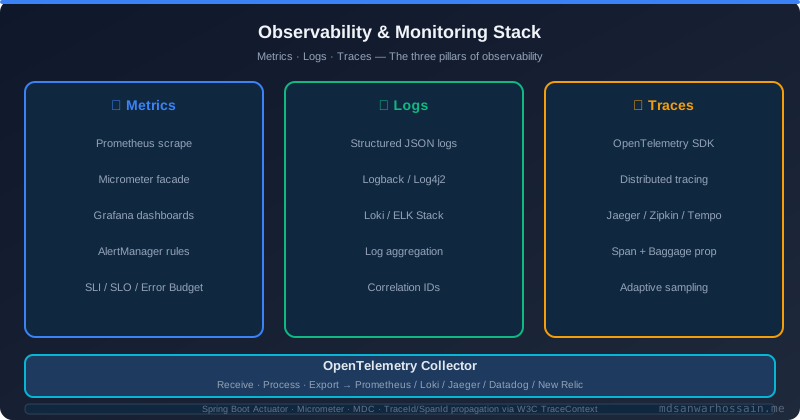
To find leaks, you need a mental model of the heap. The JVM heap is divided into Young Generation (Eden + Survivor spaces) and Old Generation (Tenured space). Short-lived objects are allocated in Eden and collected by minor GC. Objects that survive enough minor GCs are promoted to Old Gen. Old Gen is collected by major GC (stop-the-world for Serial/Parallel, concurrent for G1/ZGC/Shenandoah).
A leak manifests as Old Gen that grows across GC cycles because promoted objects are still reachable. The GC cannot collect them — it is doing its job correctly. The problem is in your code's reference graph.
Java provides four reference strength levels: Strong (default, prevents collection), Soft (SoftReference, collected under memory pressure — good for caches), Weak (WeakReference, collected at next GC — good for canonicalization maps), and Phantom (PhantomReference, used for finalization). Most leaks are caused by unintended strong references.
Solution Approach: Systematic Leak Investigation
Phase 1 — Confirm the Leak
Add JVM flags to your Spring Boot app: -Xmx4g -XX:+HeapDumpOnOutOfMemoryError -XX:HeapDumpPath=/heap-dumps/ -XX:+PrintGCDetails -XX:+PrintGCDateStamps -Xloggc:/logs/gc.log. Monitor heap usage over time via Micrometer + Prometheus: jvm.memory.used{area="heap"}. A true leak shows Old Gen growing monotonically and not recovering after full GC — distinguishable from normal heap growth where GC restores the heap to a stable baseline.
Phase 2 — Capture a Heap Dump
For a live pod: kubectl exec -n production <pod> -- jcmd 1 GC.heap_dump /tmp/heap.hprof then kubectl cp production/<pod>:/tmp/heap.hprof ./heap.hprof. In Kubernetes with an init container, mount an emptyDir volume at /heap-dumps and the JVM will write there automatically on OOM. For continuous profiling, Java Flight Recorder (-XX:StartFlightRecording=duration=60s,filename=/tmp/recording.jfr) captures allocation profiles without triggering a full heap dump.
Phase 3 — Heap Dump Analysis with Eclipse MAT
Open the hprof file in Eclipse Memory Analyzer Tool (MAT). The first stop is the Leak Suspects Report — MAT's automated analysis that identifies objects with unusually high retained heap. It will typically surface the dominant leak with a description like "One instance of java.util.HashMap occupies 1.8 GB (45% of heap)." From there, navigate to the dominator tree to find which root object is retaining the leak. The path to GC roots for any retained object reveals the exact reference chain keeping it alive.
Common MAT workflow: Leak Suspects → click the suspect → Dominator Tree → right-click on large object → "Path to GC Roots" → exclude weak/soft/phantom references → trace strong reference chain back to a static field, singleton, or thread local.
Phase 4 — Common Leak Patterns in Spring Boot
1. Static collection accumulation: A static Map or static List that is only added to, never cleared. Common in custom metrics registries, audit loggers, and retry state holders. Fix: use bounded data structures (LinkedHashMap with removeEldestEntry override, Caffeine cache with size/time eviction).
2. ThreadLocal leaks: ThreadLocal variables in application code with thread pools — because pooled threads are never destroyed, a ThreadLocal set in a request context and never cleaned up will retain the value forever. Spring's RequestContextHolder handles cleanup automatically, but custom ThreadLocals require explicit remove() in a finally block or a servlet filter.
3. Event listener accumulation: In Spring, beans registered as ApplicationEventListener via addApplicationListener() at runtime without corresponding removal. Each call adds another listener referencing its enclosing object. Fix: use @EventListener annotations (which are managed by the Spring context lifecycle) rather than programmatic registration.
4. Metaspace leaks via classloader: Applications that dynamically generate classes (CGLIB proxies, Groovy scripts, Byte Buddy transformations) without reusing classloaders accumulate class metadata in Metaspace. When Metaspace fills, the JVM throws OutOfMemoryError: Metaspace. Monitor with jvm.memory.used{area="nonheap",id="Metaspace"}. Fix: reuse classloaders; limit dynamic class generation; set -XX:MaxMetaspaceSize=256m as a circuit breaker to fail fast rather than exhausting native memory.
5. JDBC connection and ResultSet leaks: Not strictly heap leaks but native memory leaks — connections and ResultSets that are not closed cause the connection pool to grow unbounded. Use try-with-resources for all JDBC interactions, enable HikariCP's leakDetectionThreshold (e.g., 2000 ms) to log stack traces of connections held longer than expected.
Advanced: async-profiler for Allocation Profiling
For identifying which code path is allocating the leaking objects: ./profiler.sh -d 60 -e alloc -f /tmp/alloc.html <pid>. The resulting flame graph shows allocation hotspots by call stack. This is more actionable than a heap dump when the leak is diffuse — many small objects from many allocation sites rather than one massive collection.
Java Flight Recorder allocation profiling is another option: jcmd <pid> JFR.start duration=60s settings=profile filename=/tmp/r.jfr then analyze in JDK Mission Control under the Memory tab → Allocation by Class. Look for classes with high allocation rate and correspondingly high live set (both growing = leak; high allocation but stable live set = short-lived objects, possibly creating GC pressure but not a leak).
Prevention Patterns
Use Caffeine for all in-memory caches: Never use raw HashMap for production caches. Caffeine provides size-based eviction, time-based expiry (TTL and TTI), weak/soft value references, and built-in statistics. Caffeine.newBuilder().maximumSize(10_000).expireAfterWrite(5, MINUTES).recordStats().build().
Bounded queues everywhere: Replace LinkedList-backed queues with ArrayBlockingQueue or LinkedBlockingDeque with explicit capacity limits. An unbounded queue is a heap accumulation waiting to happen under load.
Regular heap monitoring: Alert on jvm_memory_used_bytes{area="heap"} / jvm_memory_max_bytes{area="heap"} > 0.85 sustained for 5 minutes. This gives you a warning before OOM and time to capture a heap dump proactively rather than post-mortem.
Continuous heap dump capture: Configure -XX:+HeapDumpOnOutOfMemoryError in all production deployments. Mount a persistent volume at the dump path so dumps survive pod restarts. Automate upload of dumps to S3 with a post-OOM init container.
Trade-offs
Heap dump analysis is invasive — capturing a dump pauses the JVM for several seconds and produces a file that can be gigabytes in size. For a pod under active traffic, this may be unacceptable. Continuous profilers (async-profiler, JFR) have much lower overhead (1–3% CPU) and should be the first-line tool. Reserve full heap dumps for post-OOM forensics or controlled maintenance windows. Metaspace monitoring is often overlooked — set explicit bounds and alert on usage to catch classloader leaks before they exhaust native memory.
Key Takeaways
- Java memory leaks are reference retention failures, not deallocation failures — the GC is working correctly
- A monotonically growing Old Gen that does not recover after full GC is the definitive leak signature
- Eclipse MAT's Leak Suspects Report + Dominator Tree + Path to GC Roots is the most efficient investigation workflow
- ThreadLocal variables in thread pools and static collections are the most common Spring Boot leak sources
- Use Caffeine for all production caches; never use raw HashMap with unbounded growth
- Enable HeapDumpOnOutOfMemoryError and continuous JFR in all production pods
Conclusion
Memory leaks are one of the highest-impact, most time-consuming classes of production bug. The engineers who resolve them fastest are the ones with systematic investigation workflows: confirm the leak pattern, capture a heap dump, use MAT to identify the dominant retained object, trace the reference chain, apply a targeted fix, and verify with a follow-up heap trend. With the right JVM flags, monitoring dashboards, and code patterns (Caffeine caches, try-with-resources, ThreadLocal cleanup), most leaks can be prevented before they reach production — and diagnosed in minutes when they do.
Frequently Asked Questions
What is Java Memory Leaks in Production and why does it matter?
Java memory leaks are paradoxical. The language has automatic garbage collection precisely to prevent the manual deallocation errors common in C/C++. Yet Java applications suffer from a category of memory leak that is in some ways harder to diagnose: not a failure to deallocate, but a failure to release references . The GC can only collect objects that are unreachable. If your code holds a reference to an object — even accidentally, even transitively — that object lives forever on the heap, consuming memory that compounds with every request cycle.
What real-world problems does Java Memory Leaks in Production solve?
A financial services team ran a Spring Boot order management service in Kubernetes with a 4 GB heap limit. For six months it ran without issue. After a feature release that added a new in-memory enrichment cache — a HashMap<String, OrderContext> keyed by order ID — the service began showing steady heap growth. The cache was supposed to expire entries after processing, but the removal code was only reached in the success path. Orders that failed validation were silently left in the cache. At peak load (40,000 orders/day), 2–3% had validation failures. After 30 days: ~36,000 leaked OrderContext objects, each holding a 60 KB payload. That is 2.16 GB of leaked heap, pushing the pod into OOM territory.
How does Java Memory Leaks in Production work at a technical level?
To find leaks, you need a mental model of the heap. The JVM heap is divided into Young Generation (Eden + Survivor spaces) and Old Generation (Tenured space). Short-lived objects are allocated in Eden and collected by minor GC. Objects that survive enough minor GCs are promoted to Old Gen. Old Gen is collected by major GC (stop-the-world for Serial/Parallel, concurrent for G1/ZGC/Shenandoah). A leak manifests as Old Gen that grows across GC cycles because promoted objects are still reachable. The GC cannot collect them — it is doing its job correctly. The problem is in your code's reference graph.
What is Phase 1 — Confirm the Leak and how does it work?
Add JVM flags to your Spring Boot app: -Xmx4g -XX:+HeapDumpOnOutOfMemoryError -XX:HeapDumpPath=/heap-dumps/ -XX:+PrintGCDetails -XX:+PrintGCDateStamps -Xloggc:/logs/gc.log . Monitor heap usage over time via Micrometer + Prometheus: jvm.memory.used{area="heap"} . A true leak shows Old Gen growing monotonically and not recovering after full GC — distinguishable from normal heap growth where GC restores the heap to a stable baseline.
What is Phase 2 — Capture a Heap Dump and how does it work?
For a live pod: kubectl exec -n production <pod> -- jcmd 1 GC.heap_dump /tmp/heap.hprof then kubectl cp production/<pod>:/tmp/heap.hprof ./heap.hprof . In Kubernetes with an init container, mount an emptyDir volume at /heap-dumps and the JVM will write there automatically on OOM. For continuous profiling, Java Flight Recorder ( -XX:StartFlightRecording=duration=60s,filename=/tmp/recording.jfr ) captures allocation profiles without triggering a full heap dump.
Leave a Comment
Related Posts

Software Engineer · Java · Spring Boot · Microservices