Java Heap Dump Analysis in Production: Diagnosing OOM Errors and Memory Leaks with MAT and async-profiler
Memory leaks are the slowest, most insidious failures in Java production systems. A service that runs for days before crashing with OutOfMemoryError is far harder to debug than one that fails immediately — by the time the JVM dies, the evidence is buried in a 4GB heap dump file. This guide gives you the practical toolkit to capture that dump, extract the root cause in minutes, and prevent the leak from reaching production again.
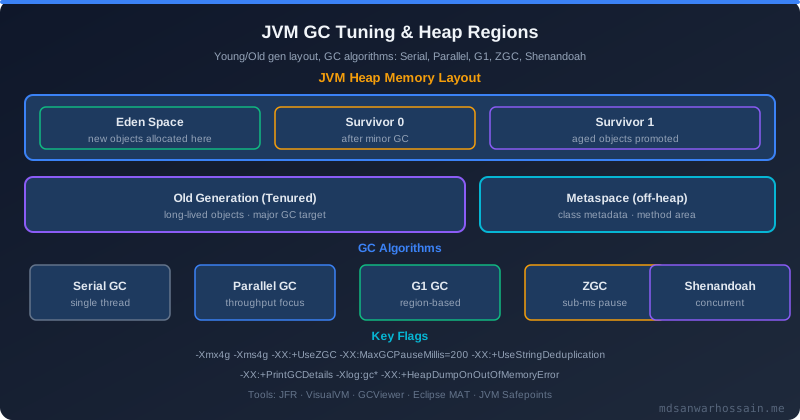
Table of Contents
- The Production Incident
- Types of OutOfMemoryError
- Capturing Heap Dumps: Production-Safe Techniques
- Eclipse MAT: Finding the Leak
- Identifying Top Memory Consumers
- Dominator Tree and Retained Heap
- Common Memory Leak Patterns in Spring Boot
- async-profiler for Allocation Profiling
- Prevention: Memory Leak Detection Before Production
- Key Takeaways
The Production Incident

A Spring Boot microservice running in production behaved perfectly for the first 72 hours after deployment — then the on-call alert fired at 3 AM. The JVM had crashed with java.lang.OutOfMemoryError: Java heap space. Heap was configured at 4GB (-Xmx4g), which had been sufficient for over six months of prior deployments. GC logs told the story clearly in hindsight: old generation had been growing by approximately 200MB per day, with no corresponding growth in application data volume or traffic. The JVM ran its last GC cycle at 99.8% heap occupancy, failed to reclaim meaningful memory, and terminated. The heap dump captured at crash time was 3.8GB.
The OOM stack trace pointed directly at the problem:
java.lang.OutOfMemoryError: Java heap space
    at java.util.Arrays.copyOf(Arrays.java:3236)
    at java.util.HashMap.resize(HashMap.java:704)
    at java.util.HashMap.putVal(HashMap.java:663)
    at com.example.session.InMemorySessionStore.put(InMemorySessionStore.java:34)
    at com.example.auth.AuthService.createSession(AuthService.java:89)
The JVM ran out of heap while resizing a HashMap inside a custom InMemorySessionStore. Opening the heap dump in Eclipse MAT's "Leak Suspects" report revealed the full picture immediately: "Problem Suspect 1: 2,156,234 instances of com.example.session.UserSession, consuming 2.1 GB (55% of heap)." A developer had added a ConcurrentHashMap<String, UserSession> as an in-memory session store in a Spring @Component without any expiry logic. After 72 hours of user logins, it contained 2.1 million entries — every session ever created, accumulating in memory with no eviction. The map was growing at roughly 30,000 entries per hour.
The fix was three-pronged. First, replace the unbounded ConcurrentHashMap with a Caffeine cache configured with a TTL:
Cache<String, UserSession> sessionCache = Caffeine.newBuilder()
    .maximumSize(100_000)
    .expireAfterWrite(30, TimeUnit.MINUTES)
    .build();
Second, add the heap dump on OOM JVM flag so that future crashes self-capture forensic evidence:
-XX:+HeapDumpOnOutOfMemoryError
-XX:HeapDumpPath=/var/log/app/heapdump.hprof
Third, add a Prometheus alert to catch heap growth trends before reaching OOM:
jvm.memory.used{area="heap"} / jvm.memory.max{area="heap"} > 0.85
This alert would have fired approximately 18 hours before the crash, giving ample time to investigate and roll out the fix during business hours rather than at 3 AM.
Types of OutOfMemoryError
Not all OutOfMemoryError exceptions have the same cause. The message in the exception tells you which memory region is exhausted, and each region requires a different diagnostic approach.
Java heap space is the most common type. The JVM heap — the region managed by the garbage collector — is full and GC cannot reclaim enough space to satisfy an allocation request. This is the scenario described above. Diagnosis always starts with a heap dump.
GC overhead limit exceeded indicates a near-death spiral: the GC is spending more than 98% of CPU time but reclaiming less than 2% of the heap per cycle. The JVM raises this error proactively before complete heap exhaustion, because continuing in this state would freeze the application rather than crashing it cleanly. The root cause is the same as heap space exhaustion — a memory leak or undersized heap — but the failure mode is different: the application is still technically running but completely non-functional, executing GC instead of user code.
Metaspace errors occur when the JVM runs out of memory for class metadata. Every loaded class consumes Metaspace proportional to its method count and bytecode size. In applications that perform dynamic class generation at runtime — Groovy scripts, CGLIB proxies in Spring, Hibernate entity enhancement, or reflection-heavy frameworks — Metaspace can grow unboundedly if classes are generated but never unloaded. Fix by adding an explicit limit and monitoring: -XX:MaxMetaspaceSize=512m. If Metaspace keeps growing until hitting the limit, you have a classloader leak — investigate with MAT's "Class Loader Explorer."
Unable to create new native thread means the OS has hit its thread creation limit for the process. This is not a heap issue — it is a ulimit issue (ulimit -u shows max user processes). In Java applications, this usually means thread pools are misconfigured and growing without bound, or threads are leaking (created but never terminated). Check jcmd <pid> Thread.print | wc -l to count live threads.
Direct buffer memory exhaustion occurs when NIO DirectByteBuffer off-heap allocation fails. Direct buffers are allocated outside the Java heap, directly in native memory, and are not subject to GC pressure — they are freed only when the DirectByteBuffer object itself is collected. Netty, Kafka, and other high-performance I/O frameworks make heavy use of direct buffers. Fix with -XX:MaxDirectMemorySize=512m and monitor with jcmd <pid> VM.native_memory summary.
Capturing Heap Dumps: Production-Safe Techniques
There are four practical methods to capture a heap dump from a production JVM. Each has different safety characteristics and is suited to different scenarios.
# Method 1: Add to JVM startup — auto-dump on OOM (ALWAYS add this flag)
-XX:+HeapDumpOnOutOfMemoryError
-XX:HeapDumpPath=/var/log/app/heapdump.hprof

# Method 2: jcmd (live dump, non-blocking for GC-paused production)
jcmd <pid> GC.heap_dump /tmp/heapdump-$(date +%Y%m%d-%H%M%S).hprof

# Method 3: jmap (legacy, causes full GC first — use jcmd instead)
jmap -dump:format=b,file=/tmp/heapdump.hprof <pid>

# Method 4: jstack + jcmd for quick analysis without full dump
jcmd <pid> GC.class_histogram | head -30
Method 1 (-XX:+HeapDumpOnOutOfMemoryError) is non-negotiable for all production JVMs. It triggers automatically at crash time, capturing the exact heap state that caused the OOM. Without this flag, a JVM that crashes and restarts leaves no forensic evidence. The heap dump file is written to the path specified by HeapDumpPath; ensure the target directory has sufficient disk space (at least 1.5× your -Xmx value).
Method 2 (jcmd GC.heap_dump) is the preferred tool for capturing a live dump from a running JVM. Unlike jmap, it does not force a full GC before writing the dump, minimizing the impact on running application threads. Use this when you observe a steady heap growth trend and want to capture the state before OOM occurs.
Method 3 (jmap) is the legacy approach. It triggers a full stop-the-world GC before writing the dump, which can cause visible latency spikes in production. Prefer jcmd for live systems. Use jmap only when jcmd is unavailable.
Method 4 (GC.class_histogram) provides a quick summary of object counts and shallow sizes without writing a full dump. It is safe to run at any time and takes only seconds. Use it to get a rapid overview before deciding whether a full dump is warranted.
A critical safety note: writing a heap dump from a 4GB heap takes approximately 45–90 seconds and temporarily degrades application performance due to I/O pressure and the stop-the-world phase required to freeze the heap for a consistent snapshot. Schedule live heap dumps during low-traffic periods when possible. -XX:+HeapDumpOnOutOfMemoryError is safe precisely because it only triggers at the moment of crash, when the application is already non-functional.
Eclipse MAT: Finding the Leak
Eclipse Memory Analyzer Tool (MAT, available at eclipse.dev/mat/) is the industry-standard tool for heap dump analysis. It can parse multi-gigabyte .hprof files efficiently, computing retained heap sizes, dominator trees, and leak suspects automatically. The "Leak Suspects" report is almost always the right starting point for a new heap dump investigation.
Open the .hprof file in MAT, then navigate to File → Open Heap Dump. After the index is built (which takes several minutes for large dumps), run Analyze → Run Leak Suspects Report. MAT analyzes the dominator tree and identifies objects that retain unexpectedly large portions of the heap. For the session store leak, the output reads immediately: "Problem Suspect 1: 2,156,234 instances of com.example.session.UserSession, consuming 2.1 GB (55% of heap)."
MAT also includes an Object Query Language (OQL) console for custom analysis. OQL is SQL-like syntax for querying heap objects by class, field values, and reference relationships:
SELECT * FROM java.util.HashMap WHERE size > 100000
SELECT * FROM com.example.session.UserSession
The first query finds all HashMap instances with more than 100,000 entries — an immediately suspicious result that warrants investigation. The second query lists every UserSession instance, from which you can inspect individual objects and trace their GC root references to understand why they are retained.
Understanding the distinction between shallow heap and retained heap is essential for correct interpretation of MAT output. Shallow heap is the memory consumed by the object itself — its header and fields, not including any objects it references. A HashMap with 2 million entries has a shallow heap of just a few hundred bytes (the header and the internal array reference). Retained heap is the total memory that would be freed if the object were garbage collected, including all objects exclusively reachable through it. The same HashMap's retained heap includes all 2 million UserSession objects, their string fields, nested objects, and the internal entry array — totalling 2.1 GB. Retained heap is the number that matters for memory leak diagnosis: it tells you how much memory you reclaim by fixing the leak.
Identifying Top Memory Consumers
MAT's Histogram view (Window → Heap Dump Details → Histogram) lists all classes with their instance counts, shallow heap totals, and retained heap totals. Sorting by retained heap immediately surfaces the largest consumers.
Common memory hogs found in Spring Boot applications during heap dump analysis:
byte[] arrays almost always appear near the top of any histogram — they are used for everything from JSON serialization buffers to HTTP response bodies to string backing arrays. A large total retained by byte[] often points to Jackson's ObjectMapper holding large temporary ByteArrayOutputStream buffers, or to HTTP client response caches not being released promptly.
char[] and String accumulation can indicate string interning problems (calling String.intern() on dynamic values fills the string pool permanently) or large text values being held in memory — log messages, rendered templates, or deserialized configuration files that should have been discarded after use.
HashMap$Entry[] backing arrays appearing high in the histogram is a direct signal of large maps in the heap. Combined with the OQL query above, this leads immediately to the offending map instances.
Spring CGLIB proxy objects filling Metaspace are invisible in the heap histogram but visible in MAT's Class Loader Explorer. Each Spring-managed bean annotated with @Transactional or @Cacheable generates a CGLIB subclass proxy. In normal operation these are created once at startup and are stable. Dynamic proxy generation at request time (for example, generating proxies inside a request-scoped factory) will leak Metaspace progressively.
To trace a byte[] back to its owning object chain, right-click any instance in the Histogram and choose with outgoing references. MAT shows the reference chain upward to the GC root:
Select objects with outgoing references from a byte[] instance:
  byte[] → HttpResponseBuffer → ResponseEntity → RestTemplate → HttpClient → ...
This chain reveals that a RestTemplate (which should be a singleton) is holding an HttpClient that retains connection-level response buffers. The fix: ensure RestTemplate uses a properly configured connection pool with response body consumption and buffer release after each request.
Dominator Tree and Retained Heap
The dominator tree is the most powerful view in Eclipse MAT for pinpointing leak root causes. An object A dominates object B if every possible path from a GC root to B passes through A. This means that if A were garbage collected, B (and every object exclusively reachable through B) would also be collectible. Objects high in the dominator tree that retain large heap percentages are structurally the root cause of the memory problem — not just a symptom of it.
In MAT, open the Dominator Tree via Window → Heap Dump Details → Dominator Tree. For the session store leak, the dominator tree looks like this:
com.example.session.InMemorySessionStore (retained: 2.1 GB, 55%)
  └─ java.util.concurrent.ConcurrentHashMap (retained: 2.09 GB)
       └─ ConcurrentHashMap$Node[4194304] (retained: 2.08 GB)
            └─ 2,156,234 x com.example.session.UserSession (retained: ~950 bytes each)
This tree immediately identifies InMemorySessionStore as the root cause with zero ambiguity. It is a Spring singleton (held by the application context as a GC root), it dominates the ConcurrentHashMap, which dominates 2.1 million UserSession objects. There is a direct, unambiguous path from the GC root to 55% of the total heap. Without expiry logic on the map, every session ever created accumulates here indefinitely.
The retained heap percentage is the critical number for prioritization. An object retaining 55% of the heap and growing without bound is a P0 memory leak. An object retaining 2% of a stable heap is almost certainly not a leak at all — it is a legitimate long-lived data structure. Focus heap dump investigation effort on the top entries in the dominator tree by retained heap percentage.
Common Memory Leak Patterns in Spring Boot
After analyzing heap dumps from dozens of production Spring Boot incidents, the same patterns appear repeatedly. Understanding these patterns enables faster diagnosis and prevention.
Unbounded in-memory caches (raw HashMap or ConcurrentHashMap without eviction) are the single most common source of memory leaks in Spring Boot applications. Any code that puts objects into a map but has no corresponding removal or expiry logic will eventually exhaust the heap given sufficient time and traffic. The fix is always the same: replace raw maps used as caches with Caffeine cache or Spring @Cacheable with an explicit maximumSize and expireAfterWrite.
Static collection fields are GC roots — the GC can never collect the objects they hold, regardless of whether the rest of the application still references them. A static List or static Map that accumulates entries without cleanup will grow unboundedly. Review every static collection field in the codebase and verify it has explicit size bounds and cleanup logic.
ThreadLocal without remove() is a particularly insidious pattern in applications using thread pools (which is every Spring Boot application). Thread pool threads are reused across requests, so ThreadLocal values set during one request persist into the next request on the same thread — and accumulate over thousands of requests if never cleaned up:
// BAD: ThreadLocal in request handler without cleanup
private static final ThreadLocal<List<AuditEvent>> auditEvents = new ThreadLocal<>();

// GOOD: always clean up in a try-finally
try {
    auditEvents.set(new ArrayList<>());
    processRequest();
} finally {
    auditEvents.remove(); // CRITICAL: prevents memory leak in thread pool
}
The finally block is non-negotiable — it ensures cleanup even when the request throws an exception. A ThreadLocal without a paired remove() in a finally block in a thread pool application is always a memory leak.
Hibernate session holding too many entities occurs in large @Transactional methods that load many entities via JPA queries without ever clearing the Hibernate session. Every entity loaded into a Hibernate session is tracked by the first-level cache for change detection, and all those entities remain referenced — and therefore unreachable for GC — until the transaction completes. For batch operations loading thousands of entities, call entityManager.clear() periodically to release the session cache and allow processed entities to be collected.
Event listeners not deregistered cause leaks when an object registers as a listener on a long-lived event source but is never deregistered. The event source holds a reference to the listener, which prevents the listener from being collected, which in turn prevents anything the listener holds from being collected. In Spring, this typically manifests as @EventListener methods in prototype-scoped beans (which create a new listener instance per injection but register them all permanently on the application event publisher). Use ApplicationListener with explicit deregistration, or restrict @EventListener to singleton-scoped beans.
async-profiler for Allocation Profiling
While heap dump analysis tells you what is consuming memory at the moment of the dump, allocation profiling with async-profiler tells you which code paths are allocating the most memory over time. These are complementary tools: use heap dumps to diagnose OOM crashes, and allocation profiling to understand allocation patterns that are driving heap growth before a crash occurs.
# Profile allocations for 60 seconds on live JVM
./asprof -d 60 -e alloc -f /tmp/alloc-flamegraph.html <pid>

# Generate allocation flamegraph — shows which code paths allocate most memory
# Open in browser: alloc-flamegraph.html
The resulting allocation flamegraph shows call stacks as horizontal bars, with width proportional to bytes allocated by each call path. The widest frames at the top of the flame are the most allocation-intensive code paths. Look for frames that are unexpectedly wide relative to what you would expect given the request volume they handle.
Common unexpected allocation hotspots found with async-profiler in Spring Boot applications:
Hibernate SessionImpl.get() allocating large entity graphs: a single findAll() call loading an entity with eager @OneToMany relationships can allocate hundreds of megabytes of intermediate objects — entity instances, proxy wrappers, collection holders, and JDBC result set buffers — even if most of that data is immediately discarded by application logic. The allocation flamegraph makes this visible as a wide Hibernate frame even for requests that appear lightweight from the outside.
Jackson ObjectMapper.writeValueAsBytes() allocating large ByteArrayOutputStream for each request: if your application serializes large response bodies to JSON, Jackson allocates and immediately discards a byte array proportional to the response size on every request. At high request volume, this creates significant GC pressure even though no memory is leaked. The fix is to stream the serialization output directly to the HTTP response output stream rather than buffering it in memory.
Log4j2 StringFormattedMessage allocating strings even when the log level is disabled: the classic logging performance anti-pattern. String concatenation in a log statement is evaluated before the log level check, so even DEBUG log statements in a production service running at INFO level incur string allocation costs. Fix with lazy logging:
// Allocates string even when DEBUG is disabled
logger.debug("Processing entity: " + entity.toDetailString());

// GOOD: lambda is only evaluated if DEBUG level is enabled
logger.debug(() -> "Processing entity: " + entity.toDetailString());
Run allocation profiling in staging under realistic load before every major release. Wide new frames that were not present in the previous release indicate new allocation hotspots introduced by recent code changes — catch them before they drive up GC overhead in production.
Prevention: Memory Leak Detection Before Production
The most effective memory leak strategy is prevention: catching leaks in staging and CI before they reach production JVMs. A combination of JVM flags, monitoring alerts, tooling choices, and release process discipline eliminates the majority of production OOM incidents.
Add -XX:+HeapDumpOnOutOfMemoryError -XX:HeapDumpPath=/var/log/app/ to ALL production JVMs. This is the single highest-value JVM flag that most teams neglect to set. Without it, a crashed JVM leaves no forensic evidence. With it, the first OOM crash yields a complete heap dump ready for MAT analysis. There is no performance overhead when the JVM is running normally — the flag only activates at crash time.
Set a Prometheus alert on heap utilization trending above 85% for 5 minutes:
jvm_memory_used_bytes{area="heap"} / jvm_memory_max_bytes{area="heap"} > 0.85
This alert fires hours or days before an OOM crash, giving the team time to investigate and deploy a fix without an incident. Sustained heap utilization above 85% is the early warning signal for memory leaks that grow slowly — like the session store accumulating 30,000 entries per hour.
Use Caffeine cache instead of raw HashMap for any in-memory caching. Caffeine provides maximum size bounds, TTL-based expiry, and LRU eviction out of the box. It is a drop-in replacement for raw maps used as caches, and it makes unbounded accumulation architecturally impossible. Adopting Caffeine as the standard caching library eliminates the entire class of unbounded-cache memory leaks.
Enable JFR continuous recording to capture OOM context:
jcmd <pid> JFR.start name=continuous settings=low-overhead maxage=1h
JFR's low-overhead continuous recording captures allocation statistics, GC events, and thread activity over a rolling 1-hour window. If an OOM occurs, the JFR recording from the preceding hour provides allocation trends and GC history that complement the heap dump — showing how the heap filled, not just what was in it at crash time.
Add @Bean(destroyMethod = "close") or @PreDestroy on all beans that hold resources. Any component holding open connections, registered listeners, or background threads must implement proper cleanup on application shutdown. Without explicit destroy methods, these resources are GC roots that prevent their held objects from being collected, and they accumulate in long-running applications.
Run async-profiler allocation profiling in staging before every major release to catch new allocation hotspots before they reach production. A 60-second allocation profile under realistic load takes minutes to capture and analyze. Compare the flamegraph against the previous release. Unexpected new wide frames indicate new allocation regressions that should be investigated before deployment.
Key Takeaways
- Always add
-XX:+HeapDumpOnOutOfMemoryErrorto every production JVM: without it, a JVM crash leaves no forensic evidence; with it, the first crash yields a complete heap dump ready for MAT analysis at zero runtime overhead. - Start every heap dump investigation with Eclipse MAT's "Leak Suspects" report: it automatically identifies objects dominating large retained heap percentages, reducing root cause diagnosis from hours to minutes on even multi-gigabyte dumps.
- Understand retained heap, not shallow heap: the retained heap of a leaking collection (e.g., 2.1 GB for a
ConcurrentHashMapwith 2 million entries) is orders of magnitude larger than its shallow heap, and is the number that drives OOM crashes. - Replace every raw
HashMapused as a cache with Caffeine: unbounded accumulation in in-memory maps is the single most common source of production OOM incidents in Spring Boot applications, and Caffeine eliminates it by design. - Always call
ThreadLocal.remove()in afinallyblock in thread pool applications: thread pool threads are reused across requests, and uncleanedThreadLocalvalues accumulate indefinitely — this pattern leaks memory silently across millions of requests before manifesting as OOM. - Combine heap dump analysis with async-profiler allocation flamegraphs: heap dumps reveal what is in memory at crash time; allocation profiling reveals which code paths drove the heap there — both tools together give a complete picture required to fix the root cause and prevent recurrence.
Leave a Comment
Related Posts

Software Engineer · Java · Spring Boot · Microservices