Kubernetes Cost Optimization at Scale: FinOps, Resource Rightsizing, and Spot Instance Strategies
Kubernetes makes it dangerously easy to over-provision. When every team requests "2 CPU, 4GB RAM" per pod because it feels safe, and you multiply that across 200 services, you end up with $80,000/month of wasted compute. This guide shows you how to systematically identify, eliminate, and prevent that waste.
Table of Contents
- The Real-World Problem: $80k/Month Cloud Bill
- Resource Requests vs Limits: The Number One Mistake
- VPA (Vertical Pod Autoscaler) for Rightsizing
- HPA and KEDA: Scale-to-Zero for Non-Production
- Spot and Preemptible Instances: 70% Cost Reduction
- Karpenter vs Cluster Autoscaler
- Namespace ResourceQuota and LimitRange
- FinOps Tooling and Chargeback Model
- Failure Scenarios to Avoid
The Real-World Problem: $80k/Month Cloud Bill
The call came on a Tuesday: the VP of Engineering wanted to know why the AWS bill had crossed $80,000 for the second straight month. Nobody had a clear answer. The platform team knew roughly which environments were most expensive, but the granularity ended there. Which teams? Which services? Which deployments were consuming resources they never actually used?
The first step was installing Kubecost into the production EKS cluster. Within 24 hours of enabling cost allocation, the picture became painfully clear. The Kubecost namespace cost breakdown revealed that actual CPU utilization across the cluster was 8% of requested capacity, and memory utilization was 22%. In other words, the cluster was provisioned for the peak of every service's imagined worst-case scenario, not for its actual measured usage.
The top 10 most wasteful deployments fell into three patterns. First, legacy batch jobs that ran for 15 minutes per hour but held a full node's worth of resources around the clock. Second, development-facing services that were left running at full production sizing in the staging namespace overnight and on weekends. Third, stateless API services that had received resource "upgrades" after an on-call incident months ago and never had their allocations reviewed afterward.
The remediation plan targeted three areas over 90 days: rightsizing resource requests using VPA recommendations, migrating stateless services to spot instances, and implementing Karpenter for intelligent node provisioning. The result after three months: $28,000/month — a 65% reduction. The key insight is that cost optimization in Kubernetes is not a one-time project; it is an ongoing operational discipline supported by tooling, team accountability, and a monthly FinOps review cycle.
Resource Requests vs Limits: The Number One Mistake
Understanding the difference between resource requests and limits is foundational to Kubernetes cost optimization, and the misunderstanding here is the root cause of most over-provisioning waste.
Requests are what the Kubernetes scheduler uses for bin-packing and node selection. When a pod with a 500m CPU request is scheduled, the scheduler finds a node with at least 500m of allocatable CPU remaining and reserves that capacity — even if the pod is idle. Requests directly translate to the node capacity you must provision and therefore directly drive your cloud bill. Limits are a runtime enforcement cap: the pod's container cannot exceed the limit without being throttled (CPU) or killed (memory OOMKill).
The three most common and costly mistakes in production clusters are:
- Setting requests equal to limits prevents burstable workloads. A service that typically uses 200m CPU but occasionally bursts to 600m will be throttled at 200m if both request and limit are 200m, degrading latency unnecessarily while paying for unused headroom on every node.
- Setting no limits at all causes noisy-neighbour CPU steal and memory pressure, potentially starving other pods on the same node and causing cascading degradation.
- Memory limits set too low causes OOMKill loops that platform teams mistake for application bugs, wasting hours of investigation time while the real fix is adjusting a YAML value.
The production best practice is: set CPU requests based on the P95 usage measured from Prometheus or VPA recommendations over a representative period. Set CPU limits at 2–3× the request since CPU is compressible (throttling degrades performance gracefully). Set memory requests based on P95 usage. Set memory limits approximately equal to requests because memory is incompressible — exceeding the limit results in OOMKill, so there is no benefit to a large gap between request and limit for memory.
resources:
  requests:
    cpu: "250m"
    memory: "512Mi"
  limits:
    cpu: "750m"
    memory: "512Mi"
This configuration gives the scheduler an accurate picture of baseline consumption (250m CPU, 512Mi memory) for bin-packing, while allowing the container to burst to 750m CPU during peak load without being throttled. The memory limit matches the request, providing a firm ceiling that prevents the container from growing unboundedly while eliminating false OOMKill events caused by artificially low limits.
VPA (Vertical Pod Autoscaler) for Rightsizing
The Vertical Pod Autoscaler automatically recommends and optionally applies right-sized resource requests based on observed historical usage. It uses an 8-day rolling window of metrics by default, which captures weekly traffic patterns and gives statistically meaningful recommendations.
VPA operates in three modes. Off mode is the safest starting point: VPA collects usage data and generates recommendations but does not modify any pods. This is the recommended mode for an initial rightsizing assessment. Initial mode sets resource requests at pod creation time based on VPA recommendations but does not update running pods. Auto mode applies recommendations to live pods by evicting and recreating them — suitable for non-critical workloads where brief restarts are acceptable.
An important conflict to avoid: do not run VPA and HPA simultaneously targeting the same CPU or memory metric on the same deployment. Both controllers will fight each other — HPA scaling out pods when CPU rises, and VPA simultaneously adjusting requests downward, potentially creating an unstable feedback loop. If you need both horizontal and vertical scaling, use KEDA for horizontal scaling based on custom business metrics (queue depth, request rate) while VPA handles vertical rightsizing of the base request.
apiVersion: autoscaling.k8s.io/v1
kind: VerticalPodAutoscaler
metadata:
  name: order-service-vpa
spec:
  targetRef:
    apiVersion: apps/v1
    kind: Deployment
    name: order-service
  updatePolicy:
    updateMode: "Off"
  resourcePolicy:
    containerPolicies:
    - containerName: order-service
      minAllowed:
        cpu: "100m"
        memory: "128Mi"
      maxAllowed:
        cpu: "2"
        memory: "4Gi"
Run this VPA in Off mode for a full week — long enough to capture weekday and weekend traffic patterns. Then inspect the recommendations with kubectl describe vpa order-service-vpa. The output includes a Recommendation section with LowerBound, Target, and UpperBound values for CPU and memory. Apply the Target values as your new resource requests manually, verify the deployment is stable, then repeat the cycle for the next service. This iterative manual process is safer than Auto mode for production services and produces permanent improvements to your cluster's cost efficiency.
HPA and KEDA: Scale-to-Zero for Non-Production
The Horizontal Pod Autoscaler scales replica counts based on CPU or memory utilization. It works well for stateless web services where load is correlated with CPU. However, HPA has a critical limitation: it cannot scale to zero replicas, which means idle development and staging services keep consuming compute around the clock.
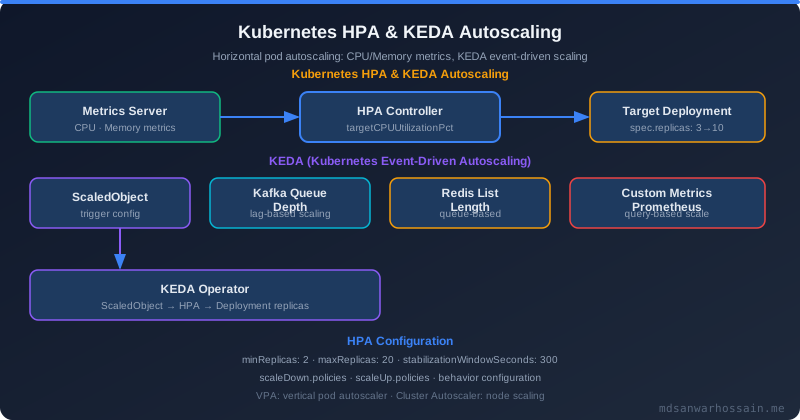
KEDA (Kubernetes Event-Driven Autoscaling) extends Kubernetes' native autoscaling with over 50 built-in scalers for external event sources — SQS queue depth, Kafka consumer lag, Prometheus metrics, cron schedules, and more. Most critically, KEDA supports scale-to-zero: when the trigger metric drops to zero (no messages in queue, no traffic in off-hours), the deployment is scaled to zero replicas and consumes no compute resources.
For a mid-size platform with 30 development and staging services, implementing KEDA scale-to-zero with cron-based schedules (scale down to zero at 8 PM, scale up at 8 AM) consistently reduces non-production compute costs by 35–45%, since these environments are idle roughly 67% of every 24-hour cycle.
apiVersion: keda.sh/v1alpha1
kind: ScaledObject
metadata:
  name: order-processor-scaler
spec:
  scaleTargetRef:
    name: order-processor
  minReplicaCount: 0
  maxReplicaCount: 20
  cooldownPeriod: 300
  triggers:
  - type: aws-sqs-queue
    metadata:
      queueURL: https://sqs.us-east-1.amazonaws.com/123456789/order-queue
      queueLength: "5"
      awsRegion: us-east-1
This ScaledObject scales the order-processor deployment based on SQS queue depth. With a queueLength target of 5 messages per replica, KEDA maintains enough replicas to process the queue at pace. When the queue is empty, the deployment scales to zero, and cooldownPeriod: 300 prevents scale-in flapping by requiring the queue to remain empty for 5 minutes before removing replicas.
Spot and Preemptible Instances: 70% Cost Reduction
Spot instances (AWS) and preemptible VMs (GCP) are spare cloud capacity sold at 70–80% discount compared to on-demand pricing. The trade-off is interruption risk: the cloud provider can reclaim the instance with a 2-minute warning. For stateless, fault-tolerant workloads — web API services, batch processing, ML inference, cache workers — this risk is entirely manageable and the cost savings are transformative.
The architectural pattern for spot-safe workloads relies on node taints, pod tolerations, and PodDisruptionBudgets. Spot node groups are tainted so that only pods explicitly tolerating the taint are scheduled there:
# Node taint added by spot node group
node.kubernetes.io/spot=true:NoSchedule

# Pod toleration to allow scheduling on spot
tolerations:
- key: "node.kubernetes.io/spot"
  operator: "Equal"
  value: "true"
  effect: "NoSchedule"
nodeSelector:
  node.kubernetes.io/lifecycle: spot
A PodDisruptionBudget ensures that when spot instances are reclaimed and pods are evicted, the service maintains minimum availability throughout the disruption:
apiVersion: policy/v1
kind: PodDisruptionBudget
metadata:
  name: order-service-pdb
spec:
  minAvailable: 2
  selector:
    matchLabels:
      app: order-service
This PDB guarantees at least 2 replicas of order-service remain available during any disruption event, whether that is a spot interruption, a node drain for maintenance, or a rolling deployment. Combined with multiple availability zones for your spot node group (reducing correlated interruption probability), this pattern enables production-grade availability on spot infrastructure.
The critical anti-pattern to avoid: never run stateful workloads — PostgreSQL, Kafka brokers, Elasticsearch data nodes, ZooKeeper — on spot instances. A spot interruption mid-write can corrupt data or split a consensus quorum. Reserve spot exclusively for stateless compute. Deploy the aws-node-termination-handler DaemonSet to consume the EC2 spot interruption notice and initiate a graceful Kubernetes drain with the full 2-minute window, allowing in-flight requests to complete before the instance is reclaimed.
Karpenter vs Cluster Autoscaler
The Cluster Autoscaler (CA) has been the standard Kubernetes node provisioner for years, but it has fundamental architectural limitations that make it expensive to operate at scale. CA is node-group-based: you must pre-define a set of instance types for each node group, CA cannot automatically select the cheapest available spot instance type at the moment of provisioning, and new node provisioning typically takes 1–2 minutes (EC2 launch + kubelet registration). CA also does not natively consolidate underutilized nodes — it waits for nodes to become completely empty before removing them.
Karpenter, now a CNCF incubating project and the default for EKS Auto Mode, addresses all of these limitations. Karpenter provisions nodes in under 60 seconds, right-sizes each node to fit the actual pod requirements (rather than provisioning the closest node-group-defined instance type), selects the cheapest available spot instance across multiple instance families at provisioning time, and actively consolidates underutilized nodes by migrating pods and removing excess capacity.
apiVersion: karpenter.sh/v1
kind: NodePool
metadata:
  name: default
spec:
  template:
    spec:
      requirements:
      - key: karpenter.sh/capacity-type
        operator: In
        values: ["spot", "on-demand"]
      - key: node.kubernetes.io/instance-type
        operator: In
        values: ["m5.large", "m5.xlarge", "m5.2xlarge", "m6i.large", "m6i.xlarge"]
  limits:
    cpu: "1000"
    memory: "2000Gi"
  disruption:
    consolidationPolicy: WhenUnderutilized
    consolidateAfter: 30s
The disruption.consolidationPolicy: WhenUnderutilized setting is Karpenter's most powerful cost feature. It continuously evaluates whether running workloads can be consolidated onto fewer nodes, and after a node has been underutilized for consolidateAfter: 30s, Karpenter migrates its pods and terminates the node. In practice, this alone reduces idle node cost by 15–25% compared to CA in clusters with variable load patterns — particularly overnight, on weekends, and after batch jobs complete.
Namespace ResourceQuota and LimitRange
Individual service rightsizing prevents waste at the pod level, but without namespace-level guardrails, a single team can inadvertently (or carelessly) deploy a new service with enormous resource requests that starve other teams or force unexpected node scale-out. ResourceQuota and LimitRange provide that governance layer.
A ResourceQuota sets a hard ceiling on the total resources a namespace can consume. When the quota is reached, new pods are rejected until existing resource usage is reduced:
apiVersion: v1
kind: ResourceQuota
metadata:
  name: team-alpha-quota
  namespace: team-alpha
spec:
  hard:
    requests.cpu: "20"
    requests.memory: "40Gi"
    limits.cpu: "40"
    limits.memory: "80Gi"
    pods: "50"
A LimitRange sets default requests and limits for containers that do not specify their own. Without a LimitRange, a developer can deploy a pod with no resource settings at all — which, from the scheduler's perspective, has zero CPU and memory requests, allowing it to be scheduled anywhere and potentially consume all available resources on a node:
apiVersion: v1
kind: LimitRange
metadata:
  name: default-limits
  namespace: team-alpha
spec:
  limits:
  - default:
      cpu: "500m"
      memory: "512Mi"
    defaultRequest:
      cpu: "100m"
      memory: "128Mi"
    type: Container
Together, ResourceQuota and LimitRange create a contract between the platform team and application teams. Each team's namespace has a defined budget that prevents runaway costs, while the LimitRange ensures that even hastily deployed workloads have sensible defaults applied. This governance model also makes chargeback straightforward — each team's Kubernetes cost is bounded and attributable by namespace.
FinOps Tooling and Chargeback Model
Cost visibility is the prerequisite for cost reduction. Without granular, actionable data, engineering teams cannot make informed trade-offs between feature velocity and infrastructure efficiency. FinOps tooling bridges the gap between raw cloud billing data and per-team, per-service cost accountability.
Kubecost is the most feature-complete Kubernetes cost management tool available. It integrates with cloud provider billing APIs (AWS Cost and Usage Report, GCP Billing Export) to allocate infrastructure costs at the namespace, deployment, pod, and label level. Kubecost's efficiency scores highlight the gap between requested and actual resource usage — a deployment with a 5% CPU efficiency score is a cost optimization opportunity that is immediately visible to the team that owns it. The idle cost allocation feature surfaces the cost of resources that are requested but never used, making the "over-provisioning tax" visible.
OpenCost is the CNCF-adopted open-source cost standard that provides the underlying cost model without Kubecost's commercial dashboard. It is the right choice for teams that want to build cost data into their own internal tooling or feed it into an existing observability platform.
The most effective FinOps practice is a monthly cost review meeting with the following structure: review the top 10 most wasteful deployments by idle cost percentage, examine cost trends by team over the past quarter, and track the spot-to-on-demand ratio as a leading indicator of cost efficiency. Teams whose costs trend upward receive a focused review session. Teams that achieve meaningful reductions are recognized — cost efficiency is treated as an engineering quality metric alongside availability and latency.
"The teams that achieved the biggest cost reductions weren't the ones who were told to cut costs — they were the teams who could finally see exactly what they were spending and why. Visibility creates accountability."
Failure Scenarios to Avoid
Eviction storms under memory pressure: When a node approaches memory exhaustion, the kubelet begins evicting pods to reclaim memory. If all pods in the cluster have the same QoS class (Burstable) and priority, the kubelet evicts them in an essentially arbitrary order. In a worst case, multiple pods from a critical service are evicted simultaneously, taking the service down entirely. The fix is to assign PriorityClass to critical services — the kubelet evicts lower-priority pods first, preserving service availability.
OOMKilled cascade during traffic spikes: If memory limits are set too aggressively close to the request (for example, both at 256Mi for a service that occasionally needs 512Mi during high-traffic), a traffic spike causes widespread OOMKill events across all replicas simultaneously. This pattern is responsible for more misidentified "application bugs" than almost any other Kubernetes misconfiguration. The fix is to set limits based on observed P99 memory usage, not P95 — the tail matters for memory.
Insufficient on-demand fallback during spot shortages: Spot instance availability varies by region, availability zone, and instance type. If your cluster relies entirely on spot with no on-demand fallback and a popular instance type becomes unavailable in your AZ (common during large-scale cloud events), Karpenter or CA will fail to provision replacement nodes and your workloads will remain unscheduled. Always configure a mixed spot/on-demand ratio (typically 70/30) and ensure your NodePool or node groups include enough instance type diversity to find available spot capacity across families.
Key Takeaways
- Measure actual utilization first — install Kubecost or OpenCost before making any changes; you cannot optimize what you cannot see.
- Set CPU requests based on P95 usage, CPU limits at 2–3× requests; set memory limits equal to P99 usage to prevent OOMKill cascades.
- Run VPA in Off mode for one week per service, review recommendations, then apply manually — avoid Auto mode on production stateful workloads.
- Migrate stateless workloads to spot instances with PodDisruptionBudgets and the aws-node-termination-handler for a reliable 70% node cost reduction.
- Replace Cluster Autoscaler with Karpenter for sub-minute provisioning, intelligent instance selection, and automatic consolidation of underutilized nodes.
- Enforce namespace ResourceQuota and LimitRange as governance guardrails, and run a monthly FinOps review to maintain cost efficiency as a continuous operational discipline.
Leave a Comment
Related Posts

Software Engineer · Java · Spring Boot · Microservices