Kubernetes Gateway API: Complete Production Guide — HTTPRoute, Traffic Splitting & Migrating from Nginx Ingress 2026
The Kubernetes Ingress API served the community for years, but its annotation-driven customization, lack of role separation, and absence of first-class TCP/UDP support created a maintenance nightmare at scale. The Gateway API — now GA in Kubernetes 1.28+ — replaces it with an expressive, role-oriented, extensible networking model. This comprehensive guide covers every resource, every production pattern, and a battle-tested migration path from Nginx Ingress.
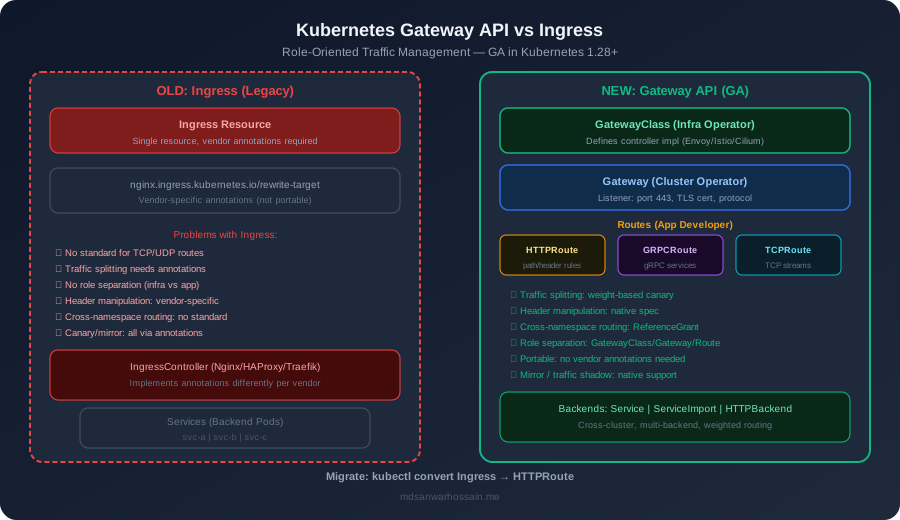
TL;DR — Key Takeaways
- Gateway API is GA since Kubernetes 1.28; HTTPRoute and GatewayClass are stable — start migrating today.
- The three-layer model (GatewayClass → Gateway → HTTPRoute) replaces annotation hacks with type-safe, role-oriented YAML.
- Native weight-based traffic splitting enables zero-config canary and blue/green deployments without Istio overhead.
- ReferenceGrant enables secure cross-namespace routing — critical for multi-team platform setups.
- Nginx Ingress annotations map 1-to-1 to HTTPRoute filters; migration is incremental and fully reversible.
Table of Contents
- Why Kubernetes Needed a New Networking API
- The Four Core Resources
- HTTPRoute Deep Dive
- Traffic Splitting & Canary Releases
- TLS Configuration & Certificate Management
- GRPCRoute & TCPRoute
- Cross-Namespace Routing with ReferenceGrant
- Supported Implementations in 2026
- Step-by-Step Migration from Nginx Ingress
- Production Patterns & Best Practices
- Conclusion & Migration Checklist
1. Why Kubernetes Needed a New Networking API
The Kubernetes Ingress resource was introduced in 2015 as a simple, portable way to expose HTTP services to the outside world. By 2022, it had become the greatest source of vendor lock-in in the Kubernetes ecosystem — a problem entirely of its own design.
The Annotation Chaos Problem
Every Ingress controller vendor — Nginx, Traefik, HAProxy, Contour — extended the resource through metadata.annotations. There was no schema validation, no type safety, and no portability. A cluster migrating from Nginx to Contour had to rewrite every annotation. Worse, complex features like rate limiting, auth, or header manipulation required 10–20 annotations that were silently ignored by any controller that didn't recognize them.
No Role Separation
The original Ingress model conflated infrastructure concerns (which load balancer to use, TLS certificates) with application concerns (URL routing, retry policies). In practice this meant:
- Cluster operators couldn't own the load balancer tier independently of application teams.
- Application developers needed cluster-admin rights just to configure basic routing rules.
- Security teams had no guardrails — any team could add any annotation and affect global behaviour.
TCP/UDP and Protocol Gaps
Kubernetes Ingress is HTTP-only by spec. Teams running gRPC, TCP databases, or WebSocket proxies had to fall back to custom CRDs or LoadBalancer services, fragmenting the networking model. There was no standard way to route a Postgres connection or a gRPC stream through the same abstraction as HTTP traffic.
Gateway API Goals
The SIG-Network Gateway API project, started in 2019 and reaching GA (v1) in October 2023 with Kubernetes 1.28, was designed to solve all of these problems simultaneously:
- Role-oriented: Distinct resource types for infrastructure providers (GatewayClass), cluster operators (Gateway), and application developers (HTTPRoute).
- Portable: Implementations (Envoy Gateway, Istio, Cilium) all consume the same API surface — no annotation lock-in.
- Expressive: Traffic splitting, header manipulation, URL rewrites, and timeouts are first-class fields — not annotations.
- Extensible: Custom filter types and policy attachments allow implementations to add capabilities without breaking portability.
- Multi-protocol: HTTPRoute, GRPCRoute, TCPRoute, TLSRoute, and UDPRoute cover every traffic type.
2. The Four Core Resources
The Gateway API defines a hierarchy of four core resource types. Each is owned and operated by a different persona in the Kubernetes organization model.
GatewayClass — The Infrastructure Tier
GatewayClass is a cluster-scoped resource that declares which controller will implement Gateways referencing it. Think of it as the StorageClass equivalent for networking — owned by the infrastructure team or cloud provider.
# GatewayClass — provisioned by the infrastructure / platform team
apiVersion: gateway.networking.k8s.io/v1
kind: GatewayClass
metadata:
  name: envoy-gateway          # referenced by Gateway resources
spec:
  controllerName: gateway.envoyproxy.io/gatewayclass-controller
  description: "Envoy Gateway — production Internet-facing load balancer"
  parametersRef:               # optional: link to implementation-specific config
    group: gateway.envoyproxy.io
    kind: EnvoyProxy
    name: default-proxy-config
    namespace: envoy-gateway-system
Gateway — The Cluster Operator Tier
A Gateway is a namespace-scoped resource that binds to a GatewayClass and configures the actual listener (port, protocol, TLS). It defines which namespaces can attach routes to it — a critical security boundary.
# Gateway — managed by the cluster / platform team
apiVersion: gateway.networking.k8s.io/v1
kind: Gateway
metadata:
  name: prod-gateway
  namespace: gateway-infra
spec:
  gatewayClassName: envoy-gateway
  listeners:
    - name: https
      port: 443
      protocol: HTTPS
      tls:
        mode: Terminate
        certificateRefs:
          - kind: Secret
            name: wildcard-tls-cert
            namespace: gateway-infra
      allowedRoutes:
        namespaces:
          from: Selector          # only approved namespaces can attach
          selector:
            matchLabels:
              gateway-access: "true"
    - name: http
      port: 80
      protocol: HTTP
      allowedRoutes:
        namespaces:
          from: Same
HTTPRoute — The Application Developer Tier
HTTPRoute is namespace-scoped and owned by the application team. It describes how HTTP traffic arriving at an attached Gateway should be routed, filtered, and transformed. This is where most of your day-to-day networking configuration lives.
ReferenceGrant — The Cross-Namespace Bridge
ReferenceGrant is an authorization mechanism that allows a resource in one namespace to reference a resource in another. Without an explicit ReferenceGrant, cross-namespace references are blocked by default — preventing namespace-escape attacks. Covered in depth in Section 7.
3. HTTPRoute Deep Dive
HTTPRoute is the workhorse of the Gateway API. It supports a rich match-and-filter model that replaces every Nginx Ingress annotation you've ever relied on.
Match Types
Every HTTPRoute rule begins with a list of match criteria. All matchers within a single rule are ANDed together; multiple rules are evaluated in order (first match wins):
- Path matching:
Exact,PathPrefix, orRegularExpression— the most common route discriminator. - Header matching: Exact header value match or regular expression. Enables environment-based routing (e.g.,
X-Env: staging). - Query parameter matching: Route based on
?debug=trueor feature flag parameters. - Method matching: Limit a route to specific HTTP verbs (GET, POST, PUT).
Complete Spring Boot Microservices HTTPRoute Example
This example routes an e-commerce platform with three Spring Boot services — order-service, product-service, and user-service — through a shared Gateway:
apiVersion: gateway.networking.k8s.io/v1
kind: HTTPRoute
metadata:
  name: ecommerce-routes
  namespace: ecommerce
spec:
  parentRefs:
    - name: prod-gateway
      namespace: gateway-infra
      sectionName: https          # attach to HTTPS listener only
  hostnames:
    - "api.example.com"
  rules:
    # ── Order Service ──────────────────────────────────────────────
    - matches:
        - path:
            type: PathPrefix
            value: /api/v1/orders
      filters:
        - type: RequestHeaderModifier
          requestHeaderModifier:
            add:
              - name: X-Service-Name
                value: order-service
        - type: URLRewrite
          urlRewrite:
            path:
              type: ReplacePrefixMatch
              replacePrefixMatch: /orders    # strip /api/v1 prefix
      backendRefs:
        - name: order-service
          port: 8080
          weight: 100

    # ── Product Service ─────────────────────────────────────────────
    - matches:
        - path:
            type: PathPrefix
            value: /api/v1/products
        - headers:
            - name: Accept
              value: application/json
      backendRefs:
        - name: product-service
          port: 8080

    # ── User Service — internal header required ──────────────────────
    - matches:
        - path:
            type: PathPrefix
            value: /api/v1/users
          headers:
            - name: X-Internal-Token
              type: Exact
              value: "{{ .Values.internalToken }}"
      backendRefs:
        - name: user-service
          port: 8080

    # ── Global HTTP → HTTPS redirect ────────────────────────────────
    - matches:
        - path:
            type: PathPrefix
            value: /
      filters:
        - type: RequestRedirect
          requestRedirect:
            scheme: https
            statusCode: 301
4. Traffic Splitting & Canary Releases
One of the most celebrated improvements in Gateway API over legacy Ingress is first-class traffic splitting. No external tools, no Istio VirtualService, no annotation hacks — just a weight field on each backendRef.
Weight-Based Canary Release
Roll out a new version of checkout-service to 10% of traffic while keeping 90% on the stable version:
apiVersion: gateway.networking.k8s.io/v1
kind: HTTPRoute
metadata:
  name: checkout-canary
  namespace: checkout
  annotations:
    # Human-readable deployment context — not used by the controller
    deployment.kubernetes.io/canary-version: "v2.3.0"
    deployment.kubernetes.io/stable-version: "v2.2.5"
spec:
  parentRefs:
    - name: prod-gateway
      namespace: gateway-infra
  hostnames:
    - "api.example.com"
  rules:
    # ── Header-based canary: internal testers get v2 100% ──────────
    - matches:
        - headers:
            - name: X-Canary-User
              value: "true"
      backendRefs:
        - name: checkout-service-v2
          port: 8080
          weight: 100

    # ── Weight-based: 10% canary for all other traffic ─────────────
    - matches:
        - path:
            type: PathPrefix
            value: /api/v1/checkout
      backendRefs:
        - name: checkout-service-stable   # v2.2.5 — receives 90%
          port: 8080
          weight: 90
        - name: checkout-service-v2       # v2.3.0 — receives 10%
          port: 8080
          weight: 10
Blue/Green Deployment Pattern
For a blue/green deployment, maintain two Deployments (blue = current, green = new) and flip the weight atomically:
- Phase 1 (warm-up):
blue: 100, green: 0— green is deployed but receives no traffic. - Phase 2 (validation):
blue: 80, green: 20— run smoke tests against live traffic. - Phase 3 (cutover):
blue: 0, green: 100— instant cutover, blue stays running for rollback. - Rollback: Set
blue: 100, green: 0in a singlekubectl apply.
This entire flow is driven by modifying a single weight field — no need for Argo Rollouts, Flagger, or any external progressive delivery tool for simple use cases.
5. TLS Configuration & Certificate Management
Gateway API supports three TLS modes, each suited to different security architectures. The mode is configured on the Gateway listener, not on the HTTPRoute.
TLS Termination at the Gateway (Most Common)
The Gateway decrypts TLS and forwards plain HTTP to backend services. This is the standard pattern for Internet-facing APIs where backend services don't need mTLS:
# Gateway with cert-manager Certificate auto-provisioning
apiVersion: gateway.networking.k8s.io/v1
kind: Gateway
metadata:
  name: prod-gateway
  namespace: gateway-infra
  annotations:
    # cert-manager integration — automatically provisions Let's Encrypt cert
    cert-manager.io/cluster-issuer: letsencrypt-prod
spec:
  gatewayClassName: envoy-gateway
  listeners:
    - name: https
      protocol: HTTPS
      port: 443
      tls:
        mode: Terminate
        certificateRefs:
          - kind: Secret
            name: api-example-com-tls    # created by cert-manager
            namespace: gateway-infra
      hostname: "api.example.com"
      allowedRoutes:
        namespaces:
          from: All
---
# cert-manager Certificate resource (creates the Secret above)
apiVersion: cert-manager.io/v1
kind: Certificate
metadata:
  name: api-example-com-tls
  namespace: gateway-infra
spec:
  secretName: api-example-com-tls
  issuerRef:
    name: letsencrypt-prod
    kind: ClusterIssuer
  dnsNames:
    - api.example.com
    - "*.api.example.com"
TLS Passthrough Mode
In passthrough mode, the Gateway SNI-routes encrypted traffic to the backend without decrypting it. The backend service is responsible for TLS termination. This is essential for mTLS workloads (databases, gRPC mutual auth) or when the application must own its certificate lifecycle:
- Set
protocol: TLSandtls.mode: Passthroughon the listener. - Route via
TLSRouteinstead of HTTPRoute — the controller matches on SNI hostname only. - Useful for PostgreSQL TLS, MongoDB TLS, and Kafka TLS streams behind the same Gateway.
6. GRPCRoute & TCPRoute
The Gateway API extends beyond HTTP with first-class protocol-specific route types. As of Kubernetes 1.31, GRPCRoute has reached GA stability.
GRPCRoute — gRPC Service Routing
GRPCRoute allows routing at the gRPC method and service level — something completely impossible with legacy Ingress. Matches use the gRPC service and method fields, mapping naturally to the Protobuf package structure:
apiVersion: gateway.networking.k8s.io/v1
kind: GRPCRoute
metadata:
  name: payment-grpc-route
  namespace: payments
spec:
  parentRefs:
    - name: prod-gateway
      namespace: gateway-infra
      sectionName: grpc-listener    # a dedicated gRPC listener (port 50051, protocol HTTPS/h2)
  hostnames:
    - "grpc.example.com"
  rules:
    # Route all PaymentService RPCs to payment-grpc-svc
    - matches:
        - method:
            type: Exact
            service: payments.PaymentService
      backendRefs:
        - name: payment-grpc-svc
          port: 50051
          weight: 100

    # Route OrderService to order-grpc-svc, with canary split
    - matches:
        - method:
            type: Exact
            service: orders.OrderService
      backendRefs:
        - name: order-grpc-svc-stable
          port: 50051
          weight: 95
        - name: order-grpc-svc-v2
          port: 50051
          weight: 5
TCPRoute — TCP Stream Routing
TCPRoute (experimental in 2026) enables direct TCP proxying — useful for databases, message brokers, and any non-HTTP protocol. A Gateway listener on port 5432 with protocol: TCP and a TCPRoute pointing to a Postgres Service gives you a managed, auditable database proxy without any additional tooling.
Key use cases for TCPRoute in 2026: exposing read replicas on distinct ports, routing analytics database traffic through a separate Gateway, and providing a unified access point for legacy applications that can't use HTTP-based proxies.
7. Cross-Namespace Routing with ReferenceGrant
Platform teams running shared Gateways face a fundamental challenge: application teams deploy their services in their own namespaces, but the Gateway lives in a shared infrastructure namespace. ReferenceGrant is the mechanism that safely bridges this boundary.
The Shared Gateway Pattern
In a multi-team organization, a single production Gateway (owned by the platform team in gateway-infra) serves application teams in team-alpha, team-beta, and team-gamma. Each team writes HTTPRoutes in their own namespace that attach to the shared Gateway. Without ReferenceGrant, this cross-namespace attachment would be blocked.
# Step 1: ReferenceGrant in team-alpha — allows Gateway to reference
# team-alpha's Services from a Route in any namespace
apiVersion: gateway.networking.k8s.io/v1beta1
kind: ReferenceGrant
metadata:
  name: allow-gateway-infra
  namespace: team-alpha          # lives in the TARGET namespace (where Services are)
spec:
  from:
    - group: gateway.networking.k8s.io
      kind: HTTPRoute
      namespace: team-alpha      # routes from team-alpha can reference services here
  to:
    - group: ""
      kind: Service
---
# Step 2: HTTPRoute in team-alpha attaches to the shared Gateway
apiVersion: gateway.networking.k8s.io/v1
kind: HTTPRoute
metadata:
  name: alpha-app-route
  namespace: team-alpha
spec:
  parentRefs:
    - name: prod-gateway
      namespace: gateway-infra   # cross-namespace attachment — allowed by Gateway's
      kind: Gateway              # allowedRoutes.namespaces selector
  hostnames:
    - "alpha.example.com"
  rules:
    - matches:
        - path:
            type: PathPrefix
            value: /
      backendRefs:
        - name: alpha-app-svc    # Service in team-alpha — no ReferenceGrant needed
          port: 8080             # because Route and Service are in the same namespace
The key insight: a ReferenceGrant must exist in the target namespace (where the referenced resource lives) and must specify both the referencing resource kind and the referenced resource kind. This gives namespace owners full control over which external resources can reach into their namespace.
8. Supported Implementations in 2026
By 2026, all major Kubernetes networking projects have adopted Gateway API. The ecosystem has matured significantly since the v1 release — here is the current feature matrix for production-grade implementations:
| Implementation | HTTPRoute (GA) | GRPCRoute | TCPRoute | TLS Passthrough | Policy Attach |
|---|---|---|---|---|---|
| Envoy Gateway | ✅ GA | ✅ GA | ⚠️ Beta | ✅ | ✅ |
| Istio (Gateway API mode) | ✅ GA | ✅ GA | ✅ Beta | ✅ | ✅ |
| Cilium Gateway | ✅ GA | ✅ GA | ⚠️ Beta | ✅ | ⚠️ Partial |
| Contour | ✅ GA | ⚠️ Beta | ❌ Planned | ✅ | ⚠️ Partial |
| Kong Gateway | ✅ GA | ✅ GA | ✅ GA | ✅ | ✅ |
| Nginx Gateway Fabric | ✅ GA | ⚠️ Beta | ❌ Planned | ✅ | ⚠️ Partial |
Recommendation for 2026: Envoy Gateway and Kong are the most feature-complete implementations for pure Gateway API workloads. Istio in Gateway API mode is the best choice if you already run a service mesh and want a single control plane. Cilium is the best choice for eBPF-native clusters on GKE, EKS, or bare metal.
9. Step-by-Step Migration from Nginx Ingress
Migration from ingress-nginx to Gateway API is incremental — both can coexist in the same cluster. Here is the battle-tested migration playbook used by production platform teams.
Migration Checklist
- ☑️ Audit existing Ingress resources: Run
kubectl get ingress -A -o yamland extract all unique annotations. - ☑️ Install Gateway API CRDs:
kubectl apply -f https://github.com/kubernetes-sigs/gateway-api/releases/download/v1.2.0/standard-install.yaml - ☑️ Deploy chosen implementation (e.g., Envoy Gateway) alongside existing Nginx Ingress controller.
- ☑️ Create GatewayClass and Gateway in a dedicated
gateway-infranamespace. - ☑️ Migrate low-risk routes first (internal services, dev/staging) — convert Ingress → HTTPRoute one service at a time.
- ☑️ Validate with parallel traffic — configure both Ingress and HTTPRoute for the same service, compare responses.
- ☑️ Cut over DNS — point the hostname to the new Gateway's LoadBalancer IP.
- ☑️ Keep Nginx Ingress running for 2–4 weeks as a fallback; decommission after stabilization.
Nginx Ingress Annotation → HTTPRoute Filter Equivalents
| Nginx Ingress Annotation | HTTPRoute / Gateway API Equivalent |
|---|---|
| nginx.ingress.kubernetes.io/rewrite-target: / | HTTPRoute filter: URLRewrite.path.type: ReplacePrefixMatch |
| nginx.ingress.kubernetes.io/ssl-redirect: "true" | HTTPRoute filter: RequestRedirect.scheme: https |
| nginx.ingress.kubernetes.io/proxy-read-timeout: "60" | HTTPRoute timeouts.backendRequest field (e.g., 60s) |
| nginx.ingress.kubernetes.io/canary: "true" + nginx.ingress.kubernetes.io/canary-weight: "20" | HTTPRoute backendRefs[].weight: 20 on the canary backend |
| nginx.ingress.kubernetes.io/add-headers: "namespace/headers-configmap" | HTTPRoute filter: RequestHeaderModifier or ResponseHeaderModifier |
| nginx.ingress.kubernetes.io/backend-protocol: "GRPC" | Use GRPCRoute resource instead of HTTPRoute |
| nginx.ingress.kubernetes.io/limit-rps: "100" | Implementation-specific Policy Attachment (e.g., Envoy Gateway BackendTrafficPolicy) |
| nginx.ingress.kubernetes.io/auth-url + nginx.ingress.kubernetes.io/auth-signin | HTTPRoute filter: ExtensionRef pointing to implementation auth policy |
10. Production Patterns & Best Practices
Running Gateway API at scale in production requires more than just converting Ingress manifests. These patterns address the operational realities of high-traffic, multi-team Kubernetes platforms.
Rate Limiting with HTTPRoute Filters
While core HTTPRoute doesn't include a built-in rate limit filter, all major implementations expose it through Policy Attachments. With Envoy Gateway, attach a BackendTrafficPolicy to any Gateway, HTTPRoute, or individual backend:
# Envoy Gateway: rate limiting policy attached to an HTTPRoute
apiVersion: gateway.envoyproxy.io/v1alpha1
kind: BackendTrafficPolicy
metadata:
  name: order-service-rate-limit
  namespace: ecommerce
spec:
  targetRef:
    group: gateway.networking.k8s.io
    kind: HTTPRoute
    name: ecommerce-routes
  rateLimit:
    type: Global
    global:
      rules:
        # Limit by IP: 100 req/s per client
        - clientSelectors:
            - remoteAddress:
                type: Distinct
          limit:
            requests: 100
            unit: Second
        # Limit by API key header: 1000 req/min per key
        - clientSelectors:
            - headers:
                - name: X-API-Key
                  type: Distinct
          limit:
            requests: 1000
            unit: Minute
---
# Timeout and retry configuration on the HTTPRoute itself
apiVersion: gateway.networking.k8s.io/v1
kind: HTTPRoute
metadata:
  name: order-service-with-resilience
  namespace: ecommerce
spec:
  parentRefs:
    - name: prod-gateway
      namespace: gateway-infra
  rules:
    - matches:
        - path:
            type: PathPrefix
            value: /api/v1/orders
      timeouts:
        request: 10s            # total request timeout
        backendRequest: 5s      # per-backend attempt timeout
      retry:
        attempts: 3
        perTryTimeout: 3s
        retryOn:
          - gateway-error
          - connection-failure
          - retriable-4xx
      backendRefs:
        - name: order-service
          port: 8080
Observability Hooks
Every production Gateway should emit traces and metrics. With Envoy Gateway, configure the proxy via EnvoyProxy:
- Tracing: Configure OpenTelemetry trace export to Jaeger or Zipkin. Set
tracingProvider.type: OpenTelemetryin the EnvoyProxy resource. - Metrics: Gateway API implementations expose Prometheus metrics. Scrape
/stats/prometheusfor request rates, error rates, latency histograms per HTTPRoute. - Access logging: Configure JSON-formatted access logs with route name, upstream cluster, and response code enriched by OpenTelemetry baggage.
- Gateway status conditions: Monitor
kubectl get gateway -o wideforAcceptedandProgrammedconditions — alert on any non-True status.
Multi-Cluster Gateway Pattern
For multi-region deployments, the Multi-Cluster Gateway pattern (supported by GKE and Envoy Gateway multi-cluster add-ons) allows a single GatewayClass to spawn Gateways across multiple clusters with shared DNS and health-based failover. The routing intent is declared once via HTTPRoute in a management cluster; the implementation syncs it to all member clusters via ClusterSet APIs.
11. Conclusion & Migration Checklist
The Kubernetes Gateway API represents a genuine step-change in cluster networking. After years of annotation-driven chaos, teams now have a portable, type-safe, role-oriented API that handles every traffic type their platform needs. The migration from Nginx Ingress is incremental and reversible — there is no reason to delay.
Key Takeaways
- Gateway API is stable and production-ready — HTTPRoute, GatewayClass, and Gateway are v1 (GA).
- The three-resource hierarchy (GatewayClass → Gateway → HTTPRoute) enforces clear ownership boundaries between infrastructure, platform, and app teams.
- Weight-based traffic splitting is a first-class field — unlocking zero-dependency canary and blue/green deployments.
- ReferenceGrant solves the shared-gateway multi-team pattern securely by default.
- Nginx Ingress annotations map directly to HTTPRoute filters — migration is mechanical and low-risk.
- Envoy Gateway, Istio, Cilium, and Kong all support the GA feature set; choose based on existing infrastructure, not vendor preference.
10-Item Production Readiness Checklist
- ☐ Install Gateway API CRDs (v1.2.0+) and verify with
kubectl get crd | grep gateway. - ☐ Create a dedicated
gateway-infranamespace with RBAC limiting GatewayClass/Gateway writes to the platform team. - ☐ Configure
allowedRoutes.namespaceswith a label selector — never usefrom: Allin production. - ☐ Integrate cert-manager with ClusterIssuer for automated TLS certificate provisioning on all HTTPS listeners.
- ☐ Enable Prometheus scraping on the Gateway data plane; configure alerts on error rate > 1% and p99 latency > 2s.
- ☐ Configure OpenTelemetry trace export and validate trace propagation end-to-end through at least one service.
- ☐ Test weight-based traffic splitting with a canary on a non-critical service before adopting it platform-wide.
- ☐ Document ReferenceGrant policies for each application namespace in the platform runbook.
- ☐ Run the Nginx-to-Gateway migration in staging with parallel traffic validation for at least 48 hours before production.
- ☐ Keep the legacy Nginx Ingress controller running for 4 weeks post-cutover with a documented rollback procedure.
Leave a Comment
Related Posts

Software Engineer · Java · Spring Boot · Kubernetes · AWS · Cloud-Native Architecture