Kubernetes Microservices Deployment: Helm, HPA, Health Probes & Production Readiness 2026
Running microservices on Kubernetes is not just about writing a Deployment YAML. Production-ready K8s deployments demand Helm-based packaging, precise resource tuning, probe configuration that survives JVM warm-up, HPA backed by real application metrics, and a hardened security posture before the first real traffic hits. This guide gives you every pattern, configuration, and decision — battle-tested in 2026 production environments.
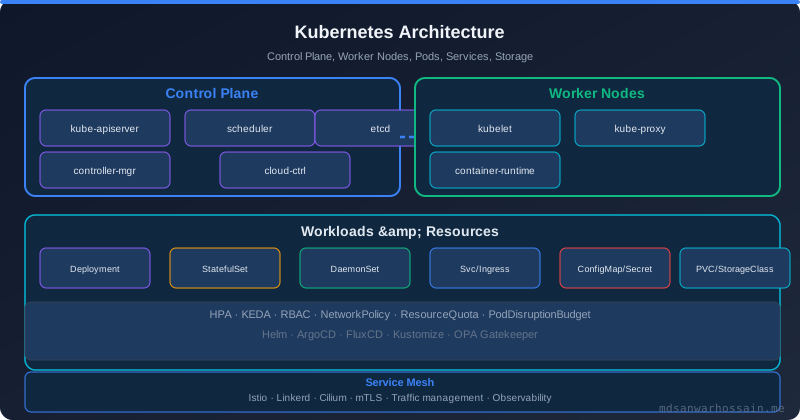
TL;DR — Production K8s in One Paragraph
"Package every microservice as a Helm chart with environment-specific values.yaml overrides. Set resource requests = resource limits (Guaranteed QoS class) for JVM services. Configure a startup probe to survive slow JVM boot, then separate liveness from readiness probes. Wire HPA to custom Prometheus metrics or Kafka consumer-lag — not just CPU. Enforce PodDisruptionBudgets, non-root security contexts, and network policies before calling a deployment production-ready."
Table of Contents
- Why Kubernetes for Microservices?
- Dockerizing Spring Boot Microservices
- Helm Chart Structure for Microservices
- Resource Limits & Requests
- Health Probes: Liveness, Readiness & Startup
- Horizontal Pod Autoscaler with Custom Metrics
- ConfigMap & Secret Management
- Rolling Updates & Rollback Strategies
- Pod Disruption Budgets & Zero-Downtime Upgrades
- Production Readiness Checklist
- Conclusion & Quick Reference
1. Why Kubernetes for Microservices?
Microservices architectures decompose a monolith into many independently deployable services — each with its own release cadence, scaling requirements, and failure domain. This creates operational complexity that manual processes cannot sustain at scale. Kubernetes was purpose-built to solve exactly this class of problems.
Container Orchestration at Scale
A typical microservices platform in 2026 runs 30–200+ services across multiple environments. Kubernetes provides a declarative control plane: you describe the desired state (replicas, resource constraints, health requirements) and the control loop reconciles reality to match. This is fundamentally different from scripted deployment — infrastructure self-heals without human intervention.
- Auto-healing: Pods that fail liveness checks are automatically restarted. Nodes that become unhealthy evict and reschedule their workloads.
- Bin-packing: The scheduler fits pods onto nodes based on resource requests, maximising cluster utilisation while respecting affinity/anti-affinity rules.
- Service discovery: Built-in DNS for every Service object. No external service registry (Eureka, Consul) needed for intra-cluster communication.
- Rolling deployments: Native support for zero-downtime updates with configurable surge and unavailability thresholds.
- Namespace isolation: Logical tenancy boundaries for teams, environments (dev/staging/prod), or compliance zones — each with its own RBAC and network policy.
The Kubernetes Microservices Value Stack
Beyond orchestration, the K8s ecosystem provides the complete operational stack that microservices need: Helm for packaging, Prometheus + Grafana for observability, Istio or Linkerd for mTLS service mesh, ArgoCD for GitOps delivery, KEDA for event-driven autoscaling, and Cert-Manager for automatic TLS. This ecosystem is why 78% of organisations running microservices use Kubernetes as their runtime platform (CNCF Survey 2025).
2. Dockerizing Spring Boot Microservices
The container image is the unit of deployment in Kubernetes. A badly constructed image wastes bandwidth, slows builds, creates security exposure, and causes GC pressure at runtime. Spring Boot's layered jar support and multi-stage Docker builds eliminate all of these problems.
Multi-Stage Build with Layered Jars
Spring Boot 2.3+ produces a layered jar where dependencies, spring boot loader, snapshot dependencies, and application classes are in separate layers. The Docker build exploits this so only changed layers are pushed — typically just the application layer (a few KB), not the 80–150 MB dependency layer.
# Stage 1: Extract layered jar
FROM eclipse-temurin:21-jre-alpine AS builder
WORKDIR /application
COPY target/*.jar application.jar
RUN java -Djarmode=layertools -jar application.jar extract

# Stage 2: Production image
FROM eclipse-temurin:21-jre-alpine
RUN addgroup -S appgroup && adduser -S appuser -G appgroup
WORKDIR /application

# Copy layers in cache-optimal order (least to most volatile)
COPY --from=builder /application/dependencies/ ./
COPY --from=builder /application/spring-boot-loader/ ./
COPY --from=builder /application/snapshot-dependencies/ ./
COPY --from=builder /application/application/ ./

# JVM flags tuned for container environments
ENV JAVA_OPTS="\
  -XX:+UseContainerSupport \
  -XX:MaxRAMPercentage=75.0 \
  -XX:InitialRAMPercentage=50.0 \
  -XX:+ExitOnOutOfMemoryError \
  -Djava.security.egd=file:/dev/./urandom \
  -Dspring.backgroundpreinitializer.ignore=true"

USER appuser
EXPOSE 8080
ENTRYPOINT ["sh", "-c", "java $JAVA_OPTS org.springframework.boot.loader.launch.JarLauncher"]
Critical JVM Container Flags Explained
-XX:+UseContainerSupport(default on Java 11+): Reads cgroup memory/CPU limits instead of host resources. Without this, a JVM in a 512 MiB container on a 64 GB host will set its heap based on 64 GB — causing OOM kills.-XX:MaxRAMPercentage=75.0: Allocates 75% of cgroup memory limit to heap. Reserve 25% for off-heap (metaspace, thread stacks, NIO buffers, JIT compiled code cache).-XX:+ExitOnOutOfMemoryError: Immediately terminates the JVM on OOM instead of limping along in a broken state. Kubernetes restarts the pod cleanly.-Djava.security.egd=file:/dev/./urandom: PreventsSecureRandomfrom blocking on/dev/randomentropy starvation in containers.
Spring Boot Buildpacks Alternative
For teams that prefer zero-Dockerfile workflows, Spring Boot's spring-boot:build-image Maven/Gradle goal uses Cloud Native Buildpacks (Paketo) to produce a production-grade OCI image automatically — including memory calculator, security hardening, and Java runtime selection.
# Maven: build OCI image via Buildpacks (no Dockerfile required)
./mvnw spring-boot:build-image \
  -Dspring-boot.build-image.imageName=registry.example.com/order-service:1.5.2 \
  -Dspring-boot.build-image.publish=true

# Gradle equivalent
./gradlew bootBuildImage \
  --imageName=registry.example.com/order-service:1.5.2 \
  --publishImage
3. Helm Chart Structure for Microservices
Helm is the de-facto package manager for Kubernetes. It converts parameterised Go templates into Kubernetes manifests, manages release history, and enables one-command rollbacks. A well-structured Helm chart is the difference between a reproducible, auditable deployment and a pile of hand-edited YAML files.
Canonical Chart Layout
order-service/
├── Chart.yaml           # Chart metadata, version, appVersion
├── values.yaml          # Default values (safe for dev)
├── values-staging.yaml  # Staging overrides
├── values-prod.yaml     # Production overrides (more replicas, strict probes)
├── charts/              # Subchart dependencies (redis, postgresql)
└── templates/
    ├── _helpers.tpl     # Named template helpers (labels, selectors)
    ├── deployment.yaml
    ├── service.yaml
    ├── hpa.yaml
    ├── pdb.yaml
    ├── configmap.yaml
    ├── serviceaccount.yaml
    ├── networkpolicy.yaml
    └── NOTES.txt        # Post-install usage notes
Production values.yaml
# values.yaml — defaults (safe for development)
replicaCount: 2

image:
  repository: registry.example.com/order-service
  pullPolicy: IfNotPresent
  tag: ""  # Overridden by CI with Chart.appVersion

serviceAccount:
  create: true
  annotations: {}

service:
  type: ClusterIP
  port: 8080

resources:
  requests:
    cpu: "250m"
    memory: "512Mi"
  limits:
    cpu: "500m"
    memory: "512Mi"  # Equal to requests = Guaranteed QoS

autoscaling:
  enabled: true
  minReplicas: 2
  maxReplicas: 10
  targetCPUUtilizationPercentage: 60
  targetMemoryUtilizationPercentage: 80

livenessProbe:
  httpGet:
    path: /actuator/health/liveness
    port: 8080
  initialDelaySeconds: 0   # Startup probe handles the delay
  periodSeconds: 15
  failureThreshold: 3
  timeoutSeconds: 5

readinessProbe:
  httpGet:
    path: /actuator/health/readiness
    port: 8080
  initialDelaySeconds: 0
  periodSeconds: 10
  failureThreshold: 3
  timeoutSeconds: 5

startupProbe:
  httpGet:
    path: /actuator/health/liveness
    port: 8080
  initialDelaySeconds: 10
  periodSeconds: 5
  failureThreshold: 30      # 30 × 5s = 150s maximum startup time
  timeoutSeconds: 5

podDisruptionBudget:
  enabled: true
  minAvailable: 1

securityContext:
  runAsNonRoot: true
  runAsUser: 1000
  readOnlyRootFilesystem: true
  allowPrivilegeEscalation: false
  capabilities:
    drop: ["ALL"]

env:
  SPRING_PROFILES_ACTIVE: "production"
  SERVER_PORT: "8080"
Helm Chart Versioning Strategy
Separate Chart.yaml's version (chart schema version, bumped when templates change) from appVersion (application image tag). CI pipelines should inject the image digest or Git SHA into appVersion at release time. Lock subchart dependency versions using Chart.lock committed to Git — never use floating version ranges for production dependencies.
# Chart.yaml
apiVersion: v2
name: order-service
description: Order management microservice
type: application
version: 3.1.0      # Chart version — bump when templates change
appVersion: "1.5.2" # Application version — injected by CI

dependencies:
  - name: redis
    version: "19.6.2"
    repository: "https://charts.bitnami.com/bitnami"
    condition: redis.enabled
4. Resource Limits & Requests
Resource configuration is the most common source of production Kubernetes incidents. Under-provisioned limits cause OOM kills; over-provisioned requests waste cluster capacity and prevent scheduling. Getting this right for JVM services requires understanding both Kubernetes QoS classes and JVM memory architecture.
Kubernetes QoS Classes
| QoS Class | Condition | Eviction Priority | Recommended For |
|---|---|---|---|
| Guaranteed | requests == limits (all containers) | Last evicted | JVM microservices, stateful workloads |
| Burstable | requests < limits | Medium priority | Batch jobs, dev/staging workloads |
| BestEffort | No requests or limits set | First evicted | Never in production |
JVM Heap vs Container Memory Budget
JVM memory is not just the heap. A container limit of 1 GiB must cover: heap, metaspace, thread stacks (~512 KB/thread × thread count), JIT code cache (~240 MB), off-heap NIO buffers, and GC overhead. A common production formula for Spring Boot services:
# Memory sizing formula for Spring Boot on K8s
# Container limit = Heap + Off-heap overhead
# Off-heap overhead ≈ 256–400 MiB for a typical Spring Boot service

# Example: 512 MiB container limit
# Heap: 75% of 512 MiB = ~384 MiB  (via MaxRAMPercentage=75.0)
# Off-heap: ~128 MiB               (metaspace + threads + buffers)

# Example: 1 GiB container limit (preferred for production)
# Heap: 75% of 1024 MiB = ~768 MiB
# Off-heap: ~256 MiB

# Kubernetes resource block for a 1 GiB service (Guaranteed QoS)
resources:
  requests:
    cpu: "500m"
    memory: "1Gi"
  limits:
    cpu: "500m"     # Equal to request = no CPU throttling surprise
    memory: "1Gi"   # Equal to request = Guaranteed QoS, no OOM eviction
Vertical Pod Autoscaler (VPA) for Right-Sizing
Rather than guessing initial resource values, deploy VPA in Off mode during staging to collect recommendations from real traffic patterns, then promote the recommendations to production manifests. Never run VPA in Auto mode alongside HPA on the same deployment — they conflict on the memory dimension. Use KEDA for event-driven horizontal scaling and VPA for vertical right-sizing in separate workload pools.
5. Health Probes: Liveness, Readiness & Startup
Kubernetes probes are the mechanism by which the platform decides whether to send traffic to a pod (readiness) or restart it (liveness). Misconfigured probes are responsible for a significant proportion of production incidents: premature OOMKills due to aggressive liveness probes during GC pauses, and traffic sent to pods that haven't finished warming up their connection pools.
Spring Boot Actuator Health Groups
Spring Boot 2.3+ ships dedicated /actuator/health/liveness and /actuator/health/readiness endpoints. Configure them explicitly to include the right health indicators:
# application.yaml — Spring Boot Actuator probe configuration
management:
  endpoint:
    health:
      probes:
        enabled: true
      show-details: always
      group:
        liveness:
          include: livenessState          # Only JVM/application state
        readiness:
          include: readinessState,db,redis # Include dependencies
  health:
    livenessstate:
      enabled: true
    readinessstate:
      enabled: true
  endpoints:
    web:
      exposure:
        include: health,info,prometheus,metrics
The Three-Probe Pattern
The critical insight is that liveness and readiness must be independent. The liveness probe should only fail if the application is in an unrecoverable state (deadlock, corruption). The readiness probe should fail when the application cannot serve requests (DB connection lost, circuit breaker open). The startup probe buys time during slow JVM boot without triggering premature liveness restarts.
# deployment.yaml — Three-probe pattern for Spring Boot
containers:
  - name: order-service
    image: "{{ .Values.image.repository }}:{{ .Values.image.tag }}"
    ports:
      - containerPort: 8080
        protocol: TCP

    # STARTUP PROBE: Runs first. Prevents liveness from firing during slow start.
    # Max startup time = failureThreshold × periodSeconds = 30 × 5 = 150s
    startupProbe:
      httpGet:
        path: /actuator/health/liveness
        port: 8080
      initialDelaySeconds: 10   # Give JVM 10s to begin starting
      periodSeconds: 5
      failureThreshold: 30      # 150s total budget for startup
      timeoutSeconds: 5

    # LIVENESS PROBE: Only for detecting deadlocks / unrecoverable states.
    # Does NOT check dependencies — that's readiness's job.
    livenessProbe:
      httpGet:
        path: /actuator/health/liveness
        port: 8080
      periodSeconds: 15
      failureThreshold: 3       # 3 failures → restart pod
      timeoutSeconds: 5

    # READINESS PROBE: Controls traffic routing. Checks DB, Redis, etc.
    readinessProbe:
      httpGet:
        path: /actuator/health/readiness
        port: 8080
      periodSeconds: 10
      failureThreshold: 3       # 3 failures → remove from Service endpoints
      successThreshold: 1
      timeoutSeconds: 5
Probe Timing Gotchas
- GC pause liveness failures: A full GC pause can take 2–10 seconds on heap-heavy JVMs. Set
timeoutSecondsto at least 5s andperiodSecondsto at least 15s to prevent false positives. - Database connection pool startup: HikariCP validates the pool during startup. If DB is slow, readiness will correctly fail — but liveness must not also fail or you get a restart loop.
- JVM class loading: Spring Boot JVMs often take 30–90 seconds to be fully ready in production (especially with many Beans and slow classpath scanning). The startup probe is mandatory for these services.
- Sidecar containers: If your pod uses Istio or other sidecars, add
initialDelaySecondsto account for sidecar startup before any probe fires.
6. Horizontal Pod Autoscaler with Custom Metrics
CPU-based HPA is often a poor fit for microservices: a Spring Boot service under heavy database I/O load may be saturated while using only 20% CPU. Custom metrics — request rate, queue depth, Kafka consumer lag — are far more meaningful autoscaling signals for most production workloads.
CPU-Based HPA (Baseline)
# hpa.yaml — CPU-based autoscaling (minimum viable)
apiVersion: autoscaling/v2
kind: HorizontalPodAutoscaler
metadata:
  name: order-service-hpa
  namespace: production
spec:
  scaleTargetRef:
    apiVersion: apps/v1
    kind: Deployment
    name: order-service
  minReplicas: 2
  maxReplicas: 20
  metrics:
    - type: Resource
      resource:
        name: cpu
        target:
          type: Utilization
          averageUtilization: 60    # Scale up when avg CPU > 60%
    - type: Resource
      resource:
        name: memory
        target:
          type: Utilization
          averageUtilization: 80
  behavior:
    scaleUp:
      stabilizationWindowSeconds: 30     # React quickly to load spikes
      policies:
        - type: Pods
          value: 4
          periodSeconds: 60
    scaleDown:
      stabilizationWindowSeconds: 300    # Wait 5 min before scaling down
      policies:
        - type: Percent
          value: 10
          periodSeconds: 60
Custom Metrics HPA via Prometheus Adapter
The Prometheus Adapter bridges Prometheus metrics into Kubernetes' Custom Metrics API, making application-level metrics available to HPA. The following example scales the order service based on HTTP request rate per pod:
# prometheus-adapter ConfigMap rule
rules:
  - seriesQuery: 'http_server_requests_seconds_count{namespace!="",pod!=""}'
    resources:
      overrides:
        namespace: {resource: "namespace"}
        pod: {resource: "pod"}
    name:
      matches: "^(.*)_count$"
      as: "http_requests_per_second"
    metricsQuery: |
      sum(rate(<<.Series>>{<<.LabelMatchers>>}[2m])) by (<<.GroupBy>>)

---
# hpa.yaml — Custom metric: requests per second per pod
apiVersion: autoscaling/v2
kind: HorizontalPodAutoscaler
metadata:
  name: order-service-hpa-rps
  namespace: production
spec:
  scaleTargetRef:
    apiVersion: apps/v1
    kind: Deployment
    name: order-service
  minReplicas: 2
  maxReplicas: 30
  metrics:
    - type: Pods
      pods:
        metric:
          name: http_requests_per_second
        target:
          type: AverageValue
          averageValue: "100"    # Scale up if avg > 100 RPS per pod
Kafka Consumer Lag HPA with KEDA
For event-driven microservices consuming from Kafka, KEDA (Kubernetes Event-Driven Autoscaling) provides first-class Kafka consumer lag scaling without needing the Prometheus adapter. This is the 2026 standard for async microservices:
# KEDA ScaledObject — Kafka consumer lag autoscaling
apiVersion: keda.sh/v1alpha1
kind: ScaledObject
metadata:
  name: order-processor-scaler
  namespace: production
spec:
  scaleTargetRef:
    name: order-processor
  minReplicaCount: 2
  maxReplicaCount: 50
  cooldownPeriod: 300           # Seconds before scaling down after lag clears
  pollingInterval: 15           # Check lag every 15 seconds
  triggers:
    - type: kafka
      metadata:
        bootstrapServers: kafka-broker:9092
        consumerGroup: order-processor-group
        topic: orders
        lagThreshold: "100"     # 1 pod per 100 messages of lag
        offsetResetPolicy: latest
      authenticationRef:
        name: kafka-trigger-auth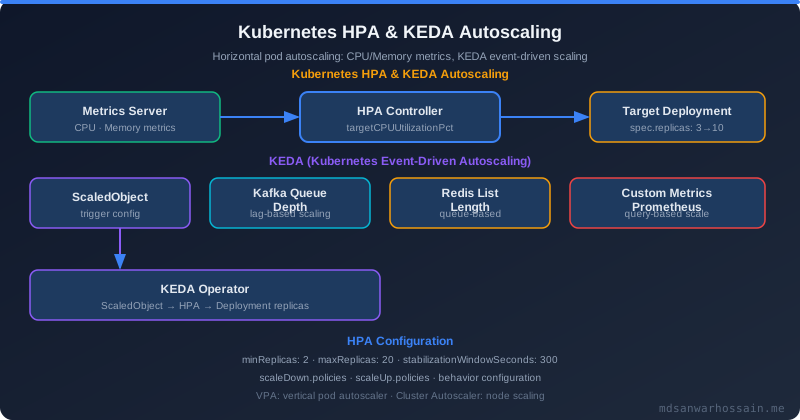
7. ConfigMap & Secret Management for Microservices
Every microservice has environment-specific configuration: database URLs, feature flags, timeouts, external service endpoints. Never bake configuration into the image. Kubernetes ConfigMap handles non-sensitive config; Secret handles credentials — but raw Kubernetes Secrets are only base64-encoded, not encrypted. Production systems need an external secrets provider.
ConfigMap for Application Properties
# configmap.yaml — mounted as Spring Boot application.yaml
apiVersion: v1
kind: ConfigMap
metadata:
  name: order-service-config
  namespace: production
data:
  application.yaml: |
    spring:
      datasource:
        url: jdbc:postgresql://postgres-svc:5432/orders
        hikari:
          maximum-pool-size: 20
          minimum-idle: 5
          connection-timeout: 30000
          idle-timeout: 600000
      kafka:
        bootstrap-servers: kafka-svc:9092
        consumer:
          group-id: order-processor-group
          auto-offset-reset: earliest
    management:
      server:
        port: 8081   # Separate management port from application port
    logging:
      level:
        com.example: INFO
        org.springframework: WARN

---
# Mount in Deployment
volumes:
  - name: config-volume
    configMap:
      name: order-service-config
volumeMounts:
  - name: config-volume
    mountPath: /config
    readOnly: true
env:
  - name: SPRING_CONFIG_ADDITIONAL_LOCATION
    value: "file:/config/"
External Secrets Operator (ESO) for Production
The External Secrets Operator syncs secrets from AWS Secrets Manager, HashiCorp Vault, or GCP Secret Manager into Kubernetes Secrets, automatically rotating them when the upstream value changes. This is the 2026 standard — no secrets in Git, no manual kubectl create secret commands:
# ExternalSecret — syncs from AWS Secrets Manager
apiVersion: external-secrets.io/v1beta1
kind: ExternalSecret
metadata:
  name: order-service-db-credentials
  namespace: production
spec:
  refreshInterval: 1h             # Re-sync every hour for rotation
  secretStoreRef:
    name: aws-secrets-manager
    kind: ClusterSecretStore
  target:
    name: order-service-db-secret # Creates this K8s Secret
    creationPolicy: Owner
  data:
    - secretKey: db-password
      remoteRef:
        key: production/order-service/db
        property: password
    - secretKey: db-username
      remoteRef:
        key: production/order-service/db
        property: username
8. Rolling Updates & Rollback Strategies
Kubernetes RollingUpdate strategy replaces old pods incrementally, maintaining service availability throughout the deployment. However, the default settings are often too aggressive for JVM-heavy microservices. Careful tuning prevents traffic from being routed to pods that are not yet warm.
Rolling Update Configuration
# deployment.yaml — Rolling update strategy for JVM microservices
apiVersion: apps/v1
kind: Deployment
metadata:
  name: order-service
  namespace: production
spec:
  replicas: 4
  strategy:
    type: RollingUpdate
    rollingUpdate:
      maxSurge: 1          # Create 1 extra pod during update (5 total)
      maxUnavailable: 0    # Never take a pod down before the new one is Ready
  selector:
    matchLabels:
      app: order-service
  template:
    metadata:
      labels:
        app: order-service
    spec:
      # Graceful shutdown: allow in-flight requests to complete
      terminationGracePeriodSeconds: 60

      containers:
        - name: order-service
          # ... (image, resources, probes as defined earlier)
          lifecycle:
            preStop:
              exec:
                # Signal Spring Boot to stop accepting new requests.
                # Kubernetes waits for this before sending SIGTERM.
                command: ["sh", "-c", "sleep 5"]
Graceful Shutdown in Spring Boot
# application.yaml — Graceful shutdown configuration
server:
  shutdown: graceful          # Enabled since Spring Boot 2.3

spring:
  lifecycle:
    timeout-per-shutdown-phase: 30s  # Wait up to 30s for active requests to finish

# The shutdown sequence:
# 1. K8s removes pod from Service endpoints (stops new traffic)
# 2. preStop hook runs (5s sleep ensures propagation)
# 3. SIGTERM sent to JVM
# 4. Spring context starts graceful shutdown
# 5. Active HTTP requests drain (up to 30s)
# 6. Kafka consumers commit offsets and disconnect
# 7. DB connections returned to pool
# 8. JVM exits cleanly
# 9. SIGKILL sent after terminationGracePeriodSeconds (60s) as backstop
Helm Rollback
Helm maintains a complete release history. Rolling back is a single command that re-applies the previous rendered manifests, triggering another rolling update in reverse. Always verify your rollback target before executing in production:
# List Helm release history
helm history order-service -n production

# Roll back to the previous release
helm rollback order-service -n production

# Roll back to a specific revision
helm rollback order-service 7 -n production

# Verify rollback status
helm status order-service -n production
kubectl rollout status deployment/order-service -n production
9. Pod Disruption Budgets & Zero-Downtime Upgrades
A PodDisruptionBudget (PDB) limits the number of pods that can be simultaneously unavailable due to voluntary disruptions — node drains during cluster upgrades, cluster autoscaler scale-downs, or admin-initiated evictions. Without PDBs, a cluster upgrade can evict all replicas of a service at once, causing a complete service outage.
PodDisruptionBudget Configuration
# pdb.yaml — Ensure at least 1 replica always available
apiVersion: policy/v1
kind: PodDisruptionBudget
metadata:
  name: order-service-pdb
  namespace: production
spec:
  # minAvailable: 1 means at most (replicas - 1) pods can be disrupted
  # For a 3-replica service: at most 2 can be disrupted → always 1 running
  minAvailable: 1
  selector:
    matchLabels:
      app: order-service

# Alternative: use maxUnavailable for percentage-based budgets
# maxUnavailable: "25%"  # At most 25% of pods can be disrupted at once

# For critical services with 4+ replicas, prefer:
# minAvailable: 2        # Always keep at least 2 pods running
Pod Anti-Affinity for Multi-Zone Availability
PDBs protect against voluntary disruptions, but you also need to ensure replicas are spread across availability zones so a single zone failure does not take down all pods. Use topologySpreadConstraints (preferred over hard anti-affinity in 2026):
# deployment.yaml — Spread pods across zones and nodes
spec:
  template:
    spec:
      topologySpreadConstraints:
        # Spread evenly across availability zones
        - maxSkew: 1
          topologyKey: topology.kubernetes.io/zone
          whenUnsatisfiable: DoNotSchedule
          labelSelector:
            matchLabels:
              app: order-service
        # Also spread across nodes within each zone
        - maxSkew: 1
          topologyKey: kubernetes.io/hostname
          whenUnsatisfiable: ScheduleAnyway
          labelSelector:
            matchLabels:
              app: order-service
10. Production Readiness Checklist
Kubernetes production readiness goes beyond deploying workloads. Security contexts, network policies, RBAC, image scanning, and resource quotas are all mandatory before a service can be called production-grade. This is the checklist used at high-traffic platforms in 2026.
Security Context: Non-Root, Read-Only Filesystem
# deployment.yaml — Hardened security context
spec:
  template:
    spec:
      # Pod-level security context
      securityContext:
        runAsNonRoot: true
        runAsUser: 1000
        runAsGroup: 1000
        fsGroup: 1000
        seccompProfile:
          type: RuntimeDefault    # Enable seccomp filtering

      containers:
        - name: order-service
          # Container-level security context
          securityContext:
            allowPrivilegeEscalation: false
            readOnlyRootFilesystem: true    # Prevents filesystem tampering
            capabilities:
              drop: ["ALL"]                 # Drop all Linux capabilities
            seccompProfile:
              type: RuntimeDefault

          # Read-only root FS requires writable volumes for temp dirs
          volumeMounts:
            - name: tmp-volume
              mountPath: /tmp
            - name: logs-volume
              mountPath: /app/logs

      volumes:
        - name: tmp-volume
          emptyDir: {}          # In-memory, not persisted
        - name: logs-volume
          emptyDir: {}
Network Policy: Zero-Trust Microservice Communication
# networkpolicy.yaml — Default-deny + explicit ingress/egress
apiVersion: networking.k8s.io/v1
kind: NetworkPolicy
metadata:
  name: order-service-netpol
  namespace: production
spec:
  podSelector:
    matchLabels:
      app: order-service
  policyTypes:
    - Ingress
    - Egress
  ingress:
    # Allow traffic only from API gateway and other internal services
    - from:
        - podSelector:
            matchLabels:
              app: api-gateway
        - podSelector:
            matchLabels:
              app: payment-service
      ports:
        - protocol: TCP
          port: 8080
    # Allow Prometheus scraping on management port
    - from:
        - namespaceSelector:
            matchLabels:
              kubernetes.io/metadata.name: monitoring
      ports:
        - protocol: TCP
          port: 8081
  egress:
    # Allow DNS resolution
    - ports:
        - protocol: UDP
          port: 53
    # Allow outbound to database
    - to:
        - podSelector:
            matchLabels:
              app: postgres
      ports:
        - protocol: TCP
          port: 5432
    # Allow outbound to Kafka
    - to:
        - podSelector:
            matchLabels:
              app: kafka
      ports:
        - protocol: TCP
          port: 9092
Production Readiness: Full Checklist
Security
- ☐
runAsNonRoot: trueand specificrunAsUserset on all containers - ☐
readOnlyRootFilesystem: truewith explicit writableemptyDirmounts - ☐
allowPrivilegeEscalation: falseand all capabilities dropped - ☐ NetworkPolicy with default-deny — explicit allow rules only
- ☐ Service account with minimal RBAC permissions (no cluster-admin)
- ☐ Container images scanned with Trivy or Grype (no HIGH/CRITICAL CVEs in base)
- ☐ Secrets managed via External Secrets Operator, not raw K8s Secrets
- ☐ ImagePullPolicy: Always in production (prevent stale cached images)
Reliability
- ☐ Startup probe configured for JVM startup budget (failureThreshold × periodSeconds)
- ☐ Liveness probe checks only internal state, not external dependencies
- ☐ Readiness probe includes DB, Redis, and other required dependencies
- ☐ PodDisruptionBudget with
minAvailable ≥ 1for all critical services - ☐
topologySpreadConstraintsfor multi-zone pod distribution - ☐
terminationGracePeriodSeconds> longest expected request duration + drain buffer - ☐ Spring Boot graceful shutdown enabled (
server.shutdown: graceful) - ☐ HPA configured with meaningful metrics (not just CPU for I/O-bound services)
Observability
- ☐ Prometheus metrics exposed on
/actuator/prometheus - ☐ ServiceMonitor (or PodMonitor) created for Prometheus scraping
- ☐ Structured JSON logging (Logback/Log4j2 JSON encoder)
- ☐ Distributed tracing headers propagated (OpenTelemetry B3 or W3C Trace Context)
- ☐ Resource metrics (CPU, memory, GC time) in Grafana dashboard
- ☐ Alerting rules for error rate, P99 latency, pod restart count
Resource Management
- ☐ CPU and memory requests set (pod gets scheduled) and limits set (Guaranteed QoS for JVM)
- ☐
-XX:+UseContainerSupportand-XX:MaxRAMPercentageconfigured - ☐ ResourceQuota on namespace to prevent resource exhaustion by runaway scaling
- ☐ LimitRange on namespace for default limits on pods without explicit settings
- ☐ VPA in Recommendation mode for ongoing right-sizing guidance
11. Conclusion & Quick Reference
Deploying microservices on Kubernetes is a multi-layered discipline. The cluster is not the hard part — the patterns you apply on top of it determine whether you get a resilient, self-healing platform or a complex failure domain. The principles that separate production-ready from "it runs in staging" are:
- Package with Helm from day one — no hand-edited YAML files that drift between environments.
- Set resources accurately — Guaranteed QoS for JVM services, measured with VPA recommendations from real traffic.
- Three distinct probes — startup for boot budget, liveness for deadlock detection, readiness for traffic eligibility.
- HPA on application metrics — CPU alone is a lagging indicator. Request rate, queue depth, and Kafka lag scale faster and more accurately.
- PDBs + topologySpread — protect availability during voluntary disruptions and zone failures simultaneously.
- Security context by default — non-root, read-only filesystem, all capabilities dropped, NetworkPolicy default-deny.
- Graceful shutdown — coordinate
terminationGracePeriodSeconds,preStophooks, and Spring Boot's graceful shutdown to drain in-flight requests without 502 errors.
Go-Live Decision Gate
- ☐ All containers run as non-root with read-only filesystem
- ☐ Three probes configured — startup / liveness / readiness are distinct
- ☐ Resources set: requests == limits for JVM services (Guaranteed QoS)
- ☐ HPA configured with meaningful scaling metric, tested under load
- ☐ PodDisruptionBudget deployed — tested via
kubectl drainsimulation - ☐ Pods spread across ≥ 2 availability zones via topologySpreadConstraints
- ☐ NetworkPolicy deployed — inbound and outbound locked to known services
- ☐ Secrets managed via ESO — no plaintext credentials in ConfigMaps or env vars
- ☐ Graceful shutdown tested: send SIGTERM, verify in-flight requests complete
- ☐ Rollback tested:
helm rollbackworks and triggers clean rolling update - ☐ Prometheus metrics scraped, Grafana dashboard exists with error rate alert
Kubernetes rewards teams that invest in the operational discipline upfront. Each item on this checklist eliminates a class of incident. The platforms running millions of requests per day on Kubernetes are not doing anything exotic — they are doing all of the above, consistently, for every service in the fleet. Start with one service, get every item green, and use it as the golden template for every subsequent service you deploy.
