Kubernetes KEDA and HPA: Event-Driven Autoscaling for Production Workloads That HPA Can't Handle
Standard Kubernetes Horizontal Pod Autoscaling works brilliantly for stateless HTTP services — until the moment your workload is driven by an event queue rather than CPU utilization. At that inflection point, HPA's reliance on reactive resource metrics introduces a dangerous lag between when work arrives and when your pods are ready to process it. KEDA (Kubernetes-based Event Driven Autoscaler) was built specifically to close that gap, scaling on the actual workload signal — queue depth, consumer lag, Prometheus query results — rather than the downstream resource symptoms those signals eventually produce.
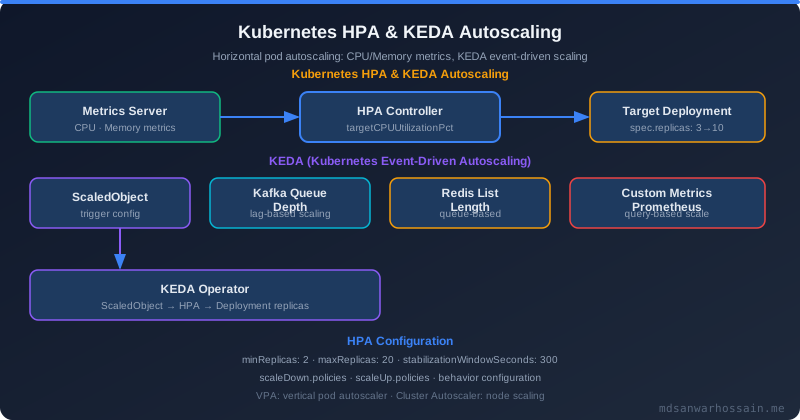
Table of Contents
- The Real Problem: Why HPA Fails for Event-Driven Workloads
- What is KEDA?
- Architecture: How KEDA Works
- Implementing KEDA for Kafka Consumer Scaling
- Scale to Zero in Practice
- KEDA with Prometheus Metrics (Custom Business Metrics)
- Failure Scenarios and Debugging
- KEDA vs HPA: When to Use Which
- Performance Optimization
- Key Takeaways
- Conclusion
1. The Real Problem: Why HPA Fails for Event-Driven Workloads
A media streaming platform was running a video transcoding fleet on Kubernetes. When a user uploaded a new video, an event landed on a Kafka topic and a pool of transcoding pods consumed those events to convert the file to multiple resolutions. The ops team had configured an HPA targeting 70% CPU utilization — which seemed perfectly reasonable.
Then a creator with 2 million followers uploaded a video that went immediately viral. Within seconds, hundreds of concurrent upload events flooded the Kafka topic. The transcoding pods that were already running were immediately saturated. But the HPA did not trigger. Why? Because the existing pods had not yet started processing the backlog — they had not yet driven their CPU up to the 70% threshold. The CPU metric was still low. HPA saw nothing to act on.
The fundamental disconnect is this: HPA thinks about resource consumption; event-driven workloads need to think about workload intent. CPU and memory are trailing indicators. A queue filling with unprocessed messages is the leading indicator. For batch processors, Kafka consumers, SQS workers, and cron-triggered jobs, scaling on resource metrics means you will always scale after users are already waiting — not before they notice a problem. The fix was KEDA scaling on Kafka consumer lag, which scaled pods up within seconds of the lag crossing a threshold, before CPU had any chance to respond.
2. What is KEDA?
KEDA (Kubernetes-based Event Driven Autoscaler) is a CNCF graduated project that adds event-driven autoscaling capabilities to any Kubernetes cluster without replacing the existing HPA machinery — it extends it. KEDA was originally created by Microsoft and Red Hat and donated to the CNCF in 2020. Its graduation status reflects production maturity across thousands of enterprise deployments.
KEDA's architecture consists of three primary components:
- ScaledObject CRD: A custom resource you define per workload that declares the scaling target, trigger sources, min/max replicas, and polling intervals.
- External Metrics Server: KEDA exposes a custom metrics API endpoint that Kubernetes's HPA controller reads from. This is the bridge between KEDA's event-source data and the standard HPA scaling loop.
- Trigger Providers (Scalers): Pluggable adapters that connect to specific event sources — Kafka, RabbitMQ, AWS SQS, Redis, Prometheus, PostgreSQL, Azure Service Bus, Cron, and over 50 others — and translate their queue depth or lag into a numeric metric the HPA controller can act on.
The critical difference from native HPA is that KEDA reads directly from the event source. When you configure a Kafka trigger, KEDA connects to the Kafka broker, queries the consumer group lag for a specific topic, and immediately surfaces that lag as a scaling metric — before any pod has consumed a single message. Native HPA cannot do this because it is limited to CPU, memory, and custom metrics that must already be emitted by running pods.
minReplicaCount: 0, allowing a deployment to scale all the way down to zero pods when there is no work. Native HPA enforces a minimum of 1 replica at all times. This single capability can reduce idle infrastructure costs by 60–80% for batch workloads, nightly ETL jobs, and development environments.
3. Architecture: How KEDA Works
Understanding KEDA's internal data flow is essential for tuning it correctly in production. The scaling loop works as follows:
Kafka Topic (consumer lag grows)
  └── KEDA Scaler polls broker every pollingInterval seconds
        └── Reads consumer group lag for target topic
              └── Exposes metric via External Metrics API
                    └── Kubernetes HPA controller reads metric
                          └── HPA calculates desired replicas:
                                desiredReplicas = ceil(lag / lagThreshold)
                          └── Kubernetes scales the Deployment
                                └── New transcoder pods start consuming
                                      └── Consumer lag drops → scale-down after cooldownPeriod
KEDA does not bypass or replace the HPA controller. Instead, it acts as a metric provider that feeds the standard HPA loop. When you create a ScaledObject, KEDA automatically creates a corresponding HorizontalPodAutoscaler resource managed by the KEDA operator. The HPA controller then drives actual pod scaling using Kubernetes's native replica management. This design means KEDA inherits all of HPA's stability guarantees — including the scale-down stabilization window — while adding event-source awareness that HPA alone cannot provide.
The KEDA operator runs as a Deployment in the keda namespace and consists of two containers: the keda-operator (manages ScaledObject lifecycle and metric exposure) and the keda-operator-metrics-apiserver (serves the External Metrics API endpoint). Both are stateless and can be replicated for high availability.
4. Implementing KEDA for Kafka Consumer Scaling
The following ScaledObject is the exact configuration that resolved the viral video transcoding incident described in the introduction. It scales the video-transcoder deployment based on Kafka consumer lag, with a 1-pod-per-5-messages ratio:
apiVersion: keda.sh/v1alpha1
kind: ScaledObject
metadata:
  name: video-transcoder-scaler
  namespace: production
spec:
  scaleTargetRef:
    name: video-transcoder
  pollingInterval: 10        # Check every 10 seconds
  cooldownPeriod: 60         # Wait 60s before scaling down
  minReplicaCount: 0         # Scale to zero when idle!
  maxReplicaCount: 50        # Cap at 50 pods
  triggers:
  - type: kafka
    metadata:
      bootstrapServers: kafka-broker:9092
      consumerGroup: video-transcoder-group
      topic: video-upload-events
      lagThreshold: "5"      # 1 pod per 5 messages in lag
      offsetResetPolicy: latest
Let's break down the key fields. pollingInterval: 10 tells KEDA to query the Kafka broker every 10 seconds for updated consumer lag. This is what enables near-real-time reaction to queue depth changes — a stark contrast to HPA's CPU scrape interval which often runs at 15–30 seconds and then requires CPU to actually climb before triggering. lagThreshold: "5" means KEDA will target one pod for every 5 unprocessed messages. With 50 messages in lag, KEDA will drive the deployment to 10 pods. With 250 messages, it caps at maxReplicaCount: 50.
cooldownPeriod: 60 is the number of seconds KEDA waits after the last active event before beginning to scale down. This prevents flapping when lag briefly drops to zero between bursts. For video transcoding, 60 seconds is appropriate — enough to absorb inter-upload gaps without keeping idle pods running for minutes.
5. Scale to Zero in Practice
Scale to zero is KEDA's most financially impactful feature for workloads with predictable idle periods. A nightly ETL job, a report generation service, a development-environment worker — these run for hours and then sit idle consuming node resources for the remainder of the day. With minReplicaCount: 0, the deployment drops to zero pods when the event source is empty, and KEDA restores replicas the moment a new trigger event arrives.
The cold start problem is the main trade-off: scaling from zero means the first event after an idle period must wait for a new pod to be scheduled, pulled, and initialized before processing begins. Mitigations include:
- Pre-cached container images: Ensure the node image cache is warm via a DaemonSet or node startup scripts.
- Lightweight init containers: Keep pod startup time under 5 seconds by avoiding heavy classpath scanning at boot.
- KEDA
ScaledJob: For true batch workloads, useScaledJobinstead ofScaledObject. KEDA creates a new Kubernetes Job per event batch, which terminates cleanly after processing rather than idling between batches. - KEDA-HTTP Add-on: For HTTP workloads, the KEDA HTTP add-on proxies incoming requests and buffers them while the deployment scales from zero, preventing connection errors during cold start.
Here is a ScaledJob configuration for a batch image processing pipeline that runs to completion and terminates, with zero idle cost:
apiVersion: keda.sh/v1alpha1
kind: ScaledJob
metadata:
  name: image-processor-job
  namespace: production
spec:
  jobTargetRef:
    template:
      spec:
        containers:
        - name: image-processor
          image: myrepo/image-processor:latest
        restartPolicy: Never
  pollingInterval: 15
  maxReplicaCount: 20
  triggers:
  - type: rabbitmq
    metadata:
      host: amqp://rabbitmq:5672/
      queueName: image-processing-queue
      queueLength: "1"       # 1 Job per message in queue
6. KEDA with Prometheus Metrics (Custom Business Metrics)
Scaling on Prometheus metrics sounds straightforward until you try to wire the Prometheus Adapter to Kubernetes's Custom Metrics API — at which point you discover that getting the adapter's RBAC, APIService registration, and PromQL configuration aligned correctly takes days, not hours. KEDA's prometheus trigger bypasses this entirely: you give KEDA a Prometheus server address and a PromQL query, and KEDA handles the rest.
This opens a powerful capability: scaling on business-level metrics, not just infrastructure metrics. Consider an order processing service where the right scaling signal is not pod CPU but the number of orders sitting in a queued state in the database:
triggers:
- type: prometheus
  metadata:
    serverAddress: http://prometheus:9090
    metricName: pending_orders_total
    threshold: "100"
    query: sum(pending_orders{status="queued"})
With this configuration, KEDA evaluates the PromQL query sum(pending_orders{status="queued"}) every pollingInterval seconds. When the result exceeds 100, KEDA scales up: if there are 300 pending orders, it drives the deployment to 3 replicas; 500 pending orders yields 5 replicas. The metric is derived directly from application instrumentation — a Micrometer gauge emitting pending_orders with a status label — not from inferred infrastructure consumption.
This approach aligns infrastructure cost directly with business throughput. The order processor fleet is sized exactly proportional to business backlog, not to the CPU that backlog eventually causes. Teams using this pattern typically see 30–40% cost reduction compared to static replica counts or CPU-based HPA, because the fleet is never over-provisioned in anticipation of load that never arrives.
7. Failure Scenarios and Debugging
KEDA introduces a new failure surface between your event source and your scaling loop. Here are the most common production failure modes and how to investigate them.
ScaledObject stuck at wrong replica count. Run kubectl describe scaledobject video-transcoder-scaler -n production and examine the Conditions block. A healthy ScaledObject shows ScalerReady=True and Active=True. If ScalerReady=False, the trigger cannot connect to its event source — usually a network policy block, wrong bootstrap server address, or authentication failure. The kubectl get events -n production output will show the specific error message from the scaler.
KEDA operator crash or unavailability. KEDA is designed to fail safe: if the KEDA operator pod crashes, the last-known replica count is preserved by the underlying HPA. The deployment does not immediately scale to zero or to max. The HPA will continue to function based on the most recently computed metric until KEDA recovers. This means a KEDA outage during low-traffic periods is generally graceful, though a KEDA outage during a traffic surge means no scale-up until the operator recovers.
Kafka SASL/TLS authentication. Production Kafka clusters require authentication. KEDA handles this via the TriggerAuthentication CRD, which references Kubernetes Secrets containing credentials. Never embed credentials directly in the ScaledObject metadata.
apiVersion: keda.sh/v1alpha1
kind: TriggerAuthentication
metadata:
  name: kafka-trigger-auth
  namespace: production
spec:
  secretTargetRef:
  - parameter: username
    name: kafka-credentials
    key: username
  - parameter: password
    name: kafka-credentials
    key: password
Reference the TriggerAuthentication from your ScaledObject trigger with authenticationRef: { name: kafka-trigger-auth }. Common failures and their resolutions:
| Failure | Symptom | Fix |
|---|---|---|
| Kafka auth error | Scaler shows Error, pods stuck at 0 | Add TriggerAuthentication with SASL/TLS creds |
| lagThreshold too high | Slow scale-up despite large lag | Lower threshold value, reduce pollingInterval |
| cooldownPeriod too short | Pods flapping up and down repeatedly | Increase cooldownPeriod to 120s or more |
8. KEDA vs HPA: When to Use Which
KEDA is not a wholesale replacement for HPA — both tools have clear, non-overlapping use cases. Use HPA when your workload is CPU or memory bound and the resource metric accurately represents demand. Use KEDA when your workload reacts to external event sources, queues, or business-level metrics that precede resource consumption.
| Scenario | Use HPA | Use KEDA |
|---|---|---|
| CPU/memory bound workloads | ✓ | |
| Event queue consumers (Kafka, SQS, RabbitMQ) | ✓ | |
| Scale to zero needed | ✓ | |
| Prometheus-driven business metrics | ✓ | |
| Simple stateless web API scaling | ✓ | |
| Cron-based batch jobs | ✓ |
One nuance: you can use KEDA and HPA on the same deployment simultaneously when KEDA manages replica count based on queue depth and HPA handles CPU autoscaling within the KEDA-defined bounds. KEDA explicitly supports this via the advanced.horizontalPodAutoscalerConfig field in the ScaledObject, which lets you pass custom HPA behavior settings alongside KEDA triggers.
9. Performance Optimization
pollingInterval tuning. Lower values (5–10 seconds) reduce scale-up latency but increase API load against the event source broker. For latency-sensitive consumer groups, 10 seconds is a practical floor. For batch jobs with relaxed SLAs, 30–60 seconds reduces broker query load significantly. Never set pollingInterval below 5 seconds without confirming your broker can handle the increased polling frequency across all KEDA-managed consumer groups.
Combining KEDA and HPA for dual-axis scaling. KEDA governs the outer loop — how many pods exist based on queue depth. HPA can govern the inner loop — CPU-based vertical burst scaling within pods, or managing request rate on a sidecar proxy. Configure this by setting advanced.horizontalPodAutoscalerConfig.behavior in the ScaledObject spec. The HPA behavior settings apply to the KEDA-managed HPA, giving you fine-grained control over scale-up and scale-down stabilization windows.
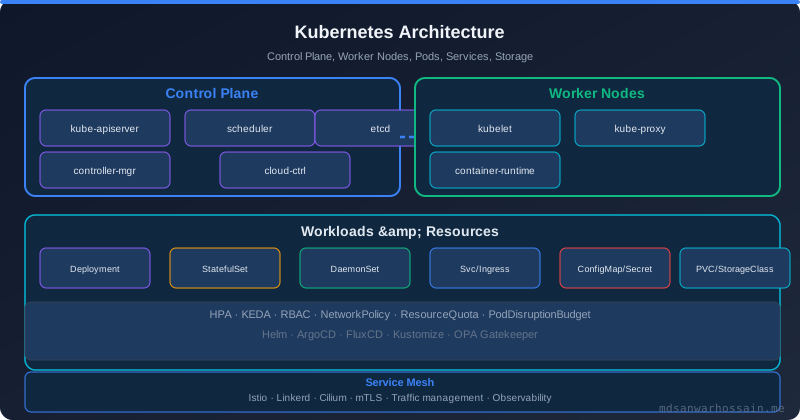
Cluster Autoscaler integration. When KEDA scales a deployment beyond available node capacity, pods enter Pending state. The Kubernetes Cluster Autoscaler detects pending pods and provisions additional nodes. This creates a cascading scale-out: KEDA scales pods → CA scales nodes → pods become schedulable → consumers process lag → KEDA scales down → CA removes idle nodes. Tune your CA scale-down-delay-after-add to match KEDA's cooldownPeriod to avoid premature node removal that would immediately trigger another CA scale-out.
"The best scaling policy is one that can see the future — not the past. KEDA gives you the closest thing to that: scaling on intent, not on consequence."
— KEDA project maintainers, KubeCon 2024
Key Takeaways
- HPA scales on resource consumption — KEDA scales on workload intent. For event-driven workloads, queue depth and consumer lag are leading indicators that CPU metrics will never capture in time to prevent user impact.
- Scale to zero is a game-changer for batch and dev workloads. KEDA's
minReplicaCount: 0support can reduce idle infrastructure costs by 60–80% for workloads with predictable idle windows that native HPA cannot handle. - KEDA's Prometheus trigger removes the Prometheus Adapter complexity entirely. Direct PromQL evaluation in KEDA triggers lets you scale on business metrics — pending orders, job queue depth — without custom metrics API plumbing.
- TriggerAuthentication is mandatory for production Kafka clusters. Never embed credentials in ScaledObject metadata — use the TriggerAuthentication CRD to reference Kubernetes Secrets for SASL and TLS configurations.
- KEDA and Cluster Autoscaler form a complete two-tier scaling solution. KEDA handles pod-level scaling based on events; the Cluster Autoscaler handles node-level capacity in response to pod scheduling pressure, creating an end-to-end elastic infrastructure layer.
Conclusion
KEDA resolves the fundamental mismatch between how Kubernetes HPA observes load and how event-driven workloads actually generate load. By scaling directly on queue depth, consumer lag, and business-level Prometheus metrics, KEDA eliminates the 3–4 minute response lag that CPU-based autoscaling inevitably introduces for consumer workloads — a lag that translates directly into user-visible delays and unnecessary costs from over-provisioned standing fleets.
The transcoding fleet example from the introduction is representative of a broad class of production problems that appear as capacity issues but are actually scaling-signal latency issues. The hardware was always sufficient — the signal to use it simply arrived too late. KEDA's architecture of reading the event source directly, rather than waiting for that event to propagate through CPU utilization and then through HPA's scrape interval, is the correct abstraction for the event-driven systems that increasingly define modern backend infrastructure.
For teams managing complex multi-cluster deployments and advanced Kubernetes workload patterns, our Kubernetes Advanced Patterns guide covers StatefulSets, Operators, admission webhooks, and the full spectrum of production Kubernetes primitives that complement KEDA in a mature platform engineering setup.
Read Full Blog Here
Explore the complete guide including advanced ScaledObject configurations, multi-trigger setups, KEDA operator HA, and production runbook for event-driven autoscaling.
Read the Full PostLeave a Comment
Related Posts

Software Engineer · Java · Spring Boot · Microservices