Microservices Health Checks & Graceful Shutdown: Spring Boot Actuator, K8s Probes & Zero-Downtime 2026
Your microservice can be functionally correct and still silently kill production traffic if health checks are misconfigured. Kubernetes needs accurate health signals to route traffic, schedule pods, and self-heal — and Spring Boot ships with everything you need to provide those signals correctly. This production-grade guide covers every layer: Actuator endpoints, custom health indicators, liveness, readiness and startup probes, graceful shutdown mechanics, preStop hooks, and zero-downtime rolling deployments. By the end, you'll have a battle-tested checklist ready to apply to any microservice.
TL;DR — The Golden Rule of Health Checks
"Use liveness to detect a broken JVM that needs a restart, readiness to signal whether the pod can accept traffic right now, and startup to protect slow-booting apps during initialisation. Enable graceful shutdown (server.shutdown=graceful) and pair it with a preStop sleep to drain in-flight requests before Kubernetes removes the pod from all load balancers."
Table of Contents
- Why Health Checks Matter in Microservices
- Spring Boot Actuator Health Endpoints
- Kubernetes Liveness Probe: Pitfalls & Self-Healing
- Kubernetes Readiness Probe: Traffic Routing & Warmup
- Kubernetes Startup Probe: Slow-Start Apps & Boot Time
- Custom Health Indicators in Spring Boot
- Deep vs Shallow Health Checks: Tradeoffs
- Graceful Shutdown in Spring Boot 3
- Kubernetes preStop Hook & terminationGracePeriodSeconds
- Zero-Downtime Rolling Deployments
- Health Check Anti-Patterns to Avoid
- Production Checklist & Monitoring
1. Why Health Checks Matter in Microservices
In a monolith, a single process either runs or it doesn't — the ops team knows instantly. In a microservices architecture running dozens of pods across a Kubernetes cluster, individual pods can drift into subtly broken states that are invisible to external observers yet catastrophic to the users hitting them. Health checks are the contract between your application and the orchestration platform.
Three Critical Problems Health Checks Solve
- Traffic routing: Kubernetes Services and Ingress controllers only forward requests to pods that pass their readiness probe. A pod that has lost its database connection or is warming up its thread pool should not receive production traffic — readiness probes enforce this boundary automatically.
- Pod scheduling & bin-packing: The scheduler uses readiness state when deciding where to place workloads during rolling updates. A new pod must become ready before the old one is terminated, ensuring continuous availability without manual intervention.
- Auto-healing: When a pod's liveness probe fails consecutively, kubelet restarts the container. This handles the class of bugs where a JVM thread deadlocks, a connection pool starves, or an off-heap memory region becomes corrupted — states that keep the process running but make it incapable of meaningful work.
The Business Cost of Misconfigured Health Checks
Teams underestimate health check failures because they manifest as intermittent errors rather than total outages. A common scenario: a pod's liveness probe hits a database-dependent endpoint. When the database is under load, the probe times out, kubelet restarts the container, the restarting pod triggers more load on the database, and the restart loop cascades across the fleet. The root cause was a misconfigured probe, but the symptom is a database brownout. Proper probe design eliminates this entire failure class.
According to SRE teams at large-scale Kubernetes deployments, improper probe configuration is consistently in the top-five root causes of production incidents. The good news: Spring Boot Actuator and Kubernetes together give you all the primitives you need — the challenge is wiring them correctly.
2. Spring Boot Actuator Health Endpoints
Spring Boot Actuator's /actuator/health endpoint is the cornerstone of microservice observability. Since Spring Boot 2.3 (and refined further in 3.x), Actuator exposes dedicated liveness and readiness groups that map directly to Kubernetes probe semantics.
Core Configuration (application.yml)
# application.yml — Actuator health configuration for Kubernetes
management:
  endpoint:
    health:
      # Expose detailed component breakdown (not default — keep internal)
      show-details: always
      show-components: always
      # Map liveness and readiness to Kubernetes probe groups
      probes:
        enabled: true
      group:
        liveness:
          include:
            - livenessState
            # Only include indicators that signal JVM/app corruption
            - diskSpace
        readiness:
          include:
            - readinessState
            # Include dependencies the app NEEDS to serve traffic
            - db
            - redis
            - kafka
  endpoints:
    web:
      exposure:
        include: health, info, metrics, prometheus
      base-path: /actuator
  health:
    # Increase timeout for slow dependency checks
    defaults:
      enabled: true
    db:
      enabled: true
    redis:
      enabled: true
    kafka:
      enabled: true

# Server-side graceful shutdown (covered in Section 8)
server:
  shutdown: graceful

spring:
  lifecycle:
    timeout-per-shutdown-phase: 30s
Health Endpoint URL Reference
| Endpoint | Purpose | K8s Probe |
|---|---|---|
| /actuator/health | Aggregated health including all components | Not recommended directly |
| /actuator/health/liveness | Is the JVM alive? Should we restart? | livenessProbe |
| /actuator/health/readiness | Can the app accept requests right now? | readinessProbe |
| /actuator/info | Build info, git SHA, version metadata | — |
Key design principle: The liveness and readiness groups should contain different health indicators. Liveness should only include indicators that signal the JVM or app state is fundamentally broken (deadlocked thread pool, corrupted in-memory state, disk full). Readiness should include downstream dependencies the service needs to process requests. Mixing them is the single most common health check mistake.
3. Kubernetes Liveness Probe: What It Checks, When to Use, Common Pitfalls
The liveness probe answers one question: "Is this container still alive and worth keeping, or should kubelet kill and restart it?" When the probe fails failureThreshold consecutive times, kubelet restarts the container. This is a blunt instrument — it incurs a cold-start penalty, drops any in-flight requests, and temporarily reduces cluster capacity. Use it deliberately.
What Belongs in a Liveness Probe
- Deadlock detection: A thread pool that has completely stalled and cannot process any work. Expose a simple endpoint that executes a trivial task; if it doesn't respond, the JVM is deadlocked.
- Unrecoverable state: Corrupted in-memory caches, permanently full off-heap buffers, or circular reference leaks that prevent normal operation and cannot self-correct.
- JVM health: OutOfMemoryError states where the process is running but GC pauses have reached 99% overhead and the process is effectively frozen.
- Application lifecycle state: The Spring
LivenessState.BROKENstate — set programmatically when the app detects an unrecoverable condition.
What Does NOT Belong in a Liveness Probe
- Database connectivity: If the database is temporarily unavailable, restarting the pod will not fix the database. You'll restart healthy pods until your cluster exhausts its restart budget — a cascading failure amplifier.
- External service availability: Same logic. The pod is alive and healthy; the dependency is temporarily down. Readiness, not liveness, handles this.
- Slow dependency checks: Any check that can take more than 1–2 seconds under load risks false-positive failures, especially during GC pauses or brief network hiccups.
Liveness Probe Kubernetes Configuration
livenessProbe:
  httpGet:
    path: /actuator/health/liveness
    port: 8080
    httpHeaders:
      - name: Accept
        value: application/json
  # Wait 60s before first probe — let Spring context initialise
  initialDelaySeconds: 60
  # Probe every 10 seconds
  periodSeconds: 10
  # Must respond within 3 seconds
  timeoutSeconds: 3
  # Fail 3 consecutive times before restarting
  failureThreshold: 3
  # One success clears the failure count
  successThreshold: 1
Restart Loop Anti-Pattern
The most destructive liveness misconfiguration is a probe that includes database or external service checks. When the dependency degrades, all pods fail their liveness probes simultaneously, triggering mass restarts. The restarting pods amplify traffic on the struggling dependency, which fails the probes of more pods. The cluster enters a restart death spiral. In production environments, this pattern has caused hour-long outages from what was originally a 30-second database blip. Always keep liveness checks isolated to indicators that reflect only the pod's own internal health.
4. Kubernetes Readiness Probe: Traffic Routing, Connection Pool Warmup, Not-Ready vs Not-Healthy
The readiness probe answers: "Is this pod ready to serve production traffic right now?" When it fails, Kubernetes removes the pod from the Service's endpoint slice. No traffic is routed to it. The container is NOT restarted — this is the fundamental semantic difference from liveness. A pod can be not-ready for a legitimate reason (warming up, upstream dependency temporarily down) and return to ready when conditions improve, all without a restart.
Readiness Probe Kubernetes Configuration
readinessProbe:
  httpGet:
    path: /actuator/health/readiness
    port: 8080
    httpHeaders:
      - name: Accept
        value: application/json
  # Start checking after 20s — allow connection pool to warm up
  initialDelaySeconds: 20
  # Probe every 5 seconds for faster traffic routing decisions
  periodSeconds: 5
  timeoutSeconds: 3
  # Remove from load balancer after 2 consecutive failures
  failureThreshold: 2
  # Require 2 consecutive successes before re-adding to load balancer
  successThreshold: 2
Connection Pool Warmup Pattern
HikariCP (Spring Boot's default connection pool) validates connections lazily by default. On startup, the pool may have zero established connections; the first wave of requests blocks while connections are established, often causing timeouts under load. The readiness probe's initialDelaySeconds must be tuned to allow the connection pool to establish its minimumIdle connections and warm up before traffic arrives.
A production-grade pattern: use a custom ReadinessIndicator that executes a lightweight validation query (SELECT 1) and confirms the pool has at least minimumIdle connections established. Only mark the app as ready when this check passes. This prevents the "thundering herd on cold pool" failure mode that causes latency spikes on every rolling deploy.
Programmatic Readiness Control
Spring Boot exposes the ReadinessState as an event-driven mechanism. You can mark a pod as refusing traffic from application code, which is critical for graceful shutdown scenarios (covered in Section 8):
@Component
public class MaintenanceModeController {

    private final ApplicationEventPublisher eventPublisher;

    public MaintenanceModeController(ApplicationEventPublisher eventPublisher) {
        this.eventPublisher = eventPublisher;
    }

    // Call this to stop receiving new traffic (e.g., during maintenance)
    public void enterMaintenanceMode() {
        eventPublisher.publishEvent(
            new AvailabilityChangeEvent<>(this, ReadinessState.REFUSING_TRAFFIC)
        );
    }

    // Call this to resume receiving traffic
    public void exitMaintenanceMode() {
        eventPublisher.publishEvent(
            new AvailabilityChangeEvent<>(this, ReadinessState.ACCEPTING_TRAFFIC)
        );
    }
}
5. Kubernetes Startup Probe: Slow-Start Apps, Spring Boot Boot Time, failureThreshold Calculation
Introduced in Kubernetes 1.18, the startup probe is the solution to a long-standing dilemma: how do you give a slow-booting application enough time to start without setting an excessively high initialDelaySeconds on the liveness probe? The startup probe gates the activation of liveness and readiness probes — until the startup probe succeeds, the other probes are disabled.
Why Spring Boot Needs a Startup Probe
A Spring Boot application with Hibernate, Flyway migrations, Kafka consumer group registration, and several @PostConstruct initialisation tasks can easily take 45–90 seconds to start in a containerised environment. Without a startup probe, you have two bad options:
- Set
initialDelaySeconds: 90on the liveness probe — the pod can be dead for up to 90 seconds before Kubernetes notices - Set a low
initialDelaySeconds— the liveness probe fires while the app is still starting, triggers a restart, and you get a restart loop before the app ever boots
The startup probe solves this with a dedicated maximum startup window calculated as: failureThreshold × periodSeconds = maximum startup time. During this window, the app can take as long as it needs. Once it passes the startup probe once, liveness and readiness probes take over with their tight timing windows.
Startup Probe Configuration for Spring Boot
startupProbe:
  httpGet:
    path: /actuator/health/liveness
    port: 8080
  # Poll every 10 seconds
  periodSeconds: 10
  # Allow up to 120 seconds to boot (12 × 10 = 120s maximum)
  failureThreshold: 12
  timeoutSeconds: 5
  # One success is sufficient — liveness/readiness take over immediately
  successThreshold: 1

# After startup probe succeeds, tight liveness timing is safe
livenessProbe:
  httpGet:
    path: /actuator/health/liveness
    port: 8080
  # No need for large initialDelaySeconds — startup probe handles it
  initialDelaySeconds: 0
  periodSeconds: 10
  timeoutSeconds: 3
  failureThreshold: 3

readinessProbe:
  httpGet:
    path: /actuator/health/readiness
    port: 8080
  initialDelaySeconds: 0
  periodSeconds: 5
  timeoutSeconds: 3
  failureThreshold: 2
  successThreshold: 2
failureThreshold Calculation Guide
Measure your P99 startup time across 50+ cold starts (including worst-case: cold JVM, Flyway with many migrations, slow network to config server). Add a 50% safety margin. Divide by your periodSeconds and round up. For example: P99 startup = 75s → add 50% → 113s → divide by 10s period → failureThreshold: 12 (120s maximum). This gives a comfortable buffer without creating a situation where a genuinely crashed container is mistaken for a slow starter.
6. Custom Health Indicators in Spring Boot
Spring Boot's built-in HealthIndicator implementations cover common infrastructure (DataSource, Redis, Kafka, Elasticsearch, Cassandra, Mongo), but production microservices often require custom checks tailored to domain-specific dependencies. Implementing a HealthIndicator is straightforward: implement the interface, return a Health object, and Spring Actuator automatically aggregates it.
Database Health Indicator with Connection Pool Metrics
@Component("db")
public class DatabaseHealthIndicator implements HealthIndicator {

    private final DataSource dataSource;
    private final HikariDataSource hikariDataSource;

    public DatabaseHealthIndicator(DataSource dataSource) {
        this.dataSource = dataSource;
        // Unwrap to access HikariCP pool metrics
        this.hikariDataSource = (HikariDataSource) dataSource;
    }

    @Override
    public Health health() {
        try (Connection conn = dataSource.getConnection();
             Statement stmt = conn.createStatement()) {

            stmt.execute("SELECT 1");

            HikariPoolMXBean poolBean = hikariDataSource.getHikariPoolMXBean();
            int activeConnections = poolBean.getActiveConnections();
            int idleConnections   = poolBean.getIdleConnections();
            int totalConnections  = poolBean.getTotalConnections();
            int awaitingThread    = poolBean.getThreadsAwaitingConnection();

            // Degraded if threads are waiting for connections
            if (awaitingThread > 0) {
                return Health.degraded()
                    .withDetail("activeConnections", activeConnections)
                    .withDetail("idleConnections", idleConnections)
                    .withDetail("awaitingConnections", awaitingThread)
                    .withDetail("warning", "Connection pool contention detected")
                    .build();
            }

            return Health.up()
                .withDetail("activeConnections", activeConnections)
                .withDetail("idleConnections", idleConnections)
                .withDetail("totalConnections", totalConnections)
                .build();

        } catch (SQLException ex) {
            return Health.down()
                .withDetail("error", ex.getMessage())
                .withDetail("errorCode", ex.getErrorCode())
                .build();
        }
    }
}
Kafka Health Indicator
@Component("kafka")
public class KafkaHealthIndicator implements HealthIndicator {

    private final KafkaAdmin kafkaAdmin;
    private final String requiredTopic;

    public KafkaHealthIndicator(KafkaAdmin kafkaAdmin,
                                 @Value("${app.kafka.required-topic}") String requiredTopic) {
        this.kafkaAdmin = kafkaAdmin;
        this.requiredTopic = requiredTopic;
    }

    @Override
    public Health health() {
        try (AdminClient client = AdminClient.create(kafkaAdmin.getConfigurationProperties())) {

            // Check broker connectivity with a short timeout
            DescribeClusterResult cluster = client.describeCluster();
            String clusterId = cluster.clusterId().get(3, TimeUnit.SECONDS);

            // Verify required topic exists and has correct partition count
            Map<String, TopicDescription> topics = client
                .describeTopics(List.of(requiredTopic))
                .allTopicNames()
                .get(3, TimeUnit.SECONDS);

            if (!topics.containsKey(requiredTopic)) {
                return Health.down()
                    .withDetail("error", "Required topic missing: " + requiredTopic)
                    .build();
            }

            int partitions = topics.get(requiredTopic).partitions().size();
            return Health.up()
                .withDetail("clusterId", clusterId)
                .withDetail("topic", requiredTopic)
                .withDetail("partitions", partitions)
                .build();

        } catch (Exception ex) {
            return Health.down()
                .withDetail("error", "Kafka unreachable: " + ex.getMessage())
                .build();
        }
    }
}
Downstream Service Health Indicator
@Component("paymentService")
public class PaymentServiceHealthIndicator implements HealthIndicator {

    private final RestTemplate restTemplate;
    private final String paymentServiceUrl;

    public PaymentServiceHealthIndicator(
            RestTemplate restTemplate,
            @Value("${services.payment.url}") String paymentServiceUrl) {
        this.restTemplate = restTemplate;
        this.paymentServiceUrl = paymentServiceUrl;
    }

    @Override
    public Health health() {
        try {
            ResponseEntity<String> response = restTemplate.getForEntity(
                paymentServiceUrl + "/actuator/health/liveness",
                String.class
            );
            if (response.getStatusCode().is2xxSuccessful()) {
                return Health.up()
                    .withDetail("url", paymentServiceUrl)
                    .withDetail("status", response.getStatusCode().value())
                    .build();
            }
            return Health.degraded()
                .withDetail("url", paymentServiceUrl)
                .withDetail("status", response.getStatusCode().value())
                .build();
        } catch (Exception ex) {
            return Health.down()
                .withDetail("url", paymentServiceUrl)
                .withDetail("error", ex.getMessage())
                .build();
        }
    }
}
Important: Downstream service health indicators belong in the readiness group only, not liveness. If the payment service is down, this service should stop receiving traffic but should NOT be restarted. The pod is alive and healthy; it simply cannot fulfil its purpose without the downstream dependency.
7. Deep Health Checks vs Shallow Health Checks
One of the most important architectural decisions in health check design is the depth of each check. This is not a binary choice — it's a spectrum, and the right level depends on which probe is consuming the check result.
Shallow Health Checks
A shallow check verifies only that the process is running and able to respond to HTTP requests. It does not connect to any external systems. Characteristics:
- Response time: Sub-millisecond (typically 1–5ms)
- Reliability: Nearly 100% — no network calls, no I/O
- What it tells you: The JVM is alive and the HTTP server is accepting requests
- Use for: Liveness probe — the question is "is the process alive?", not "are all dependencies healthy?"
- Risk: False positives — the pod looks healthy but cannot actually serve meaningful work because dependencies are down
Deep Health Checks
A deep check exercises the full dependency stack: database connection and query, Redis ping, Kafka broker connectivity, downstream service liveness. Characteristics:
- Response time: 10–500ms depending on dependencies and network
- Reliability: Depends on all checked systems — one slow dependency makes every check slow
- What it tells you: The pod can currently serve end-to-end requests through the full dependency chain
- Use for: Readiness probe, operational dashboards, synthetic monitoring
- Risk: Cascading failures — a single flaky dependency can flip all pods to not-ready simultaneously
The Cascading Failure Risk of Deep Liveness Checks
Consider a 20-pod deployment where each pod's liveness probe executes a database query. A database maintenance window causes all 20 probes to fail simultaneously. Kubernetes restarts all 20 pods. The restarting pods hit the database during startup (Flyway migrations, Hibernate schema validation, connection pool initialization) with 20× the normal connection demand. The database, already under stress, falls over completely. What started as a planned maintenance window has become a full outage caused by inappropriate liveness probe depth.
The rule: Liveness = shallow. Readiness = deep (but with timeouts, circuit breakers, and independent failure modes per dependency).
Probe Comparison Table
| Attribute | Liveness Probe | Readiness Probe | Startup Probe |
|---|---|---|---|
| Question answered | Should this container be restarted? | Should traffic be routed here? | Has the container finished starting? |
| Failure action | Container restart | Remove from Service endpoints | Block liveness/readiness probes; eventually restart |
| Check depth | Shallow (JVM/process only) | Deep (dependencies included) | Shallow (same as liveness) |
| Spring Boot endpoint | /actuator/health/liveness | /actuator/health/readiness | /actuator/health/liveness |
| Typical periodSeconds | 10–15s | 5–10s | 10s |
| Typical failureThreshold | 3 | 2–3 | 10–18 (boot-time dependent) |
8. Graceful Shutdown in Spring Boot 3
Graceful shutdown is the mechanism by which your application finishes processing in-flight requests before it shuts down, rather than abruptly closing the socket and dropping requests mid-stream. Without it, every rolling deployment incurs 502/503 errors for requests that were being processed when Kubernetes sent SIGTERM. With it, zero requests are dropped — even during rapid deployments.
Enabling Graceful Shutdown (application.yml)
server:
  # Enable graceful shutdown — Spring Boot 2.3+ / 3.x
  shutdown: graceful

spring:
  lifecycle:
    # Maximum time to wait for in-flight requests to complete
    # After this, the application context is closed regardless
    timeout-per-shutdown-phase: 30s

# Combine with connection pool cleanup
spring:
  datasource:
    hikari:
      # Pool will release connections on context shutdown
      connection-timeout: 20000
      # Allow existing transactions to complete
      keepalive-time: 30000

# Kafka consumer shutdown
spring:
  kafka:
    listener:
      # Allow running poll to complete before stopping
      immediate-stop: false
What Happens During Graceful Shutdown
When Spring Boot receives SIGTERM (sent by kubelet), the following ordered sequence occurs:
- ReadinessState → REFUSING_TRAFFIC: Spring immediately marks the app as refusing traffic. The readiness probe returns DOWN, Kubernetes removes the pod from Service endpoints. New requests stop arriving.
- Drain in-flight requests: The embedded Tomcat/Undertow/Netty server waits up to
timeout-per-shutdown-phasefor active requests to complete. It stops accepting new connections but allows existing ones to finish. - @PreDestroy hooks: After the server shuts down, Spring fires
@PreDestroycallbacks andDisposableBean.destroy()methods for all beans. Database connections are released, Kafka consumers unsubscribe (triggering consumer group rebalance), scheduled tasks are cancelled. - Application context closed: The Spring context is fully closed. The JVM exits with code 0.
Async Task and Scheduled Task Shutdown
@Configuration
public class AsyncShutdownConfig {

    @Bean
    public ThreadPoolTaskExecutor taskExecutor() {
        ThreadPoolTaskExecutor executor = new ThreadPoolTaskExecutor();
        executor.setCorePoolSize(10);
        executor.setMaxPoolSize(20);
        executor.setQueueCapacity(100);
        executor.setThreadNamePrefix("app-async-");
        // Wait for queued tasks to complete during shutdown
        executor.setWaitForTasksToCompleteOnShutdown(true);
        // Maximum wait time for async tasks to finish
        executor.setAwaitTerminationSeconds(30);
        executor.initialize();
        return executor;
    }

    @Bean
    public ThreadPoolTaskScheduler taskScheduler() {
        ThreadPoolTaskScheduler scheduler = new ThreadPoolTaskScheduler();
        scheduler.setPoolSize(5);
        scheduler.setThreadNamePrefix("app-scheduled-");
        // Allow running scheduled tasks to complete
        scheduler.setWaitForTasksToCompleteOnShutdown(true);
        scheduler.setAwaitTerminationSeconds(30);
        return scheduler;
    }
}
9. Kubernetes preStop Hook and terminationGracePeriodSeconds
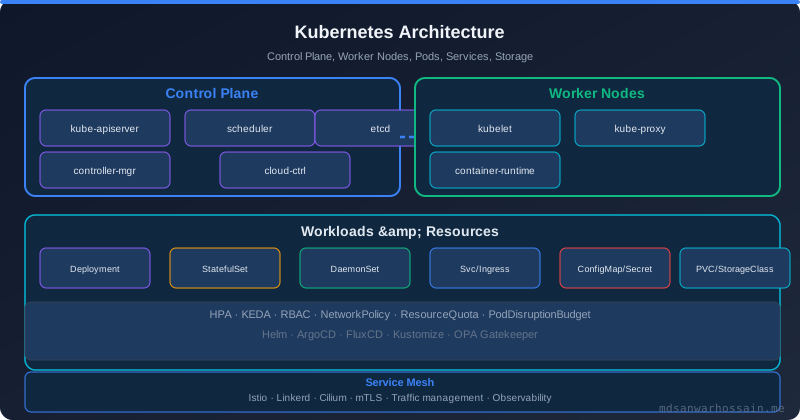
Spring Boot's graceful shutdown handles the application side. But there is a race condition at the Kubernetes level: when a pod is marked for termination, kubelet sends SIGTERM and simultaneously removes the pod from Service endpoints. These two events are not synchronised — the load balancer (kube-proxy or the CNI plugin) may take several seconds to propagate the endpoint removal. During that window, the load balancer continues routing new requests to a pod that is already shutting down.
The preStop Hook Solution
The preStop hook runs before kubelet sends SIGTERM. By adding a sleep in the preStop hook, you give the load balancer enough time to propagate the endpoint removal before the app starts shutting down. This eliminates the race condition entirely.
apiVersion: apps/v1
kind: Deployment
metadata:
  name: order-service
  namespace: production
spec:
  replicas: 3
  selector:
    matchLabels:
      app: order-service
  template:
    metadata:
      labels:
        app: order-service
    spec:
      # Must be greater than: preStop sleep + app shutdown time + buffer
      # 10s preStop sleep + 30s app drain + 10s buffer = 50s minimum
      terminationGracePeriodSeconds: 60
      containers:
        - name: order-service
          image: order-service:2.1.4
          ports:
            - containerPort: 8080
          env:
            - name: SPRING_PROFILES_ACTIVE
              value: production
          lifecycle:
            preStop:
              exec:
                # Sleep BEFORE SIGTERM is sent — allows iptables rules to drain
                # 10 seconds is sufficient for most CNI propagation delays
                command: ["/bin/sh", "-c", "sleep 10"]
          startupProbe:
            httpGet:
              path: /actuator/health/liveness
              port: 8080
            periodSeconds: 10
            failureThreshold: 12
            timeoutSeconds: 5
          livenessProbe:
            httpGet:
              path: /actuator/health/liveness
              port: 8080
            initialDelaySeconds: 0
            periodSeconds: 10
            timeoutSeconds: 3
            failureThreshold: 3
          readinessProbe:
            httpGet:
              path: /actuator/health/readiness
              port: 8080
            initialDelaySeconds: 0
            periodSeconds: 5
            timeoutSeconds: 3
            failureThreshold: 2
            successThreshold: 2
          resources:
            requests:
              memory: "512Mi"
              cpu: "250m"
            limits:
              memory: "1Gi"
              cpu: "1000m"
terminationGracePeriodSeconds Calculation
Set terminationGracePeriodSeconds to the sum of: preStop sleep duration + maximum app drain time (timeout-per-shutdown-phase) + safety buffer (10s). If the sum is 10 + 30 + 10 = 50, set it to at least 60. If terminationGracePeriodSeconds is exceeded before the app finishes, kubelet sends SIGKILL — which immediately kills the process, dropping any remaining in-flight requests. The graceful shutdown becomes ungraceful.
10. Zero-Downtime Rolling Deployments: Probe Timing, maxSurge, maxUnavailable, PodDisruptionBudgets
Health probes are not just operational — they are the core mechanism that makes zero-downtime rolling deployments possible. Kubernetes orchestrates rolling updates by waiting for new pods to pass their readiness probe before terminating old pods, but this guarantee only holds if all the configuration pieces are correctly set.
Rolling Update Strategy Configuration
spec:
  replicas: 6
  strategy:
    type: RollingUpdate
    rollingUpdate:
      # Allow 1 extra pod above desired replica count during update
      # Ensures zero old pods are killed before new pods are ready
      maxSurge: 1
      # Never go below 100% capacity — all replicas must be available
      maxUnavailable: 0
  # minReadySeconds: new pod must be ready for this long
  # before it is considered "available" — prevents flapping
  minReadySeconds: 15
With maxUnavailable: 0 and maxSurge: 1, the rolling update algorithm is: create one new pod, wait for it to pass readiness probe for minReadySeconds, then terminate one old pod, repeat. This maintains 100% capacity throughout the deployment. With 6 replicas, a rolling update takes approximately 6 × (startup time + minReadySeconds) total — slower than a fast rollout but guaranteed zero-downtime.
PodDisruptionBudgets for Voluntary Disruptions
apiVersion: policy/v1
kind: PodDisruptionBudget
metadata:
  name: order-service-pdb
  namespace: production
spec:
  # Ensure at least 80% of pods are always available
  # during voluntary disruptions (node drain, cluster upgrades)
  minAvailable: "80%"
  selector:
    matchLabels:
      app: order-service
PodDisruptionBudgets (PDBs) protect against voluntary disruptions — node drains during cluster upgrades, spot instance terminations, or maintenance windows. Without a PDB, a kubectl drain can evict all pods on a node simultaneously, taking the service offline. The PDB instructs Kubernetes to throttle voluntary evictions until the budget is satisfied. For critical services, set minAvailable to at least 50%; for stateless high-throughput services, 80% is appropriate.
successThreshold: The Overlooked Setting
Setting successThreshold: 2 on the readiness probe requires two consecutive successful probe responses before a pod is considered ready and receives traffic. This guards against a pathological situation where a pod passes its readiness probe once (during the brief window when its thread pool is warm and connections are established) and then fails again under load. Two consecutive successes provide higher confidence the pod is genuinely stable. For the liveness probe, successThreshold must always be 1 (Kubernetes enforces this).
11. Health Check Anti-Patterns to Avoid
Years of production incidents have surfaced a consistent set of health check mistakes. Recognising these patterns is the fastest way to harden your microservice fleet.
Anti-Pattern 1: Database Ping as Liveness
Including a database connectivity check in the liveness group triggers container restarts when the database is unavailable — even though the pod itself is perfectly healthy. This amplifies dependency failures into pod restart storms. Fix: Move database checks to the readiness group only. The liveness probe should check only livenessState and perhaps disk space.
Anti-Pattern 2: Missing Startup Probe on Slow Boot Apps
Without a startup probe, liveness fires during the Spring context initialisation window. If context startup takes longer than initialDelaySeconds + (periodSeconds × failureThreshold), the container is killed and restarted — before it ever successfully starts. Teams compensate by setting initialDelaySeconds: 120, which means a genuinely dead pod isn't restarted for 2 minutes. Fix: Always use a startup probe for apps with startup time > 30 seconds.
Anti-Pattern 3: Slow Probe Timeouts Causing False Positives
When a database query in the readiness probe takes 4 seconds and timeoutSeconds: 3, the probe fails — not because the app is unhealthy, but because the check itself timed out. Under load, slow queries become more common, meaning the readiness probe degrades precisely when you need it most. Fix: Use a dedicated lightweight health-check query (a trivial SELECT, not a production query), set a generous but bounded timeout (3–5s), and add a circuit breaker around the health indicator to avoid amplifying latency.
Anti-Pattern 4: No preStop Hook — Dropped Requests on Shutdown
Without a preStop sleep, SIGTERM arrives simultaneously with the endpoint removal event. The load balancer continues sending requests for 2–10 seconds after the app starts shutting down, causing 502s for those requests. Fix: Add a preStop: exec: sleep 10 hook and set terminationGracePeriodSeconds high enough to accommodate it.
Anti-Pattern 5: Exposing Health Details to Public Network
Setting show-details: always on a publicly accessible Actuator endpoint leaks database hostnames, Redis cluster topology, Kafka broker addresses, and internal service URLs — a significant security exposure. Fix: Expose Actuator on a separate management port (e.g., 9090) and restrict network access to that port using NetworkPolicy. Kubernetes probes access the container directly via the pod IP and do not go through the Ingress.
Anti-Pattern 6: maxUnavailable: 1 Without PDB
A deployment with 3 replicas and maxUnavailable: 1 allows one pod to be down during rolling updates. If a node drain is happening simultaneously (e.g., a cluster upgrade), a second pod can be evicted, leaving only 1 replica serving 100% of traffic — a dangerous capacity cliff. Fix: Always deploy a PodDisruptionBudget alongside any stateless service with SLA requirements.
12. Production Checklist and Monitoring Health Endpoints
Use this checklist when reviewing any microservice deployment for production readiness. Each item represents a failure mode discovered in real production incidents.
Production Health Check Checklist
- ☐ Actuator configured:
management.endpoint.health.probes.enabled=trueand both groups defined - ☐ Liveness group: Contains only
livenessState— NO external dependency checks - ☐ Readiness group: Includes all dependencies required to serve traffic (db, redis, kafka, downstream services)
- ☐ Startup probe configured:
failureThreshold × periodSeconds≥ P99 startup time × 1.5 - ☐ Graceful shutdown enabled:
server.shutdown=gracefulandtimeout-per-shutdown-phaseconfigured - ☐ preStop hook present: At least 10-second sleep before SIGTERM is delivered
- ☐ terminationGracePeriodSeconds: preStop + app drain timeout + 10s buffer
- ☐ maxUnavailable: 0: Rolling update never reduces capacity below desired replica count
- ☐ PodDisruptionBudget deployed: Protects against simultaneous voluntary evictions
- ☐ minReadySeconds set: At least 10–30s to prevent flapping on rapid probe success
- ☐ Actuator secured: Management port separate from application port; NetworkPolicy restricting access
- ☐ Health details not exposed publicly:
show-details: when-authorizedorneveron public-facing endpoints - ☐ Custom indicators tested: Verified that readiness probe returns DOWN when each dependency is unavailable
- ☐ Async task shutdown:
setWaitForTasksToCompleteOnShutdown(true)on all executor beans - ☐ Kafka consumer shutdown:
spring.kafka.listener.immediate-stop=falseto drain in-progress poll
Monitoring Health Endpoints with Prometheus and Grafana
Health endpoint state should be scraped by Prometheus and visualised in Grafana dashboards. Spring Boot Actuator exposes health state as a Micrometer gauge. Configure these alerts in your Prometheus alerting rules:
# Prometheus alert: pod readiness probe failures
groups:
  - name: microservice-health
    rules:
      - alert: PodReadinessProbeFailure
        expr: |
          kube_pod_container_status_ready == 0
          and on (namespace, pod)
          kube_pod_status_phase{phase="Running"} == 1
        for: 2m
        labels:
          severity: warning
        annotations:
          summary: "Pod {{ $labels.pod }} readiness probe failing for 2+ minutes"
          description: "Pod is running but not ready — check readiness probe and dependencies"

      - alert: PodLivenessProbeRestartLoop
        expr: |
          increase(kube_pod_container_status_restarts_total[10m]) > 3
        for: 0m
        labels:
          severity: critical
        annotations:
          summary: "Restart loop detected on {{ $labels.pod }}"
          description: "3+ restarts in 10 minutes — likely liveness probe misconfiguration or OOMKill"

      - alert: GracefulShutdownTimeout
        expr: |
          spring_lifecycle_phase_duration_seconds{phase="shutdown"} > 25
        for: 0m
        labels:
          severity: warning
        annotations:
          summary: "Shutdown taking longer than expected on {{ $labels.instance }}"
          description: "Shutdown drain exceeding 25s — adjust timeout-per-shutdown-phase or investigate long-running requests"
Key Grafana Metrics to Track
- kube_pod_container_status_ready: Per-pod readiness state over time — reveals flapping, slow rollouts, and dependency brownouts
- kube_pod_container_status_restarts_total: Cumulative restart count — sudden increases indicate liveness probe misconfiguration or OOMKills
- http_server_requests_seconds (5xx rate during deployments): Measures effectiveness of graceful shutdown — should be zero during a correctly configured rolling update
- hikaricp_connections_active / hikaricp_connections_pending: Connection pool health — spikes in pending indicate the readiness probe should be returning DOWN but isn't
- spring_lifecycle_phase_duration_seconds: How long each shutdown phase takes — useful for tuning
timeout-per-shutdown-phase
In 2026, the gold standard for health check observability is combining Prometheus metrics with structured JSON logs from each health indicator. When a readiness probe fails, you want to know which indicator failed, why (error message, error code), and for how long. This context reduces mean-time-to-resolution from hours to minutes during production incidents. Structure your custom HealthIndicator implementations to return rich withDetail() metadata on every response — not just on failure.
Leave a Comment
Related Posts

Software Engineer · Java · Spring Boot · Microservices · Kubernetes · AWS